Fresh Win 11 Install


Witterings

Member
Local time
5:23 PM
Posts
36
OS
Windows 11
I bought a 2nd had PC and want to do a complete new Windows 11 install which I've not done before.

I was going to follow the video in the link below, at just after 5.15 he deletes the partitions but doesn't then format the disk, is there reason for that, I'm thinking of it's a complete new install you'd be best off doing it in case anything you don't want remains on there ..... or will the new install do it anyway?


My Computers My Computers

  • At a glance

    Windows 11Intel(R) Core(TM) Ultra 7 258V (2.20 GHz)32gb
    OS
    Windows 11
    Computer type
    Laptop
    Manufacturer/Model
    Lenovo Yoga 7 Gen10
    CPU
    Intel(R) Core(TM) Ultra 7 258V (2.20 GHz)
    Memory
    32gb
    Hard Drives
    1tb
  • At a glance

    Windows 11 ProIntel i7Currently 16gb ... may upgrade to 32gb+
    Operating System
    Windows 11 Pro
    Computer type
    PC/Desktop
    Manufacturer/Model
    Dell Optiplex 7090
    CPU
    Intel i7
    Memory
    Currently 16gb ... may upgrade to 32gb+
    Hard Drives
    NVME 512gb
    Internet Speed
    1tb
    Browser
    Chrome
    Antivirus
    Windows Defender
Disk will be formatted when the partitions are made for C:
You don’t see it, it just happens. Microsoft Magic (or something)
 

My Computers My Computers

  • At a glance

    Windows 11 Pro 25H2 Build 26200.9168Intel(R) Core(TM) i7-4770K CPU @ 3.50GHz32.0 GB of I forget and the box is in storage.Gigabyte nVidia GeForce GTX 1660 Super OC 6GB
    OS
    Windows 11 Pro 25H2 Build 26200.9168
    Computer type
    PC/Desktop
    Manufacturer/Model
    Sin-built 2013
    CPU
    Intel(R) Core(TM) i7-4770K CPU @ 3.50GHz
    Motherboard
    ASUS ROG Maximus VI Formula
    Memory
    32.0 GB of I forget and the box is in storage.
    Graphics Card(s)
    Gigabyte nVidia GeForce GTX 1660 Super OC 6GB
    Sound Card
    ROG SupremeFX Formula 8-Channel High Definition Audio
    Monitor(s) Displays
    5 x LG 25MS500-B - 1 x 24MK430H-B - 1 x Wacom Pro 22" Touch Screen Tablet
    Screen Resolution
    All over the place
    Hard Drives
    Too many to list. OS on Samsung 1TB 870 QVO SATA
    PSU
    Silverstone 1500
    Case
    NZXT Phantom 820 Full-Tower Case
    Cooling
    Noctua NH-D15 Elite Class Dual Tower CPU Cooler / 6 x EziDIY 120mm / 2 x Corsair 140mm somethings / 1 x 140mm Thermaltake something / 2 x 200mm Corsair.
    Keyboard
    Corsair K95 / Logitech diNovo Edge Wireless
    Mouse
    Logitech: G402 / G502 / Mx Masters / Mx Air Cordless
    Internet Speed
    2000/500Mbps
    Browser
    All sorts
    Antivirus
    Kaspersky Premium
    Other Info
    ㅤㅤㅤㅤㅤㅤㅤㅤㅤㅤㅤㅤㅤㅤㅤㅤㅤㅤㅤㅤㅤㅤㅤㅤㅤㅤㅤㅤㅤㅤㅤㅤㅤㅤㅤㅤㅤㅤㅤㅤ⠀⠀⠀⠀⠀⠀⠀⠀⠀⠀
    TP-Link BE9300 WiFi 7 Bluetooth 5.4 (Archer TBE550E)
    TP-Link TX201 V1 2.5GB Lan

    Grandstream HT812 - VoIP
    ASUS DSL-AX82U - Mesh
    ASUS RT-AC68U - Mesh
    ASUS RT-BE88U Router

    Brother MFC-L2880DW Printer

    I’m on a horse.
  • At a glance

    Windows 11 Pro 25H2 Build 26200.9168 (Wifes)13th Generation Intel® Core™ i5-1340P Process...16GB LPDDR5-52001x Intel® Iris® Xe Graphics
    Operating System
    Windows 11 Pro 25H2 Build 26200.9168 (Wifes)
    Computer type
    Laptop
    Manufacturer/Model
    LENOVO Yoga 7 14IRL8 - Type 82YL
    CPU
    13th Generation Intel® Core™ i5-1340P Processor(Core™ i5-1340P)
    Memory
    16GB LPDDR5-5200
    Graphics card(s)
    1x Intel® Iris® Xe Graphics
    Sound Card
    Optimized with Dolby Atmos®
    Screen Resolution
    QHD 2880 x 1800 OLED
    Hard Drives
    M.2 512 GB SSD PCIe
    Mouse
    Logiteck MX Master 3S
    Internet Speed
    2000/500
    Antivirus
    Defender / Malwarebytes
    Other Info
    …still on a horse.


    Wireless Network: Wi-Fi 6E 2x2 AX; Bluetooth® 5.1 or above
    Ports: 1x 1 Novo button; 2 in 1 Audio Combo jack; Micro SD Card Reader; HDMI 1.4b; 2 x USB Type-C (TBT4)
    USB 3.2 Gen 2 DP 1.4a
    PD 3.0); 1 x USB 3.2 Gen1 Type A
    Camera
    1x 1080P FHD IR/RGB Hybrid with Privacy Shutter and Dual Array Microphone
    Graphics
    1x Intel® Iris® Xe Graphics
    Monitor
    14" WUXGA
    Form Factor
    Convertible Notebook
  • Windows 11 Pro 25H2 Build 26200.9168 (Wifes)

    Yoga 7 2-in-1 14IML9 - Type 83DJ

    Processor: Intel® Core™ Ultra 7 155H Processor(Core™ Ultra 7 155H)

    Memory: 32GB LPD5X-7467

    Hard Drive: 1 TB SSD PCIe

    Wireless Network: 1x Wi-Fi 6E 2x2 AX; Bluetooth® 5.1 or above

    Ports: 1 x HDMI 2.1 TMDS; 1 x Novo Button; 1 x Combo Audio Jack
    2 x USB-C (USB 4.0)
    1 x USB-A 3.2 Gen 1

    Camera: 1080P FHD IR Hybrid with Dual Microphone

    Graphics: Intel® Arc™ Graphics

    Monitor: 14" 2.8K

    ...Where's my horse?
As it is a OEM computer, extract and save all drivers from the current installation.


On BIOS
Set Disk mode to AHCI, not RAID
Select OS mode = UEFI
Disable fast boot and secure boot (you can turn it on after installation)

Windows can be installed in two ways: Legacy-MBR or UEFI-GPT
To install as Legacy-MBR you must boot the installation drive as Legacy
To install as UEFI-GPT you must boot the installation drive as UEFI.

As you have a UEFI BIOS, you should install as UEFI-GPT
Detach any other drives (SATA or Power cable) from the MB.

During POST, press F12(?) to launch the boot menu. You will see two options for the USB drive. USB UEFI (Name) and USB (Name). Select USB UEFI (Name) to install as UEFI-GPT.
Go to install and delete ALL partitions on the main drive till you have one and only one unallocated space and then proceed.


My Computers My Computers

  • At a glance

    Windows 11 Pro - Windows 7 HP 64 - Lubuntui5 6600K - 800MHz to 4400MHz4+4G GSkill DDR4 3000IG - Intel 530
    OS
    Windows 11 Pro - Windows 7 HP 64 - Lubuntu
    Computer type
    PC/Desktop
    Manufacturer/Model
    custom build
    CPU
    i5 6600K - 800MHz to 4400MHz
    Motherboard
    GA-Z170-HD3P
    Memory
    4+4G GSkill DDR4 3000
    Graphics Card(s)
    IG - Intel 530
    Monitor(s) Displays
    Samsung 226BW
    Screen Resolution
    1680x1050
    Hard Drives
    (1) -1 SM951 – 128GB M.2 AHCI PCIe SSD drive for Win 11
    (2) -1 WD SATA 3 - 1T for Data
    (3) -1 WD SATA 3 - 1T for backup
    (4) -1 BX500 SSD - 256G for Windows 7 and Lubuntu
    PSU
    Thermaltake 450W TR2 gold
    Keyboard
    Old and good Chicony mechanical keyboard
    Mouse
    Logitech mX performance - 9 buttons (had to disable some)
    Internet Speed
    500 Mb/s
    Browser
    Firefox 64
  • At a glance

    Windows 11 Proi7-4500U 800- 3000MHz(4+4)G DDR3 1600IG intel 4400 + NVIDIA GeForce GT 745M
    Operating System
    Windows 11 Pro
    Computer type
    Laptop
    Manufacturer/Model
    Asus Q550LF
    CPU
    i7-4500U 800- 3000MHz
    Motherboard
    Asus Q550LF
    Memory
    (4+4)G DDR3 1600
    Graphics card(s)
    IG intel 4400 + NVIDIA GeForce GT 745M
    Sound Card
    Realtek
    Monitor(s) Displays
    LG Display LP156WF4-SPH1
    Screen Resolution
    1920 x 1080
    Hard Drives
    BX500 120G SSD for Windows and programs
    & 1T HDD for data
    Internet Speed
    500 Mb/s
    Browser
    Firefox 64
As mentioned once all the old partitions are deleted by the one doing the clean install, the installation process creates the appropriate partitions. This is the same thing that happens with Win10, so Win11 is no different.
 

My Computer My Computer

At a glance

Win 7/10/11
OS
Win 7/10/11
Computer type
PC/Desktop
Other Info
I'm a computer enthusiast so have quite a few systems that I run. More like an advanced hobby.
@Witterings


And here's ten points for filling out your computer specs. ;-)


Here's some other things that you may find useful...


My Computers My Computers

  • At a glance

    Win 11 Home ♦♦♦26300.9445 ♦♦♦♦♦♦♦26H2AMD Ryzen 7 3700XG.Skill (F4-3200C14D-16GTZKW)EVGA RTX 2070 (08G-P4-2171-KR)
    OS
    Win 11 Home ♦♦♦26300.9445 ♦♦♦♦♦♦♦26H2
    Computer type
    PC/Desktop
    Manufacturer/Model
    Built by Ghot® [May 2020]
    CPU
    AMD Ryzen 7 3700X
    Motherboard
    Asus Pro WS X570-ACE (BIOS 5302)
    Memory
    G.Skill (F4-3200C14D-16GTZKW)
    Graphics Card(s)
    EVGA RTX 2070 (08G-P4-2171-KR)
    Sound Card
    Realtek ALC1220P / ALC S1220A
    Monitor(s) Displays
    Dell U3011 30"
    Screen Resolution
    2560 x 1600
    Hard Drives
    2x Samsung 860 EVO 500GB,
    WD 4TB Black FZBX - SATA III,
    WD 8TB Black FZBX - SATA III,
    DRW-24B1ST CD/DVD Burner
    PSU
    PC Power & Cooling 750W Quad EPS12V
    Case
    Cooler Master ATCS 840 Tower
    Cooling
    CM Hyper 212 EVO (push/pull)
    Keyboard
    Ducky DK9008 Shine II Blue LED
    Mouse
    Logitech Optical M-100
    Internet Speed
    300/300
    Browser
    Firefox (latest)
    Antivirus
    Bitdefender Total Security
    Other Info
    Speakers: Klipsch Pro Media 2.1
  • At a glance

    Windows XP Pro 32bit w/SP3AMD Athlon 64 X2 5000+ (OC'd @ 3.2Ghz)TWIN2X2048-6400C4DHX (2 x 1GB, DDR2 800)EVGA 256-P2-N758-TR GeForce 8600GT SSC
    Operating System
    Windows XP Pro 32bit w/SP3
    Computer type
    PC/Desktop
    Manufacturer/Model
    Built by Ghot® (not in use)
    CPU
    AMD Athlon 64 X2 5000+ (OC'd @ 3.2Ghz)
    Motherboard
    ASUS M2N32-SLI Deluxe Wireless Edition
    Memory
    TWIN2X2048-6400C4DHX (2 x 1GB, DDR2 800)
    Graphics card(s)
    EVGA 256-P2-N758-TR GeForce 8600GT SSC
    Sound Card
    Onboard
    Monitor(s) Displays
    ViewSonic G90FB Black 19" Professional (CRT)
    Screen Resolution
    up to 2048 x 1536
    Hard Drives
    WD 36GB 10,000rpm Raptor SATA
    Seagate 80GB 7200rpm SATA
    Lite-On LTR-52246S CD/RW
    Lite-On LH-18A1P CD/DVD Burner
    PSU
    PC Power & Cooling Silencer 750 Quad EPS12V
    Case
    Generic Beige case, 80mm fans
    Cooling
    ZALMAN 9500A 92mm CPU Cooler
    Keyboard
    Logitech Classic Keybooard 200
    Mouse
    Logitech Optical M-BT96a
    Internet Speed
    300/300
    Browser
    Firefox 3.x ??
    Antivirus
    Symantec (Norton)
    Other Info
    Still assembled, still runs. Haven't turned it on for 15 years?
If the disk drive is too big, e.g. 1 TB, you may wish to not allocate the whole disk to Windows partition. Therefore, you may think of partitioning the drive according to your needs before starting installation. Then you just select the partition on which you wish to install Windows. The rest will be carried on by Windows installer.
 

My Computers My Computers

  • At a glance

    Windows 11 Pro build 26200.8524Intel i7-4790Teams DDR3-1600 4x4 GBMSI Nvidia GeForce GTX 1050Ti
    OS
    Windows 11 Pro build 26200.8524
    Computer type
    PC/Desktop
    Manufacturer/Model
    Home Built
    CPU
    Intel i7-4790
    Motherboard
    Asus H97 Pro Gamer with add-on TPM1.2 module
    Memory
    Teams DDR3-1600 4x4 GB
    Graphics Card(s)
    MSI Nvidia GeForce GTX 1050Ti
    Sound Card
    Realtek ALC1150
    Monitor(s) Displays
    Dell P2425D
    Screen Resolution
    2560 by 1440 pixels
    Hard Drives
    Corsair NVMe M.2 Core XT 1000 GB (Windows 11 v.25H2); Samsung SATA Evo 870 500 GB (Windows 11 v.25H2);
    PSU
    Corsair HX850
    Case
    Gigabyte Solo 210
    Cooling
    Zalman CNPS7X Tower
    Keyboard
    Microsoft AIO Wireless (includes touchpad)
    Mouse
    HP S1000 Plus Wireless
    Internet Speed
    500 Mb fiber optic
    Browser
    Chrome; MS Edge
    Antivirus
    Windows Defender
  • At a glance

    MacOS 12 MontereyIntel Core i58 GBIntel integrated
    Operating System
    MacOS 12 Monterey
    Computer type
    Laptop
    Manufacturer/Model
    Apple Macbook Air
    CPU
    Intel Core i5
    Memory
    8 GB
    Graphics card(s)
    Intel integrated
    Screen Resolution
    1440 by 900 pixels
    Hard Drives
    128 GB
    Keyboard
    Built-in
    Mouse
    Microsoft Wireless
    Internet Speed
    802.11 ac
    Browser
    Chrome; Safari
    Antivirus
    N/A
And here's ten points for filling out your computer specs. ;-)

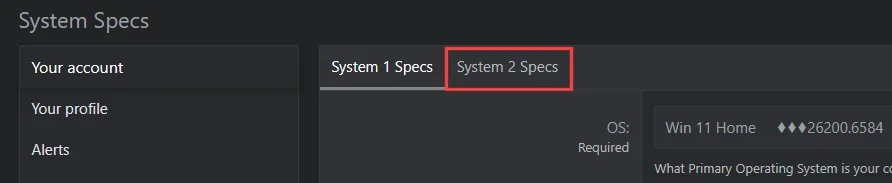
It's a different computer though :Dthere was only room to list 1 for either laptop or PC so I listed the laptop.
 

My Computers My Computers

  • At a glance

    Windows 11Intel(R) Core(TM) Ultra 7 258V (2.20 GHz)32gb
    OS
    Windows 11
    Computer type
    Laptop
    Manufacturer/Model
    Lenovo Yoga 7 Gen10
    CPU
    Intel(R) Core(TM) Ultra 7 258V (2.20 GHz)
    Memory
    32gb
    Hard Drives
    1tb
  • At a glance

    Windows 11 ProIntel i7Currently 16gb ... may upgrade to 32gb+
    Operating System
    Windows 11 Pro
    Computer type
    PC/Desktop
    Manufacturer/Model
    Dell Optiplex 7090
    CPU
    Intel i7
    Memory
    Currently 16gb ... may upgrade to 32gb+
    Hard Drives
    NVME 512gb
    Internet Speed
    1tb
    Browser
    Chrome
    Antivirus
    Windows Defender
It's a different computer though :Dthere was only room to list 1 for either laptop or PC so I listed the laptop.


You can list TWO...


Image1.webp
 

My Computers My Computers

  • At a glance

    Win 11 Home ♦♦♦26300.9445 ♦♦♦♦♦♦♦26H2AMD Ryzen 7 3700XG.Skill (F4-3200C14D-16GTZKW)EVGA RTX 2070 (08G-P4-2171-KR)
    OS
    Win 11 Home ♦♦♦26300.9445 ♦♦♦♦♦♦♦26H2
    Computer type
    PC/Desktop
    Manufacturer/Model
    Built by Ghot® [May 2020]
    CPU
    AMD Ryzen 7 3700X
    Motherboard
    Asus Pro WS X570-ACE (BIOS 5302)
    Memory
    G.Skill (F4-3200C14D-16GTZKW)
    Graphics Card(s)
    EVGA RTX 2070 (08G-P4-2171-KR)
    Sound Card
    Realtek ALC1220P / ALC S1220A
    Monitor(s) Displays
    Dell U3011 30"
    Screen Resolution
    2560 x 1600
    Hard Drives
    2x Samsung 860 EVO 500GB,
    WD 4TB Black FZBX - SATA III,
    WD 8TB Black FZBX - SATA III,
    DRW-24B1ST CD/DVD Burner
    PSU
    PC Power & Cooling 750W Quad EPS12V
    Case
    Cooler Master ATCS 840 Tower
    Cooling
    CM Hyper 212 EVO (push/pull)
    Keyboard
    Ducky DK9008 Shine II Blue LED
    Mouse
    Logitech Optical M-100
    Internet Speed
    300/300
    Browser
    Firefox (latest)
    Antivirus
    Bitdefender Total Security
    Other Info
    Speakers: Klipsch Pro Media 2.1
  • At a glance

    Windows XP Pro 32bit w/SP3AMD Athlon 64 X2 5000+ (OC'd @ 3.2Ghz)TWIN2X2048-6400C4DHX (2 x 1GB, DDR2 800)EVGA 256-P2-N758-TR GeForce 8600GT SSC
    Operating System
    Windows XP Pro 32bit w/SP3
    Computer type
    PC/Desktop
    Manufacturer/Model
    Built by Ghot® (not in use)
    CPU
    AMD Athlon 64 X2 5000+ (OC'd @ 3.2Ghz)
    Motherboard
    ASUS M2N32-SLI Deluxe Wireless Edition
    Memory
    TWIN2X2048-6400C4DHX (2 x 1GB, DDR2 800)
    Graphics card(s)
    EVGA 256-P2-N758-TR GeForce 8600GT SSC
    Sound Card
    Onboard
    Monitor(s) Displays
    ViewSonic G90FB Black 19" Professional (CRT)
    Screen Resolution
    up to 2048 x 1536
    Hard Drives
    WD 36GB 10,000rpm Raptor SATA
    Seagate 80GB 7200rpm SATA
    Lite-On LTR-52246S CD/RW
    Lite-On LH-18A1P CD/DVD Burner
    PSU
    PC Power & Cooling Silencer 750 Quad EPS12V
    Case
    Generic Beige case, 80mm fans
    Cooling
    ZALMAN 9500A 92mm CPU Cooler
    Keyboard
    Logitech Classic Keybooard 200
    Mouse
    Logitech Optical M-BT96a
    Internet Speed
    300/300
    Browser
    Firefox 3.x ??
    Antivirus
    Symantec (Norton)
    Other Info
    Still assembled, still runs. Haven't turned it on for 15 years?
I think this was from a company that's gone into liquidation (shows dissolved on companies house website) and is locked to them .... have gone through trying to do a fresh install and their name comes up and askes you to login but I'm guessing it's to their old domain as nothing seems to work.

Is there any way I can get rid of this or should I send it back to the seller?
 

My Computers My Computers

  • At a glance

    Windows 11Intel(R) Core(TM) Ultra 7 258V (2.20 GHz)32gb
    OS
    Windows 11
    Computer type
    Laptop
    Manufacturer/Model
    Lenovo Yoga 7 Gen10
    CPU
    Intel(R) Core(TM) Ultra 7 258V (2.20 GHz)
    Memory
    32gb
    Hard Drives
    1tb
  • At a glance

    Windows 11 ProIntel i7Currently 16gb ... may upgrade to 32gb+
    Operating System
    Windows 11 Pro
    Computer type
    PC/Desktop
    Manufacturer/Model
    Dell Optiplex 7090
    CPU
    Intel i7
    Memory
    Currently 16gb ... may upgrade to 32gb+
    Hard Drives
    NVME 512gb
    Internet Speed
    1tb
    Browser
    Chrome
    Antivirus
    Windows Defender
I think this was from a company that's gone into liquidation (shows dissolved on companies house website) and is locked to them .... have gone through trying to do a fresh install and their name comes up and askes you to login but I'm guessing it's to their old domain as nothing seems to work.

Is there any way I can get rid of this or should I send it back to the seller?
This is a PC which was registered in Autopilot to its former owner. When you buy from a liquidator, there's a fair chance the company collapsed and laid off all their IT staff and nobody unregistered all their PC's from the domain. This means whenever you do a clean install, Windows sends the PC's ID to MS and it thinks it should be "owned" by the former company.

Normally a retired PC is disposed of by unregistering it from the domain. But that wasn't done. PC liquidators should know better to check, but a lot of them don't care. I don't know what your options are, you should return it if possible.

There are technical ways around it by disabling the network at certain points in the install process. You really shouldn't be forced to this time every time you need Windows re-installed. Or ask the seller if they can provide a PC from a different liquidated company.
 

My Computer My Computer

At a glance

Windows 7
OS
Windows 7
From Google AI (see garlin's post > this is additional confirmation)

Code:
AI Overview
To perform a clean installation on a computer that was enrolled in Windows Autopilot, the device must first be deregistered from the

former owner's tenant and Azure AD environment.

Without this step, the device will automatically try to enroll in the former owner's organization again as soon as it connects to the internet.


You must get the previous owner's IT administrator to complete these steps.

If you cannot contact them, you should return the computer to the seller as unusable.

Step 1: Former owner's IT removes the device from Autopilot

The organization's administrator needs to remove the computer's hardware hash from their tenant via the Microsoft Intune admin center.

Sign into the Microsoft Intune admin center.

Navigate to Devices > Windows > Windows enrollment > Devices.

Find and select the computer by its serial number. You can find the device's serial number in the Settings app under System > About.

Click the Delete button.

Wait for the process to complete, which can take several minutes. Clicking the Sync button may speed it up.

Step 2: Former owner's IT deletes the device from Azure AD

After deleting the device from Autopilot, the administrator should also remove its record from Azure AD (now Microsoft Entra ID).

Sign in to the Microsoft Entra ID admin center.

Navigate to Devices > All Devices.

Find and select the device. Its icon will no longer indicate it is an Autopilot device.

Select the Delete option.

Step 3: Perform a clean Windows installation

Once the former owner's IT has confirmed that the device records have been removed, you can perform a clean installation using

a Windows installation media, like a USB flash drive.
 

My Computer My Computer

At a glance

Windows 10Intel(R) Core(TM) i7-4800MQ CPU @ 2.70GHz16 GB Total: Manufacturer : Samsung MemoryTyp...NVIDIA Quadro K3100M; Intel(R) HD Graphics 4600
OS
Windows 10
Computer type
Laptop
Manufacturer/Model
HP
CPU
Intel(R) Core(TM) i7-4800MQ CPU @ 2.70GHz
Motherboard
Product : 190A Version : KBC Version 94.56
Memory
16 GB Total: Manufacturer : Samsung MemoryType : DDR3 FormFactor : SODIMM Capacity : 8GB Speed : 1600
Graphics Card(s)
NVIDIA Quadro K3100M; Intel(R) HD Graphics 4600
Sound Card
IDT High Definition Audio CODEC; PNP Device ID HDAUDIO\FUNC_01&VEN_111D&DEV_76E0
Hard Drives
Model Hitachi HTS727575A9E364
Antivirus
Microsoft Defender
Other Info
Mobile Workstation
This is a PC which was registered in Autopilot to its former owner. When you buy from a liquidator, there's a fair chance the company collapsed and laid off all their IT staff and nobody unregistered all their PC's from the domain. This means whenever you do a clean install, Windows sends the PC's ID to MS and it thinks it should be "owned" by the former company.

Normally a retired PC is disposed of by unregistering it from the domain. But that wasn't done. PC liquidators should know better to check, but a lot of them don't care. I don't know what your options are, you should return it if possible.

There are technical ways around it by disabling the network at certain points in the install process. You really shouldn't be forced to this time every time you need Windows re-installed. Or ask the seller if they can provide a PC from a different liquidated company.

A big thank you to everyone for their help and @zbook .... and @garlin I've tried pretty much everything I found on google to try and deregister including removing the cmos battery and taking the drive out and using another computer to reformat the drive but nothing has worked so I've started a return.

Thanks to all (y)(y):-)
 

My Computers My Computers

  • At a glance

    Windows 11Intel(R) Core(TM) Ultra 7 258V (2.20 GHz)32gb
    OS
    Windows 11
    Computer type
    Laptop
    Manufacturer/Model
    Lenovo Yoga 7 Gen10
    CPU
    Intel(R) Core(TM) Ultra 7 258V (2.20 GHz)
    Memory
    32gb
    Hard Drives
    1tb
  • At a glance

    Windows 11 ProIntel i7Currently 16gb ... may upgrade to 32gb+
    Operating System
    Windows 11 Pro
    Computer type
    PC/Desktop
    Manufacturer/Model
    Dell Optiplex 7090
    CPU
    Intel i7
    Memory
    Currently 16gb ... may upgrade to 32gb+
    Hard Drives
    NVME 512gb
    Internet Speed
    1tb
    Browser
    Chrome
    Antivirus
    Windows Defender
Back
Top Bottom