- Local time
- 10:11 AM
- Posts
- 12,306
- Location
- The Lone Star State of Texas
- OS
- Windows 11 Pro 25H2 26200.9445
Hopefully this will help others who have cussed Edge for not giving us an option to “always open link in new tab & switch to it automatically”. I know there's a lot of complaints about it on the web.
This will be nothing new to power users who use keyboard shortcuts, but I’m a mouse gal. I don’t touch the keyboard while browsing unless I’m searching for something. For years I would never use Edge because of the way it handles tabs. I always resorted to Firefox. Well, I am now a happy full-time Edge user.
I also said a few ugly words because I had to use so many mouse clicks when closing tabs, not only in Edge, but Firefox, Explorer, and Notepad
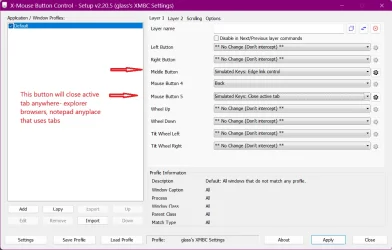
If you have a mouse that has at least 3 buttons, left/right/and a tiltable scroll wheel, you can use either the mouse manufacturer software (ie:Logi-Options for Logitech users) or my preference, X-Mouse Button Control by HighResolution Enterprises which will control any brand such mouse, including Logitech. I use it’s similated keys function.
I use a basic 3 button Logitech mouse, so I use XMBC for only one basic level of control. But, XMBC has multiple layers of programming and can control virtually all the same functions within Windows that keyboard shortcuts can do. The more buttons your mouse has, the more you can set it to do. You can chose which button you want to do what.
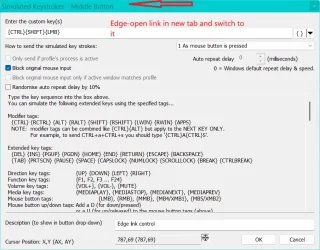
To Open link in new tab and switch to it automatically in Edge - similated keys {CTRL}{SHIFT}{LMB}
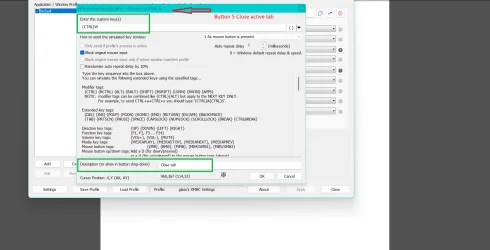
To close active tab in any tabbed applicated - similated keys {CTRL}W
Now, with one mouse click I can open any link in an Edge tab and switch to it automatically or close any open tab in any tabbed application.,
Note: For my basic mouse XMBC recognizes the tilt wheel click as buttons 4 & 5 rather than “tilt wheel left/right) If your mouse has more buttons, you might have to use process of elimination to find how XMBC will recognize each button.
This will be nothing new to power users who use keyboard shortcuts, but I’m a mouse gal. I don’t touch the keyboard while browsing unless I’m searching for something. For years I would never use Edge because of the way it handles tabs. I always resorted to Firefox. Well, I am now a happy full-time Edge user.
I also said a few ugly words because I had to use so many mouse clicks when closing tabs, not only in Edge, but Firefox, Explorer, and Notepad
If you have a mouse that has at least 3 buttons, left/right/and a tiltable scroll wheel, you can use either the mouse manufacturer software (ie:Logi-Options for Logitech users) or my preference, X-Mouse Button Control by HighResolution Enterprises which will control any brand such mouse, including Logitech. I use it’s similated keys function.
I use a basic 3 button Logitech mouse, so I use XMBC for only one basic level of control. But, XMBC has multiple layers of programming and can control virtually all the same functions within Windows that keyboard shortcuts can do. The more buttons your mouse has, the more you can set it to do. You can chose which button you want to do what.
To Open link in new tab and switch to it automatically in Edge - similated keys {CTRL}{SHIFT}{LMB}
To close active tab in any tabbed applicated - similated keys {CTRL}W
Now, with one mouse click I can open any link in an Edge tab and switch to it automatically or close any open tab in any tabbed application.,
Note: For my basic mouse XMBC recognizes the tilt wheel click as buttons 4 & 5 rather than “tilt wheel left/right) If your mouse has more buttons, you might have to use process of elimination to find how XMBC will recognize each button.
Attachments
Last edited:
My Computers
-
At a glance
Windows 11 Pro 25H2 26200.9445i9-10900 10 core 20 threads32 gbnone-Intel UHD Graphics 630- OS
- Windows 11 Pro 25H2 26200.9445
- Computer type
- PC/Desktop
- Manufacturer/Model
- Dell Optiplex 7080
- CPU
- i9-10900 10 core 20 threads
- Motherboard
- DELL 0J37VM
- Memory
- 32 gb
- Graphics Card(s)
- none-Intel UHD Graphics 630
- Sound Card
- Integrated Realtek
- Monitor(s) Displays
- Benq 27
- Screen Resolution
- 2560x1440
- Hard Drives
- 2x1tb Solidigm m.2 nvme /External drives 512gb Samsung m.2 sata+2tb Kingston m2.nvme
- PSU
- 500w
- Case
- MT
- Cooling
- Dell Premium
- Keyboard
- Logitech wired
- Mouse
- Logitech wireless
- Internet Speed
- so slow I'm too embarrassed to tell
- Browser
- #1 Edge #2 Firefox
- Antivirus
- Defender+MWB Premium
-
At a glance
Windows 11 Pro 24H2 26200.9445AMD Ryzen 7 6800U32 gbintegrated- Operating System
- Windows 11 Pro 24H2 26200.9445
- Computer type
- PC/Desktop
- Manufacturer/Model
- Beelink Mini PC SER5
- CPU
- AMD Ryzen 7 6800U
- Memory
- 32 gb
- Graphics card(s)
- integrated
- Sound Card
- integrated
- Monitor(s) Displays
- Benq 27
- Screen Resolution
- 2560x1440
- Hard Drives
- 1TB Crucial nvme
- Keyboard
- Logitech wired
- Mouse
- Logitech wireless
- Internet Speed
- still too embarrassed to tell
- Browser
- Firefox
- Antivirus
- Defender
-
System 3 is non compliant Dell 9020 i7-4770/24gb ram Win11 PRO 26200.9445