Solved garlin's PowerShell scripts for updating Secure Boot CA 2023


Was your Tosh technically a W11 supported device?
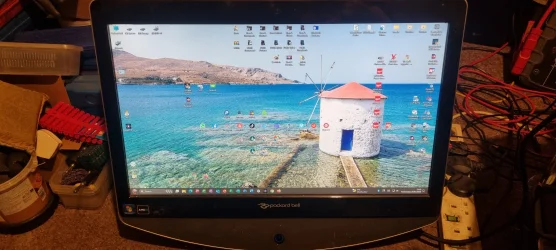
Nope, all of my machines are antiques but all running 25H2, except for my Packard Bell which has an old style BIOS and no popcnt.
 
Last edited:

My Computers

System One System Two

  • OS
    Windows 11 Enterprise 25H2 26200 7462
    Computer type
    PC/Desktop
    Manufacturer/Model
    Custom Build
    CPU
    Intel XEON E5-2699 v3
    Motherboard
    ASUS X99-A
    Memory
    64GB Teamgroup UD4-3600
    Graphics Card(s)
    NVIDIA GeForce GTX 1080 Ti
    Sound Card
    Integrated
    Monitor(s) Displays
    ACER X34 Predator
    Screen Resolution
    3440 x 1440
    Hard Drives
    Crucial CT1000P 3P SSD8 1TB
    Crucial CT1000 BX500 SSD 1TB
    PSU
    GameMax Pro
    Case
    Fractal Design
    Cooling
    Corsair H110iGT + 6 140mm Fans
    Keyboard
    Corsair K4
    Mouse
    G-Skill G502
    Internet Speed
    300MBs
    Browser
    Chrome
    Antivirus
    OEM
    Other Info
    ASUS RT-AC87U Router
  • Operating System
    25H2 26200.5074
    Computer type
    Laptop
    Manufacturer/Model
    ASUS X555LA
    Memory
    8GB
    Browser
    Chrome
    Antivirus
    OEM
Nope, all of my machines are antiques but all running 25H2, except for my Packard Bell which has an old style BIOS and no popcnt.
WOW! I didn't think there were any Packard Bell computers left running. I used to work for the company that serviced their PCs back in the day. I made several trips to their headquarters in Chatsworth, CA until the building was destroyed by the 1994 earthquake.
 

My Computers

System One System Two

  • OS
    Windows 11 Pro 25H2
    Computer type
    Laptop
    Manufacturer/Model
    Lenovo T490 (2020 Hardware)
    CPU
    i7-8565U
    Motherboard
    20N20028US
    Memory
    16GB
    Graphics Card(s)
    Intel UHD Graphics 620
    Sound Card
    Realtec Audio
    Monitor(s) Displays
    ASUS VE248
    Screen Resolution
    1920 X 1080
    Hard Drives
    Samsung SSD 970 PRO 512GB NVMe
    Internet Speed
    Frontier fiber 1GB
    Browser
    Chrome, Firefox, Edge
    Antivirus
    Norton 360 Deluxe Plus
    Other Info
    Supported hardware, upgraded from Windows 10 Pro to Windows 11 Pro version 24H2 on 06/01/2025 using the Windows 11 ISO file. Used the enablement package to upgrade to version 25H2 on 10/07/2025. Secure boot enabled. Secure Boot CA 2023 updated.
  • Operating System
    Windows 11 Pro 25H2
    Computer type
    PC/Desktop
    Manufacturer/Model
    Lenovo ThinkCentre M83 (2014 Hardware)
    CPU
    i7-4770 (with SSE4.2, and POPCNT)
    Motherboard
    10AL000GUS
    Memory
    16GB
    Graphics card(s)
    Intel HD Graphics 4600
    Sound Card
    Realtec High Definition Audio
    Monitor(s) Displays
    ASUS VE248
    Screen Resolution
    1920 X 1080
    Hard Drives
    Samsung SSD 860 PRO 1TB SATA
    Internet Speed
    Frontier fiber 1GB
    Browser
    Chrome, Firefox, Edge
    Antivirus
    Norton 360 Deluxe Plus
    Other Info
    Unsupported hardware, upgraded from Windows 10 Pro (TPM 1.2 & unsupported CPU, but does have SSE4.2, and POPCNT) to Windows 11 Pro version 24H2 on 06/15/2025. Added Registry Key HKEY_LOCAL_MACHINE\SYSTEM\Setup\MoSetup – AllowUpgradesWithUnsupportedTPMOrCPU=1 to allow installation using the Windows 11 ISO file. Used the enablement package to upgrade to version 25H2 on 10/08/2025. Secure boot enabled. Secure Boot CA 2023 updated.
WOW! I didn't think there were any Packard Bell computers left running. I used to work for the company that serviced their PCs back in the day. I made several trips to their headquarters in Chatsworth, CA until the building was destroyed by the 1994 earthquake.
Yep this PB is an all-in-one OneTwo with an upgraded processor.
 

My Computers

System One System Two

  • OS
    Windows 11 Enterprise 25H2 26200 7462
    Computer type
    PC/Desktop
    Manufacturer/Model
    Custom Build
    CPU
    Intel XEON E5-2699 v3
    Motherboard
    ASUS X99-A
    Memory
    64GB Teamgroup UD4-3600
    Graphics Card(s)
    NVIDIA GeForce GTX 1080 Ti
    Sound Card
    Integrated
    Monitor(s) Displays
    ACER X34 Predator
    Screen Resolution
    3440 x 1440
    Hard Drives
    Crucial CT1000P 3P SSD8 1TB
    Crucial CT1000 BX500 SSD 1TB
    PSU
    GameMax Pro
    Case
    Fractal Design
    Cooling
    Corsair H110iGT + 6 140mm Fans
    Keyboard
    Corsair K4
    Mouse
    G-Skill G502
    Internet Speed
    300MBs
    Browser
    Chrome
    Antivirus
    OEM
    Other Info
    ASUS RT-AC87U Router
  • Operating System
    25H2 26200.5074
    Computer type
    Laptop
    Manufacturer/Model
    ASUS X555LA
    Memory
    8GB
    Browser
    Chrome
    Antivirus
    OEM

My Computers

System One System Two

  • OS
    Windows 11 Pro 25H2 26200.8457
    Computer type
    PC/Desktop
    Manufacturer/Model
    Dell Tower Plus EBT2250, DOB: 06/15/2025
    CPU
    Intel® Core™ Ultra 7 265 1.8GHz to 5.3GHz (Arrow Lake)
    Motherboard
    Dell Inc. 02D3NT A00 (U3E1)
    Memory
    SK Hynix 32GB DDR5 5600 Desktop RAM UDIMM Non-ECC PC5-5600B
    Graphics Card(s)
    Dell NVIDIA® GeForce RTX™ 4060 8GB GDDR6 & (iGPU) Integrated Intel® UHD Graphics
    Sound Card
    Chipset Realtek High-Definition Audio with Dolby Atmos
    Monitor(s) Displays
    Dell Ultra Sharp U2515H 25-Inch Screen LED-Lit
    Screen Resolution
    2560 X 1440
    Hard Drives
    Samsung (NVMe PM9C1a 1024GB) M.2 PCIe NVMe Solid State Drive (OS), with Samsung Piccolo (S4LY022) 6-Core 4 Channel Controller.

    Samsung T7 500GB SSD, USB-C External Drive
    PSU
    Dell 460W
    Case
    Dell Tower Plus EBT 2250
    Cooling
    Fan
    Keyboard
    Dell Wired Keyboard - KB216
    Mouse
    Logitech M510
    Internet Speed
    Intel Killer E3100G 2.5 Gigabit Ethernet Controller
    Browser
    Microsoft Edge
    Antivirus
    Microsoft Windows Security
    Other Info
    The Samsung NVMe PM9C1a 1024GB SSD does not use a Phison NAND controller. Instead, it uses Samsung's in-house developed Piccolo (S4LY022) 6-Core 4 Channel Controller. The PM9C1a utilizes a controller built using Samsung's 5-nanometer process and seventh-generation V-NAND technology. 🤔
  • Operating System
    Windows 11 Pro 25H2 26200.8457
    Computer type
    Laptop
    Manufacturer/Model
    Dell Inspiron 15 7000 (7591) 2-in-1, DOB: 11/30/2019
    CPU
    10th Generation Intel Core i7-10510U Processor (8MB Cache, up to 4.9 GHz) Comet Lake
    Motherboard
    Dell 0NNW5N
    Memory
    16GB DDR4 RAM
    Graphics card(s)
    NVIDIA® GeForce® MX250 with 2GB GDDR5 graphics memory
    Sound Card
    Chipset Realtek ALC3254 🤔🤣
    Monitor(s) Displays
    Dell 15.6-inch UHD Truelife Touch Narrow Border WVA Display with Active Pen support
    Screen Resolution
    3840 x 2160
    Hard Drives
    Intel NVME 512GB SSD with 32GB Intel Optane Memory, M.2 80mm PCIe 3.0 RAID

    SanDisk 256GB Extreme microSDXC UHS-I Memory Card
    PSU
    Dell 4-Cell Battery, 68 Whr (Integrated), 90 Watt AC Adapter
    Case
    Dell Inspiron 15 7000 2-in-1 (7591)
    Cooling
    Standard Dell Case Fan & Havit HV-F2056 USB Powered (3 Fans) Laptop Cooling Pad.
    Keyboard
    Dell
    Mouse
    Logitech Wireless Mouse M650L
    Internet Speed
    Wireless/Wired connectivity (WiFi 6 - 802.11 ax)
    Browser
    Microsoft Edge
    Antivirus
    Microsoft Windows Security
    Other Info
    From Dell: 512GB NVME Solid State Drive accelerated by 32GB Intel Optane Memory are the fastest as compared to NAND SSDs. Intel Optane H10 with SSD offers speedy storage and accelerates opening your programs.

Attachments

  • 20260128_171003.webp
    20260128_171003.webp
    1.2 MB · Views: 4

My Computers

System One System Two

  • OS
    Windows 11 Enterprise 25H2 26200 7462
    Computer type
    PC/Desktop
    Manufacturer/Model
    Custom Build
    CPU
    Intel XEON E5-2699 v3
    Motherboard
    ASUS X99-A
    Memory
    64GB Teamgroup UD4-3600
    Graphics Card(s)
    NVIDIA GeForce GTX 1080 Ti
    Sound Card
    Integrated
    Monitor(s) Displays
    ACER X34 Predator
    Screen Resolution
    3440 x 1440
    Hard Drives
    Crucial CT1000P 3P SSD8 1TB
    Crucial CT1000 BX500 SSD 1TB
    PSU
    GameMax Pro
    Case
    Fractal Design
    Cooling
    Corsair H110iGT + 6 140mm Fans
    Keyboard
    Corsair K4
    Mouse
    G-Skill G502
    Internet Speed
    300MBs
    Browser
    Chrome
    Antivirus
    OEM
    Other Info
    ASUS RT-AC87U Router
  • Operating System
    25H2 26200.5074
    Computer type
    Laptop
    Manufacturer/Model
    ASUS X555LA
    Memory
    8GB
    Browser
    Chrome
    Antivirus
    OEM
Thanks... that's great! ;-):-)
 

My Computers

System One System Two

  • OS
    Windows 11 Pro 25H2 26200.8457
    Computer type
    PC/Desktop
    Manufacturer/Model
    Dell Tower Plus EBT2250, DOB: 06/15/2025
    CPU
    Intel® Core™ Ultra 7 265 1.8GHz to 5.3GHz (Arrow Lake)
    Motherboard
    Dell Inc. 02D3NT A00 (U3E1)
    Memory
    SK Hynix 32GB DDR5 5600 Desktop RAM UDIMM Non-ECC PC5-5600B
    Graphics Card(s)
    Dell NVIDIA® GeForce RTX™ 4060 8GB GDDR6 & (iGPU) Integrated Intel® UHD Graphics
    Sound Card
    Chipset Realtek High-Definition Audio with Dolby Atmos
    Monitor(s) Displays
    Dell Ultra Sharp U2515H 25-Inch Screen LED-Lit
    Screen Resolution
    2560 X 1440
    Hard Drives
    Samsung (NVMe PM9C1a 1024GB) M.2 PCIe NVMe Solid State Drive (OS), with Samsung Piccolo (S4LY022) 6-Core 4 Channel Controller.

    Samsung T7 500GB SSD, USB-C External Drive
    PSU
    Dell 460W
    Case
    Dell Tower Plus EBT 2250
    Cooling
    Fan
    Keyboard
    Dell Wired Keyboard - KB216
    Mouse
    Logitech M510
    Internet Speed
    Intel Killer E3100G 2.5 Gigabit Ethernet Controller
    Browser
    Microsoft Edge
    Antivirus
    Microsoft Windows Security
    Other Info
    The Samsung NVMe PM9C1a 1024GB SSD does not use a Phison NAND controller. Instead, it uses Samsung's in-house developed Piccolo (S4LY022) 6-Core 4 Channel Controller. The PM9C1a utilizes a controller built using Samsung's 5-nanometer process and seventh-generation V-NAND technology. 🤔
  • Operating System
    Windows 11 Pro 25H2 26200.8457
    Computer type
    Laptop
    Manufacturer/Model
    Dell Inspiron 15 7000 (7591) 2-in-1, DOB: 11/30/2019
    CPU
    10th Generation Intel Core i7-10510U Processor (8MB Cache, up to 4.9 GHz) Comet Lake
    Motherboard
    Dell 0NNW5N
    Memory
    16GB DDR4 RAM
    Graphics card(s)
    NVIDIA® GeForce® MX250 with 2GB GDDR5 graphics memory
    Sound Card
    Chipset Realtek ALC3254 🤔🤣
    Monitor(s) Displays
    Dell 15.6-inch UHD Truelife Touch Narrow Border WVA Display with Active Pen support
    Screen Resolution
    3840 x 2160
    Hard Drives
    Intel NVME 512GB SSD with 32GB Intel Optane Memory, M.2 80mm PCIe 3.0 RAID

    SanDisk 256GB Extreme microSDXC UHS-I Memory Card
    PSU
    Dell 4-Cell Battery, 68 Whr (Integrated), 90 Watt AC Adapter
    Case
    Dell Inspiron 15 7000 2-in-1 (7591)
    Cooling
    Standard Dell Case Fan & Havit HV-F2056 USB Powered (3 Fans) Laptop Cooling Pad.
    Keyboard
    Dell
    Mouse
    Logitech Wireless Mouse M650L
    Internet Speed
    Wireless/Wired connectivity (WiFi 6 - 802.11 ax)
    Browser
    Microsoft Edge
    Antivirus
    Microsoft Windows Security
    Other Info
    From Dell: 512GB NVME Solid State Drive accelerated by 32GB Intel Optane Memory are the fastest as compared to NAND SSDs. Intel Optane H10 with SSD offers speedy storage and accelerates opening your programs.
Thanks... that's great! ;-):-)
I've got it maxed out with Memory, upgraded the processor and it's booting from an SSD so it's probably not as PB intended it to be.
 

My Computers

System One System Two

  • OS
    Windows 11 Enterprise 25H2 26200 7462
    Computer type
    PC/Desktop
    Manufacturer/Model
    Custom Build
    CPU
    Intel XEON E5-2699 v3
    Motherboard
    ASUS X99-A
    Memory
    64GB Teamgroup UD4-3600
    Graphics Card(s)
    NVIDIA GeForce GTX 1080 Ti
    Sound Card
    Integrated
    Monitor(s) Displays
    ACER X34 Predator
    Screen Resolution
    3440 x 1440
    Hard Drives
    Crucial CT1000P 3P SSD8 1TB
    Crucial CT1000 BX500 SSD 1TB
    PSU
    GameMax Pro
    Case
    Fractal Design
    Cooling
    Corsair H110iGT + 6 140mm Fans
    Keyboard
    Corsair K4
    Mouse
    G-Skill G502
    Internet Speed
    300MBs
    Browser
    Chrome
    Antivirus
    OEM
    Other Info
    ASUS RT-AC87U Router
  • Operating System
    25H2 26200.5074
    Computer type
    Laptop
    Manufacturer/Model
    ASUS X555LA
    Memory
    8GB
    Browser
    Chrome
    Antivirus
    OEM
I've got it maxed out with Memory, upgraded the processor and it's booting from an SSD so it's probably not as PB intended it to be.

No, not at all, lol. That is an interesting life story for that machine and that it is operating today with Windows 11 - that's crazy! :oops: Good job!
 

My Computers

System One System Two

  • OS
    Windows 11 Pro 25H2 26200.8457
    Computer type
    PC/Desktop
    Manufacturer/Model
    Dell Tower Plus EBT2250, DOB: 06/15/2025
    CPU
    Intel® Core™ Ultra 7 265 1.8GHz to 5.3GHz (Arrow Lake)
    Motherboard
    Dell Inc. 02D3NT A00 (U3E1)
    Memory
    SK Hynix 32GB DDR5 5600 Desktop RAM UDIMM Non-ECC PC5-5600B
    Graphics Card(s)
    Dell NVIDIA® GeForce RTX™ 4060 8GB GDDR6 & (iGPU) Integrated Intel® UHD Graphics
    Sound Card
    Chipset Realtek High-Definition Audio with Dolby Atmos
    Monitor(s) Displays
    Dell Ultra Sharp U2515H 25-Inch Screen LED-Lit
    Screen Resolution
    2560 X 1440
    Hard Drives
    Samsung (NVMe PM9C1a 1024GB) M.2 PCIe NVMe Solid State Drive (OS), with Samsung Piccolo (S4LY022) 6-Core 4 Channel Controller.

    Samsung T7 500GB SSD, USB-C External Drive
    PSU
    Dell 460W
    Case
    Dell Tower Plus EBT 2250
    Cooling
    Fan
    Keyboard
    Dell Wired Keyboard - KB216
    Mouse
    Logitech M510
    Internet Speed
    Intel Killer E3100G 2.5 Gigabit Ethernet Controller
    Browser
    Microsoft Edge
    Antivirus
    Microsoft Windows Security
    Other Info
    The Samsung NVMe PM9C1a 1024GB SSD does not use a Phison NAND controller. Instead, it uses Samsung's in-house developed Piccolo (S4LY022) 6-Core 4 Channel Controller. The PM9C1a utilizes a controller built using Samsung's 5-nanometer process and seventh-generation V-NAND technology. 🤔
  • Operating System
    Windows 11 Pro 25H2 26200.8457
    Computer type
    Laptop
    Manufacturer/Model
    Dell Inspiron 15 7000 (7591) 2-in-1, DOB: 11/30/2019
    CPU
    10th Generation Intel Core i7-10510U Processor (8MB Cache, up to 4.9 GHz) Comet Lake
    Motherboard
    Dell 0NNW5N
    Memory
    16GB DDR4 RAM
    Graphics card(s)
    NVIDIA® GeForce® MX250 with 2GB GDDR5 graphics memory
    Sound Card
    Chipset Realtek ALC3254 🤔🤣
    Monitor(s) Displays
    Dell 15.6-inch UHD Truelife Touch Narrow Border WVA Display with Active Pen support
    Screen Resolution
    3840 x 2160
    Hard Drives
    Intel NVME 512GB SSD with 32GB Intel Optane Memory, M.2 80mm PCIe 3.0 RAID

    SanDisk 256GB Extreme microSDXC UHS-I Memory Card
    PSU
    Dell 4-Cell Battery, 68 Whr (Integrated), 90 Watt AC Adapter
    Case
    Dell Inspiron 15 7000 2-in-1 (7591)
    Cooling
    Standard Dell Case Fan & Havit HV-F2056 USB Powered (3 Fans) Laptop Cooling Pad.
    Keyboard
    Dell
    Mouse
    Logitech Wireless Mouse M650L
    Internet Speed
    Wireless/Wired connectivity (WiFi 6 - 802.11 ax)
    Browser
    Microsoft Edge
    Antivirus
    Microsoft Windows Security
    Other Info
    From Dell: 512GB NVME Solid State Drive accelerated by 32GB Intel Optane Memory are the fastest as compared to NAND SSDs. Intel Optane H10 with SSD offers speedy storage and accelerates opening your programs.
PowerShell script with graphical interface for updating Windows installation media with UEFI CA 2023 certificates.

Compatible with all Windows languages: works on Windows in English, German, French, or any other language.

For Server And Client Windows ( 10 / 11 / Server 2016 /19 /22 /25 ) arm64 and 64 bits

English interface: all messages, buttons, and labels are now in English for international use.

Features:

Signature verification: detects whether an ISO uses the old certificate (PCA 2011) or the new one (CA 2023).

Automatic update: extracts and replaces boot binaries with the 2023 signed versions.

Native ISO creation: uses the Windows IMAPI2 API, no external tools required.

Bootable USB creation: FAT32 formatting with automatic splitting if install.wim > 4 GB.

Technical changes:

Removal of dependencies on localized commands (e.g., Get-Volume instead of text parsing).

Use of .NET/WMI APIs independent of the system language

Messages and logs entirely in English

Prerequisites:

Windows 10 / 11 with PowerShell 5.1+

Administrator rights
 

Attachments

My Computer

System One

  • OS
    windows 11 25H2
    Computer type
    Laptop
    Manufacturer/Model
    ASUS Vivobook 15 (X1504)
    Motherboard
    Intel Alder Lake-P PCH
    Memory
    24GB
    Graphics Card(s)
    iris xe
    Sound Card
    realtek
    Screen Resolution
    1920X1080
    Hard Drives
    Samsung SSD 990 PRO 1TB
    Browser
    edge
    Antivirus
    eset anti virus
No worries, I wasn't sure where to post it. Sorry again for the damage.
 

My Computer

System One

  • OS
    windows 11 25H2
    Computer type
    Laptop
    Manufacturer/Model
    ASUS Vivobook 15 (X1504)
    Motherboard
    Intel Alder Lake-P PCH
    Memory
    24GB
    Graphics Card(s)
    iris xe
    Sound Card
    realtek
    Screen Resolution
    1920X1080
    Hard Drives
    Samsung SSD 990 PRO 1TB
    Browser
    edge
    Antivirus
    eset anti virus
I think a GUI tool is an improvement over the Make2023BootableMedia.ps1 script provided by MS. Which supports a confusing array of options :confused:.
 

My Computer

System One

  • OS
    Windows 7
Not tested yet, we'll see.
 

My Computer

System One

  • OS
    windows 11 25H2
    Computer type
    Laptop
    Manufacturer/Model
    ASUS Vivobook 15 (X1504)
    Motherboard
    Intel Alder Lake-P PCH
    Memory
    24GB
    Graphics Card(s)
    iris xe
    Sound Card
    realtek
    Screen Resolution
    1920X1080
    Hard Drives
    Samsung SSD 990 PRO 1TB
    Browser
    edge
    Antivirus
    eset anti virus
@garlin

Thanks for the magnificent work. I ran the Windows 11 "Secure Boot Allowed Key Exchange Key (KEK) Update"; however, after several reboots, I still seem to be on the 2011 cert.

I ran your "Check_UEFI-CA2023.ps1" script and generated a log. It appears there are some issues on my machine.

While the "REQUIRED ACTIONS" seem clear, I'm a bit worried that running the required actions might make my machine unbootable in some way.

Will performing the actions listed at the bottom of the log clear everything up without breaking my machine:

(LOG START)

Windows 11 25H2 (26200.7623)

Secure Boot: ON
Virtualization Based Security: ON
BitLocker on (C:) ON

BIOS Firmware
-------------
Gigabyte Technology Co. Z390 I AORUS PRO WIFI
Version: F8
Date: 2021-11-04

Factory Default UEFI PK Cert
----------------------------
(NONE)

UEFI PK Cert
------------
(NONE)

Factory Default UEFI KEK Certs
------------------------------
Microsoft Corporation KEK CA 2011

UEFI KEK Certs
--------------
Microsoft Corporation KEK CA 2011
Microsoft Corporation KEK 2K CA 2023

Factory Default UEFI DB Certs
-----------------------------
Microsoft Corporation UEFI CA 2011
Microsoft Windows Production PCA 2011

UEFI DB Certs
-------------
Microsoft Corporation UEFI CA 2011
Microsoft Windows Production PCA 2011
Microsoft Option ROM UEFI CA 2023
Microsoft UEFI CA 2023
Windows UEFI CA 2023

Factory Default UEFI DBX Certs
------------------------------
(NONE)
EFI_CERT_SHA256_GUID Signatures: 77

UEFI DBX Certs
--------------
(NONE)
Windows BootMgr SVN is MISSING.
EFI_CERT_SHA256_GUID Signatures: 483

EFI Files
---------
Disk 1: Windows Boot Manager [Windows UEFI CA 2023] is ALLOWED.
bootmgfw.efi File version: 26100.30227

Registry: WindowsUEFICA2023Capable = 2
[Windows UEFI CA 2023] in UEFI DB, and Windows starting from CA 2023 Boot Manager.

Disk 1: SkuSiPolicy.p7b (for VBS) is NOT PRESENT.

Bootable Media
--------------
DVD Drive E:

AUDIT REPORT
============
1. [Production PCA 2011] is missing from UEFI DBX
2. Windows BootMgr SVN is missing from UEFI DBX
3. SkuSiPolicy.p7b (for VBS) is missing

REQUIRED ACTION
===============

To revoke the [PCA 2011] cert, run the commands, run the commands:

manage-bde -Protectors -Disable C: -RebootCount 1
reg add HKEY_LOCAL_MACHINE\SYSTEM\CurrentControlSet\Control\Secureboot /v AvailableUpdates /t REG_DWORD /d 0x280 /f
powershell Start-ScheduledTask -TaskName "\Microsoft\Windows\PI\Secure-Boot-Update"

To install SkuSiPolicy.p7b, run the command:
Update_UEFI-CA2023.ps1 -SkuSiPolicy

(LOG END)

 

My Computer

System One

  • OS
    Windows 11
    Computer type
    PC/Desktop
    Manufacturer/Model
    Gigabyte Z390 AORUS PRO WIFI (rev.1.0)
    CPU
    Intel(R) Core(TM) i9-9900 CPU @ 3.10GHz, 3096
    Motherboard
    Z390 I AORUS PRO WIFI-CF
    Memory
    64.0 GB
    Graphics Card(s)
    NVIDIA GeForce RTX 2060 SUPER
    Sound Card
    USB Audio Device
    Monitor(s) Displays
    AW3423DW
    Screen Resolution
    3440x1440, 60Hz
    Hard Drives
    Seagate FireCuda 510 SSD (1TB); WD_BLACK SN770 (1TB)
    PSU
    Corsair SF Series, SF600, SFX Form Factor, 600 Watt (600W)
    Case
    NCASE
@garlin

Thanks for the magnificent work. I ran the Windows 11 "Secure Boot Allowed Key Exchange Key (KEK) Update"; however, after several reboots, I still seem to be on the 2011 cert.

I ran your "Check_UEFI-CA2023.ps1" script and generated a log. It appears there are some issues on my machine.

While the "REQUIRED ACTIONS" seem clear, I'm a bit worried that running the required actions might make my machine unbootable in some way.
AUDIT REPORT
============
1. [Production PCA 2011] is missing from UEFI DBX
2. Windows BootMgr SVN is missing from UEFI DBX
3. SkuSiPolicy.p7b (for VBS) is missing

REQUIRED ACTION
===============

To revoke the [PCA 2011] cert, run the commands, run the commands:

manage-bde -Protectors -Disable C: -RebootCount 1
reg add HKEY_LOCAL_MACHINE\SYSTEM\CurrentControlSet\Control\Secureboot /v AvailableUpdates /t REG_DWORD /d 0x280 /f
powershell Start-ScheduledTask -TaskName "\Microsoft\Windows\PI\Secure-Boot-Update"

To install SkuSiPolicy.p7b, run the command:
Update_UEFI-CA2023.ps1 -SkuSiPolicy

In your case, the CA 2023 certs are fully installed. But the CA 2011 certs have not been revoked (which is optional as of today, but will be enforced by Windows later this year). If you want to proceed with revocation, then follow the instructions in the first half of "REQUIRED ACTION".

The instructions are the same as MS provides. But the script does the "math" to figure out the registry value that is appropriate for your current state.

If you want to perform both halves of the revocation process (block CA 2011 and update the VBS policy), you can run the update script:
Code:
powershell -ep bypass -f .\Update_UEFI-CA2023.ps1 -revoke
 

My Computer

System One

  • OS
    Windows 7
@goink
I may be crazy but it looks like you are just fine with the CA 2013 certs. You don't need to revoke the 2011 - I'm going to wait until Microsoft does it or until June. The risk of bad actors getting into my machine via the CA 2011 cert is virtually non existent.
 

My Computers

System One System Two

  • OS
    Windows 11 Home, ver 25H2 build 26200.8246
    Computer type
    Laptop
    Manufacturer/Model
    Hewlett-Packard Spectre 13-4001 x360 convertable
    CPU
    Intel Core i5 5200U @ 2.20GH
    Motherboard
    Hewlett-Packard 802D
    Memory
    4 GB
    Graphics Card(s)
    Intel HD Graphics 5500 on board
    Sound Card
    Intel Smart Sound Technology (Intel SST)
    Hard Drives
    Micron 256GB M.2 2280 NGFF SSD MTFDDAV256TBN, (SATA 6.0 Gb/s)
    Keyboard
    Model # G01KB
    Antivirus
    Microsoft Defender
    Other Info
    born on date: 25 Feb 2016
  • Operating System
    Win 11 Home 25H2 build 26200.7922
    Computer type
    PC/Desktop
    Manufacturer/Model
    Asus Desktop model M32AD-US019S (DOM: 6/9/2014 )
    CPU
    Intel Core i7 4th Gen 4790 (3.60GHz), Haswell 22nm Technology, SOCKET 1150
    Motherboard
    H81M-E/M51AD/DP_MB
    Memory
    Samsung 16 GB DDR3 (8GB in 2 modules)
    Graphics card(s)
    NVIDIA GeForce GTX 760, 3GB, and on-board Intel HD Graphics 4600 Rev 6
    Monitor(s) Displays
    HP EliteDisplay E241i LED; HP EliteDisplay E243
    Hard Drives
    Samsung 500GB SSD, 870 EVO (SATA 6.0 )
    Micron 250GB SSD, CT250MX500
    Toshiba HDD, 3GB (original drive w/PC)
    Case
    ASUS
    Keyboard
    ASUS-------------------------
    Antivirus
    MS Defender
    Other Info
    Additional Laptops:

    HEWLETT PACKARD
    HP OmniBook X Flip NGAI (Next Gen AI),
    Model: 16-as0023dx
    PT# B5UH1UA#ABA Product #: B5UH1UA
    delivered and setup 7/25/25
    16" 2K Touch-Screen Laptop
    Intel Core Ultra 7 256V '24 Series 2 - CPU
    Boost Clock Frequency 4.8 gigahertz; Neural Processing Unit (NPU) Yes;
    16GB Memory, LPDDR5X
    1TB SSD PCIe 4.0
    Graphics: Intel Arc 140V
    1 x HDMI 2.1
    1 x Thunderbolt 4
    2K Touch-Screen display, LED, IPS; 1920 x 1200 (Full HD+)
    USB Ports: 1 x USB-C 3.1, 2 x USB-A 3.1
    Wi-Fi 6E
    weight 4.15 pounds

    DELL
    Model:I7591-7483BLK-PUS 2-in-1 (7000 Series)
    purchased 12/3/2019,
    15.6 inch 2-IN-1;
    4K Ultra HD Touch-Screen, 3840 x 2160,
    Intel Core i7 10510U CPU 1.80GHz,
    16GB RAM DDR4 SDRAM 2400 megahert (2 slots),
    dedicated graphics Nvidia GeForce MX250 2 GB Graphics,
    PCIe 512GB Intel SSD + 32GB Optane Memory (Intel Optane Memory H10 with solid-state storage),
    wireless-AX & Bluetooth
    Battery: 68wh, Type 4VGMP 4 cell
@garin

What does "powershell -ep bypass -f" do?

and

Do I need to run " install SkuSiPolicy.p7b" - is it run before or after "powershell -ep bypass -f .\Update_UEFI-CA2023.ps1 -revoke"? Or is this taken care of by running "powershell -ep bypass -f .\Update_UEFI-CA2023.ps1 -revoke"?

And all this is safe?

Sorry, I'm a bit of a Nervous Nelly, worried about bricking my machine somehow...
 

My Computer

System One

  • OS
    Windows 11
    Computer type
    PC/Desktop
    Manufacturer/Model
    Gigabyte Z390 AORUS PRO WIFI (rev.1.0)
    CPU
    Intel(R) Core(TM) i9-9900 CPU @ 3.10GHz, 3096
    Motherboard
    Z390 I AORUS PRO WIFI-CF
    Memory
    64.0 GB
    Graphics Card(s)
    NVIDIA GeForce RTX 2060 SUPER
    Sound Card
    USB Audio Device
    Monitor(s) Displays
    AW3423DW
    Screen Resolution
    3440x1440, 60Hz
    Hard Drives
    Seagate FireCuda 510 SSD (1TB); WD_BLACK SN770 (1TB)
    PSU
    Corsair SF Series, SF600, SFX Form Factor, 600 Watt (600W)
    Case
    NCASE
OK. I see, "powershell -ep bypass -f" bypasses the PS Execution Policy enforcement limitation. I should have known this.
 

My Computer

System One

  • OS
    Windows 11
    Computer type
    PC/Desktop
    Manufacturer/Model
    Gigabyte Z390 AORUS PRO WIFI (rev.1.0)
    CPU
    Intel(R) Core(TM) i9-9900 CPU @ 3.10GHz, 3096
    Motherboard
    Z390 I AORUS PRO WIFI-CF
    Memory
    64.0 GB
    Graphics Card(s)
    NVIDIA GeForce RTX 2060 SUPER
    Sound Card
    USB Audio Device
    Monitor(s) Displays
    AW3423DW
    Screen Resolution
    3440x1440, 60Hz
    Hard Drives
    Seagate FireCuda 510 SSD (1TB); WD_BLACK SN770 (1TB)
    PSU
    Corsair SF Series, SF600, SFX Form Factor, 600 Watt (600W)
    Case
    NCASE
Do I need to run " install SkuSiPolicy.p7b" - is it run before or after "powershell -ep bypass -f .\Update_UEFI-CA2023.ps1 -revoke"? Or is this taken care of by running "powershell -ep bypass -f .\Update_UEFI-CA2023.ps1 -revoke"?
I added a separate -SkuSiPolicy option if you wanted to enforce the SkuSiPolicy without revoking the CA 2011 certs.
But -Revoke includes the -SkuSiPolicy to everything at the same time.

And all this is safe?
Generally yes. I've tested the scripts several hundred times, trying to see what unexpected things can happen. We're following the same overall steps as Windows does, but doing it all at once instead of waiting a mysterious amount of time to check whether the process finished or not. If it fails from an error, you will know right away.

The normal Windows update task is slow from paranoia. But I'd added extensive checking in the scripts, so it will only the logical steps that are required.
 

My Computer

System One

  • OS
    Windows 7
@garlin

Thank you for your swift responses!

I read that running "powershell -ep bypass -f .\Update_UEFI-CA2023.ps1 -revoke" will do everything and clear the issues.
 

My Computer

System One

  • OS
    Windows 11
    Computer type
    PC/Desktop
    Manufacturer/Model
    Gigabyte Z390 AORUS PRO WIFI (rev.1.0)
    CPU
    Intel(R) Core(TM) i9-9900 CPU @ 3.10GHz, 3096
    Motherboard
    Z390 I AORUS PRO WIFI-CF
    Memory
    64.0 GB
    Graphics Card(s)
    NVIDIA GeForce RTX 2060 SUPER
    Sound Card
    USB Audio Device
    Monitor(s) Displays
    AW3423DW
    Screen Resolution
    3440x1440, 60Hz
    Hard Drives
    Seagate FireCuda 510 SSD (1TB); WD_BLACK SN770 (1TB)
    PSU
    Corsair SF Series, SF600, SFX Form Factor, 600 Watt (600W)
    Case
    NCASE
Back
Top Bottom