Hi to all.
@garlin and anyone really, I could use your help.
While trying to update to 26300.7674 by installing the KB5074170 msu,
I got hit again with the Windows 11 error:
Code:
The installation failed in the SAFE_OS phase with an error during BOOT operation
So I downloaded the 26300.7674 iso from UUP.
With SecureBoot enabled, I got hit with the same SAFE_OS error again.
I disabled SecureBoot during the installtion,
and while the installation was successful,
I am once again unable to access WinRE with the error:
Unable to access WinRE: The digital signature for winload.efi couldn't be verified
Code:
Recovery
Your PC/Device needs to be repaired.
The digital signature for this file couldn't be verified.

File: \windows\system32\winload.efi
Error code: 0xc0000428
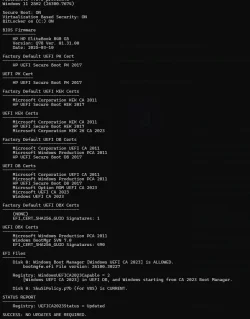
I have checked with your script and everything is up to date
(except from an updated BIOS from HP, which I am not holding my breath they will ever release).
I have checked everything with SFC and DISM.
I have made several attempts with
Code:
ConvertConfig.ini -> UpdtBootFiles=0 or 1
in the UUP download package
and with the setting in Rufus to enable or not Windows CA 2023.
May I ask:
1. Why the "SAFE_OS phase with an error during BOOT operation" error?
2. Why the "winload.efi digital signature for this file couldn't be verified" error?
3. How can I access WinRe again?
4. What is the correct procedure to make an ISO from UUP with Rufus
that is able to be installed on an Windows CA 2023 updated machine?
Thank you all in advance.