Solved garlin's PowerShell scripts for updating Secure Boot CA 2023


This PC (AceMagic S1) is not completing the Revoke action. I've run the suggested commands and rebooted several times. Any ideas?

C:\DownLoad\SecureBoot-CA-2023-Updates.v2026.10.14>Check-UEFI -audit -verbose
Windows PowerShell 5.1
Copyright (C) Microsoft Corporation. All rights reserved.

Windows 11 26H2 (26340.9767)
Secure Boot: ON
Virtualization Based Security: ON
BitLocker on (C:) OFF

BIOS Firmware
-------------
Default string Default string
Version: 5.26
Date: 2023-09-26

Factory Default UEFI PK Cert
----------------------------
DO NOT TRUST - AMI Test PK

UEFI PK Cert
------------
Windows OEM Devices PK

Factory Default UEFI KEK Certs
------------------------------
Microsoft Corporation KEK CA 2011

UEFI KEK Certs
--------------
Microsoft Corporation KEK CA 2011
Microsoft Corporation KEK 2K CA 2023

Factory Default UEFI DB Certs
-----------------------------
Microsoft Corporation UEFI CA 2011
Microsoft Windows Production PCA 2011

UEFI DB Certs
-------------
Microsoft Corporation UEFI CA 2011
Microsoft Windows Production PCA 2011
Microsoft Option ROM UEFI CA 2023
Microsoft UEFI CA 2023
Windows UEFI CA 2023

Factory Default UEFI DBX Certs
------------------------------
(NONE)
EFI_CERT_SHA256_GUID Signatures: 217

UEFI DBX Certs
--------------
(NONE)
Windows BootMgr SVN is MISSING.
EFI_CERT_SHA256_GUID Signatures: 443

UEFI Variables
--------------
Credential Guard: ON

EFI Files
---------
Windows Boot Manager [Windows UEFI CA 2023] is ALLOWED.
\\.\HarddiskVolume1\EFI\Microsoft\Boot\bootmgfw.efi
File Version: 28000.380, SVN 12.0

Registry: "WindowsUEFICA2023Capable" = 2
[Windows UEFI CA 2023] in UEFI DB, and Windows starting from CA 2023 Boot Manager.

[OPTIONAL] SkuSiPolicy.p7b (for VBS) is MISSING.

AUDIT REPORT
============
1. Cannot confirm if Windows 11 26H2 (26340.9767) has the latest files
2. [Production PCA 2011] is missing from UEFI DBX
3. EFI signatures are missing from UEFI DBX (dbxupdate.bin)
4. Windows BootMgr SVN is missing from UEFI DBX

[OPTIONAL] SkuSiPolicy.p7b (for VBS) is missing from EFI

STATUS REPORT
-------------
Scheduled Task: "Secure-Boot-Update" is Ready.

Registry: "UEFICA2023Status" = Updated


REQUIRED ACTION
===============

To REVOKE the [PCA 2011] cert, run the commands:

reg add HKEY_LOCAL_MACHINE\SYSTEM\CurrentControlSet\Control\Secureboot /v AvailableUpdates /t REG_DWORD /d 0x282 /f
powershell Start-ScheduledTask -TaskName "\Microsoft\Windows\PI\Secure-Boot-Update"
 

My Computer My Computer

At a glance

Windows 11
OS
Windows 11
Computer type
PC/Desktop
AUDIT REPORT
============
1. Cannot confirm if Windows 11 26H2 (26340.9767) has the latest files
2. [Production PCA 2011] is missing from UEFI DBX
3. EFI signatures are missing from UEFI DBX (dbxupdate.bin)
4. Windows BootMgr SVN is missing from UEFI DBX

Based on the report's output, there should be no reason why the Secure Boot update task can't perform. Here's a version of the update script which ignores the Windows build check (since you're on 26340).

Run as Admin:
Code:
powershell -ep bypass -f .\McNugget.ps1 -Revoke
 

Attachments

My Computer My Computer

At a glance

Windows 7
OS
Windows 7
Based on the report's output, there should be no reason why the Secure Boot update task can't perform. Here's a version of the update script which ignores the Windows build check (since you're on 26340).

Run as Admin:
Code:
powershell -ep bypass -f .\McNugget.ps1 -Revoke
All good now, thanks!

C:\DownLoad\SecureBoot-CA-2023-Updates.v2026.10.14>Check-UEFI -audit -verbose
Windows PowerShell 5.1
Copyright (C) Microsoft Corporation. All rights reserved.

Windows 11 26H2 (26340.9767)
Secure Boot: ON
Virtualization Based Security: ON
BitLocker on (C:) OFF

BIOS Firmware
-------------
Default string Default string
Version: 5.26
Date: 2023-09-26

Factory Default UEFI PK Cert
----------------------------
DO NOT TRUST - AMI Test PK

UEFI PK Cert
------------
Windows OEM Devices PK

Factory Default UEFI KEK Certs
------------------------------
Microsoft Corporation KEK CA 2011

UEFI KEK Certs
--------------
Microsoft Corporation KEK CA 2011
Microsoft Corporation KEK 2K CA 2023

Factory Default UEFI DB Certs
-----------------------------
Microsoft Corporation UEFI CA 2011
Microsoft Windows Production PCA 2011

UEFI DB Certs
-------------
Microsoft Corporation UEFI CA 2011
Microsoft Windows Production PCA 2011
Microsoft Option ROM UEFI CA 2023
Microsoft UEFI CA 2023
Windows UEFI CA 2023

Factory Default UEFI DBX Certs
------------------------------
(NONE)
EFI_CERT_SHA256_GUID Signatures: 217

UEFI DBX Certs
--------------
Microsoft Windows Production PCA 2011
Windows BootMgr SVN 12.0
EFI_CERT_SHA256_GUID Signatures: 448

UEFI Variables
--------------
Credential Guard: ON

EFI Files
---------
Windows Boot Manager [Windows UEFI CA 2023] is ALLOWED.
\\.\HarddiskVolume1\EFI\Microsoft\Boot\bootmgfw.efi
File Version: 28000.380, SVN 12.0

Registry: "WindowsUEFICA2023Capable" = 2
[Windows UEFI CA 2023] in UEFI DB, and Windows starting from CA 2023 Boot Manager.

[OPTIONAL] SkuSiPolicy.p7b (for VBS) is MISSING.

AUDIT REPORT
============
1. Cannot confirm if Windows 11 26H2 (26340.9767) has the latest files

[OPTIONAL] SkuSiPolicy.p7b (for VBS) is missing from EFI

STATUS REPORT
-------------
Scheduled Task: "Secure-Boot-Update" is Ready.

Registry: "UEFICA2023Status" = Updated

SUCCESS: UPDATES ARE FINISHED.
UEFI CA 2023 certs are present, PCA 2011 cert is revoked.
 

My Computer My Computer

At a glance

Windows 11
OS
Windows 11
Computer type
PC/Desktop
For the next version of the update script, I'll unblock all Insider builds above 26300.

My original plan was to block changes if we couldn't figure out if your Insider build was "recent enough". But that's a difficult problem to track because MS doesn't publish explicit details on what's inside every Insider build. With the Monthly Updates, there's a definitive CSV file which lists every file that got updated that month.

Using the CSV, we can compare file changes without needing to download the actual Windows build. But no such mechanism exists for Insider builds, since they're considered "throwaway" builds that will eventually expire, or be replaced by a newer beta or production version.

Since it's now past the PCA 2011 expiration date, I'll assume your 26300+ build will have some version of the CA 2023 files, even if it's not the absolute latest version. This can't be guaranteed for Insider builds below 26300, which could be much older and not a recent enough version of the update files.
 

My Computer My Computer

At a glance

Windows 7
OS
Windows 7
Finally got my Secure Boot certificates to update. All I did was force my region's Acer team to provide me with the actual BIOS file and viola, after installing it successfully, the firmware update installed correctly, and then I was offered "Secure Boot Allowed Key Exchange Key (KEK) Update". Device Manager now shows this for me:
1793286500791.webp
 

My Computer My Computer

At a glance

Windows 11 Pro 25H2Intel Core i7-11800H16GB (2x8 GB)RTX 3060 Laptop GPU
OS
Windows 11 Pro 25H2
Computer type
Laptop
Manufacturer/Model
Acer Predator Helios 300 PH314-54-72ZJ
CPU
Intel Core i7-11800H
Motherboard
TGL
Memory
16GB (2x8 GB)
Graphics Card(s)
RTX 3060 Laptop GPU
Sound Card
Realtek ALC295
Monitor(s) Displays
1
Screen Resolution
2560 x 1440 @ 165Hz
Hard Drives
1TB NVMe SSD, 512GB NVMe SSD, 1TB 7200 RPM HDD
Cooling
Aeroblade 5th Gen 3D fan
Keyboard
RGB Laptop keyboard
Mouse
Logitech Lightsync G203
Internet Speed
175 Mbps up/175 Mbps down
Browser
Firefox with uBlock Origin and YouTube enhancing extensions..
Antivirus
Windows Security with Core Isolation on
Finally got my Secure Boot certificates to update. All I did was force my region's Acer team to provide me with the actual BIOS file and viola, after installing it successfully, the firmware update installed correctly, and then I was offered "Secure Boot Allowed Key Exchange Key (KEK) Update". Device Manager now shows this for me:
For supported models, Acer released a bunch of BIOS updates this summer. Those BIOS updates are intended to be installed via Windows Update (instead of being provided as firmware images).

It's believed that Acer needed to fix a BIOS firmware limitation to allow larger changes to the DBX variable.
 

My Computer My Computer

At a glance

Windows 7
OS
Windows 7
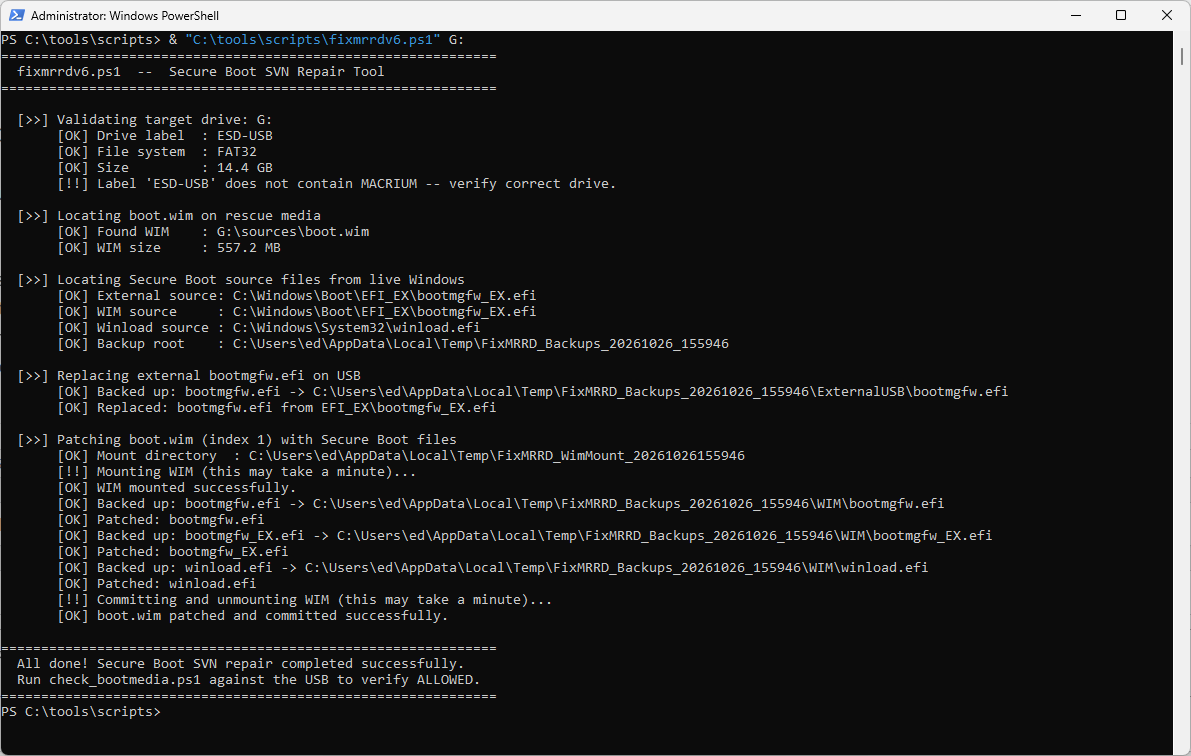
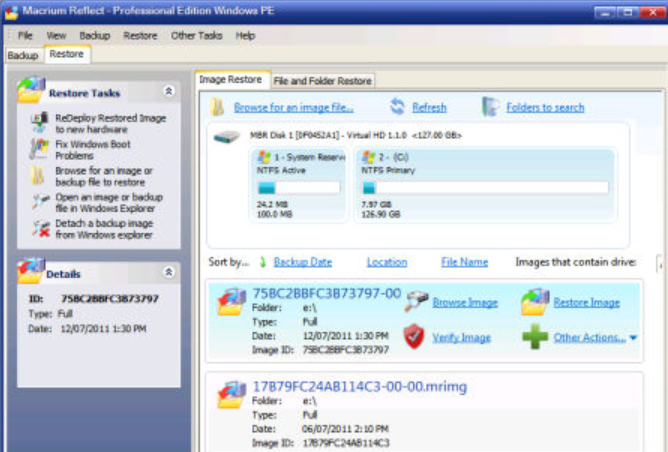
Hello, all! I've been on an extended hiatus since mid-September owing to family and work issues. I'm back in the saddle and have been working with the script to repair a newly-generated Macrium Reflect X rescue disk and make it get a clean bill of health from Garlin's check bootmedia scripts AND actually boot into the Macrium WinRE environment so one could do an image backup from there. It's been waaaaaaaaaaaaay too interesting. Several recent and hopefully relevant blog posts of mine include:
And here's a link to the latest version of the script: fixmrrdv6.txt (rename to fixrmrrdv6.ps1 to get it to run, don't forget to unblock)
FWIW, I've tested it on two PCs, each of which successfully "fixed" a newly-generated Macrium Reflect X Rescue Disk, BUT:
1. I had to turn off Device Guard on one of those PCs to get it to allow UFD boot
2. Then I had to suspend bitlocker to get it to quit prompting for the 48-digit key on each boot
3. I had to try to get the ThinkPad P16 Gen1 to "see" 4 different UFDs before I found one that worked (it's finicky about UFD controllers, apparently)
It's a bit of a rougher road to get to booting into the MacRef WinRE Rescue environment than I had ever guessed or supposed.
Cheers!
--Ed--
 
Last edited:

My Computers My Computers

  • At a glance

    Windows 11i7-8650U (8th Gen/Kaby Lake)16 GBIntel UHD Graphics 620
    OS
    Windows 11
    Computer type
    Laptop
    Manufacturer/Model
    Lenovo X380 Yoga
    CPU
    i7-8650U (8th Gen/Kaby Lake)
    Motherboard
    20LH000MUS (U3E1)
    Memory
    16 GB
    Graphics Card(s)
    Intel UHD Graphics 620
    Sound Card
    Integrated Conexant SmartAudio HD
    Monitor(s) Displays
    FlexView Display
    Screen Resolution
    1920x1080
    Hard Drives
    Toshiba 1 TB PCIe x3 NVMe SSD
    external 5TB Seagate USB-C attached HDD
    PSU
    Lenovo integrated 65W power brick
    Case
    Laptop
    Cooling
    Laptop
    Keyboard
    Integrated Lenovo ThinkPad keyboard
    Mouse
    touchscreen, touchpad
    Internet Speed
    GbE (Spectrum/Charter)
    Browser
    all of em
    Antivirus
    Defender
    Other Info
    Purchased early 2019 as Windows Insider test PC
  • At a glance

    Windows 11Ryzen 5800X128 GB (4x32 DDR5-5600)NVIDIA 3070Ti
    Operating System
    Windows 11
    Computer type
    PC/Desktop
    Manufacturer/Model
    DIY
    CPU
    Ryzen 5800X
    Motherboard
    Asrock B550 Extreme4
    Memory
    128 GB (4x32 DDR5-5600)
    Graphics card(s)
    NVIDIA 3070Ti
    Sound Card
    built-in
    Monitor(s) Displays
    2xDell 2707
    Screen Resolution
    1980x1200
    Hard Drives
    2XNVMe, multiple HDDs from 3 to 12 TB
    PSU
    Seasonic 650
    Case
    NZXT Flo 6
    Cooling
    dual-fan air cooler
    Keyboard
    Logitech Wave
    Mouse
    Logitech Logi
    Internet Speed
    GbE
    Browser
    all of 'em
    Antivirus
    Defender
    Other Info
    temperamental UEFI
For supported models, Acer released a bunch of BIOS updates this summer. Those BIOS updates are intended to be installed via Windows Update (instead of being provided as firmware images).

It's believed that Acer needed to fix a BIOS firmware limitation to allow larger changes to the DBX variable.
The ones through WIndows Update kept failing, so I asked them to share me the EXE file, like they did for the previous versions.
 

My Computer My Computer

At a glance

Windows 11 Pro 25H2Intel Core i7-11800H16GB (2x8 GB)RTX 3060 Laptop GPU
OS
Windows 11 Pro 25H2
Computer type
Laptop
Manufacturer/Model
Acer Predator Helios 300 PH314-54-72ZJ
CPU
Intel Core i7-11800H
Motherboard
TGL
Memory
16GB (2x8 GB)
Graphics Card(s)
RTX 3060 Laptop GPU
Sound Card
Realtek ALC295
Monitor(s) Displays
1
Screen Resolution
2560 x 1440 @ 165Hz
Hard Drives
1TB NVMe SSD, 512GB NVMe SSD, 1TB 7200 RPM HDD
Cooling
Aeroblade 5th Gen 3D fan
Keyboard
RGB Laptop keyboard
Mouse
Logitech Lightsync G203
Internet Speed
175 Mbps up/175 Mbps down
Browser
Firefox with uBlock Origin and YouTube enhancing extensions..
Antivirus
Windows Security with Core Isolation on
Back
Top Bottom