Solved garlin's PowerShell scripts for updating Secure Boot CA 2023


My current thinking is it's a bug within the PowerShell function.

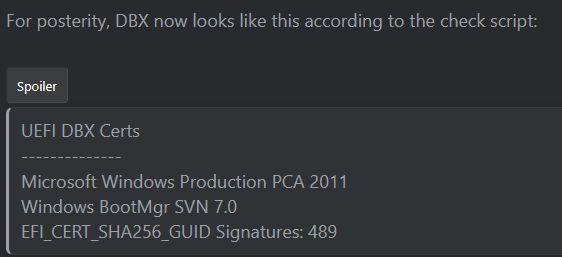
If you've followed the expected steps, there are least two different BootMgr SVN numbers, 2.0 & 7.0. In theory, the highest of the available number is enforced. But PS can return inconsistent results for different people. For now, I would place more faith on the way my script determines the SVN because that's how the SVN mechanism is designed to work.
 

My Computer

System One

  • OS
    Windows 7
So which of your scripts would fix it? Sorry I'm now lost too..
 

My Computer

System One

  • OS
    Windows 11 Pro 25H2
    Computer type
    Laptop
    Manufacturer/Model
    HP
    CPU
    Gen 11 Core i5
    Memory
    16GB
No, my script reports what's to be expected. But the new PS command is broken, and it's probably not worth resetting your UEFI and re-applying the certs just to make the command look correct. I expect MS to make a simple bug fix in another update, once they know the problem exists.
 

My Computer

System One

  • OS
    Windows 7
No, my script reports what's to be expected. But the new PS command is broken, and it's probably not worth resetting your UEFI and re-applying the certs just to make the command look correct. I expect MS to make a simple bug fix in another update, once they know the problem exists.
Agreed, besides that on my laptop doesn't have any kind of those options that I could find anyway.
 

My Computer

System One

  • OS
    Windows 11 Pro 25H2
    Computer type
    Laptop
    Manufacturer/Model
    HP
    CPU
    Gen 11 Core i5
    Memory
    16GB
No, my script reports what's to be expected. But the new PS command is broken, and it's probably not worth resetting your UEFI and re-applying the certs just to make the command look correct. I expect MS to make a simple bug fix in another update, once they know the problem exists.
You don't really expect MSC to actually test this stuff, right? :lmao: That's what all the Insider versions are for, they get to test this stuff. :think:
 

My Computers

System One System Two

  • OS
    Win 11 Pro 25H2, Build 26200.8524
    Computer type
    PC/Desktop
    Manufacturer/Model
    Home Brew
    CPU
    Intel Core i5 14500
    Motherboard
    Gigabyte B760M G P WIFI
    Memory
    64GB DDR4
    Graphics Card(s)
    GeForce RTX 4060
    Sound Card
    Chipset Realtek
    Monitor(s) Displays
    LG 45" Ultragear, Acer 24" 1080p
    Screen Resolution
    5120x1440, 1920x1080
    Hard Drives
    Crucial P310 2TB 2280 PCIe Gen4 3D NAND NVMe M.2 SSD (O/S)
    Silicon Power 2TB US75 NVMe PCIe Gen4 M.2 2280 SSD (backup)
    Crucial BX500 2TB 3D NAND (2nd backup)
    Seagate 4TB Ironwolf, rotating HDD archive files
    External off-line backup Drives: 2 NVMe 4TB drives in external enclosures
    PSU
    Thermaltake Toughpower GF3 750W
    Case
    LIAN LI LANCOOL 216 E-ATX PC Case
    Cooling
    Lots of fans!
    Keyboard
    Microsoft Comfort Curve 2000
    Mouse
    Logitech G305
    Internet Speed
    Verizon FiOS 1GB
    Browser
    Firefox
    Antivirus
    Malware Bytes & Windows Defender Security
  • Operating System
    Win 11 Pro 25H2, Build 26200.8524
    Computer type
    PC/Desktop
    Manufacturer/Model
    Home Brew
    CPU
    Intel Core i5 14400
    Motherboard
    Gigabyte B760M DS3H AX
    Memory
    32GB DDR5
    Graphics card(s)
    Intel 700 Embedded GPU
    Sound Card
    Realtek Embedded
    Monitor(s) Displays
    27" HP 1080p
    Screen Resolution
    1920x1080
    Hard Drives
    Crucial P310 2TB 2280 PCIe Gen4 eD NAND PCIe SSD
    Samsung EVO 990 2TB NVMe Gen4 SSD
    Samsung 2TB SATA SSD
    PSU
    Thermaltake Smart BM3 650W
    Case
    Okinos Micro ATX Case
    Cooling
    Fans
    Keyboard
    Microsoft Comfort Curve 2000
    Mouse
    Logitech G305
    Internet Speed
    Verizon FiOS 1GB
    Browser
    Firefox
    Antivirus
    Malware Bytes & Windows Defender Security
Maybe Nebulon Ranger or itsme1 want to report back if they really don't have the revocation for the PCA 2011 cert installed?

KzBIAMY.png


garlin's PowerShell scripts for updating Secure Boot CA 2023 :)
 

My Computer

System One

  • OS
    Windows 11 Pro 25H2
    Computer type
    PC/Desktop
    Manufacturer/Model
    custom
    CPU
    AMD Ryzen 9 3950X
    Motherboard
    ASUS ROG Strix X570-E (first gen)
    Memory
    64 GB DDR4-3600 CL18 (2x32 GB)
    Graphics Card(s)
    MSI Ventus RTX 2060 Super
    Sound Card
    Audient iD4 Mk.I
    Monitor(s) Displays
    2x AOC 24G1 / 1x XP-Pen Artist Pro 16 Gen 2 2.5K
    Screen Resolution
    1080p / 2560x1600
    Hard Drives
    1TB WD/SanDisk SN850X (main) / 2TB Sabrent Rocket 4 / 6TB WD MyBook EE
    PSU
    Corsair RM850X 850W Gold (2019)
    Case
    Lian-Li O11-D
    Cooling
    EKWB EK-AIO 360 RGB
    Keyboard
    wooting Two HE fullsize
    Mouse
    some old mouse from an older PC
    Internet Speed
    Gigabit symmetric (fibre); Bell Fibe
    Browser
    Firefox
    Antivirus
    ol' reliable Windows Defender
    Other Info
    Other peripherals:

    - Shure SM7B (Mexico)
    - AKG K 240 Studio (calibrated flat)
    - PDP FaceOff wired Switch gamepad
No. All that means is the Windows UEFI CA 2023 hasn't been added to DB. You can't make any conclusions on a standalone check of just one setting. What needs to happen is all the different cert types need to be installed together.

Here's an analogy to explain the problem:

You're planning to fly overseas to another country. In order to accomplish that, you need an airline ticket and usually a visa from the other country. To get a visa, the other country needs your passport info.

It's possible to book the airline ticket without having a visa. The airline leaves that problem to the departure or arrivals staff at the different airports.
It's possible to request a visa without having an airline ticket. The other country leaves that problem to you.
It's possible you have a ticket and visa, but forget to show up with your passport.

In order to actually arrive in the other country, all the following things must be in place: booked ticket, approved visa, possession of a passport.

The Secure Boot update process is similar, all the pieces must be done. But you can skip around, and partially update some settings. If you have not revoked anything, then you're only adding new settings which don't prevent Secure Boot from booting. The main point of having a good script is most folks are not informed enough on how Secure Boot works to make good conclusions by looking at different settings.

The check script will highlight if your current boot file, as your UEFI stands right now, is ALLOWED or BANNED. If it's BANNED, then you have to fix the settings, or temporarily disable Secure Boot.
Hello again,
Thanks for the "Janet & John" explanation of the Secure Boot daisy chain. Being "an old fart" my knowledge of Secure Systems stretches back to the 80s', when I was working with government/military under the strictures of the "Orange Book"!
I have attached the logs of Check UEFI and Check DBX from one of our systems. I presume that If I force the revoke of the CA 2011 Certs these will change.. Does that then force the update of Db or DBX? The current situation on this computer is that Disk 0: Windows Boot Manager [Windows UEFI CA 2023] is ALLOWED. Is that what you meant in your comment above re ALLOWED or BANNED?
I am still not clear as to whether the update to install SkuSiPolicy.p7b is required/recommeded
Thanks for, as has been commented on, your patience of a Saint, especially when dealing with oldies like me!
SaliesBuzz
 

Attachments

My Computer

System One

  • OS
    Windows11
    Computer type
    PC/Desktop
    Manufacturer/Model
    Acemagic S1
    CPU
    Intel(R) N97, 2000 Mhz, 4 Core(s), 4 Logical
    Memory
    16Gb
    Graphics Card(s)
    Intel(R) UHD Graphics
    Sound Card
    (Generic USB Audio)
    Monitor(s) Displays
    2
    Screen Resolution
    2560 x 1440 x 59 hertz
    Hard Drives
    Model KPART512GBC2DVT 512Gb
On these older Dell Laptops (Latitude 3580) that Dell not gonna update the bios can you install some ver of Linux
and have secure boot enabled and be safe from rootkits, bootkits ? Or should I ask in Linux forum?
 

My Computer

System One

  • OS
    windows 11
    Computer type
    PC/Desktop
    Manufacturer/Model
    Antec/Case
    CPU
    Intel i5-10600kf
    Motherboard
    GIGABYTE Z590 UD AC
    Memory
    32gb corsair vengerance pro
    Graphics Card(s)
    AMD RX 6500XT
    Sound Card
    onboard
    Monitor(s) Displays
    40" Hisense
    Hard Drives
    Samsung 850
    Samsung 870
    Seagate 2TB
    PSU
    EVGA GQ 750
I have attached the logs of Check UEFI and Check DBX from one of our systems. I presume that If I force the revoke of the CA 2011 Certs these will change.. Does that then force the update of Db or DBX? The current situation on this computer is that Disk 0: Windows Boot Manager [Windows UEFI CA 2023] is ALLOWED. Is that what you meant in your comment above re ALLOWED or BANNED?

Code:
UEFI DB Certs
-------------
    Microsoft Corporation UEFI CA 2011
    Microsoft Windows Production PCA 2011
    Microsoft Option ROM UEFI CA 2023
    Microsoft UEFI CA 2023
    Windows UEFI CA 2023

UEFI DBX Certs
--------------
    (NONE)
    Windows BootMgr SVN is MISSING.
    EFI_CERT_SHA256_GUID Signatures: 431

EFI Files
---------
    Disk 0: Windows Boot Manager [Windows UEFI CA 2023] is ALLOWED.
        bootmgfw.efi File version: 26100.30227

    Registry: WindowsUEFICA2023Capable = 2
        [Windows UEFI CA 2023] in UEFI DB, and Windows starting from CA 2023 Boot Manager.

    Disk 0: SkuSiPolicy.p7b (for VBS) is NOT PRESENT.
1. Your PC doesn't have the PCA 2011 cert revoked; it doesn't appear on the DBX list.

2. Current boot manager (Windows UEFI CA 2023) is allowed to boot, because its matching cert appears on the DB list. Any boot file is considered ALLOWED if the following conditions are true:
- Secure Boot is disabled, then all boot files are allowed because there is no signature enforcement​
- Secure Boot is enabled, and the boot file's cert is added to DBX and not banned at the same time from DBX​

When DB contains both CA 2011 and CA 2023, and DBX doesn't contain CA 2011, then Secure Boot allows either CA 2011 or CA 2023 files to boot. At this point, you can use either version of the boot file. As soon as CA 2011 is added to DBX (banning it), CA 2011 boot files are disallowed.

3. Virtualization Based Security has an optional SkuSiPolicy file that has a versioning number to prevent rollback of older boot files. Normally, MS recommends you deploy this policy file to the EFI.

But in a number of cases, people have reported problems with their USB boot drives since the boot files don't match the SkuSiPolicy. It's most good to have, but can cause problems with things like Macrium (depending on where it gets the boot files).
 

My Computer

System One

  • OS
    Windows 7
On these older Dell Laptops (Latitude 3580) that Dell not gonna update the bios can you install some ver of Linux
and have secure boot enabled and be safe from rootkits, bootkits ? Or should I ask in Linux forum?
Linux distributions typically handle Secure Boot in one of two methods:

1. They piggyback off the Microsoft UEFI CA 2011 or Microsoft UEFI CA 2023 cert, which are explicitly provided for Linux distro's use. Those are not being canceled by MS, as MS is only concerned about revoking the compromised Windows boot managers it owns.

2. They suggest you install new self-signed certs creating from Linux to allow Secure Boot mode. Sometimes this step includes replacing the PK, and owning the whole cert chain. UEFI only allows for one PK, but you can have multiple KEK's and DB's in parallel. So the UEFI can have MS certs for Windows, and Linux certs for your distro in a dual-boot setup.

3. Only the MS certs can be used with Windows. A Linux distro can shim boot from a Microsoft (not Windows) UEFI cert, or use its own certs.

4. For older, unsupported laptops you can try Setup Mode and replace the entire cert package with the Windows OEM Devices set as a drop-in replacement. On paper this works, but some older BIOS'es are cranky about the update process and you have to get the setup settings right.
 

My Computer

System One

  • OS
    Windows 7
Hello Again,
I am helping a French friend with an old Dell Inspiron Laptop that I have managed to upgrade to Windows 11 using the excellent Rufus method. (It was originally shipped with Windows 8,1!! It was migrated to Windows 10 and now Windows 11 despite being totally non compliant!
My specific question relevant to the Secure Boot issues is that, when I run the CheckUEFI script it throws the following error:
Dell Inc. Inspiron 5721
Version: A16
Date: 2018-05-24
La variable est actuellement non définie : 0xC0000100
(The variable is currently undefined)
I see that usually means there is a problem with the old and not updatable 2018 Bios?
The DBX check shows:
SUCCESS: Matched 431/431 EFI signatures from "dbxupdate.bin"
FAILED: Missing 3/3 SVN signatures from "DBXUpdate2024.bin"
Missing [01612B139DD5598843AB1C185C3CB2EB92000002000000000000000000000000] bootmgfw.efi SVN 2.0
Missing [019D2EF8E827E15841A4884C18ABE2F284000002000000000000000000000000] cdboot.efi SVN 2.0
Missing [01C2CA99C9FE7F6F4981279E2A8A535976000002000000000000000000000000] wdsmgfw.efi SVN 2.0

FAILED: Missing 3/3 SVN signatures from "DBXUpdateSVN.bin"
Missing [01612B139DD5598843AB1C185C3CB2EB92000007000000000000000000000000] bootmgfw.efi SVN 7.0
Missing [019D2EF8E827E15841A4884C18ABE2F284000003000000000000000000000000] cdboot.efi SVN 3.0
Missing [01C2CA99C9FE7F6F4981279E2A8A535976000003000000000000000000000000] wdsmgfw.efi SVN 3.0

Is it worth forcing another update to the old BIOS (V:A16)

I guess, at the end of the day, I could just turn off Secure Boot.
Regards to all
SaliesBuzz
 

My Computer

System One

  • OS
    Windows11
    Computer type
    PC/Desktop
    Manufacturer/Model
    Acemagic S1
    CPU
    Intel(R) N97, 2000 Mhz, 4 Core(s), 4 Logical
    Memory
    16Gb
    Graphics Card(s)
    Intel(R) UHD Graphics
    Sound Card
    (Generic USB Audio)
    Monitor(s) Displays
    2
    Screen Resolution
    2560 x 1440 x 59 hertz
    Hard Drives
    Model KPART512GBC2DVT 512Gb
My specific question relevant to the Secure Boot issues is that, when I run the CheckUEFI script it throws the following error:
Dell Inc. Inspiron 5721
Version: A16
Date: 2018-05-24
La variable est actuellement non définie : 0xC0000100
(The variable is currently undefined)
I see that usually means there is a problem with the old and not updatable 2018 Bios?
Some of the "problem" BIOS versions can return errors to the Get-SecureBootUEFI function. I've added more error handling in a newer version of the script.

The DBX check shows:
SUCCESS: Matched 431/431 EFI signatures from "dbxupdate.bin"
FAILED: Missing 3/3 SVN signatures from "DBXUpdate2024.bin"
Missing [01612B139DD5598843AB1C185C3CB2EB92000002000000000000000000000000] bootmgfw.efi SVN 2.0
Missing [019D2EF8E827E15841A4884C18ABE2F284000002000000000000000000000000] cdboot.efi SVN 2.0
Missing [01C2CA99C9FE7F6F4981279E2A8A535976000002000000000000000000000000] wdsmgfw.efi SVN 2.0

FAILED: Missing 3/3 SVN signatures from "DBXUpdateSVN.bin"
Missing [01612B139DD5598843AB1C185C3CB2EB92000007000000000000000000000000] bootmgfw.efi SVN 7.0
Missing [019D2EF8E827E15841A4884C18ABE2F284000003000000000000000000000000] cdboot.efi SVN 3.0
Missing [01C2CA99C9FE7F6F4981279E2A8A535976000003000000000000000000000000] wdsmgfw.efi SVN 3.0
The last two imply you have not revoke the PCA 2011 cert.

When the PCA 2011 cert is applied (by Windows or my update script), the SVN is set to 2.0. After the DBXUpdateSVN file is next added, by design the SVN jumps to 7.0. Since none of those conditions are true, it reflects you have not performed the revoke steps.
 

My Computer

System One

  • OS
    Windows 7
Some of the "problem" BIOS versions can return errors to the Get-SecureBootUEFI function. I've added more error handling in a newer version of the script.


The last two imply you have not revoke the PCA 2011 cert.

When the PCA 2011 cert is applied (by Windows or my update script), the SVN is set to 2.0. After the DBXUpdateSVN file is next added, by design the SVN jumps to 7.0. Since none of those conditions are true, it reflects you have not performed the revoke steps.
Hello Again,
Pardon me for being dumb but where is the newer version of the script? Is is still the one dated 18/01/2016?
 

My Computer

System One

  • OS
    Windows11
    Computer type
    PC/Desktop
    Manufacturer/Model
    Acemagic S1
    CPU
    Intel(R) N97, 2000 Mhz, 4 Core(s), 4 Logical
    Memory
    16Gb
    Graphics Card(s)
    Intel(R) UHD Graphics
    Sound Card
    (Generic USB Audio)
    Monitor(s) Displays
    2
    Screen Resolution
    2560 x 1440 x 59 hertz
    Hard Drives
    Model KPART512GBC2DVT 512Gb
Quick question for @JamesSmith: have you installed the March 2026 Windows update?

There's a new PS feature just added to the Get-SecureBootUEFI command which converts the certs back into a human form. Can you run this to confirm what the actual Subject line for all those mysterious GIGABYTE certs?

Code:
> foreach ($var in @('PK','KEK','DB','DBX')) { "`n${var}:"; (Get-SecureBootUEFI -Name $var -Decoded).Subject }

PK:
CN=Windows OEM Devices PK, O=Microsoft Corporation, L=Redmond, S=Washington, C=US

KEK:
CN=Microsoft Corporation KEK CA 2011, O=Microsoft Corporation, L=Redmond, S=Washington, C=US
CN=Microsoft Corporation KEK 2K CA 2023, O=Microsoft Corporation, C=US

DB:
CN=Microsoft Corporation UEFI CA 2011, O=Microsoft Corporation, L=Redmond, S=Washington, C=US
CN=Microsoft Windows Production PCA 2011, O=Microsoft Corporation, L=Redmond, S=Washington, C=US
CN=Windows UEFI CA 2023, O=Microsoft Corporation, C=US
CN=Microsoft UEFI CA 2023, O=Microsoft Corporation, C=US
CN=Microsoft Option ROM UEFI CA 2023, O=Microsoft Corporation, C=US

DBX:
CN=Microsoft Windows Production PCA 2011, O=Microsoft Corporation, L=Redmond, S=Washington, C=US

My suspicion is Gigabyte is publishing "CN=GIGABYTE" and nothing else on the Subject line.

PK:
CN=GIGABYTE

KEK:
CN=Microsoft Corporation KEK 2K CA 2023, O=Microsoft Corporation, C=US
CN=Microsoft Corporation KEK CA 2011, O=Microsoft Corporation, L=Redmond, S=Washington, C=US
CN=GIGABYTE

DB:
CN=Microsoft Corporation UEFI CA 2011, O=Microsoft Corporation, L=Redmond, S=Washington, C=US
CN=Windows UEFI CA 2023, O=Microsoft Corporation, C=US
CN=Microsoft Windows Production PCA 2011, O=Microsoft Corporation, L=Redmond, S=Washington, C=US
CN=GIGABYTE
CN=GIGABYTE
CN=Microsoft UEFI CA 2023, O=Microsoft Corporation, C=US
CN=Microsoft Option ROM UEFI CA 2023, O=Microsoft Corporation, C=US

DBX:
CN=Microsoft Windows Production PCA 2011, O=Microsoft Corporation, L=Redmond, S=Washington, C=US
PS C:\Users\James>


No further information. Sadly.
 

My Computers

System One System Two

  • OS
    Windows 11 Pro
    Computer type
    PC/Desktop
    Manufacturer/Model
    Me
    CPU
    Intel Core i5-12600K 3.7 GHz 10-Core Processor
    Motherboard
    Gigabyte B760M H DDR4 Micro ATX LGA1700 Motherboard
    Memory
    Corsair Vengeance LPX 64 GB (2 x 32 GB) DDR4-3200 CL16 Memory
    Graphics Card(s)
    Integrated Intel UHD Graphics 770
    Sound Card
    Realtek
    Monitor(s) Displays
    LG
    Hard Drives
    Samsung 990 Pro 1 TB M.2-2280 PCIe 4.0 X4 NVME Solid State Drive
    Samsung 990 Pro 2 TB M.2-2280 PCIe 4.0 X4 NVME Solid State Drive
    PSU
    NZXT 850w ATX 3.1 Gold Fully Modular Power Supply
    Case
    Thermaltake Versa H25 ATX Mid Tower Case
    Cooling
    CPU Cooler Thermalright Assassin Spirit 120 EVO ARGB (ARGB Disabled) - Case Fans BlackThermalright TL-C12C-S X3 66.17 CFM 120 mm Fans 3-Pack (ARGB disabled)
    Internet Speed
    1 Gbps
    Other Info
    I hate ARGB.
  • Operating System
    Windows 11 Pro
    Computer type
    Laptop
    Manufacturer/Model
    Lenovo ThinkBook 14 G2 ITL
Thanks. Somebody at Gigabyte didn't understand the exercise.

There's a Gigabyte PK, separate from a Gigabyte KEK, and separate from two different Gigabyte DB certs. You can distinguish the individual certs by their thumbprints (which are unique); but if someone gave you a random cert, you wouldn't know which role it's intended for.

A designated PK signs a KEK. A designated KEK signs a DB. The whole point of a proper cert name is to prevent the possibility of a mix-up.
 

My Computer

System One

  • OS
    Windows 7
Tried it also:

PS C:\WINDOWS\system32> powershell -nop -ep bypass -f C:\Temp\Check_UEFI-CA2023.ps1 -Verbose
Windows 11 24H2 (26100.8037)

Secure Boot: ON
Virtualization Based Security: ON
BitLocker on (C:) OFF

BIOS Firmware
-------------
Gigabyte Technology Co. B650 AORUS ELITE AX V2
Version: F40
Date: 2026-02-06

Factory Default UEFI PK Cert
----------------------------
GIGABYTE

UEFI PK Cert
------------
GIGABYTE

Factory Default UEFI KEK Certs
------------------------------
Microsoft Corporation KEK CA 2011
Microsoft Corporation KEK 2K CA 2023
GIGABYTE

UEFI KEK Certs
--------------
Microsoft Corporation KEK CA 2011
Microsoft Corporation KEK 2K CA 2023
GIGABYTE

Factory Default UEFI DB Certs
-----------------------------
Microsoft Corporation UEFI CA 2011
Microsoft Windows Production PCA 2011
Windows UEFI CA 2023
GIGABYTE
GIGABYTE

UEFI DB Certs
-------------
Microsoft Corporation UEFI CA 2011
Microsoft Windows Production PCA 2011
Microsoft Option ROM UEFI CA 2023
Microsoft UEFI CA 2023
Windows UEFI CA 2023
GIGABYTE
GIGABYTE

Factory Default UEFI DBX Certs
------------------------------
(NONE)
EFI_CERT_SHA256_GUID Signatures: 77

UEFI DBX Certs
--------------
Microsoft Windows Production PCA 2011
Windows BootMgr SVN 7.0
EFI_CERT_SHA256_GUID Signatures: 487

EFI Files
---------
Windows Boot Manager [Windows UEFI CA 2023] is ALLOWED.
\\.\HarddiskVolume1\EFI\Microsoft\Boot\bootmgfw.efi
File Version: 26100.30227, SVN 7.0

Registry: WindowsUEFICA2023Capable = 2
[Windows UEFI CA 2023] in UEFI DB, and Windows starting from CA 2023 Boot Manager.

SkuSiPolicy.p7b is CURRENT.
\\.\HarddiskVolume1\EFI\Microsoft\Boot\SkuSiPolicy.p7b
Version: 33284.17421.33440.335

STATUS REPORT
-------------
Registry: UEFICA2023Status = Updated

SUCCESS: NO UPDATES ARE REQUIRED.

[ \\.\HarddiskVolume1] does that stand for partition or Disk, as my windows M.2 = Disk 0 Sorry had a "blond" moment :-)


I forgot to mention last time that I run windows 24H2 IOT LTSC on this machine

Thanx again for all your work !

 
Last edited:

My Computer

System One

  • OS
    Win11 24H2 IOT LTSC / Win11 Pro 25H2
    Computer type
    PC/Desktop
    Manufacturer/Model
    Gigabyte / Asus Home build
    CPU
    AMD Ryzen 7 8700G / AMD Ryzen 7 8700G
    Motherboard
    Gigabyte B650 AORUS ELITE AX V2 / ASUS TUF GAMING B650-PLUS
    Memory
    F5-6000J3636F16GX2-FX5 32GB / Lexar Ares RGB LD5BU016G-R6000GDLA 32GB
    Graphics Card(s)
    internal
    Sound Card
    Realtec
    Monitor(s) Displays
    BenQ 27 L EW2780
    Screen Resolution
    1920x1080
    Hard Drives
    Many M.2's
    Internet Speed
    400 mbs
    Browser
    Vivaldi
    Antivirus
    Eset
\\.\HarddiskVolume1] does that stand for partition or Disk, as my windows M.2 = Disk 0

I forgot to mention last time that I run windows 24H2 IOT LTSC on this machine
The script looks for the active EFI volume, based on what Windows reports.

We've seen the threads on Elevenforum where people have all sorts of duplicate (and unused) partitions created by incorrect cloning or migrated partitions. So I don't just assume you're always on disk 0, nor that partition 0 is the EFI. I ask Windows where the active partition lives. You might even have a dual-boot setup.

Normally this returns a long \\?\Volume{GUID} path name, which can be used to read the EFI filesystem without using a drive letter. But the new Get-SecureBootSVN command returns the old fashioned \\.\DeviceName path name. That's more presentable than the longer GUID variant.

On your system, if you can access the EFI volume using this path:
Code:
dir \\.\HarddiskVolume1\EFI
copy bootfile \\.\HarddiskVolume1\EFI\Microsoft\Boot

If your EFI volume was assigned to a different partition (people with the weird disk layouts), your HarddiskVolume would be changed.

forgot to mention last time that I run windows 24H2 IOT LTSC on this machine
If your Windows release still gets a monthly update, then \Windows\System32\SecureBootUpdates folder will have the latest cert and boot files. In practice, the important files only change every few months. The other files are there to help the Secure Boot task do its job.
 

My Computer

System One

  • OS
    Windows 7
Thanks. Somebody at Gigabyte didn't understand the exercise.

There's a Gigabyte PK, separate from a Gigabyte KEK, and separate from two different Gigabyte DB certs. You can distinguish the individual certs by their thumbprints (which are unique); but if someone gave you a random cert, you wouldn't know which role it's intended for.

A designated PK signs a KEK. A designated KEK signs a DB. The whole point of a proper cert name is to prevent the possibility of a mix-up.

Should I be worried? I kind of understand what you are saying. Not sure if I can do anything?
Please advise.


@Klaver7 try this in PS

foreach ($var in @('PK','KEK','DB','DBX')) { "`n${var}:"; (Get-SecureBootUEFI -Name $var -Decoded).Subject }

What do you get?
 

My Computers

System One System Two

  • OS
    Windows 11 Pro
    Computer type
    PC/Desktop
    Manufacturer/Model
    Me
    CPU
    Intel Core i5-12600K 3.7 GHz 10-Core Processor
    Motherboard
    Gigabyte B760M H DDR4 Micro ATX LGA1700 Motherboard
    Memory
    Corsair Vengeance LPX 64 GB (2 x 32 GB) DDR4-3200 CL16 Memory
    Graphics Card(s)
    Integrated Intel UHD Graphics 770
    Sound Card
    Realtek
    Monitor(s) Displays
    LG
    Hard Drives
    Samsung 990 Pro 1 TB M.2-2280 PCIe 4.0 X4 NVME Solid State Drive
    Samsung 990 Pro 2 TB M.2-2280 PCIe 4.0 X4 NVME Solid State Drive
    PSU
    NZXT 850w ATX 3.1 Gold Fully Modular Power Supply
    Case
    Thermaltake Versa H25 ATX Mid Tower Case
    Cooling
    CPU Cooler Thermalright Assassin Spirit 120 EVO ARGB (ARGB Disabled) - Case Fans BlackThermalright TL-C12C-S X3 66.17 CFM 120 mm Fans 3-Pack (ARGB disabled)
    Internet Speed
    1 Gbps
    Other Info
    I hate ARGB.
  • Operating System
    Windows 11 Pro
    Computer type
    Laptop
    Manufacturer/Model
    Lenovo ThinkBook 14 G2 ITL
Back
Top Bottom