Solved garlin's PowerShell scripts for updating Secure Boot CA 2023


In general, it depends on your PC model and the current BIOS version.

Some BIOS'es support the CA 2023 certs and the update process works very well, and other times you have a legacy PC where some manual help is required. You can download and install the check script from post #1, and share the output.
 

My Computer

System One

  • OS
    Windows 7
I don't have the technical knowledge to clear the dbx keys on the Gigabyte Bios
In your profile you say Gigabyte B760M H DDR4
These pics are from a Gigabyte B760M DS3H DDR4 (Rev. 1.0) and it's not too hard- should look pretty much the same on your board:

Go into your bios setup, choose boot, then secure boot
1.webp

Klick Key Management:
2.webp

Klick Forbidden Signatures (dbx)
3.webp

Klick delete (don't worry, there's at least one more question):
4.webp

Klick "No" since you don't want to delete the complete dbx but just a single entry:
5.webp

Choose the entry with the additional SVNs- this pic has just the necessary entries, if Get-SecureBootSVN still shows Firmware SVN 2 you have in addition another entry with Count 3 in the list. First two (count 430 and 1) are the 431 standard hashes, the PCA 2011 revocation is clearly marked, and in my pic the last entry is the SVN update. It should be the first entry with count 3 before or directly after the PCA2011 entry.
Click the entry you want to remove / delete (it's not the one marked in the pic, these 4 entries are all OK)
6.webp

Now you have to confirm one last time
7.webp

If you by accident delete both SVN updates you simply re- apply the latest (single) SVN update.

(Despite veing applied in a single file both for my 10th gen Intel Asus board and the Gigabyte board had the old SVN update and the 2011 recovation as separate entries)
 

My Computer

System One

  • OS
    W10
In your profile you say Gigabyte B760M H DDR4
These pics are from a Gigabyte B760M DS3H DDR4 (Rev. 1.0) and it's not too hard- should look pretty much the same on your board:

Go into your bios setup, choose boot, then secure boot
View attachment 166210

Klick Key Management:
View attachment 166211

Klick Forbidden Signatures (dbx)
View attachment 166212

Klick delete (don't worry, there's at least one more question):
View attachment 166213

Klick "No" since you don't want to delete the complete dbx but just a single entry:
View attachment 166214

Choose the entry with the additional SVNs- this pic has just the necessary entries, if Get-SecureBootSVN still shows Firmware SVN 2 you have in addition another entry with Count 3 in the list. First two (count 430 and 1) are the 431 standard hashes, the PCA 2011 revocation is clearly marked, and in my pic the last entry is the SVN update. It should be the first entry with count 3 before or directly after the PCA2011 entry.
Click the entry you want to remove / delete (it's not the one marked in the pic, these 4 entries are all OK)
View attachment 166215

Now you have to confirm one last time
View attachment 166216

If you by accident delete both SVN updates you simply re- apply the latest (single) SVN update.

(Despite veing applied in a single file both for my 10th gen Intel Asus board and the Gigabyte board had the old SVN update and the 2011 recovation as separate entries)

If I remember I need to reset the entire dbx database as everything is out of order? Wouldn't that mean I need to remove more than 1 certificate?

I can possibly take a picture of that menu and show it to you before I delete anything. Technically I would like to reset the whole thing and start again using garlin's script.

I am still sitting on the fence as I trust what Garlin is saying.

Also I am waiting on this

If it is a bug then there's no need to do anything.
 

My Computers

System One System Two

  • OS
    Windows 11 Pro
    Computer type
    PC/Desktop
    Manufacturer/Model
    Self built PC by me.
    CPU
    Intel Core i5-12600K 3.7 GHz 10-Core Processor
    Motherboard
    Gigabyte B760M H DDR4 Micro ATX LGA1700 Motherboard
    Memory
    Corsair Vengeance LPX 64 GB (2 x 32 GB) DDR4-3200 CL16 Memory
    Graphics Card(s)
    Integrated Intel UHD Graphics 770
    Sound Card
    Realtek
    Monitor(s) Displays
    LG
    Hard Drives
    Samsung 990 Pro 1 TB M.2-2280 PCIe 4.0 X4 NVME Solid State Drive
    Samsung 990 Pro 2 TB M.2-2280 PCIe 4.0 X4 NVME Solid State Drive
    PSU
    NZXT 850w ATX 3.1 Gold Fully Modular Power Supply
    Case
    Thermaltake Versa H25 ATX Mid Tower Case
    Cooling
    CPU Cooler Thermalright Assassin Spirit 120 EVO ARGB (ARGB Disabled) - Case Fans BlackThermalright TL-C12C-S X3 66.17 CFM 120 mm Fans 3-Pack (ARGB disabled)
    Internet Speed
    1 Gbps
    Other Info
    I hate ARGB.
  • Operating System
    Windows 11 Pro
    Computer type
    Laptop
    Manufacturer/Model
    Lenovo ThinkBook 14 G2 ITL

My Computers

System One System Two

  • OS
    Windows 11 Pro 25H2 26200.8457
    Computer type
    PC/Desktop
    Manufacturer/Model
    Dell Tower Plus EBT2250, DOB: 06/15/2025
    CPU
    Intel® Core™ Ultra 7 265 1.8GHz to 5.3GHz (Arrow Lake)
    Motherboard
    Dell Inc. 02D3NT A00 (U3E1)
    Memory
    SK Hynix 32GB DDR5 5600 Desktop RAM UDIMM Non-ECC PC5-5600B
    Graphics Card(s)
    Dell NVIDIA® GeForce RTX™ 4060 8GB GDDR6 & (iGPU) Integrated Intel® UHD Graphics
    Sound Card
    Chipset Realtek High-Definition Audio with Dolby Atmos
    Monitor(s) Displays
    Dell Ultra Sharp U2515H 25-Inch Screen LED-Lit
    Screen Resolution
    2560 X 1440
    Hard Drives
    Samsung (NVMe PM9C1a 1024GB) M.2 PCIe NVMe Solid State Drive (OS), with Samsung Piccolo (S4LY022) 6-Core 4 Channel Controller.

    Samsung T7 500GB SSD, USB-C External Drive
    PSU
    Dell 460W
    Case
    Dell Tower Plus EBT 2250
    Cooling
    Fan
    Keyboard
    Dell Wired Keyboard - KB216
    Mouse
    Logitech M510
    Internet Speed
    Intel Killer E3100G 2.5 Gigabit Ethernet Controller
    Browser
    Microsoft Edge
    Antivirus
    Microsoft Windows Security
    Other Info
    The Samsung NVMe PM9C1a 1024GB SSD does not use a Phison NAND controller. Instead, it uses Samsung's in-house developed Piccolo (S4LY022) 6-Core 4 Channel Controller. The PM9C1a utilizes a controller built using Samsung's 5-nanometer process and seventh-generation V-NAND technology. 🤔
  • Operating System
    Windows 11 Pro 25H2 26200.8457
    Computer type
    Laptop
    Manufacturer/Model
    Dell Inspiron 15 7000 (7591) 2-in-1, DOB: 11/30/2019
    CPU
    10th Generation Intel Core i7-10510U Processor (8MB Cache, up to 4.9 GHz) Comet Lake
    Motherboard
    Dell 0NNW5N
    Memory
    16GB DDR4 RAM
    Graphics card(s)
    NVIDIA® GeForce® MX250 with 2GB GDDR5 graphics memory
    Sound Card
    Chipset Realtek ALC3254 🤔🤣
    Monitor(s) Displays
    Dell 15.6-inch UHD Truelife Touch Narrow Border WVA Display with Active Pen support
    Screen Resolution
    3840 x 2160
    Hard Drives
    Intel NVME 512GB SSD with 32GB Intel Optane Memory, M.2 80mm PCIe 3.0 RAID

    SanDisk 256GB Extreme microSDXC UHS-I Memory Card
    PSU
    Dell 4-Cell Battery, 68 Whr (Integrated), 90 Watt AC Adapter
    Case
    Dell Inspiron 15 7000 2-in-1 (7591)
    Cooling
    Standard Dell Case Fan & Havit HV-F2056 USB Powered (3 Fans) Laptop Cooling Pad.
    Keyboard
    Dell
    Mouse
    Logitech Wireless Mouse M650L
    Internet Speed
    Wireless/Wired connectivity (WiFi 6 - 802.11 ax)
    Browser
    Microsoft Edge
    Antivirus
    Microsoft Windows Security
    Other Info
    From Dell: 512GB NVME Solid State Drive accelerated by 32GB Intel Optane Memory are the fastest as compared to NAND SSDs. Intel Optane H10 with SSD offers speedy storage and accelerates opening your programs.
It's a trivial bug to fix. In my scripts, I sort the different SVN's in ascending order before selecting the last (highest) one. I'm guessing it's buried in a shared library because PS 5.1 has the same bug.

I chalk it up to insufficient testing.
 

My Computer

System One

  • OS
    Windows 7
Yeah, that's true - it's not like it is going to hurt anything. I'll just ignore it.
 

My Computers

System One System Two

  • OS
    Windows 11 Pro 25H2 26200.8457
    Computer type
    PC/Desktop
    Manufacturer/Model
    Dell Tower Plus EBT2250, DOB: 06/15/2025
    CPU
    Intel® Core™ Ultra 7 265 1.8GHz to 5.3GHz (Arrow Lake)
    Motherboard
    Dell Inc. 02D3NT A00 (U3E1)
    Memory
    SK Hynix 32GB DDR5 5600 Desktop RAM UDIMM Non-ECC PC5-5600B
    Graphics Card(s)
    Dell NVIDIA® GeForce RTX™ 4060 8GB GDDR6 & (iGPU) Integrated Intel® UHD Graphics
    Sound Card
    Chipset Realtek High-Definition Audio with Dolby Atmos
    Monitor(s) Displays
    Dell Ultra Sharp U2515H 25-Inch Screen LED-Lit
    Screen Resolution
    2560 X 1440
    Hard Drives
    Samsung (NVMe PM9C1a 1024GB) M.2 PCIe NVMe Solid State Drive (OS), with Samsung Piccolo (S4LY022) 6-Core 4 Channel Controller.

    Samsung T7 500GB SSD, USB-C External Drive
    PSU
    Dell 460W
    Case
    Dell Tower Plus EBT 2250
    Cooling
    Fan
    Keyboard
    Dell Wired Keyboard - KB216
    Mouse
    Logitech M510
    Internet Speed
    Intel Killer E3100G 2.5 Gigabit Ethernet Controller
    Browser
    Microsoft Edge
    Antivirus
    Microsoft Windows Security
    Other Info
    The Samsung NVMe PM9C1a 1024GB SSD does not use a Phison NAND controller. Instead, it uses Samsung's in-house developed Piccolo (S4LY022) 6-Core 4 Channel Controller. The PM9C1a utilizes a controller built using Samsung's 5-nanometer process and seventh-generation V-NAND technology. 🤔
  • Operating System
    Windows 11 Pro 25H2 26200.8457
    Computer type
    Laptop
    Manufacturer/Model
    Dell Inspiron 15 7000 (7591) 2-in-1, DOB: 11/30/2019
    CPU
    10th Generation Intel Core i7-10510U Processor (8MB Cache, up to 4.9 GHz) Comet Lake
    Motherboard
    Dell 0NNW5N
    Memory
    16GB DDR4 RAM
    Graphics card(s)
    NVIDIA® GeForce® MX250 with 2GB GDDR5 graphics memory
    Sound Card
    Chipset Realtek ALC3254 🤔🤣
    Monitor(s) Displays
    Dell 15.6-inch UHD Truelife Touch Narrow Border WVA Display with Active Pen support
    Screen Resolution
    3840 x 2160
    Hard Drives
    Intel NVME 512GB SSD with 32GB Intel Optane Memory, M.2 80mm PCIe 3.0 RAID

    SanDisk 256GB Extreme microSDXC UHS-I Memory Card
    PSU
    Dell 4-Cell Battery, 68 Whr (Integrated), 90 Watt AC Adapter
    Case
    Dell Inspiron 15 7000 2-in-1 (7591)
    Cooling
    Standard Dell Case Fan & Havit HV-F2056 USB Powered (3 Fans) Laptop Cooling Pad.
    Keyboard
    Dell
    Mouse
    Logitech Wireless Mouse M650L
    Internet Speed
    Wireless/Wired connectivity (WiFi 6 - 802.11 ax)
    Browser
    Microsoft Edge
    Antivirus
    Microsoft Windows Security
    Other Info
    From Dell: 512GB NVME Solid State Drive accelerated by 32GB Intel Optane Memory are the fastest as compared to NAND SSDs. Intel Optane H10 with SSD offers speedy storage and accelerates opening your programs.
Yeah, that's true - it's not like it is going to hurt anything. I'll just ignore it.

Agreed we should ignore this unless there is new information saying otherwise.

I trust Garlin’s thinking.
 

My Computers

System One System Two

  • OS
    Windows 11 Pro
    Computer type
    PC/Desktop
    Manufacturer/Model
    Self built PC by me.
    CPU
    Intel Core i5-12600K 3.7 GHz 10-Core Processor
    Motherboard
    Gigabyte B760M H DDR4 Micro ATX LGA1700 Motherboard
    Memory
    Corsair Vengeance LPX 64 GB (2 x 32 GB) DDR4-3200 CL16 Memory
    Graphics Card(s)
    Integrated Intel UHD Graphics 770
    Sound Card
    Realtek
    Monitor(s) Displays
    LG
    Hard Drives
    Samsung 990 Pro 1 TB M.2-2280 PCIe 4.0 X4 NVME Solid State Drive
    Samsung 990 Pro 2 TB M.2-2280 PCIe 4.0 X4 NVME Solid State Drive
    PSU
    NZXT 850w ATX 3.1 Gold Fully Modular Power Supply
    Case
    Thermaltake Versa H25 ATX Mid Tower Case
    Cooling
    CPU Cooler Thermalright Assassin Spirit 120 EVO ARGB (ARGB Disabled) - Case Fans BlackThermalright TL-C12C-S X3 66.17 CFM 120 mm Fans 3-Pack (ARGB disabled)
    Internet Speed
    1 Gbps
    Other Info
    I hate ARGB.
  • Operating System
    Windows 11 Pro
    Computer type
    Laptop
    Manufacturer/Model
    Lenovo ThinkBook 14 G2 ITL
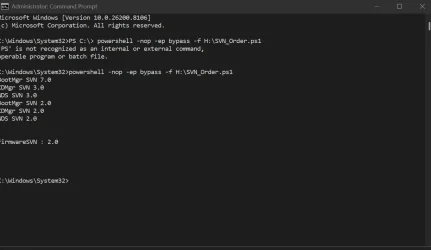
Tried a bootmanager SVN3 on a machine with all revocations applied (meaning it should show Firmware SVN: 7.0) but showing Firmware SVN: 2.0 and got a secure boot violation- didn't boot. So it's one more indication that it's an error in PS and Secure Boot SVNs worked as expected...
 

My Computer

System One

  • OS
    W10
This is mine
 

Attachments

  • Screenshot 2026-03-19 084553.webp
    Screenshot 2026-03-19 084553.webp
    42.2 KB · Views: 2

My Computer

System One

  • OS
    Windows 11 Pro 25H2 (RP channel)
    Computer type
    PC/Desktop
    Manufacturer/Model
    MSI
    CPU
    AMD Ryzen 7 9800X3D 8-core
    Motherboard
    MEG X870E Godlike
    Memory
    64GB Corsair Titanium 6000/CL30
    Graphics Card(s)
    MSI Suprim 5080 SOC
    Sound Card
    Soundblaster AE-9
    Monitor(s) Displays
    ASUS TUF Gaming VG289Q
    Screen Resolution
    3840x2160
    Hard Drives
    Samsung 9100 Pro 4TB (gen 5 x4, system drive/games)
    Samsung 990 Pro 2TB
    Samsung 980 Pro 2TB
    Samsung 870 Evo 4TB
    Samsung 870 Evo 2TB
    Samsung T9 4TB
    PSU
    Seasonic PX-2200
    Case
    Bequiet! Dark Base Pro 901
    Cooling
    Noctua NH-D15S Chromax black
    Keyboard
    Logitech G915 X (wired)
    Mouse
    Logitech G903 with PowerPlay charger
    Internet Speed
    900Mb/sec
    Browser
    Microsoft Edge
    Antivirus
    Windows Defender
Read all of those, not one lists "Reset All Keys" just Factory Default. The setup screen is also different as it is InsydeH20 Setup Utility. Will try again later today my time, it is early morning here! Thanks anyway
Achieved the update leaving the Bios alone by the method described in the original Microsoft article:
The Check_UEFI script still returns the error:
ell Inc. Inspiron 5721
Version: A16
Date: 2018-05-24
La variable est actuellement non définie : 0xC0000100
(The variable is currently undefined)
However the status in the relevant Registry Keys shows 2023 Ca is present and updated.
 

My Computer

System One

  • OS
    Windows11
    Computer type
    PC/Desktop
    Manufacturer/Model
    Acemagic S1
    CPU
    Intel(R) N97, 2000 Mhz, 4 Core(s), 4 Logical
    Memory
    16Gb
    Graphics Card(s)
    Intel(R) UHD Graphics
    Sound Card
    (Generic USB Audio)
    Monitor(s) Displays
    2
    Screen Resolution
    2560 x 1440 x 59 hertz
    Hard Drives
    Model KPART512GBC2DVT 512Gb
Achieved the update leaving the Bios alone by the method described in the original Microsoft article:
The Check_UEFI script still returns the error:
ell Inc. Inspiron 5721
Version: A16
Date: 2018-05-24
La variable est actuellement non définie : 0xC0000100
(The variable is currently undefined)
However the status in the relevant Registry Keys shows 2023 Ca is present and updated.
Does this version return the 0xC0000100 error?
 

Attachments

My Computer

System One

  • OS
    Windows 7
Does this version return the 0xC0000100 error?
Yes it did.
I will not have this computer after another hour, as its owner is coming to collect it.
Attached are 2 files, showing the results of 2 other checks that also show errors but succeed in parts. I hope they may help. One of them has a partly French output as I piped the output to a file.
Kind Regards
SaliesBuzz
 

Attachments

My Computer

System One

  • OS
    Windows11
    Computer type
    PC/Desktop
    Manufacturer/Model
    Acemagic S1
    CPU
    Intel(R) N97, 2000 Mhz, 4 Core(s), 4 Logical
    Memory
    16Gb
    Graphics Card(s)
    Intel(R) UHD Graphics
    Sound Card
    (Generic USB Audio)
    Monitor(s) Displays
    2
    Screen Resolution
    2560 x 1440 x 59 hertz
    Hard Drives
    Model KPART512GBC2DVT 512Gb
Last edited:

My Computers

System One System Two

  • OS
    Windows 11 Pro
    Computer type
    PC/Desktop
    Manufacturer/Model
    Self built PC by me.
    CPU
    Intel Core i5-12600K 3.7 GHz 10-Core Processor
    Motherboard
    Gigabyte B760M H DDR4 Micro ATX LGA1700 Motherboard
    Memory
    Corsair Vengeance LPX 64 GB (2 x 32 GB) DDR4-3200 CL16 Memory
    Graphics Card(s)
    Integrated Intel UHD Graphics 770
    Sound Card
    Realtek
    Monitor(s) Displays
    LG
    Hard Drives
    Samsung 990 Pro 1 TB M.2-2280 PCIe 4.0 X4 NVME Solid State Drive
    Samsung 990 Pro 2 TB M.2-2280 PCIe 4.0 X4 NVME Solid State Drive
    PSU
    NZXT 850w ATX 3.1 Gold Fully Modular Power Supply
    Case
    Thermaltake Versa H25 ATX Mid Tower Case
    Cooling
    CPU Cooler Thermalright Assassin Spirit 120 EVO ARGB (ARGB Disabled) - Case Fans BlackThermalright TL-C12C-S X3 66.17 CFM 120 mm Fans 3-Pack (ARGB disabled)
    Internet Speed
    1 Gbps
    Other Info
    I hate ARGB.
  • Operating System
    Windows 11 Pro
    Computer type
    Laptop
    Manufacturer/Model
    Lenovo ThinkBook 14 G2 ITL
It's not a vulnerability. Get-SecureBootSVN doesn't determine any actual behavior, it's merely a reporting feature.

The actual implementation of SVN is handled by the Windows boot manager code. I know because I've read the MS PowerPoint describing how it's supposed to work.

I'm not going to cry wolf, and have someone reject my bug report because I said it's security vulnerability when it wasn't.
 
Last edited:

My Computer

System One

  • OS
    Windows 7
Attached are 2 files, showing the results of 2 other checks that also show errors but succeed in parts. I hope they may help. One of them has a partly French output as I piped the output to a file.
I finally tracked down the last place in the script that doesn't trap the 0xC0000100 error (SetupMode variable).

This PC's DB list has 5 certs, or the correct number.
 

My Computer

System One

  • OS
    Windows 7
Just installed 28000.1719 (x64) on a VM.

DBXUpdateSVN.bin is not the latest version, but 26H1 has the latest boot manager.
I'm not sure why some builds don't include SVN 7.0!
Code:
FAILED: Missing 3/3 SVN signatures from "DBXUpdate2024.bin"
    Missing [01612B139DD5598843AB1C185C3CB2EB92000002000000000000000000000000] bootmgfw.efi SVN 2.0  <-- Always SVN 2.0 in DBXUpdate2024
    Missing [019D2EF8E827E15841A4884C18ABE2F284000002000000000000000000000000] cdboot.efi SVN 2.0
    Missing [01C2CA99C9FE7F6F4981279E2A8A535976000002000000000000000000000000] wdsmgfw.efi SVN 2.0

FAILED: Missing 3/3 SVN signatures from "DBXUpdateSVN.bin"
    Missing [01612B139DD5598843AB1C185C3CB2EB92000005000000000000000000000000] bootmgfw.efi SVN 5.0  <-- Outdated DBXUpdateSVN file
    Missing [019D2EF8E827E15841A4884C18ABE2F284000003000000000000000000000000] cdboot.efi SVN 3.0
    Missing [01C2CA99C9FE7F6F4981279E2A8A535976000003000000000000000000000000] wdsmgfw.efi SVN 3.0

PS C:\Users\GARLIN\Downloads\Check_UEFI> Get-SecureBootSVN

FirmwareSVN      : 0.0  <-- DBX variable is missing the SVN
BootManagerSVN   : 7.0
StagedSVN        : 5.0  <-- Version from DBXUpdateSVN.bin
ComplianceStatus : Not compliant (Staged SVN does not match firmware SVN)
BootManagerPath  : \\.\HarddiskVolume1\EFI\Microsoft\Boot\bootmgfw.efi
 

My Computer

System One

  • OS
    Windows 7
Hi Garlin,
First of all, thanks for all the time and effort you have put into these scripts. I have been through all 40 some pages and haven’t seen anything that addresses my problem.

Below is the output of ./Check_UEFI-CA2023.ps1 -verbose
.............................
Windows 11 25H2 (26200.8037)

Secure Boot: ON
Virtualization Based Security: OFF
BitLocker on (C:) OFF

BIOS Firmware
-------------
Dell Inc. Precision M4800
Version: A26
Date: 2019-06-12

Factory Default UEFI PK Cert
----------------------------
(NONE)

UEFI PK Cert
------------
Dell Inc. UEFI Platform Key
Manual update of [KEK CA 2023] is REQUIRED.

Factory Default UEFI KEK Certs
------------------------------
(NONE)

UEFI KEK Certs
--------------
Microsoft Corporation KEK CA 2011

Factory Default UEFI DB Certs
-----------------------------
(NONE)

UEFI DB Certs
-------------
Microsoft Corporation UEFI CA 2011
Microsoft Windows Production PCA 2011
Microsoft Option ROM UEFI CA 2023
Microsoft UEFI CA 2023
Windows UEFI CA 2023

Factory Default UEFI DBX Certs
------------------------------
(NONE)
Get-SecureBootUEFI: D:\SecureBoot-CA-2023-Updates\Check_UEFI-CA2023.ps1:1115
Line |
1115 | … gnatures: {1}' -f $Tab4, (Get-SecureBootUEFI -Name dbxDefault | Get-U …
| ~~~~~~~~~~~~~~~~~~~~~~~~~~~~~~~~~~~
| Variable is currently undefined: 0xC0000100

UEFI DBX Certs
--------------
Microsoft Windows PCA 2010
Windows BootMgr SVN is MISSING.
EFI_CERT_SHA256_GUID Signatures: 432

EFI Files
---------
Disk 1: Windows Boot Manager [Windows UEFI CA 2023] is BANNED.
bootmgfw.efi File version: 26100.30227

Registry: WindowsUEFICA2023Capable = 2
[Windows UEFI CA 2023] in UEFI DB, and Windows starting from CA 2023 Boot Manager.


REQUIRED ACTION
===============

Run the command:
Update_UEFI-CA2023.ps1 -Revoke

Finish the UEFI steps to manually add the [KEK CA 2023] cert, if the script provided instructions.

PS D:\SecureBoot-CA-2023-Updates>
.................................
So I run the above command W/O -revoke then attempt to add the KEK CA2023 certificates via the instructions "Manual installation of [KEK 2K CA 2023]". Whether I attempt to replace the key or add the key I get a the error "Error replacing key, Make sure the new key is properly formatted". I get this error with both the .der and .crt certs. Can you help?
 

My Computer

System One

  • OS
    win 11
    Computer type
    Laptop
    Manufacturer/Model
    Dell Precision M4800
    CPU
    Intell Core i7 4900 MQ
    Motherboard
    Dell QT3YTY A00
    Memory
    DDR3 16 GB
UEFI PK Cert
------------
Dell Inc. UEFI Platform Key
Manual update of [KEK CA 2023] is REQUIRED.
Your PC's last BIOS was Dec 2019, which is too old to support Secure Boot CA 2023 and Dell never signed a KEK update for this BIOS.

So I run the above command W/O -revoke then attempt to add the KEK CA2023 certificates via the instructions "Manual installation of [KEK 2K CA 2023]". Whether I attempt to replace the key or add the key I get a the error "Error replacing key, Make sure the new key is properly formatted". I get this error with both the .der and .crt certs. Can you help?
This version of the BIOS also doesn't take the .der or .crt-formatted certs, so manual enrollment of the KEK CA 2023 won't work. A number of other folks have the same issue with their older-generation Dells.

1. BitLocker is OFF for you, so we don't need to disable or suspend it.

2. We need to put the BIOS into Setup Mode (clear all certs), so the update script can install a new set of replacement MS certs. Please read this Dell article, and determine which BIOS version you have (looking at the screen layout).

How To Update Secure Boot Active Database from BIOS

3. Follow the Dell instructions. Make sure Secure Boot mode is disabled, before booting into Windows.

4. Run the check script; if it recognizes you're in Setup Mode then we can proceed.

5. Run the update script, it should replace the Dell PK with a Windows OEM Devices PK (from MS). Once that gets added, the rest of the CA 2023 certs should be installed in turn.

6. Run the check script. You should see the KEK CA 2023 now.
 

My Computer

System One

  • OS
    Windows 7
outcome runing Check_UEFI-CA2023.ps1 script:
powershell -nop -ep bypass -f "C:\temp\SecureBoot-CA-2023-Updates\Check_UEFI-CA2023.ps1”
Secure Boot: ON
Virtualization Based Security: OFF
BitLocker on (C:) OFF

UEFI KEK Certs
--------------
Microsoft Corporation KEK CA 2011
Microsoft Corporation KEK 2K CA 2023

UEFI DB Certs
-------------
Microsoft Corporation UEFI CA 2011
Microsoft Windows Production PCA 2011
Microsoft Option ROM UEFI CA 2023
Microsoft UEFI CA 2023
Windows UEFI CA 2023

UEFI DBX Certs
--------------
Microsoft Windows Production PCA 2011
Windows BootMgr SVN 7.0

EFI Files
---------
Disk 1: Windows Boot Manager [Windows UEFI CA 2023] is ALLOWED.

Registry: WindowsUEFICA2023Capable = 2
[Windows UEFI CA 2023] in UEFI DB, and Windows starting from CA 2023 Boot Manager.

STATUS REPORT
-------------
Registry: UEFICA2023Status = Updated

SUCCESS: NO UPDATES ARE REQUIRED.

PS C:\Users\asimo>
I would like to share the outcome of the following script running with you:everything looks good.

powershell -nop -ep bypass -f "C:\temp\SecureBoot-CA-2023-Updates\Check_DBXUpdate.bin.ps1”
SUCCESS: Matched 431/431 EFI signatures from "dbxupdate.bin"
SUCCESS: Matched 3/3 SVN signatures from "DBXUpdate2024.bin"
SUCCESS: Matched 3/3 SVN signatures from "DBXUpdateSVN.bin"
 

My Computer

System One

  • OS
    Windows 11 Home x64 Version 25H2 Build 26200.8457
    Computer type
    Laptop
    Manufacturer/Model
    ASUSTeK COMPUTER INC./N751JX
    CPU
    Intel® Core™ i7-4750HQ CPU @ 2.00GHz
    Motherboard
    ASUSTeK Computer INC., BIOS version AMI N751JX.211
    Memory
    16 GB
    Graphics Card(s)
    Intel® Iris™ Pro Graphics 5200
    Sound Card
    Realtek High Definition Audio
    Internet Speed
    250 Mbps
    Antivirus
    Safe Online (F-Secure)

Latest Support Threads

Back
Top Bottom