Solved garlin's PowerShell scripts for updating Secure Boot CA 2023


MS posted a new page for IT admins:
IT admin guide: Secure Boot certificate update status in the Windows Security app

Here's a schedule of when you'll get the new Security Center app. W11 will receive it as a WU download. W10 requires a CU, because the current version of SecurityHealthUI is marked only for W11, and not for W10 (inside the embedded AppxManifest.xml file).

Operating system Available
Windows 11 (23H2, 24H2, 25H2, 26H1)April 8, 2026 (app update)
Windows Server 2025April 8, 2026 (app update)
Windows 10 (22H2, 21H2, 1809)April 14, 2026 (cumulative update)
Windows Server 2019 & 2022 (Desktop Experience)April 14, 2026 (cumulative update)
 

My Computer

System One

  • OS
    Windows 7
If you're on Enterprise (LTSC) or Server, you get no notification because MS assumes you're a real IT admin and will use other methods to collect the Secure Boot status.

Setting Details
Registry subkey HKEY_LOCAL_MACHINE\SOFTWARE\Policies\Microsoft\Windows Defender Security Center\Device security
Name HideSecureBootStates
Type REG_DWORD
Values 0 = Enabled (Show Secure Boot certificate status.)
1 = Disabled (Hide Secure Boot certificate status.)
Not present = Default (Enabled for Home/Pro; Disabled for Enterprise/Server)
 

My Computer

System One

  • OS
    Windows 7
OK thanks for the info! Mine was not present so I made the registry punch for my 24H2 IOT LTSC and it done Nothing, not even after a reboot,
so I removed it again.
To be more clear:
HKEY_LOCAL_MACHINE\SOFTWARE\Policies\Microsoft\Windows Defender Security Center\Device security does not exist.
 

My Computer

System One

  • OS
    Win11 24H2 IOT LTSC / Win11 Pro 25H2
    Computer type
    PC/Desktop
    Manufacturer/Model
    Gigabyte / Asus Home build
    CPU
    AMD Ryzen 7 8700G / AMD Ryzen 7 8700G
    Motherboard
    Gigabyte B650 AORUS ELITE AX V2 / ASUS TUF GAMING B650-PLUS
    Memory
    F5-6000J3636F16GX2-FX5 32GB / Lexar Ares RGB LD5BU016G-R6000GDLA 32GB
    Graphics Card(s)
    internal
    Sound Card
    Realtec
    Monitor(s) Displays
    BenQ 27 L EW2780
    Screen Resolution
    1920x1080
    Hard Drives
    Many M.2's
    Internet Speed
    400 mbs
    Browser
    Vivaldi
    Antivirus
    Eset
@gunrunnerjohn: In my blog post and in its cited Windows Latest article you would have found an explanation that the green checkmark in the little icon to the left of the "Secure Boot" text is the OK marker. Sorry if that wasn't crystal clear. It's there: you needed more info to recognize it for what it is. And FWIW, I agree with @garlin that this dumbed down version doesn't tell us everything we might need or want to know about Secure Boot status. His Check_UEFI-CA2023.ps1 script remains my "gold standard" for insight into what's up with Secure Boot on any of my Windows systems.
--Ed--
OK, the little green checkmark was too dumbed down, even for me! 🤣
 

My Computers

System One System Two

  • OS
    Win 11 Pro 25H2, Build 26200.8524
    Computer type
    PC/Desktop
    Manufacturer/Model
    Home Brew
    CPU
    Intel Core i5 14500
    Motherboard
    Gigabyte B760M G P WIFI
    Memory
    64GB DDR4
    Graphics Card(s)
    GeForce RTX 4060
    Sound Card
    Chipset Realtek
    Monitor(s) Displays
    LG 45" Ultragear, Acer 24" 1080p
    Screen Resolution
    5120x1440, 1920x1080
    Hard Drives
    Crucial P310 2TB 2280 PCIe Gen4 3D NAND NVMe M.2 SSD (O/S)
    Silicon Power 2TB US75 NVMe PCIe Gen4 M.2 2280 SSD (backup)
    Crucial BX500 2TB 3D NAND (2nd backup)
    Seagate 4TB Ironwolf, rotating HDD archive files
    External off-line backup Drives: 2 NVMe 4TB drives in external enclosures
    PSU
    Thermaltake Toughpower GF3 750W
    Case
    LIAN LI LANCOOL 216 E-ATX PC Case
    Cooling
    Lots of fans!
    Keyboard
    Microsoft Comfort Curve 2000
    Mouse
    Logitech G305
    Internet Speed
    Verizon FiOS 1GB
    Browser
    Firefox
    Antivirus
    Malware Bytes & Windows Defender Security
  • Operating System
    Win 11 Pro 25H2, Build 26200.8524
    Computer type
    PC/Desktop
    Manufacturer/Model
    Home Brew
    CPU
    Intel Core i5 14400
    Motherboard
    Gigabyte B760M DS3H AX
    Memory
    32GB DDR5
    Graphics card(s)
    Intel 700 Embedded GPU
    Sound Card
    Realtek Embedded
    Monitor(s) Displays
    27" HP 1080p
    Screen Resolution
    1920x1080
    Hard Drives
    Crucial P310 2TB 2280 PCIe Gen4 eD NAND PCIe SSD
    Samsung EVO 990 2TB NVMe Gen4 SSD
    Samsung 2TB SATA SSD
    PSU
    Thermaltake Smart BM3 650W
    Case
    Okinos Micro ATX Case
    Cooling
    Fans
    Keyboard
    Microsoft Comfort Curve 2000
    Mouse
    Logitech G305
    Internet Speed
    Verizon FiOS 1GB
    Browser
    Firefox
    Antivirus
    Malware Bytes & Windows Defender Security
hmm lots to process.
I just want to get my old X99 board updated with 2023 secure boot.
Theres an option in bios to use custom (instead of standard)
Should i just enable custom?

I will linger around as this becomes more of a concern closer we get.

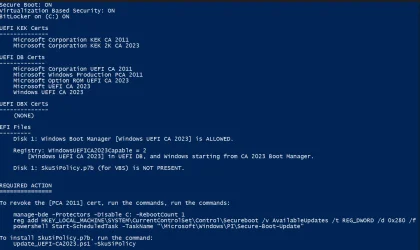
What i get:

REQUIRED ACTION
===============

Run the command:
Update_UEFI-CA2023.ps1 -Revoke

Finish the UEFI steps to manually add the Platform Key (PK) cert, if the script provided instructions.

Finish the UEFI steps to manually add the [KEK CA 2023] cert, if the script provided instructions.
 

My Computer

System One

  • OS
    Windows 10
I just have a question regarding revoking PCA 2011. How safe is it to run the command? Like, can I have issues booting my device if I do? Should I also run the SkuSiPolicy install command? Sorry if that is a stupid question
 

Attachments

  • Screenshot 2026-04-04 140422.webp
    Screenshot 2026-04-04 140422.webp
    93.2 KB · Views: 1

My Computer

System One

  • OS
    Windows 11
    Computer type
    Laptop
    Manufacturer/Model
    Asus
    CPU
    Intel i7-11370H
    Memory
    24GB
I just have a question regarding revoking PCA 2011. How safe is it to run the command? Like, can I have issues booting my device if I do? Should I also run the SkuSiPolicy install command? Sorry if that is a stupid question
You should get all the other stuff laying flat so that the only thing left is revoking the 2011 cert before you take that step. Also, note that any bootable USB drives for recovery, etc. may need to be updated with the later boot files in order to boot with the 2023 certs.

If the wheels fall off when you revoke the 2011 cert, you can disable secure boot in the BIOS to get back in business and sort things out.
 

My Computers

System One System Two

  • OS
    Win 11 Pro 25H2, Build 26200.8524
    Computer type
    PC/Desktop
    Manufacturer/Model
    Home Brew
    CPU
    Intel Core i5 14500
    Motherboard
    Gigabyte B760M G P WIFI
    Memory
    64GB DDR4
    Graphics Card(s)
    GeForce RTX 4060
    Sound Card
    Chipset Realtek
    Monitor(s) Displays
    LG 45" Ultragear, Acer 24" 1080p
    Screen Resolution
    5120x1440, 1920x1080
    Hard Drives
    Crucial P310 2TB 2280 PCIe Gen4 3D NAND NVMe M.2 SSD (O/S)
    Silicon Power 2TB US75 NVMe PCIe Gen4 M.2 2280 SSD (backup)
    Crucial BX500 2TB 3D NAND (2nd backup)
    Seagate 4TB Ironwolf, rotating HDD archive files
    External off-line backup Drives: 2 NVMe 4TB drives in external enclosures
    PSU
    Thermaltake Toughpower GF3 750W
    Case
    LIAN LI LANCOOL 216 E-ATX PC Case
    Cooling
    Lots of fans!
    Keyboard
    Microsoft Comfort Curve 2000
    Mouse
    Logitech G305
    Internet Speed
    Verizon FiOS 1GB
    Browser
    Firefox
    Antivirus
    Malware Bytes & Windows Defender Security
  • Operating System
    Win 11 Pro 25H2, Build 26200.8524
    Computer type
    PC/Desktop
    Manufacturer/Model
    Home Brew
    CPU
    Intel Core i5 14400
    Motherboard
    Gigabyte B760M DS3H AX
    Memory
    32GB DDR5
    Graphics card(s)
    Intel 700 Embedded GPU
    Sound Card
    Realtek Embedded
    Monitor(s) Displays
    27" HP 1080p
    Screen Resolution
    1920x1080
    Hard Drives
    Crucial P310 2TB 2280 PCIe Gen4 eD NAND PCIe SSD
    Samsung EVO 990 2TB NVMe Gen4 SSD
    Samsung 2TB SATA SSD
    PSU
    Thermaltake Smart BM3 650W
    Case
    Okinos Micro ATX Case
    Cooling
    Fans
    Keyboard
    Microsoft Comfort Curve 2000
    Mouse
    Logitech G305
    Internet Speed
    Verizon FiOS 1GB
    Browser
    Firefox
    Antivirus
    Malware Bytes & Windows Defender Security
hmm lots to process.
I just want to get my old X99 board updated with 2023 secure boot.
Theres an option in bios to use custom (instead of standard)
Should i just enable custom?

I will linger around as this becomes more of a concern closer we get.

What i get:

REQUIRED ACTION
===============

Run the command:
Update_UEFI-CA2023.ps1 -Revoke

Finish the UEFI steps to manually add the Platform Key (PK) cert, if the script provided instructions.

Finish the UEFI steps to manually add the [KEK CA 2023] cert, if the script provided instructions.
Check if your BIOS menu has an option for manual key enrollment (importing a cert file from a disk). The script should have copied two certs into the EFI partition. If you have that option, separately import the cert file by browsing the local disk and searching for the "\EFI\Certs" folder.

In case you don't have this option, or it fails to work, then enter Custom mode and delete all keys. Re-run the update script, it should recognize you're in Setup mode and replace all the certs.
 

My Computer

System One

  • OS
    Windows 7
I just have a question regarding revoking PCA 2011. How safe is it to run the command? Like, can I have issues booting my device if I do? Should I also run the SkuSiPolicy install command? Sorry if that is a stupid question
You've added all the CA 2023 certs, but have not revoked PCA 2011. It's safe to run the revocation.

Updating the SkuSiPolicy adds more security, but sometimes it can conflict if you like playing around with Windows Insider (or different Windows versions on the same system), and some Macrium USB recovery drives. If you don't do anything of those things, then it's safe to update SkuSkiPolicy.

There is a way to undo the SkuSkiPolicy push if it turns out to cause a problem.
 

My Computer

System One

  • OS
    Windows 7
Apologies but I'm not sure if I would really need this and getting up to date with 52 pages is... a lot 🫠

I got this while running the script:
Code:
Secure Boot: OFF
Virtualization Based Security: OFF
BitLocker on (C:) OFF

UEFI is in Setup Mode (NO CERTS)

EFI Files
---------
    Disk 0: Windows Boot Manager [Production PCA 2011] is ALLOWED.

    Registry: WindowsUEFICA2023Capable = 0
        [Windows UEFI CA 2023] not in UEFI DB.

I know that both Secure Boot and VBS are off, I'm dual booting Linux and had some issues with Secure Boot on.
I guess my question is, would this affect me in any way on the long run on Windows itself?
 

My Computer

System One

  • OS
    Windows 11 Enterprise 23H2
    Computer type
    PC/Desktop
    CPU
    AMD Ryzen 5 5600X
    Memory
    32 GB DDR4
    Graphics Card(s)
    RTX 3060 12 GB variant
You're not required to enable Secure Boot. But advanced kernel protections are not available when Secure Boot is off. If you play certain games, they will demand Secure Boot in order to have their anti-cheat drivers loaded.

For a dual-boot scenario with Linux, one of two options needs to happen:

1. Install the complete set of legacy CA 2011 certs and the new CA 2023 certs. Most of the major distros have a boot loader shim which is signed by the Microsoft UEFI CA 2023 key. This key exists solely so the major distros can co-exist with Windows, because the shim chain boots into the normal Linux boot loader.

2. You can create your own custom PK, and then self-sign the MS provided certs (from GitHub). With the same PK, you also sign your Linux distro's cert files. Install both sets of self-signed certs (MS and Linux) at the same time. But this is probably too much work for most people, unless you've done this before. The process isn't super difficult but you have to get the details exactly right.

From a practical point of view, you can continue to run Windows and Linux without Secure Boot. Or check if your Linux has a boot shim that's signed by Microsoft (not Windows) UEFI CA 2023. When the latter is possible, you can go forward with normal Windows steps to update Secure Boot.

Worse case, you can always turn Secure Boot if it doesn't work out. The one problem with Setup mode is you are possibly exposed to UEFI malware since you have no certs protecting what can be added to your UEFI's software. You have zero signature protection against added UEFI code.
 
Last edited:

My Computer

System One

  • OS
    Windows 7
Awesome, thanks for the explanation, what a legend! 🙇‍♂️ :clap:
 

My Computer

System One

  • OS
    Windows 11 Enterprise 23H2
    Computer type
    PC/Desktop
    CPU
    AMD Ryzen 5 5600X
    Memory
    32 GB DDR4
    Graphics Card(s)
    RTX 3060 12 GB variant
I have changed to MANUAL permanently instead of STANDARD so it would have a better chance of updating then ran the .\Check_UEFI-CA2023.ps1 script again:

Secure Boot: ON
Virtualization Based Security: OFF
BitLocker on (C:) OFF

UEFI PK Cert
------------
DO NOT TRUST - AMI Test PK
Platform Key is UNTRUSTED.

UEFI KEK Certs
--------------
Microsoft Corporation KEK CA 2011

UEFI DB Certs
-------------
Microsoft Corporation UEFI CA 2011
Microsoft Windows Production PCA 2011
Microsoft Option ROM UEFI CA 2023
Microsoft UEFI CA 2023
Windows UEFI CA 2023

UEFI DBX Certs
--------------
(NONE)

EFI Files
---------
Windows Boot Manager [Windows UEFI CA 2023] is BANNED.

Registry: WindowsUEFICA2023Capable = 2
[Windows UEFI CA 2023] in UEFI DB, and Windows starting from CA 2023 Boot Manager.


REQUIRED ACTION
===============

Run the command:
Update_UEFI-CA2023.ps1 -Revoke

Finish the UEFI steps to manually add the Platform Key (PK) cert, if the script provided instructions.

Finish the UEFI steps to manually add the [KEK CA 2023] cert, if the script provided instructions.

--------------------------------------------------------------------------------------------------------------------------------------------------------------------


Some screenshots from eufi when CUSTOM is enabled:
SecureBootCustom0.webpSecureBootCustom01.webpSecureBootCustom02.webp
 

My Computer

System One

  • OS
    Windows 10
I have changed to MANUAL permanently instead of STANDARD so it would have a better chance of updating then ran the .\Check_UEFI-CA2023.ps1 script again:

Secure Boot: ON
Virtualization Based Security: OFF
BitLocker on (C:) OFF

UEFI PK Cert
------------
DO NOT TRUST - AMI Test PK
Platform Key is UNTRUSTED.

UEFI KEK Certs
--------------
Microsoft Corporation KEK CA 2011
You have the dreaded "AMI Test PK", which is considered insecure.

It's a default PK provided to OEM's as an example BIOS. But some OEM's unintentionally rolled it out to live PC's. If your OEM has never fixed the problem by replacing this BIOS, then you need to stay in Custom mode and delete all of the current certs.

MS created a special set of "Windows OEM Devices PK" certs for situations like your BIOS, as a direct replacement.

Disable Secure Boot mode, and delete all the certs. Run the check script again, and if you're confirmed in Setup mode then run the update script. The update script should recognize you're in Setup mode, and replace all the certs so you have the complete set of KEK's and DB's.

Afterwards, you can decide if it's time to revoke the CA 2011 cert or not.
 

My Computer

System One

  • OS
    Windows 7
Not sure why I need to do anything if I have the KEK and the cert is in the DB and windows is starting from the CA 2023 boot manager? I've rebooted several times.

1775642910525.webp
 

My Computer

System One

  • OS
    11
    Computer type
    Laptop
Not sure why I need to do anything if I have the KEK and the cert is in the DB and windows is starting from the CA 2023 boot manager? I've rebooted several times
You're done adding the required CA 2023 certs, except for the Option ROM cert (which may be needed by graphics cards that use signed firmware).

At this point, you can revoke the PCA 2011 cert or wait for MS to perform revocation later this year.

The script has a bug where it thinks the Option ROM is needed. Most users will add it any way so they don't worry about why their PC looks different from other PC's. Run these commands as Admin:
Code:
reg add HKEY_LOCAL_MACHINE\SYSTEM\CurrentControlSet\Control\Secureboot /v AvailableUpdates /t REG_DWORD /d 0x800 /f
powershell Start-ScheduledTask -TaskName "\Microsoft\Windows\PI\Secure-Boot-Update"
 

My Computer

System One

  • OS
    Windows 7
I have a couple of cheap Mini PCs (Acemgic & Nipogi), and, despite the fact that they are both less than 2 years old there is little prospect of the manufacturer(s) updating their AMI based BIOS.
On my Acemagic S1
I have a similar output to GunnzAkimbo except that, after running the Update Script with the BIOS in Custom Mode, the Check Script shows:

UEFI PK Cert is:
------------
Windows OEM Devices PK

Running the Check Script shows:
BIOS Firmware
-------------
Default string Default string
Version: 5.26
Date: 2023-09-27

Factory Default UEFI PK Cert
----------------------------
DO NOT TRUST - AMI Test PK

Do I still need to clear all the certificates in the BIOS, with Secure Boot Disabled, and then re-run the update script? I cannot see how the Update script can actually write to the BIOS, which is where I presume the Factory Default PK is coming from?

I await, with interest, what the revised Secure Boot Status reports in the Security Centre, after the Windows Update to the Security Centre expected today (April 08).

Regards
SaliesBuzz
 

My Computer

System One

  • OS
    Windows11
    Computer type
    PC/Desktop
    Manufacturer/Model
    Acemagic S1
    CPU
    Intel(R) N97, 2000 Mhz, 4 Core(s), 4 Logical
    Memory
    16Gb
    Graphics Card(s)
    Intel(R) UHD Graphics
    Sound Card
    (Generic USB Audio)
    Monitor(s) Displays
    2
    Screen Resolution
    2560 x 1440 x 59 hertz
    Hard Drives
    Model KPART512GBC2DVT 512Gb
It doesn't look good for me as my OEM won't be providing an updated BIOS to my 5 years old laptop. What is the Setup Mode and how do I enter it as my laptop's BIOS does not allow manual addition of the certificates I think. This is what it shows for now:
1775662340622.webp
 

My Computer

System One

  • OS
    Windows 11 Pro 25H2
    Computer type
    Laptop
    Manufacturer/Model
    Acer Predator Helios 300 PH314-54-72ZJ
    CPU
    Intel Core i7-11800H
    Motherboard
    TGL
    Memory
    16GB (2x8 GB)
    Graphics Card(s)
    RTX 3060 Laptop GPU
    Sound Card
    Realtek ALC295
    Monitor(s) Displays
    1
    Screen Resolution
    2560 x 1440 @ 165Hz
    Hard Drives
    1TB NVMe SSD, 512GB NVMe SSD, 1TB 7200 RPM HDD
    Cooling
    Aeroblade 5th Gen 3D fan
    Keyboard
    RGB Laptop keyboard
    Mouse
    Logitech Lightsync G203
    Internet Speed
    175 Mbps up/175 Mbps down
    Browser
    Firefox with uBlock Origin and YouTube enhancing extensions..
    Antivirus
    Windows Security with Core Isolation on
I have a couple of cheap Mini PCs (Acemgic & Nipogi), and, despite the fact that they are both less than 2 years old there is little prospect of the manufacturer(s) updating their AMI based BIOS.
On my Acemagic S1
I have a similar output to GunnzAkimbo except that, after running the Update Script with the BIOS in Custom Mode, the Check Script shows:

UEFI PK Cert is:
------------
Windows OEM Devices PK
Do I still need to clear all the certificates in the BIOS, with Secure Boot Disabled, and then re-run the update script? I cannot see how the Update script can actually write to the BIOS, which is where I presume the Factory Default PK is coming from?
If you have the Windows OEM Devices PK, the update script can install all of the required certs because MS provides a complete set of post-signed certs for vendors using this PK.

The easiest method is to clear all certs (with Secure Boot disabled) and run the update script. It should recognize you're in Setup Mode and install everything in one pass. I don't know if you cleared the non-PK certs. It's better in this case to have a clean slate so the replacement certs don't get a conflict with pre-existing ones.

That's just how MS packages these certs for use. Since your factory default is the AMI Test PK, MS would instruct you to do the same thing.
 

My Computer

System One

  • OS
    Windows 7
It doesn't look good for me as my OEM won't be providing an updated BIOS to my 5 years old laptop. What is the Setup Mode and how do I enter it as my laptop's BIOS does not allow manual addition of the certificates I think. This is what it shows for now:
You're missing KEK CA 2023, which is the important one.

Depending on your BIOS, there's normally a setting for Custom (non-factory) mode. Once enabled, there might be an option to Remove All Keys or something similar to wipe all the current certs. This leaves your Secure Boot UEFI in a blank state, where we can install the MS provided Windows OEM Devices PK as a replacement set of certs.

That part is a little tricky, the exact screens or wording can be different on your BIOS version. Otherwise you may have menu options to delete individual keys, and you can try deleting all of them until none are left.
 

My Computer

System One

  • OS
    Windows 7
Back
Top Bottom