Solved garlin's PowerShell scripts for updating Secure Boot CA 2023


I am confused because yesterday all was good and now I have no idea what is going on. Maybe its throwing up this error because when I run Get-SecurebootSVN I get firmwareSVN 2.0 instead of the latest. I am pretty sure I revoked the PCA 2011 cert previously.

or maybe the new windows update is not compatible with the script garlin wrote. I do have the green tick with no more certificate changes are needed .
Welcome to the confusion club. :confused:
 

My Computers

System One System Two

  • OS
    Windows 11 Pro 25H2
    Computer type
    Laptop
    Manufacturer/Model
    Lenovo T490 (2020 Hardware)
    CPU
    i7-8565U
    Motherboard
    20N20028US
    Memory
    16GB
    Graphics Card(s)
    Intel UHD Graphics 620
    Sound Card
    Realtec Audio
    Monitor(s) Displays
    ASUS VE248
    Screen Resolution
    1920 X 1080
    Hard Drives
    Samsung SSD 970 PRO 512GB NVMe
    Internet Speed
    Frontier fiber 1GB
    Browser
    Chrome, Firefox, Edge
    Antivirus
    Norton 360 Deluxe Plus
    Other Info
    Supported hardware, upgraded from Windows 10 Pro to Windows 11 Pro version 24H2 on 06/01/2025 using the Windows 11 ISO file. Used the enablement package to upgrade to version 25H2 on 10/07/2025. Secure boot enabled. Secure Boot CA 2023 updated.
  • Operating System
    Windows 11 Pro 25H2
    Computer type
    PC/Desktop
    Manufacturer/Model
    Lenovo ThinkCentre M83 (2014 Hardware)
    CPU
    i7-4770 (with SSE4.2, and POPCNT)
    Motherboard
    10AL000GUS
    Memory
    16GB
    Graphics card(s)
    Intel HD Graphics 4600
    Sound Card
    Realtec High Definition Audio
    Monitor(s) Displays
    ASUS VE248
    Screen Resolution
    1920 X 1080
    Hard Drives
    Samsung SSD 860 PRO 1TB SATA
    Internet Speed
    Frontier fiber 1GB
    Browser
    Chrome, Firefox, Edge
    Antivirus
    Norton 360 Deluxe Plus
    Other Info
    Unsupported hardware, upgraded from Windows 10 Pro (TPM 1.2 & unsupported CPU, but does have SSE4.2, and POPCNT) to Windows 11 Pro version 24H2 on 06/15/2025. Added Registry Key HKEY_LOCAL_MACHINE\SYSTEM\Setup\MoSetup – AllowUpgradesWithUnsupportedTPMOrCPU=1 to allow installation using the Windows 11 ISO file. Used the enablement package to upgrade to version 25H2 on 10/08/2025. Secure boot enabled. Secure Boot CA 2023 updated.

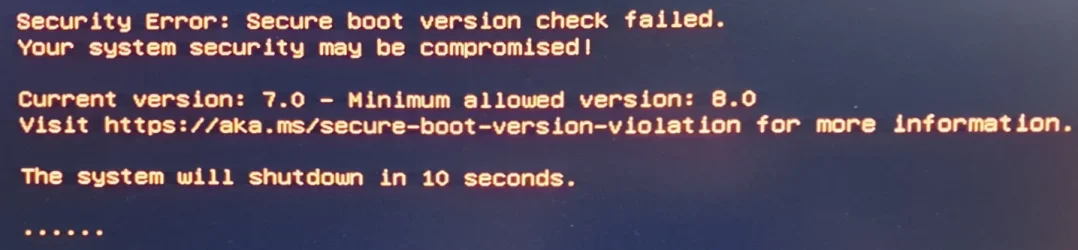
Thank heavens I checked this thread again. Seemingly random SVN bump, what the Hell Microsoft? Poop indeed.

Anyway, all is right in my neck of the universe again:

q9OJczO.png
 

My Computer

System One

  • OS
    Windows 11 Pro 25H2
    Computer type
    PC/Desktop
    Manufacturer/Model
    custom
    CPU
    AMD Ryzen 9 3950X
    Motherboard
    ASUS ROG Strix X570-E (first gen)
    Memory
    64 GB DDR4-3600 CL18 (2x32 GB)
    Graphics Card(s)
    MSI Ventus RTX 2060 Super
    Sound Card
    Audient iD4 Mk.I
    Monitor(s) Displays
    2x AOC 24G1 / 1x XP-Pen Artist Pro 16 Gen 2 2.5K
    Screen Resolution
    1080p / 2560x1600
    Hard Drives
    1TB WD/SanDisk SN850X (main) / 2TB Sabrent Rocket 4 / 6TB WD MyBook EE
    PSU
    Corsair RM850X 850W Gold (2019)
    Case
    Lian-Li O11-D
    Cooling
    EKWB EK-AIO 360 RGB
    Keyboard
    wooting Two HE fullsize
    Mouse
    some old mouse from an older PC
    Internet Speed
    Gigabit symmetric (fibre); Bell Fibe
    Browser
    Firefox
    Antivirus
    ol' reliable Windows Defender
    Other Info
    Other peripherals:

    - Shure SM7B (Mexico)
    - AKG K 240 Studio (calibrated flat)
    - PDP FaceOff wired Switch gamepad
A preliminary report of the April 2026 changes to the DBX update files:

1. These files have the same list of EFI signature hashes (as before April), but have a different signature block for the .bin file.
Code:
dbxupdate.bin
dbxupdateLegacy.bin
DBXUpdateSVN.bin
DBXUpdateSVNLegacy.bin

2. These files either have a new data structure (but why just this pair of files?), or corrupted data within them. Normally, the Get-UefiDatabaseSignatures function expects to see a header size of 0 bytes, and a signature size of 48 or 1515 bytes.
Code:
DBXUpdatesvn.bin
DBXUpdatesvnLegacy.bin

If you're assuming the old parsing method is correct, our new files apparently have a different GUID, and extracted header sizes far in excess of the update file's total filesize. From browsing the byte stream, the timestamps inside the cert payload for CA 2011 are modified. I'm really confused as to what their intentions were.

Assuming it's a simple change to bump SVN from 7.0 to 8.0, all MS needed to do was replace BootMgr SVN and leave everything else alone.

Right now, I don't understand if this was intentional or not. No fix is possible until I understand the problem. Everyone can update to SVN 8.0, so needing the DBX check script fixed isn't so important. The total count of EFI signature hashes won't go up, it's only the SVN number will randomly change.
 

My Computer

System One

  • OS
    Windows 7
What do you recommend? Waiting for an update for your script?
For me is easier to wait for you, I'm not updating Windows soon... I prefer to rely on your own method.
 

My Computers

System One System Two

  • OS
    Windows 11 Pro 25H2
    Computer type
    PC/Desktop
    Manufacturer/Model
    Built PC
    CPU
    AMD Ryzen 5 5600G @ 3.9/4.4Ghz
    Motherboard
    MSI B550M-PRO-WiFi Ver. 1.4
    Memory
    2 x 16 GB DDR4 Kingston Fury Beast 3200 Mhz
    Graphics Card(s)
    AMD Radeon RX 6600 XT MSI Mech 2X OC Edition 8 GB
    Sound Card
    Realtek High Definition Audio (Integrated)
    Monitor(s) Displays
    Samsung C50Rx 27" LED / HP S2031 20" LCD
    Screen Resolution
    1920 x 1080 px / 1600 x 900 px
    Hard Drives
    WD Blue SN570 NVME M.2 SSD [1 TB] -- External Drives: - WD Scorpion Blue 250 GB 5400 RPM (Data Backup) - Hitachi 500 GB 5400 RPM (Software / ISOs Backup) - Toshiba MQ01ABD100 1 TB 5400 RPM (OS Images) - HGST TravelStar 7K1000 1 TB, 7200 RPM USB 3.0 - ADATA SU800 2TB SSD USB 3.0
    PSU
    Corsair RM750e 750W Fully Modular
    Case
    Naceb Hydra NA-1602
    Cooling
    Naceb Orpheus x 3 (Front) + Naceb Cepheus 1200 RPM Max (Rear) + ThemalRight Assasin X 90 SE (CPU)
    Keyboard
    Logitech MK470 Wireless
    Mouse
    Logitech MK470 Wireless
    Internet Speed
    120 MB Symetrical
    Browser
    Firefox / Brave / Edge
    Antivirus
    Windows Defender
    Other Info
    - VMs: WMware Player - Windows 8.1 Pro x64 / Windows 11 Pro
    - Wacom Intuos Pro Small Tablet PTH-460
  • Operating System
    Windows 11 Pro 25H2
    Computer type
    Laptop
    Manufacturer/Model
    HP Pavilion 15-eh3000la (80M53LA)
    CPU
    AMD Ryzen 7 7730U @ 2.0/4.5 Ghz
    Motherboard
    HP 8BC7
    Memory
    2 x 16 GB Kingston Fury Impact DDR4 3200 Mhz
    Graphics card(s)
    Radeon (tm) Graphics Vega 8 (512 MB)
    Sound Card
    Realtek High Definition Audio (Integrated)
    Monitor(s) Displays
    AU Optronics
    Screen Resolution
    1920 x 1080 px (125% size)
    Hard Drives
    WD Blue SN570 1TB NVME M.2 Drive
    PSU
    45 Watt Charger
    Cooling
    Laptop Cooling Pad
    Keyboard
    Free Wolf Foldable Portable Keyboard
    Mouse
    Free Wolf Wireless Mouse
    Internet Speed
    120 MB Symetrical
    Browser
    Firefox / Brave / Edge
    Antivirus
    Windows Defender
    Other Info
    - 41mWh battery.
    - Wacom Intuos Pro Small Tablet PTH-460
There's nothing wrong (at the moment) with the main check or update scripts. The DBX check script doesn't recognize two of the DBX update files, but it's a separate script for troubleshooting.

If you haven't started updates, I would worry more about making sure the base CA 2023 certs can be installed. The DBX issue concerns an enforcement value that will be used later this summer, and is still optional for now.
 

My Computer

System One

  • OS
    Windows 7
There's nothing wrong (at the moment) with the main check or update scripts. The DBX check script doesn't recognize two of the DBX update files, but it's a separate script for troubleshooting.

If you haven't started updates, I would worry more about making sure the base CA 2023 certs can be installed. The DBX issue concerns an enforcement value that will be used later this summer, and is still optional for now.
Do you think that MSC could make this process any more convoluted? :lmao:
 

My Computers

System One System Two

  • OS
    Win 11 Pro 25H2, Build 26200.8524
    Computer type
    PC/Desktop
    Manufacturer/Model
    Home Brew
    CPU
    Intel Core i5 14500
    Motherboard
    Gigabyte B760M G P WIFI
    Memory
    64GB DDR4
    Graphics Card(s)
    GeForce RTX 4060
    Sound Card
    Chipset Realtek
    Monitor(s) Displays
    LG 45" Ultragear, Acer 24" 1080p
    Screen Resolution
    5120x1440, 1920x1080
    Hard Drives
    Crucial P310 2TB 2280 PCIe Gen4 3D NAND NVMe M.2 SSD (O/S)
    Silicon Power 2TB US75 NVMe PCIe Gen4 M.2 2280 SSD (backup)
    Crucial BX500 2TB 3D NAND (2nd backup)
    Seagate 4TB Ironwolf, rotating HDD archive files
    External off-line backup Drives: 2 NVMe 4TB drives in external enclosures
    PSU
    Thermaltake Toughpower GF3 750W
    Case
    LIAN LI LANCOOL 216 E-ATX PC Case
    Cooling
    Lots of fans!
    Keyboard
    Microsoft Comfort Curve 2000
    Mouse
    Logitech G305
    Internet Speed
    Verizon FiOS 1GB
    Browser
    Firefox
    Antivirus
    Malware Bytes & Windows Defender Security
  • Operating System
    Win 11 Pro 25H2, Build 26200.8524
    Computer type
    PC/Desktop
    Manufacturer/Model
    Home Brew
    CPU
    Intel Core i5 14400
    Motherboard
    Gigabyte B760M DS3H AX
    Memory
    32GB DDR5
    Graphics card(s)
    Intel 700 Embedded GPU
    Sound Card
    Realtek Embedded
    Monitor(s) Displays
    27" HP 1080p
    Screen Resolution
    1920x1080
    Hard Drives
    Crucial P310 2TB 2280 PCIe Gen4 eD NAND PCIe SSD
    Samsung EVO 990 2TB NVMe Gen4 SSD
    Samsung 2TB SATA SSD
    PSU
    Thermaltake Smart BM3 650W
    Case
    Okinos Micro ATX Case
    Cooling
    Fans
    Keyboard
    Microsoft Comfort Curve 2000
    Mouse
    Logitech G305
    Internet Speed
    Verizon FiOS 1GB
    Browser
    Firefox
    Antivirus
    Malware Bytes & Windows Defender Security
@garlin Just to confirm. This was the previous output for Check_DBXUpdate.bin.ps1

image1.webp

Now this output is what is correct at least for now?

db.webp
 
Last edited:

My Computers

System One System Two

  • OS
    Windows 11 Pro
    Computer type
    PC/Desktop
    Manufacturer/Model
    Me
    CPU
    Intel Core i5-12600K 3.7 GHz 10-Core Processor
    Motherboard
    Gigabyte B760M H DDR4 Micro ATX LGA1700 Motherboard
    Memory
    Corsair Vengeance LPX 64 GB (2 x 32 GB) DDR4-3200 CL16 Memory
    Graphics Card(s)
    Integrated Intel UHD Graphics 770
    Sound Card
    Realtek
    Monitor(s) Displays
    LG
    Hard Drives
    Samsung 990 Pro 1 TB M.2-2280 PCIe 4.0 X4 NVME Solid State Drive
    Samsung 990 Pro 2 TB M.2-2280 PCIe 4.0 X4 NVME Solid State Drive
    PSU
    NZXT 850w ATX 3.1 Gold Fully Modular Power Supply
    Case
    Thermaltake Versa H25 ATX Mid Tower Case
    Cooling
    CPU Cooler Thermalright Assassin Spirit 120 EVO ARGB (ARGB Disabled) - Case Fans BlackThermalright TL-C12C-S X3 66.17 CFM 120 mm Fans 3-Pack (ARGB disabled)
    Internet Speed
    1 Gbps
    Other Info
    I hate ARGB.
  • Operating System
    Windows 11 Pro
    Computer type
    Laptop
    Manufacturer/Model
    Lenovo ThinkBook 14 G2 ITL
There's nothing wrong (at the moment) with the main check or update scripts. The DBX check script doesn't recognize two of the DBX update files, but it's a separate script for troubleshooting.

If you haven't started updates, I would worry more about making sure the base CA 2023 certs can be installed. The DBX issue concerns an enforcement value that will be used later this summer, and is still optional for now.
I already have them installed, and BIOS updated. If this means only the DBX is affected, I'll wait to see how this evolves before I let Windows Update do anything. I think I confused this with the SkuSiPolicy stuff lol
 

My Computers

System One System Two

  • OS
    Windows 11 Pro 25H2
    Computer type
    PC/Desktop
    Manufacturer/Model
    Built PC
    CPU
    AMD Ryzen 5 5600G @ 3.9/4.4Ghz
    Motherboard
    MSI B550M-PRO-WiFi Ver. 1.4
    Memory
    2 x 16 GB DDR4 Kingston Fury Beast 3200 Mhz
    Graphics Card(s)
    AMD Radeon RX 6600 XT MSI Mech 2X OC Edition 8 GB
    Sound Card
    Realtek High Definition Audio (Integrated)
    Monitor(s) Displays
    Samsung C50Rx 27" LED / HP S2031 20" LCD
    Screen Resolution
    1920 x 1080 px / 1600 x 900 px
    Hard Drives
    WD Blue SN570 NVME M.2 SSD [1 TB] -- External Drives: - WD Scorpion Blue 250 GB 5400 RPM (Data Backup) - Hitachi 500 GB 5400 RPM (Software / ISOs Backup) - Toshiba MQ01ABD100 1 TB 5400 RPM (OS Images) - HGST TravelStar 7K1000 1 TB, 7200 RPM USB 3.0 - ADATA SU800 2TB SSD USB 3.0
    PSU
    Corsair RM750e 750W Fully Modular
    Case
    Naceb Hydra NA-1602
    Cooling
    Naceb Orpheus x 3 (Front) + Naceb Cepheus 1200 RPM Max (Rear) + ThemalRight Assasin X 90 SE (CPU)
    Keyboard
    Logitech MK470 Wireless
    Mouse
    Logitech MK470 Wireless
    Internet Speed
    120 MB Symetrical
    Browser
    Firefox / Brave / Edge
    Antivirus
    Windows Defender
    Other Info
    - VMs: WMware Player - Windows 8.1 Pro x64 / Windows 11 Pro
    - Wacom Intuos Pro Small Tablet PTH-460
  • Operating System
    Windows 11 Pro 25H2
    Computer type
    Laptop
    Manufacturer/Model
    HP Pavilion 15-eh3000la (80M53LA)
    CPU
    AMD Ryzen 7 7730U @ 2.0/4.5 Ghz
    Motherboard
    HP 8BC7
    Memory
    2 x 16 GB Kingston Fury Impact DDR4 3200 Mhz
    Graphics card(s)
    Radeon (tm) Graphics Vega 8 (512 MB)
    Sound Card
    Realtek High Definition Audio (Integrated)
    Monitor(s) Displays
    AU Optronics
    Screen Resolution
    1920 x 1080 px (125% size)
    Hard Drives
    WD Blue SN570 1TB NVME M.2 Drive
    PSU
    45 Watt Charger
    Cooling
    Laptop Cooling Pad
    Keyboard
    Free Wolf Foldable Portable Keyboard
    Mouse
    Free Wolf Wireless Mouse
    Internet Speed
    120 MB Symetrical
    Browser
    Firefox / Brave / Edge
    Antivirus
    Windows Defender
    Other Info
    - 41mWh battery.
    - Wacom Intuos Pro Small Tablet PTH-460
Hey Garlin I am at my dads house and he messed with his BIOS. So I had to reset his keys in custom mode and re do the update script. This is what I got

PS C:\SecureBoot-CA-2023-Updates> powershell -nop -ep bypass -f .\Check_UEFI-CA2023.ps1 -Verbose -Audit
Windows 11 25H2 (26200.8246)

Secure Boot: ON
Virtualization Based Security: ON
BitLocker on (C:) OFF

BIOS Firmware
-------------
Gigabyte Technology Co. B760M H DDR4
Version: F14
Date: 2025-06-19

Factory Default UEFI PK Cert
----------------------------
GIGABYTE

UEFI PK Cert
------------
GIGABYTE

Factory Default UEFI KEK Certs
------------------------------
Microsoft Corporation KEK CA 2011
Microsoft Corporation KEK 2K CA 2023
GIGABYTE

UEFI KEK Certs
--------------
Microsoft Corporation KEK CA 2011
Microsoft Corporation KEK 2K CA 2023
GIGABYTE

Factory Default UEFI DB Certs
-----------------------------
Microsoft Corporation UEFI CA 2011
Microsoft Windows Production PCA 2011
Windows UEFI CA 2023
GIGABYTE
GIGABYTE

UEFI DB Certs
-------------
Microsoft Corporation UEFI CA 2011
Microsoft Windows Production PCA 2011
Microsoft Option ROM UEFI CA 2023
Microsoft UEFI CA 2023
Windows UEFI CA 2023
GIGABYTE
GIGABYTE

Factory Default UEFI DBX Certs
------------------------------
(NONE)
EFI_CERT_SHA256_GUID Signatures: 77

UEFI DBX Certs
--------------
Microsoft Windows Production PCA 2011
Windows BootMgr SVN 8.0
EFI_CERT_SHA256_GUID Signatures: 81

EFI Files
---------
Windows Boot Manager [Windows UEFI CA 2023] is ALLOWED.
\\.\HarddiskVolume1\EFI\Microsoft\Boot\bootmgfw.efi
File Version: 28000.322, SVN 8.0

Registry: WindowsUEFICA2023Capable = 2
[Windows UEFI CA 2023] in UEFI DB, and Windows starting from CA 2023 Boot Manager.

SkuSiPolicy.p7b is CURRENT.
\\.\HarddiskVolume1\EFI\Microsoft\Boot\SkuSiPolicy.p7b
Version: 3.0.0.14


AUDIT REPORT
============
1. DBX Updates are missing from UEFI DBX


REQUIRED ACTION
===============

To revoke the [PCA 2011] cert, run the commands:

reg add HKEY_LOCAL_MACHINE\SYSTEM\CurrentControlSet\Control\Secureboot /v AvailableUpdates /t REG_DWORD /d 0x2 /f
powershell Start-ScheduledTask -TaskName "\Microsoft\Windows\PI\Secure-Boot-Update"

So I ran the command and then got this

PS C:\SecureBoot-CA-2023-Updates> powershell -nop -ep bypass -f .\Check_UEFI-CA2023.ps1 -Verbose -Audit
Windows 11 25H2 (26200.8246)

Secure Boot: ON
Virtualization Based Security: ON
BitLocker on (C:) OFF

BIOS Firmware
-------------
Gigabyte Technology Co. B760M H DDR4
Version: F14
Date: 2025-06-19

Factory Default UEFI PK Cert
----------------------------
GIGABYTE

UEFI PK Cert
------------
GIGABYTE

Factory Default UEFI KEK Certs
------------------------------
Microsoft Corporation KEK CA 2011
Microsoft Corporation KEK 2K CA 2023
GIGABYTE

UEFI KEK Certs
--------------
Microsoft Corporation KEK CA 2011
Microsoft Corporation KEK 2K CA 2023
GIGABYTE

Factory Default UEFI DB Certs
-----------------------------
Microsoft Corporation UEFI CA 2011
Microsoft Windows Production PCA 2011
Windows UEFI CA 2023
GIGABYTE
GIGABYTE

UEFI DB Certs
-------------
Microsoft Corporation UEFI CA 2011
Microsoft Windows Production PCA 2011
Microsoft Option ROM UEFI CA 2023
Microsoft UEFI CA 2023
Windows UEFI CA 2023
GIGABYTE
GIGABYTE

Factory Default UEFI DBX Certs
------------------------------
(NONE)
EFI_CERT_SHA256_GUID Signatures: 77

UEFI DBX Certs
--------------
Microsoft Windows Production PCA 2011
Windows BootMgr SVN 8.0
EFI_CERT_SHA256_GUID Signatures: 332

EFI Files
---------
Windows Boot Manager [Windows UEFI CA 2023] is ALLOWED.
\\.\HarddiskVolume1\EFI\Microsoft\Boot\bootmgfw.efi
File Version: 28000.322, SVN 8.0

Registry: WindowsUEFICA2023Capable = 2
[Windows UEFI CA 2023] in UEFI DB, and Windows starting from CA 2023 Boot Manager.

SkuSiPolicy.p7b is CURRENT.
\\.\HarddiskVolume1\EFI\Microsoft\Boot\SkuSiPolicy.p7b
Version: 3.0.0.14


AUDIT REPORT
============


STATUS REPORT
-------------
Registry: UEFICA2023Status = Updated

SUCCESS: UPDATES ARE FINISHED. UEFI CA 2023 certs are present, PCA 2011 cert is revoked.

PS C:\SecureBoot-CA-2023-Updates>

The only thing I am concerned about is the UEFI DBX Certs
EFI_CERT_SHA256_GUID Signatures: 332

I thought this was supposed to be in the 400's? I know the 332 is not a normal result but could this be because of the Windows April Update?
 

My Computers

System One System Two

  • OS
    Windows 11 Pro
    Computer type
    PC/Desktop
    Manufacturer/Model
    Me
    CPU
    Intel Core i5-12600K 3.7 GHz 10-Core Processor
    Motherboard
    Gigabyte B760M H DDR4 Micro ATX LGA1700 Motherboard
    Memory
    Corsair Vengeance LPX 64 GB (2 x 32 GB) DDR4-3200 CL16 Memory
    Graphics Card(s)
    Integrated Intel UHD Graphics 770
    Sound Card
    Realtek
    Monitor(s) Displays
    LG
    Hard Drives
    Samsung 990 Pro 1 TB M.2-2280 PCIe 4.0 X4 NVME Solid State Drive
    Samsung 990 Pro 2 TB M.2-2280 PCIe 4.0 X4 NVME Solid State Drive
    PSU
    NZXT 850w ATX 3.1 Gold Fully Modular Power Supply
    Case
    Thermaltake Versa H25 ATX Mid Tower Case
    Cooling
    CPU Cooler Thermalright Assassin Spirit 120 EVO ARGB (ARGB Disabled) - Case Fans BlackThermalright TL-C12C-S X3 66.17 CFM 120 mm Fans 3-Pack (ARGB disabled)
    Internet Speed
    1 Gbps
    Other Info
    I hate ARGB.
  • Operating System
    Windows 11 Pro
    Computer type
    Laptop
    Manufacturer/Model
    Lenovo ThinkBook 14 G2 ITL
As I mentioned privately, DBX EFI signatures is an older way of banning boot files where you list every single banned file's signature, one by one.

Before the PCA 2011 revocation, MS had to ban every single version of the boot file going back several Windows releases. Now the PCA 2011 revocation bans en masse all of MS's older boot files which were all signed by the same PCA 2011 cert. One banned cert does the same work as listing every banned Windows boot file. It's a duplication of effort.

What's not important is your total DBX count. What is important is the update script determines there are no missing DBX EFI signatures to add. If you run the script and it detects there's some missing, it'll re-apply the DBX update files.

MS has done some clean-up on the DBX list (in order to save NVRAM space). The now redundant EFI signatures (if they're already in place) do not need to be "cleaned up". The only way to clear them is to manually delete them from your UEFI menu by hand, or wipe your certs clean and start over.

The only time the full list of 431 DBX signatures is required is if you never intend to revoke PCA 2011.

This will invalidate most of the wrong wisdom on the webs right now. There has never been a "correct" number.
 

My Computer

System One

  • OS
    Windows 7
Thank you Garlin. I know this must be frustrating for you. I appreciate the answer. All is good …until next month! 😜
 

My Computers

System One System Two

  • OS
    Windows 11 Pro
    Computer type
    PC/Desktop
    Manufacturer/Model
    Me
    CPU
    Intel Core i5-12600K 3.7 GHz 10-Core Processor
    Motherboard
    Gigabyte B760M H DDR4 Micro ATX LGA1700 Motherboard
    Memory
    Corsair Vengeance LPX 64 GB (2 x 32 GB) DDR4-3200 CL16 Memory
    Graphics Card(s)
    Integrated Intel UHD Graphics 770
    Sound Card
    Realtek
    Monitor(s) Displays
    LG
    Hard Drives
    Samsung 990 Pro 1 TB M.2-2280 PCIe 4.0 X4 NVME Solid State Drive
    Samsung 990 Pro 2 TB M.2-2280 PCIe 4.0 X4 NVME Solid State Drive
    PSU
    NZXT 850w ATX 3.1 Gold Fully Modular Power Supply
    Case
    Thermaltake Versa H25 ATX Mid Tower Case
    Cooling
    CPU Cooler Thermalright Assassin Spirit 120 EVO ARGB (ARGB Disabled) - Case Fans BlackThermalright TL-C12C-S X3 66.17 CFM 120 mm Fans 3-Pack (ARGB disabled)
    Internet Speed
    1 Gbps
    Other Info
    I hate ARGB.
  • Operating System
    Windows 11 Pro
    Computer type
    Laptop
    Manufacturer/Model
    Lenovo ThinkBook 14 G2 ITL
MS has done some clean-up on the DBX list (in order to save NVRAM space). The now redundant EFI signatures (if they're already in place) do not need to be "cleaned up". The only way to clear them is to manually delete them from your UEFI menu by hand, or wipe your certs clean and start over.

The only time the full list of 431 DBX signatures is required is if you never intend to revoke PCA 2011.

This will invalidate most of the wrong wisdom on the webs right now. There has never been a "correct" number.
So this is the reason why the SVN thing went from 7.0 to 8.0? Or I'm just being ignorant?
 

My Computers

System One System Two

  • OS
    Windows 11 Pro 25H2
    Computer type
    PC/Desktop
    Manufacturer/Model
    Built PC
    CPU
    AMD Ryzen 5 5600G @ 3.9/4.4Ghz
    Motherboard
    MSI B550M-PRO-WiFi Ver. 1.4
    Memory
    2 x 16 GB DDR4 Kingston Fury Beast 3200 Mhz
    Graphics Card(s)
    AMD Radeon RX 6600 XT MSI Mech 2X OC Edition 8 GB
    Sound Card
    Realtek High Definition Audio (Integrated)
    Monitor(s) Displays
    Samsung C50Rx 27" LED / HP S2031 20" LCD
    Screen Resolution
    1920 x 1080 px / 1600 x 900 px
    Hard Drives
    WD Blue SN570 NVME M.2 SSD [1 TB] -- External Drives: - WD Scorpion Blue 250 GB 5400 RPM (Data Backup) - Hitachi 500 GB 5400 RPM (Software / ISOs Backup) - Toshiba MQ01ABD100 1 TB 5400 RPM (OS Images) - HGST TravelStar 7K1000 1 TB, 7200 RPM USB 3.0 - ADATA SU800 2TB SSD USB 3.0
    PSU
    Corsair RM750e 750W Fully Modular
    Case
    Naceb Hydra NA-1602
    Cooling
    Naceb Orpheus x 3 (Front) + Naceb Cepheus 1200 RPM Max (Rear) + ThemalRight Assasin X 90 SE (CPU)
    Keyboard
    Logitech MK470 Wireless
    Mouse
    Logitech MK470 Wireless
    Internet Speed
    120 MB Symetrical
    Browser
    Firefox / Brave / Edge
    Antivirus
    Windows Defender
    Other Info
    - VMs: WMware Player - Windows 8.1 Pro x64 / Windows 11 Pro
    - Wacom Intuos Pro Small Tablet PTH-460
  • Operating System
    Windows 11 Pro 25H2
    Computer type
    Laptop
    Manufacturer/Model
    HP Pavilion 15-eh3000la (80M53LA)
    CPU
    AMD Ryzen 7 7730U @ 2.0/4.5 Ghz
    Motherboard
    HP 8BC7
    Memory
    2 x 16 GB Kingston Fury Impact DDR4 3200 Mhz
    Graphics card(s)
    Radeon (tm) Graphics Vega 8 (512 MB)
    Sound Card
    Realtek High Definition Audio (Integrated)
    Monitor(s) Displays
    AU Optronics
    Screen Resolution
    1920 x 1080 px (125% size)
    Hard Drives
    WD Blue SN570 1TB NVME M.2 Drive
    PSU
    45 Watt Charger
    Cooling
    Laptop Cooling Pad
    Keyboard
    Free Wolf Foldable Portable Keyboard
    Mouse
    Free Wolf Wireless Mouse
    Internet Speed
    120 MB Symetrical
    Browser
    Firefox / Brave / Edge
    Antivirus
    Windows Defender
    Other Info
    - 41mWh battery.
    - Wacom Intuos Pro Small Tablet PTH-460
Those two issues are unrelated.

Originally, the UEFI standard only supported the banning of a known insecure boot file by entering its hash (or representation) of the file's unique digital certificate. Over time, OEM's collected various lists of banned hashes. Some of them were hard-coded in the factory BIOS. The problem is nobody was serious about continuously updating the list.

Eventually MS took over responsibility from the vendors. MS would ideally write the latest list of banned hashes to your UEFI on some regular basis.

When the Black Lotus UEFI rootkit was discovered, MS ended up having to ship a fixed boot manager to close the security hole, and immediately invalidate all older (and unfixed) boot files from all of the previous Windows releases. This list ended up with 151 unique entries.

By revocating the PCA 2011 certificate as part of the planned migration, MS can avoid using the list of 151 hashes and use the banned 2011 cert as a wildcard to ban every Windows boot file that isn't signed by CA 2023. But not everyone has migrated yet. So the older method of listing the 151 is still supported in parallel.

What they've done in the April 2026 updates, is remove the 151 Windows boot files (shrinking the total DBX count).


Separately, a different change has been made to the boot files provided across all supported versions of Windows (from W10 22H2 to W11 26H1, and various W10 Server builds). Whenever a new boot file is released, the SVN number is bumped up as to ban whatever the older versions of the boot file. The introduction of a new boot manager and its matching SVN number will be always be synchronized by Windows Update.

But it's entirely detached from the DBX count issue. Now the DBX list also includes non-Windows boot files from Linux. But it's not expected to get new additions as Linux now uses the SBAT model. SBAT has a similar idea to SVN, in banning older boot files, but operates differently.
 
Last edited:

My Computer

System One

  • OS
    Windows 7
Thank heavens I checked this thread again. Seemingly random SVN bump, what the Hell Microsoft? Poop indeed.

Anyway, all is right in my neck of the universe again:

Now check your boot media. I've got my Macrium boot media working, now working on my Win 11 media.

1776314695718.webp
 

My Computers

System One System Two

  • OS
    Win 11 Pro 25H2 26200.8524
    Computer type
    PC/Desktop
    Manufacturer/Model
    Self Built
    CPU
    Intel® Core™ i7-14700K
    Motherboard
    ASUS TUF Z690-PLUS WIFI BIOS 4505 11/29/25
    Memory
    G.SKILL Ripjaws S5 Series 64GB (2 x 32GB) DDR5
    Graphics Card(s)
    ASUS GeForce RTX 4070 Super 12GB
    Sound Card
    Sound Blaster AE-5 Plus
    Monitor(s) Displays
    ASUS TUF Gaming 27" 2K HDR Gaming
    Screen Resolution
    2560 x 1440
    Hard Drives
    Samsung 990 Pro 1TB NVMe (Win 11 25H2)
    SK hynix P41 500GB NVMe 25H2 DEV/Games
    SK hynix P41 2TB NVMe (x3)
    Crucial P3 Plus 4TB
    PSU
    Corsair RM850x Shift
    Case
    Antec Dark Phantom DP502 FLUX
    Cooling
    Corsair Nautilus 360 RS AIO
    Keyboard
    Logitech MK 320
    Mouse
    Razer Basilisk V3
    Internet Speed
    350Mbs
    Browser
    Firefox
    Antivirus
    Winows Security
    Other Info
    MR 8.1 Home

    System 3 Specs
    Win 11 Pro 25H2 26200.8524
    ASUS PRIME Z370-P II BIOS 3004 7/12/21
    Intel Core i7-8700 CPU @ 3.20GHz
    32GB DDR4 RAM (4x8)
    iGPU Intel UHD Graphics 630
  • Operating System
    Win 11 Pro 25H2 26200.8524
    Computer type
    PC/Desktop
    Manufacturer/Model
    Self Built
    CPU
    Intel Core i7-11700F
    Motherboard
    Asus TUF Gaming Z590 Plus WiFi (BIOS 2803)
    Memory
    64 GB DDR4
    Graphics card(s)
    MSI GeForce RTX 3060 Ventus 2X 12GB
    Sound Card
    SoundBlaster Audigy Fx V2
    Monitor(s) Displays
    Samsung F27T350
    Screen Resolution
    1920x1080
    Hard Drives
    Samsung 980 Pro 1TB
    Samsung 970 EVO Plus 2TB
    Samsung 870 EVO 500GB SSD
    PSU
    Corsair HX750
    Case
    Cougar MX330-G Window
    Cooling
    Thermalright Frozen Edge 240 Black AIO
    Internet Speed
    350Mbps
    Browser
    Firefox
    Antivirus
    Windows Security
You'll have to replace your boot file again. Run the update script (with your USB drive plugged in):
Code:
.\Update_UEFI-CA2023.ps1 -BootMedia

While the Secure Boot scheduled task will take care of Windows every month. It has no obligation, nor cares about your removable boot media or the dual-boot Windows system that hasn't been updated yet.
 

My Computer

System One

  • OS
    Windows 7
As I mentioned privately, DBX EFI signatures is an older way of banning boot files where you list every single banned file's signature, one by one.

Before the PCA 2011 revocation, MS had to ban every single version of the boot file going back several Windows releases. Now the PCA 2011 revocation bans en masse all of MS's older boot files which were all signed by the same PCA 2011 cert. One banned cert does the same work as listing every banned Windows boot file. It's a duplication of effort.

What's not important is your total DBX count. What is important is the update script determines there are no missing DBX EFI signatures to add. If you run the script and it detects there's some missing, it'll re-apply the DBX update files.

MS has done some clean-up on the DBX list (in order to save NVRAM space). The now redundant EFI signatures (if they're already in place) do not need to be "cleaned up". The only way to clear them is to manually delete them from your UEFI menu by hand, or wipe your certs clean and start over.

The only time the full list of 431 DBX signatures is required is if you never intend to revoke PCA 2011.

This will invalidate most of the wrong wisdom on the webs right now. There has never been a "correct" number.

I guess what was making my OCD worse was and I know you said the number doesn't matter.

Last month when I did the updates he was at 485. He messed up something in the BIOS. So I went back reset to factory keys put it in custom mode ran the script fresh and got 332. Not sure if I did the procedure right. Hopefully I did. Everything else looks good. Ill be back there next month if something goes wrong next month.
 

My Computers

System One System Two

  • OS
    Windows 11 Pro
    Computer type
    PC/Desktop
    Manufacturer/Model
    Me
    CPU
    Intel Core i5-12600K 3.7 GHz 10-Core Processor
    Motherboard
    Gigabyte B760M H DDR4 Micro ATX LGA1700 Motherboard
    Memory
    Corsair Vengeance LPX 64 GB (2 x 32 GB) DDR4-3200 CL16 Memory
    Graphics Card(s)
    Integrated Intel UHD Graphics 770
    Sound Card
    Realtek
    Monitor(s) Displays
    LG
    Hard Drives
    Samsung 990 Pro 1 TB M.2-2280 PCIe 4.0 X4 NVME Solid State Drive
    Samsung 990 Pro 2 TB M.2-2280 PCIe 4.0 X4 NVME Solid State Drive
    PSU
    NZXT 850w ATX 3.1 Gold Fully Modular Power Supply
    Case
    Thermaltake Versa H25 ATX Mid Tower Case
    Cooling
    CPU Cooler Thermalright Assassin Spirit 120 EVO ARGB (ARGB Disabled) - Case Fans BlackThermalright TL-C12C-S X3 66.17 CFM 120 mm Fans 3-Pack (ARGB disabled)
    Internet Speed
    1 Gbps
    Other Info
    I hate ARGB.
  • Operating System
    Windows 11 Pro
    Computer type
    Laptop
    Manufacturer/Model
    Lenovo ThinkBook 14 G2 ITL
I guess what was making my OCD worse was and I know you said the number doesn't matter.
If your OCD is a problem, then run:
Code:
Update_UEFI-CA2023.ps1 -Revoke -Latest

This backfills the "missing" DBX signatures because the MS GitHub has the old version of DBXupdate.bin posted. It used be the "latest", but now it's not. Your father's PC will have 431 (or more) if that makes you happy.

EVERYONE ELSE: You really don't need to follow this step.
 

My Computer

System One

  • OS
    Windows 7
If your OCD is a problem, then run:
Code:
Update_UEFI-CA2023.ps1 -Revoke -Latest

This backfills the "missing" DBX signatures because the MS GitHub has the old version of DBXupdate.bin posted. It used be the "latest", but now it's not. Your father's PC will have 431 (or more) if that makes you happy.

EVERYONE ELSE: You really don't need to follow this step.
That won't make me happy. I am going to leave it. Thanks for the command.
I have re read a lot of what you wrote and I can understand it a bit more.

I apologise if my comments came across as if I wanted you to fix the 300 problem.
I was only seeking reassurance I had done everything right.

Have a good night.
James.
 

My Computers

System One System Two

  • OS
    Windows 11 Pro
    Computer type
    PC/Desktop
    Manufacturer/Model
    Me
    CPU
    Intel Core i5-12600K 3.7 GHz 10-Core Processor
    Motherboard
    Gigabyte B760M H DDR4 Micro ATX LGA1700 Motherboard
    Memory
    Corsair Vengeance LPX 64 GB (2 x 32 GB) DDR4-3200 CL16 Memory
    Graphics Card(s)
    Integrated Intel UHD Graphics 770
    Sound Card
    Realtek
    Monitor(s) Displays
    LG
    Hard Drives
    Samsung 990 Pro 1 TB M.2-2280 PCIe 4.0 X4 NVME Solid State Drive
    Samsung 990 Pro 2 TB M.2-2280 PCIe 4.0 X4 NVME Solid State Drive
    PSU
    NZXT 850w ATX 3.1 Gold Fully Modular Power Supply
    Case
    Thermaltake Versa H25 ATX Mid Tower Case
    Cooling
    CPU Cooler Thermalright Assassin Spirit 120 EVO ARGB (ARGB Disabled) - Case Fans BlackThermalright TL-C12C-S X3 66.17 CFM 120 mm Fans 3-Pack (ARGB disabled)
    Internet Speed
    1 Gbps
    Other Info
    I hate ARGB.
  • Operating System
    Windows 11 Pro
    Computer type
    Laptop
    Manufacturer/Model
    Lenovo ThinkBook 14 G2 ITL
for me there's :
UEFI DBX Certs
--------------
Microsoft Windows Production PCA 2011
Windows BootMgr SVN 8.0
EFI_CERT_SHA256_GUID Signatures: 492

and install media up to date as well

USB Drive J: "ESD-USB"
Boot File [Windows UEFI CA 2023] is ALLOWED.
J:\EFI\Boot\bootx64.efi
File Version: 28000.322, SVN 8.0

boot.wim:2 Boot Manager [Windows UEFI CA 2023] is PRESENT.
install.swm:1 Boot Manager [Windows UEFI CA 2023] is PRESENT.
Skipping checks on next 6 install.swm images.
 

My Computer

System One

  • OS
    Windows 11 Pro 64bit (release preview channel)
    Computer type
    PC/Desktop
    Manufacturer/Model
    Asus
    CPU
    i5 8400
    Motherboard
    ROG STRIX Z370-H GAMING
    Memory
    16 GB DDR4
    Graphics Card(s)
    RTX 3060 Ti
    Sound Card
    On Board
    Monitor(s) Displays
    Acer VG242Y P
    Screen Resolution
    1080p
    Hard Drives
    Intel 660p SSD
    PSU
    800w
    Internet Speed
    1000 Mbps
I had to do secure boot clear again (this old 2015 mobo is odd, when powered off at the plug, turning on gives black screen. Have to clear secure boot into setup mode to boot into windows and redo process).
I have done the update with -revoke, and checked with -audit - verbose -bootmedia this time and results with:


1. [Production PCA 2011] is missing from UEFI DBX
2. Windows BootMgr SVN is missing from UEFI DBX
3. SkuSiPolicy.p7b (for VBS) is missing [OPTIONAL]

To revoke the [PCA 2011] cert, run the commands:

reg add HKEY_LOCAL_MACHINE\SYSTEM\CurrentControlSet\Control\Secureboot /v AvailableUpdates /t REG_DWORD /d 0x280 /f
powershell Start-ScheduledTask -TaskName "\Microsoft\Windows\PI\Secure-Boot-Update"

Windows 11 25H2 (26200.8246)

Secure Boot: ON
Virtualization Based Security: ON
BitLocker on (C:) OFF

BIOS Firmware
-------------
MSI X99A GODLIKE GAMING (MS-7883)
Version: 1.A1_0.4.3
Date: 2025-07-26

Factory Default UEFI PK Cert
----------------------------
DO NOT TRUST - AMI Test PK

UEFI PK Cert
------------
Windows OEM Devices PK

Factory Default UEFI KEK Certs
------------------------------
Microsoft Corporation KEK CA 2011

UEFI KEK Certs
--------------
Microsoft Corporation KEK CA 2011
Microsoft Corporation KEK 2K CA 2023

Factory Default UEFI DB Certs
-----------------------------
Microsoft Corporation UEFI CA 2011
Microsoft Windows Production PCA 2011

UEFI DB Certs
-------------
Microsoft Corporation UEFI CA 2011
Microsoft Windows Production PCA 2011
Microsoft Option ROM UEFI CA 2023
Microsoft UEFI CA 2023
Windows UEFI CA 2023

Factory Default UEFI DBX Certs
------------------------------
(NONE)
EFI_CERT_SHA256_GUID Signatures: 13

UEFI DBX Certs
--------------
(NONE)
Windows BootMgr SVN is MISSING.
EFI_CERT_SHA256_GUID Signatures: 432

EFI Files
---------
Windows Boot Manager [Windows UEFI CA 2023] is ALLOWED.
\\.\HarddiskVolume2\EFI\Microsoft\Boot\bootmgfw.efi
File Version: 28000.322, SVN 8.0

Registry: WindowsUEFICA2023Capable = 2
[Windows UEFI CA 2023] in UEFI DB, and Windows starting from CA 2023 Boot Manager.

SkuSiPolicy.p7b (for VBS) is MISSING. [OPTIONAL]


AUDIT REPORT
============
1. [Production PCA 2011] is missing from UEFI DBX
2. Windows BootMgr SVN is missing from UEFI DBX
3. SkuSiPolicy.p7b (for VBS) is missing [OPTIONAL]


REQUIRED ACTION
===============

To revoke the [PCA 2011] cert, run the commands:

reg add HKEY_LOCAL_MACHINE\SYSTEM\CurrentControlSet\Control\Secureboot /v AvailableUpdates /t REG_DWORD /d 0x280 /f
powershell Start-ScheduledTask -TaskName "\Microsoft\Windows\PI\Secure-Boot-Update"
 

My Computer

System One

  • OS
    Windows 10
Back
Top Bottom