Solved garlin's PowerShell scripts for updating Secure Boot CA 2023


EVERYONE ELSE: You really don't need to follow this step.
Come to think of it.

Since this has been written in BIG RED BOLD Letters I can’t tell if this command is a good idea to run.

I know it’s going to fill the missing dbx signatures and help my OCD but is there something it may break? That big red warning is concerning.

I just want everyone to be happy.
 

My Computers

System One System Two

  • OS
    Windows 11 Pro
    Computer type
    PC/Desktop
    Manufacturer/Model
    Me
    CPU
    Intel Core i5-12600K 3.7 GHz 10-Core Processor
    Motherboard
    Gigabyte B760M H DDR4 Micro ATX LGA1700 Motherboard
    Memory
    Corsair Vengeance LPX 64 GB (2 x 32 GB) DDR4-3200 CL16 Memory
    Graphics Card(s)
    Integrated Intel UHD Graphics 770
    Sound Card
    Realtek
    Monitor(s) Displays
    LG
    Hard Drives
    Samsung 990 Pro 1 TB M.2-2280 PCIe 4.0 X4 NVME Solid State Drive
    Samsung 990 Pro 2 TB M.2-2280 PCIe 4.0 X4 NVME Solid State Drive
    PSU
    NZXT 850w ATX 3.1 Gold Fully Modular Power Supply
    Case
    Thermaltake Versa H25 ATX Mid Tower Case
    Cooling
    CPU Cooler Thermalright Assassin Spirit 120 EVO ARGB (ARGB Disabled) - Case Fans BlackThermalright TL-C12C-S X3 66.17 CFM 120 mm Fans 3-Pack (ARGB disabled)
    Internet Speed
    1 Gbps
    Other Info
    I hate ARGB.
  • Operating System
    Windows 11 Pro
    Computer type
    Laptop
    Manufacturer/Model
    Lenovo ThinkBook 14 G2 ITL
This will invalidate most of the wrong wisdom on the webs right now. There has never been a "correct" number.
Gee, I can only hope that Microsoft is paying you for all the work you've done for them! :clap:
 

My Computers

System One System Two

  • OS
    Win 11 Pro 25H2, Build 26200.8524
    Computer type
    PC/Desktop
    Manufacturer/Model
    Home Brew
    CPU
    Intel Core i5 14500
    Motherboard
    Gigabyte B760M G P WIFI
    Memory
    64GB DDR4
    Graphics Card(s)
    GeForce RTX 4060
    Sound Card
    Chipset Realtek
    Monitor(s) Displays
    LG 45" Ultragear, Acer 24" 1080p
    Screen Resolution
    5120x1440, 1920x1080
    Hard Drives
    Crucial P310 2TB 2280 PCIe Gen4 3D NAND NVMe M.2 SSD (O/S)
    Silicon Power 2TB US75 NVMe PCIe Gen4 M.2 2280 SSD (backup)
    Crucial BX500 2TB 3D NAND (2nd backup)
    Seagate 4TB Ironwolf, rotating HDD archive files
    External off-line backup Drives: 2 NVMe 4TB drives in external enclosures
    PSU
    Thermaltake Toughpower GF3 750W
    Case
    LIAN LI LANCOOL 216 E-ATX PC Case
    Cooling
    Lots of fans!
    Keyboard
    Microsoft Comfort Curve 2000
    Mouse
    Logitech G305
    Internet Speed
    Verizon FiOS 1GB
    Browser
    Firefox
    Antivirus
    Malware Bytes & Windows Defender Security
  • Operating System
    Win 11 Pro 25H2, Build 26200.8524
    Computer type
    PC/Desktop
    Manufacturer/Model
    Home Brew
    CPU
    Intel Core i5 14400
    Motherboard
    Gigabyte B760M DS3H AX
    Memory
    32GB DDR5
    Graphics card(s)
    Intel 700 Embedded GPU
    Sound Card
    Realtek Embedded
    Monitor(s) Displays
    27" HP 1080p
    Screen Resolution
    1920x1080
    Hard Drives
    Crucial P310 2TB 2280 PCIe Gen4 eD NAND PCIe SSD
    Samsung EVO 990 2TB NVMe Gen4 SSD
    Samsung 2TB SATA SSD
    PSU
    Thermaltake Smart BM3 650W
    Case
    Okinos Micro ATX Case
    Cooling
    Fans
    Keyboard
    Microsoft Comfort Curve 2000
    Mouse
    Logitech G305
    Internet Speed
    Verizon FiOS 1GB
    Browser
    Firefox
    Antivirus
    Malware Bytes & Windows Defender Security
UEFI DBX Certs
--------------
(NONE)
Windows BootMgr SVN is MISSING.
EFI_CERT_SHA256_GUID Signatures: 432

EFI Files
---------
Windows Boot Manager [Windows UEFI CA 2023] is ALLOWED.
\\.\HarddiskVolume2\EFI\Microsoft\Boot\bootmgfw.efi
File Version: 28000.322, SVN 8.0

Registry: WindowsUEFICA2023Capable = 2
[Windows UEFI CA 2023] in UEFI DB, and Windows starting from CA 2023 Boot Manager.

SkuSiPolicy.p7b (for VBS) is MISSING. [OPTIONAL]


AUDIT REPORT
============
1. [Production PCA 2011] is missing from UEFI DBX
2. Windows BootMgr SVN is missing from UEFI DBX
3. SkuSiPolicy.p7b (for VBS) is missing [OPTIONAL]
You have the CA 2023 certs, but haven't revoked anything yet (DBX).
 

My Computer

System One

  • OS
    Windows 7
Hello
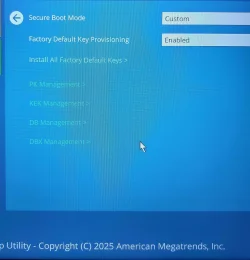
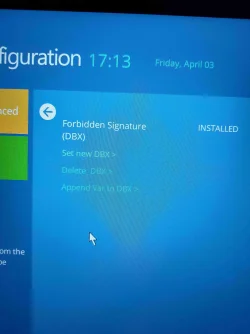
I have a Samsung Galaxy Book 2 notebook. The last BIOS update was in April 2025. Here are images of my BIOS.

In the event viewer I have error 1801: Updated Secure Boot certificates are available on this device, but have not yet been applied to the firmware. Review the published guidelines to complete the update and maintain full protection. Error 1797: The Secure Boot update failed because the Windows UEFI CA 2023 certificate is not present in the Db. Error 1802: The Secure Boot KEK 2023 update was blocked due to a known firmware issue on the device.

In this scenario, do I have to do it manually? I don't think I'll get another BIOS update for my machine. Thank you.
 

Attachments

  • 20260403_105330_compressed.webp
    20260403_105330_compressed.webp
    1.5 MB · Views: 2
  • 20260403_171355_compressed.webp
    20260403_171355_compressed.webp
    1.8 MB · Views: 3
  • Captura de tela 2026-04-16 120304.webp
    Captura de tela 2026-04-16 120304.webp
    100.7 KB · Views: 1

My Computer

System One

  • OS
    Windows 11 Home
    Computer type
    Laptop
    Manufacturer/Model
    SAMSUNG/ GALAXY BOOK2
    CPU
    INTEL 12 gen I5 1235U
You have a KEK Management screen, which means you can try manual key enrollment.

1. Download the KEK CA 2023 cert file from MS's GitHub:
secureboot_objects/PreSignedObjects/KEK/Certificates/microsoft corporation kek 2k ca 2023.der at main · microsoft/secureboot_objects

2. Copy it to your EFI partition:
Code:
mountvol S: /s
mkdir S:\EFI\certs
copy "microsoft corporation kek 2k ca 2023.der" S:\EFI\certs

3. Shutdown Windows. Enter BIOS and return to the first screen.

4. Enter KEK Management. You should have an option to load a key from a file. Browse the EFI partition (you may have to guess which device is your system disk, and look for the EFI\Certs folder.

5. Load the file. If successful, reboot into Windows and run the update script.
 

My Computer

System One

  • OS
    Windows 7
I've tried everything, but I keep getting these errors :(

Code:
SUCCESS: Matched 278/278 EFI signatures from "dbxupdate.bin"
No EFI_CERT_SHA256 signatures in C:\Windows\System32\SecureBootUpdates\DBXUpdate2024.bin
No EFI_CERT_SHA256 signatures in C:\Windows\System32\SecureBootUpdates\DBXUpdate2024Legacy.bin
SUCCESS: Matched 278/278 EFI signatures from "dbxupdateLegacy.bin"
FAILED: Missing 3/3 SVN signatures from "DBXUpdateSVN.bin"
FAILED: Missing 3/3 SVN signatures from "DBXUpdateSVNLegacy.bin"

second error:

Code:
PowerShell 7.6.0
Secure Boot: OFF
Virtualization Based Security: ON
BitLocker on (C:) OFF

UEFI KEK Certs
--------------
    Microsoft Corporation KEK CA 2011

UEFI DB Certs
-------------
    Microsoft Corporation UEFI CA 2011
    Microsoft Windows Production PCA 2011
    Microsoft Option ROM UEFI CA 2023
    Microsoft UEFI CA 2023
    Windows UEFI CA 2023

UEFI DBX Certs
--------------
    (NONE)

EFI Files
---------
    Windows Boot Manager [Windows UEFI CA 2023] is ALLOWED.

    Registry: WindowsUEFICA2023Capable = 2
        [Windows UEFI CA 2023] in UEFI DB, and Windows starting from CA 2023 Boot Manager.

    SkuSiPolicy.p7b (for VBS) is MISSING. [OPTIONAL]


REQUIRED ACTION
===============

Run the command:
    Update_UEFI-CA2023.ps1 -Revoke

Finish the UEFI steps to manually add the [KEK CA 2023] cert, if the script provided instructions.

PS C:\Users\xxx\Desktop\SecureBoot-CA-2023-Updates2> .\Update_UEFI-CA2023.ps1 -Revoke
ERROR: Failed to append "DBXUpdate2024.bin" to UEFI DBX.
Wrong signature for this UEFI variable.
 

My Computer

System One

  • OS
    Windows 11
I've tried everything, but I keep getting these errors :(

Code:
SUCCESS: Matched 278/278 EFI signatures from "dbxupdate.bin"
No EFI_CERT_SHA256 signatures in C:\Windows\System32\SecureBootUpdates\DBXUpdate2024.bin
No EFI_CERT_SHA256 signatures in C:\Windows\System32\SecureBootUpdates\DBXUpdate2024Legacy.bin
FAILED: Missing 3/3 SVN signatures from "DBXUpdateSVNLegacy.bin"
A newer version of the DBXUpdate2024.bin was pushed in the Apr 2026, I'm beginning to suspect it's a corrupted file.

second error:

Code:
PowerShell 7.6.0
Secure Boot: OFF
Virtualization Based Security: ON
BitLocker on (C:) OFF

UEFI KEK Certs
--------------
    Microsoft Corporation KEK CA 2011
[/QUOTE]
You're missing the specific KEK CA 2023 for your BIOS.  What model PC do you have?

[QUOTE="mx101, post: 731027, member: 11617"]
PS C:\Users\xxx\Desktop\SecureBoot-CA-2023-Updates2> .\Update_UEFI-CA2023.ps1 -Revoke
ERROR: Failed to append "DBXUpdate2024.bin" to UEFI DBX.
Wrong signature for this UEFI variable.
I would worry about the missing KEK first. Without it, you're stuck. Check if there's a newer BIOS available, which might have the certs built-in.
 

My Computer

System One

  • OS
    Windows 7
What's the PC model? You can check if your PC supports manual key enrollment for Secure Boot certs. Otherwise you may need to wipe the factory certs and go into Setup mode.
 

My Computer

System One

  • OS
    Windows 7
You have a KEK Management screen, which means you can try manual key enrolment......
You help has been invaluable to me, though perhaps not in the way you might think.

I have (or rather had) a Dell Latitude E7440 on which I practised the manual updating. I got as far as the KEK CA 2023 certificate before I hit an obstacle. It's bios management refused to accept the KEK CA 2023 certificate whatever I did. I solved the dilemma by selling on that laptop and letting someone else deal with it ;)

My remaining Dells have all been updated to 2023 certs without any effort on my part, all through Windows Update (including the Dell bios). Your scripts confirm that the only thing left to do is revocation, which I think I'll wait and let MS do that.

So thanks for helping me cull my collection of laptops down to just the ones that can get the 2023 certs automatically (y)
 

My Computers

System One System Two

  • OS
    Windows 11 Home
    Computer type
    Laptop
    Manufacturer/Model
    Acer Aspire 3 A315-23-R9VY
    CPU
    AMD Athlon Silver 3050U
    Memory
    8GB
    Graphics Card(s)
    Radeon Graphics
    Monitor(s) Displays
    laptop screen
    Screen Resolution
    1366x768 native resolution, up to 2560x1440 with Radeon Virtual Super Resolution
    Hard Drives
    1TB Samsung EVO 870 SSD (from April 2026: 250GB EVO 850)
    Internet Speed
    150 Mbps
    Browser
    Edge, Firefox
    Antivirus
    Defender
    Other Info
    fully 'Windows 11 ready' laptop. Windows 10 C: partition migrated from my old unsupported 'main machine' then upgraded to 11. A test migration ran Insider builds for 2 months. When 11 was released on 5th October 2021 it was re-imaged back to 10 and was offered the upgrade in Windows Update on 20th October. Windows Update offered the 22H2 Feature Update on 20th September 2022. It got the 23H2 Feature Update on 4th November 2023 through Windows Update, 24H2 on 3rd October 2024 through Windows Update by setting the Target Release Version for 24H2, and 25H2 on 30th September 2025 through Windows Update by setting the Target Release Version for 25H2.

    UPDATE - 11 April 2026: due to mechanical deterioration this PC has been retired from active duty. The OS with all software and files has been migrated to my System Seven below to carry on as my general purpose 'main machine'.

    My SYSTEM THREE is a Dell Latitude 5410, i7-10610U, 32GB RAM, 512GB NVMe ssd, supported device running Windows 11 Pro.

    My SYSTEM FOUR is a 2-in-1 convertible Lenovo Yoga 11e 20DA, Celeron N2930, 8GB RAM, 256GB ssd. Unsupported device: currently running Win10 Pro, plus Win11 Pro RTM and Insider Dev, Beta, and RP 24H2 as native boot vhdx.

    My SYSTEM FIVE is a Dell Latitude 3190 2-in-1, Pentium Silver N5030, 8GB RAM, 1TB NVMe ssd, supported device running Windows 11 Pro, plus Insider Beta, Dev, and Canary builds (and a few others) as a native boot .vhdx.

    My SYSTEM SIX is a Dell Latitude 5550, Core Ultra 7 165H, 64GB RAM, 1TB NVMe SSD, supported device, Windows 11 Pro 24H2, Hyper-V host machine. Updated to 25H2 on 30th September 2025.

    My SYSTEM SEVEN is a Lenovo Thinkpad T580, Intel Core i7-8650U, 16GB RAM, 512GB NVMe SSD + 2nd 512GB NVMe SSD, a supported device for Windows 11. This is my current general purpose 'main machine'. The installed Windows 11 Home from my System One has been migrated to this machine.
  • Operating System
    Windows 11 Pro
    Computer type
    Laptop
    Manufacturer/Model
    Dell Latitude E4310
    CPU
    Intel® Core™ i5-520M
    Motherboard
    0T6M8G
    Memory
    8GB
    Graphics card(s)
    (integrated graphics) Intel HD Graphics
    Screen Resolution
    1366x768
    Hard Drives
    500GB Crucial MX500 SSD
    Browser
    Firefox, Edge
    Antivirus
    Defender
    Other Info
    unsupported machine: Legacy bios, MBR, TPM 1.2, upgraded from W10 to W11 using W10/W11 hybrid install media workaround. In-place upgrade to 22H2 using ISO and a workaround. Feature Update to 23H2 by manually installing the Enablement Package. In-place upgrade to 24H2 using hybrid 23H2/24H2 install media. Upgraded to 25H2 by Enablement Package. Also running Insider Dev, and Canary builds and Windows 10 as native boot .vhdx.

    My SYSTEM THREE is a Dell Latitude 5410, i7-10610U, 32GB RAM, 512GB NVMe ssd, supported device running Windows 11 Pro.

    My SYSTEM FOUR is a 2-in-1 convertible Lenovo Yoga 11e 20DA, Celeron N2930, 8GB RAM, 256GB ssd. Unsupported device: currently running Win10 Pro, plus Win11 Pro RTM and Insider Dev, Beta, and RP 24H2 as native boot vhdx.

    My SYSTEM FIVE is a Dell Latitude 3190 2-in-1, Pentium Silver N5030, 8GB RAM, 1TB NVMe ssd, supported device running Windows 11 Pro, plus Insider Beta, Dev, and Canary builds (and a few others) as a native boot .vhdx.

    My SYSTEM SIX is a Dell Latitude 5550, Core Ultra 7 165H, 64GB RAM, 1TB NVMe SSD, supported device, Windows 11 Pro 24H2, Hyper-V host machine. Updated to 25H2 on 30th September 2025.

    My SYSTEM SEVEN is a Lenovo Thinkpad T580, Intel Core i7-8650U, 16GB RAM, 512GB NVMe SSD + 2nd 512GB NVMe SSD, a supported device for Windows 11. This is my current general purpose 'main machine'. The installed Windows 11 Home from my System One has been migrated to this machine.
What's the PC model? You can check if your PC supports manual key enrollment for Secure Boot certs. Otherwise you may need to wipe the factory certs and go into Setup mode.

acer nitro 5 an515-55 notebook and don't support key enrrollment
 

My Computer

System One

  • OS
    Windows 11
I have (or rather had) a Dell Latitude E7440 on which I practised the manual updating. I got as far as the KEK CA 2023 certificate before I hit an obstacle. It's bios management refused to accept the KEK CA 2023 certificate whatever I did. I solved the dilemma by selling on that laptop and letting someone else deal with it ;)

My remaining Dells have all been updated to 2023 certs without any effort on my part, all through Windows Update (including the Dell bios). Your scripts confirm that the only thing left to do is revocation, which I think I'll wait and let MS do that.
Unlike other OEM's, Dell's can only use an .auth file for key management.

The .auth format has additional security because it requires you sign the cert with a personal key. At that point, you're doing what Mosby does. My approach is to keep the update process as close to the original certs as possible. Barring the use of .auth files, the alternative on older Dells without a BIOS update is to use Setup mode (wiping the factory certs).

MS anticipated problems like this, and provided their own Windows OEM Devices certs as a drop-in replacement for Setup mode.
 

My Computer

System One

  • OS
    Windows 7
acer nitro 5 an515-55 notebook and don't support key enrrollment

What you need to do:
1. Disable Secure Boot mode.
2. Select Custom mode.
3. Find the Delete all keys option.
4. Restart Windows, and run the update script. It should recognize you're in Setup mode and write the Windows OEM Devices PK certs as a replacement. Now you have a MS-provided set of certs that was made for situations like yours.
 

My Computer

System One

  • OS
    Windows 7
What you need to do:
1. Disable Secure Boot mode.
2. Select Custom mode.
3. Find the Delete all keys option.
4. Restart Windows, and run the update script. It should recognize you're in Setup mode and write the Windows OEM Devices PK certs as a replacement. Now you have a MS-provided set of certs that was made for situations like yours.
I don't have option for custom mode and I've already done the other steps several times "delete all keys" include.

With no results.
 

My Computer

System One

  • OS
    Windows 11
If you've deleted all keys, the update script should install certs for you (including the missing KEK CA 2023). What's the output from the update script?
 

My Computer

System One

  • OS
    Windows 7
If you've deleted all keys, the update script should install certs for you (including the missing KEK CA 2023). What's the output from the update script?

to restart the windows and read the "README_UEFI.txt", but after restart the windows nothing change, my secure boot say that I have an old certificate.
 

My Computer

System One

  • OS
    Windows 11
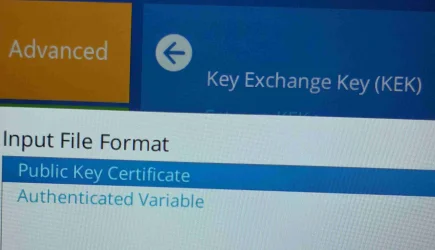
Set new KEK or Append Var to KEK?
input file format? which one
 

Attachments

  • 20260416_140709_compressed_compressed_compressed.webp
    20260416_140709_compressed_compressed_compressed.webp
    1.3 MB · Views: 1
  • 20260416_140825_compressed_compressed_compressed.webp
    20260416_140825_compressed_compressed_compressed.webp
    1.1 MB · Views: 1

My Computer

System One

  • OS
    Windows 11 Home
    Computer type
    Laptop
    Manufacturer/Model
    SAMSUNG/ GALAXY BOOK2
    CPU
    INTEL 12 gen I5 1235U
@garlin I've already done these I don't have option for custom mode

the only option I've is enable or disable the secure boot is always on "UEFI mode", I can only enable or disable.
 

My Computer

System One

  • OS
    Windows 11
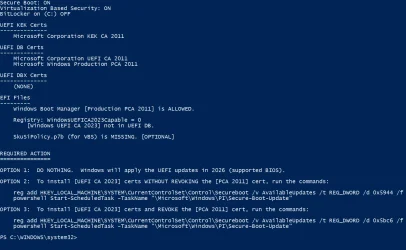
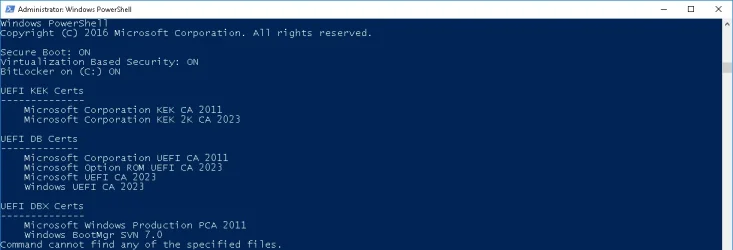
I wonder a little bit why your script proposes to revoke the PCA2011 cert while it lists the PCA2011 already in the dbx? (Read the latest posts and didn't find that covered. Did I overlook something?)

1776360387880.webp
 

Attachments

  • 1776361071128.webp
    1776361071128.webp
    25.6 KB · Views: 2

My Computer

System One

  • OS
    W10

Latest Support Threads

Back
Top Bottom