Solved garlin's PowerShell scripts for updating Secure Boot CA 2023


No luck, but thank you nevertheless! I think it may be because I'm running an older version of 24H2.
I appended the text from the previous powershell check scripts so it looks like this:
PS C:\Users\theislands> powershell -nop -ep bypass -f C:\temp\Check_UEFI-CA2023.ps1
as I have the scripts copied to the temp folder in Windows root.
 

My Computers

System One System Two

  • OS
    Windows 11 Home, ver 25H2 build 26200.8246
    Computer type
    Laptop
    Manufacturer/Model
    Hewlett-Packard Spectre 13-4001 x360 convertable
    CPU
    Intel Core i5 5200U @ 2.20GH
    Motherboard
    Hewlett-Packard 802D
    Memory
    4 GB
    Graphics Card(s)
    Intel HD Graphics 5500 on board
    Sound Card
    Intel Smart Sound Technology (Intel SST)
    Hard Drives
    Micron 256GB M.2 2280 NGFF SSD MTFDDAV256TBN, (SATA 6.0 Gb/s)
    Keyboard
    Model # G01KB
    Antivirus
    Microsoft Defender
    Other Info
    born on date: 25 Feb 2016
  • Operating System
    Win 11 Home 25H2 build 26200.7922
    Computer type
    PC/Desktop
    Manufacturer/Model
    Asus Desktop model M32AD-US019S (DOM: 6/9/2014 )
    CPU
    Intel Core i7 4th Gen 4790 (3.60GHz), Haswell 22nm Technology, SOCKET 1150
    Motherboard
    H81M-E/M51AD/DP_MB
    Memory
    Samsung 16 GB DDR3 (8GB in 2 modules)
    Graphics card(s)
    NVIDIA GeForce GTX 760, 3GB, and on-board Intel HD Graphics 4600 Rev 6
    Monitor(s) Displays
    HP EliteDisplay E241i LED; HP EliteDisplay E243
    Hard Drives
    Samsung 500GB SSD, 870 EVO (SATA 6.0 )
    Micron 250GB SSD, CT250MX500
    Toshiba HDD, 3GB (original drive w/PC)
    Case
    ASUS
    Keyboard
    ASUS-------------------------
    Antivirus
    MS Defender
    Other Info
    Additional Laptops:

    HEWLETT PACKARD
    HP OmniBook X Flip NGAI (Next Gen AI),
    Model: 16-as0023dx
    PT# B5UH1UA#ABA Product #: B5UH1UA
    delivered and setup 7/25/25
    16" 2K Touch-Screen Laptop
    Intel Core Ultra 7 256V '24 Series 2 - CPU
    Boost Clock Frequency 4.8 gigahertz; Neural Processing Unit (NPU) Yes;
    16GB Memory, LPDDR5X
    1TB SSD PCIe 4.0
    Graphics: Intel Arc 140V
    1 x HDMI 2.1
    1 x Thunderbolt 4
    2K Touch-Screen display, LED, IPS; 1920 x 1200 (Full HD+)
    USB Ports: 1 x USB-C 3.1, 2 x USB-A 3.1
    Wi-Fi 6E
    weight 4.15 pounds

    DELL
    Model:I7591-7483BLK-PUS 2-in-1 (7000 Series)
    purchased 12/3/2019,
    15.6 inch 2-IN-1;
    4K Ultra HD Touch-Screen, 3840 x 2160,
    Intel Core i7 10510U CPU 1.80GHz,
    16GB RAM DDR4 SDRAM 2400 megahert (2 slots),
    dedicated graphics Nvidia GeForce MX250 2 GB Graphics,
    PCIe 512GB Intel SSD + 32GB Optane Memory (Intel Optane Memory H10 with solid-state storage),
    wireless-AX & Bluetooth
    Battery: 68wh, Type 4VGMP 4 cell
Was i successful?
Absolutely. Both scripts run a specific set of checks to see if all the target conditions are met.

I don't just depend on the two Windows registry values to confirm if we were successful. This is why you don't need to bother reading the Windows event logs. Because of the extensive checking, the script knows right away whether everything went well.
 

My Computer

System One

  • OS
    Windows 7
I am absolutely dumbfounded. With just running one script, the Update_UEFI-CA2023.ps1 script (actually I first ran the Check_UEFI-CA2023.ps1 to see what the current state was) , my ASUS Secure Boot state was returned to the 12/13/25 state!!!! I ran this: powershell -nop -ep bypass -f C:\temp\Check_UEFI-CA2023.ps1 powershell Administrator mode, as I copied the scripts to the C:\temp folder, as instructed and it produced the output below. It said reboot but I didn't know if I should boot into the UEFI bios and make any selection about Enabling Secure Boot so I just rebooted right into Windows and ran the Check script and your script populated all th4e Certs that I had before I messed up my settings. Seems since the scripts were now there it automatically turned on Secure Boot. How cool is that!. I am beside myself with glee!!

The first output below is the result from running Update_UEFI-CA2023.ps1, the second, in case you were interested, is the result from the \Check_UEFI-CA2023.ps1 script.

I don't know if you can appreciate how grateful I am that you published this! Thanks VERY MUCH!
Thank you for confirming it worked! I wasn't sure before, since I don't have a PC with one of the older BIOS'es in my home.

At this point, you have the CA 2023 certs installed but have not cancelled the CA 2011 certs. Which is still optional for now.
 

My Computer

System One

  • OS
    Windows 7
Where are the links to the scripts e.g. Check_UEFI-CA2023.ps1
 

My Computer

System One

  • OS
    Windows 11 Pro
    Computer type
    PC/Desktop
    Manufacturer/Model
    Self build
    CPU
    Core i7-13700K
    Motherboard
    Asus TUF Gaming Plus WiFi Z790
    Memory
    64 GB Kingston Fury Beast DDR5
    Graphics Card(s)
    Gigabyte GeForce RTX 2060 Super Gaming OC 8G
    Sound Card
    Realtek S1200A
    Monitor(s) Displays
    Viewsonic VP2770 & Dell (secondary)
    Screen Resolution
    2560 x 1440
    Hard Drives
    Kingston KC3000 2TB NVME SSD & SATA HDDs & SSD
    PSU
    EVGA SuperNova G2 850W
    Case
    Nanoxia Deep Silence 1
    Cooling
    Noctua NH-D14
    Keyboard
    Microsoft Digital Media Pro
    Mouse
    Logitech Wireless
    Internet Speed
    80 Mb / s
    Browser
    Chrome
    Antivirus
    Defender, Malwarebytes Free & AdwCleaner
Good morning.
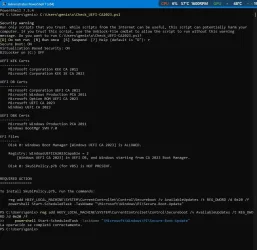
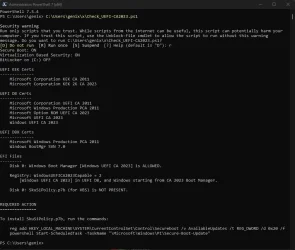
After completing the check, it indicates that I have an action to perform.
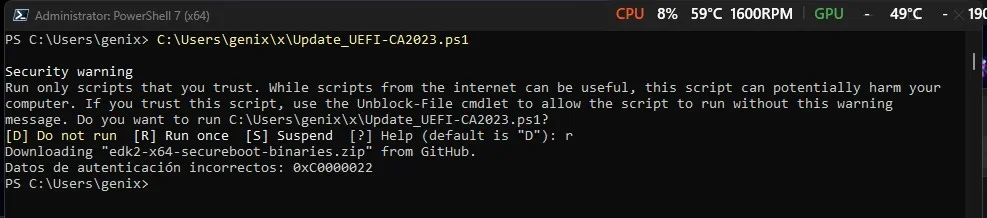
When I try to update, I get the error shown in the second screenshot.
Is there a solution?
Thank you.
 

Attachments

  • 1.webp
    1.webp
    87.7 KB · Views: 14
  • 2.webp
    2.webp
    31.6 KB · Views: 16

My Computer

System One

  • OS
    Windows 11
    Computer type
    Laptop
    Manufacturer/Model
    Lenovo LOQ 17IRX10 - Type 83JH
    CPU
    i7-13650HX (Raptor Lake-HX)
    Motherboard
    Lenovo LOQ 17IRX10 (Intel Raptor Lake-HX IMC / Raptor Point-S HM770)
    Memory
    32 Gb (16x2)
    Graphics Card(s)
    RTX 5060 Laptop
    Monitor(s) Displays
    17"
    Hard Drives
    1 Tb NVMe (WD PC SN7100S SDFPMSL-1T00-1101)
Good morning.
After completing the check, it indicates that I have an action to perform.
When I try to update, I get the error shown in the second screenshot.
Is there a solution?
Thank you.
That looks like a bug. Screen image #1 reports everything is updated, except the missing SkuSiPolicy.p7b file.

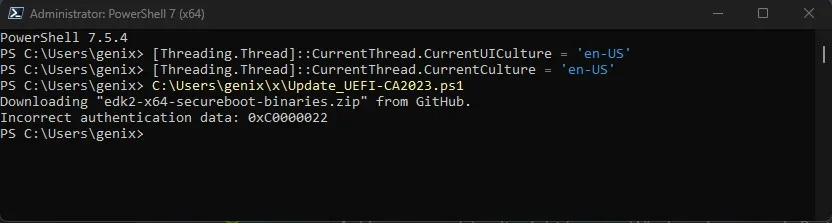
Screen image #2 looks like Update_UEFI-CA2023.ps1 thinks your system is in Setup Mode, and wants to install all the certs from scratch ("Downloading edk2 from GitHub"). The script fails, because as Screen 1 reports, your PC already has the certs applied ("authentication error 0xC0000022").

The question is why does the update script think it needs to start over? Can you try:

Code:
Unblock-File -Path C:\Users\genix\x\Update_UEFI-CA2023.ps1
C:\Users\genix\x\Update_UEFI-CA2023.ps1

If that doesn't work:
Code:
pwsh -nop -ep bypass -f C:\Users\genix\x\Update_UEFI-CA2023.ps1
 

My Computer

System One

  • OS
    Windows 7
That looks like a bug. Screen image #1 reports everything is updated, except the missing SkuSiPolicy.p7b file.

Screen image #2 looks like Update_UEFI-CA2023.ps1 thinks your system is in Setup Mode, and wants to install all the certs from scratch ("Downloading edk2 from GitHub"). The script fails, because as Screen 1 reports, your PC already has the certs applied ("authentication error 0xC0000022").

The question is why does the update script think it needs to start over? Can you try:

Code:
Unblock-File -Path C:\Users\genix\x\Update_UEFI-CA2023.ps1
C:\Users\genix\x\Update_UEFI-CA2023.ps1

If that doesn't work:
Code:
pwsh -nop -ep bypass -f C:\Users\genix\x\Update_UEFI-CA2023.ps1
Thank you so much for your reply.

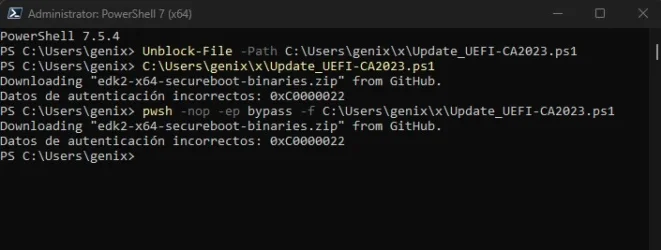
I've tried, but as you can see in the screenshot, it's not working.

I think the Boot/EFI partition/folder is protected and inaccessible.
 

Attachments

  • 3.webp
    3.webp
    25.8 KB · Views: 12

My Computer

System One

  • OS
    Windows 11
    Computer type
    Laptop
    Manufacturer/Model
    Lenovo LOQ 17IRX10 - Type 83JH
    CPU
    i7-13650HX (Raptor Lake-HX)
    Motherboard
    Lenovo LOQ 17IRX10 (Intel Raptor Lake-HX IMC / Raptor Point-S HM770)
    Memory
    32 Gb (16x2)
    Graphics Card(s)
    RTX 5060 Laptop
    Monitor(s) Displays
    17"
    Hard Drives
    1 Tb NVMe (WD PC SN7100S SDFPMSL-1T00-1101)
Do you have a dual-boot setup, or is the EFI partition on a different disk than Windows?
 

My Computer

System One

  • OS
    Windows 7
I got the result below for my 5 year old HP laptop. Copilot advises my laptop will still boot fine after 2026 even if the 2023 certificates are not installed.

Secure Boot: ON
Virtualization Based Security: ON
BitLocker on (C:) OFF

UEFI KEK Certs
--------------
Microsoft Corporation KEK CA 2011

UEFI DB Certs
-------------
Microsoft Corporation UEFI CA 2011
Microsoft Windows Production PCA 2011

UEFI DBX Certs
--------------
(NONE)

EFI Files
---------
Disk 0: Windows Boot Manager [Production PCA 2011] is ALLOWED.

Registry: WindowsUEFICA2023Capable = 0
[Windows UEFI CA 2023] not in UEFI DB.

Disk 0: SkuSiPolicy.p7b (for VBS) is NOT PRESENT.


REQUIRED ACTION
===============

OPTION 1: DO NOTHING. Windows will apply the UEFI updates in 2026 (supported BIOS).

OPTION 2: To install [UEFI CA 2023] certs WITHOUT REVOKING the [PCA 2011] cert, run the commands:

reg add HKEY_LOCAL_MACHINE\SYSTEM\CurrentControlSet\Control\Secureboot /v AvailableUpdates /t REG_DWORD /d 0x5944 /f
powershell Start-ScheduledTask -TaskName "\Microsoft\Windows\PI\Secure-Boot-Update"

OPTION 3: To install [UEFI CA 2023] certs and REVOKE the [PCA 2011] cert, run the commands:

reg add HKEY_LOCAL_MACHINE\SYSTEM\CurrentControlSet\Control\Secureboot /v AvailableUpdates /t REG_DWORD /d 0x5be4 /f
powershell Start-ScheduledTask -TaskName "\Microsoft\Windows\PI\Secure-Boot-Update"
 

My Computer

System One

  • OS
    Windows 11 Pro
    Computer type
    PC/Desktop
    Manufacturer/Model
    Self build
    CPU
    Core i7-13700K
    Motherboard
    Asus TUF Gaming Plus WiFi Z790
    Memory
    64 GB Kingston Fury Beast DDR5
    Graphics Card(s)
    Gigabyte GeForce RTX 2060 Super Gaming OC 8G
    Sound Card
    Realtek S1200A
    Monitor(s) Displays
    Viewsonic VP2770 & Dell (secondary)
    Screen Resolution
    2560 x 1440
    Hard Drives
    Kingston KC3000 2TB NVME SSD & SATA HDDs & SSD
    PSU
    EVGA SuperNova G2 850W
    Case
    Nanoxia Deep Silence 1
    Cooling
    Noctua NH-D14
    Keyboard
    Microsoft Digital Media Pro
    Mouse
    Logitech Wireless
    Internet Speed
    80 Mb / s
    Browser
    Chrome
    Antivirus
    Defender, Malwarebytes Free & AdwCleaner
Do you have a dual-boot setup, or is the EFI partition on a different disk than Windows?
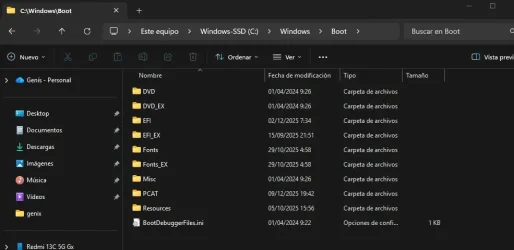
No, this is the route, but there's like an "EX" image
 

Attachments

  • 4.webp
    4.webp
    36.3 KB · Views: 9

My Computer

System One

  • OS
    Windows 11
    Computer type
    Laptop
    Manufacturer/Model
    Lenovo LOQ 17IRX10 - Type 83JH
    CPU
    i7-13650HX (Raptor Lake-HX)
    Motherboard
    Lenovo LOQ 17IRX10 (Intel Raptor Lake-HX IMC / Raptor Point-S HM770)
    Memory
    32 Gb (16x2)
    Graphics Card(s)
    RTX 5060 Laptop
    Monitor(s) Displays
    17"
    Hard Drives
    1 Tb NVMe (WD PC SN7100S SDFPMSL-1T00-1101)
I got the result below for my 5 year old HP laptop. Copilot advises my laptop will still boot fine after 2026 even if the 2023 certificates are not installed.
That is true, you can continue booting from CA 2011 certs unless MS gets a report of a new security hole in the boot manager. In that case, they would be forced to ship a replacement boot file, and the CA 2011 cert would no longer be valid to sign it (since it expired after 2026).

But the "OPTION 1:" message indicates HP has worked with MS to guarantee the CA 2023 updates can be applied to your model without any troubles.
 

My Computer

System One

  • OS
    Windows 7
Thank you so much for your reply.

I've tried, but as you can see in the screenshot, it's not working.

I think the Boot/EFI partition/folder is protected and inaccessible.
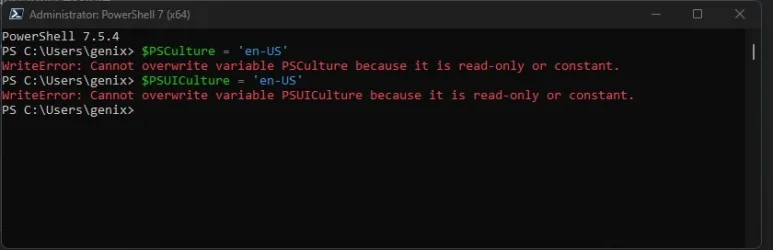
I have a suspicion it might be your Windows language is Portuguese, and the script is expecting to match an error message in English.

Try this:
Code:
$PSCulture = 'en-US'
$PSUICulture = 'en-US'
C:\Users\genix\x\Update_UEFI-CA2023.ps1
 

My Computer

System One

  • OS
    Windows 7
I have a suspicion it might be your Windows language is Portuguese, and the script is expecting to match an error message in English.

Try this:
Code:
$PSCulture = 'en-US'
$PSUICulture = 'en-US'
C:\Users\genix\x\Update_UEFI-CA2023.ps1
It's in Spanish.
It doesn't recognize the command: $PSCulture

I'm sorry to be giving you more work than I'd like.
 

Attachments

  • 5.webp
    5.webp
    16.2 KB · Views: 4

My Computer

System One

  • OS
    Windows 11
    Computer type
    Laptop
    Manufacturer/Model
    Lenovo LOQ 17IRX10 - Type 83JH
    CPU
    i7-13650HX (Raptor Lake-HX)
    Motherboard
    Lenovo LOQ 17IRX10 (Intel Raptor Lake-HX IMC / Raptor Point-S HM770)
    Memory
    32 Gb (16x2)
    Graphics Card(s)
    RTX 5060 Laptop
    Monitor(s) Displays
    17"
    Hard Drives
    1 Tb NVMe (WD PC SN7100S SDFPMSL-1T00-1101)
Code:
[Threading.Thread]::CurrentThread.CurrentUICulture = 'en-US'
[Threading.Thread]::CurrentThread.CurrentCulture = 'en-US'
 

My Computer

System One

  • OS
    Windows 7
This is good stuff. I have copied your scripts for future use. Thanks.
 

My Computer

System One

  • OS
    Win 7,8.1,10,11, Mint, Kde Plasma, Debian
    Computer type
    Laptop
    Manufacturer/Model
    Dell
    CPU
    Intel(R) Core(TM) i7-6500U CPU @ 2.50GHz
    Memory
    16 GB
    Graphics Card(s)
    Intel(R) HD Graphics 520/Nvidia GeForce 930M
    Sound Card
    Intel(R) Display Audio/RealtekAudio
    Monitor(s) Displays
    Generic Pnp Monitor
    Screen Resolution
    1366 X 768
    Hard Drives
    ST2000LM024-1EJ164
    Keyboard
    Eng (US)
    Mouse
    Sanwa Supply
    Browser
    Firefox
    Antivirus
    Avast One
    Other Info
    Too many laptops with different system specifications.
Code:
[Threading.Thread]::CurrentThread.CurrentUICulture = 'en-US'
[Threading.Thread]::CurrentThread.CurrentCulture = 'en-US'
Nothing, authentication not supported.

What if I clear the certificates from the BIOS?
 

Attachments

  • 6.webp
    6.webp
    21.8 KB · Views: 5

My Computer

System One

  • OS
    Windows 11
    Computer type
    Laptop
    Manufacturer/Model
    Lenovo LOQ 17IRX10 - Type 83JH
    CPU
    i7-13650HX (Raptor Lake-HX)
    Motherboard
    Lenovo LOQ 17IRX10 (Intel Raptor Lake-HX IMC / Raptor Point-S HM770)
    Memory
    32 Gb (16x2)
    Graphics Card(s)
    RTX 5060 Laptop
    Monitor(s) Displays
    17"
    Hard Drives
    1 Tb NVMe (WD PC SN7100S SDFPMSL-1T00-1101)
What I don't understand is your first screen shows the check script can read the UEFI variables, but the second screen proves the update script cannot.

But the two scripts share the same internal functions. If you run the check script again, it reports the same information? Everything is updated, except for SkuSiPolicy.p7b?
 

My Computer

System One

  • OS
    Windows 7
What I don't understand is your first screen shows the check script can read the UEFI variables, but the second screen proves the update script cannot.

But the two scripts share the same internal functions. If you run the check script again, it reports the same information? Everything is updated, except for SkuSiPolicy.p7b?
Apparently, it allows reading but not writing.
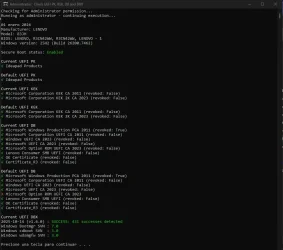
If everything seems to be up to date, I'll show you another checker.
Perhaps it's best to leave it as it is?
 

Attachments

  • 7.webp
    7.webp
    70.8 KB · Views: 12
  • 8.webp
    8.webp
    77.6 KB · Views: 10

My Computer

System One

  • OS
    Windows 11
    Computer type
    Laptop
    Manufacturer/Model
    Lenovo LOQ 17IRX10 - Type 83JH
    CPU
    i7-13650HX (Raptor Lake-HX)
    Motherboard
    Lenovo LOQ 17IRX10 (Intel Raptor Lake-HX IMC / Raptor Point-S HM770)
    Memory
    32 Gb (16x2)
    Graphics Card(s)
    RTX 5060 Laptop
    Monitor(s) Displays
    17"
    Hard Drives
    1 Tb NVMe (WD PC SN7100S SDFPMSL-1T00-1101)
I'll try a few tests tomorrow, I am concerned if someone actually does get a localized error message. Which I should fix anyway.
 

My Computer

System One

  • OS
    Windows 7
Back
Top Bottom