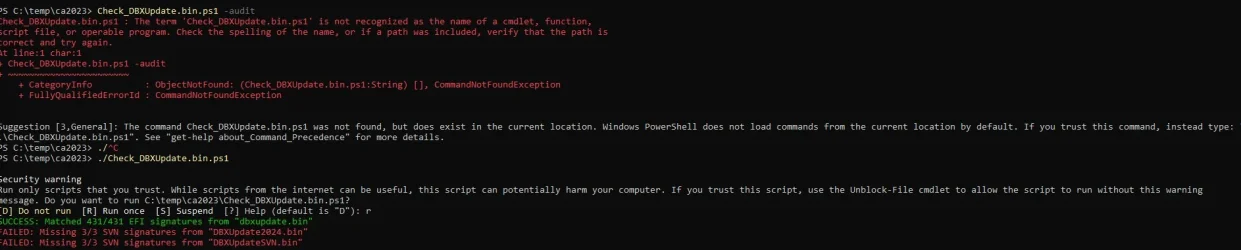
Solved garlin's PowerShell scripts for updating Secure Boot CA 2023


PS C:\Downloads> Update_UEFI-CA2023.ps1 -SkuSiPolicy
Update_UEFI-CA2023.ps1: The term 'Update_UEFI-CA2023.ps1' is not recognized as a name of a cmdlet, function, script file, or executable program.
Check the spelling of the name, or if a path was included, verify that the path is correct and try again.

The Script is in the C:\Downloads folder.
PS is picky about running script files. Unlike CMD, it doesn't "see" files in the current folder as a preventative security measure.

You have to explicitly call it using ".\Update_UEFI-CA2023.ps1 -SkuSiPolicy", from inside the Downloads folder.
 

My Computer

System One

  • OS
    Windows 7
PS is picky about running script files. Unlike CMD, it doesn't "see" files in the current folder as a preventative security measure.

You have to explicitly call it using ".\Update_UEFI-CA2023.ps1 -SkuSiPolicy", from inside the Downloads folder.
Thank you very much Garlin. (y) 🍻

PowerShell 7.5.4
Secure Boot: ON
Virtualization Based Security: ON
BitLocker on (C:) OFF

UEFI KEK Certs
--------------
Microsoft Corporation KEK CA 2011
Microsoft Corporation KEK 2K CA 2023

UEFI DB Certs
-------------
Microsoft Corporation UEFI CA 2011
Microsoft Windows Production PCA 2011
Microsoft Option ROM UEFI CA 2023
Microsoft UEFI CA 2023
Windows UEFI CA 2023

UEFI DBX Certs
--------------
Microsoft Windows Production PCA 2011
Windows BootMgr SVN 7.0

EFI Files
---------
Disk 0: Windows Boot Manager [Windows UEFI CA 2023] is ALLOWED.

Registry: WindowsUEFICA2023Capable = 2
[Windows UEFI CA 2023] in UEFI DB, and Windows starting from CA 2023 Boot Manager.

Disk 0: SkuSiPolicy.p7b (for VBS) is CURRENT.

STATUS REPORT
-------------
Registry: UEFICA2023Status = Updated

SUCCESS: NO UPDATES ARE REQUIRED.
 

My Computer

System One

  • OS
    Windows 11
    Computer type
    PC/Desktop
    Manufacturer/Model
    Generic
    CPU
    AMD Ryzen 8700G
    Motherboard
    Gigabyte B650 UD AC
    Memory
    64 GB
    Graphics Card(s)
    Onboard
    Sound Card
    Onboard
    Monitor(s) Displays
    Del U2723QE
    Screen Resolution
    3840 x 2160
    Hard Drives
    Corsiar MP600 1TB
    PSU
    Silverstone 750 GOLD
    Case
    Silverstone FARA 513
The only way I could get anything to run was to use file explorer right click on the bat file run as admn
I had zero success trying to run the ps1 files, no matter how I tried
 

My Computer

System One

  • OS
    windows 11
    Computer type
    PC/Desktop
    Manufacturer/Model
    Antec/Case
    CPU
    Intel i5-10600kf
    Motherboard
    GIGABYTE Z590 UD AC
    Memory
    32gb corsair vengerance pro
    Graphics Card(s)
    AMD RX 6500XT
    Sound Card
    onboard
    Monitor(s) Displays
    40" Hisense
    Hard Drives
    Samsung 850
    Samsung 870
    Seagate 2TB
    PSU
    EVGA GQ 750
The only way I could get anything to run was to use file explorer right click on the bat file run as admn
I had zero success trying to run the ps1 files, no matter how I tried
Did you check if scripts are enabled in PowerShell?
Enabling PowerShell Scripts in Windows 11
To run PowerShell scripts in Windows 11, you need to change the execution policy. By default, this policy is set to restrict script execution for security reasons.

Steps to Enable Script Execution
Open PowerShell as Administrator
Right-click the Start button.
Select "Windows PowerShell (Admin)".
Click "Yes" if prompted by User Account Control.
Check Current Execution Policy
Type the command: Get-ExecutionPolicy
Press Enter. The default value is usually "Restricted".
Change Execution Policy
To allow scripts to run, type: Set-ExecutionPolicy Unrestricted
Press Enter.
You may be prompted to confirm the change. Type A for "Yes to All" and press Enter.
Verify the Change
Again, type: Get-ExecutionPolicy
Press Enter. It should now show "Unrestricted".
Run Your Script
You can now execute your PowerShell scripts.
Revert Execution Policy (Optional)
For security, you may want to revert the policy after running your scripts. Type: Set-ExecutionPolicy Restricted
Press Enter and confirm as needed.
 

My Computer

System One

  • OS
    Windows 11
    Computer type
    PC/Desktop
    Manufacturer/Model
    Generic
    CPU
    AMD Ryzen 8700G
    Motherboard
    Gigabyte B650 UD AC
    Memory
    64 GB
    Graphics Card(s)
    Onboard
    Sound Card
    Onboard
    Monitor(s) Displays
    Del U2723QE
    Screen Resolution
    3840 x 2160
    Hard Drives
    Corsiar MP600 1TB
    PSU
    Silverstone 750 GOLD
    Case
    Silverstone FARA 513
Works for me. Are you inside the folder (or outside) when calling the script? Are you in CMD or powershell at the time?
OK, it works in Powershell, but if I right click on the batch file in Explorer and say Run as administrator, it fails. The command window opens and immediately closes.

However, if I run CMD and then navigate into the folder within the command window and run the batch job, it runs.
 

My Computers

System One System Two

  • OS
    Win 11 Pro 25H2, Build 26200.8524
    Computer type
    PC/Desktop
    Manufacturer/Model
    Home Brew
    CPU
    Intel Core i5 14500
    Motherboard
    Gigabyte B760M G P WIFI
    Memory
    64GB DDR4
    Graphics Card(s)
    GeForce RTX 4060
    Sound Card
    Chipset Realtek
    Monitor(s) Displays
    LG 45" Ultragear, Acer 24" 1080p
    Screen Resolution
    5120x1440, 1920x1080
    Hard Drives
    Crucial P310 2TB 2280 PCIe Gen4 3D NAND NVMe M.2 SSD (O/S)
    Silicon Power 2TB US75 NVMe PCIe Gen4 M.2 2280 SSD (backup)
    Crucial BX500 2TB 3D NAND (2nd backup)
    Seagate 4TB Ironwolf, rotating HDD archive files
    External off-line backup Drives: 2 NVMe 4TB drives in external enclosures
    PSU
    Thermaltake Toughpower GF3 750W
    Case
    LIAN LI LANCOOL 216 E-ATX PC Case
    Cooling
    Lots of fans!
    Keyboard
    Microsoft Comfort Curve 2000
    Mouse
    Logitech G305
    Internet Speed
    Verizon FiOS 1GB
    Browser
    Firefox
    Antivirus
    Malware Bytes & Windows Defender Security
  • Operating System
    Win 11 Pro 25H2, Build 26200.8524
    Computer type
    PC/Desktop
    Manufacturer/Model
    Home Brew
    CPU
    Intel Core i5 14400
    Motherboard
    Gigabyte B760M DS3H AX
    Memory
    32GB DDR5
    Graphics card(s)
    Intel 700 Embedded GPU
    Sound Card
    Realtek Embedded
    Monitor(s) Displays
    27" HP 1080p
    Screen Resolution
    1920x1080
    Hard Drives
    Crucial P310 2TB 2280 PCIe Gen4 eD NAND PCIe SSD
    Samsung EVO 990 2TB NVMe Gen4 SSD
    Samsung 2TB SATA SSD
    PSU
    Thermaltake Smart BM3 650W
    Case
    Okinos Micro ATX Case
    Cooling
    Fans
    Keyboard
    Microsoft Comfort Curve 2000
    Mouse
    Logitech G305
    Internet Speed
    Verizon FiOS 1GB
    Browser
    Firefox
    Antivirus
    Malware Bytes & Windows Defender Security
Did you check if scripts are enabled in PowerShell?
Enabling PowerShell Scripts in Windows 11
To run PowerShell scripts in Windows 11, you need to change the execution policy. By default, this policy is set to restrict script execution for security reasons.

Steps to Enable Script Execution
Open PowerShell as Administrator
Right-click the Start button.
Select "Windows PowerShell (Admin)".
Click "Yes" if prompted by User Account Control.
Check Current Execution Policy
Type the command: Get-ExecutionPolicy
Press Enter. The default value is usually "Restricted".
Change Execution Policy
To allow scripts to run, type: Set-ExecutionPolicy Unrestricted
Press Enter.
You may be prompted to confirm the change. Type A for "Yes to All" and press Enter.
Verify the Change
Again, type: Get-ExecutionPolicy
Press Enter. It should now show "Unrestricted".
Run Your Script
You can now execute your PowerShell scripts.
Revert Execution Policy (Optional)
For security, you may want to revert the policy after running your scripts. Type: Set-ExecutionPolicy Restricted
Press Enter and confirm as needed.
Thanks..results
once again.webp
 

My Computer

System One

  • OS
    windows 11
    Computer type
    PC/Desktop
    Manufacturer/Model
    Antec/Case
    CPU
    Intel i5-10600kf
    Motherboard
    GIGABYTE Z590 UD AC
    Memory
    32gb corsair vengerance pro
    Graphics Card(s)
    AMD RX 6500XT
    Sound Card
    onboard
    Monitor(s) Displays
    40" Hisense
    Hard Drives
    Samsung 850
    Samsung 870
    Seagate 2TB
    PSU
    EVGA GQ 750
it's quicker just to run this as it sets execution policy to unrestriced but only for the current session.

Set-ExecutionPolicy -Scope Process -ExecutionPolicy Bypass
 

My Computers

System One System Two

  • OS
    Windows 11 Pro 25H2 26200.8524
    Computer type
    Laptop
    Manufacturer/Model
    Acemagic LX15PRO
    CPU
    AMD Ryzen 7 5825U with Radeon Graphics
    Memory
    16GB
    Screen Resolution
    1920 x 1080
    Hard Drives
    SSD 2TB
    Internet Speed
    30 Mbps
    Browser
    Brave
    Antivirus
    Webroot Secure Anywhere
    Other Info
    System 3

    Acer Swift SF114-34 laptop
    OS Windows 11 Pro 26200.8524
    CPU Pentium Silver N6000
    RAM 4GB
    SSD Samsung 970 EVO Plus SSD 2TB (an upgrade)
  • Operating System
    Windows 11 Pro 23H2 22631.2506
    Computer type
    Laptop
    Manufacturer/Model
    HP Mini 210-1090NR PC (bought in late 2009!)
    CPU
    Atom N450 1.66GHz
    Memory
    2GB
    Browser
    Brave
    Antivirus
    Webroot
OK, it works in Powershell, but if I right click on the batch file in Explorer and say Run as administrator, it fails. The command window opens and immediately closes.

However, if I run CMD and then navigate into the folder within the command window and run the batch job, it runs.
Got it.
 

My Computer

System One

  • OS
    Windows 7
@garlin I cant update my bootable USB SSD (Crucial X9 Pro) because it is not recognised as a removable drive when I run .\Update_UEFI-CA2023.ps1 -bootmedia. This is true whether it is MBR or GPT

As GPT, the disk GUID is 370F20F9-3649-416B-8504-A866151D919F, should I change this?
 

My Computers

System One System Two

  • OS
    Windows 11 Pro 25H2 26200.8524
    Computer type
    Laptop
    Manufacturer/Model
    Acemagic LX15PRO
    CPU
    AMD Ryzen 7 5825U with Radeon Graphics
    Memory
    16GB
    Screen Resolution
    1920 x 1080
    Hard Drives
    SSD 2TB
    Internet Speed
    30 Mbps
    Browser
    Brave
    Antivirus
    Webroot Secure Anywhere
    Other Info
    System 3

    Acer Swift SF114-34 laptop
    OS Windows 11 Pro 26200.8524
    CPU Pentium Silver N6000
    RAM 4GB
    SSD Samsung 970 EVO Plus SSD 2TB (an upgrade)
  • Operating System
    Windows 11 Pro 23H2 22631.2506
    Computer type
    Laptop
    Manufacturer/Model
    HP Mini 210-1090NR PC (bought in late 2009!)
    CPU
    Atom N450 1.66GHz
    Memory
    2GB
    Browser
    Brave
    Antivirus
    Webroot
-BootMedia is reserved for Windows ISO's and recovery media. It checks for the presence of bootx64.efi as a safety feature (so it doesn't accidentally touch other drives it shouldn't). What kind of bootable drive is this? (Windows To Go, Windows ISO, etc.)
 

My Computer

System One

  • OS
    Windows 7
-BootMedia is reserved for Windows ISO's and recovery media. It checks for the presence of bootx64.efi as a safety feature (so it doesn't accidentally touch other drives it shouldn't). What kind of bootable drive is this? (Windows To Go, Windows ISO, etc.)
It's a bootable Macrium Reflect USB SSD. Forget it, I'll just turn off secure boot when I need it.
 

My Computers

System One System Two

  • OS
    Windows 11 Pro 25H2 26200.8524
    Computer type
    Laptop
    Manufacturer/Model
    Acemagic LX15PRO
    CPU
    AMD Ryzen 7 5825U with Radeon Graphics
    Memory
    16GB
    Screen Resolution
    1920 x 1080
    Hard Drives
    SSD 2TB
    Internet Speed
    30 Mbps
    Browser
    Brave
    Antivirus
    Webroot Secure Anywhere
    Other Info
    System 3

    Acer Swift SF114-34 laptop
    OS Windows 11 Pro 26200.8524
    CPU Pentium Silver N6000
    RAM 4GB
    SSD Samsung 970 EVO Plus SSD 2TB (an upgrade)
  • Operating System
    Windows 11 Pro 23H2 22631.2506
    Computer type
    Laptop
    Manufacturer/Model
    HP Mini 210-1090NR PC (bought in late 2009!)
    CPU
    Atom N450 1.66GHz
    Memory
    2GB
    Browser
    Brave
    Antivirus
    Webroot
Hi,


I read a talk in Mosby about this type of behavior in certain MB. Mine is a MSI Ms-7915 (Z97 Mpower).
I managed to install the "Microsoft Corporation KEK 2K CA 2023", but only after deleting "Microsoft Corporation KEK CA 2011".


So my questions are:
(1) Is there any problem in not having both KEK installed?
(2) Will your Update_UEFI-CA2023.ps1 script be able to write the two KEK?


I don't care much for Secure Boot, but I was rather curious about this failure in appending the KEK and, at the end, if my update to the Secure Boot is correct.
You will see attached the output of Check_UEFI-CA2023.ps1


Thanks,
 

Attachments

My Computer

System One

  • OS
    Windows 11 Pro 25H2
    Computer type
    PC/Desktop
    CPU
    Intel(R) Core(TM) i7-4790K
    Motherboard
    MSI Z97 MPOWER
Hi,


I read a talk in Mosby about this type of behavior in certain MB. Mine is a MSI Ms-7915 (Z97 Mpower).
I managed to install the "Microsoft Corporation KEK 2K CA 2023", but only after deleting "Microsoft Corporation KEK CA 2011".


So my questions are:
(1) Is there any problem in not having both KEK installed?
(2) Will your Update_UEFI-CA2023.ps1 script be able to write the two KEK?


I don't care much for Secure Boot, but I was rather curious about this failure in appending the KEK and, at the end, if my update to the Secure Boot is correct.
You will see attached the output of Check_UEFI-CA2023.ps1


Thanks,
I forget to say. What happens is that I cannot append one KEK to another in the BIOS
 

My Computer

System One

  • OS
    Windows 11 Pro 25H2
    Computer type
    PC/Desktop
    CPU
    Intel(R) Core(TM) i7-4790K
    Motherboard
    MSI Z97 MPOWER
I read a talk in Mosby about this type of behavior in certain MB. Mine is a MSI Ms-7915 (Z97 Mpower).
I managed to install the "Microsoft Corporation KEK 2K CA 2023", but only after deleting "Microsoft Corporation KEK CA 2011".


So my questions are:
(1) Is there any problem in not having both KEK installed?
(2) Will your Update_UEFI-CA2023.ps1 script be able to write the two KEK?
Normally the trust order goes:
PK -> authenticates KEK -> authenticates DB or DBX cert

If you don't have a KEK CA 2011 cert, then any CA 2011 DB or DBX cert (doesn't matter) isn't trusted. With a KEK CA 2023-only UEFI, then effectively you have a "new style" PC which is only CA 2023-compatible and not backwards compatible for booting CA 2011 (while Secure Boot is enabled).

MS recognizes a number of PC vendors prefer to support backwards compatibility and will include both sets of CA 2011 and CA 2023 certs. But it also allows vendors to ship "new style" PC's which are CA 2011-free since after 2026 and beyond, casual users who don't install legacy Windows won't care the old certs are missing.

After Windows updates the ISO's to boot from CA 2023, then having no KEK CA 2011 will be irrelevant. And you can always temporarily disable Secure Boot for an install, ignoring what's present in your UEFI.

I believe the Rufus discussion concerns some UEFI's which don't correctly support KEK append operations, but are able to write both KEK's at the same time (assuming you're in Setup Mode and all variables are empty). My upgrade script, if you're using Setup Mode, writes both KEK's since they're provided in the same DefaultKEK.bin provided by MS, as a reference to OEM builders.

MS provides several reference sets of Default .bin files:
- CA 2011 + CA 2023 for full compatibility (I use this)​
- CA 2023 + Linux support​
- CA 2023-only​
 

My Computer

System One

  • OS
    Windows 7
I didn't update the PK. See below

Subject : CN=MSI SHIP PK
Issuer : CN=Root Agency
Thumbprint : 33C0EEEA5E92A06E26B3F3B8CC3B013D26CA314F
FriendlyName :
NotBefore : 09/06/2012 09:25:18
NotAfter : 09/06/2022 09:25:17
Extensions : {System.Security.Cryptography.Oid, System.Security.Cryptography.Oid}

Is there any problem, or should it be updated? It says «NotAfter: 09/06/2022»
Would it be better to replace it with WindowsOEMDevicesPK.der ?

PS - I didn't use the Update script, I wrote the certificates directly in UEFI Bios.
 

Attachments

Last edited:

My Computer

System One

  • OS
    Windows 11 Pro 25H2
    Computer type
    PC/Desktop
    CPU
    Intel(R) Core(TM) i7-4790K
    Motherboard
    MSI Z97 MPOWER
Just an update, i spent some time with my Toshiba laptop tonight and finally got secure boot updated and so was able to switch an updated Secure Boot back on successfully.

This takes me to 100% success on 3 antique machines.

Many thanks to all that put the work into these scripts in this project.
 

My Computers

System One System Two

  • OS
    Windows 11 Enterprise 25H2 26200 7462
    Computer type
    PC/Desktop
    Manufacturer/Model
    Custom Build
    CPU
    Intel XEON E5-2699 v3
    Motherboard
    ASUS X99-A
    Memory
    64GB Teamgroup UD4-3600
    Graphics Card(s)
    NVIDIA GeForce GTX 1080 Ti
    Sound Card
    Integrated
    Monitor(s) Displays
    ACER X34 Predator
    Screen Resolution
    3440 x 1440
    Hard Drives
    Crucial CT1000P 3P SSD8 1TB
    Crucial CT1000 BX500 SSD 1TB
    PSU
    GameMax Pro
    Case
    Fractal Design
    Cooling
    Corsair H110iGT + 6 140mm Fans
    Keyboard
    Corsair K4
    Mouse
    G-Skill G502
    Internet Speed
    300MBs
    Browser
    Chrome
    Antivirus
    OEM
    Other Info
    ASUS RT-AC87U Router
  • Operating System
    25H2 26200.5074
    Computer type
    Laptop
    Manufacturer/Model
    ASUS X555LA
    Memory
    8GB
    Browser
    Chrome
    Antivirus
    OEM
Just an update, i spent some time with my Toshiba laptop tonight and finally got secure boot updated and so was able to switch an updated Secure Boot back on successfully.

This takes me to 100% success on 3 antique machines.

Many thanks to all that put the work into these scripts in this project.
Why was the Toshiba so difficult?
 

My Computer

System One

  • OS
    Windows 11
Why was the Toshiba so difficult?
I turned off Secure Boot because i got a certificate error, intending to continue diagnosing, all scripts failed due to it being turned off including Mosby. The way this Tosh works i couldn’t even boot into recovery media, so i left it turned off hoping scripts would get modified or an update would help.

Today i sat down with a fresh mind, a hot cup of strong Yorkshire tea and a full pack of cigars and ran through the scripts again. Bingo, i got messages that all was now compatible with Secure boot, I rebooted into UEFI and flicked the switch!

I suspect in the meantime that Microsoft shipped some updates because nothing else has changed.
 

My Computers

System One System Two

  • OS
    Windows 11 Enterprise 25H2 26200 7462
    Computer type
    PC/Desktop
    Manufacturer/Model
    Custom Build
    CPU
    Intel XEON E5-2699 v3
    Motherboard
    ASUS X99-A
    Memory
    64GB Teamgroup UD4-3600
    Graphics Card(s)
    NVIDIA GeForce GTX 1080 Ti
    Sound Card
    Integrated
    Monitor(s) Displays
    ACER X34 Predator
    Screen Resolution
    3440 x 1440
    Hard Drives
    Crucial CT1000P 3P SSD8 1TB
    Crucial CT1000 BX500 SSD 1TB
    PSU
    GameMax Pro
    Case
    Fractal Design
    Cooling
    Corsair H110iGT + 6 140mm Fans
    Keyboard
    Corsair K4
    Mouse
    G-Skill G502
    Internet Speed
    300MBs
    Browser
    Chrome
    Antivirus
    OEM
    Other Info
    ASUS RT-AC87U Router
  • Operating System
    25H2 26200.5074
    Computer type
    Laptop
    Manufacturer/Model
    ASUS X555LA
    Memory
    8GB
    Browser
    Chrome
    Antivirus
    OEM
I didn't update the PK. See below

Subject : CN=MSI SHIP PK
Issuer : CN=Root Agency
Thumbprint : 33C0EEEA5E92A06E26B3F3B8CC3B013D26CA314F
FriendlyName :
NotBefore : 09/06/2012 09:25:18
NotAfter : 09/06/2022 09:25:17
Extensions : {System.Security.Cryptography.Oid, System.Security.Cryptography.Oid}

Is there any problem, or should it be updated? It says «NotAfter: 09/06/2022»
Would it be better to replace it with WindowsOEMDevicesPK.der ?

This PK is supported by MS, according the KEK JSON file on the MS GitHub:
Code:
    "33c0eeea5e92a06e26b3f3b8cc3b013d26ca314f": {
        "KEKUpdate": "MCJ Co, Ltd/KEKUpdate_MCJ_Co,_Ltd_PK2.bin",
        "Certificate": {
            "serial_number": "db5fb6f674b994bc48085d791780f5fe",
            "issued_to": "CN=MSI SHIP PK",
            "issued_by": "CN=Root Agency"
        }
    }

You should try running the update script.
 

My Computer

System One

  • OS
    Windows 7
I turned off Secure Boot because i got a certificate error, intending to continue diagnosing, all scripts failed due to it being turned off including Mosby. The way this Tosh works i couldn’t even boot into recovery media, so i left it turned off hoping scripts would get modified or an update would help.

Today i sat down with a fresh mind, a hot cup of strong Yorkshire tea and a full pack of cigars and ran through the scripts again. Bingo, i got messages that all was now compatible with Secure boot, I rebooted into UEFI and flicked the switch!

I suspect in the meantime that Microsoft shipped some updates because nothing else has changed.
Was your Tosh technically a W11 supported device?
 

My Computer

System One

  • OS
    Windows 11

Latest Support Threads

Back
Top Bottom