Solved garlin's PowerShell scripts for updating Secure Boot CA 2023


Quick question for @JamesSmith: have you installed the March 2026 Windows update?

There's a new PS feature just added to the Get-SecureBootUEFI command which converts the certs back into a human form. Can you run this to confirm what the actual Subject line for all those mysterious GIGABYTE certs?

Code:
> foreach ($var in @('PK','KEK','DB','DBX')) { "`n${var}:"; (Get-SecureBootUEFI -Name $var -Decoded).Subject }

PK:
CN=Windows OEM Devices PK, O=Microsoft Corporation, L=Redmond, S=Washington, C=US

KEK:
CN=Microsoft Corporation KEK CA 2011, O=Microsoft Corporation, L=Redmond, S=Washington, C=US
CN=Microsoft Corporation KEK 2K CA 2023, O=Microsoft Corporation, C=US

DB:
CN=Microsoft Corporation UEFI CA 2011, O=Microsoft Corporation, L=Redmond, S=Washington, C=US
CN=Microsoft Windows Production PCA 2011, O=Microsoft Corporation, L=Redmond, S=Washington, C=US
CN=Windows UEFI CA 2023, O=Microsoft Corporation, C=US
CN=Microsoft UEFI CA 2023, O=Microsoft Corporation, C=US
CN=Microsoft Option ROM UEFI CA 2023, O=Microsoft Corporation, C=US

DBX:
CN=Microsoft Windows Production PCA 2011, O=Microsoft Corporation, L=Redmond, S=Washington, C=US

My suspicion is Gigabyte is publishing "CN=GIGABYTE" and nothing else on the Subject line.

Yes I have the March Update I tried running that script last night and I couldn’t figure out how to make it work? I typed Get-SecureBootUEFI in PS and nothing happened. Could you advise? After looking at the code again I assume I run

> foreach ($var in @('PK','KEK','DB','DBX')) { "`n${var}:"; (Get-SecureBootUEFI -Name $var -Decoded).Subject }
in PS?

I won’t have access to my PC for about 2 weeks.
I can try again when I’m back home.
 
Last edited:

My Computers My Computers

  • At a glance

    Windows 11 ProIntel Core i5-12600K 3.7 GHz 10-Core ProcessorCorsair Vengeance LPX 64 GB (2 x 32 GB) DDR4-...Integrated Intel UHD Graphics 770
    OS
    Windows 11 Pro
    Computer type
    PC/Desktop
    Manufacturer/Model
    Self built PC by me.
    CPU
    Intel Core i5-12600K 3.7 GHz 10-Core Processor
    Motherboard
    Gigabyte B760M H DDR4 Micro ATX LGA1700 Motherboard
    Memory
    Corsair Vengeance LPX 64 GB (2 x 32 GB) DDR4-3200 CL16 Memory
    Graphics Card(s)
    Integrated Intel UHD Graphics 770
    Sound Card
    Realtek
    Monitor(s) Displays
    LG
    Hard Drives
    Samsung 990 Pro 1 TB M.2-2280 PCIe 4.0 X4 NVME Solid State Drive
    Samsung 990 Pro 2 TB M.2-2280 PCIe 4.0 X4 NVME Solid State Drive
    PSU
    NZXT 850w ATX 3.1 Gold Fully Modular Power Supply
    Case
    Thermaltake Versa H25 ATX Mid Tower Case
    Cooling
    CPU Cooler Thermalright Assassin Spirit 120 EVO ARGB (ARGB Disabled) - Case Fans BlackThermalright TL-C12C-S X3 66.17 CFM 120 mm Fans 3-Pack (ARGB disabled)
    Internet Speed
    1 Gbps
    Other Info
    I hate ARGB.
  • At a glance

    Windows 11 Pro
    Operating System
    Windows 11 Pro
    Computer type
    Laptop
    Manufacturer/Model
    Lenovo ThinkBook 14 G2 ITL
I hope you're not typing the ">" which is the command prompt.
Code:
foreach ($var in @('PK','KEK','DB','DBX')) { "`n${var}:"; (Get-SecureBootUEFI -Name $var -Decoded).Subject }
 

My Computer My Computer

At a glance

Windows 7
OS
Windows 7
I hope you're not typing the ">" which is the command prompt.
Code:
foreach ($var in @('PK','KEK','DB','DBX')) { "`n${var}:"; (Get-SecureBootUEFI -Name $var -Decoded).Subject }

Yeah I ran this on my laptop and figured it out. Unfortunately I am away from home and can't run this on my Gigabyte PC for another 2 weeks.

How important is this information? Can it wait until I get back home?
 

My Computers My Computers

  • At a glance

    Windows 11 ProIntel Core i5-12600K 3.7 GHz 10-Core ProcessorCorsair Vengeance LPX 64 GB (2 x 32 GB) DDR4-...Integrated Intel UHD Graphics 770
    OS
    Windows 11 Pro
    Computer type
    PC/Desktop
    Manufacturer/Model
    Self built PC by me.
    CPU
    Intel Core i5-12600K 3.7 GHz 10-Core Processor
    Motherboard
    Gigabyte B760M H DDR4 Micro ATX LGA1700 Motherboard
    Memory
    Corsair Vengeance LPX 64 GB (2 x 32 GB) DDR4-3200 CL16 Memory
    Graphics Card(s)
    Integrated Intel UHD Graphics 770
    Sound Card
    Realtek
    Monitor(s) Displays
    LG
    Hard Drives
    Samsung 990 Pro 1 TB M.2-2280 PCIe 4.0 X4 NVME Solid State Drive
    Samsung 990 Pro 2 TB M.2-2280 PCIe 4.0 X4 NVME Solid State Drive
    PSU
    NZXT 850w ATX 3.1 Gold Fully Modular Power Supply
    Case
    Thermaltake Versa H25 ATX Mid Tower Case
    Cooling
    CPU Cooler Thermalright Assassin Spirit 120 EVO ARGB (ARGB Disabled) - Case Fans BlackThermalright TL-C12C-S X3 66.17 CFM 120 mm Fans 3-Pack (ARGB disabled)
    Internet Speed
    1 Gbps
    Other Info
    I hate ARGB.
  • At a glance

    Windows 11 Pro
    Operating System
    Windows 11 Pro
    Computer type
    Laptop
    Manufacturer/Model
    Lenovo ThinkBook 14 G2 ITL
It's not important for me in terms of the script's functionality, other than fixing the output for worried Gigabyte owners. Pop back in when you get around to it
 

My Computer My Computer

At a glance

Windows 7
OS
Windows 7
There's a new PS feature just added to the Get-SecureBootUEFI command which converts the certs back into a human form.
Code:
> foreach ($var in @('PK','KEK','DB','DBX')) { "`n${var}:"; (Get-SecureBootUEFI -Name $var -Decoded).Subject }
My suspicion is Gigabyte is publishing "CN=GIGABYTE" and nothing else on the Subject line.

Tried this for an Asus board, seems they aren't any better than Gigabyte, they use just some more words, but it's only CN:

5.webp
(Couldn't try Gigabyte since the PC has W10 and they didn't update the Powershell commands)

Otherwise I'm missing some explanations from MS what the parameters in GetSecureBootSVN really mean- I get Firmware SVN 2.0 'non compliant' :

4.webp

SVN update applied, updated machine::

1773431444377.webp 1773431606157.webp

Script output:

10.webp 6.webp
7.webp 3.webp

So I can't really understand why 'FirmwareSVN' should be '2.0'?
 

My Computer My Computer

At a glance

W10
OS
W10
Otherwise I'm missing some explanations from MS what the parameters in GetSecureBootSVN really mean- I get Firmware SVN 2.0 'non compliant' :

4.webp

I got this exact same output on my Lenovo laptop.
 

My Computers My Computers

  • At a glance

    Windows 11 ProIntel Core i5-12600K 3.7 GHz 10-Core ProcessorCorsair Vengeance LPX 64 GB (2 x 32 GB) DDR4-...Integrated Intel UHD Graphics 770
    OS
    Windows 11 Pro
    Computer type
    PC/Desktop
    Manufacturer/Model
    Self built PC by me.
    CPU
    Intel Core i5-12600K 3.7 GHz 10-Core Processor
    Motherboard
    Gigabyte B760M H DDR4 Micro ATX LGA1700 Motherboard
    Memory
    Corsair Vengeance LPX 64 GB (2 x 32 GB) DDR4-3200 CL16 Memory
    Graphics Card(s)
    Integrated Intel UHD Graphics 770
    Sound Card
    Realtek
    Monitor(s) Displays
    LG
    Hard Drives
    Samsung 990 Pro 1 TB M.2-2280 PCIe 4.0 X4 NVME Solid State Drive
    Samsung 990 Pro 2 TB M.2-2280 PCIe 4.0 X4 NVME Solid State Drive
    PSU
    NZXT 850w ATX 3.1 Gold Fully Modular Power Supply
    Case
    Thermaltake Versa H25 ATX Mid Tower Case
    Cooling
    CPU Cooler Thermalright Assassin Spirit 120 EVO ARGB (ARGB Disabled) - Case Fans BlackThermalright TL-C12C-S X3 66.17 CFM 120 mm Fans 3-Pack (ARGB disabled)
    Internet Speed
    1 Gbps
    Other Info
    I hate ARGB.
  • At a glance

    Windows 11 Pro
    Operating System
    Windows 11 Pro
    Computer type
    Laptop
    Manufacturer/Model
    Lenovo ThinkBook 14 G2 ITL
Here's my take:
FirmwareSVN -> DBX version (as read from the last reboot, may not reflect pending changes)
BootManagerSVN -> EFI boot manager's file SVN
StagedSVN -> DBXupdateSVN.bin from SecureBootUpdates folder

Why doesn't the FirmwareSVN match what's in the DBX? It probably takes a reboot to officially make it effective. Windows may be reading the PCR logs, and saying you haven't rebooted with the refreshed SVN yet.

Remember if you use the scheduled task, some things don't move forward until you've done a few reboots because it's measuring things since the last reboot, and not what's currently read from the UEFI variables.
 

My Computer My Computer

At a glance

Windows 7
OS
Windows 7
I have SVN Firmware 3.0 7.0

Did you run these commands in PowerShell as administrator?

Code:
reg add HKEY_LOCAL_MACHINE\SYSTEM\CurrentControlSet\Control\Secureboot /v AvailableUpdates /t REG_DWORD /d 0x200 /f

Code:
Start-ScheduledTask -TaskName "\Microsoft\Windows\PI\Secure-Boot-Update"
 
Last edited:

My Computer My Computer

At a glance

windows 11
OS
windows 11
Tried this for an Asus board, seems they aren't any better than Gigabyte, they use just some more words, but it's only CN:

At least for the PK, you can parse the KEK JSON file from GitHub and see all the weird examples without the words "PK", "cert" or "key".
Code:
CN=ASRock Rack Inc.
CN=CASPER
CN=db_Manufacture20150617
CN=ECS
CN=Emdoor
CN=Foo
CN=GIGABYTE
CN=HQRoot
CN=HQTGLRoot
CN=HUAWEI
CN=hubbleb
CN=HWACezanne
CN=HWALucienne
CN=HWARenoir
CN=HWIAlderLake
CN=HWIRaptor
CN=HWIRockLake
CN=HWITigerLake
CN=Ideapad Products
CN=Infinix
CN=JOPLIN
CN=JPik
CN=LENOVO
CN=LG Electronics inc.
CN=MEDION_AG
CN=NEC Corporation.
CN=NEC Personal Computers Ltd.
CN=QCI_2017
CN=Root Agency
CN=SAMSUNG ELECTRONICS_Root
CN=SIMATIC IPC
CN=Techvision Intelligent Technology Limited
CN=Wingtech_G2
CN=ZEBRA Technologies
CN=ZZTOP

MS also posted 1.5 M lines of CSV, documenting all the different motherboard/firmware version combinations their telemetry has collected for the confidence buckets. That data is also wildly corrupted with nonsensical data, from what I recognize as parsing glitches.

Like MS made the same mistake, and presumed all vendors would have orderly field data.
 

My Computer My Computer

At a glance

Windows 7
OS
Windows 7
I have SVN Firmware 3.0
BootMgr SVN 3.0 was limited to a previous version of the DBXUpdateSVN.bin.
If you have this system updated since Oct 2025, it should be on SVN 7.0.

DBXUpdate2024.bin originally installed SVN 2.0, and the DBXUpdateSVN was gradually pushed to 3.0, 5.0 and 7.0 over the different Monthly Updates.
 

My Computer My Computer

At a glance

Windows 7
OS
Windows 7
BootMgr SVN 3.0 was limited to a previous version of the DBXUpdateSVN.bin.
If you have this system updated since Oct 2025, it should be on SVN 7.0.

DBXUpdate2024.bin originally installed SVN 2.0, and the DBXUpdateSVN was gradually pushed to 3.0, 5.0 and 7.0 over the different Monthly Updates.
I get SVN Firmware 7.0 in response to the get-securebootsvn command.

That was a typo on my part.
 

My Computer My Computer

At a glance

windows 11
OS
windows 11
......
Why doesn't the FirmwareSVN match what's in the DBX? It probably takes a reboot to officially make it effective. Windows may be reading the PCR logs, and saying you haven't rebooted with the refreshed SVN yet.
Remember if you use the scheduled task, some things don't move forward until you've done a few reboots because it's measuring things since the last reboot, and not what's currently read from the UEFI variables.
I'd concur, but I had the SVN update originally applied on march 5th, and done a lot of reboots afterwards. In addition I reapplied the SVN update twice today and rebooted more than four times thereafter.

In addition this output suggests, too, that the SVN dbx update has been applied:

3.webp
 

My Computer My Computer

At a glance

W10
OS
W10
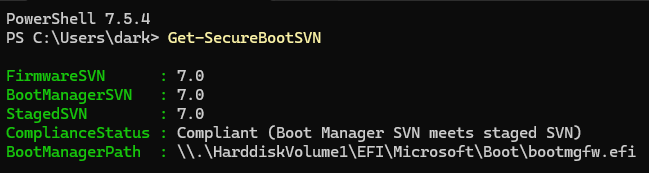
I installed 26200.8037, and, just to confirm for everyone, yes, all three parameters output by Get-SecureBootSVN are supposed to match (i.e. read 7.0). Likely means whoever has a non-matching FirmwareSVN either had a weird SVN update or hasn't rebooted enough times to get it to stick (8037 made me reboot twice, which is new for such a small update all things considered). Or, their motherboard isn't taking the SVN update for some other reason, which is most likely given how weird especially laptop OEM UEFI can be.
VQYmrWA.png
 
Last edited:

My Computer My Computer

At a glance

Windows 11 Pro 25H2AMD Ryzen 9 3950X64 GB DDR4-3600 CL18 (2x32 GB)MSI Ventus RTX 2060 Super
OS
Windows 11 Pro 25H2
Computer type
PC/Desktop
Manufacturer/Model
custom
CPU
AMD Ryzen 9 3950X
Motherboard
ASUS ROG Strix X570-E (first gen)
Memory
64 GB DDR4-3600 CL18 (2x32 GB)
Graphics Card(s)
MSI Ventus RTX 2060 Super
Sound Card
Audient iD4 Mk.I
Monitor(s) Displays
2x AOC 24G1 / 1x XP-Pen Artist Pro 16 Gen 2 2.5K
Screen Resolution
1080p / 2560x1600
Hard Drives
1TB WD/SanDisk SN850X (main) / 2TB Sabrent Rocket 4 / 6TB WD MyBook EE
PSU
Corsair RM850X 850W Gold (2019)
Case
Lian-Li O11-D
Cooling
EKWB EK-AIO 360 RGB
Keyboard
wooting Two HE fullsize
Mouse
some old mouse from an older PC
Internet Speed
Gigabit symmetric (fibre); Bell Fibe
Browser
Firefox
Antivirus
ol' reliable Windows Defender
Other Info
Other peripherals:

- Shure SM7B (Mexico)
- AKG K 240 Studio (calibrated flat)
- PDP FaceOff wired Switch gamepad
Well, played a little bit- deleted dbx in bios, confirmed no dbx:

11.webp

Applied SVN update alone first, NO dbx update and NO 2011 cert revocation (availableupdates 0x200):

21.webp

14.webp

So far as expected, but applying dbx update and 2011 revocation:

22.webp

Back to Firmware SVN 2.0 (regedit was availableupdates 0x82), the changes are effective directly.

So I think there's still something unexpected in either MS' way of recognition or bios way of adding to the dbx or both. I doubt that the SVN code just disappears or gets overwritten.

dbx before deleting, dbx update, svn update, 2011 revoc applied:

24.webp
 
Last edited:

My Computer My Computer

At a glance

W10
OS
W10
Seems that MS adds 2 SVN updates and even if there's the latest SVN update installed recognizes the older one, too.

Bios - dbx after inserting SVN first - consistent a MS entry with 3 hashes first (since I applied the SVN update first), so 431 dbx entries, so the 2011 revoc and then another (unexpected) MS entry with 3 hashes:

29.webp

Deleting the last entry:

31.webp

Problem solved? Looks better but still unclear how this duplicate different SVN information would be handled by the bootloader? Maybe it's not enough to just search for the presence of the correct signatures but one has to exclude duplicate / differing entries, too?

26.webp

(Sorry for answering myself)
 
Last edited:

My Computer My Computer

At a glance

W10
OS
W10
SVN numbers are stored within a "fake" EFI_CERT_SHA256_GUID cert, where the cert's SignatureData returns a specially encoded value.

By matching against a known GUID, representing by the first leading digits of SignatureData, you can mask some of the middle digits to extract the SVN major/minor numbers. As multiple SVN's can be appended to the DBX (as individual EFI_CERT_SHA256_GUID certs), you're supposed to pick the highest SVN of that known GUID to enforce.

Code:
$EFI_BOOTMGR_DBXSVN_GUID = '01612B139DD5598843AB1C185C3CB2EB92'
$EFI_CDBOOT_DBXSVN_GUID =  '019D2EF8E827E15841A4884C18ABE2F284'
$EFI_WDSMGR_DBXSVN_GUID =  '01C2CA99C9FE7F6F4981279E2A8A535976'

It sounds like Get-SecureBootSVN is broken because it's not following the rule of returning the highest SVN (per GUID).

Here's my script's code:
Code:
    try {
        $SignatureData = (Get-SecureBootUEFI dbx | Get-UEFIDatabaseSignatures).SignatureList.SignatureData
    }
    catch {
        if ($_.Exception.Message -eq 'Variable is currently undefined: 0xC0000100') {
            return $null
        }
        else {
            throw $_.Exception.Message
        }
    }

    $LastSig = $SignatureData -match "^$DBXSVN" | sort | select -Last 1

    if ($LastSig.Count) {
        $SVN = Get-SignatureDataSVN $LastSig
    }
    else {
        $SVN = $null
    }

    return $SVN

DBXUpdate.bin: No SVN's
DBXUpdate2024: Adds PCA 2011 to DBX, SVN 2.0 (this file never changes)
DBXUpdateSVN.bin: Adds SVN 7.0, previous versions of file added 3.0 & 5.0

When my update script runs, it always follows the above order in applying DBX entries.
 

My Computer My Computer

At a glance

Windows 7
OS
Windows 7
Thanks for confirming.

So if this is a systematic error users getting Firmware SVN 2 again would have applied the 2011 cert revocation while the one with the correct looking results (Firmware SVN 7) did not yet apply this revocation? (Assuming that all / most firmwares would simply append and would not remove duplicate entries by themself)

Maybe Nebulon Ranger or itsme1 want to report back if they really don't have the revocation for the PCA 2011 cert installed?

Just out of curiosity:
Maybe I'm misunderstanding something here, but why is your confirmation message in you check-dbx scripts for DBXUpdate2024.bin "Matched 3/3 SVN signatures from "DBXUpdate2024.bin"?
The SVNs are at least old if not outdated, at least if the latest SVNs are installed? The still relevant part would be the revocation of the 2011 cert?
 

My Computer My Computer

At a glance

W10
OS
W10
Check_DBXUpdate.bin.ps1 looks at the submitted file's SVN's, and confirms each of the SVN's is not higher than the highest SVN's currently stored in the DBX variable. Therefore, even if this lower SVN doesn't get appended to DBX, it's not a security problem.

The problem is MS decided to combine both PCA 2011 & SVN 2.0 in the same file, DBXUpdate2024.bin. And that file's frozen.

All future SVN changes will be pushed as newer versions of DBXUpdateSVN, which only contains the 3 SVN's. My script follows the logic of what I think MS intended the process to work out as 3 separate file updates.

They could have simply just rolled everything into a single DBX update file (since appends will reject duplicate entries), but they chose not to.
 

My Computer My Computer

At a glance

Windows 7
OS
Windows 7
Am I the only one who is getting more confused?

Is the output for my laptop okay? #827

I have no idea how to delete the files from the BIOS to look like this #836

Garlin excuse me if this obvious or you have already answered it.
 

My Computers My Computers

  • At a glance

    Windows 11 ProIntel Core i5-12600K 3.7 GHz 10-Core ProcessorCorsair Vengeance LPX 64 GB (2 x 32 GB) DDR4-...Integrated Intel UHD Graphics 770
    OS
    Windows 11 Pro
    Computer type
    PC/Desktop
    Manufacturer/Model
    Self built PC by me.
    CPU
    Intel Core i5-12600K 3.7 GHz 10-Core Processor
    Motherboard
    Gigabyte B760M H DDR4 Micro ATX LGA1700 Motherboard
    Memory
    Corsair Vengeance LPX 64 GB (2 x 32 GB) DDR4-3200 CL16 Memory
    Graphics Card(s)
    Integrated Intel UHD Graphics 770
    Sound Card
    Realtek
    Monitor(s) Displays
    LG
    Hard Drives
    Samsung 990 Pro 1 TB M.2-2280 PCIe 4.0 X4 NVME Solid State Drive
    Samsung 990 Pro 2 TB M.2-2280 PCIe 4.0 X4 NVME Solid State Drive
    PSU
    NZXT 850w ATX 3.1 Gold Fully Modular Power Supply
    Case
    Thermaltake Versa H25 ATX Mid Tower Case
    Cooling
    CPU Cooler Thermalright Assassin Spirit 120 EVO ARGB (ARGB Disabled) - Case Fans BlackThermalright TL-C12C-S X3 66.17 CFM 120 mm Fans 3-Pack (ARGB disabled)
    Internet Speed
    1 Gbps
    Other Info
    I hate ARGB.
  • At a glance

    Windows 11 Pro
    Operating System
    Windows 11 Pro
    Computer type
    Laptop
    Manufacturer/Model
    Lenovo ThinkBook 14 G2 ITL
Back
Top Bottom





