- Local time
- 2:19 AM
- Posts
- 504
- OS
- Windows 11

Follow along with the video below to see how to install our site as a web app on your home screen.
Note: This feature may not be available in some browsers.
Quick question for @JamesSmith: have you installed the March 2026 Windows update?
There's a new PS feature just added to the Get-SecureBootUEFI command which converts the certs back into a human form. Can you run this to confirm what the actual Subject line for all those mysterious GIGABYTE certs?
Code:> foreach ($var in @('PK','KEK','DB','DBX')) { "`n${var}:"; (Get-SecureBootUEFI -Name $var -Decoded).Subject } PK: CN=Windows OEM Devices PK, O=Microsoft Corporation, L=Redmond, S=Washington, C=US KEK: CN=Microsoft Corporation KEK CA 2011, O=Microsoft Corporation, L=Redmond, S=Washington, C=US CN=Microsoft Corporation KEK 2K CA 2023, O=Microsoft Corporation, C=US DB: CN=Microsoft Corporation UEFI CA 2011, O=Microsoft Corporation, L=Redmond, S=Washington, C=US CN=Microsoft Windows Production PCA 2011, O=Microsoft Corporation, L=Redmond, S=Washington, C=US CN=Windows UEFI CA 2023, O=Microsoft Corporation, C=US CN=Microsoft UEFI CA 2023, O=Microsoft Corporation, C=US CN=Microsoft Option ROM UEFI CA 2023, O=Microsoft Corporation, C=US DBX: CN=Microsoft Windows Production PCA 2011, O=Microsoft Corporation, L=Redmond, S=Washington, C=US
My suspicion is Gigabyte is publishing "CN=GIGABYTE" and nothing else on the Subject line.
foreach ($var in @('PK','KEK','DB','DBX')) { "`n${var}:"; (Get-SecureBootUEFI -Name $var -Decoded).Subject }I hope you're not typing the ">" which is the command prompt.
Code:foreach ($var in @('PK','KEK','DB','DBX')) { "`n${var}:"; (Get-SecureBootUEFI -Name $var -Decoded).Subject }
There's a new PS feature just added to the Get-SecureBootUEFI command which converts the certs back into a human form.
My suspicion is Gigabyte is publishing "CN=GIGABYTE" and nothing else on the Subject line.Code:> foreach ($var in @('PK','KEK','DB','DBX')) { "`n${var}:"; (Get-SecureBootUEFI -Name $var -Decoded).Subject }
Otherwise I'm missing some explanations from MS what the parameters in GetSecureBootSVN really mean- I get Firmware SVN 2.0 'non compliant' :


reg add HKEY_LOCAL_MACHINE\SYSTEM\CurrentControlSet\Control\Secureboot /v AvailableUpdates /t REG_DWORD /d 0x200 /fStart-ScheduledTask -TaskName "\Microsoft\Windows\PI\Secure-Boot-Update"Tried this for an Asus board, seems they aren't any better than Gigabyte, they use just some more words, but it's only CN:
CN=ASRock Rack Inc.
CN=CASPER
CN=db_Manufacture20150617
CN=ECS
CN=Emdoor
CN=Foo
CN=GIGABYTE
CN=HQRoot
CN=HQTGLRoot
CN=HUAWEI
CN=hubbleb
CN=HWACezanne
CN=HWALucienne
CN=HWARenoir
CN=HWIAlderLake
CN=HWIRaptor
CN=HWIRockLake
CN=HWITigerLake
CN=Ideapad Products
CN=Infinix
CN=JOPLIN
CN=JPik
CN=LENOVO
CN=LG Electronics inc.
CN=MEDION_AG
CN=NEC Corporation.
CN=NEC Personal Computers Ltd.
CN=QCI_2017
CN=Root Agency
CN=SAMSUNG ELECTRONICS_Root
CN=SIMATIC IPC
CN=Techvision Intelligent Technology Limited
CN=Wingtech_G2
CN=ZEBRA Technologies
CN=ZZTOPBootMgr SVN 3.0 was limited to a previous version of the DBXUpdateSVN.bin.I have SVN Firmware 3.0
I get SVN Firmware 7.0 in response to the get-securebootsvn command.BootMgr SVN 3.0 was limited to a previous version of the DBXUpdateSVN.bin.
If you have this system updated since Oct 2025, it should be on SVN 7.0.
DBXUpdate2024.bin originally installed SVN 2.0, and the DBXUpdateSVN was gradually pushed to 3.0, 5.0 and 7.0 over the different Monthly Updates.
I'd concur, but I had the SVN update originally applied on march 5th, and done a lot of reboots afterwards. In addition I reapplied the SVN update twice today and rebooted more than four times thereafter.......
Why doesn't the FirmwareSVN match what's in the DBX? It probably takes a reboot to officially make it effective. Windows may be reading the PCR logs, and saying you haven't rebooted with the refreshed SVN yet.
Remember if you use the scheduled task, some things don't move forward until you've done a few reboots because it's measuring things since the last reboot, and not what's currently read from the UEFI variables.
Get-SecureBootSVN are supposed to match (i.e. read 7.0). Likely means whoever has a non-matching FirmwareSVN either had a weird SVN update or hasn't rebooted enough times to get it to stick (8037 made me reboot twice, which is new for such a small update all things considered). Or, their motherboard isn't taking the SVN update for some other reason, which is most likely given how weird especially laptop OEM UEFI can be.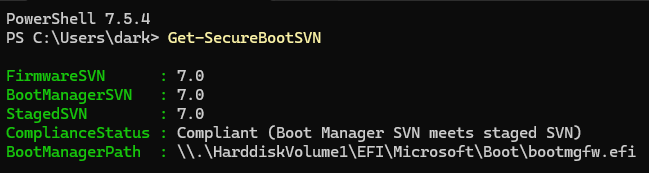
$EFI_BOOTMGR_DBXSVN_GUID = '01612B139DD5598843AB1C185C3CB2EB92'
$EFI_CDBOOT_DBXSVN_GUID =  '019D2EF8E827E15841A4884C18ABE2F284'
$EFI_WDSMGR_DBXSVN_GUID = '01C2CA99C9FE7F6F4981279E2A8A535976' try {
$SignatureData = (Get-SecureBootUEFI dbx | Get-UEFIDatabaseSignatures).SignatureList.SignatureData
}
catch {
if ($_.Exception.Message -eq 'Variable is currently undefined: 0xC0000100') {
return $null
}
else {
throw $_.Exception.Message
}
}
$LastSig = $SignatureData -match "^$DBXSVN" | sort | select -Last 1
if ($LastSig.Count) {
$SVN = Get-SignatureDataSVN $LastSig
}
else {
$SVN = $null
}
return $SVN








