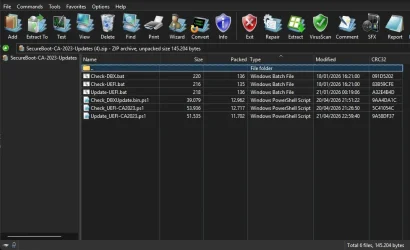
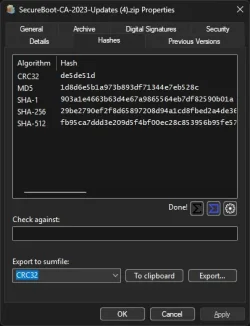
Solved garlin's PowerShell scripts for updating Secure Boot CA 2023


One workaround is to temporarily disable Secure Boot during Windows installs. Then re-enable it when you're done.

It beats the game of trying to update your images every time a new boot manager drops.
yes, that's much easier than updating each usb drive all the time.
However, I noticed that on the Surface Pro 4, disabling Secure Boot also erased all Secure Boot Keys.
The UEFI on this device's very basic.

I'm not certain the paid Macrium users will have it any better, unless the backup vendors have some plan that resembles this:

1. When you first ask to create a recovery drive, it logs the current SVN number inside the backup software's config.

2. Every time the backup software wakes up to run, it checks the UEFI's SVN number again. If the SVN has changed from the recorded number, then inform the user that a new recovery drive is needed.

3. When the user creates a new recovery drive, log this SVN number to the software's config. Rinse and repeat.

Now because it requires new code, obviously your Macium 8 free users are stranded.

But in theory, a similar solution could be written as an outside script. You write the current SVN down into a file, and every day you check for changes. Every day, because we don't know if everyone installs their Monthly Update on the same day. When the SVN changes, alert the user and then keep nagging them until they run the script to acknowledge they've done the update.

Rinse and repeat.
Not ideal, I fear that most people will leave secure boot disabled permanently for convenience.
But Macrium 8.0 Free usb drives (thanks to Garlin's script) and Rufus usb drives are easy and fast to update unlike Ventoy.
 

My Computer My Computer

At a glance

Windows 10 x64 PRO N with ESUi3-4005U8 GB DDR3Intel HD Graphics 4400 / NVIDIA GeForce 920M
OS
Windows 10 x64 PRO N with ESU
Computer type
Laptop
Manufacturer/Model
Acer
CPU
i3-4005U
Memory
8 GB DDR3
Graphics Card(s)
Intel HD Graphics 4400 / NVIDIA GeForce 920M
Hard Drives
512 GB SSD
Browser
Firefox
Other Info
10 years old, still running
Weird question: As usual, I'm manually updating Windows, I don't think there's a way to manually update the computer's boot manager using your script... is it? 👀
My last update was in February, using the preview Update for that month. I have SVN 7.0 and the other stuff at 3.0
If there is, that would rock!
Thanks in advance X3
 

My Computers My Computers

  • At a glance

    Windows 11 Pro 25H2AMD Ryzen 5 5600G @ 3.9/4.4Ghz2 x 16 GB DDR4 Kingston Fury Beast 3200 MhzAMD Radeon RX 6600 XT MSI Mech 2X OC Edition ...
    OS
    Windows 11 Pro 25H2
    Computer type
    PC/Desktop
    Manufacturer/Model
    Built PC
    CPU
    AMD Ryzen 5 5600G @ 3.9/4.4Ghz
    Motherboard
    MSI B550M-PRO-WiFi Ver. 1.4
    Memory
    2 x 16 GB DDR4 Kingston Fury Beast 3200 Mhz
    Graphics Card(s)
    AMD Radeon RX 6600 XT MSI Mech 2X OC Edition 8 GB
    Sound Card
    Realtek High Definition Audio (Integrated)
    Monitor(s) Displays
    Samsung C50Rx 27" LED / HP S2031 20" LCD
    Screen Resolution
    1920 x 1080 px / 1600 x 900 px
    Hard Drives
    WD Blue SN570 NVME M.2 SSD [1 TB] -- External Drives: - WD Scorpion Blue 250 GB 5400 RPM (Data Backup) - Hitachi 500 GB 5400 RPM (Software / ISOs Backup) - Toshiba MQ01ABD100 1 TB 5400 RPM (OS Images) - HGST TravelStar 7K1000 1 TB, 7200 RPM USB 3.0 - ADATA SU800 2TB SSD USB 3.0
    PSU
    Corsair RM750e 750W Fully Modular
    Case
    Naceb Hydra NA-1602
    Cooling
    Naceb Orpheus x 3 (Front) + Naceb Cepheus 1200 RPM Max (Rear) + ThemalRight Assasin X 90 SE (CPU)
    Keyboard
    Logitech MK470 Wireless
    Mouse
    Logitech MK470 Wireless
    Internet Speed
    120 MB Symetrical
    Browser
    Firefox / Brave / Edge
    Antivirus
    Windows Defender
    Other Info
    - VMs: WMware Player - Windows 8.1 Pro x64 / Windows 11 Pro
    - Wacom Intuos Pro Small Tablet PTH-460
  • At a glance

    Windows 11 Pro 25H2AMD Ryzen 7 7730U @ 2.0/4.5 Ghz2 x 16 GB Kingston Fury Impact DDR4 3200 MhzRadeon (tm) Graphics Vega 8 (512 MB)
    Operating System
    Windows 11 Pro 25H2
    Computer type
    Laptop
    Manufacturer/Model
    HP Pavilion 15-eh3000la (80M53LA)
    CPU
    AMD Ryzen 7 7730U @ 2.0/4.5 Ghz
    Motherboard
    HP 8BC7
    Memory
    2 x 16 GB Kingston Fury Impact DDR4 3200 Mhz
    Graphics card(s)
    Radeon (tm) Graphics Vega 8 (512 MB)
    Sound Card
    Realtek High Definition Audio (Integrated)
    Monitor(s) Displays
    AU Optronics
    Screen Resolution
    1920 x 1080 px (125% size)
    Hard Drives
    WD Blue SN570 1TB NVME M.2 Drive
    PSU
    45 Watt Charger
    Cooling
    Laptop Cooling Pad
    Keyboard
    Free Wolf Foldable Portable Keyboard
    Mouse
    Free Wolf Wireless Mouse
    Internet Speed
    120 MB Symetrical
    Browser
    Firefox / Brave / Edge
    Antivirus
    Windows Defender
    Other Info
    - 41mWh battery.
    - Wacom Intuos Pro Small Tablet PTH-460
I'm not certain the paid Macrium users will have it any better
We do not, at least for now. Maybe that will change. Hope springs eternal.
 

My Computers My Computers

  • At a glance

    Windows 11 Pro 24H2Intel i7-1260P 12th Gen 4.7GHz32GB DDR4-3200NVIDIA T550 Laptop GPU
    OS
    Windows 11 Pro 24H2
    Computer type
    Laptop
    Manufacturer/Model
    Lenovo P16s Workstation
    CPU
    Intel i7-1260P 12th Gen 4.7GHz
    Memory
    32GB DDR4-3200
    Graphics Card(s)
    NVIDIA T550 Laptop GPU
    Sound Card
    Realtek Audio
    Monitor(s) Displays
    16" Laptop Display
    Screen Resolution
    2560x1600
    Hard Drives
    2TB Samsung M.2 2280 SSD PCIe 4.0 x 4 NVMe
    Mouse
    Logitech MX Anywhere 2s
    Internet Speed
    1000 Mb
    Browser
    Firefox
    Antivirus
    Avast
  • At a glance

    Windows 11 Pro 24H2i7-6820HQ 6th Gen 3.6 GHz32GB DDR4-2133NVIDIA Quadro M2000M Laptop GPU
    Operating System
    Windows 11 Pro 24H2
    Computer type
    Laptop
    Manufacturer/Model
    Lenovo P50 Workstation
    CPU
    i7-6820HQ 6th Gen 3.6 GHz
    Memory
    32GB DDR4-2133
    Graphics card(s)
    NVIDIA Quadro M2000M Laptop GPU
    Sound Card
    Realtek Audio
    Monitor(s) Displays
    15.6" Laptop Display
    Screen Resolution
    1920x1080
    Hard Drives
    2 x 1TB Samsung M.2 2280 SSD PCIe 3.0 x 4 NVMe
    Cooling
    Dual Fan System
    Mouse
    Logitech MX Anywhere 2s
    Internet Speed
    1000 Mb
    Browser
    Firefox
    Antivirus
    Avast
Weird question: As usual, I'm manually updating Windows, I don't think there's a way to manually update the computer's boot manager using your script... is it? 👀
If there is, that would rock!
Thanks in advance X3
When the update script runs, it will check if your Windows boot manager (in the EFI partition) doesn't match the current version in the \Windows\Boot folders and copies the right version over.

There's a sanity check to make sure it doesn't copy the CA 2023-signed boot file, if your UEFI doesn't have a KEK CA 2023 and Windows UEFI CA 2023 cert already installed in Secure Boot mode. If you need to update a bootable USB drive, leave it plugged in and run the update script with the -BootMedia option.
 

My Computer My Computer

At a glance

Windows 7
OS
Windows 7
UPDATE: 2026-04-21

EMERGENCY HOTFIX for
Update_UEFI-CA2023.ps1 script, due to April 2026's Monthly Update pushing a bad DBXUpdate2024.bin file.

In order to ban the PCA 2011 certificate, the normal procedure is to append DBXUpdate2024.bin to the DBX variable. This should add the PCA 2011 cert and 3 SVN's (all marked as 2.0).

Instead, the April 2026 version of DBXUpdate2024.bin contains PCA 2011 and 3 SVN's (marked 5.0 for Windows BootMgr). But this file cannot be analyzed by Matthew Graeber's or Ry Auscitte's scripts for reading DBX files. Furthermore, my update script fails when applying the file, due to a wrong signature.

This strongly leads me to the conclusion, MS inadvertantly pushed a corrupted file to the SecureBootUpdates folder.

I have filed a high priority bug report on the Secure Boot Objects GitHub. While we're waiting for MS's response, I've temporarily changed the update script to bypass the SecureBootUpdates folder's version of the file, and instead download an older copy from the GitHub repo.

IF YOU WANT TO PERFORM THE REVOCATION, BUT HAVE NOT STARTED, PLEASE DOWNLOAD THE LATEST ZIP FILE FROM POST #1.
garlin's PowerShell scripts for updating Secure Boot CA 2023

IF YOU HAVE ALREADY REVOKED THE PCA 2011 CERT, NO ACTION IS REQUIRED. YOU ARE NOT AFFECTED.
I KNOW SOME OF YOU WON'T READ THE PREVIOUS LINE. READ IT TWICE.
 

My Computer My Computer

At a glance

Windows 7
OS
Windows 7
Hey Garlin is Get-SecureBootSVN still bugged? Because my dads pc is showing

FirmwareSVN : 5.0

While my other 2 pcs have gone from 2.0 - 8.0
 
Last edited:

My Computers My Computers

  • At a glance

    Windows 11 ProIntel Core i5-12600K 3.7 GHz 10-Core ProcessorCorsair Vengeance LPX 64 GB (2 x 32 GB) DDR4-...Integrated Intel UHD Graphics 770
    OS
    Windows 11 Pro
    Computer type
    PC/Desktop
    Manufacturer/Model
    Self built PC by me.
    CPU
    Intel Core i5-12600K 3.7 GHz 10-Core Processor
    Motherboard
    Gigabyte B760M H DDR4 Micro ATX LGA1700 Motherboard
    Memory
    Corsair Vengeance LPX 64 GB (2 x 32 GB) DDR4-3200 CL16 Memory
    Graphics Card(s)
    Integrated Intel UHD Graphics 770
    Sound Card
    Realtek
    Monitor(s) Displays
    LG
    Hard Drives
    Samsung 990 Pro 1 TB M.2-2280 PCIe 4.0 X4 NVME Solid State Drive
    Samsung 990 Pro 2 TB M.2-2280 PCIe 4.0 X4 NVME Solid State Drive
    PSU
    NZXT 850w ATX 3.1 Gold Fully Modular Power Supply
    Case
    Thermaltake Versa H25 ATX Mid Tower Case
    Cooling
    CPU Cooler Thermalright Assassin Spirit 120 EVO ARGB (ARGB Disabled) - Case Fans BlackThermalright TL-C12C-S X3 66.17 CFM 120 mm Fans 3-Pack (ARGB disabled)
    Internet Speed
    1 Gbps
    Other Info
    I hate ARGB.
  • At a glance

    Windows 11 Pro
    Operating System
    Windows 11 Pro
    Computer type
    Laptop
    Manufacturer/Model
    Lenovo ThinkBook 14 G2 ITL
Hi,

Here are the steps to update your USB drives for Rufus & Ventoy with Windows 10 22H2 ISO updated October 2025 for Windows Boot Mgr SVN 8.0 and don't want to disable Secure Boot.
Of course, this should work with Windows 11 too!
IMPORTANT: Remember to update your Windows bootable media to use the PCA2023 signed boot manager:
Updating Windows bootable media to use the PCA2023 signed boot manager - Microsoft Support


1) Rufus 4.13

Open Powershell as administrator and type the following commands :
mountvol s: /s
copy S:\EFI\Boot\bootx64.efi c:\bootx64.efi
mountvol s: /d

Overwrite the bootx64.efi file on USB "DriveLetter:\efi\boot\bootx64.efi" with the updated file from c:\bootx64.efi.
IMPORTANT: Replace DriveLetter with the letter matching the partition where the ISO's been extracted not the partition containing a Rufus folder and an EFI folder. Overwriting bootx64.efi on that partition will make your USB drive unbootable.


2) Ventoy 1.1.11

I found out why I was unable to boot from my USB drive with Ventoy with Windows 10 22H2 ISO updated October 2025 after updating the Windows Boot Mgr SVN to 8.0 from 7.0 using the registry "trick".
I managed to boot from Ventoy after updating my Windows 10 22H2 ISO to April 2026, it took over an hour for just one index!
Comparing the 2 Windows 10 ISOs, I worked out the difference between them.
Ventoy differs from Rufus, you have to format your USB drive with Ventoy & then you can copy your ISOs on the USB drive.
But you've got to edit the ISO first before copying it to your USB drive.

Open Powershell as administrator and type the following commands :
mountvol s: /s
copy S:\EFI\Boot\bootx64.efi c:\bootx64.efi
copy S:\EFI\Microsoft\Boot\bootmgr.efi c:\bootmgr.efi
mountvol s: /d

Download and run the portable version of AnyBurn Free. Choose Edit image file and choose your ISO.
Delete bootmgr.efi and replace it with the updated file, do the same for bootx64.efi in efi\boot\ , save your updated ISO.


NB: The file bootmgfw.efi in S:\EFI\Microsoft\Boot\ is the same as bootx64.efi in S:\EFI\Boot\ but with a different name.
 

My Computer My Computer

At a glance

Windows 10 x64 PRO N with ESUi3-4005U8 GB DDR3Intel HD Graphics 4400 / NVIDIA GeForce 920M
OS
Windows 10 x64 PRO N with ESU
Computer type
Laptop
Manufacturer/Model
Acer
CPU
i3-4005U
Memory
8 GB DDR3
Graphics Card(s)
Intel HD Graphics 4400 / NVIDIA GeForce 920M
Hard Drives
512 GB SSD
Browser
Firefox
Other Info
10 years old, still running
Would like your guidance for this error:

Code:
Cannot convert value "System.Byte[]" to type "System.Guid". Error: "Byte array for Guid must be exactly 16 bytes long. (Parameter 'b')"


And this output:

Code:
.\Check-DBX.bat -Verbose
PowerShell 7.6.1
SUCCESS: Matched 278/278 EFI signatures from "dbxupdate.bin"
SUCCESS: Matched 3/3 SVN signatures from "DBXUpdate2024.bin"
No EFI_CERT_SHA256 signatures in C:\WINDOWS\System32\SecureBootUpdates\DBXUpdateSVN.bin

Code:
.\Check-UEFI.bat -verbose
PowerShell 7.6.1
Windows 11 25H2 (26300.8276)

Secure Boot: ON
Virtualization Based Security: ON
BitLocker on (C:) ON

BIOS Firmware
-------------
    HP HP EliteBook 840 G5
    Version: Q78 Ver. 01.31.00
    Date: 2025-03-10

Factory Default UEFI PK Cert
----------------------------
    HP UEFI Secure Boot PK 2017

UEFI PK Cert
------------
    HP UEFI Secure Boot PK 2017

Factory Default UEFI KEK Certs
------------------------------
    Microsoft Corporation KEK CA 2011
    HP UEFI Secure Boot KEK 2017

UEFI KEK Certs
--------------
    Microsoft Corporation KEK CA 2011
    HP UEFI Secure Boot KEK 2017
    Microsoft Corporation KEK 2K CA 2023

Factory Default UEFI DB Certs
-----------------------------
    Microsoft Corporation UEFI CA 2011
    Microsoft Windows Production PCA 2011
    HP UEFI Secure Boot DB 2017

UEFI DB Certs
-------------
    Microsoft Corporation UEFI CA 2011
    Microsoft Windows Production PCA 2011
    HP UEFI Secure Boot DB 2017
    Microsoft Option ROM UEFI CA 2023
    Microsoft UEFI CA 2023
    Windows UEFI CA 2023

Factory Default UEFI DBX Certs
------------------------------
    (NONE)
    EFI_CERT_SHA256_GUID Signatures: 1

UEFI DBX Certs
--------------
    Microsoft Windows Production PCA 2011
    Windows BootMgr SVN 7.0
    EFI_CERT_SHA256_GUID Signatures: 491

UEFI Variable
-------------
    SBAT (Linux only): sbat,1,2024010900 / shim,4 / grub,3 / grub.debian,4

EFI Files
---------
    Windows Boot Manager [Windows UEFI CA 2023] is ALLOWED.
        \\.\HarddiskVolume1\EFI\Microsoft\Boot\bootmgfw.efi
        File Version: 26100.30227, SVN 8.0

    Registry: WindowsUEFICA2023Capable = 2
        [Windows UEFI CA 2023] in UEFI DB, and Windows starting from CA 2023 Boot Manager.

    SkuSiPolicy.p7b Version: 3.0.0.13 is WRONG VERSION.
        \\.\HarddiskVolume1\EFI\Microsoft\Boot\SkuSiPolicy.p7b
        Version: 3.0.0.13

    SkuSiPolicy.p7b is WRONG VERSION.
Cannot convert value "System.Byte[]" to type "System.Guid". Error: "Byte array for Guid must be exactly 16 bytes long. (Parameter 'b')"

Code:
.\Update-UEFI.bat
PowerShell 7.6.1
WARNING: Cannot confirm if W11 25H2 (26300.8276) has the latest files.

Cannot convert value "System.Byte[]" to type "System.Guid". Error: "Byte array for Guid must be exactly 16 bytes long. (Parameter 'b')"

Thanks in advance.
 

My Computer My Computer

At a glance

Windows 11
OS
Windows 11
I found this out yesterday when I checked my USB stick for the fun of it and was banned. I ran your code to fix it.

Code:
copy C:\Windows\Boot\EFI_EX\bootmgfw_EX.efi D:\EFI\Boot\bootx64.efi
@garlin Will we have the same problem with a Windows Recovery Drive that was created, let's say, months ago?
 

My Computers My Computers

  • At a glance

    Windows 11 Pro 25H2i7-8565U16GBIntel UHD Graphics 620
    OS
    Windows 11 Pro 25H2
    Computer type
    Laptop
    Manufacturer/Model
    Lenovo T490 (2020 Hardware)
    CPU
    i7-8565U
    Motherboard
    20N20028US
    Memory
    16GB
    Graphics Card(s)
    Intel UHD Graphics 620
    Sound Card
    Realtec Audio
    Monitor(s) Displays
    ASUS VE248
    Screen Resolution
    1920 X 1080
    Hard Drives
    Samsung SSD 970 PRO 512GB NVMe
    Internet Speed
    Frontier fiber 1GB
    Browser
    Chrome, Firefox, Edge
    Antivirus
    Norton 360 Deluxe Plus
    Other Info
    Supported hardware, upgraded from Windows 10 Pro to Windows 11 Pro version 24H2 on 06/01/2025 using the Windows 11 ISO file. Used the enablement package to upgrade to version 25H2 on 10/07/2025. Secure boot enabled. Secure Boot CA 2023 updated.
  • At a glance

    Windows 11 Pro 25H2i7-4770 (with SSE4.2, and POPCNT)16GBIntel HD Graphics 4600
    Operating System
    Windows 11 Pro 25H2
    Computer type
    PC/Desktop
    Manufacturer/Model
    Lenovo ThinkCentre M83 (2014 Hardware)
    CPU
    i7-4770 (with SSE4.2, and POPCNT)
    Motherboard
    10AL000GUS
    Memory
    16GB
    Graphics card(s)
    Intel HD Graphics 4600
    Sound Card
    Realtec High Definition Audio
    Monitor(s) Displays
    ASUS VE248
    Screen Resolution
    1920 X 1080
    Hard Drives
    Samsung SSD 860 PRO 1TB SATA
    Internet Speed
    Frontier fiber 1GB
    Browser
    Chrome, Firefox, Edge
    Antivirus
    Norton 360 Deluxe Plus
    Other Info
    Unsupported hardware, upgraded from Windows 10 Pro (TPM 1.2 & unsupported CPU, but does have SSE4.2, and POPCNT) to Windows 11 Pro version 24H2 on 06/15/2025. Added Registry Key HKEY_LOCAL_MACHINE\SYSTEM\Setup\MoSetup – AllowUpgradesWithUnsupportedTPMOrCPU=1 to allow installation using the Windows 11 ISO file. Used the enablement package to upgrade to version 25H2 on 10/08/2025. Secure boot enabled. Secure Boot CA 2023 updated.
Hey Garlin is Get-SecureBootSVN still bugged? Because my dads pc is showing

FirmwareSVN : 5.0

While my other 2 pcs have gone from 2.0 - 8.0
Yes. The fix won't ship until May 2026 until the earliest.
 

My Computer My Computer

At a glance

Windows 7
OS
Windows 7
NB: The file bootmgfw.efi in S:\EFI\Microsoft\Boot\ is the same as bootx64.efi in S:\EFI\Boot\ but with a different name.
Correct. They're the same file.

In some boot scenarios, the UEFI is looking for bootmgfw.exe and when it cannot find it, looks for bootx64.efi. The problem is the two files are expected to live in different folder paths.
 

My Computer My Computer

At a glance

Windows 7
OS
Windows 7
@garlin Will we have the same problem with a Windows Recovery Drive that was created, let's say, months ago?
If your SVN is now 8.0, then all your recovery drives need to have their boot files updated.

From Oct 2025 to this month's Patch Tuesday, SVN was 7.0. Any USB drive that was created or updated during those months falls under the category that the boot file needs replacement (again).
 

My Computer My Computer

At a glance

Windows 7
OS
Windows 7
Would like your guidance for this error:

Code:
Cannot convert value "System.Byte[]" to type "System.Guid". Error: "Byte array for Guid must be exactly 16 bytes long. (Parameter 'b')"
Code:
    SkuSiPolicy.p7b is WRONG VERSION.
Cannot convert value "System.Byte[]" to type "System.Guid". Error: "Byte array for Guid must be exactly 16 bytes long. (Parameter 'b')"

That's not the latest version of the scripts. Please download the ZIP file (not the GitHub version) from post #1 in this thread.
 

My Computer My Computer

At a glance

Windows 7
OS
Windows 7
If your SVN is now 8.0, then all your recovery drives need to have their boot files updated.

From Oct 2025 to this month's Patch Tuesday, SVN was 7.0. Any USB drive that was created or updated during those months falls under the category that the boot file needs replacement (again).
Thanks. I thought that was going to be the case. I'll recreate my 2 recovery flash drives.
 

My Computers My Computers

  • At a glance

    Windows 11 Pro 25H2i7-8565U16GBIntel UHD Graphics 620
    OS
    Windows 11 Pro 25H2
    Computer type
    Laptop
    Manufacturer/Model
    Lenovo T490 (2020 Hardware)
    CPU
    i7-8565U
    Motherboard
    20N20028US
    Memory
    16GB
    Graphics Card(s)
    Intel UHD Graphics 620
    Sound Card
    Realtec Audio
    Monitor(s) Displays
    ASUS VE248
    Screen Resolution
    1920 X 1080
    Hard Drives
    Samsung SSD 970 PRO 512GB NVMe
    Internet Speed
    Frontier fiber 1GB
    Browser
    Chrome, Firefox, Edge
    Antivirus
    Norton 360 Deluxe Plus
    Other Info
    Supported hardware, upgraded from Windows 10 Pro to Windows 11 Pro version 24H2 on 06/01/2025 using the Windows 11 ISO file. Used the enablement package to upgrade to version 25H2 on 10/07/2025. Secure boot enabled. Secure Boot CA 2023 updated.
  • At a glance

    Windows 11 Pro 25H2i7-4770 (with SSE4.2, and POPCNT)16GBIntel HD Graphics 4600
    Operating System
    Windows 11 Pro 25H2
    Computer type
    PC/Desktop
    Manufacturer/Model
    Lenovo ThinkCentre M83 (2014 Hardware)
    CPU
    i7-4770 (with SSE4.2, and POPCNT)
    Motherboard
    10AL000GUS
    Memory
    16GB
    Graphics card(s)
    Intel HD Graphics 4600
    Sound Card
    Realtec High Definition Audio
    Monitor(s) Displays
    ASUS VE248
    Screen Resolution
    1920 X 1080
    Hard Drives
    Samsung SSD 860 PRO 1TB SATA
    Internet Speed
    Frontier fiber 1GB
    Browser
    Chrome, Firefox, Edge
    Antivirus
    Norton 360 Deluxe Plus
    Other Info
    Unsupported hardware, upgraded from Windows 10 Pro (TPM 1.2 & unsupported CPU, but does have SSE4.2, and POPCNT) to Windows 11 Pro version 24H2 on 06/15/2025. Added Registry Key HKEY_LOCAL_MACHINE\SYSTEM\Setup\MoSetup – AllowUpgradesWithUnsupportedTPMOrCPU=1 to allow installation using the Windows 11 ISO file. Used the enablement package to upgrade to version 25H2 on 10/08/2025. Secure boot enabled. Secure Boot CA 2023 updated.
I assume I am ok ?
*******************
EFI Files
---------
Windows Boot Manager [Windows UEFI CA 2023] is ALLOWED.
\\.\HarddiskVolume1\EFI\Microsoft\Boot\bootmgfw.efi
File Version: 28000.322, SVN 8.0

Registry: WindowsUEFICA2023Capable = 2
[Windows UEFI CA 2023] in UEFI DB, and Windows starting from CA 2023 Boot Manager.

SkuSiPolicy.p7b is CURRENT.
\\.\HarddiskVolume1\EFI\Microsoft\Boot\SkuSiPolicy.p7b
Version: 3.0.0.14

STATUS REPORT
-------------
Registry: UEFICA2023Status = Updated

SUCCESS: UPDATES ARE FINISHED.
UEFI CA 2023 certs are present, PCA 2011 cert is revoked.

And Yes I had to redo all my backup USB Stuf.
 

My Computer My Computer

At a glance

Win11 24H2 IOT LTSC / Win11 Pro 25H2AMD Ryzen 7 8700G / AMD Ryzen 7 8700GF5-6000J3636F16GX2-FX5 32GB / Lexar Ares RGB ...internal
OS
Win11 24H2 IOT LTSC / Win11 Pro 25H2
Computer type
PC/Desktop
Manufacturer/Model
Gigabyte / Asus Home build
CPU
AMD Ryzen 7 8700G / AMD Ryzen 7 8700G
Motherboard
Gigabyte B650 AORUS ELITE AX V2 / ASUS TUF GAMING B650-PLUS
Memory
F5-6000J3636F16GX2-FX5 32GB / Lexar Ares RGB LD5BU016G-R6000GDLA 32GB
Graphics Card(s)
internal
Sound Card
Realtek
Monitor(s) Displays
BenQ 27 L EW2780
Screen Resolution
1920x1080
Hard Drives
Many M.2's
Internet Speed
400 mbs
Browser
Vivaldi
Antivirus
Eset
That's not the latest version of the scripts. Please download the ZIP file (not the GitHub version) from post #1 in this thread.

It most certainly is the latest version of the scripts, from the zip file, downloaded mere hours ago.
I know you don't have time to waste.
I would not have bothered you otherwise.
 

Attachments

  • Screenshot 2026-04-22 190753.webp
    Screenshot 2026-04-22 190753.webp
    54.5 KB · Views: 3
  • Screenshot 2026-04-22 190930.webp
    Screenshot 2026-04-22 190930.webp
    22.9 KB · Views: 3

My Computer My Computer

At a glance

Windows 11
OS
Windows 11
It most certainly is the latest version of the scripts, from the zip file, downloaded mere hours ago.
I know you don't have time to waste.
I would not have bothered you otherwise.
The latest Check_DBXUpdate.bin.ps1 no longer skips over DBXUpdate2024.bin, and you would never get "exactly 16 bytes long" since that part's been replaced. So no, it's not the latest version of the ZIP file attached in Post #1.


1776876842974.webp
 

My Computer My Computer

At a glance

Windows 7
OS
Windows 7
UPDATE 2026-04-22:

MS replied and admitted they changed DBXUpdate2024.bin to a different file format. The Secure Boot scheduled task knows how to deal with it, but anyone who's writing scripts based on the "normal" format will have problems because they added extra bytes of unexpected data.

The next version of DBXUpdate2024.bin (in May) will return to the usual file format.

There's the explanation of why the scripts stopped working after April's Patch Tuesday. Workarounds have been put into the scripts, so remember to download the latest ZIP file so you don't get any errors.
 

My Computer My Computer

At a glance

Windows 7
OS
Windows 7
I'm really the only one you can trust. :rolleyes:
 

My Computers My Computers

  • At a glance

    Windows 11 Pro 25H2 26200.8655Intel® Core™ Ultra 7 265 1.8GHz to 5.3GHz (Ar...SK Hynix 32GB DDR5 5600 Desktop RAM UDIMM Non...Dell NVIDIA® GeForce RTX™ 4060 8GB GDDR6 & (i...
    OS
    Windows 11 Pro 25H2 26200.8655
    Computer type
    PC/Desktop
    Manufacturer/Model
    Dell Tower Plus EBT2250, DOB: 06/15/2025
    CPU
    Intel® Core™ Ultra 7 265 1.8GHz to 5.3GHz (Arrow Lake)
    Motherboard
    Dell Inc. 02D3NT A00 (U3E1)
    Memory
    SK Hynix 32GB DDR5 5600 Desktop RAM UDIMM Non-ECC PC5-5600B
    Graphics Card(s)
    Dell NVIDIA® GeForce RTX™ 4060 8GB GDDR6 & (iGPU) Integrated Intel® UHD Graphics
    Sound Card
    Chipset Realtek High-Definition Audio with Dolby Atmos
    Monitor(s) Displays
    Dell Ultra Sharp U2515H 25-Inch Screen LED-Lit
    Screen Resolution
    2560 X 1440
    Hard Drives
    Samsung (NVMe PM9C1a 1024GB) M.2 PCIe NVMe Solid State Drive (OS), with Samsung Piccolo (S4LY022) 6-Core 4 Channel Controller.

    Samsung T7 500GB SSD, USB-C External Drive
    PSU
    Dell 460W
    Case
    Dell Tower Plus EBT 2250
    Cooling
    Fan
    Keyboard
    Dell Wired Keyboard - KB216
    Mouse
    Logitech M510
    Internet Speed
    Intel Killer E3100G 2.5 Gigabit Ethernet Controller
    Browser
    Microsoft Edge
    Antivirus
    Microsoft Windows Security
    Other Info
    The Samsung NVMe PM9C1a 1024GB SSD does not use a Phison NAND controller. Instead, it uses Samsung's in-house developed Piccolo (S4LY022) 6-Core 4 Channel Controller. The PM9C1a utilizes a controller built using Samsung's 5-nanometer process and seventh-generation V-NAND technology. 🤔
  • At a glance

    Windows 11 Pro 25H2 26200.865510th Generation Intel Core i7-10510U Processo...16GB DDR4 RAMNVIDIA® GeForce® MX250 with 2GB GDDR5 graphic...
    Operating System
    Windows 11 Pro 25H2 26200.8655
    Computer type
    Laptop
    Manufacturer/Model
    Dell Inspiron 15 7000 (7591) 2-in-1, DOB: 11/30/2019
    CPU
    10th Generation Intel Core i7-10510U Processor (8MB Cache, up to 4.9 GHz) Comet Lake
    Motherboard
    Dell 0NNW5N
    Memory
    16GB DDR4 RAM
    Graphics card(s)
    NVIDIA® GeForce® MX250 with 2GB GDDR5 graphics memory
    Sound Card
    Chipset Realtek ALC3254 🤔
    Monitor(s) Displays
    Dell 15.6-inch UHD Truelife Touch Narrow Border WVA Display with Active Pen support
    Screen Resolution
    3840 x 2160
    Hard Drives
    Intel NVME 512GB SSD with 32GB Intel Optane Memory, M.2 80mm PCIe 3.0 RAID

    SanDisk 256GB Extreme microSDXC UHS-I Memory Card
    PSU
    Dell 4-Cell Battery, 68 Whr (Integrated), 90 Watt AC Adapter
    Case
    Dell Inspiron 15 7000 2-in-1 (7591)
    Cooling
    Standard Dell Case Fan & Havit HV-F2056 USB Powered (3 Fans) Laptop Cooling Pad.
    Keyboard
    Dell
    Mouse
    Logitech Wireless Mouse M650L
    Internet Speed
    Wireless/Wired connectivity (WiFi 6 - 802.11 ax)
    Browser
    Microsoft Edge
    Antivirus
    Microsoft Windows Security
    Other Info
    From Dell: 512GB NVME Solid State Drive accelerated by 32GB Intel Optane Memory are the fastest as compared to NAND SSDs. Intel Optane H10 with SSD offers speedy storage and accelerates opening your programs.
Back
Top Bottom