Solved garlin's PowerShell scripts for updating Secure Boot CA 2023


That's true, but I don't know if a factory reset is going to cause new problems because someone doesn't remember what settings they changed before. I've done a factory reset a few times and forgot something that needed customization.
 

My Computer My Computer

At a glance

Windows 7
OS
Windows 7
That's true, but I don't know if a factory reset is going to cause new problems because someone doesn't remember what settings they changed before. I've done a factory reset a few times and forgot something that needed customization.
Unless you have changed the hardware like new disk controler, factory reset usally brings back the prefered settings
On older computers, sometimes you need to reactivate hardware virtualisation, but that's usually on PC that came out arround 2010 and before (Intel-VT or AMD-V)
Some OEM arround that time were not activating it be default
 

My Computer My Computer

At a glance

Windows 11
OS
Windows 11
So now I'm good to go...again?
Secure Boot: ON
Virtualization Based Security: OFF
BitLocker on (C:) OFF

UEFI KEK Certs
--------------
Microsoft Corporation KEK CA 2011
Microsoft Corporation KEK 2K CA 2023

UEFI DB Certs
-------------
Microsoft Corporation UEFI CA 2011
Microsoft Windows Production PCA 2011
Microsoft Option ROM UEFI CA 2023
Microsoft UEFI CA 2023
Windows UEFI CA 2023

UEFI DBX Certs
--------------
Microsoft Windows Production PCA 2011
Windows BootMgr SVN 8.0

EFI Files
---------
Windows Boot Manager [Windows UEFI CA 2023] is ALLOWED.
Registry: "WindowsUEFICA2023Capable" = 2
[Windows UEFI CA 2023] in UEFI DB, and Windows starting from CA 2023 Boot Manager.


STATUS REPORT
-------------
Registry: "UEFICA2023Status" = Updated

SUCCESS: UPDATES ARE FINISHED.
UEFI CA 2023 certs are present, PCA 2011 cert is revoked.
 

My Computer My Computer

At a glance

windows 11Intel i5-10600kf32gb corsair vengerance proAMD RX 6500XT
OS
windows 11
Computer type
PC/Desktop
Manufacturer/Model
Antec/Case
CPU
Intel i5-10600kf
Motherboard
GIGABYTE Z590 UD AC
Memory
32gb corsair vengerance pro
Graphics Card(s)
AMD RX 6500XT
Sound Card
onboard
Monitor(s) Displays
40" Hisense
Hard Drives
Samsung 850
Samsung 870
Seagate 2TB
PSU
EVGA GQ 750
Just do nothing! All my PCs have been updated via Windows Update as confirmed by running the script Detect-SecureBootCertUpdateStatus.ps1 in C:\Windows\SecureBoot\ExampleRolloutScripts installed in the latest monthly update.
 

My Computer My Computer

At a glance

Windows 11 ProCore i7-13700K64 GB Kingston Fury Beast DDR5Gigabyte GeForce RTX 2060 Super Gaming OC 8G
OS
Windows 11 Pro
Computer type
PC/Desktop
Manufacturer/Model
Self build
CPU
Core i7-13700K
Motherboard
Asus TUF Gaming Plus WiFi Z790
Memory
64 GB Kingston Fury Beast DDR5
Graphics Card(s)
Gigabyte GeForce RTX 2060 Super Gaming OC 8G
Sound Card
Realtek S1200A
Monitor(s) Displays
Viewsonic VP2770 & Dell (secondary)
Screen Resolution
2560 x 1440
Hard Drives
Kingston KC3000 2TB NVME SSD & SATA HDDs & SSD
PSU
EVGA SuperNova G2 850W
Case
Nanoxia Deep Silence 1
Cooling
Noctua NH-D14
Keyboard
Microsoft Digital Media Pro
Mouse
Logitech Wireless
Internet Speed
80 Mb / s
Browser
Chrome
Antivirus
Defender, Malwarebytes Free & AdwCleaner
Secure Boot task will try to refresh Windows whenever it detects a new update, but it doesn't always do things right away. I dunno, some users prefer to run a script and see immediate feedback. It makes them happy.

Especially if a reboot is required. Sometimes the expected restart is accounted for because you're already going to reboot after Patch Tuesday.
 

My Computer My Computer

At a glance

Windows 7
OS
Windows 7
Old laptop (Samsung NP300E5C, Phoenix P09RAP, HM75, Ivy Bridge) doesn't like the latest DBXUpdate2024.bin (together with latest DBXUpdateSVN.bin). All other updates can be installed. The older PCA2011 cert already was revoked and the SVN8(?) update was manually installed. Tried to reinstall the PCA2011 revocation and the machine no longer had a secure-boot-able installation. No cert errors, no BSOD, no SVN warning, just the (old) normal Samsung behaviour for 'no boot device'. Doesn't matter which one to install first, but when I try to install revocations in a single run I get a BSOD after running the Taskmanager script (Start-ScheduledTask -TaskName "\Microsoft\Windows\PI\Secure-Boot-Update").
Someone got an idea, what's different with the newer (from april and may '26) cert updates for PCA2011 revocation and SVN update (DBXUpdate2024.bin and DBXUpdateSVN.bin)?
I assume it's a old- bios- error, but I'd like ask if there's a known reason?!
  • Just a comment:
    I get an unlogic result with the same old laptop when recovered / partially updated. (Scripts dated May 16th)
    Latest bootmgrfw.efi (2023 cert, SVN 8) is already installed and used, original default 2011 certs reinstalled in bios, 2023-db re- installed by booting from SecureBootRecovery.efi, secure-boot re-enabled and confirmed by script.
    Everything looks like expected, but the script declares: "Boot File [Windows UEFI CA 2023] is BANNED"
    Windows PowerShell
    Copyright (C) Microsoft Corporation. All rights reserved.

    Try the new cross-platform PowerShell https ://aka.ms/pscore6

    Windows 10 22H2 (19045.7291)

    Secure Boot: ON
    Virtualization Based Security: ON
    BitLocker on (C:) OFF

    BIOS Firmware
    -------------
    SAMSUNG ELECTRONICS CO. 300E4C/300E5C/300E7C
    Version: P09RAP
    Date: 2013-11-01

    Factory Default UEFI PK Cert
    ----------------------------
    (NONE)

    UEFI PK Cert
    ------------
    SAMSUNG ELECTRONICS_PK
    [KEK CA 2023] Update is available from Samsung Mobile or Microsoft.

    Factory Default UEFI KEK Certs
    ------------------------------
    (NONE)

    UEFI KEK Certs
    --------------
    Microsoft Corporation KEK CA 2011
    Phoenix Kek Example
    SEC_PRODUCTION_KekRoot

    Factory Default UEFI DB Certs
    -----------------------------
    (NONE)

    UEFI DB Certs
    -------------
    Microsoft Corporation UEFI CA 2011
    Microsoft Windows Production PCA 2011
    Windows UEFI CA 2023
    SEC_PRODUCTION_KeyUEFI

    Factory Default UEFI DBX Certs
    ------------------------------
    (NONE)
    EFI_CERT_SHA256_GUID Signatures: 0

    UEFI DBX Certs
    --------------
    Microsoft Windows Production PCA 2011
    Windows BootMgr SVN 5.0
    EFI_CERT_SHA256_GUID Signatures: 4

    UEFI Variables
    --------------
    Credential Guard: ON

    EFI Files
    ---------
    Boot File [Windows UEFI CA 2023] is BANNED
    \\.\HarddiskVolume1\EFI\Microsoft\Boot\bootmgfw.efi
    File Version: 28000.322, SVN 8.0


    Registry: "WindowsUEFICA2023Capable" = 2
    [Windows UEFI CA 2023] in UEFI DB, and Windows starting from CA 2023 Boot Manager.

    SkuSiPolicy.p7b is CURRENT.
    \\.\HarddiskVolume1\EFI\Microsoft\Boot\SkuSiPolicy.p7b
    Version: 3.0.0.14


    REQUIRED ACTION
    ===============

    Run the command:
    Update_UEFI-CA2023.ps1 -Revoke

    Finish the UEFI steps to manually add the [KEK CA 2023] cert, if the script provided instructions.
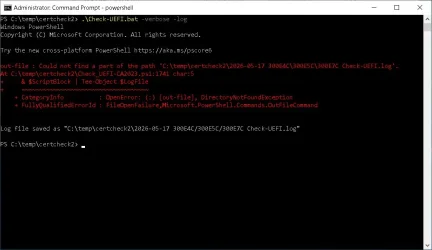
  • And it seems the log function doesn't like special signs in the modelname? Or am I missing something here?
    Zwischenablage_05-17-2026_01.webp
 
Last edited:

My Computer My Computer

At a glance

W10
OS
W10
I hope I don't have to update secure boot certs often.
 

My Computer My Computer

At a glance

windows 11Intel i5-10600kf32gb corsair vengerance proAMD RX 6500XT
OS
windows 11
Computer type
PC/Desktop
Manufacturer/Model
Antec/Case
CPU
Intel i5-10600kf
Motherboard
GIGABYTE Z590 UD AC
Memory
32gb corsair vengerance pro
Graphics Card(s)
AMD RX 6500XT
Sound Card
onboard
Monitor(s) Displays
40" Hisense
Hard Drives
Samsung 850
Samsung 870
Seagate 2TB
PSU
EVGA GQ 750
Just do nothing! All my PCs have been updated via Windows Update as confirmed by running the script Detect-SecureBootCertUpdateStatus.ps1 in C:\Windows\SecureBoot\ExampleRolloutScripts installed in the latest monthly update.

Unfortunately it's not all people that were so lucky
Many older PC are not getting updated BIOS to allow MS to update it automatically
Even newer PC sometimes have issue with the automatic update from MS
As you can see from this thread, other threads, other forums and multiple techno reports of PC not getting updated or just not getting updated successfully
That's why the help Garlin is providing and his scripts are so appreciated

So, all your PC got updated from MS without a itch, good for you, really, good for you
But all people are not that fortunate
 

My Computer My Computer

At a glance

Windows 11
OS
Windows 11
I hope I don't have to update secure boot certs often.
Assuming a Black Lotus-level security disaster doesn't hit again, you shouldn't expect to replace the Secure Boot certs for the next 14 years.

But MS will continue rolling out unplanned security fixes to the boot manager whenever a vulnerability is reported. This means Windows will push a new boot file and a matching SVN to mark the older boot files should be banned. If you've overcome the difficult part of the update (getting the CA 2023 certs installed), then the rest happens automatically – without user intervention.

You won't need any of my scripts, except to randomly confirm everything is up to date. Windows Security Center will give you a green check mark, but won't bother explaining how you got there, in comparison to another PC which didn't get the check mark. The Secure Boot task will skip over some future updates, if it thinks there's something wrong and it can't safely proceed.

Once the CA 2023 hype and drama is done, everyone should relax and learn not to run the scripts every month. The scripts are there to help older PC's and provide deeper detail into the update process, for those who want the extra information.
 

My Computer My Computer

At a glance

Windows 7
OS
Windows 7
UEFI KEK Certs
--------------
Microsoft Corporation KEK CA 2011
Phoenix Kek Example
SEC_PRODUCTION_KekRoot
No KEK CA 2023 was installed, so it's probably an unsupported PC. "Phoenix Kek Example" suggests this is a sloppy factory BIOS implementation, and should probably be wiped (Setup Mode).

And it seems the log function doesn't like special signs in the modelname? Or am I missing something here?
The script tries to use the system's model as the log file's name. So it needs to replace any special characters which would be illegal file characters. I'll have to fix that bug.
 

My Computer My Computer

At a glance

Windows 7
OS
Windows 7
Assuming a Black Lotus-level security disaster doesn't hit again, you shouldn't expect to replace the Secure Boot certs for the next 14 years.

But MS will continue rolling out unplanned security fixes to the boot manager whenever a vulnerability is reported. This means Windows will push a new boot file and a matching SVN to mark the older boot files should be banned. If you've overcome the difficult part of the update (getting the CA 2023 certs installed), then the rest happens automatically – without user intervention.

You won't need any of my scripts, except to randomly confirm everything is up to date. Windows Security Center will give you a green check mark, but won't bother explaining how you got there, in comparison to another PC which didn't get the check mark. The Secure Boot task will skip over some future updates, if it thinks there's something wrong and it can't safely proceed.

Once the CA 2023 hype and drama is done, everyone should relax and learn not to run the scripts every month. The scripts are there to help older PC's and provide deeper detail into the update process, for those who want the extra information.
On the positive side, many of us now better understand the whole Secure Boot and boot manager !
Thanks to you !
 

My Computer My Computer

At a glance

Windows 11
OS
Windows 11
Dear Garlin: May I suggest you rename your zip files to include posting date?
E.g. SecureBoot-CA-2023-Updates-260421.zip intead of SecureBoot-CA-2023-Updates.zip?
Makes it easier to see what's current and more straightforward to groom my Downloads folder in the aftermath...
No big deal, but might be helpful for some (including yours truly).
HTH,
--Ed--
 

My Computers My Computers

  • At a glance

    Windows 11i7-8650U (8th Gen/Kaby Lake)16 GBIntel UHD Graphics 620
    OS
    Windows 11
    Computer type
    Laptop
    Manufacturer/Model
    Lenovo X380 Yoga
    CPU
    i7-8650U (8th Gen/Kaby Lake)
    Motherboard
    20LH000MUS (U3E1)
    Memory
    16 GB
    Graphics Card(s)
    Intel UHD Graphics 620
    Sound Card
    Integrated Conexant SmartAudio HD
    Monitor(s) Displays
    FlexView Display
    Screen Resolution
    1920x1080
    Hard Drives
    Toshiba 1 TB PCIe x3 NVMe SSD
    external 5TB Seagate USB-C attached HDD
    PSU
    Lenovo integrated 65W power brick
    Case
    Laptop
    Cooling
    Laptop
    Keyboard
    Integrated Lenovo ThinkPad keyboard
    Mouse
    touchscreen, touchpad
    Internet Speed
    GbE (Spectrum/Charter)
    Browser
    all of em
    Antivirus
    Defender
    Other Info
    Purchased early 2019 as Windows Insider test PC
  • At a glance

    Windows 11Ryzen 5800X128 GB (4x32 DDR5-5600)NVIDIA 3070Ti
    Operating System
    Windows 11
    Computer type
    PC/Desktop
    Manufacturer/Model
    DIY
    CPU
    Ryzen 5800X
    Motherboard
    Asrock B550 Extreme4
    Memory
    128 GB (4x32 DDR5-5600)
    Graphics card(s)
    NVIDIA 3070Ti
    Sound Card
    built-in
    Monitor(s) Displays
    2xDell 2707
    Screen Resolution
    1980x1200
    Hard Drives
    2XNVMe, multiple HDDs from 3 to 12 TB
    PSU
    Seasonic 650
    Case
    NZXT Flo 6
    Cooling
    dual-fan air cooler
    Keyboard
    Logitech Wave
    Mouse
    Logitech Logi
    Internet Speed
    GbE
    Browser
    all of 'em
    Antivirus
    Defender
    Other Info
    temperamental UEFI
@t2s50: This version of the check script replaces any characters in the PC's model name which are illegal file characters.
 

Attachments

My Computer My Computer

At a glance

Windows 7
OS
Windows 7
Dear Garlin: May I suggest you rename your zip files to include posting date?
E.g. SecureBoot-CA-2023-Updates-260421.zip intead of SecureBoot-CA-2023-Updates.zip?
Makes it easier to see what's current and more straightforward to groom my Downloads folder in the aftermath...
No big deal, but might be helpful for some (including yours truly).
HTH,
--Ed--
Been thinking about that. Will change it on the next release. Thanks!
 

My Computer My Computer

At a glance

Windows 7
OS
Windows 7
No KEK CA 2023 was installed, so it's probably an unsupported PC. "Phoenix Kek Example" suggests this is a sloppy factory BIOS implementation, and should probably be wiped (Setup Mode).
No, that's not correct. It's supported, but the KEK isn't installed yet. As written this is the output exactly after recovering from an unsuccessfull revocation-update when secure boot no longer was possible. I did:
1) Disable secure boot in bios settings
2) Restore factory (2011-) secure boot certificates in bios
3) Reboot from an USB- stick where \EFI\Boot\bootx64.efi is replaced by SecureBootRecovery.efi (renamed to bootx64.efi) which applies Windows UEFI CA 2023 to the DB.
4) Enable secure boot in bios settings again
5) Boot again from the unchanged Windows installation (which already had an updated bootmgrfw.efi [SVN 8] as your script correctly states)
6) Run your script which in this state says that bootmgrfw.efi is BANNED (which can't be since the system just booted from it)

Output after applying the other certs and two of three revocations:
Windows PowerShell
Copyright (C) Microsoft Corporation. All rights reserved.

Try the new cross-platform PowerShell Quiet peak, loud view

Windows 10 22H2 (19045.7291)

Secure Boot: ON
Virtualization Based Security: ON
BitLocker on (C:) ON

BIOS Firmware
-------------
SAMSUNG ELECTRONICS CO. 300E4C/300E5C/300E7C
Version: P09RAP
Date: 2013-11-01

Factory Default UEFI PK Cert
----------------------------
(NONE)

UEFI PK Cert
------------
SAMSUNG ELECTRONICS_PK

Factory Default UEFI KEK Certs
------------------------------
(NONE)

UEFI KEK Certs
--------------
Microsoft Corporation KEK CA 2011
Microsoft Corporation KEK 2K CA 2023
Phoenix Kek Example
SEC_PRODUCTION_KekRoot

Factory Default UEFI DB Certs
-----------------------------
(NONE)

UEFI DB Certs
-------------
Microsoft Corporation UEFI CA 2011
Microsoft Windows Production PCA 2011
Microsoft Option ROM UEFI CA 2023
Microsoft UEFI CA 2023
Windows UEFI CA 2023
SEC_PRODUCTION_KeyUEFI

Factory Default UEFI DBX Certs
------------------------------
(NONE)
EFI_CERT_SHA256_GUID Signatures: 0

UEFI DBX Certs
--------------
Microsoft Windows Production PCA 2011
Windows BootMgr SVN 5.0
EFI_CERT_SHA256_GUID Signatures: 282

UEFI Variables
--------------
Credential Guard: ON

EFI Files
---------
Windows Boot Manager [Windows UEFI CA 2023] is ALLOWED.
\\.\HarddiskVolume1\EFI\Microsoft\Boot\bootmgfw.efi
File Version: 28000.322, SVN 8.0

Registry: "WindowsUEFICA2023Capable" = 2
[Windows UEFI CA 2023] in UEFI DB, and Windows starting from CA 2023 Boot Manager.

SkuSiPolicy.p7b is CURRENT.
\\.\HarddiskVolume1\EFI\Microsoft\Boot\SkuSiPolicy.p7b
Version: 3.0.0.14


REQUIRED ACTION
===============
To update the DBX SVN, run the commands:

manage-bde -Protectors -Disable C: -RebootCount 1
reg add HKEY_LOCAL_MACHINE\SYSTEM\CurrentControlSet\Control\Secureboot /v AvailableUpdates /t REG_DWORD /d 0x200 /f
powershell Start-ScheduledTask -TaskName "\Microsoft\Windows\PI\Secure-Boot-Update"

BUT:
After the April 2026 MCUs (and still after the May 2026 MCUs I no longer can have both the revocation for PCA2011 and the latest SVN updates installed. If I try- as your script proposes- the machine no longer sees a secure bootable device, not on the ssd nor on an USB recovery stick.

The order of installation doesn't matter.
- I can install DBX update and SVN update and it will brick when I install the PCA2011 revocation
- I can install DBX update and PCA2011 revocation and it will brick when I install the SVN update

Up to and including March 2026 MCUs all revocations could be installed without any problems.
 
Last edited:

My Computer My Computer

At a glance

W10
OS
W10
@t2s50: This version of the check script replaces any characters in the PC's model name which are illegal file characters.
Thanks a lot, this version did run and write the logfile.

Sorry for Samsung, don't know if there are many (and newer) firmware revisions with special signs from other vendors out there!

(But the main question still is why I can only install two of three revocations after April 2026 MCUs? It doesn't kill me to have a SVN of 5 instead of 8, but I still wonder what MS did change from April on?)
 

My Computer My Computer

At a glance

W10
OS
W10
In your first log, there was no KEK CA 2023 installed. Boot Manager's cert is checked against inclusion in the DB (and required to supported by the underlying KEK) and not banned in DBX. That's following the logic on how the chain of trust works.

DBXUpdate2024.bin contains the PCA 2011 cert to be added to DBX (for revocation). Additionally, it includes 3 SVN's.
Originally the bundled SVN's were 2.0, then bumped to 5.0.

April 2026 bumped DBXUpdateSVN.bin from 7.0 to 8.0. May 2026 doesn't introduce a new boot manager (AFAIK), so the SVN doesn't change from April to May.

Installing DBXUpdate2024.bin before DBXUpdateSVN.bin, or in the reverse order shouldn't matter. 2024 is the only file that contains a PCA 2011 cert, so that part never conflicts with the SVN.bin. SVN's are really special forms of EFI banned signatures, where it's faked (because it doesn't correspond to a real-world file) and part of the signature hex value is used as a "bitmask" to record a SVN.

Since each SVN represents an unique EFI "signature", the DBX list can hold multiple SVN's in parallel. If you try appending an EFI signature which already exists, the Windows library will ignore a duplicate entry of the same number. If you already had a SVN of 8.0 installed, and then added a DBXUpdateSVN which had SVN 5.0, it should be allowed (according to the UEFI spec), but the boot manager would obey the highest SVN.

I haven't checked the May 2026 updates for differences. Last night I had an accident with my VM, after trying to expand the virtual disk's size. Since Secure Boot was enabled, Windows threw an error and I couldn't recover the volume. So I re-installed Windows. The bad part is I don't have April 2026's files since Windows Update skipped ahead to May. Might have to re-install using April's image so I can see if any of the .bin files changed.
 

My Computer My Computer

At a glance

Windows 7
OS
Windows 7
In your first log, there was no KEK CA 2023 installed. Boot Manager's cert is checked against inclusion in the DB (and required to supported by the underlying KEK) and not banned in DBX. That's following the logic on how the chain of trust works.
OK, thanks. I did have a different understanding of "banned" since for a bootmanager to boot it has to be signed with a non revoked cert stored in DB, no more no less- if there aren't any other revocations installed.

DBXUpdate2024.bin contains the PCA 2011 cert to be added to DBX (for revocation). Additionally, it includes 3 SVN's.
Originally the bundled SVN's were 2.0, then bumped to 5.0.
.......
Thanks for the explanation, I do know that stuff, and it should work as you outlined. Unfortunately my old Samsung laptop no longer follows this knowledge. I can't install both the PCA2011 revocation and the SVN update while keeping a secure- bootable device.

(Attachement and related text removed)
 
Last edited:

My Computer My Computer

At a glance

W10
OS
W10
I never would have gotten this done without the help of the folks on here
Many Thanks
 

My Computer My Computer

At a glance

windows 11Intel i5-10600kf32gb corsair vengerance proAMD RX 6500XT
OS
windows 11
Computer type
PC/Desktop
Manufacturer/Model
Antec/Case
CPU
Intel i5-10600kf
Motherboard
GIGABYTE Z590 UD AC
Memory
32gb corsair vengerance pro
Graphics Card(s)
AMD RX 6500XT
Sound Card
onboard
Monitor(s) Displays
40" Hisense
Hard Drives
Samsung 850
Samsung 870
Seagate 2TB
PSU
EVGA GQ 750

Latest Support Threads

Back
Top Bottom