
Navigation
Install the app
How to install the app on iOS
Follow along with the video below to see how to install our site as a web app on your home screen.
Note: This feature may not be available in some browsers.
More options
Style variation
System
Light
Dark
You are using an out of date browser. It may not display this or other websites correctly.
You should upgrade or use an alternative browser.
You should upgrade or use an alternative browser.
Solved garlin's PowerShell scripts for updating Secure Boot CA 2023
- Thread starter garlin
- Start date
Screen 1 is fully updated and revoked.well hopefully i am good till i die . but wait this is microsoft lol. what do u think master garlin
Screen 2 hasn't finished revocation. Run:
Code:
.\Update-UEFI.bat -RevokeMy Computer
At a glance
Windows 7
- OS
- Windows 7

screen 1 is ur version screen 2 is another version called bo script. which one should i go by lol . and there is a 3 rd one i use and it looks very diffrentScreen 1 is fully updated and revoked.
Screen 2 hasn't finished revocation. Run:
Code:.\Update-UEFI.bat -Revoke
My Computer
At a glance
WINDOWS 11 WINDOWS 10Intel(R) Core(TM) i7 -3770K CPU 3.50 GZ 3501 ...32.0 GB (31.9 GB usable)AMD RADEON TM R5240 INTELL HD GRAPHICS 4600 T...
- OS
- WINDOWS 11 WINDOWS 10
- Computer type
- PC/Desktop
- Manufacturer/Model
- HP H8 1360T
- CPU
- Intel(R) Core(TM) i7 -3770K CPU 3.50 GZ 3501 4 CORE
- Motherboard
- PEGATRON 2AD5
- Memory
- 32.0 GB (31.9 GB usable)
- Graphics Card(s)
- AMD RADEON TM R5240 INTELL HD GRAPHICS 4600 TIGER 1+1 USB
- Sound Card
- AMD HD . IDT
- Monitor(s) Displays
- AOC WAL MART SPECIAL . HP 2311 IX IPS LED DELL 1708 FP
- Screen Resolution
- 1920 X 1080 1600X900 1280X940
- Hard Drives
- 1 FAXING S 100 512GB 1 KINGSTON 120 GB SSD 1 X12 SSD 512 GB
- PSU
- 300 WATT HP
- Case
- FULL
- Cooling
- ON BOARD FAN
- Keyboard
- LOGITEC K 520 WIRELESS
- Mouse
- LOGITEC M 510 WIRELESS
- Internet Speed
- 55 UP 11.2 DOWN
- Browser
- CHROME EDGE
- Antivirus
- WINDOWS SECUIRTY
- Other Info
- NON SUPPORTED HARDWARE FOR WINDOWS 11

Rebooted to BIOS?After you log into the BIOS, you can access Secure Boot (enable or disable Secure Boot under Boot) and modify Secure Boot settings (under Security). The key was setting the BIOS password first.
Secure Boot Mode was fixed at Standard. After I erased Secure Boot settings and rebooted, Secure Boot Mode showed Custom.
My Computer
At a glance
Windows 11 Pro 25H2Intel Core i7-11800H16GB (2x8 GB)RTX 3060 Laptop GPU
- OS
- Windows 11 Pro 25H2
- Computer type
- Laptop
- Manufacturer/Model
- Acer Predator Helios 300 PH314-54-72ZJ
- CPU
- Intel Core i7-11800H
- Motherboard
- TGL
- Memory
- 16GB (2x8 GB)
- Graphics Card(s)
- RTX 3060 Laptop GPU
- Sound Card
- Realtek ALC295
- Monitor(s) Displays
- 1
- Screen Resolution
- 2560 x 1440 @ 165Hz
- Hard Drives
- 1TB NVMe SSD, 512GB NVMe SSD, 1TB 7200 RPM HDD
- Cooling
- Aeroblade 5th Gen 3D fan
- Keyboard
- RGB Laptop keyboard
- Mouse
- Logitech Lightsync G203
- Internet Speed
- 175 Mbps up/175 Mbps down
- Browser
- Firefox with uBlock Origin and YouTube enhancing extensions..
- Antivirus
- Windows Security with Core Isolation on
I rebooted my computer, used Advanced Startup to enter the BIOS, and viewed Secure Boot Mode.Rebooted to BIOS?
My Computer
At a glance
Windows 11 Pro
- OS
- Windows 11 Pro
- Computer type
- Laptop
- Manufacturer/Model
- Acer TravelMate P215-52
"Bo Script" is a really outdated version from a few months ago. It shouldn't be used since the script has improved a lot since then.screen 1 is ur version screen 2 is another version called bo script. which one should i go by lol . and there is a 3 rd one i use and it looks very diffrent
My Computer
At a glance
Windows 7
- OS
- Windows 7

I think I got why the SBAT gives an error when reading in my laptop...UPDATE: 2026-05-27
[BUG] Hotfix for bad comparison of boot manager's SVN version
I added the OptOut parameter, and the script is looking for the SbatLevel parameter, which doesn't exist since I opted out.
Just to let you know in case you need to revisit that. I also tried today to remove the OptOut key and update SBAT with your script, but nothing happens, SBAT registry keeps itself blank in despite to set AvailableUpdates to 0x400, so I returned the OptOut value so event viewer doesn't add errors each reboot. I tried reseting the Secure Boot values to default and doing the revocation all over again with your script, but nothing happens with SBAT even using the parameter.
Nothing important, but maybe helps in improving the script :)
My Computers
-
At a glance
Windows 11 Pro 25H2AMD Ryzen 5 5600G @ 3.9/4.4Ghz2 x 16 GB DDR4 Kingston Fury Beast 3200 MhzAMD Radeon RX 6600 XT MSI Mech 2X OC Edition ...- OS
- Windows 11 Pro 25H2
- Computer type
- PC/Desktop
- Manufacturer/Model
- Built PC
- CPU
- AMD Ryzen 5 5600G @ 3.9/4.4Ghz
- Motherboard
- MSI B550M-PRO-WiFi Ver. 1.4
- Memory
- 2 x 16 GB DDR4 Kingston Fury Beast 3200 Mhz
- Graphics Card(s)
- AMD Radeon RX 6600 XT MSI Mech 2X OC Edition 8 GB
- Sound Card
- Realtek High Definition Audio (Integrated)
- Monitor(s) Displays
- Samsung C50Rx 27" LED / HP S2031 20" LCD
- Screen Resolution
- 1920 x 1080 px / 1600 x 900 px
- Hard Drives
- WD Blue SN570 NVME M.2 SSD [1 TB] -- External Drives: - WD Scorpion Blue 250 GB 5400 RPM (Data Backup) - Hitachi 500 GB 5400 RPM (Software / ISOs Backup) - Toshiba MQ01ABD100 1 TB 5400 RPM (OS Images) - HGST TravelStar 7K1000 1 TB, 7200 RPM USB 3.0 - ADATA SU800 2TB SSD USB 3.0
- PSU
- Corsair RM750e 750W Fully Modular
- Case
- Naceb Hydra NA-1602
- Cooling
- Naceb Orpheus x 3 (Front) + Naceb Cepheus 1200 RPM Max (Rear) + ThemalRight Assasin X 90 SE (CPU)
- Keyboard
- Logitech MK470 Wireless
- Mouse
- Logitech MK470 Wireless
- Internet Speed
- 200 MB Symetrical
- Browser
- Firefox / Brave / Edge
- Antivirus
- Windows Defender
- Other Info
- - VMs: WMware Player - Windows 8.1 Pro x64 / Windows 11 Pro
- Wacom Intuos Pro Small Tablet PTH-460
-
At a glance
Windows 11 Pro 25H2AMD Ryzen 7 7730U @ 2.0/4.5 Ghz2 x 16 GB Kingston Fury Impact DDR4 3200 MhzRadeon (tm) Graphics Vega 8 (512 MB)- Operating System
- Windows 11 Pro 25H2
- Computer type
- Laptop
- Manufacturer/Model
- HP Pavilion 15-eh3000la (80M53LA)
- CPU
- AMD Ryzen 7 7730U @ 2.0/4.5 Ghz
- Motherboard
- HP 8BC7
- Memory
- 2 x 16 GB Kingston Fury Impact DDR4 3200 Mhz
- Graphics card(s)
- Radeon (tm) Graphics Vega 8 (512 MB)
- Sound Card
- Realtek High Definition Audio (Integrated)
- Monitor(s) Displays
- AU Optronics
- Screen Resolution
- 1920 x 1080 px (125% size)
- Hard Drives
- WD Blue SN570 1TB NVME M.2 Drive
- PSU
- 45 Watt Charger
- Cooling
- Laptop Cooling Pad
- Keyboard
- Free Wolf Foldable Portable Keyboard
- Mouse
- Free Wolf Wireless Mouse
- Internet Speed
- 200 MB Symetrical
- Browser
- Firefox / Brave / Edge
- Antivirus
- Windows Defender
- Other Info
- - 41mWh battery.
- Wacom Intuos Pro Small Tablet PTH-460
Here's a confession: My update script can't actually set the SBAT variable, it's a restricted operation limited to the Secure Boot task. So I'm calling the task with AvailableUpdates=0x400.
What I've found in browsing the Event Logs, is the task won't apply the SBAT under two conditions:
The task should be applying the SBAT when you're in a revoke situation. I have seen PC's report the SBAT when the old version of the update script didn't touch the setting. I wouldn't worry too much about a missing SBAT, it's there just in case you run Linux.
Real Linux users get mad because Windows is writing the SBAT, instead of Linux. Which is why the OptOut setting is provided.
What I've found in browsing the Event Logs, is the task won't apply the SBAT under two conditions:
- you're opted out
- Secure Boot is disabled (there's a specific TPM-WMI warning to the effect of "can't apply SBAT because Secure Boot is off")
The task should be applying the SBAT when you're in a revoke situation. I have seen PC's report the SBAT when the old version of the update script didn't touch the setting. I wouldn't worry too much about a missing SBAT, it's there just in case you run Linux.
Real Linux users get mad because Windows is writing the SBAT, instead of Linux. Which is why the OptOut setting is provided.
My Computer
At a glance
Windows 7
- OS
- Windows 7

That one works a lot better.Missing a ')' on the line. I should probably not post before having my caffeine in the morning.

My Computers
-
At a glance
Win 11 Pro 25H2, Build 26200.9550.Intel Core i5 14500, 14th Generation64GB DDR4GeForce RTX 4060- OS
- Win 11 Pro 25H2, Build 26200.9550.
- Computer type
- PC/Desktop
- Manufacturer/Model
- Home Brew
- CPU
- Intel Core i5 14500, 14th Generation
- Motherboard
- Gigabyte B760M G P WIFI
- Memory
- 64GB DDR4
- Graphics Card(s)
- GeForce RTX 4060
- Sound Card
- Chipset Realtek
- Monitor(s) Displays
- LG 45" Ultragear & Acer 24" 1080p
- Screen Resolution
- 5120x1440 & 1920x1080
- Hard Drives
- Crucial P310 2TB 2280 PCIe Gen4 3D NAND NVMe M.2 SSD (O/S)
Silicon Power 2TB US75 NVMe PCIe Gen4 M.2 2280 SSD (backup)
Crucial BX500 2TB 3D NAND (2nd backup)
Seagate 4TB Ironwolf, rotating HDD secondary backup
External off-line backup Drives: 2 NVMe 4TB drives in external enclosures
- PSU
- Thermaltake Toughpower GF3 750W
- Case
- LIAN LI LANCOOL 216 E-ATX PC Case
- Cooling
- Lots of fans!
- Keyboard
- Microsoft Comfort Curve 2000
- Mouse
- Logitech G305
- Internet Speed
- Verizon FiOS 1GB
- Browser
- Firefox
- Antivirus
- Malware Bytes & Windows Defender Security
-
At a glance
Win 11 Pro 25H2, Build 26200.9550.Intel Core i5 1440032GB DDR5Intel 700 Embedded GPU- Operating System
- Win 11 Pro 25H2, Build 26200.9550.
- Computer type
- PC/Desktop
- Manufacturer/Model
- Home Brew
- CPU
- Intel Core i5 14400
- Motherboard
- Gigabyte B760M DS3H AX
- Memory
- 32GB DDR5
- Graphics card(s)
- Intel 700 Embedded GPU
- Sound Card
- Realtek Embedded
- Monitor(s) Displays
- 27" HP 1080p
- Screen Resolution
- 1920x1080
- Hard Drives
- Crucial P310 2TB NVMe Gen4 SSD
Samsung EVO 990 2TB NVMe Gen4 SSD
Samsung 2TB SATA SSD
Seagate 4TB Ironwolf, rotating HDD secondary backup
- PSU
- Thermaltake Smart BM3 650W
- Case
- Okinos Micro ATX Case
- Cooling
- Fans
- Keyboard
- Microsoft Comfort Curve 2000
- Mouse
- Logitech G305
- Internet Speed
- Verizon FiOS 1GB
- Browser
- Firefox
- Antivirus
- Malware Bytes & Windows Defender Security
-
Nimo N171 17" Laptop, (Intel i3-1215U, 16GB RAM, 2TB NVMe, Win11 Pro)
Acemagic Vista Mini PC V1 (Intel N150, 16GB RAM, 1TB NVMe, Win11 Pro)
HP ENVY h8-1540t, (24GB RAM, 2TB SSD, 2TB HDD, Win11 Pro)
Welp, I'll just leave the optout setting then.Here's a confession: My update script can't actually set the SBAT variable, it's a restricted operation limited to the Secure Boot task. So I'm calling the task with AvailableUpdates=0x400.
What I've found in browsing the Event Logs, is the task won't apply the SBAT under two conditions:
- you're opted out- Secure Boot is disabled (there's a specific TPM-WMI warning to the effect of "can't apply SBAT because Secure Boot is off")
The task should be applying the SBAT when you're in a revoke situation. I have seen PC's report the SBAT when the old version of the update script didn't touch the setting. I wouldn't worry too much about a missing SBAT, it's there just in case you run Linux.
Real Linux users get mad because Windows is writing the SBAT, instead of Linux. Which is why the OptOut setting is provided.
Probably I would suggest then for the script to read this key and skip SBAT for systems that opted out... just a personal thing because seeing an error in red can make others panic or think something is wrong when it isn't.
My Computers
-
At a glance
Windows 11 Pro 25H2AMD Ryzen 5 5600G @ 3.9/4.4Ghz2 x 16 GB DDR4 Kingston Fury Beast 3200 MhzAMD Radeon RX 6600 XT MSI Mech 2X OC Edition ...- OS
- Windows 11 Pro 25H2
- Computer type
- PC/Desktop
- Manufacturer/Model
- Built PC
- CPU
- AMD Ryzen 5 5600G @ 3.9/4.4Ghz
- Motherboard
- MSI B550M-PRO-WiFi Ver. 1.4
- Memory
- 2 x 16 GB DDR4 Kingston Fury Beast 3200 Mhz
- Graphics Card(s)
- AMD Radeon RX 6600 XT MSI Mech 2X OC Edition 8 GB
- Sound Card
- Realtek High Definition Audio (Integrated)
- Monitor(s) Displays
- Samsung C50Rx 27" LED / HP S2031 20" LCD
- Screen Resolution
- 1920 x 1080 px / 1600 x 900 px
- Hard Drives
- WD Blue SN570 NVME M.2 SSD [1 TB] -- External Drives: - WD Scorpion Blue 250 GB 5400 RPM (Data Backup) - Hitachi 500 GB 5400 RPM (Software / ISOs Backup) - Toshiba MQ01ABD100 1 TB 5400 RPM (OS Images) - HGST TravelStar 7K1000 1 TB, 7200 RPM USB 3.0 - ADATA SU800 2TB SSD USB 3.0
- PSU
- Corsair RM750e 750W Fully Modular
- Case
- Naceb Hydra NA-1602
- Cooling
- Naceb Orpheus x 3 (Front) + Naceb Cepheus 1200 RPM Max (Rear) + ThemalRight Assasin X 90 SE (CPU)
- Keyboard
- Logitech MK470 Wireless
- Mouse
- Logitech MK470 Wireless
- Internet Speed
- 200 MB Symetrical
- Browser
- Firefox / Brave / Edge
- Antivirus
- Windows Defender
- Other Info
- - VMs: WMware Player - Windows 8.1 Pro x64 / Windows 11 Pro
- Wacom Intuos Pro Small Tablet PTH-460
-
At a glance
Windows 11 Pro 25H2AMD Ryzen 7 7730U @ 2.0/4.5 Ghz2 x 16 GB Kingston Fury Impact DDR4 3200 MhzRadeon (tm) Graphics Vega 8 (512 MB)- Operating System
- Windows 11 Pro 25H2
- Computer type
- Laptop
- Manufacturer/Model
- HP Pavilion 15-eh3000la (80M53LA)
- CPU
- AMD Ryzen 7 7730U @ 2.0/4.5 Ghz
- Motherboard
- HP 8BC7
- Memory
- 2 x 16 GB Kingston Fury Impact DDR4 3200 Mhz
- Graphics card(s)
- Radeon (tm) Graphics Vega 8 (512 MB)
- Sound Card
- Realtek High Definition Audio (Integrated)
- Monitor(s) Displays
- AU Optronics
- Screen Resolution
- 1920 x 1080 px (125% size)
- Hard Drives
- WD Blue SN570 1TB NVME M.2 Drive
- PSU
- 45 Watt Charger
- Cooling
- Laptop Cooling Pad
- Keyboard
- Free Wolf Foldable Portable Keyboard
- Mouse
- Free Wolf Wireless Mouse
- Internet Speed
- 200 MB Symetrical
- Browser
- Firefox / Brave / Edge
- Antivirus
- Windows Defender
- Other Info
- - 41mWh battery.
- Wacom Intuos Pro Small Tablet PTH-460
Ok so now run Update_UEFI-CA2023.ps1
And if I remember correctly the last time you were in that state, the update script will tell you at the end to load the PK from the BIOS. If I also remember correctly, I think you had loaded the PK "WindowsOEMDevicesPK.der", since in your case your manufacturer, PC Specialist LTD, has not provided MS with a PK.
Then run the check script with "-verbose -audit" again, and hopefully it will tell you that all you need to do is run the update with "-revoke" or wait for MS to do it later.

Please see the result below after running the update script and manually loading the PK per instructions. However note that Secure Boot is Disabled. If I enable it I get the boot failure.
Code:
.\check_UEFI-CA2023.ps1 -Verbose -audit
Windows 11 25H2 (26200.8457)

Secure Boot: OFF (Audit Report runs as ON)
Virtualization Based Security: OFF
BitLocker on (C:) OFF

BIOS Firmware
-------------
    PC Specialist LTD Intel Z370
    Version: 2101
    Date: 2024-01-19

Factory Default UEFI PK Cert
----------------------------
    ASUSTeK MotherBoard PK Certificate

UEFI PK Cert
------------
    Windows OEM Devices PK

Factory Default UEFI KEK Certs
------------------------------
    Microsoft Corporation KEK CA 2011
    Canonical Ltd. Master Certificate Authority
    ASUSTeK MotherBoard KEK Certificate

UEFI KEK Certs
--------------
    Microsoft Corporation KEK CA 2011
    Microsoft Corporation KEK 2K CA 2023

Factory Default UEFI DB Certs
-----------------------------
    Microsoft Corporation UEFI CA 2011
    Microsoft Windows Production PCA 2011
    Canonical Ltd. Master Certificate Authority
    ASUSTeK MotherBoard SW Key Certificate
    ASUSTeK Notebook SW Key Certificate

UEFI DB Certs
-------------
    Microsoft Corporation UEFI CA 2011
    Microsoft Windows Production PCA 2011
    Microsoft Option ROM UEFI CA 2023
    Microsoft UEFI CA 2023
    Windows UEFI CA 2023

Factory Default UEFI DBX Certs
------------------------------
    (NONE)
    EFI_CERT_SHA256_GUID Signatures: 77

UEFI DBX Certs
--------------
    (NONE)
    Windows BootMgr SVN is MISSING.
    EFI_CERT_SHA256_GUID Signatures: 431

UEFI Variables
--------------
    Credential Guard: ON
    SBAT (Linux only): sbat,1,2025051000 / shim,4 / grub,5 / grub.proxmox,2

EFI Files
---------
    Windows Boot Manager [Windows UEFI CA 2023] will be ALLOWED.
        \\.\HarddiskVolume4\EFI\Microsoft\Boot\bootmgfw.efi
        File Version: 28000.326, SVN 8.0

    Registry: "WindowsUEFICA2023Capable" = 2
        [Windows UEFI CA 2023] in UEFI DB, and Windows starting from CA 2023 Boot Manager.


AUDIT REPORT
============
1.  Secure Boot is DISABLED
2.  [Production PCA 2011] is missing from UEFI DBX
3.  DBX Updates are missing from UEFI DBX
4.  Windows BootMgr SVN is missing from UEFI DBX


REQUIRED ACTION
===============
To REVOKE the [PCA 2011] cert, run the commands:

    reg add HKEY_LOCAL_MACHINE\SYSTEM\CurrentControlSet\Control\Secureboot /v AvailableUpdates /t REG_DWORD /d 0x282 /f
    powershell Start-ScheduledTask -TaskName "\Microsoft\Windows\PI\Secure-Boot-Update"
My Computer
At a glance
Windows 11
- OS
- Windows 11
- Computer type
- PC/Desktop
- Manufacturer/Model
- Asus
I'm not sure why your PC doesn't accept the current settings. They're exactly right. Other than trying to reflash the BIOS (which sometimes works) to reset the BIOS.
My Computer
At a glance
Windows 7
- OS
- Windows 7
If Secure Boot settings were erased, reboot into your computer after viewing Secure Boot Mode in the BIOS and update the certificates.I rebooted my computer, used Advanced Startup to enter the BIOS, and viewed Secure Boot Mode.
My Computer
At a glance
Windows 11 Pro
- OS
- Windows 11 Pro
- Computer type
- Laptop
- Manufacturer/Model
- Acer TravelMate P215-52
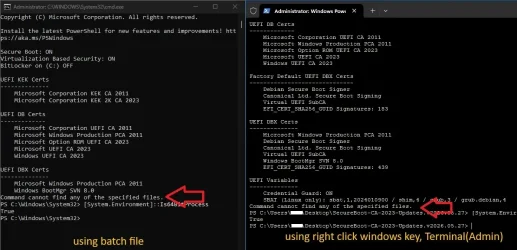
I think I am, in powershell when I run: [System.Environment]::Is64BitProcess, it comes back True.Are you using the 32-bit version of PowerShell? There was a fix for "cannot find any specified files" a few releases back.
I'm now using the latest file from SecureBoot-CA-2023-Updates.v2026.05.27 :
The error only occurs if I run the batch file Check-UEFI.bat (Run as Admin),
if I use.. right click windows key, Terminal(Admin), I don't get the error but then it falters after the SBAT section?
edit... installed PowerShell 7.6.2 getting the same
Attachments
Last edited:
My Computer
At a glance
windows 11 pro
- OS
- windows 11 pro
- Computer type
- PC/Desktop
- Manufacturer/Model
- geekom a5 5800h 170W PSU
I updated my system successfully with many thanks to Garlin.
There is an updated Motherboard Bios to fix a DDR5 vulnerability.
I have updated the Bios previously but I am wondering if the Certificate Upgrades may cause boot issues if I flash the Bios?
There is an updated Motherboard Bios to fix a DDR5 vulnerability.
I have updated the Bios previously but I am wondering if the Certificate Upgrades may cause boot issues if I flash the Bios?
My Computer
At a glance
Windows 11AMD Ryzen 8700G64 GBOnboard
- OS
- Windows 11
- Computer type
- PC/Desktop
- Manufacturer/Model
- Generic
- CPU
- AMD Ryzen 8700G
- Motherboard
- Gigabyte B650 UD AC
- Memory
- 64 GB
- Graphics Card(s)
- Onboard
- Sound Card
- Onboard
- Monitor(s) Displays
- Del U2723QE
- Screen Resolution
- 3840 x 2160
- Hard Drives
- Corsiar MP600 1TB
- PSU
- Silverstone 750 GOLD
- Case
- Silverstone FARA 513
Normally, flashing the BIOS should not change the current certs (which are stored in NVRAM).I updated my system successfully with many thanks to Garlin.
There is an updated Motherboard Bios to fix a DDR5 vulnerability.
I have updated the Bios previously but I am wondering if the Certificate Upgrades may cause boot issues if I flash the Bios?
A new BIOS can have a different set of factory default certs. But it can only go in one direction (factory certs added to NVRAM), but not in the other direction. If updating the BIOS corrupts the NVRAM, you can always reset to factory defaults and repeat the same update process you successfully performed the first time.
My Computer
At a glance
Windows 7
- OS
- Windows 7
(Repost from another thread)
I have two Acer laptops running 25H2 and with the InsydeH20 UEFI BIOS. Windows update did a partial certificate update but failed as the new KEK has not been provided by the OEM. Using garlin's manual suggestion I copied "microsoft corporation kek 2k ca 2023.der" to the EFI folder. The BIOS appears to have the option to add it but I cannot see the file to select it.
Will running garlin's update script perform the update using the Microsoft KEK?
If I wait is it likely that Windows will retry and eventually succeed using either an OEM or Microsoft KEK?
Garlin noted in the other thread: "In order to see the file, you should browse the listed disk devices for the cert file. If it's under a subfolder, you will have to change folders to find it." The BIOS option I used was "Select an UEFI file as trusted for executing". When I do that it lists HDD0 and hitting enter again appears to select <EFI>. That has a list of folders but no files. I have confirmed by browsing the partition that the .der file is in the EFI folder.
I have two Acer laptops running 25H2 and with the InsydeH20 UEFI BIOS. Windows update did a partial certificate update but failed as the new KEK has not been provided by the OEM. Using garlin's manual suggestion I copied "microsoft corporation kek 2k ca 2023.der" to the EFI folder. The BIOS appears to have the option to add it but I cannot see the file to select it.
Will running garlin's update script perform the update using the Microsoft KEK?
If I wait is it likely that Windows will retry and eventually succeed using either an OEM or Microsoft KEK?
Garlin noted in the other thread: "In order to see the file, you should browse the listed disk devices for the cert file. If it's under a subfolder, you will have to change folders to find it." The BIOS option I used was "Select an UEFI file as trusted for executing". When I do that it lists HDD0 and hitting enter again appears to select <EFI>. That has a list of folders but no files. I have confirmed by browsing the partition that the .der file is in the EFI folder.
Last edited:
My Computer
At a glance
Windows 11
- OS
- Windows 11
- Computer type
- Laptop
- Manufacturer/Model
- Acer
- Local time
- 12:41 PM
- Posts
- 1,234
- OS
- Windows 11 Education For 25H2
Its only Microsoft KEKs. The OEM won't provide one if its out of support.
My Computers
-
At a glance
Windows 11 Education For 25H2Intel® Core i7 5500u8 GBIntel HD Family Graphics 5500 AMD Firepro 4150M- OS
- Windows 11 Education For 25H2
- Computer type
- Laptop
- Manufacturer/Model
- HP ZBook G2
- CPU
- Intel® Core i7 5500u
- Motherboard
- HP
- Memory
- 8 GB
- Graphics Card(s)
- Intel HD Family Graphics 5500 AMD Firepro 4150M
- Sound Card
- Realtek High Audio
- Hard Drives
- 1 TB SSD
- Mouse
- HP USB Mouse
- Antivirus
- Windows Defender
-
At a glance
Windows 11 Pro For Workstations 25H2Xeon 1535m v632 GBAMD Quadro Pro 4100- Operating System
- Windows 11 Pro For Workstations 25H2
- Computer type
- Laptop
- Manufacturer/Model
- HP Zbook G4
- CPU
- Xeon 1535m v6
- Motherboard
- HP
- Memory
- 32 GB
- Graphics card(s)
- AMD Quadro Pro 4100
- Sound Card
- Bang and Olufson Audio
- Hard Drives
- 1TB SSD
- Mouse
- HP USB Mouse
- Antivirus
- Windows Defender
I'm now using the latest file from SecureBoot-CA-2023-Updates.v2026.05.27 :
The error only occurs if I run the batch file Check-UEFI.bat (Run as Admin),
if I use.. right click windows key, Terminal(Admin), I don't get the error but then it falters after the SBAT section?
edit... installed PowerShell 7.6.2 getting the same
What happens if you're in CMD (Admin), and you run:
Code:
powershell -ep bypass -f \path\Check_UEFI-CA2023.ps1 -Verbose
pwsh -ep bypass -f \path\Check_UEFI-CA2023.ps1 -Verbose
My Computer
At a glance
Windows 7
- OS
- Windows 7
There are four ways to install a new KEK CA 2023:(Repost from another thread)
I have two Acer laptops running 25H2 and with the InsydeH20 UEFI BIOS. Windows update did a partial certificate update but failed as the new KEK has not been provided by the OEM. Using garlin's manual suggestion I copied "microsoft corporation kek 2k ca 2023.der" to the EFI folder. The BIOS appears to have the option to add it but I cannot see the file to select it.
Will running garlin's update script perform the update using the Microsoft KEK?
If I wait is it likely that Windows will retry and eventually succeed using either an OEM or Microsoft KEK?
1. OEM provides the CA 2023 certs in an updated BIOS (best solution).
2. OEM submits a signed KEK CA 2023 to MS, so it can be applied by Windows (next best solution).
3. User adds a KEK CA 2023 by manual key enrollment.
4. User enters Setup Mode by deleting all keys.
The update script tries to figure out which of those scenarios is workable.
Case 1: Script recognizes you have a supported BIOS, and applies any missing certs.
Case 2: Script tries to apply the submitted KEK CA 2023 file, from the MS GitHub for vendor submitted KEK files.
Case 3: Script determines neither 1 or 2 apply, copies the KEK cert file to the EFI partition, under a new "\EFI\Certs" folder. From the UEFI's manual KEK key management menu, navigate the presented disk volumes until you find an \EFI folder. Select the folder and drill down until you find the cert file inside. Apply the file, and restart Windows. Re-run the update script to finish the job.
Case 4: Your UEFI doesn't support manual enrollment, or refuses the key type (mostly Dell's). Then delete all Secure Boot keys from the UEFI menu, and run the update script.
It sounds like you're in Case 3. Rather than manually copy the cert file, run the update script. It will copy the cert file twice for you (one copy is named .der, and another is named .crt since some BIOS'es require a specific file extension).
My Computer
At a glance
Windows 7
- OS
- Windows 7
Similar threads


Latest Support Threads
-
-
Installing 25H2 (on unsupported hardware) has partially bricked laptop.
- Started by Mooly
- Replies: 1
-
 Bug Cut and paste is glitching and not working.
- Started by Alex_S_MrBison
- Replies: 5
-
Need help choosing an SSD for Acer Aspire 5 (515-45) ?
- Started by bdxoul
- Replies: 5
-


Latest Tutorials
-
 Personalization Add or Remove Extract Context Menu for CAB files in Windows 11
- Started by Brink
- Replies: 0
-

-

-
 Accessibility Change Mouse Indicator Activation Method in Windows 11
- Started by Brink
- Replies: 0
-
 Accessibility Enable or Disable Include Screen Reader Audio in Live Captions on Windows 11
- Started by Brink
- Replies: 0