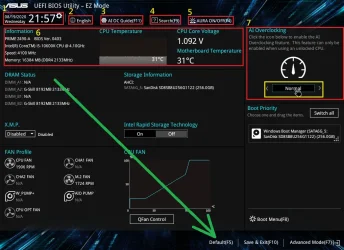
I looked again at the BIOS and the help notes say "users may select all available .efi in FAT32 partitions and add the .efi hash into secure DB". I assume that is why the .der file is not listed. Does that mean the manual part of Case 3 will still fail? There is no other option to add a cert.There are four ways to install a new KEK CA 2023:
1. OEM provides the CA 2023 certs in an updated BIOS (best solution).2. OEM submits a signed KEK CA 2023 to MS, so it can be applied by Windows (next best solution).3. User adds a KEK CA 2023 by manual key enrollment.4. User enters Setup Mode by deleting all keys.
The update script tries to figure out which of those scenarios is workable.
Case 1: Script recognizes you have a supported BIOS, and applies any missing certs.
Case 2: Script tries to apply the submitted KEK CA 2023 file, from the MS GitHub for vendor submitted KEK files.
Case 3: Script determines neither 1 or 2 apply, copies the KEK cert file to the EFI partition, under a new "\EFI\Certs" folder. From the UEFI's manual KEK key management menu, navigate the presented disk volumes until you find an \EFI folder. Select the folder and drill down until you find the cert file inside. Apply the file, and restart Windows. Re-run the update script to finish the job.
Case 4: Your UEFI doesn't support manual enrollment, or refuses the key type (mostly Dell's). Then delete all Secure Boot keys from the UEFI menu, and run the update script.
It sounds like you're in Case 3. Rather than manually copy the cert file, run the update script. It will copy the cert file twice for you (one copy is named .der, and another is named .crt since some BIOS'es require a specific file extension).
My Computer
At a glance
Windows 11
- OS
- Windows 11
- Computer type
- Laptop
- Manufacturer/Model
- Acer