Solved garlin's PowerShell scripts for updating Secure Boot CA 2023


There are four ways to install a new KEK CA 2023:
1. OEM provides the CA 2023 certs in an updated BIOS (best solution).​
2. OEM submits a signed KEK CA 2023 to MS, so it can be applied by Windows (next best solution).​
3. User adds a KEK CA 2023 by manual key enrollment.​
4. User enters Setup Mode by deleting all keys.​

The update script tries to figure out which of those scenarios is workable.

Case 1: Script recognizes you have a supported BIOS, and applies any missing certs.

Case 2: Script tries to apply the submitted KEK CA 2023 file, from the MS GitHub for vendor submitted KEK files.

Case 3: Script determines neither 1 or 2 apply, copies the KEK cert file to the EFI partition, under a new "\EFI\Certs" folder. From the UEFI's manual KEK key management menu, navigate the presented disk volumes until you find an \EFI folder. Select the folder and drill down until you find the cert file inside. Apply the file, and restart Windows. Re-run the update script to finish the job.

Case 4: Your UEFI doesn't support manual enrollment, or refuses the key type (mostly Dell's). Then delete all Secure Boot keys from the UEFI menu, and run the update script.

It sounds like you're in Case 3. Rather than manually copy the cert file, run the update script. It will copy the cert file twice for you (one copy is named .der, and another is named .crt since some BIOS'es require a specific file extension).
I looked again at the BIOS and the help notes say "users may select all available .efi in FAT32 partitions and add the .efi hash into secure DB". I assume that is why the .der file is not listed. Does that mean the manual part of Case 3 will still fail? There is no other option to add a cert.
 

My Computer

System One

  • OS
    Windows 11
    Computer type
    Laptop
    Manufacturer/Model
    Acer
I looked again at the BIOS and the help notes say "users may select all available .efi in FAT32 partitions and add the .efi hash into secure DB". I assume that is why the .der file is not listed. Does that mean the manual part of Case 3 will still fail? There is no other option to add a cert.
I presume by EFI hash they mean an entire .bin file for each UEFI variable (PK, KEK, DB, DBX).
We're now moving to Case 4 (the hardest method).

1. Check if your Windows is using BitLocker to encrypt the system drive, or using Windows Hello PIN to logon. Both options need to be disabled first, otherwise you will be forced to provide a BitLocker recovery password.

2. Check if your Secure Boot has an option for "Custom Mode". You may not have this option.

3. Look for Delete All Keys. Delete keys and boot into Windows.

4. Run the update script, it should recognize you're in Setup Mode and apply a new set of replacement certs (including KEK CA 2023).
 

My Computer

System One

  • OS
    Windows 7
I presume by EFI hash they mean an entire .bin file for each UEFI variable (PK, KEK, DB, DBX).
We're now moving to Case 4 (the hardest method).

1. Check if your Windows is using BitLocker to encrypt the system drive, or using Windows Hello PIN to logon. Both options need to be disabled first, otherwise you will be forced to provide a BitLocker recovery password.

2. Check if your Secure Boot has an option for "Custom Mode". You may not have this option.

3. Look for Delete All Keys. Delete keys and boot into Windows.

4. Run the update script, it should recognize you're in Setup Mode and apply a new set of replacement certs (including KEK CA 2023).
One of the laptops is less than two years old so I would have thought Acer/Insyde need to do something. I'm rather nervous with Case 4 so will wait until the old certs actually expire and only then if necessary resort to deleting all keys.

Thanks again for the advice and your very fast response.
 

My Computer

System One

  • OS
    Windows 11
    Computer type
    Laptop
    Manufacturer/Model
    Acer
If the laptop is two years old, it should have CA 2023 in the factory certs. Run the check script in verbose mode:
Code:
Check-UEFI.bat -Verbose
 

My Computer

System One

  • OS
    Windows 7
I'm not sure why your PC doesn't accept the current settings. They're exactly right. Other than trying to reflash the BIOS (which sometimes works) to reset the BIOS.

Thank you for your suggestion. I have tried reflashing the BIOS and unfortunately it made no difference. This might be a BIOS bug? I have emailed Asus support but no reply so far, possibly because they no longer support this model of motherboard.
 

My Computer

System One

  • OS
    Windows 11
    Computer type
    PC/Desktop
    Manufacturer/Model
    Asus
It might be a BIOS bug. Once you've figured out the UEFI menus, it's supposed to be a straightforward process to apply new certs. There's UEFI standards which BIOS makers are supposed to follow.
 

My Computer

System One

  • OS
    Windows 7
Thank you for your suggestion. I have tried reflashing the BIOS and unfortunately it made no difference. This might be a BIOS bug? I have emailed Asus support but no reply so far, possibly because they no longer support this model of motherboard.
One last attempt...

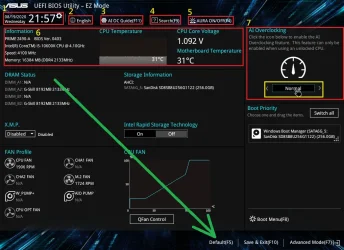
When you first come into the BIOS, you should be in EZ Mode and press F7 to go to Advanced Mode
Or you go directly to Advanced Mode if the BIOS is capable of remembering which mode you last went to
In any case, you need to be in EZ Mode and you can toggle between the 2 modes using F7

There are actually 2 "reset" BIOS available, and so far I think you have always used "Load Optimized Defaults" in Advanced Mode
The other is "Default" available while in EZ Mode

Load Optimized Defaults uses basic settings designed to get the most out of your installed hardware
Default is the actual factory defaults for the motherboard and that's the one you need to use

So try the Default from EZ Mode, it should be F5 like in the image lower I found on the web
You might have to reload the certs afterwards, but I think your getting pretty good at it by now... ;-)

If it's still not working, do these step and never booting into windows in between steps

  1. Reflash BIOS
  2. Power off
  3. Clear CMOS and after that go directly into the BIOS
  4. In BIOS EZ Mode, redo defaults (F5)
  5. Now you can boot to Windows
Again, you might have to reload the certs afterwards​

If either of these 2 technics work, you can then do the "Load Optimized Defaults" in Advanced Mode if you want
It won't impact what you did with "Default" (F5)

I really hope for you this will finally work... 🤞🤞🤞🤞


1779994917990.webp
 

My Computer

System One

  • OS
    Windows 11
If the laptop is two years old, it should have CA 2023 in the factory certs. Run the check script in verbose mode:
Code:
Check-UEFI.bat -Verbose
I previously did several checks and all the 2023 certs are present except KEK.
Here is the output from Check-UEFI.bat -Verbose


Windows 11 25H2 (26200.8457)

Secure Boot: ON
Virtualization Based Security: ON
BitLocker on (C:) OFF

BIOS Firmware
-------------
Acer Swift SFA16-41
Version: V1.09
Date: 2023-10-04

Factory Default UEFI PK Cert
----------------------------
Acer Platform Key

UEFI PK Cert
------------
Acer Platform Key
Manual update of [KEK CA 2023] is REQUIRED.

Factory Default UEFI KEK Certs
------------------------------
Microsoft Corporation KEK CA 2011
Acer Key Exchange Key

UEFI KEK Certs
--------------
Microsoft Corporation KEK CA 2011
Acer Key Exchange Key

Factory Default UEFI DB Certs
-----------------------------
Microsoft Corporation UEFI CA 2011
Microsoft Windows Production PCA 2011
ABO
Acer Database
DisablePW
linpus.com

UEFI DB Certs
-------------
Microsoft Corporation UEFI CA 2011
Microsoft Windows Production PCA 2011
Microsoft Option ROM UEFI CA 2023
Microsoft UEFI CA 2023
Windows UEFI CA 2023
ABO
Acer Database
DisablePW
linpus.com

Factory Default UEFI DBX Certs
------------------------------
(NONE)
EFI_CERT_SHA256_GUID Signatures: 33

UEFI DBX Certs
--------------
(NONE)
Windows BootMgr SVN is MISSING.
EFI_CERT_SHA256_GUID Signatures: 432

UEFI Variables
--------------
SBAT (Linux only): sbat,1,2024010900 / shim,4 / grub,3 / grub.debian,4

EFI Files
---------
Windows Boot Manager [Production PCA 2011] is ALLOWED.
\\.\HarddiskVolume1\EFI\Microsoft\Boot\bootmgfw.efi
File Version: 28000.322, SVN 8.0

Registry: "WindowsUEFICA2023Capable" = 1
[Windows UEFI CA 2023] in UEFI DB.

[OPTIONAL] SkuSiPolicy.p7b (for VBS) is MISSING.
NOT RECOMMENDED for dual-boot setups.


REQUIRED ACTION
===============

Run the command:
Update_UEFI-CA2023.ps1 -Revoke

Finish the UEFI steps to manually add the [KEK CA 2023] cert, if the script provided instructions.
 

My Computer

System One

  • OS
    Windows 11
    Computer type
    Laptop
    Manufacturer/Model
    Acer
BIOS Firmware
-------------
Acer Swift SFA16-41
Version: V1.09
Date: 2023-10-04
There's a newer 1.10 firmware available.

When I check the Confidence Bucket data, some SFA16-41 models fall under the High Confidence group. Which means either the last BIOS has factory support, or Acer submitted a signed KEK file to MS.
Code:
Swift Edge, SFA16-41
Swift Edge, SFA16-41-R5P6
Swift Edge, SFA16-41-R78J
Swift Edge, SFA16-41-R9S6
Swift Edge, Swift SFA16-41
Type1Family, SFA16-41
Type1Family, SFA16-41-R5P6
Type1Family, SFA16-41-R7SU
Type1Family, SFA16-41-R9S6
Type1Family, Swift  Edge SFA16-41
 

My Computer

System One

  • OS
    Windows 7
Wow, for my 2016 HP desktop I just updated, it was painless. I'm amazed that a two year old machine isn't much easier!
 

My Computers

System One System Two

  • OS
    Win 11 Pro 25H2, Build 26200.8524
    Computer type
    PC/Desktop
    Manufacturer/Model
    Home Brew
    CPU
    Intel Core i5 14500
    Motherboard
    Gigabyte B760M G P WIFI
    Memory
    64GB DDR4
    Graphics Card(s)
    GeForce RTX 4060
    Sound Card
    Chipset Realtek
    Monitor(s) Displays
    LG 45" Ultragear, Acer 24" 1080p
    Screen Resolution
    5120x1440, 1920x1080
    Hard Drives
    Crucial P310 2TB 2280 PCIe Gen4 3D NAND NVMe M.2 SSD (O/S)
    Silicon Power 2TB US75 NVMe PCIe Gen4 M.2 2280 SSD (backup)
    Crucial BX500 2TB 3D NAND (2nd backup)
    Seagate 4TB Ironwolf, rotating HDD archive files
    External off-line backup Drives: 2 NVMe 4TB drives in external enclosures
    PSU
    Thermaltake Toughpower GF3 750W
    Case
    LIAN LI LANCOOL 216 E-ATX PC Case
    Cooling
    Lots of fans!
    Keyboard
    Microsoft Comfort Curve 2000
    Mouse
    Logitech G305
    Internet Speed
    Verizon FiOS 1GB
    Browser
    Firefox
    Antivirus
    Malware Bytes & Windows Defender Security
  • Operating System
    Win 11 Pro 25H2, Build 26200.8524
    Computer type
    PC/Desktop
    Manufacturer/Model
    Home Brew
    CPU
    Intel Core i5 14400
    Motherboard
    Gigabyte B760M DS3H AX
    Memory
    32GB DDR5
    Graphics card(s)
    Intel 700 Embedded GPU
    Sound Card
    Realtek Embedded
    Monitor(s) Displays
    27" HP 1080p
    Screen Resolution
    1920x1080
    Hard Drives
    Crucial P310 2TB 2280 PCIe Gen4 eD NAND PCIe SSD
    Samsung EVO 990 2TB NVMe Gen4 SSD
    Samsung 2TB SATA SSD
    PSU
    Thermaltake Smart BM3 650W
    Case
    Okinos Micro ATX Case
    Cooling
    Fans
    Keyboard
    Microsoft Comfort Curve 2000
    Mouse
    Logitech G305
    Internet Speed
    Verizon FiOS 1GB
    Browser
    Firefox
    Antivirus
    Malware Bytes & Windows Defender Security
There's a newer 1.10 firmware available.

When I check the Confidence Bucket data, some SFA16-41 models fall under the High Confidence group. Which means either the last BIOS has factory support, or Acer submitted a signed KEK file to MS.
Code:
Swift Edge, SFA16-41
Swift Edge, SFA16-41-R5P6
Swift Edge, SFA16-41-R78J
Swift Edge, SFA16-41-R9S6
Swift Edge, Swift SFA16-41
Type1Family, SFA16-41
Type1Family, SFA16-41-R5P6
Type1Family, SFA16-41-R7SU
Type1Family, SFA16-41-R9S6
Type1Family, Swift  Edge SFA16-41
Thanks.
I updated the BIOS to v1.10 and it appears unchanged with the same cert update command that I noted in #1981.
What do you suggest as next step? I could wait to see what Windows Update does in due course or should I now run your automatic update script?
 

My Computer

System One

  • OS
    Windows 11
    Computer type
    Laptop
    Manufacturer/Model
    Acer
Just run the update script, either it works or doesn't. You may be lucky if Acer has already submitted a KEK file instead of updating the BIOS.
 

My Computer

System One

  • OS
    Windows 7
Just run the update script, either it works or doesn't. You may be lucky if Acer has already submitted a KEK file instead of updating the BIOS.
Ran the script but same KEK problem as before. It seems Acer have not obliged.
Very annoying because I have a really old Lenovo stuck on Windows 10 and the extended security automatic update worked perfectly.

PS D:\Install\SecureBoot-CA-2023-Updates\SecureBoot-CA-2023-Updates.v2026.05.27> .\Update_UEFI-CA2023.ps1
Downloading "Microsoft Corporation KEK 2K CA 2023.der" from GitHub.
Copying "Microsoft Corporation KEK 2K CA 2023.der" to EFI.
Applying SBAT update for Linux.

REQUIRED ACTION
---------------
Please follow the README_UEFI.TXT instructions, for installing the [KEK CA 2023] cert from BIOS.

Restart Windows, for UEFI updates to take effect.
 

My Computer

System One

  • OS
    Windows 11
    Computer type
    Laptop
    Manufacturer/Model
    Acer
Now you have to check the BIOS menus, and see if there's an option to import KEK keys manually from a file. If you browse the disk volumes, one of them should have an "\EFI" folder. The cert file will be in "\EFI\Certs".
 

My Computer

System One

  • OS
    Windows 7
What happens if you're in CMD (Admin), and you run:
Code:
powershell -ep bypass -f \path\Check_UEFI-CA2023.ps1 -Verbose
pwsh -ep bypass -f \path\Check_UEFI-CA2023.ps1 -Verbose
same deal, older script works, latest from SecureBoot-CA-2023-Updates.v2026.05.27 getting:
.
UEFI Variables
--------------
Credential Guard: ON
SBAT (Linux only): sbat,1,2024010900 / shim,4 / grub,3 / grub.debian,4
Command cannot find any of the specified files.
.
FYI, I don't run Linux only Windows 11 pro. What specified files are missing?
 

My Computer

System One

  • OS
    windows 11 pro
    Computer type
    PC/Desktop
    Manufacturer/Model
    geekom a5 5800h 170W PSU
same deal, older script works, latest from SecureBoot-CA-2023-Updates.v2026.05.27 getting:
.
UEFI Variables
--------------
Credential Guard: ON
SBAT (Linux only): sbat,1,2024010900 / shim,4 / grub,3 / grub.debian,4
Command cannot find any of the specified files.
.
FYI, I don't run Linux only Windows 11 pro. What specified files are missing?
The Secure Boot task wants to apply the SBAT variable to all PC's, regardless of whether you're running Linux (or intend to). The check script is only reporting its presence as confirmation that the normal update process are working.

What's your output from:
Code:
bcdedit /enum '{bootmgr}'

Can you try this version of the script? I think your boot manager entry in the BCD may be "strange". I've tried 4 different methods to reliably determine the location of the currently active EFI partition (it's important not to catch any false positives, since people can have duplicate EFI partitions).

The current method is to use "bcdedit /enum {bootmgr}", and read the device line. As a fallback, it uses an older version of determining the EFI's location. Unfortunately I copied the fallback code from an older version of the script where one of the function names wasn't renamed.
 

Attachments

My Computer

System One

  • OS
    Windows 7
The Secure Boot task wants to apply the SBAT variable to all PC's, regardless of whether you're running Linux (or intend to). The check script is only reporting its presence as confirmation that the normal update process are working.

What's your output from:
Code:
bcdedit /enum '{bootmgr}'

I think your boot manager entry in the BCD may be "strange". I've tried 4 different methods to reliably determine the location of the currently active EFI partition (it's important not to catch any false positives, since people can have duplicate EFI partitions).

The current method is to use "bcdedit /enum {bootmgr}", and read the device line. As a fallback, it uses an older version of determining the EFI's location. Unfortunately I copied the fallback code from an older version of the script where one of the function names wasn't renamed.
Windows Boot Manager
--------------------
identifier {bootmgr}
device partition=D:
path \EFI\Microsoft\Boot\bootmgfw.efi
description Windows Boot Manager
locale en-US
inherit {globalsettings}
default {current}
resumeobject {ee9b294b-b1f2-11ef-a35d-94bb43345ca3}
displayorder {current}
toolsdisplayorder {memdiag}
timeout 30

.... that's using bcdedit /enum {bootmgr} without the '..' quotes.

Same deal ...
Credential Guard: ON
SBAT (Linux only): sbat,1,2024010900 / shim,4 / grub,3 / grub.debian,4
Command cannot find any of the specified files.
 

My Computer

System One

  • OS
    windows 11 pro
    Computer type
    PC/Desktop
    Manufacturer/Model
    geekom a5 5800h 170W PSU
Please run this test script.
result...
PS C:\a> pwsh -ep bypass -f .\TEST.ps1
Get-Item: C:\a\TEST.ps1:80
Line |
80 | Get-Item $BootMgr_File
| ~~~~~~~~~~~~~~~~~~~~~~
| Cannot find path '\\.\HarddiskVolume4\EFI\Microsoft\Boot\bootmgfw.efi' because it does not exist.

It seems that my D: is HarddiskVolume4, as I placed the re-named: C:\Windows\Boot\EFI_EX\bootmgfw_EX.efi into D:\EFI\Microsoft\Boot\ directory, and then the current SecureBoot-CA-2023-Updates.v2026.05.27\Check_UEFI-CA2023.ps1 script now works.

D: is a NTFS partition visible in windows that I use for all types of data.
Why would it be looking into D: for bootmgfw.efi ?
Also should it be pointing to the EFI System Partition?
 
Last edited:

My Computer

System One

  • OS
    windows 11 pro
    Computer type
    PC/Desktop
    Manufacturer/Model
    geekom a5 5800h 170W PSU
Back
Top Bottom