Solved garlin's PowerShell scripts for updating Secure Boot CA 2023


Now you have to check the BIOS menus, and see if there's an option to import KEK keys manually from a file. If you browse the disk volumes, one of them should have an "\EFI" folder. The cert file will be in "\EFI\Certs".
As I said previously, the Acer InsydeH20 interface on my laptops has no option to manage keys or "enroll a file". It seems that the only likely option I could find ("users may select all available .efi in FAT32 partitions and add the .efi hash into secure DB") is intended to add a new boot partition to the secure boot database.

The InsydeH20 interface is relatively simple and a search suggests it can be changed from Easy to Advanced which might reveal a KEK enroll option. Unfortunately neither of my laptops has a setting to change the interface.
 

My Computer

System One

  • OS
    Windows 11
    Computer type
    Laptop
    Manufacturer/Model
    Acer
Also should it be pointing to the EFI System Partition?
I did a little digging, and found a fix for a similar issue: /posts/740701

I'm thinking based on that post, that is what's required in assigning the correct device under the Windows Boot Manager?

My PC only has one disk...

PS> Get-CimInstance -ClassName Win32_BootConfiguration
BootDirectory Name SettingID Caption
------------- ---- --------- -------
C:\WINDOWS BootConfiguration \Device\Harddisk0\Partition1

DISKPART>sel dis 0
DISKPART>lis par
Partition ### Type Size Offset
------------- ---------------- ------- -------
Partition 1 System 100 MB 1024 KB
Partition 2 Reserved 16 MB 101 MB
Partition 3 Primary 435 GB 117 MB
Partition 4 Primary 40 GB 435 GB
Partition 5 Recovery 985 MB 475 GB

FIX...
1. Run diskpart, assign a drive letter to the EFI (System) partition.
select disk 0
select part 1
assign letter=s
exit

2. Update the BCD store
bcdedit /set '{bootmgr}' device partition=S:

3. Go back into diskpart and remove the drive letter
select disk 0
select part 1
remove letter=s
exit

4. Confirm BCD store has switched to a device, instead of partition=D:
bcdedit /enum '{bootmgr}'

Would that be correct? AND do the changes take effect immediately or is a reboot/something else required? :unsure:

Please advise, I don't want to have a non booting PC!
 
Last edited:

My Computer

System One

  • OS
    windows 11 pro
    Computer type
    PC/Desktop
    Manufacturer/Model
    geekom a5 5800h 170W PSU
As I said previously, the Acer InsydeH20 interface on my laptops has no option to manage keys or "enroll a file". It seems that the only likely option I could find ("users may select all available .efi in FAT32 partitions and add the .efi hash into secure DB") is intended to add a new boot partition to the secure boot database.

The InsydeH20 interface is relatively simple and a search suggests it can be changed from Easy to Advanced which might reveal a KEK enroll option. Unfortunately neither of my laptops has a setting to change the interface.
On some BIOS'es, you're required to add an Administrator password before unlocking other features.
 

My Computer

System One

  • OS
    Windows 7
I did a little digging, and found a fix for a similar issue: /posts/740701

I'm thinking based on that post, that is what's required in assigning the correct device under the Windows Boot Manager?

My PC only has one disk...

PS> Get-CimInstance -ClassName Win32_BootConfiguration
BootDirectory Name SettingID Caption
------------- ---- --------- -------
C:\WINDOWS BootConfiguration \Device\Harddisk0\Partition1

DISKPART>sel dis 0
DISKPART>lis par
Partition ### Type Size Offset
------------- ---------------- ------- -------
Partition 1 System 100 MB 1024 KB
Partition 2 Reserved 16 MB 101 MB
Partition 3 Primary 435 GB 117 MB
Partition 4 Primary 40 GB 435 GB
Partition 5 Recovery 985 MB 475 GB

FIX...
1. Run diskpart, assign a drive letter to the EFI (System) partition.
select disk 0
select part 1
assign letter=s
exit
The instructions should work, but you can check if Partition 1 is valid (has a set of normal boot files) before doing the changes.

At this point, do:
dir S:\EFI\Boot
dir S:\EFI\Microsoft\Boot

\EFI\Boot should contain bootx64.efi
\EFI\Microsoft\Boot should contain a whole bunch of folders and files

If that looks good, then continue on. It doesn't make sense that your BCD store points to drive D: (since EFI can only be a FAT32 volume).
 

My Computer

System One

  • OS
    Windows 7
As I said previously, the Acer InsydeH20 interface on my laptops has no option to manage keys or "enroll a file". It seems that the only likely option I could find ("users may select all available .efi in FAT32 partitions and add the .efi hash into secure DB") is intended to add a new boot partition to the secure boot database.

The InsydeH20 interface is relatively simple and a search suggests it can be changed from Easy to Advanced which might reveal a KEK enroll option. Unfortunately neither of my laptops has a setting to change the interface.
On some BIOS'es, you're required to add an Administrator password before unlocking other features.

Lots of people seem to have been able to activate "Advanced settings" by pressing Fn + Tab 3 times while inside the BIOS and then F10 save, exit and reboot to BIOS.
So if like suggested by Garlin, adding an admin or supervisor password, does not let you access advance settings, give the Fn + Tab 3 times a try.
 

My Computer

System One

  • OS
    Windows 11
If that looks good, then continue on. It doesn't make sense that your BCD store points to drive D:
Success! :thumbsup:

...and the >SecureBoot-CA-2023-Updates.v2026.05.27\Check_UEFI-CA2023.ps1 script also works to completion, where it just stopped before.

EFI Files
---------
Windows Boot Manager [Windows UEFI CA 2023] is ALLOWED.
\\.\HarddiskVolume1\EFI\Microsoft\Boot\bootmgfw.efi
File Version: 28000.327, SVN 8.0

Registry: "WindowsUEFICA2023Capable" = 2
[Windows UEFI CA 2023] in UEFI DB, and Windows starting from CA 2023 Boot Manager.

Thank you for your valued assistance Garlin!;-)
 

My Computer

System One

  • OS
    windows 11 pro
    Computer type
    PC/Desktop
    Manufacturer/Model
    geekom a5 5800h 170W PSU
Lots of people seem to have been able to activate "Advanced settings" by pressing Fn + Tab 3 times while inside the BIOS and then F10 save, exit and reboot to BIOS.
So if like suggested by Garlin, adding an admin or supervisor password, does not let you access advance settings, give the Fn + Tab 3 times a try.
Tried the suggestion but the BIOS interface was unchanged after rebooting. Re Garlin's suggestion a supervisor password had to be set before anything important in the BIOS could be changed.
 

My Computer

System One

  • OS
    Windows 11
    Computer type
    Laptop
    Manufacturer/Model
    Acer
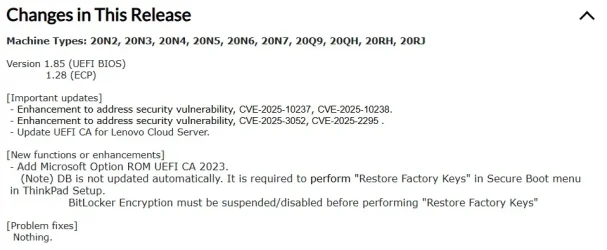
@garlin - using your scripts, I updated the certs on my Lenovo T490 months ago. All is normal. When I powered up the laptop this morning, I got a popup from Lenovo that there is a new UEFI BIOS update - 1.85. Reading the changes, there is one involving the certs and I'm wondering if I install it will it conflict with the changes your scripts made. I have NOT installed the update waiting your reply, thanks!

[New functions or enhancements]
- Add Microsoft Option ROM UEFI CA 2023.
(Note) DB is not updated automatically. It is required to perform "Restore Factory Keys" in Secure Boot menu in ThinkPad Setup.

BitLocker Encryption must be suspended/disabled before performing "Restore Factory Keys"

ReleaseChanges.webp

Full release info - https://support.lenovo.com/us/en/downloads/ds539061

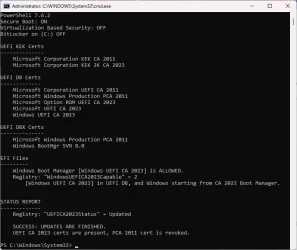
Current status after running your scripts under UEFI BIOS version 1.84 -

Updated.webp
 

My Computers

System One System Two

  • OS
    Windows 11 Pro 25H2
    Computer type
    Laptop
    Manufacturer/Model
    Lenovo T490 (2020 Hardware)
    CPU
    i7-8565U
    Motherboard
    20N20028US
    Memory
    16GB
    Graphics Card(s)
    Intel UHD Graphics 620
    Sound Card
    Realtec Audio
    Monitor(s) Displays
    ASUS VE248
    Screen Resolution
    1920 X 1080
    Hard Drives
    Samsung SSD 970 PRO 512GB NVMe
    Internet Speed
    Frontier fiber 1GB
    Browser
    Chrome, Firefox, Edge
    Antivirus
    Norton 360 Deluxe Plus
    Other Info
    Supported hardware, upgraded from Windows 10 Pro to Windows 11 Pro version 24H2 on 06/01/2025 using the Windows 11 ISO file. Used the enablement package to upgrade to version 25H2 on 10/07/2025. Secure boot enabled. Secure Boot CA 2023 updated.
  • Operating System
    Windows 11 Pro 25H2
    Computer type
    PC/Desktop
    Manufacturer/Model
    Lenovo ThinkCentre M83 (2014 Hardware)
    CPU
    i7-4770 (with SSE4.2, and POPCNT)
    Motherboard
    10AL000GUS
    Memory
    16GB
    Graphics card(s)
    Intel HD Graphics 4600
    Sound Card
    Realtec High Definition Audio
    Monitor(s) Displays
    ASUS VE248
    Screen Resolution
    1920 X 1080
    Hard Drives
    Samsung SSD 860 PRO 1TB SATA
    Internet Speed
    Frontier fiber 1GB
    Browser
    Chrome, Firefox, Edge
    Antivirus
    Norton 360 Deluxe Plus
    Other Info
    Unsupported hardware, upgraded from Windows 10 Pro (TPM 1.2 & unsupported CPU, but does have SSE4.2, and POPCNT) to Windows 11 Pro version 24H2 on 06/15/2025. Added Registry Key HKEY_LOCAL_MACHINE\SYSTEM\Setup\MoSetup – AllowUpgradesWithUnsupportedTPMOrCPU=1 to allow installation using the Windows 11 ISO file. Used the enablement package to upgrade to version 25H2 on 10/08/2025. Secure boot enabled. Secure Boot CA 2023 updated.
@garlin - using your scripts, I updated the certs on my Lenovo T490 months ago. All is normal. When I powered up the laptop this morning, I got a popup from Lenovo that there is a new UEFI BIOS update - 1.85. Reading the changes, there is one involving the certs and I'm wondering if I install it will it conflict with the changes your scripts made. I have NOT installed the update waiting your reply, thanks!

[New functions or enhancements]
- Add Microsoft Option ROM UEFI CA 2023.
(Note) DB is not updated automatically. It is required to perform "Restore Factory Keys" in Secure Boot menu in ThinkPad Setup.

BitLocker Encryption must be suspended/disabled before performing "Restore Factory Keys"
When there's a new BIOS update, you should install it even if you've manually updated the certs. Why? It makes the process easier if you ever need to reset the UEFI in the future (to debug any BIOS-related issues).

The new factory defaults will include all of the CA 2023 certs. Lenovo is indicating after you've installed the BIOS, all users need to "Restore Factory Keys" to get the Option ROM loaded. As you've already finished the update steps, you don't have to do the reset process.

Generally you want the latest BIOS, in case the OEM does fix a Secure Boot implementation issue from an earlier BIOS.
 

My Computer

System One

  • OS
    Windows 7
When there's a new BIOS update, you should install it even if you've manually updated the certs. Why? It makes the process easier if you ever need to reset the UEFI in the future (to debug any BIOS-related issues).

The new factory defaults will include all of the CA 2023 certs. Lenovo is indicating after you've installed the BIOS, all users need to "Restore Factory Keys" to get the Option ROM loaded. As you've already finished the update steps, you don't have to do the reset process.

Generally you want the latest BIOS, in case the OEM does fix a Secure Boot implementation issue from an earlier BIOS.

I assume that if we ever need to do a factory reset, if the BIOS reset also touches the certs, it would revert to CA 2023 certs because those new BIOS upgrades have the CA 2023 in it.

@garlin is my assumption good ?

I also think a BIOS factory reset should not touch the certs, but I'm not a boot certs expert as you... :-)

PS: I also got a BIOS update from Dell this week that stated "This BIOS contains the new 2023 Secure Boot Certificates" and I applied it without any issues.
 

My Computer

System One

  • OS
    Windows 11
@garlin - I updated the BIOS to 1.85. I peeked at the new BIOS Secure Boot Configuration screen but made no changes and just exited. The update added a lot of new functions that were not there before.
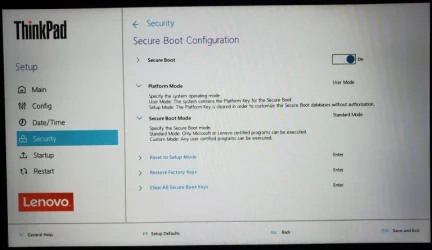
1_85SecureBoot.webp

Just to be sure, I ran your Check Script after the update. It all looks good to me:

PS C:\SecureBoot\SecureBoot-CA-2023-Updates_v2026-05-27> .\Check_UEFI-CA2023.ps1 -verbose

Windows 11 25H2 (26200.8457)

Secure Boot: ON
Virtualization Based Security: OFF
BitLocker on (C:) OFF

BIOS Firmware
-------------
LENOVO 20N20028US
Version: N2IETA7W (1.85 )
Date: 2026-04-06


Factory Default UEFI PK Cert
----------------------------
Lenovo Ltd. PK CA 2012

UEFI PK Cert
------------
Lenovo Ltd. PK CA 2012

Factory Default UEFI KEK Certs
------------------------------
Microsoft Corporation KEK CA 2011
Lenovo Ltd. KEK CA 2012
Microsoft Corporation KEK 2K CA 2023

UEFI KEK Certs
--------------
Microsoft Corporation KEK CA 2011
Lenovo Ltd. KEK CA 2012
Microsoft Corporation KEK 2K CA 2023

Factory Default UEFI DB Certs
-----------------------------
Microsoft Corporation UEFI CA 2011
Microsoft Windows Production PCA 2011
ThinkPad Product CA 2012
Lenovo UEFI CA 2014
Microsoft Option ROM UEFI CA 2023
Microsoft UEFI CA 2023
Windows UEFI CA 2023

UEFI DB Certs
-------------
Microsoft Corporation UEFI CA 2011
Microsoft Windows Production PCA 2011
ThinkPad Product CA 2012
Lenovo UEFI CA 2014
Microsoft Option ROM UEFI CA 2023
Microsoft UEFI CA 2023
Windows UEFI CA 2023

Factory Default UEFI DBX Certs
------------------------------
Debian Secure Boot Signer
Canonical Ltd. Secure Boot Signing
EFI_CERT_SHA256_GUID Signatures: 894

UEFI DBX Certs
--------------
Microsoft Windows Production PCA 2011
Windows BootMgr SVN 8.0
EFI_CERT_SHA256_GUID Signatures: 491

UEFI Variables
--------------
Credential Guard: ON
SBAT (Linux only): sbat,1,2024010900 / shim,4 / grub,3 / grub.debian,4

EFI Files
---------
Windows Boot Manager [Windows UEFI CA 2023] is ALLOWED.
\\.\HarddiskVolume2\EFI\Microsoft\Boot\bootmgfw.efi
File Version: 28000.326, SVN 8.0

Registry: "WindowsUEFICA2023Capable" = 2
[Windows UEFI CA 2023] in UEFI DB, and Windows starting from CA 2023 Boot Manager.


STATUS REPORT
-------------
Registry: "UEFICA2023Status" = Updated

SUCCESS: UPDATES ARE FINISHED.
UEFI CA 2023 certs are present, PCA 2011 cert is revoked.

PS C:\SecureBoot\SecureBoot-CA-2023-Updates_v2026-05-27>

 

My Computers

System One System Two

  • OS
    Windows 11 Pro 25H2
    Computer type
    Laptop
    Manufacturer/Model
    Lenovo T490 (2020 Hardware)
    CPU
    i7-8565U
    Motherboard
    20N20028US
    Memory
    16GB
    Graphics Card(s)
    Intel UHD Graphics 620
    Sound Card
    Realtec Audio
    Monitor(s) Displays
    ASUS VE248
    Screen Resolution
    1920 X 1080
    Hard Drives
    Samsung SSD 970 PRO 512GB NVMe
    Internet Speed
    Frontier fiber 1GB
    Browser
    Chrome, Firefox, Edge
    Antivirus
    Norton 360 Deluxe Plus
    Other Info
    Supported hardware, upgraded from Windows 10 Pro to Windows 11 Pro version 24H2 on 06/01/2025 using the Windows 11 ISO file. Used the enablement package to upgrade to version 25H2 on 10/07/2025. Secure boot enabled. Secure Boot CA 2023 updated.
  • Operating System
    Windows 11 Pro 25H2
    Computer type
    PC/Desktop
    Manufacturer/Model
    Lenovo ThinkCentre M83 (2014 Hardware)
    CPU
    i7-4770 (with SSE4.2, and POPCNT)
    Motherboard
    10AL000GUS
    Memory
    16GB
    Graphics card(s)
    Intel HD Graphics 4600
    Sound Card
    Realtec High Definition Audio
    Monitor(s) Displays
    ASUS VE248
    Screen Resolution
    1920 X 1080
    Hard Drives
    Samsung SSD 860 PRO 1TB SATA
    Internet Speed
    Frontier fiber 1GB
    Browser
    Chrome, Firefox, Edge
    Antivirus
    Norton 360 Deluxe Plus
    Other Info
    Unsupported hardware, upgraded from Windows 10 Pro (TPM 1.2 & unsupported CPU, but does have SSE4.2, and POPCNT) to Windows 11 Pro version 24H2 on 06/15/2025. Added Registry Key HKEY_LOCAL_MACHINE\SYSTEM\Setup\MoSetup – AllowUpgradesWithUnsupportedTPMOrCPU=1 to allow installation using the Windows 11 ISO file. Used the enablement package to upgrade to version 25H2 on 10/08/2025. Secure boot enabled. Secure Boot CA 2023 updated.
I assume that if we ever need to do a factory reset, if the BIOS reset also touches the certs, it would revert to CA 2023 certs because those new BIOS upgrades have the CA 2023 in it.

@garlin is my assumption good ?

I also think a BIOS factory reset should not touch the certs, but I'm not a boot certs expert as you... :-)

PS: I also got a BIOS update from Dell this week that stated "This BIOS contains the new 2023 Secure Boot Certificates" and I applied it without any issues.
A factory reset will delete all current certs, and re-install only the certs provided in the factory defaults.

Newer BIOS'es will restore the complete set of CA 2011 & CA 2023 certs, but will undo the revocation of CA 2011. You just have to repeat the revocation process from Windows. Some BIOS'es will not include the Option ROM cert (that's an OEM decision). You can repeat the update process to install the Option ROM.

Older BIOS'es will restore the complete set of CA 2011 certs, and undo the revocation of CA 2011. You will have to repeat whatever manual steps you performed the first time to update the certs. If you're on a legacy PC, hopefully you'll never have to revisit this unless an accident corrupts your BIOS's settings.
 

My Computer

System One

  • OS
    Windows 7
@garlin - I updated the BIOS to 1.85. I peeked at the new BIOS Secure Boot Configuration screen but made no changes and just exited. The update added a lot of new functions that were not there before.
It's great that Lenovo has refreshed the BIOS (even this late in the game), and tried to make the UI more presentable. I believe Acer has a round of BIOS updates scheduled for mid-June.
 

My Computer

System One

  • OS
    Windows 7
A factory reset will delete all current certs, and re-install only the certs provided in the factory defaults.

Newer BIOS'es will restore the complete set of CA 2011 & CA 2023 certs, but will undo the revocation of CA 2011. You just have to repeat the revocation process from Windows. Some BIOS'es will not include the Option ROM cert (that's an OEM decision). You can repeat the update process to install the Option ROM.

Older BIOS'es will restore the complete set of CA 2011 certs, and undo the revocation of CA 2011. You will have to repeat whatever manual steps you performed the first time to update the certs. If you're on a legacy PC, hopefully you'll never have to revisit this unless an accident corrupts your BIOS's settings.
Understood
Thanks
 

My Computer

System One

  • OS
    Windows 11
It's great that Lenovo has refreshed the BIOS (even this late in the game), and tried to make the UI more presentable. I believe Acer has a round of BIOS updates scheduled for mid-June.
I checked my older M83 desktop but there is no BIOS update for it. I'm not surprised considering it's age. Your Scripts and Mosby got all my certs up to date so that machine is fully updated:

PS C:\SecureBoot\SecureBoot-CA-2023-Updates_v2026-05-27> .\Check_UEFI-CA2023.ps1 -verbose

Windows 11 25H2 (26200.8457)

Secure Boot: ON
Virtualization Based Security: OFF
BitLocker on (C:) OFF

BIOS Firmware
-------------
LENOVO 10AL000GUS
Version: FBKTE0AUS
Date: 2021-12-22

Factory Default UEFI PK Cert
----------------------------
(NONE)

UEFI PK Cert
------------
Mosby Generated PK [2025.12.22]

Factory Default UEFI KEK Certs
------------------------------
(NONE)

UEFI KEK Certs
--------------
Microsoft Corporation KEK CA 2011
Microsoft Corporation KEK 2K CA 2023

Factory Default UEFI DB Certs
-----------------------------
(NONE)

UEFI DB Certs
-------------
MosbyKey [2025.12.22]
Microsoft Corporation UEFI CA 2011
Microsoft Windows Production PCA 2011
Microsoft Option ROM UEFI CA 2023
Microsoft UEFI CA 2023
Windows UEFI CA 2023

Factory Default UEFI DBX Certs
------------------------------
(NONE)
EFI_CERT_SHA256_GUID Signatures: 0

UEFI DBX Certs
--------------
Microsoft Windows Production PCA 2011
Windows BootMgr SVN 8.0
EFI_CERT_SHA256_GUID Signatures: 440

UEFI Variables
--------------
Credential Guard: ON
SBAT (Linux only): sbat,1,2025051000 / shim,4 / grub,5 / grub.proxmox,2

EFI Files
---------
Windows Boot Manager [Windows UEFI CA 2023] is ALLOWED.
\\.\HarddiskVolume1\EFI\Microsoft\Boot\bootmgfw.efi
File Version: 28000.326, SVN 8.0

Registry: "WindowsUEFICA2023Capable" = 2
[Windows UEFI CA 2023] in UEFI DB, and Windows starting from CA 2023 Boot Manager.


STATUS REPORT
-------------
Registry: "UEFICA2023Status" = Updated

SUCCESS: UPDATES ARE FINISHED.
UEFI CA 2023 certs are present, PCA 2011 cert is revoked.

PS C:\SecureBoot\SecureBoot-CA-2023-Updates_v2026-05-27>
 

My Computers

System One System Two

  • OS
    Windows 11 Pro 25H2
    Computer type
    Laptop
    Manufacturer/Model
    Lenovo T490 (2020 Hardware)
    CPU
    i7-8565U
    Motherboard
    20N20028US
    Memory
    16GB
    Graphics Card(s)
    Intel UHD Graphics 620
    Sound Card
    Realtec Audio
    Monitor(s) Displays
    ASUS VE248
    Screen Resolution
    1920 X 1080
    Hard Drives
    Samsung SSD 970 PRO 512GB NVMe
    Internet Speed
    Frontier fiber 1GB
    Browser
    Chrome, Firefox, Edge
    Antivirus
    Norton 360 Deluxe Plus
    Other Info
    Supported hardware, upgraded from Windows 10 Pro to Windows 11 Pro version 24H2 on 06/01/2025 using the Windows 11 ISO file. Used the enablement package to upgrade to version 25H2 on 10/07/2025. Secure boot enabled. Secure Boot CA 2023 updated.
  • Operating System
    Windows 11 Pro 25H2
    Computer type
    PC/Desktop
    Manufacturer/Model
    Lenovo ThinkCentre M83 (2014 Hardware)
    CPU
    i7-4770 (with SSE4.2, and POPCNT)
    Motherboard
    10AL000GUS
    Memory
    16GB
    Graphics card(s)
    Intel HD Graphics 4600
    Sound Card
    Realtec High Definition Audio
    Monitor(s) Displays
    ASUS VE248
    Screen Resolution
    1920 X 1080
    Hard Drives
    Samsung SSD 860 PRO 1TB SATA
    Internet Speed
    Frontier fiber 1GB
    Browser
    Chrome, Firefox, Edge
    Antivirus
    Norton 360 Deluxe Plus
    Other Info
    Unsupported hardware, upgraded from Windows 10 Pro (TPM 1.2 & unsupported CPU, but does have SSE4.2, and POPCNT) to Windows 11 Pro version 24H2 on 06/15/2025. Added Registry Key HKEY_LOCAL_MACHINE\SYSTEM\Setup\MoSetup – AllowUpgradesWithUnsupportedTPMOrCPU=1 to allow installation using the Windows 11 ISO file. Used the enablement package to upgrade to version 25H2 on 10/08/2025. Secure boot enabled. Secure Boot CA 2023 updated.
As I said previously, the Acer InsydeH20 interface on my laptops has no option to manage keys or "enroll a file". It seems that the only likely option I could find ("users may select all available .efi in FAT32 partitions and add the .efi hash into secure DB") is intended to add a new boot partition to the secure boot database.

The InsydeH20 interface is relatively simple and a search suggests it can be changed from Easy to Advanced which might reveal a KEK enroll option. Unfortunately neither of my laptops has a setting to change the interface.
I do not know if this will help you but I today updated an Acer 4thGen from 2015 by doing 1. using Garlin's Update script 2 Delete all factory certs via the Bios 3 reboot and immediately re-entered the Bios. I had an option in he Bios to select a new cert folder HD0 ->> cert - it did not show the files but after that I enabled SB and rebooted then I ran the Update script twice - the first time with -verbose. If you think it may help you I can get the copy I made from the script output..
 

My Computers

System One System Two

  • OS
    Win 10 > Win 11 > Linux Mint 22.3
    Computer type
    PC/Desktop
    Manufacturer/Model
    Custom
    CPU
    i5-11400
    Motherboard
    Gigabyte B560M DS3H
    Memory
    64GB Crucial RAM DDR4
    Graphics Card(s)
    none
    Sound Card
    Custom USB 24-bit 96kHz DAC (PCM5102A + STM32F411)
    Monitor(s) Displays
    31.5" LG 1440p
    Screen Resolution
    2560x1440
    Hard Drives
    4 TB WD HDD
    1 TB WD SSD
    500 GB WD NVME
    500 GB Crucial P5 (main OS Win10)
    PSU
    Corsair 550W
    Case
    ATX
    Cooling
    Fan
    Keyboard
    Genius
    Mouse
    Logitech
    Internet Speed
    4G/5G
    Browser
    Firefox
    Antivirus
    Defender
  • Operating System
    Win 10 more than Win 11 more than Linux Mint 22.1
    Computer type
    PC/Desktop
    Manufacturer/Model
    Home
    CPU
    i5-14400
    Motherboard
    Gigabyte B760M D3H
    Memory
    48 GB DDR5
    Graphics card(s)
    none
    Sound Card
    Custom USB 24-bit 96kHz DAC (PCM5102A + STM32F411)
    Monitor(s) Displays
    27" FHD Gaming IPS LCD 144Hz
    Screen Resolution
    1920x1080
    Hard Drives
    4 TB WD HDD
    1TB + 2TB WD NVME
    PSU
    Corsair 550W
    Case
    Cooler Master
    Cooling
    Fan
    Keyboard
    Genius
    Mouse
    Logitec
    Internet Speed
    4G/5G
    Browser
    Firefox
    Antivirus
    Defender
I do not know if this will help you but I today updated an Acer 4thGen from 2015 by doing 1. using Garlin's Update script 2 Delete all factory certs via the Bios 3 reboot and immediately re-entered the Bios. I had an option in he Bios to select a new cert folder HD0 ->> cert - it did not show the files but after that I enabled SB and rebooted then I ran the Update script twice - the first time with -verbose. If you think it may help you I can get the copy I made from the script output..
And ?
Was your computer updated with all latest certs ?
If all certs updated, can you still boot with SB on ?

You provided what you did, but not the results... :unsure:
 

My Computer

System One

  • OS
    Windows 11
And ?
Was your computer updated with all latest certs ?
If all certs updated, can you still boot with SB on ?

You provided what you did, but not the results... :unsure:
Yes all ok - so to summarize I used Garlin.s update script 3x - the first time it showed it downloading files from Github, then in the Acer Bios it did not show the cert files when I entered the cert folder but I then re-enabled SB and ran the update scripts twice more

You provided what you did, but not the results... :unsure: - ???
 

My Computers

System One System Two

  • OS
    Win 10 > Win 11 > Linux Mint 22.3
    Computer type
    PC/Desktop
    Manufacturer/Model
    Custom
    CPU
    i5-11400
    Motherboard
    Gigabyte B560M DS3H
    Memory
    64GB Crucial RAM DDR4
    Graphics Card(s)
    none
    Sound Card
    Custom USB 24-bit 96kHz DAC (PCM5102A + STM32F411)
    Monitor(s) Displays
    31.5" LG 1440p
    Screen Resolution
    2560x1440
    Hard Drives
    4 TB WD HDD
    1 TB WD SSD
    500 GB WD NVME
    500 GB Crucial P5 (main OS Win10)
    PSU
    Corsair 550W
    Case
    ATX
    Cooling
    Fan
    Keyboard
    Genius
    Mouse
    Logitech
    Internet Speed
    4G/5G
    Browser
    Firefox
    Antivirus
    Defender
  • Operating System
    Win 10 more than Win 11 more than Linux Mint 22.1
    Computer type
    PC/Desktop
    Manufacturer/Model
    Home
    CPU
    i5-14400
    Motherboard
    Gigabyte B760M D3H
    Memory
    48 GB DDR5
    Graphics card(s)
    none
    Sound Card
    Custom USB 24-bit 96kHz DAC (PCM5102A + STM32F411)
    Monitor(s) Displays
    27" FHD Gaming IPS LCD 144Hz
    Screen Resolution
    1920x1080
    Hard Drives
    4 TB WD HDD
    1TB + 2TB WD NVME
    PSU
    Corsair 550W
    Case
    Cooler Master
    Cooling
    Fan
    Keyboard
    Genius
    Mouse
    Logitec
    Internet Speed
    4G/5G
    Browser
    Firefox
    Antivirus
    Defender
I've heard stories like this. Some BIOS'es you have to change the Secure Boot mode, reboot Windows, shutdown and come back before the BIOS acts differently. When you reboot with Secure Boot disabled twice in a row, Windows can clear some hidden UEFI "locks" or settings.

It may be the update process is blocked while the "locks" are in place, because they're written as authenticated variables. To authenticate a variable, you need to have a matching cert in place to confirm the variable's contents are legitimate.
 

My Computer

System One

  • OS
    Windows 7

Latest Support Threads

Back
Top Bottom