Solved garlin's PowerShell scripts for updating Secure Boot CA 2023


That's funny. In the U.S., we would write "grayed out" but the Internet overwhelming chooses "greyed out" because of UK English speakers. I feel forced to use "grey" fit in :cautious:

Have your friend check if Legacy CSM mode is enabled. You can't have Secure Boot in CSM, it must be UEFI mode.
Some progress helping my friend with an Acer Extensa 215-32:
He managed to turn Secure Boot off in the Bios. The Secure Boot Fail then allows the system to Boot.
He ran the Update Script:
Downloading "Microsoft Corporation KEK 2K CA 2023.der" from GitHub.
Copying "Microsoft Corporation KEK 2K CA 2023.der" to EFI.
Successfully appended "dbupdate2024.bin" to UEFI DB.
Successfully appended "DBUpdate3P2023.bin" to UEFI DB.
Successfully appended "DBUpdateOROM2023.bin" to UEFI DB.

REQUIRED ACTION
---------------
Please follow the README_UEFI.TXT instructions, for installing the [KEK CA 2023] cert from BIOS.

Restart Windows, for UEFI updates to take effect.

He then shut down with a 10 second push on the power button.
Started up, ran the check script which showed the 2033 Certificates were correctly present.
Restarted, ran the check script again which shows:
Windows 11 25H2 (26200.8524)

Secure Boot: ON
Virtualization Based Security: ON
BitLocker on (C:) OFF

BIOS Firmware
-------------
Acer Extensa 215-32
Version: V1.23
Date: 2023-08-07

Factory Default UEFI PK Cert
----------------------------
Acer Platform Key

UEFI PK Cert
------------
Acer Platform Key
Manual update of [KEK CA 2023] is REQUIRED.

Factory Default UEFI KEK Certs
------------------------------
Microsoft Corporation KEK CA 2011
Acer Key Exchange Key

UEFI KEK Certs
--------------
Microsoft Corporation KEK CA 2011
Acer Key Exchange Key

Factory Default UEFI DB Certs
-----------------------------
Microsoft Corporation UEFI CA 2011
Microsoft Windows Production PCA 2011
ABO
Acer Database
DisablePW

UEFI DB Certs
-------------
Microsoft Corporation UEFI CA 2011
Microsoft Windows Production PCA 2011
Microsoft Option ROM UEFI CA 2023
Microsoft UEFI CA 2023
Windows UEFI CA 2023
ABO
Acer Database
DisablePW

Factory Default UEFI DBX Certs
------------------------------
Acer Database Forbidden
EFI_CERT_SHA256_GUID Signatures: 33

UEFI DBX Certs
--------------
Acer Database Forbidden
Windows BootMgr SVN is MISSING.
EFI_CERT_SHA256_GUID Signatures: 33

UEFI Variables
--------------
Credential Guard: ON
SBAT (Linux only): sbat,1,2024010900 / shim,4 / grub,3 / grub.debian,4

EFI Files
---------
Boot File [Windows UEFI CA 2023] is UNTRUSTED
\\.\HarddiskVolume1\EFI\Microsoft\Boot\bootmgfw.efi
File Version: 28000.327, SVN 8.0

Registry: "WindowsUEFICA2023Capable" = 2
[Windows UEFI CA 2023] in UEFI DB, and Windows starting from CA 2023 Boot Manager.

[OPTIONAL] SkuSiPolicy.p7b (for VBS) is MISSING.


REQUIRED ACTION
===============

Run the command:
Update_UEFI-CA2023.ps1 -Revoke

Finish the UEFI steps to manually add the [KEK CA 2023] cert, if the script provided instructions.

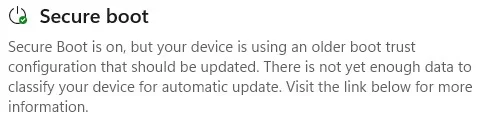
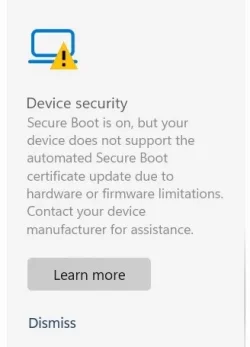
The Secure Boot section of Device Security shows: the info in the attached ScreenGrab.
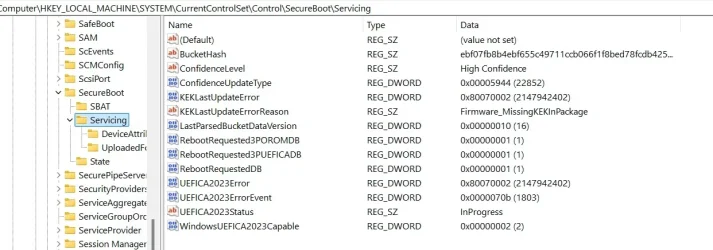
The Registry shows the info shown in the attached ScreenGrab.

I presume that the "Boot File [Windows UEFI CA 2023] is UNTRUSTED" error is because he is yet to enrol the relevant files in the Bios?
My question is, having looked at Readme_UEFI, which file precisely does he need to try to Enroll?
He tells me the Bios does not let him Browse the EFI partition but presents a list of files to choose from.
He also tells me there is no "mode" option for Secure Boot, it is just either On or Off.

Given the current time differences, I shall not be contacting him for at least another 6 hours as I am in France and he is in Fiji.
 

Attachments
  • ScreenGrab Secure Boot section.webp
    ScreenGrab Secure Boot section.webp
    11.9 KB · Views: 1
  • ScreenGrab Secure Registry.webp
    ScreenGrab Secure Registry.webp
    70.7 KB · Views: 1

My Computer

System One

  • OS
    Windows11
    Computer type
    PC/Desktop
    Manufacturer/Model
    Acemagic S1
    CPU
    Intel(R) N97, 2000 Mhz, 4 Core(s), 4 Logical
    Memory
    16Gb
    Graphics Card(s)
    Intel(R) UHD Graphics
    Sound Card
    (Generic USB Audio)
    Monitor(s) Displays
    2
    Screen Resolution
    2560 x 1440 x 59 hertz
    Hard Drives
    Model KPART512GBC2DVT 512Gb
REQUIRED ACTION
---------------
Please follow the README_UEFI.TXT instructions, for installing the [KEK CA 2023] cert from BIOS.
UEFI KEK Certs
--------------
Microsoft Corporation KEK CA 2011
Acer Key Exchange Key

I presume that the "Boot File [Windows UEFI CA 2023] is UNTRUSTED" error is because he is yet to enrol the relevant files in the Bios?
My question is, having looked at Readme_UEFI, which file precisely does he need to try to Enroll?
He tells me the Bios does not let him Browse the EFI partition but presents a list of files to choose from.
He also tells me there is no "mode" option for Secure Boot, it is just either On or Off.

Given the current time differences, I shall not be contacting him for at least another 6 hours as I am in France and he is in Fiji.
Your friend didn't follow the README instructions.

This is the hardest part, especially if you're helping someone remotely (and in the opposite time zone). What I would suggest is to remind your friend, there is no rush. Don't feel pressured to solve this all in one session. There is plenty of time in the schedule, we've not reached the hard deadline of October (when any new boot manager will absolutely require CA 2023).

Ask your friend to explore the different Secure Boot menu options in the BIOS. Unless you have the exact same model PC, what is displayed may be different from another Acer model. These are the features your friend needs to confirm exist:

1. Is there a visible option for Custom Mode (or an indicator)? Some BIOS'es require you to create a password before allowing Custom Mode to be revealed.

2. Is there a submenu for Manual Key enrollment or management? Under that menu, is there a submenu for KEK keys?

3. Assuming there is one for KEK keys, is there an option for Add/Append keys? Select this option, and you will be presented with a list of drive(s). Unplug any removable USB drives to make this easier to figure out which drive is your system drive. Browse for an "EFI" folder. If one is present, browse under the folder for a "Certs" folder. Keep going until you find the KEK CA 2023.

There will be two files (they're the same) named with .der and .crt file extensions. Try the .der file first, then .crt.

If that works, restart Windows and run the update script again. If adding the new key, doesn't work then you can ask your friend to wait and you can help them in the next session with trying to delete the Secure Boot keys.

You're learning how be a good tech support specialist. The secret isn't really being technical, it's how to calmly guide a non-technical person to follow instructions and interpret the computer's screens. When you can see a screen, the answer may be obvious to you, but it's not obvious to them.

Just be patient.
 

My Computer

System One

  • OS
    Windows 7
After Mosly failed to update the three keys due to this stubborn Dell Bios (probebly there is a factory bug) I had to open the laptop cover and reset the bios via (CMOS) battery to get the original factory keys, especially the PK. Then I re-installed Windows and updated the system but every time two keys updated only and no way to update the KEK.
PowerShell 7.6.1
([System.Text.Encoding]::ASCII.GetString((Get-SecureBootUEFI KEK).bytes) -match 'Microsoft Corporation KEK 2K CA 2023')
False
([System.Text.Encoding]::ASCII.GetString((Get-SecureBootUEFI db).bytes) -match 'Windows UEFI CA 2023')
True
([System.Text.Encoding]::ASCII.GetString((Get-SecureBootUEFI db).bytes) -match 'Microsoft Option ROM UEFI CA 2023')
True
PS C:\Users\369>
Then I tried with the help of chatgpt to find ways to fix the problem, but ends up with secure boot OFF and all keys False.
 

My Computer

System One

  • OS
    Windows 11 IoT Enterprise LTSC 2024 24H2 (En-US)
    Computer type
    Laptop
    Manufacturer/Model
    Dell Inspiron 7573 2-in-1 15.6-inch 4K UHD convertible laptop CX6LXN2 (Bios v. Dell Inc. 1.25.0, 7/13/2022)
    CPU
    Intel(R) Core(TM) i7-8550U CPU @ 1.80GHz, 1992 Mhz, 4 C
    Motherboard
    Intel Sunrise Point-LP, Intel Kaby Lake-R (BaseBoard 0X1X3N)
    Memory
    32GB DDR4 Dual
    Graphics Card(s)
    NVIDIA GeForce MX130 (2 GB), Intel(R) UHD Graphics 620 (128 MB)
    Sound Card
    Realtek Semiconductor Corp.
    Monitor(s) Displays
    Sharp LQ156D1 (Dell 4N59J) [15.6" LCD] {2017}
    Screen Resolution
    3840 x 2160 4K UHD
    Hard Drives
    SSD NVMe WD Blue SN570 1T
    Browser
    Firefox 151.0.2 (64-bit)
    Antivirus
    Windows Defender & Hitman Pro Alert
    Other Info
    Secure Boot stops working after trying to fix windows new 2023 certificates update issue. The OS works fine but no secure boot.
ChatGPT suggested:
"For the remaining lifespan of this laptop on BIOS v1.25.0, you must permanently leave "Enable Custom Mode" checked. Because Dell has marked your laptop's motherboard as End-of-Life, BIOS v1.25.0 will never receive a factory firmware patch to fix this bug.
Here is what happens under the hood depending on that toggle:
* If you uncheck it: The Dell BIOS assumes you want to abandon your custom configurations. It will instantly execute a hard wipe of the NVRAM and restore its hardcoded 2022 Factory Defaults. This puts the outdated 2011 keys back in place, causing Windows 11 24H2 to immediately throw the operating system loader signature not found boot error again.
* By leaving it checked: You freeze the BIOS validation engine. You are telling the motherboard: "Do not touch or overwrite my keys. Trust the database that is currently loaded." This locks the newly injected 2023/2026 Microsoft certificates into place permanently.
 

My Computer

System One

  • OS
    Windows 11 IoT Enterprise LTSC 2024 24H2 (En-US)
    Computer type
    Laptop
    Manufacturer/Model
    Dell Inspiron 7573 2-in-1 15.6-inch 4K UHD convertible laptop CX6LXN2 (Bios v. Dell Inc. 1.25.0, 7/13/2022)
    CPU
    Intel(R) Core(TM) i7-8550U CPU @ 1.80GHz, 1992 Mhz, 4 C
    Motherboard
    Intel Sunrise Point-LP, Intel Kaby Lake-R (BaseBoard 0X1X3N)
    Memory
    32GB DDR4 Dual
    Graphics Card(s)
    NVIDIA GeForce MX130 (2 GB), Intel(R) UHD Graphics 620 (128 MB)
    Sound Card
    Realtek Semiconductor Corp.
    Monitor(s) Displays
    Sharp LQ156D1 (Dell 4N59J) [15.6" LCD] {2017}
    Screen Resolution
    3840 x 2160 4K UHD
    Hard Drives
    SSD NVMe WD Blue SN570 1T
    Browser
    Firefox 151.0.2 (64-bit)
    Antivirus
    Windows Defender & Hitman Pro Alert
    Other Info
    Secure Boot stops working after trying to fix windows new 2023 certificates update issue. The OS works fine but no secure boot.
After Mosly failed to update the three keys due to this stubborn Dell Bios (probebly there is a factory bug) I had to open the laptop cover and reset the bios via (CMOS) battery to get the original factory keys, especially the PK. Then I re-installed Windows and updated the system but every time two keys updated only and no way to update the KEK.
The problem is you need a signed KEK CA 2023. Two of the common solutions are:

1. Manual enrollment. Unfortunately this doesn't work for Dell, because of security restrictions their BIOS'es don't accept DER-encoded cert files like everyone else. Dell expects an ".auth" format which is signed by the PK, but we're not the PK's owner!

2. Delete and replace the PK, which removes the authentication problem. That's what Mosby tries to do (by self-signing a PK). When Mosby fails, it points to a problematic BIOS version. There are stories out there of bad PC's where having the complete set of certs installed in the correct fashion (according to the UEFI standards) doesn't work. You can't boot with Secure Boot enabled.

It may be this PC falls into that dreaded category. You can have Secure Boot with the CA 2011 certs, but not with CA 2023. Which means after October 2026, if a new boot manager is released for security reasons, then you can't install it.

Some vendors like Lenovo have gone back and re-released BIOS'es that exhibit problems like this. But not Dell or HP, who have declared they're done shipping new updates for old PC's 😒.
 

My Computer

System One

  • OS
    Windows 7
To boot from a MBR drive, your BIOS must be in CSM mode.

The script has a Confirm-SecureBootUEFI check which can determine UEFI vs CSM. Does your BIOS have an UEFI + CSM (hybrid) mode?

Hi,

the motherboard manual doesn't bother to explain ANY of the BIOS settings !
CSM works differently to a gigabyte board - I was in an argument where I thought it could boot in two of the three CSM modes.
but the only one that allowed Secure boot to try and really be enabled (even though it said it was On in the BIOS) meant the PC couldn't boot.

Your scripts

the first check did nothing, just returned
PS C:\WINDOWS\system32>

the add new certs did this
ERROR: Cannot read Secure Boot status.


PS C:\WINDOWS\system32>

I started to try and write a query for help yesterday - but gave up, its here for info everything below--------
when I thought I'd try some more - then today somewhere found something telling me can't have secure boot if its on MBR use diskpart to check - where upon I found it was on MBR (I never knew that before)

I now have secure boot enabled and a bootable machine - but need to resize my RE as its only 100 meg

-------------------------------------------------------------------------------------------------------------------------------------------------------------------------------

Hi, fumbling about confused and can't seem to enable secure boot

updated BIOS to current win 11 supported BIOS from Asus

tried to match BIOS set up as per another Win 11 Asus PC I have and noticed PK cert wasn't loaded on the machine that won't behave

cleared its key and used same settings now this shows PK cert loaded in BIOS but doesn't help

MSINFO shows this PC is in Legacy mode (at this point I had NO idea Legacy was MBR and so you can't have Secure Boot enabled)

Device security

Device health attestation isn't available Please clear your TPM

cleared within device security - I still get

Device health attestation isn't available Please clear your TPM

Secure boot according to ASUS [Motherboard] How to enable or disable Secure Boot ? | Official Support | ASUS Global


CSM in Auto fails to boot the PC
CSM in Enabled PC boots (turns out in legacy mode) - BUT today I see it can actually do either or, and that explains how the other machine works at its set up as Enabled (and it has Secure boot)
CSM in Disabled (which is how ASUS says you need to run Secure boot) - fails to boot the PC

Sercere boot in BIOS says its On - but clearly the CSM setting ion this PC only brings Legacy boot conditions
Yet the other machine in CSM enables is happy

running the check or update powershell scripts I just get


ERROR: Cannot read Secure Boot status.


PS C:\WINDOWS\system32>
 
Last edited:

My Computer

System One

  • OS
    Win11
ERROR: Cannot read Secure Boot status.
This indicates you're in CSM mode (or you have an ARM-based platform). I should probably change the error message.

Assuming you've converted to GPT, you should be able to temporarily boot using:
- UEFI mode (no hydbrid)​
- Secure Boot disabled (ignores the current certs)​

After you have booted into Windows (and not in CSM mode), the script should be able report everything. Technically it can report everything, but it stops immediately when you're not in UEFI mode as a sanity check.
 

My Computer

System One

  • OS
    Windows 7
This indicates you're in CSM mode (or you have an ARM-based platform). I should probably change the error message.

Assuming you've converted to GPT, you should be able to temporarily boot using:
- UEFI mode (no hydbrid)​
- Secure Boot disabled (ignores the current certs)​

After you have booted into Windows (and not in CSM mode), the script should be able report everything. Technically it can report everything, but it stops immediately when you're not in UEFI mode as a sanity check.


Hi, thanks for your replies and ideas - I have now converted to GPT and got secure boot enabled - I will try your scrips again, but not today.

Note - I was still editing my earlier reply to make it try and make sense
 

My Computer

System One

  • OS
    Win11
No problem. Part of my work is taking user feedback, and expanding the script to cover more real-world cases.
 

My Computer

System One

  • OS
    Windows 7
Try the instructions here, to replace MiniTool's PE image:
This works. I deleted the boot.wim from my C:\boot\winpe_10_64 folder. MiniTool downloaded a new one as part of building the USB drive. It boots as it should.
You, sir, are a Wiz of a Wiz if ever a Wiz there was!
 

My Computers

System One System Two

  • OS
    Windows 11 Pro 24H2
    Computer type
    Laptop
    Manufacturer/Model
    Lenovo P16s Workstation
    CPU
    Intel i7-1260P 12th Gen 4.7GHz
    Memory
    32GB DDR4-3200
    Graphics Card(s)
    NVIDIA T550 Laptop GPU
    Sound Card
    Realtek Audio
    Monitor(s) Displays
    16" Laptop Display
    Screen Resolution
    2560x1600
    Hard Drives
    2TB Samsung M.2 2280 SSD PCIe 4.0 x 4 NVMe
    Mouse
    Logitech MX Anywhere 2s
    Internet Speed
    1000 Mb
    Browser
    Firefox
    Antivirus
    Avast
  • Operating System
    Windows 11 Pro 24H2
    Computer type
    Laptop
    Manufacturer/Model
    Lenovo P50 Workstation
    CPU
    i7-6820HQ 6th Gen 3.6 GHz
    Memory
    32GB DDR4-2133
    Graphics card(s)
    NVIDIA Quadro M2000M Laptop GPU
    Sound Card
    Realtek Audio
    Monitor(s) Displays
    15.6" Laptop Display
    Screen Resolution
    1920x1080
    Hard Drives
    2 x 1TB Samsung M.2 2280 SSD PCIe 3.0 x 4 NVMe
    Cooling
    Dual Fan System
    Mouse
    Logitech MX Anywhere 2s
    Internet Speed
    1000 Mb
    Browser
    Firefox
    Antivirus
    Avast
I didn't solve the problem, it's @LuckyEleven's fix.

But the point is the same as before. When SkuSiPolicy is enabled, it restricts which versions of winload.efi may be used in a boot.wim. So you need to find an updated image file from the same month (or later) as when SkuSiPolicy was last changed.

Any time you get a signature violation, it means you have to redo the USB drive.
 

My Computer

System One

  • OS
    Windows 7
Hi all, first post so please go easy.
I posted on toms hardware to ask how to resolve issue that MS was not updating my keys, post is here (with details of PC spec etc)
Link to my post on Tom's Hardware
That sent me down using MOSBY which seemed to work ok... but checking status after, Windows security still not happy.
The latest report from ceej21 script reports
01 Jun 2026
------------------------------------------------------------
HW : ASUS - All Series - AMD64/X64
FW : American Megatrends Inc. - 4101 - 10 Jul 2019
OS : Windows 11 - 25H2 (Build 26200.8457)

Detected AMD64/X64 UEFI architecture. Ensure that this is correct for valid DBX results.

Secure Boot status: Enabled

Current UEFI PK
√ Mosby Generated PK [2026.05.31]

Default UEFI PK
WARNING: Failed to query UEFI variable PKDefault

Current UEFI KEK
√ Microsoft Corporation KEK CA 2011 (revoked: False)
√ Microsoft Corporation KEK 2K CA 2023 (revoked: False)

Default UEFI KEK
WARNING: Failed to query UEFI variable 'KEKDefault' for cert 'Microsoft Corporation KEK CA 2011'
WARNING: Failed to query UEFI variable 'KEKDefault' for cert 'Microsoft Corporation KEK 2K CA 2023'
WARNING: Failed to query UEFI variable 'KEKDefault'

Current UEFI DB
√ Microsoft Windows Production PCA 2011 (revoked: False)
√ Microsoft Corporation UEFI CA 2011 (revoked: False)
√ Windows UEFI CA 2023 (revoked: False)
√ Microsoft UEFI CA 2023 (revoked: False)
√ Microsoft Option ROM UEFI CA 2023 (revoked: False)
√ MosbyKey [2026.05.31]

Default UEFI DB
WARNING: Failed to query UEFI variable 'dbDefault' for cert 'Microsoft Windows Production PCA 2011'
WARNING: Failed to query UEFI variable 'dbDefault' for cert 'Microsoft Corporation UEFI CA 2011'
WARNING: Failed to query UEFI variable 'dbDefault' for cert 'Windows UEFI CA 2023'
WARNING: Failed to query UEFI variable 'dbDefault' for cert 'Microsoft UEFI CA 2023'
WARNING: Failed to query UEFI variable 'dbDefault' for cert 'Microsoft Option ROM UEFI CA 2023'
WARNING: Failed to query UEFI variable 'DBDefault'

Current UEFI DBX
2025-10-14 (v1.6.0) [AMD64] : SUCCESS: 431 successes detected
Current Windows staged : FAIL: 1 failures, 277 successes detected
Windows BootMgr SVN : 7.0 (Target: 8.0)
Windows CDBoot SVN : 3.0
Windows WDSMgFw SVN : 3.0
Statistics : 20888 Bytes, 431 SHA256 hashes, 0 X.509 certs, 3 SVNs
I presume the warnings about no defaults is nothing to worry about?
But I suspect the last failure is the real issue/roadblock?

Using the check dbxupdate scripts (verbose) shows
Check_dbxupdate.bin.ps1 -verbose
FAILED: Missing 1/278 EFI signatures from "dbxupdate.bin"

SUCCESS: Matched 3/3 SVN signatures from "DBXUpdate2024.bin"
FAILED: Missing 1/3 SVN signatures from "DBXUpdateSVN.bin"
Missing [01612B139DD5598843AB1C185C3CB2EB92000008000000000000000000000000] bootmgfw.efi SVN 8.0
so I am stumped on how I can resolve this.. and get windows to accept I am all up to date.

Can anyone help me here please?
Thanks in advance for any help :)
 

My Computer

System One

  • OS
    Win 11
    Computer type
    PC/Desktop
    Manufacturer/Model
    mix
The latest report from ceej21 script reports

I presume the warnings about no defaults is nothing to worry about?
But I suspect the last failure is the real issue/roadblock?

I don't like that cjee21's script reports missing factory defaults as "errors". Your OEM may have never bothered to define them, but that's decided by the OEM. Run my check script with the -Verbose option, you will see a better report summary.
Code:
Check-UEFI.bat -Verbose

Using the check dbxupdate scripts (verbose) shows

so I am stumped on how I can resolve this.. and get windows to accept I am all up to date.
You have updated the CA 2023 certs, and performed CA 2011 revocation. But the April 2026 CU rolled out a new boot manager (to fix a security hole), and every time a new boot file is released, Windows bumps the SVN up so you can't rollback to the vulnerable version (SVN 7.0).

The easy fix is run the update script, and it will push the newer boot manager (if it's not already installed) and apply the missing DBX updates: +1 missing EFI signature, and SVN 8.0. Typically Windows should be doing it for you, but sometimes it lags.
Code:
Update-UEFI.bat -Revoke
 
Last edited:

My Computer

System One

  • OS
    Windows 7
The easy fix is run the update script, and it will push the newer boot manager (if it's not already installed) and apply the missing DBX updates: +1 missing EFI signature, and SVN 8.0. Typically Windows should be doing it for you, but sometimes it lags.
Code:
Update-UEFI.bat -Revoke
Hmmm... afraid to say it didnt go so well... running the update_UEFI.bat seemed like it was working perfectly, it reported
three lines.. saying it had successfully updated 3 items (unfortunately I cant share screen shot or describe in detail, because)
When it rebooted it now will not boot... it reports
"Invalid signature detected... check secure boot policy in setup"
and dumps me back to BIOS..
If I go to secure boot section in BIOS it says enabled.. and the key management section says each key is "loaded" and does not report any errors..

So I have left it like that for now... how best to proceed?
Clear all keys?, reload defaults (if I can, considering previous messages)... and try your own scripts exclusively to update and see if that clears/works?

What would you advise?
 

My Computer

System One

  • OS
    Win 11
    Computer type
    PC/Desktop
    Manufacturer/Model
    mix
Let's try clearing all of the keys, and start over using my script. Same general idea as Mosby, except it replaces everything with the Windows OEM Devices bundle from the MS GitHub. As the bundle is provided as a set, there should be no cross-signing issues.

1. Clear all the keys.
2. Run my update script (which will recognize Setup Mode).
3. Restart. Check if Secure Boot works.

So far, only a small handful of BIOS'es haven't worked with this method. Sometimes you will see all the certs in place, but some weird UEFI bug in the firmware doesn't like supporting the additional CA 2023 certs.
 

My Computer

System One

  • OS
    Windows 7
Let's try clearing all of the keys, and start over using my script. Same general idea as Mosby, except it replaces everything with the Windows OEM Devices bundle from the MS GitHub. As the bundle is provided as a set, there should be no cross-signing issues.
OK... its bootable again, and secure boot is working, I only ran your update_UEFI-CA2023.ps1 script, I preume thats all you expected.
Its booting, so I ran your check-uefi.bat to get a report and its output is
Secure Boot: ON
Virtualization Based Security: OFF
BitLocker on (C:) OFF

UEFI KEK Certs
--------------
Microsoft Corporation KEK CA 2011
Microsoft Corporation KEK 2K CA 2023

UEFI DB Certs
-------------
Microsoft Corporation UEFI CA 2011
Microsoft Windows Production PCA 2011
Microsoft Option ROM UEFI CA 2023
Microsoft UEFI CA 2023
Windows UEFI CA 2023

UEFI DBX Certs
--------------
(NONE)

EFI Files
---------
Windows Boot Manager [Production PCA 2011] is BANNED.
Registry: "WindowsUEFICA2023Capable" = 1
[Windows UEFI CA 2023] in UEFI DB.


REQUIRED ACTION
===============

OPTION 1: DO NOTHING AND WAIT. Windows will apply the UEFI updates (PC has supported BIOS).

OPTION 2: To update Windows Boot Manager [UEFI CA 2023] WITHOUT REVOKING the [PCA 2011] cert, run the commands:

reg add HKEY_LOCAL_MACHINE\SYSTEM\CurrentControlSet\Control\Secureboot /v AvailableUpdates /t REG_DWORD /d 0x100 /f
powershell Start-ScheduledTask -TaskName "\Microsoft\Windows\PI\Secure-Boot-Update"
it also had the option 3..
but both option 1 is what I have been doing and option 2 I have done numerous times, but Windows security still reports
Screenshot 2026-06-01 202903.webp
So what are my options to resolve from here please? (I presume the banned windows boot manager 2011 is the problem?)

Thanks so much for your help so far.. be great to get this over the line.

Oh.. by the way, your UEFI update script did alert me to update the PK key, I checked the key area in BIOS and it said PK key was loaded, but its not reporting in the above status ... so I dont know if thats significant
 

My Computer

System One

  • OS
    Win 11
    Computer type
    PC/Desktop
    Manufacturer/Model
    mix
OK. That's better.

Recently I changed the script to allow for UNTRUSTED situations, where you're missing the underlying certs but it shouldn't report BANNED. Can run the script with the -Verbose option?

I'm curious why the update script didn't copy a new boot manager. It should do that automatically.
 

My Computer

System One

  • OS
    Windows 7
OK. That's better.

Recently I changed the script to allow for UNTRUSTED situations, where you're missing the underlying certs but it shouldn't report BANNED. Can run the script with the -Verbose option?

I'm curious why the update script didn't copy a new boot manager. It should do that automatically.
Here you go
Windows 11 25H2 (26200.8457)

Secure Boot: ON
Virtualization Based Security: OFF
BitLocker on (C:) OFF

BIOS Firmware
-------------
ASUS All Series
Version: 4101
Date: 2019-07-10

Factory Default UEFI PK Cert
----------------------------
(NONE)

UEFI PK Cert
------------
Windows OEM Devices PK

Factory Default UEFI KEK Certs
------------------------------
(NONE)

UEFI KEK Certs
--------------
Microsoft Corporation KEK CA 2011
Microsoft Corporation KEK 2K CA 2023

Factory Default UEFI DB Certs
-----------------------------
(NONE)

UEFI DB Certs
-------------
Microsoft Corporation UEFI CA 2011
Microsoft Windows Production PCA 2011
Microsoft Option ROM UEFI CA 2023
Microsoft UEFI CA 2023
Windows UEFI CA 2023

Factory Default UEFI DBX Certs
------------------------------
(NONE)
EFI_CERT_SHA256_GUID Signatures: 0

UEFI DBX Certs
--------------
(NONE)
Windows BootMgr SVN is MISSING.
EFI_CERT_SHA256_GUID Signatures: 431

UEFI Variables
--------------
Credential Guard: ON
SBAT (Linux only): sbat,1,2025051000 / shim,4 / grub,5 / grub.proxmox,2

EFI Files
---------
Windows Boot Manager [Production PCA 2011] is BANNED.
\\.\HarddiskVolume1\EFI\Microsoft\Boot\bootmgfw.efi
File Version: 28000.326, SVN 8.0

Registry: "WindowsUEFICA2023Capable" = 1
[Windows UEFI CA 2023] in UEFI DB.
 

My Computer

System One

  • OS
    Win 11
    Computer type
    PC/Desktop
    Manufacturer/Model
    mix
Oops, introduced a bug in the update script where it doesn't realize it should replace the boot manager.

This should fix it:
Code:
mountvol S: /s
copy C:\Windows\Boot\EFI_EX\bootmgfw_EX.efi S:\EFI\Microsoft\Boot\bootmgfw.efi
mountvol S: /d
 

My Computer

System One

  • OS
    Windows 7
Oops, introduced a bug in the update script where it doesn't realize it should replace the boot manager.

This should fix it:
Code:
mountvol S: /s
copy C:\Windows\Boot\EFI_EX\bootmgfw_EX.efi S:\EFI\Microsoft\Boot\bootmgfw.efi
mountvol S: /d
Im flattered you thought I would not be confused with what to do with that... edit your script? run it from command prompt? but doesnt it need to write to the EFI partition? how does mountvol know to mount efi part?....
But a bit of digging.. and I understand... I put it in a bat and ran it (my AV objected and deleted the bat file... but worryingly only after it had run !!! lol)
Anyway... after running, rerunning your "check-uefi.bat -verbose" and looks MUCH better, now looks like

Windows 11 25H2 (26200.8457)

Secure Boot: ON
Virtualization Based Security: OFF
BitLocker on (C:) OFF

BIOS Firmware
-------------
ASUS All Series
Version: 4101
Date: 2019-07-10

Factory Default UEFI PK Cert
----------------------------
(NONE)

UEFI PK Cert
------------
Windows OEM Devices PK

Factory Default UEFI KEK Certs
------------------------------
(NONE)

UEFI KEK Certs
--------------
Microsoft Corporation KEK CA 2011
Microsoft Corporation KEK 2K CA 2023

Factory Default UEFI DB Certs
-----------------------------
(NONE)

UEFI DB Certs
-------------
Microsoft Corporation UEFI CA 2011
Microsoft Windows Production PCA 2011
Microsoft Option ROM UEFI CA 2023
Microsoft UEFI CA 2023
Windows UEFI CA 2023

Factory Default UEFI DBX Certs
------------------------------
(NONE)
EFI_CERT_SHA256_GUID Signatures: 0

UEFI DBX Certs
--------------
(NONE)
Windows BootMgr SVN is MISSING.
EFI_CERT_SHA256_GUID Signatures: 431

UEFI Variables
--------------
Credential Guard: ON
SBAT (Linux only): sbat,1,2025051000 / shim,4 / grub,5 / grub.proxmox,2

EFI Files
---------
Windows Boot Manager [Windows UEFI CA 2023] is ALLOWED.
\\.\HarddiskVolume1\EFI\Microsoft\Boot\bootmgfw.efi
File Version: 28000.326, SVN 8.0

Registry: "WindowsUEFICA2023Capable" = 2
[Windows UEFI CA 2023] in UEFI DB, and Windows starting from CA 2023 Boot Manager.
and now security module in windows is reporting

Screenshot 2026-06-01 211352.webp
So it looks like ALL GOOD.
Thank you SO MUCH for your help... its much appreciated.
(This is only my old crash and burn PC... but I am still a bit anal about it all working properly ;) )
 

My Computer

System One

  • OS
    Win 11
    Computer type
    PC/Desktop
    Manufacturer/Model
    mix
Back
Top Bottom