
- Local time
- 9:51 PM
- Posts
- 32
- OS
- Windows11
Some progress helping my friend with an Acer Extensa 215-32:That's funny. In the U.S., we would write "grayed out" but the Internet overwhelming chooses "greyed out" because of UK English speakers. I feel forced to use "grey" fit in
Have your friend check if Legacy CSM mode is enabled. You can't have Secure Boot in CSM, it must be UEFI mode.

He managed to turn Secure Boot off in the Bios. The Secure Boot Fail then allows the system to Boot.
He ran the Update Script:
Downloading "Microsoft Corporation KEK 2K CA 2023.der" from GitHub.
Copying "Microsoft Corporation KEK 2K CA 2023.der" to EFI.
Successfully appended "dbupdate2024.bin" to UEFI DB.
Successfully appended "DBUpdate3P2023.bin" to UEFI DB.
Successfully appended "DBUpdateOROM2023.bin" to UEFI DB.
REQUIRED ACTION
---------------
Please follow the README_UEFI.TXT instructions, for installing the [KEK CA 2023] cert from BIOS.
Restart Windows, for UEFI updates to take effect.
He then shut down with a 10 second push on the power button.
Started up, ran the check script which showed the 2033 Certificates were correctly present.
Restarted, ran the check script again which shows:
Windows 11 25H2 (26200.8524)
Secure Boot: ON
Virtualization Based Security: ON
BitLocker on (C:) OFF
BIOS Firmware
-------------
Acer Extensa 215-32
Version: V1.23
Date: 2023-08-07
Factory Default UEFI PK Cert
----------------------------
Acer Platform Key
UEFI PK Cert
------------
Acer Platform Key
Manual update of [KEK CA 2023] is REQUIRED.
Factory Default UEFI KEK Certs
------------------------------
Microsoft Corporation KEK CA 2011
Acer Key Exchange Key
UEFI KEK Certs
--------------
Microsoft Corporation KEK CA 2011
Acer Key Exchange Key
Factory Default UEFI DB Certs
-----------------------------
Microsoft Corporation UEFI CA 2011
Microsoft Windows Production PCA 2011
ABO
Acer Database
DisablePW
UEFI DB Certs
-------------
Microsoft Corporation UEFI CA 2011
Microsoft Windows Production PCA 2011
Microsoft Option ROM UEFI CA 2023
Microsoft UEFI CA 2023
Windows UEFI CA 2023
ABO
Acer Database
DisablePW
Factory Default UEFI DBX Certs
------------------------------
Acer Database Forbidden
EFI_CERT_SHA256_GUID Signatures: 33
UEFI DBX Certs
--------------
Acer Database Forbidden
Windows BootMgr SVN is MISSING.
EFI_CERT_SHA256_GUID Signatures: 33
UEFI Variables
--------------
Credential Guard: ON
SBAT (Linux only): sbat,1,2024010900 / shim,4 / grub,3 / grub.debian,4
EFI Files
---------
Boot File [Windows UEFI CA 2023] is UNTRUSTED
\\.\HarddiskVolume1\EFI\Microsoft\Boot\bootmgfw.efi
File Version: 28000.327, SVN 8.0
Registry: "WindowsUEFICA2023Capable" = 2
[Windows UEFI CA 2023] in UEFI DB, and Windows starting from CA 2023 Boot Manager.
[OPTIONAL] SkuSiPolicy.p7b (for VBS) is MISSING.
REQUIRED ACTION
===============
Run the command:
Update_UEFI-CA2023.ps1 -Revoke
Finish the UEFI steps to manually add the [KEK CA 2023] cert, if the script provided instructions.
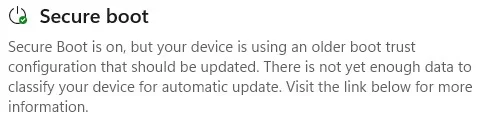
The Secure Boot section of Device Security shows: the info in the attached ScreenGrab.
The Registry shows the info shown in the attached ScreenGrab.
I presume that the "Boot File [Windows UEFI CA 2023] is UNTRUSTED" error is because he is yet to enrol the relevant files in the Bios?
My question is, having looked at Readme_UEFI, which file precisely does he need to try to Enroll?
He tells me the Bios does not let him Browse the EFI partition but presents a list of files to choose from.
He also tells me there is no "mode" option for Secure Boot, it is just either On or Off.
Given the current time differences, I shall not be contacting him for at least another 6 hours as I am in France and he is in Fiji.
Attachments
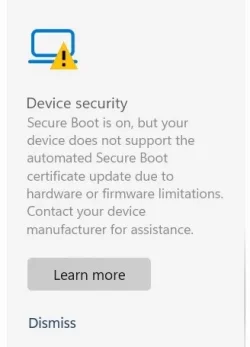
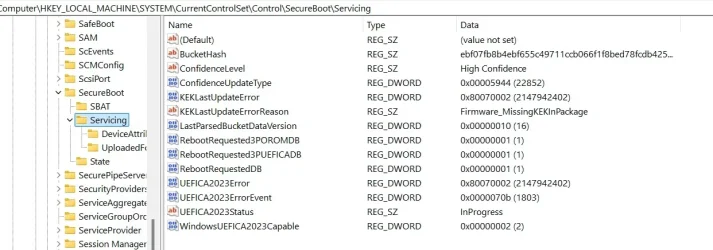
My Computer
At a glance
Windows11Intel(R) N97, 2000 Mhz, 4 Core(s), 4 Logical16GbIntel(R) UHD Graphics
- OS
- Windows11
- Computer type
- PC/Desktop
- Manufacturer/Model
- Acemagic S1
- CPU
- Intel(R) N97, 2000 Mhz, 4 Core(s), 4 Logical
- Memory
- 16Gb
- Graphics Card(s)
- Intel(R) UHD Graphics
- Sound Card
- (Generic USB Audio)
- Monitor(s) Displays
- 2
- Screen Resolution
- 2560 x 1440 x 59 hertz
- Hard Drives
- Model KPART512GBC2DVT 512Gb



 )
)






