For the last two months, I've been working on new PowerShell scripts to automate the Secure Boot CA 2023 update process. A number of contributed scripts or guides presented on various ElevenForum threads (including a few of my earlier scripts) are lacking in clarity. There's simply too much confusion and guesswork to what's going with updates. The whole process should be easier to follow.
Why should you use these scripts?
Find out if your BIOS is currently supported by MS or not
Find out if your Secure Boot update is completed right now, without the need to run other commands or looking at the Event Viewer logs
Force an immediate update to CA 2023 certs, and optionally revoke the CA 2011 cert at this time
Update your boot files on USB removable media (including Macrium recovery drives)
The scripts are written in PowerShell so any technical user can examine the code, and determine if there are any security problems presented.
All the UEFI security certificates and policy files are either sourced from the \Windows\System32\SecureBootUpdates folder, or the Microsoft GitHub repo for Secure Boot Objects. The MS GitHub is referenced by the UEFI Forum group as the official site for downloading Secure Boot CA 2023 updates.
W10 22H2 and all W11 releases, which have the July 2025 (or later) Monthly Update are supported. Including x64, x86, arm64 and arm architectures.
DO I NEED TO READ EVERYTHING BELOW?
No. If you want to just get started, first run the Check_UEFI-CA2023.ps1 script. If it doesn't suggest you to run the Update_UEFI-CA2023.ps1 script, then you have the option to do nothing (wait for MS to safely upgrade your PC in 2026), or follow the onscreen instructions. The instructions mirror the current MS guides.
Whenever you see the MS instructions for "reg add"..., you can always run the Update_UEFI-CA2023.ps1 and skip the waiting. The upgrade script does everything at the same time, so there's no need to check any Windows event logs. Run the Check_UEFI-CA2023.ps1 script again, and see if there are no more instructions left.
You have the option to stop right now, after adding the CA 2023 certs. The revocation of CA 2011 isn't expected to happen until early-mid 2026.
Before we get started, let's review an important requirement for the CA 2023 update:
When Secure Boot is enabled, your UEFI must have a signed KEK CA 2023 certificate in order to properly install the CA 2023 certs and updated boot files.
In the UEFI security model, Micorosoft provides the PC or motherboard maker a signed Key Exchange Key (KEK) signed by MS. The OEM in turn signs the KEK with their Platform Key (PK) to bless the KEK as authenticated by the vendor. The OEM has the option to provide one of two solutions:
Recent BIOS firmware update which includes the CA 2023 certs as factory defaults
Submit a re-signed KEK for inclusion in the MS GitHub repo (and Windows can perform the update by itself)
A problem happens when the OEM doesn't follow either solution, because they don't want to support older PC's.
Fortunately, another option is available. Most UEFI's have a Setup Mode, where the user clears the UEFI of all existing certs and signature hashes, and allows a tool to write certs directly into UEFI. This is what Mosby tries to do. But we don't actually need Mosby (and its requirement to format an USB drive) if you have a script or tool that runs on Windows.
There are three scripts in the release:
Check_UEFI-CA2023.ps1
Checks the current state of your UEFI certs, and the boot files for Windows and any bootable DVD or USB media. The script can provide an Audit Report, listing what steps need to be completed to be in compliance with the CA 2023 update, and what commands to run.
Update_UEFI-CA2023.ps1
Updates the UEFI certs and boot files for Windows and any bootable USB media. You have the option to only install the UEFI CA 2023 certs, and not revoke the PCA 2011 cert; or to complete the entire process in one pass.
Check_DBXUpdate.bin.ps1
Compares any submitted DBXUpdate.bin file against the current UEFI DBX variable, and informs you if there are any EFI or SVN signatures that need to be installed.
USAGE
Check_UEFI-CA2023.ps1
Report on the current UEFI certs enrolled in the KEK, DB, and DBX variables, Secure Boot and Virtualization-Based Security modes, BitLocker encryption status, and if the Windows Boot Manager is allowed by the current UEFI setup. Each command-line option may be used on its own, or in combination with any or all of them.
Supported options:
- Audit
Report what UEFI CA 2023 steps have not been completed. Check the Windows Boot Manager as if Secure Boot is enabled (in case you're running with Secure Boot as disabled).
- Verbose
Extended details including Windows build, BIOS versions, factory defaults for PK, KEK, DB and DBX variables, Windows BootMgr SVN, and count of EFI signature hashes for the DBX list.
- BootMedia
Check the boot file and Windows install image are allowed by the current UEFI setup.
- Log
Save output to a log named after the current date, and PC model.
Check_UEFI-CA2023.ps1
Code:
Secure Boot: ON
Virtualization Based Security: ON
BitLocker on (C:) ON

UEFI KEK Certs
--------------
    Microsoft Corporation KEK CA 2011

UEFI DB Certs
-------------
    Microsoft Corporation UEFI CA 2011
    Microsoft Windows Production PCA 2011

UEFI DBX Certs
--------------
    (NONE)

EFI Files
---------
    Disk 0: Windows Boot Manager [Production PCA 2011] is ALLOWED.

    Registry: WindowsUEFICA2023Capable = 0
        [Windows UEFI CA 2023] not in UEFI DB.

    Disk 0: SkuSiPolicy.p7b (for VBS) is NOT PRESENT.


REQUIRED ACTION
===============

OPTION 1:  DO NOTHING.  Windows will apply the UEFI updates in 2026 (supported BIOS).

OPTION 2:  To install [UEFI CA 2023] certs WITHOUT REVOKING the [PCA 2011] cert, run the commands:

    manage-bde -Protectors -Disable C: -RebootCount 1
    reg add HKEY_LOCAL_MACHINE\SYSTEM\CurrentControlSet\Control\Secureboot /v AvailableUpdates /t REG_DWORD /d 0x5944 /f
    powershell Start-ScheduledTask -TaskName "\Microsoft\Windows\PI\Secure-Boot-Update"

OPTION 3:  To install [UEFI CA 2023] certs and REVOKE the [PCA 2011] cert, run the commands:

    manage-bde -Protectors -Disable C: -RebootCount 1
    reg add HKEY_LOCAL_MACHINE\SYSTEM\CurrentControlSet\Control\Secureboot /v AvailableUpdates /t REG_DWORD /d 0x5be6 /f
    powershell Start-ScheduledTask -TaskName "\Microsoft\Windows\PI\Secure-Boot-Update"
Check_UEFI-CA2023.ps1 -Audit
Code:
Secure Boot: ON
Virtualization Based Security: ON
BitLocker on (C:) ON

UEFI KEK Certs
--------------
    Microsoft Corporation KEK CA 2011

UEFI DB Certs
-------------
    Microsoft Corporation UEFI CA 2011
    Microsoft Windows Production PCA 2011

UEFI DBX Certs
--------------
    (NONE)

EFI Files
---------
    Disk 0: Windows Boot Manager [Production PCA 2011] is ALLOWED.

    Registry: WindowsUEFICA2023Capable = 0
        [Windows UEFI CA 2023] not in UEFI DB.

    Disk 0: SkuSiPolicy.p7b (for VBS) is NOT PRESENT.


AUDIT REPORT
============
1.  Secure Boot is DISABLED
2.  [Microsoft Corporation KEK 2K CA 2023] is missing from UEFI KEK
3.  [Windows UEFI CA 2023] is missing from UEFI DB
4.  [Microsoft UEFI CA 2023] is missing from UEFI DB
5.  [Microsoft Option ROM UEFI CA 2023] is missing from UEFI DB
6.  [Production PCA 2011] is missing from UEFI DBX
7.  DBX Updates are missing from UEFI DBX
8.  Windows BootMgr SVN is missing from UEFI DBX
9.  Windows Boot Manager [Production PCA 2011] is wrong version
10. SkuSiPolicy.p7b (for VBS) is missing


REQUIRED ACTION
===============

OPTION 1:  DO NOTHING.  Windows will apply the UEFI updates in 2026 (supported BIOS).

OPTION 2:  To install [UEFI CA 2023] certs WITHOUT REVOKING the [PCA 2011] cert, run the commands:

    manage-bde -Protectors -Disable C: -RebootCount 1
    reg add HKEY_LOCAL_MACHINE\SYSTEM\CurrentControlSet\Control\Secureboot /v AvailableUpdates /t REG_DWORD /d 0x5944 /f
    powershell Start-ScheduledTask -TaskName "\Microsoft\Windows\PI\Secure-Boot-Update"

OPTION 3:  To install [UEFI CA 2023] certs and REVOKE the [PCA 2011] cert, run the commands:

    manage-bde -Protectors -Disable C: -RebootCount 1
    reg add HKEY_LOCAL_MACHINE\SYSTEM\CurrentControlSet\Control\Secureboot /v AvailableUpdates /t REG_DWORD /d 0x5be6 /f
    powershell Start-ScheduledTask -TaskName "\Microsoft\Windows\PI\Secure-Boot-Update"
Update_UEFI-CA2023.ps1
Install the UEFI CA 2023 certs, and optionally revoke the CA 2011 cert if desired; copy the CA 2023 boot manager file to the EFI (ESP) partition, and any removable USB drives which have an \EFI\boot\bootx64.bin boot file. SkuSiPolicy.p7b file will be copied to EFI, if Virtualization-Based Security (VBS) is currently enabled.
Before the script runs, it checks if your Windows release is July 2025 or later, in order to have the latest Secure Boot files. When BitLocker is enabled, it's suspended for 1 or 3 reboots (depending on VBS), so changes in the UEFI don't require you to provide a BitLocker recovery key.
The script is smart enough to only perform the missing steps. If you partially updated the UEFI before running the script, it will finish whatever is expected. If you want to perform the entire upgrade in one pass, you can use the -Revoke flag.
If you have a supported BIOS (where the OEM has submitted a signed KEK to MS), then Update_UEFI-CA2023.ps1 can run without needing any help.
If you have any unsupported BIOS, you have two options:
For PC's with an UEFI that supports manual key management, the script copies the KEK CA 2023 certificate to the EFI partition. You can use your UEFI's menu options to manually enroll the KEK file, from the EFI partition's \EFI\Certs folder.
If your PC has an untrusted PK cert ("DO NOT TRUST" or "TEST"), the script will copy the "Windows OEM Devices PK" cert to the EFI partition. Enroll this PK cert from the \EFI\Certs folder.
For PC's that don't support manual key management of individual keys, you can choose Setup Mode (which deletes all certs). After clearing the certs, and restarting Windows, run the Update_UEFI-CA2023.ps1 script. It will complete the process without further help from you. This does almost the same thing as Mosby, except you're using the MS recommended "Windows OEM Devices PK" instead of self-signing the KEK cert.
Each command-line option may be used on its own, or in combination with any or all of them.
-Audit
Report what UEFI CA 2023 steps have not been completed. Check the Windows Boot Manager as if Secure Boot is enabled (in case you're running with Secure Boot as disabled).
-Revoke
Revoke the PCA 2011 cert, banning all old boot files. By default, the script only installs the CA 2023 certs, and will not revoke PCA 2011 unless requested.
-Latest
Check the MS GitHub, if later version of DBXUpdate.bin and DBXUpdateSVN.bin exist. Only apply changes if the bin files are newer.
-SBAT
Apply the optional Secure Boot Advanced Targeting (SBAT) update, if you're sharing EFI with a Linux system. Not required for a pure Windows setup.
-BootMedia
Replace the EFI bootfile (\EFI\Microsoft\Boot\bootx64.efi) on mounted USB drives, if the file is present.
-Log
Save output to a log named after the current date, and PC model.
Update_UEFI-CA2023.ps1
Code:
Suspending BitLocker for one reboot.
Successfully appended "dbupdate2024.bin" to UEFI DB.
Successfully appended "DBUpdate3P2023.bin" to UEFI DB.
Successfully appended "DBUpdateOROM2023.bin" to UEFI DB.
Downloading "KEKUpdate_Microsoft_PK3d8660c0.bin" from GitHub.
Successfully appended "KEKUpdate_Microsoft_PK3d8660c0.bin" to UEFI KEK.
Copying EFI boot files.
Boot files successfully created.

REQUIRED ACTION
---------------
Restart Windows, for UEFI updates to take effect.
Update_UEFI-CA2023.ps1 -Revoke
Code:
Successfully appended "dbxupdate.bin" to UEFI DBX.
Successfully appended "DBXUpdate2024.bin" to UEFI DBX.
Successfully appended "DBXUpdateSVN.bin" (SVN 7.0) to UEFI DBX.
Deployed SkuSiPolicy.p7b (for VBS).

REQUIRED ACTION
---------------
Restart Windows, for UEFI updates to take effect.
Check_DBXUpdate.bin.ps1
For normal users, this script isn't needed for the update process. When Windows releases a new DBXUpdate or SVN, it will be part of the usual Monthly Updates and eventually pushed to the UEFI. If you want to confirm that the DBX variable contains all signatures in a provided DBXupdate or DBXupdateSVN bin file, run this script. The script will report how many matched or missing EFI or SVN signatures from the submitted file are found in the DBX variable.
By default, the script compares the DBX files in \Windows\System32\SecureBootUpdates (refreshed by the Monthly Updates). You can provide a list of individual files or folders to be searched for *DBX*.bin named files. After a successful update (or revoke), there should be no missing signatures.
-Verbose
Download the "dbx_info_msft_latest.json" from MS GitHub, and extract the filename and vendor info for the missing EFI certs. If the missing signature is a SVN, report on the SVN.
Check_DBXUpdate.bin.ps1
Code:
FAILED: Missing 404/431 EFI signatures from "dbxupdate.bin"
FAILED: Missing 3/3 SVN signatures from "DBXUpdate2024.bin"
FAILED: Missing 3/3 SVN signatures from "DBXUpdateSVN.bin"
Would this work on a Dell XPS 8930 tower PC? Microsoft isn't giving an update, & Dell mentioned on their website that they have no plans to provide an update for the XPS 8930 & several other older PC's. Or do I just have to accept that I need to get a new PC?
For the last two months, I've been working on new PowerShell scripts to automate the Secure Boot CA 2023 update process. A number of contributed scripts or guides presented on various ElevenForum threads (including a few of my earlier scripts) are lacking in clarity. There's simply too much confusion and guesswork to what's going with updates. The whole process should be easier to follow.
Why should you use these scripts?
Find out if your BIOS is currently supported by MS or not
Find out if your Secure Boot update is completed right now, without the need to run other commands or looking at the Event Viewer logs
Force an immediate update to CA 2023 certs, and optionally revoke the CA 2011 cert at this time
Update your boot files on USB removable media (including Macrium recovery drives)
The scripts are written in PowerShell so any technical user can examine the code, and determine if there are any security problems presented.
All the UEFI security certificates and policy files are either sourced from the \Windows\System32\SecureBootUpdates folder, or the Microsoft GitHub repo for Secure Boot Objects. The MS GitHub is referenced by the UEFI Forum group as the official site for downloading Secure Boot CA 2023 updates.
W10 22H2 and all W11 releases, which have the July 2025 (or later) Monthly Update are supported. Including x64, x86, arm64 and arm architectures.
DO I NEED TO READ EVERYTHING BELOW?
No. If you want to just get started, first run the Check_UEFI-CA2023.ps1 script. If it doesn't suggest you to run the Update_UEFI-CA2023.ps1 script, then you have the option to do nothing (wait for MS to safely upgrade your PC in 2026), or follow the onscreen instructions. The instructions mirror the current MS guides.
Whenever you see the MS instructions for "reg add"..., you can always run the Update_UEFI-CA2023.ps1 and skip the waiting. The upgrade script does everything at the same time, so there's no need to check any Windows event logs. Run the Check_UEFI-CA2023.ps1 script again, and see if there are no more instructions left.
You have the option to stop right now, after adding the CA 2023 certs. The revocation of CA 2011 isn't expected to happen until early-mid 2026.
Before we get started, let's review an important requirement for the CA 2023 update:
When Secure Boot is enabled, your UEFI must have a signed KEK CA 2023 certificate in order to properly install the CA 2023 certs and updated boot files.
In the UEFI security model, Micorosoft provides the PC or motherboard maker a signed Key Exchange Key (KEK) signed by MS. The OEM in turn signs the KEK with their Platform Key (PK) to bless the KEK as authenticated by the vendor. The OEM has the option to provide one of two solutions:
Recent BIOS firmware update which includes the CA 2023 certs as factory defaults
Submit a re-signed KEK for inclusion in the MS GitHub repo (and Windows can perform the update by itself)
A problem happens when the OEM doesn't follow either solution, because they don't want to support older PC's.
Fortunately, another option is available. Most UEFI's have a Setup Mode, where the user clears the UEFI of all existing certs and signature hashes, and allows a tool to write certs directly into UEFI. This is what Mosby tries to do. But we don't actually need Mosby (and its requirement to format an USB drive) if you have a script or tool that runs on Windows.
There are three scripts in the release:
Check_UEFI-CA2023.ps1
Checks the current state of your UEFI certs, and the boot files for Windows and any bootable DVD or USB media. The script can provide an Audit Report, listing what steps need to be completed to be in compliance with the CA 2023 update, and what commands to run.
Update_UEFI-CA2023.ps1
Updates the UEFI certs and boot files for Windows and any bootable USB media. You have the option to only install the UEFI CA 2023 certs, and not revoke the PCA 2011 cert; or to complete the entire process in one pass.
Check_DBXUpdate.bin.ps1
Compares any submitted DBXUpdate.bin file against the current UEFI DBX variable, and informs you if there are any EFI or SVN signatures that need to be installed.
USAGE
Check_UEFI-CA2023.ps1
Report on the current UEFI certs enrolled in the KEK, DB, and DBX variables, Secure Boot and Virtualization-Based Security modes, BitLocker encryption status, and if the Windows Boot Manager is allowed by the current UEFI setup. Each command-line option may be used on its own, or in combination with any or all of them.
Supported options:
- Audit
Report what UEFI CA 2023 steps have not been completed. Check the Windows Boot Manager as if Secure Boot is enabled (in case you're running with Secure Boot as disabled).
- Verbose
Extended details including Windows build, BIOS versions, factory defaults for PK, KEK, DB and DBX variables, Windows BootMgr SVN, and count of EFI signature hashes for the DBX list.
- BootMedia
Check the boot file and Windows install image are allowed by the current UEFI setup.
- Log
Save output to a log named after the current date, and PC model.
Check_UEFI-CA2023.ps1
Code:
Secure Boot: ON
Virtualization Based Security: ON
BitLocker on (C:) ON

UEFI KEK Certs
--------------
    Microsoft Corporation KEK CA 2011

UEFI DB Certs
-------------
    Microsoft Corporation UEFI CA 2011
    Microsoft Windows Production PCA 2011

UEFI DBX Certs
--------------
    (NONE)

EFI Files
---------
    Disk 0: Windows Boot Manager [Production PCA 2011] is ALLOWED.

    Registry: WindowsUEFICA2023Capable = 0
        [Windows UEFI CA 2023] not in UEFI DB.

    Disk 0: SkuSiPolicy.p7b (for VBS) is NOT PRESENT.


REQUIRED ACTION
===============

OPTION 1:  DO NOTHING.  Windows will apply the UEFI updates in 2026 (supported BIOS).

OPTION 2:  To install [UEFI CA 2023] certs WITHOUT REVOKING the [PCA 2011] cert, run the commands:

    manage-bde -Protectors -Disable C: -RebootCount 1
    reg add HKEY_LOCAL_MACHINE\SYSTEM\CurrentControlSet\Control\Secureboot /v AvailableUpdates /t REG_DWORD /d 0x5944 /f
    powershell Start-ScheduledTask -TaskName "\Microsoft\Windows\PI\Secure-Boot-Update"

OPTION 3:  To install [UEFI CA 2023] certs and REVOKE the [PCA 2011] cert, run the commands:

    manage-bde -Protectors -Disable C: -RebootCount 1
    reg add HKEY_LOCAL_MACHINE\SYSTEM\CurrentControlSet\Control\Secureboot /v AvailableUpdates /t REG_DWORD /d 0x5be6 /f
    powershell Start-ScheduledTask -TaskName "\Microsoft\Windows\PI\Secure-Boot-Update"
Check_UEFI-CA2023.ps1 -Audit
Code:
Secure Boot: ON
Virtualization Based Security: ON
BitLocker on (C:) ON

UEFI KEK Certs
--------------
    Microsoft Corporation KEK CA 2011

UEFI DB Certs
-------------
    Microsoft Corporation UEFI CA 2011
    Microsoft Windows Production PCA 2011

UEFI DBX Certs
--------------
    (NONE)

EFI Files
---------
    Disk 0: Windows Boot Manager [Production PCA 2011] is ALLOWED.

    Registry: WindowsUEFICA2023Capable = 0
        [Windows UEFI CA 2023] not in UEFI DB.

    Disk 0: SkuSiPolicy.p7b (for VBS) is NOT PRESENT.


AUDIT REPORT
============
1.  Secure Boot is DISABLED
2.  [Microsoft Corporation KEK 2K CA 2023] is missing from UEFI KEK
3.  [Windows UEFI CA 2023] is missing from UEFI DB
4.  [Microsoft UEFI CA 2023] is missing from UEFI DB
5.  [Microsoft Option ROM UEFI CA 2023] is missing from UEFI DB
6.  [Production PCA 2011] is missing from UEFI DBX
7.  DBX Updates are missing from UEFI DBX
8.  Windows BootMgr SVN is missing from UEFI DBX
9.  Windows Boot Manager [Production PCA 2011] is wrong version
10. SkuSiPolicy.p7b (for VBS) is missing


REQUIRED ACTION
===============

OPTION 1:  DO NOTHING.  Windows will apply the UEFI updates in 2026 (supported BIOS).

OPTION 2:  To install [UEFI CA 2023] certs WITHOUT REVOKING the [PCA 2011] cert, run the commands:

    manage-bde -Protectors -Disable C: -RebootCount 1
    reg add HKEY_LOCAL_MACHINE\SYSTEM\CurrentControlSet\Control\Secureboot /v AvailableUpdates /t REG_DWORD /d 0x5944 /f
    powershell Start-ScheduledTask -TaskName "\Microsoft\Windows\PI\Secure-Boot-Update"

OPTION 3:  To install [UEFI CA 2023] certs and REVOKE the [PCA 2011] cert, run the commands:

    manage-bde -Protectors -Disable C: -RebootCount 1
    reg add HKEY_LOCAL_MACHINE\SYSTEM\CurrentControlSet\Control\Secureboot /v AvailableUpdates /t REG_DWORD /d 0x5be6 /f
    powershell Start-ScheduledTask -TaskName "\Microsoft\Windows\PI\Secure-Boot-Update"
Update_UEFI-CA2023.ps1
Install the UEFI CA 2023 certs, and optionally revoke the CA 2011 cert if desired; copy the CA 2023 boot manager file to the EFI (ESP) partition, and any removable USB drives which have an \EFI\boot\bootx64.bin boot file. SkuSiPolicy.p7b file will be copied to EFI, if Virtualization-Based Security (VBS) is currently enabled.
Before the script runs, it checks if your Windows release is July 2025 or later, in order to have the latest Secure Boot files. When BitLocker is enabled, it's suspended for 1 or 3 reboots (depending on VBS), so changes in the UEFI don't require you to provide a BitLocker recovery key.
The script is smart enough to only perform the missing steps. If you partially updated the UEFI before running the script, it will finish whatever is expected. If you want to perform the entire upgrade in one pass, you can use the -Revoke flag.
If you have a supported BIOS (where the OEM has submitted a signed KEK to MS), then Update_UEFI-CA2023.ps1 can run without needing any help.
If you have any unsupported BIOS, you have two options:
For PC's with an UEFI that supports manual key management, the script copies the KEK CA 2023 certificate to the EFI partition. You can use your UEFI's menu options to manually enroll the KEK file, from the EFI partition's \EFI\Certs folder.
If your PC has an untrusted PK cert ("DO NOT TRUST" or "TEST"), the script will copy the "Windows OEM Devices PK" cert to the EFI partition. Enroll this PK cert from the \EFI\Certs folder.
For PC's that don't support manual key management of individual keys, you can choose Setup Mode (which deletes all certs). After clearing the certs, and restarting Windows, run the Update_UEFI-CA2023.ps1 script. It will complete the process without further help from you. This does almost the same thing as Mosby, except you're using the MS recommended "Windows OEM Devices PK" instead of self-signing the KEK cert.
Each command-line option may be used on its own, or in combination with any or all of them.
-Audit
Report what UEFI CA 2023 steps have not been completed. Check the Windows Boot Manager as if Secure Boot is enabled (in case you're running with Secure Boot as disabled).
-Revoke
Revoke the PCA 2011 cert, banning all old boot files. By default, the script only installs the CA 2023 certs, and will not revoke PCA 2011 unless requested.
-Latest
Check the MS GitHub, if later version of DBXUpdate.bin and DBXUpdateSVN.bin exist. Only apply changes if the bin files are newer.
-SBAT
Apply the optional Secure Boot Advanced Targeting (SBAT) update, if you're sharing EFI with a Linux system. Not required for a pure Windows setup.
-BootMedia
Replace the EFI bootfile (\EFI\Microsoft\Boot\bootx64.efi) on mounted USB drives, if the file is present.
-Log
Save output to a log named after the current date, and PC model.
Update_UEFI-CA2023.ps1
Code:
Suspending BitLocker for one reboot.
Successfully appended "dbupdate2024.bin" to UEFI DB.
Successfully appended "DBUpdate3P2023.bin" to UEFI DB.
Successfully appended "DBUpdateOROM2023.bin" to UEFI DB.
Downloading "KEKUpdate_Microsoft_PK3d8660c0.bin" from GitHub.
Successfully appended "KEKUpdate_Microsoft_PK3d8660c0.bin" to UEFI KEK.
Copying EFI boot files.
Boot files successfully created.

REQUIRED ACTION
---------------
Restart Windows, for UEFI updates to take effect.
Update_UEFI-CA2023.ps1 -Revoke
Code:
Successfully appended "dbxupdate.bin" to UEFI DBX.
Successfully appended "DBXUpdate2024.bin" to UEFI DBX.
Successfully appended "DBXUpdateSVN.bin" (SVN 7.0) to UEFI DBX.
Deployed SkuSiPolicy.p7b (for VBS).

REQUIRED ACTION
---------------
Restart Windows, for UEFI updates to take effect.
Check_DBXUpdate.bin.ps1
For normal users, this script isn't needed for the update process. When Windows releases a new DBXUpdate or SVN, it will be part of the usual Monthly Updates and eventually pushed to the UEFI. If you want to confirm that the DBX variable contains all signatures in a provided DBXupdate or DBXupdateSVN bin file, run this script. The script will report how many matched or missing EFI or SVN signatures from the submitted file are found in the DBX variable.
By default, the script compares the DBX files in \Windows\System32\SecureBootUpdates (refreshed by the Monthly Updates). You can provide a list of individual files or folders to be searched for *DBX*.bin named files. After a successful update (or revoke), there should be no missing signatures.
-Verbose
Download the "dbx_info_msft_latest.json" from MS GitHub, and extract the filename and vendor info for the missing EFI certs. If the missing signature is a SVN, report on the SVN.
Check_DBXUpdate.bin.ps1
Code:
FAILED: Missing 404/431 EFI signatures from "dbxupdate.bin"
FAILED: Missing 3/3 SVN signatures from "DBXUpdate2024.bin"
FAILED: Missing 3/3 SVN signatures from "DBXUpdateSVN.bin"
I am struggling to install the new Secure Boot certificates, it looks like my bios doesn't support them being inserted via Windows Update. I've downloaded your scripts and am just needing some guidance on how to use them and are their any prerequisites prior to me using them?
Would this work on a Dell XPS 8930 tower PC? Microsoft isn't giving an update, & Dell mentioned on their website that they have no plans to provide an update for the XPS 8930 & several other older PC's. Or do I just have to accept that I need to get a new PC?
Scroll back one page to post #449 in the linked thread, so you can find examples of the BIOS menu screens. Navigating the menus is the hardest part of the process.
I am struggling to install the new Secure Boot certificates, it looks like my bios doesn't support them being inserted via Windows Update. I've downloaded your scripts and am just needing some guidance on how to use them and are their any prerequisites prior to me using them?
Windows 11 HomeAMD Athlon Silver 3050U8GBRadeon Graphics
OS
Windows 11 Home
Computer type
Laptop
Manufacturer/Model
Acer Aspire 3 A315-23-R9VY
CPU
AMD Athlon Silver 3050U
Memory
8GB
Graphics Card(s)
Radeon Graphics
Monitor(s) Displays
laptop screen
Screen Resolution
1366x768 native resolution, up to 2560x1440 with Radeon Virtual Super Resolution
Hard Drives
1TB Samsung EVO 870 SSD (from April 2026: 250GB EVO 850)
Internet Speed
150 Mbps
Browser
Edge, Firefox
Antivirus
Defender
Other Info
UPDATE - 11 April 2026: due to lid hinges starting to break up this laptop has been retired from active duty. The OS with all software and files has been migrated to my System Seven in 'Other systems' to carry on as my general purpose 'main machine'.
I've now clean installed 25H2 and used Garlin's scripts to update Secure Boot to CA 2023 and revoke the PCA 2011 certificates. It's new role is to test secure boot issues.
Info for 2021-2026:
fully 'Windows 11 ready' laptop. Windows 10 C: partition migrated from my old unsupported 'main machine' then upgraded to 11. A test migration ran Insider builds for 2 months. When 11 was released on 5th October 2021 it was re-imaged back to 10 and was offered the upgrade in Windows Update on 20th October. Windows Update offered the 22H2 Feature Update on 20th September 2022. It got the 23H2 Feature Update on 4th November 2023 through Windows Update, 24H2 on 3rd October 2024 through Windows Update by setting the Target Release Version for 24H2, and 25H2 on 30th September 2025 through Windows Update by setting the Target Release Version for 25H2.
At a glance
Windows 11 ProIntel® Core™ i5-520M8GB(integrated graphics) Intel HD Graphics
Operating System
Windows 11 Pro
Computer type
Laptop
Manufacturer/Model
Dell Latitude E4310
CPU
Intel® Core™ i5-520M
Motherboard
0T6M8G
Memory
8GB
Graphics card(s)
(integrated graphics) Intel HD Graphics
Screen Resolution
1366x768
Hard Drives
500GB Crucial MX500 SSD
Browser
Firefox, Edge
Antivirus
Defender
Other Info
unsupported machine: Legacy bios, MBR, TPM 1.2, upgraded from W10 to W11 using W10/W11 hybrid install media workaround.
In-place upgrade to 22H2 using ISO and a workaround.
Feature Update to 23H2 by manually installing the Enablement Package.
In-place upgrade to 24H2 using hybrid 23H2/24H2 install media.
Upgraded to 25H2 by Enablement Package.
Also running Insider Experimental 263xx and 29xxx builds and Windows 10 as native boot .vhdx.
My SYSTEM THREE is a Dell Latitude 5410, i7-10610U, 32GB RAM, 512GB NVMe ssd, supported device running Windows 11 Pro.
My SYSTEM FOUR was a 2-in-1 convertible Lenovo Yoga 11e (1st gen) type 20DA, Celeron N2930, 8GB RAM, 256GB ssd. Unsupported device. This has now been sold. It has been replaced by my System Eight.
My SYSTEM FIVE is a Dell Latitude 3190 2-in-1, Pentium Silver N5030, 8GB RAM, 1TB NVMe ssd, supported device running Windows 11 Pro, plus Insider Beta, Experimental 263xx and 29xxx builds (and a few others) as a native boot .vhdx.
My SYSTEM SIX is a Dell Latitude 5550, Core Ultra 7 165H, 64GB RAM, 1TB NVMe SSD, supported device, Windows 11 Pro, Hyper-V host machine. Updated to 25H2 on 30th September 2025.
My SYSTEM SEVEN is a Lenovo Thinkpad T580, 1920x1080 touchscreen, Intel Core i7-8650U, 16GB RAM, 512GB NVMe SSD + 2nd 512GB NVMe SSD, a supported device for Windows 11. This is my current general purpose 'main machine'. The installed Windows 11 Home from my System One has been migrated to this machine. As its new home has an existing digital licence for Pro I've been able to upgrade the migrated OS from Home to Pro.
My SYSTEM EIGHT is a 2-in-1 convertible Lenovo Yoga 11e (5th gen) type 20LN, Celeron N4120, 8GB RAM, 512GB NVMe ssd, a supported device for Windows 11. Currently running Windows 11 Pro, plus Insider Beta, Experimental 263xx and 29xxx builds as native boot vhdx.
For the last two months, I've been working on new PowerShell scripts to automate the Secure Boot CA 2023 update process. A number of contributed scripts or guides presented on various ElevenForum threads (including a few of my earlier scripts) are lacking in clarity. There's simply too much confusion and guesswork to what's going with updates. The whole process should be easier to follow.
Why should you use these scripts?
Find out if your BIOS is currently supported by MS or not
Find out if your Secure Boot update is completed right now, without the need to run other commands or looking at the Event Viewer logs
Force an immediate update to CA 2023 certs, and optionally revoke the CA 2011 cert at this time
Update your boot files on USB removable media (including Macrium recovery drives)
The scripts are written in PowerShell so any technical user can examine the code, and determine if there are any security problems presented.
All the UEFI security certificates and policy files are either sourced from the \Windows\System32\SecureBootUpdates folder, or the Microsoft GitHub repo for Secure Boot Objects. The MS GitHub is referenced by the UEFI Forum group as the official site for downloading Secure Boot CA 2023 updates.
W10 22H2 and all W11 releases, which have the July 2025 (or later) Monthly Update are supported. Including x64, x86, arm64 and arm architectures.
DO I NEED TO READ EVERYTHING BELOW?
No. If you want to just get started, first run the Check_UEFI-CA2023.ps1 script. If it doesn't suggest you to run the Update_UEFI-CA2023.ps1 script, then you have the option to do nothing (wait for MS to safely upgrade your PC in 2026), or follow the onscreen instructions. The instructions mirror the current MS guides.
Whenever you see the MS instructions for "reg add"..., you can always run the Update_UEFI-CA2023.ps1 and skip the waiting. The upgrade script does everything at the same time, so there's no need to check any Windows event logs. Run the Check_UEFI-CA2023.ps1 script again, and see if there are no more instructions left.
You have the option to stop right now, after adding the CA 2023 certs. The revocation of CA 2011 isn't expected to happen until early-mid 2026.
Before we get started, let's review an important requirement for the CA 2023 update:
When Secure Boot is enabled, your UEFI must have a signed KEK CA 2023 certificate in order to properly install the CA 2023 certs and updated boot files.
In the UEFI security model, Micorosoft provides the PC or motherboard maker a signed Key Exchange Key (KEK) signed by MS. The OEM in turn signs the KEK with their Platform Key (PK) to bless the KEK as authenticated by the vendor. The OEM has the option to provide one of two solutions:
Recent BIOS firmware update which includes the CA 2023 certs as factory defaults
Submit a re-signed KEK for inclusion in the MS GitHub repo (and Windows can perform the update by itself)
A problem happens when the OEM doesn't follow either solution, because they don't want to support older PC's.
Fortunately, another option is available. Most UEFI's have a Setup Mode, where the user clears the UEFI of all existing certs and signature hashes, and allows a tool to write certs directly into UEFI. This is what Mosby tries to do. But we don't actually need Mosby (and its requirement to format an USB drive) if you have a script or tool that runs on Windows.
There are three scripts in the release:
Check_UEFI-CA2023.ps1
Checks the current state of your UEFI certs, and the boot files for Windows and any bootable DVD or USB media. The script can provide an Audit Report, listing what steps need to be completed to be in compliance with the CA 2023 update, and what commands to run.
Update_UEFI-CA2023.ps1
Updates the UEFI certs and boot files for Windows and any bootable USB media. You have the option to only install the UEFI CA 2023 certs, and not revoke the PCA 2011 cert; or to complete the entire process in one pass.
Check_DBXUpdate.bin.ps1
Compares any submitted DBXUpdate.bin file against the current UEFI DBX variable, and informs you if there are any EFI or SVN signatures that need to be installed.
USAGE
Check_UEFI-CA2023.ps1
Report on the current UEFI certs enrolled in the KEK, DB, and DBX variables, Secure Boot and Virtualization-Based Security modes, BitLocker encryption status, and if the Windows Boot Manager is allowed by the current UEFI setup. Each command-line option may be used on its own, or in combination with any or all of them.
Supported options:
- Audit
Report what UEFI CA 2023 steps have not been completed. Check the Windows Boot Manager as if Secure Boot is enabled (in case you're running with Secure Boot as disabled).
- Verbose
Extended details including Windows build, BIOS versions, factory defaults for PK, KEK, DB and DBX variables, Windows BootMgr SVN, and count of EFI signature hashes for the DBX list.
- BootMedia
Check the boot file and Windows install image are allowed by the current UEFI setup.
- Log
Save output to a log named after the current date, and PC model.
Check_UEFI-CA2023.ps1
Code:
Secure Boot: ON
Virtualization Based Security: ON
BitLocker on (C:) ON

UEFI KEK Certs
--------------
    Microsoft Corporation KEK CA 2011

UEFI DB Certs
-------------
    Microsoft Corporation UEFI CA 2011
    Microsoft Windows Production PCA 2011

UEFI DBX Certs
--------------
    (NONE)

EFI Files
---------
    Disk 0: Windows Boot Manager [Production PCA 2011] is ALLOWED.

    Registry: WindowsUEFICA2023Capable = 0
        [Windows UEFI CA 2023] not in UEFI DB.

    Disk 0: SkuSiPolicy.p7b (for VBS) is NOT PRESENT.


REQUIRED ACTION
===============

OPTION 1:  DO NOTHING.  Windows will apply the UEFI updates in 2026 (supported BIOS).

OPTION 2:  To install [UEFI CA 2023] certs WITHOUT REVOKING the [PCA 2011] cert, run the commands:

    manage-bde -Protectors -Disable C: -RebootCount 1
    reg add HKEY_LOCAL_MACHINE\SYSTEM\CurrentControlSet\Control\Secureboot /v AvailableUpdates /t REG_DWORD /d 0x5944 /f
    powershell Start-ScheduledTask -TaskName "\Microsoft\Windows\PI\Secure-Boot-Update"

OPTION 3:  To install [UEFI CA 2023] certs and REVOKE the [PCA 2011] cert, run the commands:

    manage-bde -Protectors -Disable C: -RebootCount 1
    reg add HKEY_LOCAL_MACHINE\SYSTEM\CurrentControlSet\Control\Secureboot /v AvailableUpdates /t REG_DWORD /d 0x5be6 /f
    powershell Start-ScheduledTask -TaskName "\Microsoft\Windows\PI\Secure-Boot-Update"
Check_UEFI-CA2023.ps1 -Audit
Code:
Secure Boot: ON
Virtualization Based Security: ON
BitLocker on (C:) ON

UEFI KEK Certs
--------------
    Microsoft Corporation KEK CA 2011

UEFI DB Certs
-------------
    Microsoft Corporation UEFI CA 2011
    Microsoft Windows Production PCA 2011

UEFI DBX Certs
--------------
    (NONE)

EFI Files
---------
    Disk 0: Windows Boot Manager [Production PCA 2011] is ALLOWED.

    Registry: WindowsUEFICA2023Capable = 0
        [Windows UEFI CA 2023] not in UEFI DB.

    Disk 0: SkuSiPolicy.p7b (for VBS) is NOT PRESENT.


AUDIT REPORT
============
1.  Secure Boot is DISABLED
2.  [Microsoft Corporation KEK 2K CA 2023] is missing from UEFI KEK
3.  [Windows UEFI CA 2023] is missing from UEFI DB
4.  [Microsoft UEFI CA 2023] is missing from UEFI DB
5.  [Microsoft Option ROM UEFI CA 2023] is missing from UEFI DB
6.  [Production PCA 2011] is missing from UEFI DBX
7.  DBX Updates are missing from UEFI DBX
8.  Windows BootMgr SVN is missing from UEFI DBX
9.  Windows Boot Manager [Production PCA 2011] is wrong version
10. SkuSiPolicy.p7b (for VBS) is missing


REQUIRED ACTION
===============

OPTION 1:  DO NOTHING.  Windows will apply the UEFI updates in 2026 (supported BIOS).

OPTION 2:  To install [UEFI CA 2023] certs WITHOUT REVOKING the [PCA 2011] cert, run the commands:

    manage-bde -Protectors -Disable C: -RebootCount 1
    reg add HKEY_LOCAL_MACHINE\SYSTEM\CurrentControlSet\Control\Secureboot /v AvailableUpdates /t REG_DWORD /d 0x5944 /f
    powershell Start-ScheduledTask -TaskName "\Microsoft\Windows\PI\Secure-Boot-Update"

OPTION 3:  To install [UEFI CA 2023] certs and REVOKE the [PCA 2011] cert, run the commands:

    manage-bde -Protectors -Disable C: -RebootCount 1
    reg add HKEY_LOCAL_MACHINE\SYSTEM\CurrentControlSet\Control\Secureboot /v AvailableUpdates /t REG_DWORD /d 0x5be6 /f
    powershell Start-ScheduledTask -TaskName "\Microsoft\Windows\PI\Secure-Boot-Update"
Update_UEFI-CA2023.ps1
Install the UEFI CA 2023 certs, and optionally revoke the CA 2011 cert if desired; copy the CA 2023 boot manager file to the EFI (ESP) partition, and any removable USB drives which have an \EFI\boot\bootx64.bin boot file. SkuSiPolicy.p7b file will be copied to EFI, if Virtualization-Based Security (VBS) is currently enabled.
Before the script runs, it checks if your Windows release is July 2025 or later, in order to have the latest Secure Boot files. When BitLocker is enabled, it's suspended for 1 or 3 reboots (depending on VBS), so changes in the UEFI don't require you to provide a BitLocker recovery key.
The script is smart enough to only perform the missing steps. If you partially updated the UEFI before running the script, it will finish whatever is expected. If you want to perform the entire upgrade in one pass, you can use the -Revoke flag.
If you have a supported BIOS (where the OEM has submitted a signed KEK to MS), then Update_UEFI-CA2023.ps1 can run without needing any help.
If you have any unsupported BIOS, you have two options:
For PC's with an UEFI that supports manual key management, the script copies the KEK CA 2023 certificate to the EFI partition. You can use your UEFI's menu options to manually enroll the KEK file, from the EFI partition's \EFI\Certs folder.
If your PC has an untrusted PK cert ("DO NOT TRUST" or "TEST"), the script will copy the "Windows OEM Devices PK" cert to the EFI partition. Enroll this PK cert from the \EFI\Certs folder.
For PC's that don't support manual key management of individual keys, you can choose Setup Mode (which deletes all certs). After clearing the certs, and restarting Windows, run the Update_UEFI-CA2023.ps1 script. It will complete the process without further help from you. This does almost the same thing as Mosby, except you're using the MS recommended "Windows OEM Devices PK" instead of self-signing the KEK cert.
Each command-line option may be used on its own, or in combination with any or all of them.
-Audit
Report what UEFI CA 2023 steps have not been completed. Check the Windows Boot Manager as if Secure Boot is enabled (in case you're running with Secure Boot as disabled).
-Revoke
Revoke the PCA 2011 cert, banning all old boot files. By default, the script only installs the CA 2023 certs, and will not revoke PCA 2011 unless requested.
-Latest
Check the MS GitHub, if later version of DBXUpdate.bin and DBXUpdateSVN.bin exist. Only apply changes if the bin files are newer.
-SBAT
Apply the optional Secure Boot Advanced Targeting (SBAT) update, if you're sharing EFI with a Linux system. Not required for a pure Windows setup.
-BootMedia
Replace the EFI bootfile (\EFI\Microsoft\Boot\bootx64.efi) on mounted USB drives, if the file is present.
-Log
Save output to a log named after the current date, and PC model.
Update_UEFI-CA2023.ps1
Code:
Suspending BitLocker for one reboot.
Successfully appended "dbupdate2024.bin" to UEFI DB.
Successfully appended "DBUpdate3P2023.bin" to UEFI DB.
Successfully appended "DBUpdateOROM2023.bin" to UEFI DB.
Downloading "KEKUpdate_Microsoft_PK3d8660c0.bin" from GitHub.
Successfully appended "KEKUpdate_Microsoft_PK3d8660c0.bin" to UEFI KEK.
Copying EFI boot files.
Boot files successfully created.

REQUIRED ACTION
---------------
Restart Windows, for UEFI updates to take effect.
Update_UEFI-CA2023.ps1 -Revoke
Code:
Successfully appended "dbxupdate.bin" to UEFI DBX.
Successfully appended "DBXUpdate2024.bin" to UEFI DBX.
Successfully appended "DBXUpdateSVN.bin" (SVN 7.0) to UEFI DBX.
Deployed SkuSiPolicy.p7b (for VBS).


[/QUOTE]
I want to thank very much to Garlin because using is file SecureBoot-CA-2023 and using Check-UEFI.bat and Update-UEFI.bat i was able to install Microsoft UEFI CA 2023 credentials and enable secure boot that is now in a complete state. Nor Microsoft through windows update nor Lenovo Support were able to solve this issue. My old Legion T5 26IAB7 in now prepared for the future. :)
@garlin
I am humbled by the Level 3 support Garlin dispenses. I've been in the support relm since I was 18... I'm now 70. I started with Teletypes... I've been level 3 for most of my career in the AIDC industry. I just want to shout out praise for Garlin. I look forward to my morning coffee and an update on this thread. If I could only convice my wife to give me her PC for a few hours so I can update her certificates as well... LOL!
@garlin
I am humbled by the Level 3 support Garlin dispenses. I've been in the support relm since I was 18... I'm now 70. I started with Teletypes... I've been level 3 for most of my career in the AIDC industry. I just want to shout out praise for Garlin. I look forward to my morning coffee and an update on this thread. If I could only convice my wife to give me her PC for a few hours so I can update her certificates as well... LOL!
I actually remember teletypes. My dad was in grad school and my mom worked, so I was forced to spent my afternoons sitting in my dad's chemistry lab offices. Of course, you're not allowed to touch anything in the lab (open flames, toxic chemicals, compressed gas tanks). Life was super boring after you finished your homework. So I just wandered the halls.
But across the hall was two hippies who befriended me. They were working on early computer graphics, using a DEC PDP/11. I really couldn't care less, because you weren't allowed to touch the computers. But they had a color TV, and I could sit there all afternoon watching cartoons and TV re-runs. My dad knew I was just down the hall.
Remember that scene in “Star Wars” where the University of Illinois at Chicago makes its case that the Empire can be stopped and the Rebels are the only ones to stop them? You don’…
Windows 11 HomeAMD Athlon Silver 3050U8GBRadeon Graphics
OS
Windows 11 Home
Computer type
Laptop
Manufacturer/Model
Acer Aspire 3 A315-23-R9VY
CPU
AMD Athlon Silver 3050U
Memory
8GB
Graphics Card(s)
Radeon Graphics
Monitor(s) Displays
laptop screen
Screen Resolution
1366x768 native resolution, up to 2560x1440 with Radeon Virtual Super Resolution
Hard Drives
1TB Samsung EVO 870 SSD (from April 2026: 250GB EVO 850)
Internet Speed
150 Mbps
Browser
Edge, Firefox
Antivirus
Defender
Other Info
UPDATE - 11 April 2026: due to lid hinges starting to break up this laptop has been retired from active duty. The OS with all software and files has been migrated to my System Seven in 'Other systems' to carry on as my general purpose 'main machine'.
I've now clean installed 25H2 and used Garlin's scripts to update Secure Boot to CA 2023 and revoke the PCA 2011 certificates. It's new role is to test secure boot issues.
Info for 2021-2026:
fully 'Windows 11 ready' laptop. Windows 10 C: partition migrated from my old unsupported 'main machine' then upgraded to 11. A test migration ran Insider builds for 2 months. When 11 was released on 5th October 2021 it was re-imaged back to 10 and was offered the upgrade in Windows Update on 20th October. Windows Update offered the 22H2 Feature Update on 20th September 2022. It got the 23H2 Feature Update on 4th November 2023 through Windows Update, 24H2 on 3rd October 2024 through Windows Update by setting the Target Release Version for 24H2, and 25H2 on 30th September 2025 through Windows Update by setting the Target Release Version for 25H2.
At a glance
Windows 11 ProIntel® Core™ i5-520M8GB(integrated graphics) Intel HD Graphics
Operating System
Windows 11 Pro
Computer type
Laptop
Manufacturer/Model
Dell Latitude E4310
CPU
Intel® Core™ i5-520M
Motherboard
0T6M8G
Memory
8GB
Graphics card(s)
(integrated graphics) Intel HD Graphics
Screen Resolution
1366x768
Hard Drives
500GB Crucial MX500 SSD
Browser
Firefox, Edge
Antivirus
Defender
Other Info
unsupported machine: Legacy bios, MBR, TPM 1.2, upgraded from W10 to W11 using W10/W11 hybrid install media workaround.
In-place upgrade to 22H2 using ISO and a workaround.
Feature Update to 23H2 by manually installing the Enablement Package.
In-place upgrade to 24H2 using hybrid 23H2/24H2 install media.
Upgraded to 25H2 by Enablement Package.
Also running Insider Experimental 263xx and 29xxx builds and Windows 10 as native boot .vhdx.
My SYSTEM THREE is a Dell Latitude 5410, i7-10610U, 32GB RAM, 512GB NVMe ssd, supported device running Windows 11 Pro.
My SYSTEM FOUR was a 2-in-1 convertible Lenovo Yoga 11e (1st gen) type 20DA, Celeron N2930, 8GB RAM, 256GB ssd. Unsupported device. This has now been sold. It has been replaced by my System Eight.
My SYSTEM FIVE is a Dell Latitude 3190 2-in-1, Pentium Silver N5030, 8GB RAM, 1TB NVMe ssd, supported device running Windows 11 Pro, plus Insider Beta, Experimental 263xx and 29xxx builds (and a few others) as a native boot .vhdx.
My SYSTEM SIX is a Dell Latitude 5550, Core Ultra 7 165H, 64GB RAM, 1TB NVMe SSD, supported device, Windows 11 Pro, Hyper-V host machine. Updated to 25H2 on 30th September 2025.
My SYSTEM SEVEN is a Lenovo Thinkpad T580, 1920x1080 touchscreen, Intel Core i7-8650U, 16GB RAM, 512GB NVMe SSD + 2nd 512GB NVMe SSD, a supported device for Windows 11. This is my current general purpose 'main machine'. The installed Windows 11 Home from my System One has been migrated to this machine. As its new home has an existing digital licence for Pro I've been able to upgrade the migrated OS from Home to Pro.
My SYSTEM EIGHT is a 2-in-1 convertible Lenovo Yoga 11e (5th gen) type 20LN, Celeron N4120, 8GB RAM, 512GB NVMe ssd, a supported device for Windows 11. Currently running Windows 11 Pro, plus Insider Beta, Experimental 263xx and 29xxx builds as native boot vhdx.
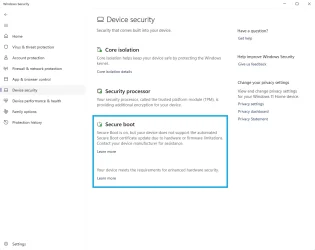
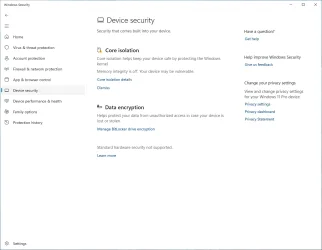
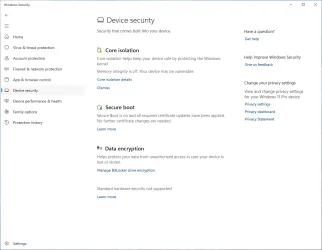
My sincere thanks to Garlin. The instructions to update the UEFI boot certificates on my Dell XPS 8930 worked great! I just needed to leave the Secure Boot set to Custom mode. After rebooting, Widows Security is now reporting that Secure Boot has been updated to the new certificates & no further changes are needed. Thanks Garlin...very well done!!!
I actually remember teletypes. My dad was in grad school and my mom worked, so I was forced to spent my afternoons sitting in my dad's chemistry lab offices. Of course, you're not allowed to touch anything in the lab (open flames, toxic chemicals, compressed gas tanks). Life was super boring after you finished your homework. So I just wandered the halls.
But across the hall was two hippies who befriended me. They were working on early computer graphics, using a DEC PDP/11. I really couldn't care less, because you weren't allowed to touch the computers. But they had a color TV, and I could sit there all afternoon watching cartoons and TV re-runs. My dad knew I was just down the hall.
I not only remember teletypes, I created a little program in the 1980's to use a Radio Shack TRS-80 Model 100 tablet to replace the old Teletype Model 28 wall mount units for query terminals on the floor of the NYSE.