Solved garlin's PowerShell scripts for updating Secure Boot CA 2023


I not only remember teletypes, I created a little program in the 1980's to use a Radio Shack TRS-80 Model 100 tablet to replace the old Teletype Model 28 wall mount units for query terminals on the floor of the NYSE.
Two of my friends worked for Quotron (back when Citibank bought it). I got to visit their headquarters in LA. Everyone including their programmers had to wear a tie. That was before Bloomberg crushed them with a normal user terminal.
 

My Computer

System One

  • OS
    Windows 7
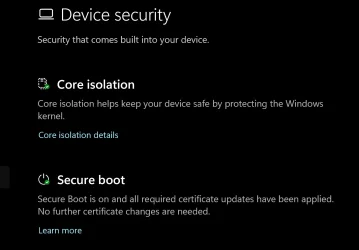
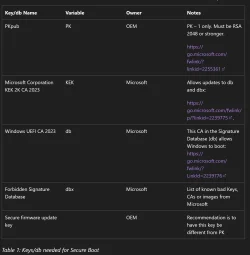
Finally, the dreaded BIOS update was successfully completed in the easiest way possible, thanks to the Garlin's SecureBoot-CA-2023-Updates.v2026.05.27 file. After putting the BIOS into setup mode by deleting all existing keys, I ran Update-UEFI.bat, restarted, and successfully re-enabled SecureBoot. Windows Security confirmed that all required certificates were successfully updated. Before running Update-UEFI.bat and restarting, I downloaded and installed three certificates from Microsoft's website (Keys Required for Secure Boot on all PCs):
- microsoft corporation kek 2k ca 2023.crt
- windows oem devices pk.cer
- windows uefi ca 2023.crt
(learn.microsoft.com/en-us/windows-hardware/manufacture/desktop/windows-secure-boot-key-creation-and-management-guidance?view=windows-11#15-keys-required-for-secure-boot-on-all-pcs)
The only thing I want to ask about is the Check-UEFI.bat report, which shows that UEFI DBX Certs = (NONE).
Also, SkuSiPolicy.p7b (for VBS) is MISSING.
Will Windows then automatically update the DBX? And adding SkuSiPolicy.p7b?

By the way, I left Custom Mode Enabled in Expert Key Management to prevent the BIOS from erasing the new keys and reactivating Dell's silly system.

Can the BIOS automatically erase the new certificates?

-----------
UEFI DB Certs
-------------
Microsoft Corporation UEFI CA 2011
Microsoft Windows Production PCA 2011
Microsoft Option ROM UEFI CA 2023
Microsoft UEFI CA 2023
Windows UEFI CA 2023

UEFI DBX Certs
--------------
(NONE)

EFI Files
---------
Windows Boot Manager [Windows UEFI CA 2023] is ALLOWED.
Registry: "WindowsUEFICA2023Capable" = 2
[Windows UEFI CA 2023] in UEFI DB, and Windows starting from CA 2023 Boot Manager.

[OPTIONAL] SkuSiPolicy.p7b (for VBS) is MISSING.
 

Attachments

  • New 2023 certificates check True 03-06-2026.webp
    New 2023 certificates check True 03-06-2026.webp
    81.2 KB · Views: 1
  • Device Security Secure boot 2023 cetificate updated 03-06-2026.webp
    Device Security Secure boot 2023 cetificate updated 03-06-2026.webp
    45.2 KB · Views: 1
  • Screenshot 2026-06-03 at 04-10-34 Windows Secure Boot Key Creation and Management Guidance Mi...webp
    Screenshot 2026-06-03 at 04-10-34 Windows Secure Boot Key Creation and Management Guidance Mi...webp
    64 KB · Views: 1

My Computer

System One

  • OS
    Windows 11 IoT Enterprise LTSC 2024 24H2 (En-US)
    Computer type
    Laptop
    Manufacturer/Model
    Dell Inspiron 7573 2-in-1 15.6-inch 4K UHD convertible laptop CX6LXN2 (Bios v. Dell Inc. 1.25.0, 7/13/2022)
    CPU
    Intel(R) Core(TM) i7-8550U CPU @ 1.80GHz, 1992 Mhz, 4 C
    Motherboard
    Intel Sunrise Point-LP, Intel Kaby Lake-R (BaseBoard 0X1X3N)
    Memory
    32GB DDR4 Dual
    Graphics Card(s)
    NVIDIA GeForce MX130 (2 GB), Intel(R) UHD Graphics 620 (128 MB)
    Sound Card
    Realtek Semiconductor Corp.
    Monitor(s) Displays
    Sharp LQ156D1 (Dell 4N59J) [15.6" LCD] {2017}
    Screen Resolution
    3840 x 2160 4K UHD
    Hard Drives
    SSD NVMe WD Blue SN570 1T
    Browser
    Firefox 151.0.2 (64-bit)
    Antivirus
    Windows Defender & Hitman Pro Alert
    Other Info
    Secure Boot stops working after trying to fix windows new 2023 certificates update issue. The OS works fine but no secure boot.
Finally, the dreaded BIOS update was successfully completed in the easiest way possible, thanks to the Garlin's SecureBoot-CA-2023-Updates.v2026.05.27 file. After putting the BIOS into setup mode by deleting all existing keys, I ran Update-UEFI.bat, restarted, and successfully re-enabled SecureBoot. Windows Security confirmed that all required certificates were successfully updated. Before running Update-UEFI.bat and restarting, I downloaded and installed three certificates from Microsoft's website (Keys Required for Secure Boot on all PCs):
- microsoft corporation kek 2k ca 2023.crt
- windows oem devices pk.cer
- windows uefi ca 2023.crt
When you delete all existing keys, the script downloads the Windows OEM Devices certs from the MS GitHub.

The Windows OEM Devices certs are encoded in a post-signed format, for direct application to the blank UEFI variables. Each .bin file can combine multiple certs in a single file. For example, the KEK .bin file contains both KEK CA 2011 & KEK CA 2023. The DB .bin file contains all 5 certs.

Pre-signed certs are provided in .crt, .cer, or .der file formats. Those can't be scripted unless you own the UEFI's Platform Key to cross-sign them, and are intended for manual enrollment using the BIOS setup screens. Two different methods of adding a cert.

The only thing I want to ask about is the Check-UEFI.bat report, which shows that UEFI DBX Certs = (NONE).
Also, SkuSiPolicy.p7b (for VBS) is MISSING.
Will Windows then automatically update the DBX? And adding SkuSiPolicy.p7b?
By default, the update script doesn't enforce CA 2011 revocation. Not everyone wants that done immediately. Some users prefer to wait.
There is no announced timeline for when Windows will force a mandatory revocation.

You can perform revocation using the -Revoke option:
Code:
Update-UEFI -Revoke

When Virtualization Based Security (VBS) is enabled, MS recommends using a SkuSiPolicy for additional security. But in some cases, SkuSipolicy can prevent a dual-boot Windows from working (where the other Windows is an Insider build), or block a WinRE-based bootable drive.

There is a version check on winload.efi used for booting, which is unrelated to the Secure Boot check on Windows boot manager. Because enough users have encountered issues with SkuSiPolicy enforcement, the update script doesn't automatically push the file. YMMV.

Code:
Update-UEFI -Revoke
Update-UEFI -Revoke -SkuSiPolicy

Can the BIOS automatically erase the new certificates?
Generally no. But technically yes.

In the best possible world, your BIOS would have the CA 2023 certs included as factory defaults. If something were to reset the NVRAM variables, then you would have to repeat the same update steps. Assuming you have an unsupported PC, there aren't any BIOS updates in the future.

But you might need to reset the UEFI or BIOS to clear some weird HW glitch, or your CMOS battery dies. Just save a copy of your update notes so you can repeat the process. It's easier the next time, since you know the BIOS menu layout.

 

My Computer

System One

  • OS
    Windows 7
Hi I have Dell XPS 8930 and I can't update KEK. Spent 4 hours and nothing works. Any help would be greatly appreciated
 

My Computer

System One

  • OS
    windows 11
1. Confirm BitLocker is not enabled on system drive, and you're not using Windows Hello PIN for logon. Disable both of them if enabled.

2. Enter the BIOS. Create an Admin or Supervisor password to unlock the additional Secure Boot menus. Your screens might look like this example:
In acer nitro 5 AN515-57 how to change Secure boot mode enable (on windows) - Acer Community

3. Disable Secure Boot mode.

4. Change from Standard Mode to Custom Mode.

5. Erase All Secure Boot Settings.

6. Restart Windows. Run the update script, and copy/paste the check script's output.
Code:
Update-UEFI.bat
Check-UEFI-bat -Verbose
Entered the Bios and created supervisor password, this unlocked some secure boot settings (delete keys etc.) but I am still not able to change secure boot from standard to custom mode.
 

My Computer

System One

  • OS
    Windows 11
Entered the Bios and created supervisor password, this unlocked some secure boot settings (delete keys etc.) but I am still not able to change secure boot from standard to custom mode.

You can only update the certificates by updating the BIOS.

So forget the scripts updating. You need a BIOS update.

I also have an Acer Nitro, and I’m not on the acer update list, I have to wait, but it looks like there won’t be any BIOS updates for my Acer Nitro 5. :(


And if there aren't any BIOS updates, that's not a big deal either; the PC works just fine. I had Secure Boot disabled for a few years and never had any problems. :)
 
Last edited:

My Computer

System One

  • OS
    Windows 11
Is it possible to use the scripts tomorrow to update machines or is it too late?
 

My Computer

System One

  • OS
    Windows 11 Enterprise
    Computer type
    PC/Desktop
    Manufacturer/Model
    WMI says "To be Filled By OEM"
    Keyboard
    Plastic
    Mouse
    I have not seen any lately
    Internet Speed
    Insert AIM ICON :)
    Browser
    The first one I find to double click on.
    Antivirus
    Sandbox
Its possible. If you want to verify the 2023 secure boot certificates are installed and present, the secure boot tab of O&O Shutup 10 Free will display them
 

My Computers

System One System Two

  • OS
    Windows 11 Education For 25H2
    Computer type
    Laptop
    Manufacturer/Model
    HP ZBook G2
    CPU
    Intel® Core i7 5500u
    Motherboard
    HP
    Memory
    8 GB
    Graphics Card(s)
    Intel HD Family Graphics 5500 AMD Firepro 4150M
    Sound Card
    Realtek High Audio
    Hard Drives
    1 TB SSD
    Mouse
    HP USB Mouse
    Antivirus
    Windows Defender
  • Operating System
    Windows 11 Pro For Workstations 25H2
    Computer type
    Laptop
    Manufacturer/Model
    HP Zbook G4
    CPU
    Xeon 1535m v6
    Motherboard
    HP
    Memory
    32 GB
    Graphics card(s)
    AMD Quadro Pro 4100
    Sound Card
    Bang and Olufson Audio
    Hard Drives
    1TB SSD
    Mouse
    HP USB Mouse
    Antivirus
    Windows Defender
Is it possible to use the scripts tomorrow to update machines or is it too late?
There is no immediate deadline, except that the PCA 2011 cert expires in October. Once that happens, MS cannot release a new boot manager (after fixing a security hole) with the CA 2011 cert. It must be signed by a valid CA 2023 cert.

You have from now to the end of September to update machines. In the upcoming months, MS will probably add more Windows features to constantly remind you to update certs. But you have enough time.
 

My Computer

System One

  • OS
    Windows 7
You can only update the certificates by updating the BIOS.

So forget the scripts updating. You need a BIOS update.
This depends on your exact BIOS. When you have a supported PC, the Secure Boot task or a script can handle updates.

Some BIOS'es support manual enrollment of keys. Only the KEK CA 2023 needs to be enrolled from BIOS. The rest can be scripted.
Some BIOS'es support deleting all keys, and allowing replacements. You perform this once, and the rest can be scripted.

A few PC's claim to support the above, but have firmware bugs which prevent the installed keys from working. Those tend to be rare. We've had a number of older Acers updated in this thread. It depends on the model (how old the BIOS is).
 

My Computer

System One

  • OS
    Windows 7
Entered the Bios and created supervisor password, this unlocked some secure boot settings (delete keys etc.) but I am still not able to change secure boot from standard to custom mode.
Does deleting all keys change the mode for you?
 

My Computer

System One

  • OS
    Windows 7
Does deleting all keys change the mode for you?
I didn't delete the keys at this stage, I didn't want to get into non boot situation, what's the worst that can happen if I delete them and whats the way forward after deletion?
 

My Computer

System One

  • OS
    Windows 11
If you delete them and it doesn't work, you can always reset back to factory defaults. Secure Boot mode should be disabled when doing the update, so it doesn't matter which version of the boot manager is currently installed (no enforcement).

After you delete all keys, restart Windows and run the update script again.
 

My Computer

System One

  • OS
    Windows 7
This depends on your exact BIOS. When you have a supported PC, the Secure Boot task or a script can handle updates.

Some BIOS'es support manual enrollment of keys. Only the KEK CA 2023 needs to be enrolled from BIOS. The rest can be scripted.
Some BIOS'es support deleting all keys, and allowing replacements. You perform this once, and the rest can be scripted.

A few PC's claim to support the above, but have firmware bugs which prevent the installed keys from working. Those tend to be rare. We've had a number of older Acers updated in this thread. It depends on the model (how old the BIOS is).

I was talking about my BIOS, which is exactly like the one on the @acer54 ; this type of BIOS can only update the certificates through BIOS update.

The BIOS is locked you only can update the certificates through a BIOS update.

None of the scripts work on this type of BIOS.

The BIOS update can be downloaded through Windows Update or from Acer site if available.
 
Last edited:

My Computer

System One

  • OS
    Windows 11
In my experience, BIOSes manufactured from 2018 onwards use a different mechanism for erasing Secure Boot keys, than to reset or set default BIOS settings, than to set default TPM settings.

Nowadays, all these three are reset separately via their respective reset option/button, so even if your BIOS is reset due to lack of power, you won't lose your secure boot keys, not TPM settings. This is very true with HP BIOS, my laptop for example can only reset keys if you explicitly do so, if you take off your battery and the BIOS is reset, the keys are still there and all Secure Boot Settings, nothing gets reset, same with TPM, except for the usual, fan, keyboard or battery settings you usually change.
 

My Computers

System One System Two

  • OS
    Windows 11 Pro 25H2
    Computer type
    PC/Desktop
    Manufacturer/Model
    Built PC
    CPU
    AMD Ryzen 5 5600G @ 3.9/4.4Ghz
    Motherboard
    MSI B550M-PRO-WiFi Ver. 1.4
    Memory
    2 x 16 GB DDR4 Kingston Fury Beast 3200 Mhz
    Graphics Card(s)
    AMD Radeon RX 6600 XT MSI Mech 2X OC Edition 8 GB
    Sound Card
    Realtek High Definition Audio (Integrated)
    Monitor(s) Displays
    Samsung C50Rx 27" LED / HP S2031 20" LCD
    Screen Resolution
    1920 x 1080 px / 1600 x 900 px
    Hard Drives
    WD Blue SN570 NVME M.2 SSD [1 TB] -- External Drives: - WD Scorpion Blue 250 GB 5400 RPM (Data Backup) - Hitachi 500 GB 5400 RPM (Software / ISOs Backup) - Toshiba MQ01ABD100 1 TB 5400 RPM (OS Images) - HGST TravelStar 7K1000 1 TB, 7200 RPM USB 3.0 - ADATA SU800 2TB SSD USB 3.0
    PSU
    Corsair RM750e 750W Fully Modular
    Case
    Naceb Hydra NA-1602
    Cooling
    Naceb Orpheus x 3 (Front) + Naceb Cepheus 1200 RPM Max (Rear) + ThemalRight Assasin X 90 SE (CPU)
    Keyboard
    Logitech MK470 Wireless
    Mouse
    Logitech MK470 Wireless
    Internet Speed
    120 MB Symetrical
    Browser
    Firefox / Brave / Edge
    Antivirus
    Windows Defender
    Other Info
    - VMs: WMware Player - Windows 8.1 Pro x64 / Windows 11 Pro
    - Wacom Intuos Pro Small Tablet PTH-460
  • Operating System
    Windows 11 Pro 25H2
    Computer type
    Laptop
    Manufacturer/Model
    HP Pavilion 15-eh3000la (80M53LA)
    CPU
    AMD Ryzen 7 7730U @ 2.0/4.5 Ghz
    Motherboard
    HP 8BC7
    Memory
    2 x 16 GB Kingston Fury Impact DDR4 3200 Mhz
    Graphics card(s)
    Radeon (tm) Graphics Vega 8 (512 MB)
    Sound Card
    Realtek High Definition Audio (Integrated)
    Monitor(s) Displays
    AU Optronics
    Screen Resolution
    1920 x 1080 px (125% size)
    Hard Drives
    WD Blue SN570 1TB NVME M.2 Drive
    PSU
    45 Watt Charger
    Cooling
    Laptop Cooling Pad
    Keyboard
    Free Wolf Foldable Portable Keyboard
    Mouse
    Free Wolf Wireless Mouse
    Internet Speed
    120 MB Symetrical
    Browser
    Firefox / Brave / Edge
    Antivirus
    Windows Defender
    Other Info
    - 41mWh battery.
    - Wacom Intuos Pro Small Tablet PTH-460
I was talking about my BIOS, which is exactly like the one on the @acer54 ; this type of BIOS can only update the certificates through BIOS update.

The BIOS is locked you only can update the certificates through a BIOS update.

None of the scripts work on this type of BIOS.

The BIOS update can be downloaded through Windows Update or from Acer site if available.
I had an Acer a while ago... if your BIOS is locked with a supervisor password, you can unlock it, there are sites that have the default unlock keys to access BIOS settings... there's also the Fn + Tab + Power combo that unlocks the advanced settings of Acer BIOSes, if you are able to enter your advanced settings, you can definitely use the script. Still you need an updated BIOS to have the default certs installed.

I haven't tried with my E5-553... but I wouldn't do it, because that laptop is unsupported, and Windows runs so poorly I'm better off letting Kubuntu do its job on it lol.
 

My Computers

System One System Two

  • OS
    Windows 11 Pro 25H2
    Computer type
    PC/Desktop
    Manufacturer/Model
    Built PC
    CPU
    AMD Ryzen 5 5600G @ 3.9/4.4Ghz
    Motherboard
    MSI B550M-PRO-WiFi Ver. 1.4
    Memory
    2 x 16 GB DDR4 Kingston Fury Beast 3200 Mhz
    Graphics Card(s)
    AMD Radeon RX 6600 XT MSI Mech 2X OC Edition 8 GB
    Sound Card
    Realtek High Definition Audio (Integrated)
    Monitor(s) Displays
    Samsung C50Rx 27" LED / HP S2031 20" LCD
    Screen Resolution
    1920 x 1080 px / 1600 x 900 px
    Hard Drives
    WD Blue SN570 NVME M.2 SSD [1 TB] -- External Drives: - WD Scorpion Blue 250 GB 5400 RPM (Data Backup) - Hitachi 500 GB 5400 RPM (Software / ISOs Backup) - Toshiba MQ01ABD100 1 TB 5400 RPM (OS Images) - HGST TravelStar 7K1000 1 TB, 7200 RPM USB 3.0 - ADATA SU800 2TB SSD USB 3.0
    PSU
    Corsair RM750e 750W Fully Modular
    Case
    Naceb Hydra NA-1602
    Cooling
    Naceb Orpheus x 3 (Front) + Naceb Cepheus 1200 RPM Max (Rear) + ThemalRight Assasin X 90 SE (CPU)
    Keyboard
    Logitech MK470 Wireless
    Mouse
    Logitech MK470 Wireless
    Internet Speed
    120 MB Symetrical
    Browser
    Firefox / Brave / Edge
    Antivirus
    Windows Defender
    Other Info
    - VMs: WMware Player - Windows 8.1 Pro x64 / Windows 11 Pro
    - Wacom Intuos Pro Small Tablet PTH-460
  • Operating System
    Windows 11 Pro 25H2
    Computer type
    Laptop
    Manufacturer/Model
    HP Pavilion 15-eh3000la (80M53LA)
    CPU
    AMD Ryzen 7 7730U @ 2.0/4.5 Ghz
    Motherboard
    HP 8BC7
    Memory
    2 x 16 GB Kingston Fury Impact DDR4 3200 Mhz
    Graphics card(s)
    Radeon (tm) Graphics Vega 8 (512 MB)
    Sound Card
    Realtek High Definition Audio (Integrated)
    Monitor(s) Displays
    AU Optronics
    Screen Resolution
    1920 x 1080 px (125% size)
    Hard Drives
    WD Blue SN570 1TB NVME M.2 Drive
    PSU
    45 Watt Charger
    Cooling
    Laptop Cooling Pad
    Keyboard
    Free Wolf Foldable Portable Keyboard
    Mouse
    Free Wolf Wireless Mouse
    Internet Speed
    120 MB Symetrical
    Browser
    Firefox / Brave / Edge
    Antivirus
    Windows Defender
    Other Info
    - 41mWh battery.
    - Wacom Intuos Pro Small Tablet PTH-460
In my experience, BIOSes manufactured from 2018 onwards use a different mechanism for erasing Secure Boot keys, than to reset or set default BIOS settings, than to set default TPM settings.

Nowadays, all these three are reset separately via their respective reset option/button, so even if your BIOS is reset due to lack of power, you won't lose your secure boot keys, not TPM settings. This is very true with HP BIOS, my laptop for example can only reset keys if you explicitly do so, if you take off your battery and the BIOS is reset, the keys are still there and all Secure Boot Settings, nothing gets reset, same with TPM, except for the usual, fan, keyboard or battery settings you usually change.
Au Contraire! I have an HP ENVY desktop that I just loaded Windows 11 on and configured for Secure Boot with the @garlin scripts with a 2014 AMI BIOS, and there was a convenient setting to nuke everything and start from scratch. This model doesn't have TPM2, but I just used Rufus to bypass that requirement. I did several updates to the current Win11 Pro version with no issues at all. It reused the license from the Win10 Pro it was running before, so I didn't have to do anything about licensing.
 

My Computers

System One System Two

  • OS
    Win 11 Pro 25H2, Build 26200.8524
    Computer type
    PC/Desktop
    Manufacturer/Model
    Home Brew
    CPU
    Intel Core i5 14500
    Motherboard
    Gigabyte B760M G P WIFI
    Memory
    64GB DDR4
    Graphics Card(s)
    GeForce RTX 4060
    Sound Card
    Chipset Realtek
    Monitor(s) Displays
    LG 45" Ultragear, Acer 24" 1080p
    Screen Resolution
    5120x1440, 1920x1080
    Hard Drives
    Crucial P310 2TB 2280 PCIe Gen4 3D NAND NVMe M.2 SSD (O/S)
    Silicon Power 2TB US75 NVMe PCIe Gen4 M.2 2280 SSD (backup)
    Crucial BX500 2TB 3D NAND (2nd backup)
    Seagate 4TB Ironwolf, rotating HDD archive files
    External off-line backup Drives: 2 NVMe 4TB drives in external enclosures
    PSU
    Thermaltake Toughpower GF3 750W
    Case
    LIAN LI LANCOOL 216 E-ATX PC Case
    Cooling
    Lots of fans!
    Keyboard
    Microsoft Comfort Curve 2000
    Mouse
    Logitech G305
    Internet Speed
    Verizon FiOS 1GB
    Browser
    Firefox
    Antivirus
    Malware Bytes & Windows Defender Security
  • Operating System
    Win 11 Pro 25H2, Build 26200.8524
    Computer type
    PC/Desktop
    Manufacturer/Model
    Home Brew
    CPU
    Intel Core i5 14400
    Motherboard
    Gigabyte B760M DS3H AX
    Memory
    32GB DDR5
    Graphics card(s)
    Intel 700 Embedded GPU
    Sound Card
    Realtek Embedded
    Monitor(s) Displays
    27" HP 1080p
    Screen Resolution
    1920x1080
    Hard Drives
    Crucial P310 2TB 2280 PCIe Gen4 eD NAND PCIe SSD
    Samsung EVO 990 2TB NVMe Gen4 SSD
    Samsung 2TB SATA SSD
    PSU
    Thermaltake Smart BM3 650W
    Case
    Okinos Micro ATX Case
    Cooling
    Fans
    Keyboard
    Microsoft Comfort Curve 2000
    Mouse
    Logitech G305
    Internet Speed
    Verizon FiOS 1GB
    Browser
    Firefox
    Antivirus
    Malware Bytes & Windows Defender Security
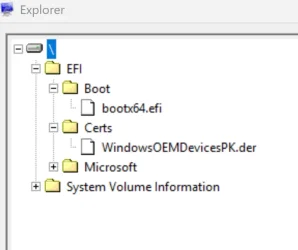
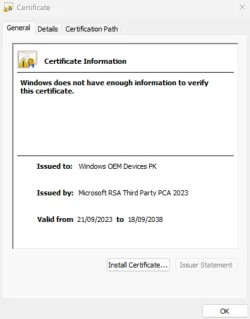
Yesterday, using the Hasleo EasyUEFI program, I noticed that a folder called Certs was added to the UEFI system partition (ESP). Inside this folder is the WindowsOEMDevicesPK.der certificate. This folder was added when the BIOS certificates were updated to 2023.
 

Attachments

  • EFI ESP Partition1.webp
    EFI ESP Partition1.webp
    17.3 KB · Views: 1
  • Windows OEM Devices PK.webp
    Windows OEM Devices PK.webp
    39.3 KB · Views: 1

My Computer

System One

  • OS
    Windows 11 IoT Enterprise LTSC 2024 24H2 (En-US)
    Computer type
    Laptop
    Manufacturer/Model
    Dell Inspiron 7573 2-in-1 15.6-inch 4K UHD convertible laptop CX6LXN2 (Bios v. Dell Inc. 1.25.0, 7/13/2022)
    CPU
    Intel(R) Core(TM) i7-8550U CPU @ 1.80GHz, 1992 Mhz, 4 C
    Motherboard
    Intel Sunrise Point-LP, Intel Kaby Lake-R (BaseBoard 0X1X3N)
    Memory
    32GB DDR4 Dual
    Graphics Card(s)
    NVIDIA GeForce MX130 (2 GB), Intel(R) UHD Graphics 620 (128 MB)
    Sound Card
    Realtek Semiconductor Corp.
    Monitor(s) Displays
    Sharp LQ156D1 (Dell 4N59J) [15.6" LCD] {2017}
    Screen Resolution
    3840 x 2160 4K UHD
    Hard Drives
    SSD NVMe WD Blue SN570 1T
    Browser
    Firefox 151.0.2 (64-bit)
    Antivirus
    Windows Defender & Hitman Pro Alert
    Other Info
    Secure Boot stops working after trying to fix windows new 2023 certificates update issue. The OS works fine but no secure boot.
Back
Top Bottom