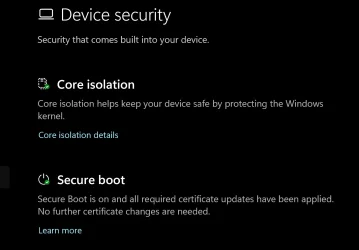
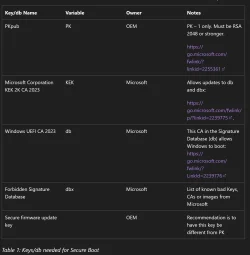
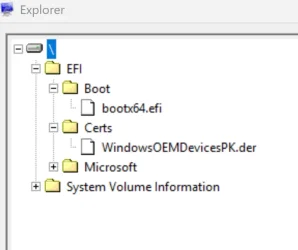
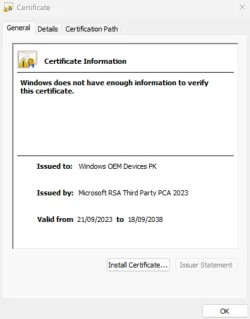
Finally, the dreaded BIOS update was successfully completed in the easiest way possible, thanks to the Garlin's SecureBoot-CA-2023-Updates.v2026.05.27 file. After putting the BIOS into setup mode by deleting all existing keys, I ran Update-UEFI.bat, restarted, and successfully re-enabled SecureBoot. Windows Security confirmed that all required certificates were successfully updated. Before running Update-UEFI.bat and restarting, I downloaded and installed three certificates from Microsoft's website (Keys Required for Secure Boot on all PCs):
- microsoft corporation kek 2k ca 2023.crt
- windows oem devices pk.cer
- windows uefi ca 2023.crt
When you delete all existing keys, the script downloads the Windows OEM Devices certs from the MS GitHub.
The Windows OEM Devices certs are encoded in a post-signed format, for direct application to the blank UEFI variables. Each .bin file can combine multiple certs in a single file. For example, the KEK .bin file contains both KEK CA 2011 & KEK CA 2023. The DB .bin file contains all 5 certs.
Pre-signed certs are provided in .crt, .cer, or .der file formats. Those can't be scripted unless you own the UEFI's Platform Key to cross-sign them, and are intended for manual enrollment using the BIOS setup screens. Two different methods of adding a cert.
The only thing I want to ask about is the Check-UEFI.bat report, which shows that UEFI DBX Certs = (NONE).
Also, SkuSiPolicy.p7b (for VBS) is MISSING.
Will Windows then automatically update the DBX? And adding SkuSiPolicy.p7b?
By default, the update script doesn't enforce CA 2011 revocation. Not everyone wants that done immediately. Some users prefer to wait.
There is no announced timeline for when Windows will force a mandatory revocation.
You can perform revocation using the -Revoke option:
When
Virtualization Based Security (VBS) is enabled, MS recommends using a SkuSiPolicy for additional security. But in some cases, SkuSipolicy can prevent a dual-boot Windows from working (where the other Windows is an Insider build), or block a WinRE-based bootable drive.
There is a version check on
winload.efi used for booting, which is unrelated to the Secure Boot check on Windows boot manager. Because enough users have encountered issues with SkuSiPolicy enforcement, the update script doesn't automatically push the file. YMMV.
Code:
Update-UEFI -Revoke
Update-UEFI -Revoke -SkuSiPolicy
Can the BIOS automatically erase the new certificates?
Generally no. But technically yes.
In the best possible world, your BIOS would have the CA 2023 certs included as factory defaults. If something were to reset the NVRAM variables, then you would have to repeat the same update steps. Assuming you have an unsupported PC, there aren't any BIOS updates in the future.
But you might need to reset the UEFI or BIOS to clear some weird HW glitch, or your CMOS battery dies. Just save a copy of your update notes so you can repeat the process. It's easier the next time, since you know the BIOS menu layout.