Solved garlin's PowerShell scripts for updating Secure Boot CA 2023


I'm guessing they cheated by setting the UEFI's "SecureBoot" variable as true, and called it a day.

So in other words, they turned the SecureBoot function on? Does that mean it was always there but not enabled?
 

My Computer My Computer

At a glance

Windows 11
OS
Windows 11
Windows can read certain UEFI variables like whether SecureBoot is enabled, or whether it's supported (BIOS might be in pure CSM mode, where you don't run Secure Boot). But otherwise the inner workings of the BIOS are hidden from Windows. You can report that specific features exist, without making them work so your PC passes a simple HW check of "supported" capabilities.
 

My Computer My Computer

At a glance

Windows 7
OS
Windows 7
Inspiron 3650 – unsupported:

Good afternoon everyone. First of all, I apologize for taking up your time and asking for your guidance today.I have the following situation with my Inspiron 3650 PC, which is getting a bit old.

When entering BIOS (F2) – “Secure Boot Enable” – switching “Secure Boot from: Standard Mode to Custom Mode” – “Key Exchange Key”:

"Delete all Key Variables” apply – Save - Exit – Reboot. (Note: I have to leave Secure Boot "disabled" because otherwise I get the error: "Secure Boot Violation – Invalid signature detected. Check Secure Boot Policy in Setup.")

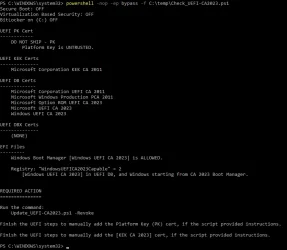
This is to leave it in Setup Mode. I apply Check_UEFI-CA2023.ps1

Secure Boot: ON
Virtualization Based Security: OFF
BitLocker on (C:) OFF

BIOS Firmware
-------------
Dell Inc. Inspiron 3650
Version: 3.12.1
Date: 2020-12-24

Factory Default UEFI PK Cert
----------------------------
DO NOT SHIP - PK

UEFI PK Cert
------------
DO NOT SHIP - PK
Platform Key is UNTRUSTED.
Manual update of [KEK CA 2023] is REQUIRED.

Factory Default UEFI KEK Certs
------------------------------
Microsoft Corporation KEK CA 2011

UEFI KEK Certs
--------------
Microsoft Corporation KEK CA 2011

Factory Default UEFI DB Certs
-----------------------------
Microsoft Corporation UEFI CA 2011
Microsoft Windows Production PCA 2011

UEFI DB Certs
-------------
Microsoft Corporation UEFI CA 2011
Microsoft Windows Production PCA 2011
Microsoft Option ROM UEFI CA 2023
Windows UEFI CA 2023

Factory Default UEFI DBX Certs
------------------------------
(NONE)
EFI_CERT_SHA256_GUID Signatures: 13

UEFI DBX Certs
--------------
(NONE)
Windows BootMgr SVN is MISSING.
EFI_CERT_SHA256_GUID Signatures: 447

UEFI Variables
--------------
Credential Guard: ON
SBAT (Linux only): sbat,1,2024010900 / shim,4 / grub,3 / grub.debian,4

EFI Files
---------
Boot File [Windows UEFI CA 2023] is UNTRUSTED
\\.\HarddiskVolume1\EFI\Microsoft\Boot\bootmgfw.efi
File Version: 28000.326, SVN 8.0

Registry: "WindowsUEFICA2023Capable" = 2
[Windows UEFI CA 2023] in UEFI DB, and Windows starting from CA 2023 Boot Manager.


REQUIRED ACTION
===============

Run the command:
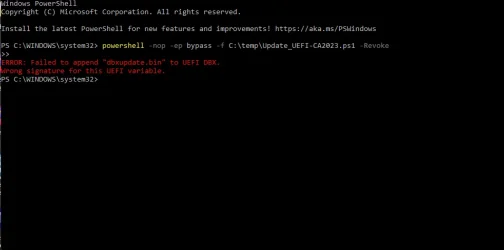
Update_UEFI-CA2023.ps1 -Revoke

Finish the UEFI steps to manually add the Platform Key (PK) cert, if the script provided instructions.

Finish the UEFI steps to manually add the [KEK CA 2023] cert, if the script provided instructions.


When I go into the BIOS and manually apply the PK, it says "success", but when I try to do the same with the KEK using the "append" section, it says "failed". I noticed the "from file" option under the KEK settings, tried applying it through there, and it said "success". Before proceeding any further, I would really appreciate your valuable advice.


"The image in question is the result of the required action: Update_UEFI-CA2023.ps1 -Revoke."
 

Attachments

  • Failed to append dbxupdate.webp
    Failed to append dbxupdate.webp
    20.2 KB · Views: 1

My Computer My Computer

At a glance

Edition Windows 11 Home Version 25H2 InstalledIntel(R) Core(TM) i7-8700 CPU @ 3.20GHz (3.19...24.0 GB (23.8 GB usable)NVIDIA GeForce GT 1030 (2 GB) Intel(R) UHD Gr...
OS
Edition Windows 11 Home Version 25H2 Installed
Computer type
PC/Desktop
Manufacturer/Model
DELL XPS 8930
CPU
Intel(R) Core(TM) i7-8700 CPU @ 3.20GHz (3.19 GHz)
Motherboard
Dell Inc. 0DF42J (U3E1) %1 Chipset
Memory
24.0 GB (23.8 GB usable)
Graphics Card(s)
NVIDIA GeForce GT 1030 (2 GB) Intel(R) UHD Graphics 630 (128 MB)
Sound Card
Intel Display Audio Realtek Audio, NVIDIA High Definition Audio
Screen Resolution
Current Resolution 1920x1080 pixels Work Resolution 1920x1032 pixels
Hard Drives
Samsung SSD 860 QVO 2TB
ST1000DM003-9YN162
Keyboard
Device Kind Keyboard Device Name HID Keyboard Device Vendor Unknown Location USB Input Device
Mouse
Device Kind Mouse Device Name HID-compliant mouse Vendor Primax Electronics Location USB Input Device
Browser
Firefox
Antivirus
McAfee
When I go into the BIOS and manually apply the PK, it says "success", but when I try to do the same with the KEK using the "append" section, it says "failed". I noticed the "from file" option under the KEK settings, tried applying it through there, and it said "success". Before proceeding any further, I would really appreciate your valuable advice.
I would do this (since the factory default PK is the "DO NOT SHIP"):

1. Keep the BIOS in Custom mode.
2. Delete All Keys.
3. Restart Windows. Run the update script without the -Revoke option (just to simplify it). It should recognize the UEFI is in Setup Mode (no certs).
4. Run the check script, assuming you see a KEK CA 2023 listed; then you can re-run the update script with a revoke.

Not sure why the script is instructing you to perform two manual cert adds, since replacing the "DO NOT SHIP" PK takes precedence, and it's removal allows the update script to work anyway without requiring you to install the KEK CA 2023.
 

My Computer My Computer

At a glance

Windows 7
OS
Windows 7
Hello - I just wanted to thank Garlin for creating the secure boot update scripts and then making them available to everyone along with support for them in this forum.

I am posting this to hopefully help others in order to sort of pay it forwards -

I have a 2018 Acer Aspire TC-885 desktop computer running a 8th gen intel processor which is likely not getting a bios firmware update from Acer.

I was previously aware of the thread on the Acer website regarding the warning about potential hardware limitation in the nvram space allocation that you also referenced in a post on this thread.

I am confirming that I was able to use your scripts to successfully install all the updated secure boot certificates on this Acer desktop computer.

At first I thought I was encountering an error from the nvram issue after running the update script due to the UEFI DBX Certs showing (NONE) when running the check script afterwards. It actually turned out to be caused by not running the revoke 2011 cert process which appeared to resolve it (ran whole clearing / updating secure boot keys 2x before figuring this out)

So I do not know if there is actually a nvram space allocation issue at this time on this Acer computer.

there seems to be very limited information regarding the Acer bios settings, so for this specific computer -

- there are only 2 options for all the secure boot keys - install default and clear , there are no individual settings, its all or none

- 2 tabs/screens involved, Security and Authentication

- supervisor password needs to be set / created to unlock the additional secure boot settings (1234)

- did not disable secure boot / left it on

- secure boot mode was changed from standard to custom

- default key provisioning was changed from enabled to disabled

- clear secure boot key <enter>, yes to reset to set up mode

- a message appears stating variable locked, need to re -do this exact step again after reboot

- save and exit

- back in bios, supervisor password required, re - do clear secure boot key <enter>, yes to reset to set up mode

- system boot state now changed from user mode to set up mode

- remove supervisor password by changing, leaving new password blank, yes to clear old password, ok

- save and exit

WARNING - deleting/clearing bios secure boot keys essentially turns off secure boot and then subsequent boot into windows will trigger bitlocker recovery key screen so have 48 number recovery key on hand/ready unless you plan ahead by "turning off" bitlocker beforehand

Code:
PS C:\Users\admin\Desktop\garlin_scripts_secureboot_2023_certs\SecureBoot-CA-2023-Updates.v2026.06.14> .\check_uefi-ca2023.ps1 -verbose
Windows 11 25H2 (26200.8655)

Secure Boot: ON
Virtualization Based Security: ON
BitLocker on (C:) ON

BIOS Firmware
-------------
    Acer Aspire TC-885
    Version: R01-C3
    Date: 2020-04-07

Factory Default UEFI PK Cert
----------------------------
    Acer Platform Key

UEFI PK Cert
------------
    Windows OEM Devices PK

Factory Default UEFI KEK Certs
------------------------------
    Microsoft Corporation KEK CA 2011
    Acer
    Acer Key Exchange Key

UEFI KEK Certs
--------------
    Microsoft Corporation KEK CA 2011
    Microsoft Corporation KEK 2K CA 2023

Factory Default UEFI DB Certs
-----------------------------
    Microsoft Corporation UEFI CA 2011
    Microsoft Windows Production PCA 2011
    Acer
    Acer Database

UEFI DB Certs
-------------
    Microsoft Corporation UEFI CA 2011
    Microsoft Windows Production PCA 2011
    Microsoft Option ROM UEFI CA 2023
    Microsoft UEFI CA 2023
    Windows UEFI CA 2023

Factory Default UEFI DBX Certs
------------------------------
    Acer Database Forbidden
    EFI_CERT_SHA256_GUID Signatures: 77

UEFI DBX Certs
--------------
    Microsoft Windows Production PCA 2011
    Windows BootMgr SVN 9.0
    EFI_CERT_SHA256_GUID Signatures: 447

UEFI Variables
--------------
    Credential Guard: ON
    SBAT (Linux only): sbat,1,2024010900 / shim,4 / grub,3 / grub.debian,4

EFI Files
---------
    Windows Boot Manager [Windows UEFI CA 2023] is ALLOWED.
        \\.\HarddiskVolume2\EFI\Microsoft\Boot\bootmgfw.efi
        File Version: 28000.342, SVN 9.0

    Registry: "WindowsUEFICA2023Capable" = 2
        [Windows UEFI CA 2023] in UEFI DB, and Windows starting from CA 2023 Boot Manager.

    [OPTIONAL] SkuSiPolicy.p7b (for VBS) is MISSING.


STATUS REPORT
-------------
    Registry: "UEFICA2023Status" = Updated

    SUCCESS: UPDATES ARE FINISHED.
    UEFI CA 2023 certs are present, PCA 2011 cert is revoked.

PS C:\Users\admin\Desktop\garlin_scripts_secureboot_2023_certs\SecureBoot-CA-2023-Updates.v2026.06.14> .\check_DBXUpdate.bin.ps1
SUCCESS: Matched 289/289 EFI signatures from "dbxupdate.bin"
SUCCESS: Matched 3/3 SVN signatures from "DBXUpdate2024.bin"
SUCCESS: Matched 3/3 SVN signatures from "DBXUpdateSVN.bin"
 

My Computer My Computer

At a glance

Windows 11
OS
Windows 11
Computer type
PC/Desktop
Manufacturer/Model
Acer Aspire TC-885
would do this (since the factory default PK is the "DO NOT SHIP"):

1. Keep the BIOS in Custom mode.
2. Delete All Keys.
3. Restart Windows. Run the update script without the -Revoke option (just to simplify it). It should recognize the UEFI is in Setup Mode (no certs).
4. Run the check script, assuming you see a KEK CA 2023 listed; then you can re-run the update script with a revoke.
"Thanks, I'll go ahead with the steps you gave me."
Not sure why the script is instructing you to perform two manual cert adds, since replacing the "DO NOT SHIP" PK takes precedence, and it's removal allows the update script to work anyway without requiring you to install the KEK CA 2023.
"As a side note — when I go back to edit in Custom Mode, it doesn't let me. I have to switch back to 'Standard Mode' and then back to 'Custom Mode' to be able to edit. Obviously, this resets it to 'Factory Settings' and I have to do everything all over again."
 

My Computer My Computer

At a glance

Edition Windows 11 Home Version 25H2 InstalledIntel(R) Core(TM) i7-8700 CPU @ 3.20GHz (3.19...24.0 GB (23.8 GB usable)NVIDIA GeForce GT 1030 (2 GB) Intel(R) UHD Gr...
OS
Edition Windows 11 Home Version 25H2 Installed
Computer type
PC/Desktop
Manufacturer/Model
DELL XPS 8930
CPU
Intel(R) Core(TM) i7-8700 CPU @ 3.20GHz (3.19 GHz)
Motherboard
Dell Inc. 0DF42J (U3E1) %1 Chipset
Memory
24.0 GB (23.8 GB usable)
Graphics Card(s)
NVIDIA GeForce GT 1030 (2 GB) Intel(R) UHD Graphics 630 (128 MB)
Sound Card
Intel Display Audio Realtek Audio, NVIDIA High Definition Audio
Screen Resolution
Current Resolution 1920x1080 pixels Work Resolution 1920x1032 pixels
Hard Drives
Samsung SSD 860 QVO 2TB
ST1000DM003-9YN162
Keyboard
Device Kind Keyboard Device Name HID Keyboard Device Vendor Unknown Location USB Input Device
Mouse
Device Kind Mouse Device Name HID-compliant mouse Vendor Primax Electronics Location USB Input Device
Browser
Firefox
Antivirus
McAfee
It's Sunday, so thank you so much for going out of your way to help us, especially since we aren't very familiar with BIOS-related topics. I look forward to your valuable advice whenever you´re available.
 

Attachments

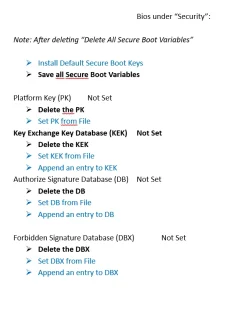
  • After.webp
    After.webp
    36.4 KB · Views: 1
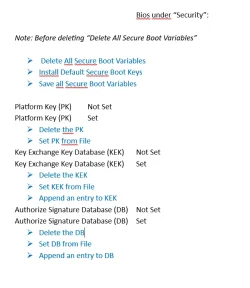
  • Before.webp
    Before.webp
    40.6 KB · Views: 1
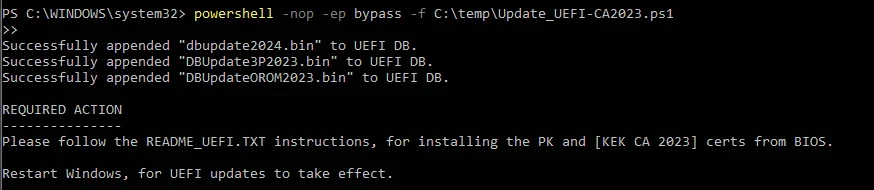
  • Update_UEFI-CA2023.webp
    Update_UEFI-CA2023.webp
    23.7 KB · Views: 1
  • Check_UEFI-CA2023.ps1.webp
    Check_UEFI-CA2023.ps1.webp
    48.7 KB · Views: 1

My Computer My Computer

At a glance

Edition Windows 11 Home Version 25H2 InstalledIntel(R) Core(TM) i7-8700 CPU @ 3.20GHz (3.19...24.0 GB (23.8 GB usable)NVIDIA GeForce GT 1030 (2 GB) Intel(R) UHD Gr...
OS
Edition Windows 11 Home Version 25H2 Installed
Computer type
PC/Desktop
Manufacturer/Model
DELL XPS 8930
CPU
Intel(R) Core(TM) i7-8700 CPU @ 3.20GHz (3.19 GHz)
Motherboard
Dell Inc. 0DF42J (U3E1) %1 Chipset
Memory
24.0 GB (23.8 GB usable)
Graphics Card(s)
NVIDIA GeForce GT 1030 (2 GB) Intel(R) UHD Graphics 630 (128 MB)
Sound Card
Intel Display Audio Realtek Audio, NVIDIA High Definition Audio
Screen Resolution
Current Resolution 1920x1080 pixels Work Resolution 1920x1032 pixels
Hard Drives
Samsung SSD 860 QVO 2TB
ST1000DM003-9YN162
Keyboard
Device Kind Keyboard Device Name HID Keyboard Device Vendor Unknown Location USB Input Device
Mouse
Device Kind Mouse Device Name HID-compliant mouse Vendor Primax Electronics Location USB Input Device
Browser
Firefox
Antivirus
McAfee
This BIOS still has the "DO NOT TRUST" PK installed. As long it remains, it blocks installation of the critical KEK CA 2023. After you delete all keys, are you still in Custom Mode or did it switch to "Setup Mode"? You need to figure out how to get a combination where all the keys are gone, before running the update script.

If you run the check script, it will report [Setup Mode] if you've correctly deleted all keys.

I will out for the next few hours, but will check back when I return.
 

My Computer My Computer

At a glance

Windows 7
OS
Windows 7
Thanks, I'll keep an eye out for your reply.
Regarding your question: I left it in Custom Mode since I can't find 'Setup Mode' anywhere. I will investigate this further and post back here with my findings.
Thanks for pointing me in the right direction.
 

My Computer My Computer

At a glance

Edition Windows 11 Home Version 25H2 InstalledIntel(R) Core(TM) i7-8700 CPU @ 3.20GHz (3.19...24.0 GB (23.8 GB usable)NVIDIA GeForce GT 1030 (2 GB) Intel(R) UHD Gr...
OS
Edition Windows 11 Home Version 25H2 Installed
Computer type
PC/Desktop
Manufacturer/Model
DELL XPS 8930
CPU
Intel(R) Core(TM) i7-8700 CPU @ 3.20GHz (3.19 GHz)
Motherboard
Dell Inc. 0DF42J (U3E1) %1 Chipset
Memory
24.0 GB (23.8 GB usable)
Graphics Card(s)
NVIDIA GeForce GT 1030 (2 GB) Intel(R) UHD Graphics 630 (128 MB)
Sound Card
Intel Display Audio Realtek Audio, NVIDIA High Definition Audio
Screen Resolution
Current Resolution 1920x1080 pixels Work Resolution 1920x1032 pixels
Hard Drives
Samsung SSD 860 QVO 2TB
ST1000DM003-9YN162
Keyboard
Device Kind Keyboard Device Name HID Keyboard Device Vendor Unknown Location USB Input Device
Mouse
Device Kind Mouse Device Name HID-compliant mouse Vendor Primax Electronics Location USB Input Device
Browser
Firefox
Antivirus
McAfee

Latest Support Threads

Back
Top Bottom