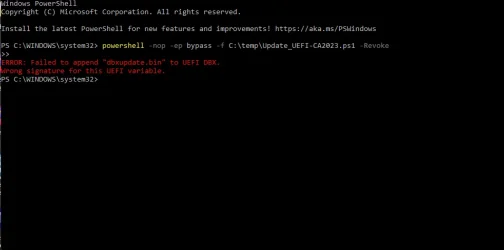
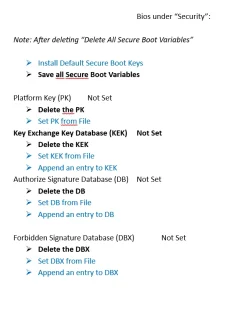
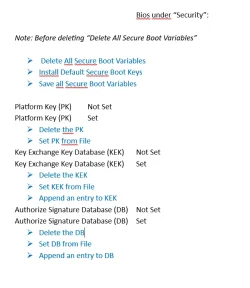
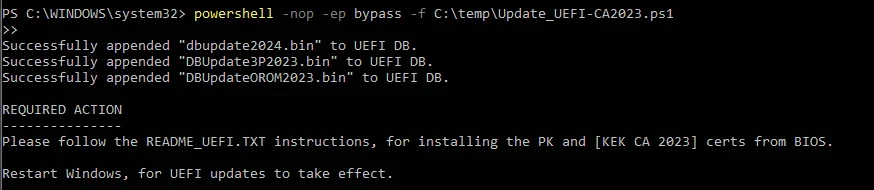
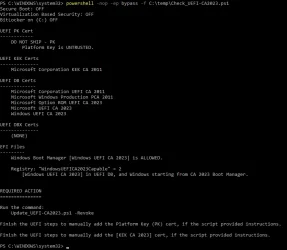
I've got 2 Acer computers a desktop and a laptop. I've successfully updated both computers with the CA 2023 .
Reading the forum, I'm wondering if the NVRAM on those computers will eventually run out of space after running the following command:
reg add HKEY_LOCAL_MACHINE\SYSTEM\CurrentControlSet\Control\Secureboot /v AvailableUpdates /t REG_DWORD /d 0x200 /f each time there's a new Windows Boot Manager SVN released?
Exhaustion of available NVRAM space is huge concern with older BIOS'es. Back then, Secure Boot was relatively new and not that much thinking was placed on how fast the DBX (banned list) would grow over time.
Secure Boot keys in the form of X509 certs aren't that many, unless your OEM cluttered the KEK and DB by adding their own branded certs. This can be seen with Acer's factory default keys. There's nothing wrong if you added the certs because you wanted to ship a low-level EFI tool (maybe a self-contained BIOS flashing tool) that was self-signed by the vendor.
The real growth and source of current doom is the explosion of the banned EFI files list, consisting of signature hashes appended to the DBX. Instead of adding each banned file's signing cert, they add a hash derived from that cert instead. When loading an EFI file at boot time, the signing cert's hash is computed and searched across all of the DBX's EFI hashes.
Over time, the banned file list kept growing and smart folks got concerned that old BIOS'es (with smaller NVRAM capacity) would hit a wall and fail because no more room is available to add new entries.
In the older set of
DBXupdate.bin files, MS listed 151 unique versions of the Windows boot manager that pre-dated the Black Lotus rootkit scare. The initial reaction to close the security hole was to ban all previous boot files going back across multiple Windows releases and builds. This approach of course isn't sustainable, so they decided on the "nuclear option".
Instead of banning file by file, they would have everyone revoke PCA 2011. In one move, that would ban all older (vulnerable) versions and you wouldn't need to know their EFI hashes. Of course you can't use the nuke option without getting onboard with CA 2023.
Why does this matter for space? In the April 2026 Monthly Update, MS shrank the
DBXUpdate.bin file by removing the 151 Windows entries. If we presume you installed CA 2023 and banned PCA 2011, then those 151 entries are moot. Those same files already banned by virtue of being released with the older PCA 2011 cert. MS shrank the DBX list to give everyone more headroom for NVRAM exhaustion.
But here's the cruel catch: it doesn't help if you revoked PCA 2011 before April 2026. You're still carrying around those extra 151 entries which are now cluttering the DBX. There isn't a cleanup function for this, and 151 entries is too many to try removing by hand.
Suppose you are concerned about NVRAM space, you would need to perform one of two options:
1. If your BIOS supports deleting all of DBX (just the DBX), delete the current entries. Re-run the update script, and it will repopulate the DBX but without the 151 retired hashes.
2. Delete all keys, and repeat the whole update process. Since you wiped everything and applied the April 2026 (or later) changes, you don't have those extra 151 entries.
Are we out of the woods yet? No, unfortunately each SVN is encoded as an "EFI hash". Unlike a normal DBX EFI hash, it doesn't represent an actual file but it's hiding a version number in the reported signature. If you look at the signature byte value, it's not a giant list of random looking bytes but a string of specific hex values which suddenly stops halfway and the rest is filled with zeros. Right before where the zeros begin, the SVN is embedded as specific bytes to be stripped off as the SVN.
Every time MS replaces the boot manager (at random frequency), the SVN gets updated and the "drip drip drip" of NVRAM consumption continues. But since they dropped the retired 151 (154 if you include 3 Canonical hashes from the same file), MS is trying to buy everyone more time.
Sorry that was a long explanation, but that's the background on "certs are too big to fit".
Is there a program or a PowerShell command script that I can use to check the NVRAM total size and the NVRAM available size?
Not really, while there are tools and scripts which can dump out the current NVRAM variables (and their contents), there are two problems:
1. None of them report the size of your available NVRAM.
2. By design, some security related settings (which also take up NVRAM space) cannot be read directly from the OS. You need a specialized EFI boot tool or shell that boots directly from UEFI, and interacts at a low level. This is where you make a hard turn in EFI or security researcher space, and there are no off-the-shelf tools for this level of detail.
NVRAM is a shared resource, and some of it may be consumed by data entirely unrelated to Secure Boot.