Solved garlin's PowerShell scripts for updating Secure Boot CA 2023


I'm guessing they cheated by setting the UEFI's "SecureBoot" variable as true, and called it a day.

So in other words, they turned the SecureBoot function on? Does that mean it was always there but not enabled?
 

My Computer My Computer

At a glance

Windows 11
OS
Windows 11
Windows can read certain UEFI variables like whether SecureBoot is enabled, or whether it's supported (BIOS might be in pure CSM mode, where you don't run Secure Boot). But otherwise the inner workings of the BIOS are hidden from Windows. You can report that specific features exist, without making them work so your PC passes a simple HW check of "supported" capabilities.
 

My Computer My Computer

At a glance

Windows 7
OS
Windows 7
Inspiron 3650 – unsupported:

Good afternoon everyone. First of all, I apologize for taking up your time and asking for your guidance today.I have the following situation with my Inspiron 3650 PC, which is getting a bit old.

When entering BIOS (F2) – “Secure Boot Enable” – switching “Secure Boot from: Standard Mode to Custom Mode” – “Key Exchange Key”:

"Delete all Key Variables” apply – Save - Exit – Reboot. (Note: I have to leave Secure Boot "disabled" because otherwise I get the error: "Secure Boot Violation – Invalid signature detected. Check Secure Boot Policy in Setup.")

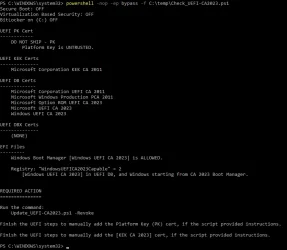
This is to leave it in Setup Mode. I apply Check_UEFI-CA2023.ps1

Secure Boot: ON
Virtualization Based Security: OFF
BitLocker on (C:) OFF

BIOS Firmware
-------------
Dell Inc. Inspiron 3650
Version: 3.12.1
Date: 2020-12-24

Factory Default UEFI PK Cert
----------------------------
DO NOT SHIP - PK

UEFI PK Cert
------------
DO NOT SHIP - PK
Platform Key is UNTRUSTED.
Manual update of [KEK CA 2023] is REQUIRED.

Factory Default UEFI KEK Certs
------------------------------
Microsoft Corporation KEK CA 2011

UEFI KEK Certs
--------------
Microsoft Corporation KEK CA 2011

Factory Default UEFI DB Certs
-----------------------------
Microsoft Corporation UEFI CA 2011
Microsoft Windows Production PCA 2011

UEFI DB Certs
-------------
Microsoft Corporation UEFI CA 2011
Microsoft Windows Production PCA 2011
Microsoft Option ROM UEFI CA 2023
Windows UEFI CA 2023

Factory Default UEFI DBX Certs
------------------------------
(NONE)
EFI_CERT_SHA256_GUID Signatures: 13

UEFI DBX Certs
--------------
(NONE)
Windows BootMgr SVN is MISSING.
EFI_CERT_SHA256_GUID Signatures: 447

UEFI Variables
--------------
Credential Guard: ON
SBAT (Linux only): sbat,1,2024010900 / shim,4 / grub,3 / grub.debian,4

EFI Files
---------
Boot File [Windows UEFI CA 2023] is UNTRUSTED
\\.\HarddiskVolume1\EFI\Microsoft\Boot\bootmgfw.efi
File Version: 28000.326, SVN 8.0

Registry: "WindowsUEFICA2023Capable" = 2
[Windows UEFI CA 2023] in UEFI DB, and Windows starting from CA 2023 Boot Manager.


REQUIRED ACTION
===============

Run the command:
Update_UEFI-CA2023.ps1 -Revoke

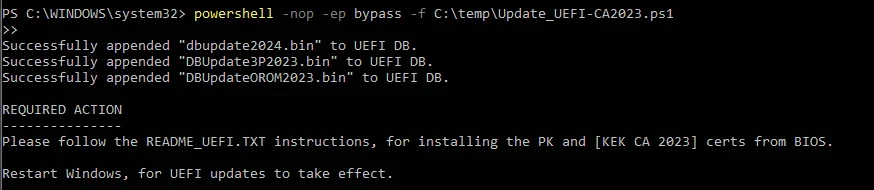
Finish the UEFI steps to manually add the Platform Key (PK) cert, if the script provided instructions.

Finish the UEFI steps to manually add the [KEK CA 2023] cert, if the script provided instructions.


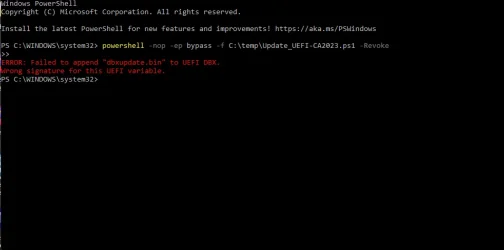
When I go into the BIOS and manually apply the PK, it says "success", but when I try to do the same with the KEK using the "append" section, it says "failed". I noticed the "from file" option under the KEK settings, tried applying it through there, and it said "success". Before proceeding any further, I would really appreciate your valuable advice.


"The image in question is the result of the required action: Update_UEFI-CA2023.ps1 -Revoke."
 

Attachments

  • Failed to append dbxupdate.webp
    Failed to append dbxupdate.webp
    20.2 KB · Views: 1

My Computer My Computer

At a glance

Edition Windows 11 Home Version 25H2 InstalledIntel(R) Core(TM) i7-8700 CPU @ 3.20GHz (3.19...24.0 GB (23.8 GB usable)NVIDIA GeForce GT 1030 (2 GB) Intel(R) UHD Gr...
OS
Edition Windows 11 Home Version 25H2 Installed
Computer type
PC/Desktop
Manufacturer/Model
DELL XPS 8930
CPU
Intel(R) Core(TM) i7-8700 CPU @ 3.20GHz (3.19 GHz)
Motherboard
Dell Inc. 0DF42J (U3E1) %1 Chipset
Memory
24.0 GB (23.8 GB usable)
Graphics Card(s)
NVIDIA GeForce GT 1030 (2 GB) Intel(R) UHD Graphics 630 (128 MB)
Sound Card
Intel Display Audio Realtek Audio, NVIDIA High Definition Audio
Screen Resolution
Current Resolution 1920x1080 pixels Work Resolution 1920x1032 pixels
Hard Drives
Samsung SSD 860 QVO 2TB
ST1000DM003-9YN162
Keyboard
Device Kind Keyboard Device Name HID Keyboard Device Vendor Unknown Location USB Input Device
Mouse
Device Kind Mouse Device Name HID-compliant mouse Vendor Primax Electronics Location USB Input Device
Browser
Firefox
Antivirus
McAfee
When I go into the BIOS and manually apply the PK, it says "success", but when I try to do the same with the KEK using the "append" section, it says "failed". I noticed the "from file" option under the KEK settings, tried applying it through there, and it said "success". Before proceeding any further, I would really appreciate your valuable advice.
I would do this (since the factory default PK is the "DO NOT SHIP"):

1. Keep the BIOS in Custom mode.
2. Delete All Keys.
3. Restart Windows. Run the update script without the -Revoke option (just to simplify it). It should recognize the UEFI is in Setup Mode (no certs).
4. Run the check script, assuming you see a KEK CA 2023 listed; then you can re-run the update script with a revoke.

Not sure why the script is instructing you to perform two manual cert adds, since replacing the "DO NOT SHIP" PK takes precedence, and it's removal allows the update script to work anyway without requiring you to install the KEK CA 2023.
 

My Computer My Computer

At a glance

Windows 7
OS
Windows 7
Hello - I just wanted to thank Garlin for creating the secure boot update scripts and then making them available to everyone along with support for them in this forum.

I am posting this to hopefully help others in order to sort of pay it forwards -

I have a 2018 Acer Aspire TC-885 desktop computer running a 8th gen intel processor which is likely not getting a bios firmware update from Acer.

I was previously aware of the thread on the Acer website regarding the warning about potential hardware limitation in the nvram space allocation that you also referenced in a post on this thread.

I am confirming that I was able to use your scripts to successfully install all the updated secure boot certificates on this Acer desktop computer.

At first I thought I was encountering an error from the nvram issue after running the update script due to the UEFI DBX Certs showing (NONE) when running the check script afterwards. It actually turned out to be caused by not running the revoke 2011 cert process which appeared to resolve it (ran whole clearing / updating secure boot keys 2x before figuring this out)

So I do not know if there is actually a nvram space allocation issue at this time on this Acer computer.

there seems to be very limited information regarding the Acer bios settings, so for this specific computer -

- there are only 2 options for all the secure boot keys - install default and clear , there are no individual settings, its all or none

- 2 tabs/screens involved, Security and Authentication

- supervisor password needs to be set / created to unlock the additional secure boot settings (1234)

- did not disable secure boot / left it on

- secure boot mode was changed from standard to custom

- default key provisioning was changed from enabled to disabled

- clear secure boot key <enter>, yes to reset to set up mode

- a message appears stating variable locked, need to re -do this exact step again after reboot

- save and exit

- back in bios, supervisor password required, re - do clear secure boot key <enter>, yes to reset to set up mode

- system boot state now changed from user mode to set up mode

- remove supervisor password by changing, leaving new password blank, yes to clear old password, ok

- save and exit

WARNING - deleting/clearing bios secure boot keys essentially turns off secure boot and then subsequent boot into windows will trigger bitlocker recovery key screen so have 48 number recovery key on hand/ready unless you plan ahead by "turning off" bitlocker beforehand

Code:
PS C:\Users\admin\Desktop\garlin_scripts_secureboot_2023_certs\SecureBoot-CA-2023-Updates.v2026.06.14> .\check_uefi-ca2023.ps1 -verbose
Windows 11 25H2 (26200.8655)

Secure Boot: ON
Virtualization Based Security: ON
BitLocker on (C:) ON

BIOS Firmware
-------------
    Acer Aspire TC-885
    Version: R01-C3
    Date: 2020-04-07

Factory Default UEFI PK Cert
----------------------------
    Acer Platform Key

UEFI PK Cert
------------
    Windows OEM Devices PK

Factory Default UEFI KEK Certs
------------------------------
    Microsoft Corporation KEK CA 2011
    Acer
    Acer Key Exchange Key

UEFI KEK Certs
--------------
    Microsoft Corporation KEK CA 2011
    Microsoft Corporation KEK 2K CA 2023

Factory Default UEFI DB Certs
-----------------------------
    Microsoft Corporation UEFI CA 2011
    Microsoft Windows Production PCA 2011
    Acer
    Acer Database

UEFI DB Certs
-------------
    Microsoft Corporation UEFI CA 2011
    Microsoft Windows Production PCA 2011
    Microsoft Option ROM UEFI CA 2023
    Microsoft UEFI CA 2023
    Windows UEFI CA 2023

Factory Default UEFI DBX Certs
------------------------------
    Acer Database Forbidden
    EFI_CERT_SHA256_GUID Signatures: 77

UEFI DBX Certs
--------------
    Microsoft Windows Production PCA 2011
    Windows BootMgr SVN 9.0
    EFI_CERT_SHA256_GUID Signatures: 447

UEFI Variables
--------------
    Credential Guard: ON
    SBAT (Linux only): sbat,1,2024010900 / shim,4 / grub,3 / grub.debian,4

EFI Files
---------
    Windows Boot Manager [Windows UEFI CA 2023] is ALLOWED.
        \\.\HarddiskVolume2\EFI\Microsoft\Boot\bootmgfw.efi
        File Version: 28000.342, SVN 9.0

    Registry: "WindowsUEFICA2023Capable" = 2
        [Windows UEFI CA 2023] in UEFI DB, and Windows starting from CA 2023 Boot Manager.

    [OPTIONAL] SkuSiPolicy.p7b (for VBS) is MISSING.


STATUS REPORT
-------------
    Registry: "UEFICA2023Status" = Updated

    SUCCESS: UPDATES ARE FINISHED.
    UEFI CA 2023 certs are present, PCA 2011 cert is revoked.

PS C:\Users\admin\Desktop\garlin_scripts_secureboot_2023_certs\SecureBoot-CA-2023-Updates.v2026.06.14> .\check_DBXUpdate.bin.ps1
SUCCESS: Matched 289/289 EFI signatures from "dbxupdate.bin"
SUCCESS: Matched 3/3 SVN signatures from "DBXUpdate2024.bin"
SUCCESS: Matched 3/3 SVN signatures from "DBXUpdateSVN.bin"
 

My Computer My Computer

At a glance

Windows 11
OS
Windows 11
Computer type
PC/Desktop
Manufacturer/Model
Acer Aspire TC-885
would do this (since the factory default PK is the "DO NOT SHIP"):

1. Keep the BIOS in Custom mode.
2. Delete All Keys.
3. Restart Windows. Run the update script without the -Revoke option (just to simplify it). It should recognize the UEFI is in Setup Mode (no certs).
4. Run the check script, assuming you see a KEK CA 2023 listed; then you can re-run the update script with a revoke.
"Thanks, I'll go ahead with the steps you gave me."
Not sure why the script is instructing you to perform two manual cert adds, since replacing the "DO NOT SHIP" PK takes precedence, and it's removal allows the update script to work anyway without requiring you to install the KEK CA 2023.
"As a side note — when I go back to edit in Custom Mode, it doesn't let me. I have to switch back to 'Standard Mode' and then back to 'Custom Mode' to be able to edit. Obviously, this resets it to 'Factory Settings' and I have to do everything all over again."
 

My Computer My Computer

At a glance

Edition Windows 11 Home Version 25H2 InstalledIntel(R) Core(TM) i7-8700 CPU @ 3.20GHz (3.19...24.0 GB (23.8 GB usable)NVIDIA GeForce GT 1030 (2 GB) Intel(R) UHD Gr...
OS
Edition Windows 11 Home Version 25H2 Installed
Computer type
PC/Desktop
Manufacturer/Model
DELL XPS 8930
CPU
Intel(R) Core(TM) i7-8700 CPU @ 3.20GHz (3.19 GHz)
Motherboard
Dell Inc. 0DF42J (U3E1) %1 Chipset
Memory
24.0 GB (23.8 GB usable)
Graphics Card(s)
NVIDIA GeForce GT 1030 (2 GB) Intel(R) UHD Graphics 630 (128 MB)
Sound Card
Intel Display Audio Realtek Audio, NVIDIA High Definition Audio
Screen Resolution
Current Resolution 1920x1080 pixels Work Resolution 1920x1032 pixels
Hard Drives
Samsung SSD 860 QVO 2TB
ST1000DM003-9YN162
Keyboard
Device Kind Keyboard Device Name HID Keyboard Device Vendor Unknown Location USB Input Device
Mouse
Device Kind Mouse Device Name HID-compliant mouse Vendor Primax Electronics Location USB Input Device
Browser
Firefox
Antivirus
McAfee
It's Sunday, so thank you so much for going out of your way to help us, especially since we aren't very familiar with BIOS-related topics. I look forward to your valuable advice whenever you´re available.
 

Attachments

  • After.webp
    After.webp
    36.4 KB · Views: 1
  • Before.webp
    Before.webp
    40.6 KB · Views: 1
  • Update_UEFI-CA2023.webp
    Update_UEFI-CA2023.webp
    23.7 KB · Views: 1
  • Check_UEFI-CA2023.ps1.webp
    Check_UEFI-CA2023.ps1.webp
    48.7 KB · Views: 1

My Computer My Computer

At a glance

Edition Windows 11 Home Version 25H2 InstalledIntel(R) Core(TM) i7-8700 CPU @ 3.20GHz (3.19...24.0 GB (23.8 GB usable)NVIDIA GeForce GT 1030 (2 GB) Intel(R) UHD Gr...
OS
Edition Windows 11 Home Version 25H2 Installed
Computer type
PC/Desktop
Manufacturer/Model
DELL XPS 8930
CPU
Intel(R) Core(TM) i7-8700 CPU @ 3.20GHz (3.19 GHz)
Motherboard
Dell Inc. 0DF42J (U3E1) %1 Chipset
Memory
24.0 GB (23.8 GB usable)
Graphics Card(s)
NVIDIA GeForce GT 1030 (2 GB) Intel(R) UHD Graphics 630 (128 MB)
Sound Card
Intel Display Audio Realtek Audio, NVIDIA High Definition Audio
Screen Resolution
Current Resolution 1920x1080 pixels Work Resolution 1920x1032 pixels
Hard Drives
Samsung SSD 860 QVO 2TB
ST1000DM003-9YN162
Keyboard
Device Kind Keyboard Device Name HID Keyboard Device Vendor Unknown Location USB Input Device
Mouse
Device Kind Mouse Device Name HID-compliant mouse Vendor Primax Electronics Location USB Input Device
Browser
Firefox
Antivirus
McAfee
This BIOS still has the "DO NOT TRUST" PK installed. As long it remains, it blocks installation of the critical KEK CA 2023. After you delete all keys, are you still in Custom Mode or did it switch to "Setup Mode"? You need to figure out how to get a combination where all the keys are gone, before running the update script.

If you run the check script, it will report [Setup Mode] if you've correctly deleted all keys.

I will out for the next few hours, but will check back when I return.
 

My Computer My Computer

At a glance

Windows 7
OS
Windows 7
Thanks, I'll keep an eye out for your reply.
Regarding your question: I left it in Custom Mode since I can't find 'Setup Mode' anywhere. I will investigate this further and post back here with my findings.
Thanks for pointing me in the right direction.
 

My Computer My Computer

At a glance

Edition Windows 11 Home Version 25H2 InstalledIntel(R) Core(TM) i7-8700 CPU @ 3.20GHz (3.19...24.0 GB (23.8 GB usable)NVIDIA GeForce GT 1030 (2 GB) Intel(R) UHD Gr...
OS
Edition Windows 11 Home Version 25H2 Installed
Computer type
PC/Desktop
Manufacturer/Model
DELL XPS 8930
CPU
Intel(R) Core(TM) i7-8700 CPU @ 3.20GHz (3.19 GHz)
Motherboard
Dell Inc. 0DF42J (U3E1) %1 Chipset
Memory
24.0 GB (23.8 GB usable)
Graphics Card(s)
NVIDIA GeForce GT 1030 (2 GB) Intel(R) UHD Graphics 630 (128 MB)
Sound Card
Intel Display Audio Realtek Audio, NVIDIA High Definition Audio
Screen Resolution
Current Resolution 1920x1080 pixels Work Resolution 1920x1032 pixels
Hard Drives
Samsung SSD 860 QVO 2TB
ST1000DM003-9YN162
Keyboard
Device Kind Keyboard Device Name HID Keyboard Device Vendor Unknown Location USB Input Device
Mouse
Device Kind Mouse Device Name HID-compliant mouse Vendor Primax Electronics Location USB Input Device
Browser
Firefox
Antivirus
McAfee
On some BIOS'es, after deleting all the keys it will report as "Setup Mode" (or no certs).
 

My Computer My Computer

At a glance

Windows 7
OS
Windows 7
It's Sunday, so thank you so much for going out of your way to help us, especially since we aren't very familiar with BIOS-related topics. I look forward to your valuable advice whenever you´re available.
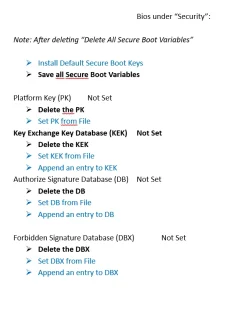
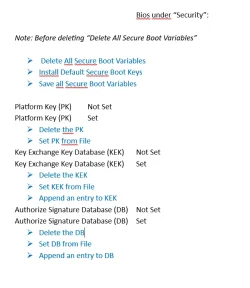
is this the issue I found - the Delete All Keys is a single box around the entire set of 4 different cert types. But is doesn't go in each and delete them, it only deletes keys in which ever is the currently selected 1 to 4 cert type. So you need to do 4 steps, to delete all keys
 

My Computer My Computer

At a glance

Win11
OS
Win11
ATTENTION ACER OWNERS:

I heard about this thread on the Acer support forum.
The Truth About the Secure Boot Update Warning ("Hardware/Firmware Limitations") on Legacy Systems

I personally don't know if the comments are true, not having owned any Acer products. But if you haven't updated your Acer, you should check if your model is referenced in the thread. It suggests there may be HW limitations if you try deleting all keys, simply because older models have a NVRAM partition that is too small to fit the new Secure Boot keys.

Concerned Acer owners should skim the thread and see if their model is mentioned.
Hi,
I've got 2 Acer computers a desktop and a laptop. I've successfully updated both computers with the CA 2023 .
Reading the forum, I'm wondering if the NVRAM on those computers will eventually run out of space after running the following command:
reg add HKEY_LOCAL_MACHINE\SYSTEM\CurrentControlSet\Control\Secureboot /v AvailableUpdates /t REG_DWORD /d 0x200 /f each time there's a new Windows Boot Manager SVN released?
Is there a program or a PowerShell command script that I can use to check the NVRAM total size and the NVRAM available size?
Thanks
 

My Computer My Computer

At a glance

Windows 10 x64 PRO N with ESUi3-4005U8 GB DDR3Intel HD Graphics 4400 / NVIDIA GeForce 920M
OS
Windows 10 x64 PRO N with ESU
Computer type
Laptop
Manufacturer/Model
Acer
CPU
i3-4005U
Memory
8 GB DDR3
Graphics Card(s)
Intel HD Graphics 4400 / NVIDIA GeForce 920M
Hard Drives
512 GB SSD
Browser
Firefox
Other Info
10 years old, still running
Someone may have set a BIOS password, and it's now forgotten. You can check if there's an online guide for removing the password. It may require taking out the battery, and waiting for the NVRAM to lose power.

If you try entering a password guess 3 times, and it returns a 8-digit error code onscreen, you might be able to use this website to recover the password:
BIOS Master Password Generator for Laptops

BIOS Password Backdoors in Laptops
Old world Acer laptop

so no BIOS password - but you have to set a supervisor password to unlock most features in the security tab
then need to go in next tab to turn off secure boot, to allow features in security tab to become fully unlocked (I'd tried that before but without supervisor password it didn't play ball)

now delete all keys and on this machine they mean ALL keys - but it never lets you know anything happened
as I'd already ran the Update-UEFI.bat earlier I was half expecting to find the kek cert in EFI to add manually

nope couldn't find any certs just two instructions I didn't understand, something like

<->
<-:>

tried first appears to do nothing
second jumps you back up the tree

gave up booted without secure boot to windows, and ran garlin's update script
said happy - rebooted to BIOS
tried to find keys in EFI again, only shows same two instructions (as above) - tried both, appeared to do nothing, but back in to security tab I see "custom" is now selected or was after going in the other tab to turn on secure boot, saved changes, and expected to get boot fail as no certs - but it booted to windows.....

ran check script

and its OK - another weird and wonderful way for the BIOS to do stuff - but I think the script gets the job done - Thanks garlin

Secure Boot: ON
Virtualization Based Security: OFF
BitLocker on (C:) OFF

UEFI KEK Certs
--------------
Microsoft Corporation KEK CA 2011
Microsoft Corporation KEK 2K CA 2023

UEFI DB Certs
-------------
Microsoft Corporation UEFI CA 2011
Microsoft Windows Production PCA 2011
Microsoft Option ROM UEFI CA 2023
Microsoft UEFI CA 2023
Windows UEFI CA 2023

UEFI DBX Certs
--------------
(NONE)

EFI Files
---------
Windows Boot Manager [Windows UEFI CA 2023] is ALLOWED.

Registry: "WindowsUEFICA2023Capable" = 2
[Windows UEFI CA 2023] in UEFI DB, and Windows starting from CA 2023 Boot Manager.


REQUIRED ACTION
===============
To REVOKE the [PCA 2011] cert, run the commands:

reg add HKEY_LOCAL_MACHINE\SYSTEM\CurrentControlSet\Control\Secureboot /v AvailableUpdates /t REG_DWORD /d 0x282 /f
powershell Start-ScheduledTask -TaskName "\Microsoft\Windows\PI\Secure-Boot-Update"

PS C:\WINDOWS\system32>
 

My Computer My Computer

At a glance

Win11
OS
Win11
and its OK - another weird and wonderful way for the BIOS to do stuff - but I think the script gets the job done - Thanks garlin
You got it to work! CA 2023 certs are installed, but CA 2011 has not been revoked.
It's your choice to wait for MS to perform the revocation, or do it now (by following the commands under "REQUIRED ACTION").
 

My Computer My Computer

At a glance

Windows 7
OS
Windows 7
and its OK - another weird and wonderful way for the BIOS to do stuff - but I think the script gets the job done - Thanks garlin
Finally, what a relief it must be !
 

My Computer My Computer

At a glance

Windows 11
OS
Windows 11
I've got 2 Acer computers a desktop and a laptop. I've successfully updated both computers with the CA 2023 .
Reading the forum, I'm wondering if the NVRAM on those computers will eventually run out of space after running the following command:
reg add HKEY_LOCAL_MACHINE\SYSTEM\CurrentControlSet\Control\Secureboot /v AvailableUpdates /t REG_DWORD /d 0x200 /f each time there's a new Windows Boot Manager SVN released?
Exhaustion of available NVRAM space is huge concern with older BIOS'es. Back then, Secure Boot was relatively new and not that much thinking was placed on how fast the DBX (banned list) would grow over time.

Secure Boot keys in the form of X509 certs aren't that many, unless your OEM cluttered the KEK and DB by adding their own branded certs. This can be seen with Acer's factory default keys. There's nothing wrong if you added the certs because you wanted to ship a low-level EFI tool (maybe a self-contained BIOS flashing tool) that was self-signed by the vendor.

The real growth and source of current doom is the explosion of the banned EFI files list, consisting of signature hashes appended to the DBX. Instead of adding each banned file's signing cert, they add a hash derived from that cert instead. When loading an EFI file at boot time, the signing cert's hash is computed and searched across all of the DBX's EFI hashes.

Over time, the banned file list kept growing and smart folks got concerned that old BIOS'es (with smaller NVRAM capacity) would hit a wall and fail because no more room is available to add new entries.

In the older set of DBXupdate.bin files, MS listed 151 unique versions of the Windows boot manager that pre-dated the Black Lotus rootkit scare. The initial reaction to close the security hole was to ban all previous boot files going back across multiple Windows releases and builds. This approach of course isn't sustainable, so they decided on the "nuclear option".

Instead of banning file by file, they would have everyone revoke PCA 2011. In one move, that would ban all older (vulnerable) versions and you wouldn't need to know their EFI hashes. Of course you can't use the nuke option without getting onboard with CA 2023.

Why does this matter for space? In the April 2026 Monthly Update, MS shrank the DBXUpdate.bin file by removing the 151 Windows entries. If we presume you installed CA 2023 and banned PCA 2011, then those 151 entries are moot. Those same files already banned by virtue of being released with the older PCA 2011 cert. MS shrank the DBX list to give everyone more headroom for NVRAM exhaustion.

But here's the cruel catch: it doesn't help if you revoked PCA 2011 before April 2026. You're still carrying around those extra 151 entries which are now cluttering the DBX. There isn't a cleanup function for this, and 151 entries is too many to try removing by hand.

Suppose you are concerned about NVRAM space, you would need to perform one of two options:

1. If your BIOS supports deleting all of DBX (just the DBX), delete the current entries. Re-run the update script, and it will repopulate the DBX but without the 151 retired hashes.

2. Delete all keys, and repeat the whole update process. Since you wiped everything and applied the April 2026 (or later) changes, you don't have those extra 151 entries.

Are we out of the woods yet? No, unfortunately each SVN is encoded as an "EFI hash". Unlike a normal DBX EFI hash, it doesn't represent an actual file but it's hiding a version number in the reported signature. If you look at the signature byte value, it's not a giant list of random looking bytes but a string of specific hex values which suddenly stops halfway and the rest is filled with zeros. Right before where the zeros begin, the SVN is embedded as specific bytes to be stripped off as the SVN.

Every time MS replaces the boot manager (at random frequency), the SVN gets updated and the "drip drip drip" of NVRAM consumption continues. But since they dropped the retired 151 (154 if you include 3 Canonical hashes from the same file), MS is trying to buy everyone more time.

Sorry that was a long explanation, but that's the background on "certs are too big to fit".

Is there a program or a PowerShell command script that I can use to check the NVRAM total size and the NVRAM available size?
Not really, while there are tools and scripts which can dump out the current NVRAM variables (and their contents), there are two problems:

1. None of them report the size of your available NVRAM.

2. By design, some security related settings (which also take up NVRAM space) cannot be read directly from the OS. You need a specialized EFI boot tool or shell that boots directly from UEFI, and interacts at a low level. This is where you make a hard turn in EFI or security researcher space, and there are no off-the-shelf tools for this level of detail.

NVRAM is a shared resource, and some of it may be consumed by data entirely unrelated to Secure Boot.

 
Last edited:

My Computer My Computer

At a glance

Windows 7
OS
Windows 7
Exhaustion of available NVRAM space is huge concern with older BIOS'es
Note to all: you have the week to understand the content of this NVRAM space 101 course
The exam is friday morning, no notes allowed !

Joking aside, thanks Garlin for explaning all this !
 

My Computer My Computer

At a glance

Windows 11
OS
Windows 11
I'm guessing when the NVRAM is exhausted, that's time to install a new motherboard. :D
 

My Computers My Computers

  • At a glance

    Win 11 Pro 25H2, Build 26200.8737Intel Core i5 1450064GB DDR4GeForce RTX 4060
    OS
    Win 11 Pro 25H2, Build 26200.8737
    Computer type
    PC/Desktop
    Manufacturer/Model
    Home Brew
    CPU
    Intel Core i5 14500
    Motherboard
    Gigabyte B760M G P WIFI
    Memory
    64GB DDR4
    Graphics Card(s)
    GeForce RTX 4060
    Sound Card
    Chipset Realtek
    Monitor(s) Displays
    LG 45" Ultragear, Acer 24" 1080p
    Screen Resolution
    5120x1440, 1920x1080
    Hard Drives
    Crucial P310 2TB 2280 PCIe Gen4 3D NAND NVMe M.2 SSD (O/S)
    Silicon Power 2TB US75 NVMe PCIe Gen4 M.2 2280 SSD (backup)
    Crucial BX500 2TB 3D NAND (2nd backup)
    Seagate 4TB Ironwolf, rotating HDD archive files
    External off-line backup Drives: 2 NVMe 4TB drives in external enclosures
    PSU
    Thermaltake Toughpower GF3 750W
    Case
    LIAN LI LANCOOL 216 E-ATX PC Case
    Cooling
    Lots of fans!
    Keyboard
    Microsoft Comfort Curve 2000
    Mouse
    Logitech G305
    Internet Speed
    Verizon FiOS 1GB
    Browser
    Firefox
    Antivirus
    Malware Bytes & Windows Defender Security
  • At a glance

    Win 11 Pro 25H2, Build 26200.8655Intel Core i5 1440032GB DDR5Intel 700 Embedded GPU
    Operating System
    Win 11 Pro 25H2, Build 26200.8655
    Computer type
    PC/Desktop
    Manufacturer/Model
    Home Brew
    CPU
    Intel Core i5 14400
    Motherboard
    Gigabyte B760M DS3H AX
    Memory
    32GB DDR5
    Graphics card(s)
    Intel 700 Embedded GPU
    Sound Card
    Realtek Embedded
    Monitor(s) Displays
    27" HP 1080p
    Screen Resolution
    1920x1080
    Hard Drives
    Crucial P310 2TB 2280 PCIe Gen4 eD NAND PCIe SSD
    Samsung EVO 990 2TB NVMe Gen4 SSD
    Samsung 2TB SATA SSD
    PSU
    Thermaltake Smart BM3 650W
    Case
    Okinos Micro ATX Case
    Cooling
    Fans
    Keyboard
    Microsoft Comfort Curve 2000
    Mouse
    Logitech G305
    Internet Speed
    Verizon FiOS 1GB
    Browser
    Firefox
    Antivirus
    Malware Bytes & Windows Defender Security
  • Nimo N171 17" Laptop, (Intel i3-1215U, 16GB RAM, 2TB NVMe, Win11 Pro)
    Acemagic Vista Mini PC V1 (Intel N150, 16GB RAM, 1TB NVMe, Win11 Pro)
    HP ENVY h8-1540t, (24GB RAM, 2TB SSD, 2TB HDD, Win11 Pro)
I'm guessing when the NVRAM is exhausted, that's time to install a new motherboard. :D
If I were in this situation, I would seriously consider getting a new PC. The other option would be to just disable secure boot until I get a replacement PC.
 

My Computers My Computers

  • At a glance

    Windows 11 Pro 25H2AMD Ryzen 9 7940HS32 GBRadeon 780M Graphics
    OS
    Windows 11 Pro 25H2
    Computer type
    PC/Desktop
    Manufacturer/Model
    Geekom AX7 Pro
    CPU
    AMD Ryzen 9 7940HS
    Memory
    32 GB
    Graphics Card(s)
    Radeon 780M Graphics
    Monitor(s) Displays
    Dell S2425H 24"
    Screen Resolution
    1920 x 1080
    Hard Drives
    2 TB NVMe SSD
    Internet Speed
    100 Mbs
    Browser
    Microsoft Edge / Firefox
    Antivirus
    F-Secure Security Suite
  • At a glance

    Windows 11 Pro 25H212th Gen Intel Core i7-12700 processor (12-Co...16 GBIntel(R) UHD Graphics 770 with shared graphic...
    Operating System
    Windows 11 Pro 25H2
    Computer type
    PC/Desktop
    Manufacturer/Model
    Dell Inspiron 3910
    CPU
    12th Gen Intel Core i7-12700 processor (12-Core, 25M Cache, 2.1GHz to 4.8GHz)
    Motherboard
    Dell 0KHP4K
    Memory
    16 GB
    Graphics card(s)
    Intel(R) UHD Graphics 770 with shared graphics memory
    Monitor(s) Displays
    Dell 27" Monitor S2721DS,
    Screen Resolution
    QHD 2560 x 1440 @ 75 Hz
    Hard Drives
    1TB M.2, PCIe NVMe, SSD
    Internet Speed
    100 Mbps
    Browser
    Edge
    Antivirus
    F-Secure Security Suite
To be fair, the other 2/3's of the DBX list represent banned Linux boot files or specialized tools that boot directly from BIOS (without an OS).

For example, the 3rd-party MemTest86 is such a tool. There's no OS involved, it's designed to boot from UEFI and run. Suppose you found one of the build versions was compromised. In theory you would add it to everyone's DBX list to prevent this version from being used by attackers.

MS was designated by the UEFI standards group to be an official keeper of the DBX list, on GitHub. MS doesn't really decide who gets on the list (other parties can submit entries), but they're supposed to maintain a public repo so everyone can review the latest reference version.

Here's a slide from an obscure MS PowerPoint from a security conference presentation:

Untitled.webp

In response to the challenges, Windows and Linux took two different approaches:

1. There is only one vendor for Windows, which makes life easy for MS. They rolled out the SVN, which is applied to the DBX as a minimum "high level" version number for the boot manager. If your Windows boot manager's SVN is below the DBX's SVN, it aborts and stops execution.

Right now, there are multiple Windows releases spanning legacy W10 (and Server) up to Insider builds. In theory they will have the same SVN if updated to the latest LCU. One SVN for all the different boot managers.

2. There are multiple Linux vendors and they don't all agree (that's the beauty and curse of Linux). They rolled out the SBAT variable, which is a list of text strings which provide rules for a minimum version. In this way, Red Hat and Ubuntu could have independent entries and their respective boot files would read whatever they each wanted from the SBAT, without a conflict.

The text list is free-form, so another vendor could add their own entry on another line. SBAT is baked in most major Linux distros, but it doesn't apply to older versions which existed before SBAT was introduced. If you have a real old distro, it would require using the DBX list to ban bad boot files since the distro doesn't know about the SBAT.
 

My Computer My Computer

At a glance

Windows 7
OS
Windows 7
Back
Top Bottom