Solved garlin's PowerShell scripts for updating Secure Boot CA 2023


I would still use Rufus for everything except 2023 certs, simpler then command line or registry fixes.
Then use Garlin's check with -bootmedia and -noskip so it checks all install images
Then use Garlin's update with -bootmedia
And rerun check with -bootmedia and -noskip to see if they all got fixed

I would try this first...

I would test it myself, but no time to do all this today or this week-end... ;-)

Thank you anchamp65, unfortunately same issue exists... it seems the issue is with the bootloader in the iso, once the system hands off to the installed files, I immediately get the SVN mismatch error
 

My Computer My Computer

At a glance

Windows 11
OS
Windows 11
Computer type
PC/Desktop
Yes, you can manually add the latest cumulative update to the latest iso file and then use Rufus.

Use AI to get information instead of Google.

Notes:

1)
It is best to download the June official original MVS iso (26200.8655) from Microsoft (Not the one from Microsoft's public website.).
SVN 9 already has that. A trusted unofficial source is also suitable.

2)
MCT/ESD is also suitable.
ESD is usually up to date on Thursday, two days after the release of CU (B).
This month, however, Microsoft released an ESD with an unofficial CU (CU B = revision 8655, ESD = revision 8653). If that doesn't bother you, create ISO using MCT.
I haven't verified that SVN 9 is there, but I'm guessing it is.

3)
If you are not able to find out information on how to update wim using dism, do not do it, it is not suitable for you.
The ready-made script (W10UI) is more suitable for you, but you wrote that you do not want to use it.

Thank you again,

1)
I assume that I need an MVS subscription to get the iso from microsoft? or is this avaialble to the public?

2)
My iso is freshly downloaded so I believe they are still using SVN 7.0 on the weird ESD. This would hav ebeen the preferred route as its easy enough to do. I'm assuming using MCT or downloading the iso from the windows 11 download site will ge tthe same version of teh file? I usually just grab the iso from there.

3)
A lot of the information is using older files and older versions of windows...It doesnt seem overly complicated. My preference is not to use 3rd party links and sources, but if I have no choice but to do it this way....so be it.... you are suggesting that the dism process is very complex?


thank you again, I'm still uncertain why your original post was deleted....
 

My Computer My Computer

At a glance

Windows 11
OS
Windows 11
Computer type
PC/Desktop
Thank you again,

1)
I assume that I need an MVS subscription to get the iso from microsoft? or is this avaialble to the public?

2)
My iso is freshly downloaded so I believe they are still using SVN 7.0 on the weird ESD. This would hav ebeen the preferred route as its easy enough to do. I'm assuming using MCT or downloading the iso from the windows 11 download site will ge tthe same version of teh file? I usually just grab the iso from there.

3)
A lot of the information is using older files and older versions of windows...It doesnt seem overly complicated. My preference is not to use 3rd party links and sources, but if I have no choice but to do it this way....so be it.... you are suggesting that the dism process is very complex?


thank you again, I'm still uncertain why your original post was deleted....
1)
MVS iso is not publicly available. Subscription required.

2)
There is an iso from March on the public website.
But MCT uses June revision 8653 ESD.
To be safe, download the current MCT and create an ISO using the MCT.
There is probably SVN 9 there, try it .-)
Edit, I just checked:
MVS iso (revision 8655) and MCT iso (ESD revision 8653) have binary identical bootmgfw_EX.efi files and since MVS iso is SVN 9...

3)
Dism process is not very complex.
 
Last edited:

My Computer My Computer

At a glance

Windows 11AMD32 GB
OS
Windows 11
Computer type
PC/Desktop
Manufacturer/Model
Gigabyte
CPU
AMD
Motherboard
Gigabyte
Memory
32 GB
1)
MVS iso is not publicly available. Subscription required.

2)
There is an iso from March on the public website.
But MCT uses June revision 8653 ESD.
To be safe, download the current MCT and create an ISO using the MCT.
There is probably SVN 9 there, try it .-)
Edit, I just checked:
MVS iso (revision 8655) and MCT iso (ESD revision 8653) have binary identical bootmgfw_EX.efi files and since MVS iso is SVN 9...

3)
Dism process is not very complex.

Darn... Monika, you hit the nail right on head...

why would microsoft only update MCT and not the iso available on the windows 11 iso download link... just so silly....

well MCT version has fully installed...once i get everything in there, I will run the get svn version tool to confirm, but it does appear that the MCT tool version of the iso is indeed now SVN 9.0.


Thank you all for your patience and assistance
 

My Computer My Computer

At a glance

Windows 11
OS
Windows 11
Computer type
PC/Desktop
FAILED: Missing 3/3 SVN signatures from "DBXUpdateSVN.bin"
FAILED: Missing 3/3 SVN signatures from "DBXUpdate2024.bin"
SUCCESS: Matched 289/289 EFI signatures from "dbxupdate.bin"

Should i do something?
 

My Computer My Computer

At a glance

Windows 11
OS
Windows 11
Computer type
PC/Desktop
Manufacturer/Model
Asrock b760 pro rs
FAILED: Missing 3/3 SVN signatures from "DBXUpdateSVN.bin"
FAILED: Missing 3/3 SVN signatures from "DBXUpdate2024.bin"
SUCCESS: Matched 289/289 EFI signatures from "dbxupdate.bin"

Should i do something?

You haven't revoked PCA 2011 yet. If you want to revoke now:
Code:
Update-UEFI.bat -Revoke
 

My Computer My Computer

At a glance

Windows 7
OS
Windows 7
I ended up with this error when I tried to update, I am now lost!
-----
Suggestion [3,General]: The command Update_UEFI-CA2023.ps1 was not found, but does exist in the current location. Windows PowerShell does not load commands from the current location by default. If you trust this command, instead type: ".\Update_UEFI-CA2023.ps1". See "get-help about_Command_Precedence" for more details.
PS D:\SecureBoot-CA-2023-Updates.v2026.06.24> .\Update_UEFI-CA2023.ps1

Security warning
Run only scripts that you trust. While scripts from the internet can be useful, this script can potentially harm your
computer. If you trust this script, use the Unblock-File cmdlet to allow the script to run without this warning
message. Do you want to run D:\SecureBoot-CA-2023-Updates.v2026.06.24\Update_UEFI-CA2023.ps1?
[D] Do not run [R] Run once Suspend [?] Help (default is "D"): R

ERROR: Unable to parse Microsoft's KEK update map.
The underlying connection was closed: An unexpected error occurred on a send.
PS D:\SecureBoot-CA-2023-Updates.v2026.06.24>
------
I am unable to progress further, DELL XPS8930 running 25H2 Build 26200.8737
 

My Computer My Computer

At a glance

Windows 113.00 gigahertz Intel Core i7-970016GBNVIDIA GeForce GTX 1660 Ti [Display adapter]
OS
Windows 11
Computer type
PC/Desktop
Manufacturer/Model
Dell XPS 8930
CPU
3.00 gigahertz Intel Core i7-9700
Motherboard
Board: Dell Inc. 0T2HR0 A00
Memory
16GB
Graphics Card(s)
NVIDIA GeForce GTX 1660 Ti [Display adapter]
Sound Card
Motherboard
PS D:\SecureBoot-CA-2023-Updates.v2026.06.24> .\Update_UEFI-CA2023.ps1

Security warning
Run only scripts that you trust. While scripts from the internet can be useful, this script can potentially harm your
computer.
Your PowerShell has a default execution policy that prevents certain scripts from running.

Instead of changing your policy, use the batch files to run the scripts:
Code:
.\Update-UEFI.bat
.\Check-UEFI.bat
 

My Computer My Computer

At a glance

Windows 7
OS
Windows 7
I ended up with this error when I tried to update, I am now lost!
-----
Suggestion [3,General]: The command Update_UEFI-CA2023.ps1 was not found, but does exist in the current location. Windows PowerShell does not load commands from the current location by default. If you trust this command, instead type: ".\Update_UEFI-CA2023.ps1". See "get-help about_Command_Precedence" for more details.
PS D:\SecureBoot-CA-2023-Updates.v2026.06.24> .\Update_UEFI-CA2023.ps1

Security warning
Run only scripts that you trust. While scripts from the internet can be useful, this script can potentially harm your
computer. If you trust this script, use the Unblock-File cmdlet to allow the script to run without this warning
message. Do you want to run D:\SecureBoot-CA-2023-Updates.v2026.06.24\Update_UEFI-CA2023.ps1?
[D] Do not run [R] Run once Suspend [?] Help (default is "D"): R

ERROR: Unable to parse Microsoft's KEK update map.
The underlying connection was closed: An unexpected error occurred on a send.
PS D:\SecureBoot-CA-2023-Updates.v2026.06.24>
------
I am unable to progress further, DELL XPS8930 running 25H2 Build 26200.8737
Simplest is to use the bat file: .\Check-UEFI.bat
It will take car of the proper flags to run it for you

Else, if you want to run the PS1 on your own: powershell -ep bypass -f .\Check_UEFI-CA2023.ps1

EDIT: ho well, Garlin answered just a few minutes before me, while I was typing... ;-)
 
Last edited:

My Computer My Computer

At a glance

Windows 11
OS
Windows 11
Congrats! You made the finish line.
I joined this ElevenForum especially to post a BIG thank you to garlin,

as having read and downloaded your utilities and posted guidance beforehand steered me to relatively straightforwardly resolve the stalled Secure Boot update process for my quite modern 2 x Acer Desktops !

All my other desktops/laptops got the required DB then KEK updates via Windows Update, many several months ago - some built-in already.

The 'problem children' were :

ACER Aspire TC-390 Desktop
ACER Aspire XC-1760 Desktop

They are std models, no modifications, no Bit Locker - 25H2.

Many online posts regarding Acer SB update issues...

*** I write this entry also to help other Acer 'victims' !

They both got the 'DB' updates via WU in May,

BUT the KEK updates by Jun had still not materialised.

This meant that ‘Windows UEFI CA 2023’ check was 'True',

BUT the all-important ‘Windows UEFI CA 2023’ check remained 'False'.

Reflected with the Apr WU 'Traffic Light' status for SB in Device Security stayed stuck at Amber and I had little confidence that things would progress ie :

’Secure boot is on but your device does not support the automated secure boot certificate update due to hardware or firmware limitations. Contact your device manufacturer for assistance’

IMHO Acer have been even more shambolic than MS about this whole debacle, which we all know should have been sorted a loooong time ago !

As I could see no prospect other than me sorting via online help, I took the 'risk' as essentially I had nothing to lose if it failed !!!

So I bit the bullet and followed what I feel is a 'hybrid' (I may have missed explicit Thread guidance wrt the Acer BIOS) process involving :

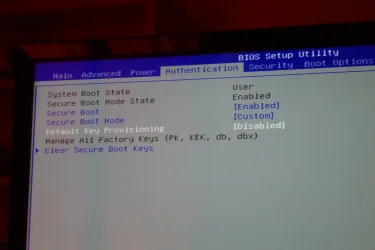
SEE PHOTO

Secure Boot
*** ENABLED
Secure Boot Mode
Custom
Default Key Provisioning
Disabled
Clear Secure Boot Keys
ENTER

then the steps after that, culminating with a reboot then executing 'Update_UEFI-CA2023.ps1'.

All resolved thereafter with no issues !

Device Security 'Traffic Light' status for SB GREEN, no warnings

‘Windows UEFI CA 2023’ check 'True'.

I have left the 2011 certs alone to still exist.

I took photos of the critical BIOS steps and the 'reactions' it displayed, the same process for both PCs

I am no expert (but have been using IT for nearly 60 years !), but from my recollection a couple of advisories :

1. The Custom Secure Boot Mode and Default Key Provisioning settings seemed to differ from that for Dells, for example.

2. The initial Aspire XC-1760 Desktop process proceeded BUT, whilst it did run, 'Update_UEFI-CA2023.ps1' produced a failure.

After I investigated it transpired that the 'Update_UEFI-CA2023.ps1' process required a download.

As a precaution I had disabled WIFI before a reboot to BIOS to do the mods !

No damage done, renabling WIFI allowed things to work like they had for the ACER Aspire TC-390 Desktop - which I THINK did have Wifi deselected.

*** I am not certain that the guidance includes ensuring that Wifi is On ?

Thanks again garlin, Rgds LW.

 

Attachments

  • P1200692.webp
    P1200692.webp
    503.4 KB · Views: 1
Last edited:

My Computer My Computer

At a glance

Windows 11
OS
Windows 11
1. The Custom Secure Boot Mode and Default Key Provisioning settings seemed to differ from that for Dells, for example.
OEM's normally license a reference BIOS platform from a 3rd-party provider (AMI, Insyde, etc.)

Like any software product, there can be several generations of the BIOS with different screens and capabilities. Over time, as PC makers start using larger capacity flash ROM's, they can deliver features like a fancy graphical UI and more management options. Usually the limitation is how much free memory is available to fit an advanced BIOS.

This leads to confusion because what you see in the Secure Boot setup screens can be wildly different between PC brands, and even within models from the same PC brand. Manually changes might be totally easy on a random PC, and confusing on another.

2. The initial Aspire XC-1760 Desktop process proceeded BUT, whilst it did run, 'Update_UEFI-CA2023.ps1' produced a failure.

After I investigated it transpired that the 'Update_UEFI-CA2023.ps1' process required a download.

As a precaution I had disabled WIFI before a reboot to BIOS to do the mods !

No damage done, renabling WIFI allowed things to work like they had for the ACER Aspire TC-390 Desktop - which I THINK did have Wifi deselected.

*** I am not certain that the guidance includes ensuring that Wifi is On ?
For security reasons, the ZIP file doesn't include any cert files because I want users to trust the scripts and what they're doing.

If any cert files are applied, there are taken directly from the Windows\System32\SecureBootUpdates folder, or downloaded from the official MS GitHub repository for Secure Boot files. When we have to perform a manual update, a network connection is required so we can pull a file from MS.

I will update the script notes to remind users to temporarily enable network access.
 

My Computer My Computer

At a glance

Windows 7
OS
Windows 7
First, I felt happy after I found this forum thread. I downloaded the scripts, executed Check_UEFI-CA2023.ps1 and was astonished then.
The script displayed:

Secure Boot: OFF (Audit Report runs as ON)
Virtualization Based Security: ON
BitLocker on (C:) OFF

UEFI KEK Certs
--------------
Microsoft Corporation KEK CA 2011
Microsoft Corporation KEK 2K CA 2023

UEFI DB Certs
-------------
Microsoft Corporation UEFI CA 2011
Microsoft Windows Production PCA 2011

UEFI DBX Certs
--------------
(NONE)

EFI Files
---------
Boot File [Windows UEFI CA 2023] will be UNTRUSTED

Registry: "WindowsUEFICA2023Capable" = 0
[Windows UEFI CA 2023] not in UEFI DB.

[OPTIONAL] SkuSiPolicy.p7b (for VBS) is MISSING.


AUDIT REPORT
============
1. Secure Boot is DISABLED
2. [Windows UEFI CA 2023] is missing from UEFI DB
3. [Microsoft UEFI CA 2023] is missing from UEFI DB
4. [Microsoft Option ROM UEFI CA 2023] is missing from UEFI DB
5. [Production PCA 2011] is missing from UEFI DBX
6. DBX Updates are missing from UEFI DBX
7. Windows BootMgr SVN is missing from UEFI DBX

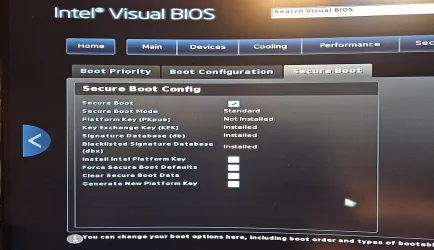
BUT. Secure Boot *IS* enabled (see attached image).
My NUC8BEK is a real miracle. I updated my BIOS to the latest available dated April 2026.
Then I tried to enable Secure Boot, but nothing special happened. So I tried to execute "clear secure boot data" within the BIOS also and the Windows 11 "Device Security" entry vanished. But tpm.msc still says I have a working TPM 2.0 chip.
I am totally lost, I have no idea what to do to let "Device Security" working again. And btw I hate my NUC8 meanwhile really.
There is no special section for the TPM, may be because Intel resolved the "TPM" very different, I guess it's similar to fTPM of AMD CPUs.

I am really grateful getting advice from anybody which owns a NUC8, it seems to be totally different compared to my Intel Core Ultra 7 main computer BIOS.
 

Attachments

  • NUC SecureBoot.webp
    NUC SecureBoot.webp
    957.9 KB · Views: 1

My Computer My Computer

At a glance

Windows 11 25H2
OS
Windows 11 25H2
Computer type
PC/Desktop
Manufacturer/Model
Intel NUC8BEK
Please run the check script again, adding "-Verbose" on the command line.

From your BIOS screen, there is no Platform Key installed. By definition, Secure Boot cannot be enabled without a valid PK to anchor the KEK's. What may have happened is after your BIOS update, the NVRAM was corrupted. You can try a "Force Secure Boot Defaults" to reset the keys back to the factory defaults.

Since the BIOS is from April 2026, presumably they've added the full set of CA 2023 certs to the factory default keys.
 

My Computer My Computer

At a glance

Windows 7
OS
Windows 7
Hello,

First, thank you for this amazing piece of work !
I'm trying to update my KEK certificates from a 2021 Gigabyte AERO laptop that unfortunately never got a BIOS update.
I'm a bit reluctant to revoke the 2011 certificates as I'm uncertain if my BIOS allows me to disable Secure Boot, and I don't want to brick my computer.
I tried enrolling the certificates in the UEFI/BIOS software, but there was three 2023 certificates files (.cer and 2 others) and I was uncertain which one to choose.
Do you think it is safe to proceed ? Here is the script output


Secure Boot: ON
Virtualization Based Security: ON
BitLocker on (C:) ON

UEFI KEK Certs
--------------
Microsoft Corporation KEK CA 2011

UEFI DB Certs
-------------
Microsoft Corporation UEFI CA 2011
Microsoft Windows Production PCA 2011
Microsoft Option ROM UEFI CA 2023
Microsoft UEFI CA 2023
Windows UEFI CA 2023

UEFI DBX Certs
--------------
(NONE)

EFI Files
---------
Boot File [Windows UEFI CA 2023] is UNTRUSTED

Registry: "WindowsUEFICA2023Capable" = 2
[Windows UEFI CA 2023] in UEFI DB, and Windows starting from CA 2023 Boot Manager.

[OPTIONAL] SkuSiPolicy.p7b (for VBS) is MISSING.


REQUIRED ACTION
===============

Run the command:
Update_UEFI-CA2023.ps1 -Revoke

Finish the UEFI steps to manually add the [KEK CA 2023] cert, if the script provided instructions.
 

My Computer My Computer

At a glance

Windows 11
OS
Windows 11
Computer type
PC/Desktop
Manufacturer/Model
Gigabyte
I tried enrolling the certificates in the UEFI/BIOS software, but there was three 2023 certificates files (.cer and 2 others) and I was uncertain which one to choose.
Those files are actually identical. I rename the same file three times, using a different file extension.

The reason is some BIOS'es expect a specific file extension, and I don't know which one your BIOS will accept. It's easier to make three copies instead of having you rename the file until one works. Pick any of the files.
 

My Computer My Computer

At a glance

Windows 7
OS
Windows 7
PERFECT WORKS ON:

- DELL INSPIRON 13 P57G
- INTEL NUC DC32178Y

CLEAN WINDOWS 11 INSTALATION WHITOUT PRE-REQS
 

My Computer My Computer

At a glance

Windows 11
OS
Windows 11
Computer type
Laptop
Manufacturer/Model
intel NUC i3
he reason is some BIOS'es expect a specific file extension, and I don't know which one your BIOS will accept. It's easier to make three copies instead of having you rename the file until one works. Pick any of the files.
Unfortunately, I think my BIOS accept none... Do you know if there is a way to update Secure Boot ? Here is the sysinfo output for the BIOS (sorry for the french but i think its quited standard across languages).

Fabricant GIGABYTE
Modèle AERO 15 YD
Type x64-based PC
Référence (SKU) du système P75YD
Processeur 11th Gen Intel(R) Core(TM) i7-11800H @ 2.30GHz, 2304 MHz, 8 cœur(s), 16 processeur(s) logique(s)
Version du BIOS/Date American Megatrends International, LLC. FB08, 2022-03-11
Version SMBIOS 3.3
Version du contrôleur embarqué 3.06
Mode BIOS UEFI
 

My Computer My Computer

At a glance

Windows 11
OS
Windows 11
Computer type
PC/Desktop
Manufacturer/Model
Gigabyte
Unfortunately, I think my BIOS accept none... Do you know if there is a way to update Secure Boot ? Here is the sysinfo output for the BIOS (sorry for the french but i think its quited standard across languages).
Your PC's last BIOS was 2022, which is too old. Please check your Secure Boot setup screen in the BIOS.

- Do you have an option for manual key enrollment?
- Or do you have an option to Delete All Keys?

If the first option is not supported, we do can the second option.
 

My Computer My Computer

At a glance

Windows 7
OS
Windows 7
Thanks for the taking the time to answer this with me.
I have an enrollment option, I tried all three file, but it gets me a (0000-0000-0000-0000-0000) ID for each file, which lead me to believe it fails to register each file properly. I also have the Delete All Keys, but fear it will kill my OS and Bitlocker encryption?
This (locked! 😤) BIOS does not allow to deactivate Secure Boot I think...
 

My Computer My Computer

At a glance

Windows 11
OS
Windows 11
Computer type
PC/Desktop
Manufacturer/Model
Gigabyte
Back
Top Bottom