Congrats! You made the finish line.
I joined this ElevenForum especially to post a BIG thank you to garlin,
as having read and downloaded your utilities and posted guidance beforehand steered me to relatively straightforwardly resolve the stalled Secure Boot update process for my quite modern 2 x Acer Desktops !
All my other desktops/laptops got the required DB then KEK updates via Windows Update, many several months ago - some built-in already.
The 'problem children' were :
ACER Aspire TC-390 Desktop
ACER Aspire XC-1760 Desktop
They are std models, no modifications, no Bit Locker - 25H2.
Many online posts regarding Acer SB update issues...
*** I write this entry also to help other Acer 'victims' !
They both got the 'DB' updates via WU in May,
BUT the KEK updates by Jun had still not materialised.
This meant that ‘Windows UEFI CA 2023’ check was 'True',
BUT the all-important ‘Windows UEFI CA 2023’ check remained 'False'.
Reflected with the Apr WU 'Traffic Light' status for SB in Device Security stayed stuck at Amber and I had little confidence that things would progress ie :
’Secure boot is on but your device does not support the automated secure boot certificate update due to hardware or firmware limitations. Contact your device manufacturer for assistance’
IMHO Acer have been even more shambolic than MS about this whole debacle, which we all know should have been sorted a loooong time ago !
As I could see no prospect other than me sorting via online help, I took the 'risk' as essentially I had nothing to lose if it failed !!!
So I bit the bullet and followed what I feel is a 'hybrid' (I may have missed explicit Thread guidance wrt the Acer BIOS) process involving :
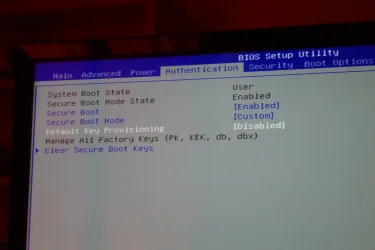
SEE PHOTO
Secure Boot
*** ENABLED
Secure Boot Mode
Custom
Default Key Provisioning
Disabled
Clear Secure Boot Keys
ENTER
then the steps after that, culminating with a reboot then executing 'Update_UEFI-CA2023.ps1'.
All resolved thereafter with no issues !
Device Security 'Traffic Light' status for SB GREEN, no warnings
‘Windows UEFI CA 2023’ check 'True'.
I have left the 2011 certs alone to still exist.
I took photos of the critical BIOS steps and the 'reactions' it displayed, the same process for both PCs
I am no expert (but have been using IT for nearly 60 years !), but from my recollection a couple of advisories :
1. The Custom Secure Boot Mode and Default Key Provisioning settings seemed to differ from that for Dells, for example.
2. The initial Aspire XC-1760 Desktop process proceeded BUT, whilst it did run, 'Update_UEFI-CA2023.ps1' produced a failure.
After I investigated it transpired that the 'Update_UEFI-CA2023.ps1' process required a download.
As a precaution I had disabled WIFI before a reboot to BIOS to do the mods !
No damage done, renabling WIFI allowed things to work like they had for the ACER Aspire TC-390 Desktop - which I THINK did have Wifi deselected.
*** I am not certain that the guidance includes ensuring that Wifi is On ?
Thanks again garlin, Rgds LW.




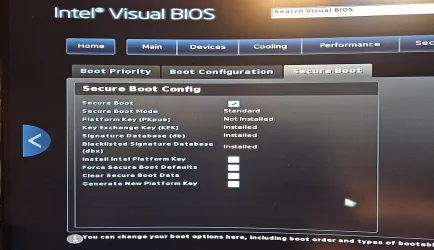

 ) BIOS does not allow to deactivate Secure Boot I think...






