Solved garlin's PowerShell scripts for updating Secure Boot CA 2023


Look before you leap?

Before using the PS scripts I would like to know before hand if something goes wrong can I recover? That might be "refreshing" the BIOS firmware via a re-installation of the firmware and then being able to reboot into the OS. Or it could be a matter of replacing the keys using the factory default variables and, again, booting into the OS. And once that set of experiences and know-how is under my belt, then try using the Garlin PS scripts.
 

My Computers My Computers

  • At a glance

    Windows 11 Pro; Windows Server 2016 EssentialsNUC8I7BEH16 GBIntel Iris
    OS
    Windows 11 Pro; Windows Server 2016 Essentials
    Computer type
    PC/Desktop
    Manufacturer/Model
    Intel
    CPU
    NUC8I7BEH
    Motherboard
    Intel NUC8BEB
    Memory
    16 GB
    Graphics Card(s)
    Intel Iris
    Sound Card
    Intel Cannon Lake-LP - cAVS (Audio, Voice, Speech)
    Monitor(s) Displays
    ASUS PB328
    Screen Resolution
    1920 x 1200
    Hard Drives
    Kingston SSD
  • At a glance

    Windows Server 2016 EssentialsIntel Xeon E-2246G16 GBMatrox MGA-G200eW3
    Operating System
    Windows Server 2016 Essentials
    Computer type
    PC/Desktop
    Manufacturer/Model
    Dell
    CPU
    Intel Xeon E-2246G
    Motherboard
    DELL 0DK9CR (Poweredge T340)
    Memory
    16 GB
    Graphics card(s)
    Matrox MGA-G200eW3
  • Intel NUCs (NUC10I5, NUC13I7, NUC13I3); Dell 9020 MT
....I have found size of the NVRAM chips in the technical specifications for all. .....

be able to determine those details: Intel CSME: Drivers, Firmware and Tools for ME 16+ or Intel® Processor Diagnostic Tool .
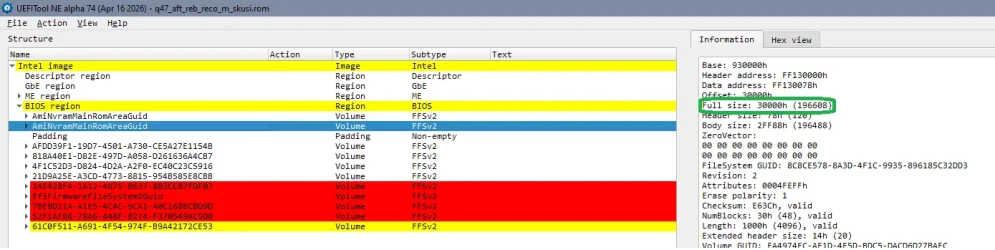
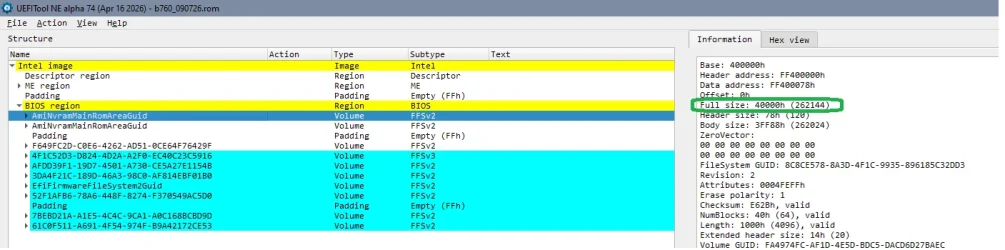
Machines don't have a NVRAM- chip. You find the size for the firmware chip(s), but the NVRAM is an EFI- volume in the firmware (with it's own defined size), and- depending on manufacturer- there are different configurations. Intel firmware can be dumped using the tools mentionend and there are parsing tools to display the structure of the firmware.

For Intel machines the bios vendor is only responsible for the part that is named Bios region. Flash descriptor, ME region are created with the mentioned Intel tools.

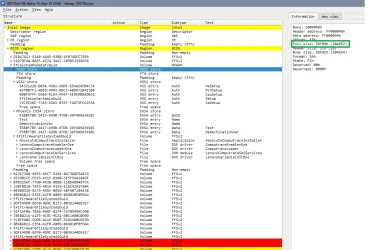
Firmware with AMI Bios region for 10 Gen Intel Asus q470- 2 NVRAM 192 kB each (24 MB size of firmware):
1783793596228.webp

Firmware with AMI Bios region for Gigabyte B760 board - 2 NVRAM 256 kB each (16 MB size of firmware):
1783793712699.webp

Intel firmware with Phoenix Bios region for 13th gen Intel Laptop - one NVRAM divided in sections, main volume ~380 kB (32 MB size of firmware):
1783794024271.webp

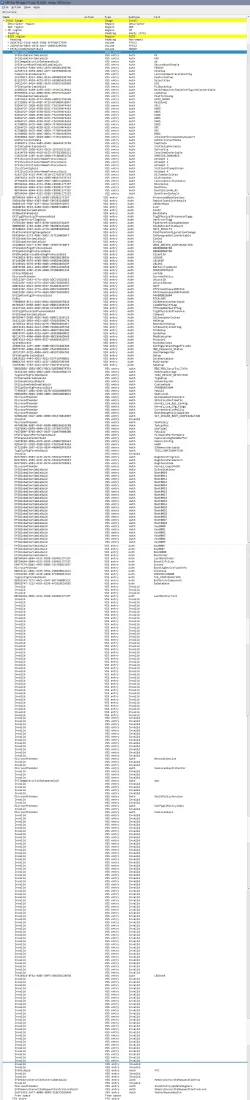
In addition the NVRAM is not only a store for the certificates, it's almost constantly written to by the OS and stores a lot more of settings. The invalid entries are old outdated entries. And there's normally a routine for emptying/ cleaning the NVRAM when it's full, it's not meant that one size the NVRAM should last the machines life and if NVRAM is full, the machine is finished...

That't the Lenovo Notebook NVRAM expanded - full length:

1783794617627.webp

(Sorry for the length of this post...)
 
Last edited:

My Computer My Computer

At a glance

W10
OS
W10
I stand corrected: I should have said volume.
 

My Computers My Computers

  • At a glance

    Windows 11 Pro; Windows Server 2016 EssentialsNUC8I7BEH16 GBIntel Iris
    OS
    Windows 11 Pro; Windows Server 2016 Essentials
    Computer type
    PC/Desktop
    Manufacturer/Model
    Intel
    CPU
    NUC8I7BEH
    Motherboard
    Intel NUC8BEB
    Memory
    16 GB
    Graphics Card(s)
    Intel Iris
    Sound Card
    Intel Cannon Lake-LP - cAVS (Audio, Voice, Speech)
    Monitor(s) Displays
    ASUS PB328
    Screen Resolution
    1920 x 1200
    Hard Drives
    Kingston SSD
  • At a glance

    Windows Server 2016 EssentialsIntel Xeon E-2246G16 GBMatrox MGA-G200eW3
    Operating System
    Windows Server 2016 Essentials
    Computer type
    PC/Desktop
    Manufacturer/Model
    Dell
    CPU
    Intel Xeon E-2246G
    Motherboard
    DELL 0DK9CR (Poweredge T340)
    Memory
    16 GB
    Graphics card(s)
    Matrox MGA-G200eW3
  • Intel NUCs (NUC10I5, NUC13I7, NUC13I3); Dell 9020 MT
Unless AMD, the future is legacy BIOS (half kidding half not).
 

My Computer My Computer

At a glance

Windows 11Celeron J4125 (10th gen)8GB DDR4
OS
Windows 11
Manufacturer/Model
MeLE Quieter 2Q (fanless miniPC)
CPU
Celeron J4125 (10th gen)
Memory
8GB DDR4
Monitor(s) Displays
Samsung SyncMaster T260
Screen Resolution
1920x1200
Hard Drives
256GB eMMC (Windows)
2TB USB3 HDD Toshiba (Data)
Disregard my question above. Windows just took care of it without my help.
Not sure why you had a problem. Looks like the CA 2023 certs got updated.
 

My Computer My Computer

At a glance

Windows 7
OS
Windows 7
I wonder if there is a way to clear that NVRAM thing and clear certs if the system is unable to boot... there's a jumper for CMOS, but this?
In our prior particular case... I dunno if there's a way to boot a Linux distro via USB and clear that... or in the worst case, a jumper.
That should be included in BIOSes... you could save yourself lots of headaches.

Also Dual BIOS with a secondary set of NVRAM should be mandatory for this kind of things...
 

My Computers My Computers

  • At a glance

    Windows 11 Pro 25H2AMD Ryzen 5 5600G @ 3.9/4.4Ghz2 x 16 GB DDR4 Kingston Fury Beast 3200 MhzAMD Radeon RX 6600 XT MSI Mech 2X OC Edition ...
    OS
    Windows 11 Pro 25H2
    Computer type
    PC/Desktop
    Manufacturer/Model
    Built PC
    CPU
    AMD Ryzen 5 5600G @ 3.9/4.4Ghz
    Motherboard
    MSI B550M-PRO-WiFi Ver. 1.4
    Memory
    2 x 16 GB DDR4 Kingston Fury Beast 3200 Mhz
    Graphics Card(s)
    AMD Radeon RX 6600 XT MSI Mech 2X OC Edition 8 GB
    Sound Card
    Realtek High Definition Audio (Integrated)
    Monitor(s) Displays
    Samsung C50Rx 27" LED / HP S2031 20" LCD
    Screen Resolution
    1920 x 1080 px / 1600 x 900 px
    Hard Drives
    WD Blue SN570 NVME M.2 SSD [1 TB] -- External Drives: - WD Scorpion Blue 250 GB 5400 RPM (Data Backup) - Hitachi 500 GB 5400 RPM (Software / ISOs Backup) - Toshiba MQ01ABD100 1 TB 5400 RPM (OS Images) - HGST TravelStar 7K1000 1 TB, 7200 RPM USB 3.0 - ADATA SU800 2TB SSD USB 3.0
    PSU
    Corsair RM750e 750W Fully Modular
    Case
    Naceb Hydra NA-1602
    Cooling
    Naceb Orpheus x 3 (Front) + Naceb Cepheus 1200 RPM Max (Rear) + ThemalRight Assasin X 90 SE (CPU)
    Keyboard
    Logitech MK470 Wireless
    Mouse
    Logitech MK470 Wireless
    Internet Speed
    120 MB Symetrical
    Browser
    Firefox / Brave / Edge
    Antivirus
    Windows Defender
    Other Info
    - VMs: WMware Player - Windows 8.1 Pro x64 / Windows 11 Pro
    - Wacom Intuos Pro Small Tablet PTH-460
  • At a glance

    Windows 11 Pro 25H2AMD Ryzen 7 7730U @ 2.0/4.5 Ghz2 x 16 GB Kingston Fury Impact DDR4 3200 MhzRadeon (tm) Graphics Vega 8 (512 MB)
    Operating System
    Windows 11 Pro 25H2
    Computer type
    Laptop
    Manufacturer/Model
    HP Pavilion 15-eh3000la (80M53LA)
    CPU
    AMD Ryzen 7 7730U @ 2.0/4.5 Ghz
    Motherboard
    HP 8BC7
    Memory
    2 x 16 GB Kingston Fury Impact DDR4 3200 Mhz
    Graphics card(s)
    Radeon (tm) Graphics Vega 8 (512 MB)
    Sound Card
    Realtek High Definition Audio (Integrated)
    Monitor(s) Displays
    AU Optronics
    Screen Resolution
    1920 x 1080 px (125% size)
    Hard Drives
    WD Blue SN570 1TB NVME M.2 Drive
    PSU
    45 Watt Charger
    Cooling
    Laptop Cooling Pad
    Keyboard
    Free Wolf Foldable Portable Keyboard
    Mouse
    Free Wolf Wireless Mouse
    Internet Speed
    120 MB Symetrical
    Browser
    Firefox / Brave / Edge
    Antivirus
    Windows Defender
    Other Info
    - 41mWh battery.
    - Wacom Intuos Pro Small Tablet PTH-460
Since someone mentioned AMD- it's still UEFI, just the prorietary part (the complement to Intels ME) is different and looks less structured at first look. The bios code volumes look quite similar. AMD sometimes has two complete firmwares for different cpus (so it's not reduncacy) in one firmware chip, looks like this is one of those.

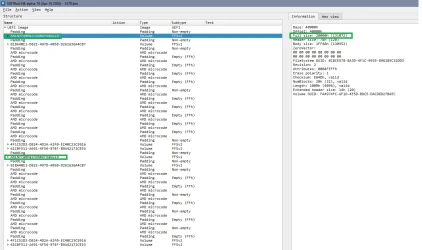
X570, AMI. 1 NVRAM 128 kB (2 x 16 MB firmware):
1783839571977.webp

There are solutions to add a layer of redundancy. Many machines from HP, Lenovo, ... do come with kinda dual bios, but it's not simply a complete 'dual' firmware solution, it's meant to add safety and security. So it's made from what the manufacturer / bios vendor means is relavant firmware parts which are stored on a second chip often the same size as the chip for the working firmware.

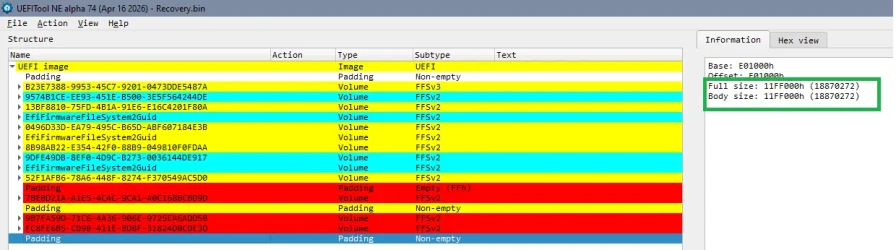
Recovery chip of an Intel 11th/12th gen firmware. The coloured parts are bios code areas (no NVRAM backup), the unstructured parts in the beginning and end contain other critical parts like parts of the ME and Flash descriptor. These elements can have a checksum in the TPM.
Have a look at the size of the area without EFI structure in the end- over 18 MB. The size of the padding in the beginning is just ~1.3MB.

1783839695828.webp
Problem with these solutions is that they're not only made for redundancy but for security = 'anti fiddling'.

Some machines do have the capability to restore parts of the NVRAM or at least to restore the basic settings. But it's unclear how it's done, maybe they use a storage outside the firmware, maybe they have really a solution for working on the firmware chip non- booted. This was seen mostly with people tampering with undervolting. A low voltage works fine when the chip is 'warm', but no longer on cold boot. Values stored in NVRAM, so...

Otherwise the hard way is to buy a programmer, was typically CH341, about 5 to 15 $ from China. Edit your firmware dump, replace the NVRAM with the (empty) NVRAM of a stock firmware / bios update for the corresponding machine. NVRAM is getting rebuilt automatically (may require several boots).
If there's machine specific data (forexample some Intel NUC) and the Windows OEM license stored in the NVRAM it's a little more tricky since this information is most often not rebuilt automatically.

As written earlier, there's a lot of firmware repair in the badcaps forum and on winraid.

.... In our prior particular case... I dunno if there's a way to boot a Linux distro via USB and clear that... ....
Since his machine doesn't get through POST it doesn't boot anything....

I wonder if there is a way to clear that NVRAM thing and clear certs if the system is unable to boot... there's a jumper for CMOS, but this?
It's not that easy. CMOS is battery dependant, but these firmware- chips don't depend on any battery voltage. And this would be the same 'delicate' write operation that might've bricked the machine, so it'd require some kind of stable 'minimal booted state' for any write operation, even if you just copy an empty default NVRAM- volume into place. Even more complicated if there's relevant information like Windows OEM activation and machine specific information like serial, service tag somewhere in the NVRAM...
 
Last edited:

My Computer My Computer

At a glance

W10
OS
W10
Is NVRAM located on a EEPROM chip?

Not always. While some types of NVRAM (Non-Volatile Random Access Memory) use EEPROM internally as a backup, many others use a traditional battery-backed SRAM (Static RAM) chip or newer solid-state technologies like FRAM. [1, 2, 3, 4]


The relationship between NVRAM and EEPROM depends entirely on the design of the chip:
  • Hybrid NVRAM (SRAM + EEPROM): Many older hardware configurations use a chip that combines both. It functions as a standard, fast RAM during normal operation. If power fails, the contents of the RAM are quickly saved into a built-in EEPROM layer to prevent data loss.
  • Battery-Backed NVRAM: Many computer motherboards and older arcade or synthesizer systems use a regular SRAM chip connected to a small internal watch battery. As long as the battery holds a charge, the RAM retains its data without needing an EEPROM.
  • Standalone EEPROM: An EEPROM chip is technically a type of non-volatile memory itself, but it is typically used for Read-Only memory (like BIOS storage) because it writes data too slowly to act like standard, dynamic RAM. [1, 2, 7, 8, 9]
Are you trying to replace or troubleshoot a specific piece of hardware (like a motherboard, arcade game, or synthesizer)? If you specify the device or chip model, I can help you figure out exactly what kind of memory it uses.
AI can make mistakes, so double-check responses
[1] https://www.eeeguide.com/nvram-non-volatile-random-access-memory/
[2] https://techterms.com/definition/nvram
[3] https://pcbstore.com.bd/glossary/nvram
[4] https://itpod.com/glossary/nvram
[5] https://www.reddit.com/r/beneater/comments/qh25u2/nvram_as_faster_eeprom/
[6] https://forums.arcade-museum.com/threads/replacing-nvram-with-eeprom.510866/
[7] https://www.lenovo.com/gb/en/glossary/nvram/
[8] https://www.edaboard.com/threads/difference-between-nvram-and-eeprom.306965/
[9] https://au.rs-online.com/web/content/discovery/ideas-and-advice/eeprom-guide
 

My Computer My Computer

At a glance

Windows 11 & Zorin ProIntel® Core™ Ultra 9 Processor 275HX 2.7 GHz32 gbNVIDIA® GeForce RTX™ 5060 Laptop GPU
OS
Windows 11 & Zorin Pro
Computer type
Laptop
Manufacturer/Model
Asus Rog Strix G16
CPU
Intel® Core™ Ultra 9 Processor 275HX 2.7 GHz
Motherboard
AsusteK Computer
Memory
32 gb
Graphics Card(s)
NVIDIA® GeForce RTX™ 5060 Laptop GPU
Sound Card
Realtek High Definition Audio
Monitor(s) Displays
Laptop 16 inch
Screen Resolution
2560 X 1600
Hard Drives
Boot: Samsung 9100 NVME 2 TB Microsoft Storage Controller: Standard NVM Express Driver: Microsoft 6/21/2006. No SATA/AHCI on my motherboard or in bios
Mouse
Pad
Browser
Google Chrome
Antivirus
Microsoft
Other Info
Printer: HP Color LaserJet MFP M477dw
Are you trying to replace or troubleshoot a specific piece of hardware (like a motherboard, arcade game, or synthesizer)? If you specify the device or chip model, I can help you figure out exactly what kind of memory it uses.

As written earlier, there's a lot of firmware repair in the badcaps forum and on winraid.
Since his machine doesn't get through POST it doesn't boot anything....

Could there still be hope for @NikosD Lenovo M700 Tiny, it would be great news for him !

But this is really getting off topic for Garlin's Secure Boot update...

Can I suggest a new thread, something like "Unbrick BIOS / Computer" ?
This way, people who have the expertise and can assist Nikos with is problem can exchange on the subject
 

My Computer My Computer

At a glance

Windows 11
OS
Windows 11
Could there still be hope for @NikosD Lenovo M700 Tiny, it would be great news for him !
Hope theoretically yes, of course, it should be possible to repair the firmware (if it's firmware / NVRAM related and the chip still can be rewritten).

But he seems to be banned? He still can write direct message where he writes that and where he's trying to convince people to warn of the use of garlins scripts and he expresses strongly that he has no interest at all in repairing his PC. So 'great news' not so much.

But this is really getting off topic for Garlin's Secure Boot update...

Can I suggest a new thread, something like "Unbrick BIOS / Computer" ?
This way, people who have the expertise and can assist Nikos with is problem can exchange on the subject
Well, it's not so much off- topic.

- That's a discussion about a possible adverse effect of trying to update the certificates (whichever way) and
- There seems to be a lot of confusion about "the NVRAM", so it might be helpful to keep it close to the thread here and
- This thread has already more than 130 pages, full with personal experiences and problems., so probably no one will anyway read it all...

But this isn't up to me!
 

My Computer My Computer

At a glance

W10
OS
W10
Can I suggest a new thread, something like "Unbrick BIOS / Computer" ?
This way, people who have the expertise and can assist Nikos with is problem can exchange on the subject
Supposedly, this is a Windows 11 forum. Keep it that way.
 

My Computer My Computer

At a glance

Windows 10
OS
Windows 10
he just pm'd me with the same story. my pc is a hp thats over 15 years old . i am not a computer tech . i am a people tech (lol).
To make a long story short i found a firmware update from hp. and installed it . got my secure boot function enabled . my stupid self tried using mosby and i had to reset my bios lost secure boot for almost a year. Then garlin released a new script and whammo it got it back .

I dont think its the scripts issues. Its his NVRAM .
 

My Computer My Computer

At a glance

WINDOWS 11 WINDOWS 10Intel(R) Core(TM) i7 -3770K CPU 3.50 GZ 3501 ...32.0 GB (31.9 GB usable)AMD RADEON TM R5240 INTELL HD GRAPHICS 4600 T...
OS
WINDOWS 11 WINDOWS 10
Computer type
PC/Desktop
Manufacturer/Model
HP H8 1360T
CPU
Intel(R) Core(TM) i7 -3770K CPU 3.50 GZ 3501 4 CORE
Motherboard
PEGATRON 2AD5
Memory
32.0 GB (31.9 GB usable)
Graphics Card(s)
AMD RADEON TM R5240 INTELL HD GRAPHICS 4600 TIGER 1+1 USB
Sound Card
AMD HD . IDT
Monitor(s) Displays
AOC WAL MART SPECIAL . HP 2311 IX IPS LED DELL 1708 FP
Screen Resolution
1920 X 1080 1600X900 1280X940
Hard Drives
1 FAXING S 100 512GB 1 KINGSTON 120 GB SSD 1 X12 SSD 512 GB
PSU
300 WATT HP
Case
FULL
Cooling
ON BOARD FAN
Keyboard
LOGITEC K 520 WIRELESS
Mouse
LOGITEC M 510 WIRELESS
Internet Speed
55 UP 11.2 DOWN
Browser
CHROME EDGE
Antivirus
WINDOWS SECUIRTY
Other Info
NON SUPPORTED HARDWARE FOR WINDOWS 11
I believe it's a healthy discussion to note some particular BIOS'es can be effectively "bricked". But these problems are hard to predict externally, because you would have to know about their specific BIOS implementations.

The script isn't doing any unsupported, in fact MS provides a bare bones reference example on their Secure Boot GitHub repo. PS has supported commands for writing to the Secure Boot variables (presumably it's a pass-thru to the underlying SecureBoot.dll library). From Windows, based on what features are supported in communicating with the BIOS, you cannot get any indication of the UEFI NVRAM's free space, or how it's internally assigned.

Before writing my scripts (and after that time), I've always looked at other Windows-based UEFI tools and PS modules to see if there's room for improvements. There's compiled executables like uefivar.exe and the popular UEFIv2 PowerShell module. You don't get much beyond the standard reading & writing of variables.

If you read the UEFI specs, it's up to the BIOS run-time services to inform the calling OS whether it can comply with a write request.

8. Services — Runtime Services — UEFI Specification 2.10 documentation
Status Codes Returned
EFI_SUCCESSThe firmware has successfully stored the variable and its data as defined by the Attributes.
EFI_INVALID_PARAMETERAn invalid combination of attribute bits, name, and GUID was supplied, or the DataSize exceeds the maximum allowed.
EFI_INVALID_PARAMETERVariableName is an empty string.
EFI_OUT_OF_RESOURCESNot enough storage is available to hold the variable and its data.
EFI_DEVICE_ERRORThe variable could not be saved due to a hardware failure.
EFI_WRITE_PROTECTEDThe variable in question is read-only.
EFI_WRITE_PROTECTEDThe variable in question cannot be deleted.
EFI_SECURITY_VIOLATIONThe variable could not be written due to
EFI_VARIABLE_ENHANCED_AUTHENTICATED_ACCESS or
EFI_VARI ABLE_TIME_BASED_AUTHENTICATED_WRITE_ACESS being set, but the payload does NOT pass the validation check carried out by the firmware.
EFI_NOT_FOUNDThe variable trying to be updated or deleted was not found.
EFI_UNSUPPORTEDThis call is not supported by this platform at the time the call is made. The platform should describe this runtime service as unsupported at runtime via an EFI_RT_PROPERTIES_TABLE configuration table.

From my reading of the spec, it implies the UEFI is responsible for knowing whether it could comply with any request to write more data to the DBX. It sounds like the warning posted in the Acer community forum: it's not that the DBX's content was too large, but an incorrect implementation of the expected data size within the firmware causes an unusable BIOS.

Meaning, it's a firmware bug.

A number of other Lenovo PC's have been updated without problems. That doesn't imply the script can't cause problems. But it's not the script itself, the bug would have existed regardless of whether you used another method to write the same DBX data. Could you skip the DBX update (in terms of the banned EFI signature hashes)? Yes, that doesn't directly impact the CA 2023 migration or banning of the PCA 2011.

But the normal practice (even on Linux) is to apply the DBX EFI hashes as a recommended security step (to block vulnerable boot files).

MS has some data in the Confidence Bucket JSON files for BucketID's which are blocked from updates (presumably from known firmware issues). Unfortunately, MS doesn't make it easy because you have to cross-index the blocked ID's with the HighConfidenceData CSV's on their GitHub. It's a data parsing nightmare, and the only way to efficiently deal with the data is to build a database for searching.

I'm not motivated to creating such a database because I think some of their published Confidence Bucket data is garbage. It's garbage because some data import or export process from their source database is creating nonsensical HW entries that don't make sense on review. I've reported it to MS, but they don't seem to have figured it out. (For example: a MS Surface device is reported as both an ASUS and HP device on the same line).
 
Last edited:

My Computer My Computer

At a glance

Windows 7
OS
Windows 7
Back in May I noticed my Acer laptops had an issue with the cert update, found garlin's advice/scripts, and discovered that his instructions to add the KEK did not match my very simple Acer BIOS. He and some others kindly responded to my request for advice (#1977) but I realised I was out of my depth. I decided the risk of creating an instant brick was greater than not receiving potential future boot‑level security protections. Especially as Microsoft would probably declare my hardware obsolete by then (in fact it already did with one laptop).

Returning today to look at where the discussion has moved I think I made the right decision.
 

My Computer My Computer

At a glance

Windows 11
OS
Windows 11
Computer type
Laptop
Manufacturer/Model
Acer
Returning today to look at where the discussion has moved I think I made the right decision.
Maybe... maybe not... :unsure:
I initially ran Garlin's scripts on computers that were 5 and 7 years old
And that was after reading most of this thread at that time, early April, and reading up on MS guides (for what it's worth) and other forums, etc...
I then decided to take a chance on a Lenovo L440 from 2013 telling myself, if it goes horibly wrong, am I ok with letting go of this computer.
My answer was yes, I can live without it, and I jump in !

It's a mather of how important or attached to the computer you are when it's more then +/- 10 years and you try and change/update things in the BIOS...

I truly hope someone can help him
Best of luck @NikosD !
 

My Computer My Computer

At a glance

Windows 11
OS
Windows 11
I ran the scripts on an HP ENVY that has a 2014 BIOS, they ran perfectly and it's not happily fully updated. I believe @garlin when he says that bricking the BIOS is an isolated example. As I've said before, I've bricked a machine years ago with an old Phoenix BIOS just by running their approved update procedure!
 

My Computers My Computers

  • At a glance

    Win 11 Pro 25H2, Build 26200.8737Intel Core i5 1450064GB DDR4GeForce RTX 4060
    OS
    Win 11 Pro 25H2, Build 26200.8737
    Computer type
    PC/Desktop
    Manufacturer/Model
    Home Brew
    CPU
    Intel Core i5 14500
    Motherboard
    Gigabyte B760M G P WIFI
    Memory
    64GB DDR4
    Graphics Card(s)
    GeForce RTX 4060
    Sound Card
    Chipset Realtek
    Monitor(s) Displays
    LG 45" Ultragear, Acer 24" 1080p
    Screen Resolution
    5120x1440, 1920x1080
    Hard Drives
    Crucial P310 2TB 2280 PCIe Gen4 3D NAND NVMe M.2 SSD (O/S)
    Silicon Power 2TB US75 NVMe PCIe Gen4 M.2 2280 SSD (backup)
    Crucial BX500 2TB 3D NAND (2nd backup)
    Seagate 4TB Ironwolf, rotating HDD archive files
    External off-line backup Drives: 2 NVMe 4TB drives in external enclosures
    PSU
    Thermaltake Toughpower GF3 750W
    Case
    LIAN LI LANCOOL 216 E-ATX PC Case
    Cooling
    Lots of fans!
    Keyboard
    Microsoft Comfort Curve 2000
    Mouse
    Logitech G305
    Internet Speed
    Verizon FiOS 1GB
    Browser
    Firefox
    Antivirus
    Malware Bytes & Windows Defender Security
  • At a glance

    Win 11 Pro 25H2, Build 26200.8655Intel Core i5 1440032GB DDR5Intel 700 Embedded GPU
    Operating System
    Win 11 Pro 25H2, Build 26200.8655
    Computer type
    PC/Desktop
    Manufacturer/Model
    Home Brew
    CPU
    Intel Core i5 14400
    Motherboard
    Gigabyte B760M DS3H AX
    Memory
    32GB DDR5
    Graphics card(s)
    Intel 700 Embedded GPU
    Sound Card
    Realtek Embedded
    Monitor(s) Displays
    27" HP 1080p
    Screen Resolution
    1920x1080
    Hard Drives
    Crucial P310 2TB 2280 PCIe Gen4 eD NAND PCIe SSD
    Samsung EVO 990 2TB NVMe Gen4 SSD
    Samsung 2TB SATA SSD
    PSU
    Thermaltake Smart BM3 650W
    Case
    Okinos Micro ATX Case
    Cooling
    Fans
    Keyboard
    Microsoft Comfort Curve 2000
    Mouse
    Logitech G305
    Internet Speed
    Verizon FiOS 1GB
    Browser
    Firefox
    Antivirus
    Malware Bytes & Windows Defender Security
  • Nimo N171 17" Laptop, (Intel i3-1215U, 16GB RAM, 2TB NVMe, Win11 Pro)
    Acemagic Vista Mini PC V1 (Intel N150, 16GB RAM, 1TB NVMe, Win11 Pro)
    HP ENVY h8-1540t, (24GB RAM, 2TB SSD, 2TB HDD, Win11 Pro)
Back in May I noticed my Acer laptops had an issue with the cert update, found garlin's advice/scripts, and discovered that his instructions to add the KEK did not match my very simple Acer BIOS. He and some others kindly responded to my request for advice (#1977) but I realised I was out of my depth. I decided the risk of creating an instant brick was greater than not receiving potential future boot‑level security protections. Especially as Microsoft would probably declare my hardware obsolete by then (in fact it already did with one laptop).
The sad reality is not all BIOS'es are created equal. And some brands have more issues (Acer for example) because of the earlier BIOS implementations that were chosen. It's strange that within the next week or so, Acer is finally delivering CA 2023 support for the laptops they're supporting. Most other OEM's finished their BIOS updates by late 2025 or early 2026.

Update Your Secure Boot Certificates In June 2026 to Stay Protected - Acer Community

Makes me think that Acer knows something about their own UEFI, because you wouldn't waited this long to act. To add more certs to the factory defaults normally involves appending more bytes to the end of your existing data. It doesn't take months of engineering work to complete.
 

My Computer My Computer

At a glance

Windows 7
OS
Windows 7

Latest Support Threads

Back
Top Bottom