Solved garlin's PowerShell scripts for updating Secure Boot CA 2023


Add me as a satisfied customer. I had some doubts that this would work for me on an older HP workstation since HP stated there would be no additional Bios updates for the HP Z640.
It didn't exactly work the first time, because I cleared the keys and Windows didn't recognize that secure boot was on after running the update and then enabling secure boot. I had to reset the keys to factory defaults which deleted all the new certs and I had to start over. I then disabled secure boot again, ran the update, enabled secure boot again and had the certs. I did revoke the old certs and copied the SKUSiPolicy.P7b.
All is good.


Thanks a bunch.
 

My Computer My Computer

At a glance

Windows 10, Windows 11, Linux
OS
Windows 10, Windows 11, Linux
please allow me an off-topic post!!: 👑 ⚽ 🌍 🏆 🇪🇸 😎,

fernando
 

My Computer My Computer

At a glance

windows 10 Enterprise IoT LTSCIntel(R) Core(TM) i5-6400 CPU @ 2.70GHz16GBNVIDIA GeForce GT 720 2GB
OS
windows 10 Enterprise IoT LTSC
Computer type
PC/Desktop
Manufacturer/Model
ASUS/ K31CD
CPU
Intel(R) Core(TM) i5-6400 CPU @ 2.70GHz
Memory
16GB
Graphics Card(s)
NVIDIA GeForce GT 720 2GB
Other Info
BIOS: American Megatrends Inc.
v. 1102 (12-2018)
And here we go again. I built new Macrium Reflect WinRE USB boot drives and updated to SVN 9.0 on my two Lenovo laptops. This has always worked in the past.

Now, only my newer machine (Reflect X) will boot from the Macrium USB. The older one (Reflect Free) WILL NOT.

I have tried everything, including copying the boot files manually. The Garlin scripts report all is OK. But trying to boot from the USB ends up on the blue Recovery screen every time. I don't know what else to try.
 

My Computers My Computers

  • At a glance

    Windows 11 Pro 24H2Intel i7-1260P 12th Gen 4.7GHz32GB DDR4-3200NVIDIA T550 Laptop GPU
    OS
    Windows 11 Pro 24H2
    Computer type
    Laptop
    Manufacturer/Model
    Lenovo P16s Workstation
    CPU
    Intel i7-1260P 12th Gen 4.7GHz
    Memory
    32GB DDR4-3200
    Graphics Card(s)
    NVIDIA T550 Laptop GPU
    Sound Card
    Realtek Audio
    Monitor(s) Displays
    16" Laptop Display
    Screen Resolution
    2560x1600
    Hard Drives
    2TB Samsung M.2 2280 SSD PCIe 4.0 x 4 NVMe
    Mouse
    Logitech MX Anywhere 2s
    Internet Speed
    1000 Mb
    Browser
    Firefox
    Antivirus
    Avast
  • At a glance

    Windows 11 Pro 24H2i7-6820HQ 6th Gen 3.6 GHz32GB DDR4-2133NVIDIA Quadro M2000M Laptop GPU
    Operating System
    Windows 11 Pro 24H2
    Computer type
    Laptop
    Manufacturer/Model
    Lenovo P50 Workstation
    CPU
    i7-6820HQ 6th Gen 3.6 GHz
    Memory
    32GB DDR4-2133
    Graphics card(s)
    NVIDIA Quadro M2000M Laptop GPU
    Sound Card
    Realtek Audio
    Monitor(s) Displays
    15.6" Laptop Display
    Screen Resolution
    1920x1080
    Hard Drives
    2 x 1TB Samsung M.2 2280 SSD PCIe 3.0 x 4 NVMe
    Cooling
    Dual Fan System
    Mouse
    Logitech MX Anywhere 2s
    Internet Speed
    1000 Mb
    Browser
    Firefox
    Antivirus
    Avast
Do you use the SkuSipolicy? July 2026's Monthly Update updated the SkuSiPolicy, but otherwise did not change any Secure Boot items.

On the laptop that doesn't work, run the check script with the matching USB recovery drive plugged in.
Code:
Check-UEFI.bat -BootMedia
 

My Computer My Computer

At a glance

Windows 7
OS
Windows 7
Do you use the SkuSipolicy? July 2026's Monthly Update updated the SkuSiPolicy, but otherwise did not change any Secure Boot items.

On the laptop that doesn't work, run the check script with the matching USB recovery drive plugged in.
Code:
Check-UEFI.bat -BootMedia
It looks good to me, but still no boot.
*
Secure Boot: ON
Virtualization Based Security: ON
BitLocker on (C:) OFF

UEFI KEK Certs
--------------
Microsoft Corporation KEK CA 2011
Microsoft Corporation KEK 2K CA 2023

UEFI DB Certs
-------------
MosbyKey [2025.10.14]
Microsoft Corporation UEFI CA 2011
Microsoft Windows Production PCA 2011
Microsoft Option ROM UEFI CA 2023
Microsoft UEFI CA 2023
Windows UEFI CA 2023

UEFI DBX Certs
--------------
Microsoft Windows Production PCA 2011
Windows BootMgr SVN 9.0

EFI Files
---------
Windows Boot Manager [Windows UEFI CA 2023] is ALLOWED.

Registry: "WindowsUEFICA2023Capable" = 2
[Windows UEFI CA 2023] in UEFI DB, and Windows starting from CA 2023 Boot Manager.

SkuSiPolicy.p7b is CURRENT.

Bootable Media
--------------
USB Drive J: "KINGSTON"
Windows Boot Manager [Windows UEFI CA 2023] is ALLOWED.


STATUS REPORT
-------------
Registry: "UEFICA2023Status" = Updated

SUCCESS: UPDATES ARE FINISHED.
UEFI CA 2023 certs are present, PCA 2011 cert is revoked.
*
 

My Computers My Computers

  • At a glance

    Windows 11 Pro 24H2Intel i7-1260P 12th Gen 4.7GHz32GB DDR4-3200NVIDIA T550 Laptop GPU
    OS
    Windows 11 Pro 24H2
    Computer type
    Laptop
    Manufacturer/Model
    Lenovo P16s Workstation
    CPU
    Intel i7-1260P 12th Gen 4.7GHz
    Memory
    32GB DDR4-3200
    Graphics Card(s)
    NVIDIA T550 Laptop GPU
    Sound Card
    Realtek Audio
    Monitor(s) Displays
    16" Laptop Display
    Screen Resolution
    2560x1600
    Hard Drives
    2TB Samsung M.2 2280 SSD PCIe 4.0 x 4 NVMe
    Mouse
    Logitech MX Anywhere 2s
    Internet Speed
    1000 Mb
    Browser
    Firefox
    Antivirus
    Avast
  • At a glance

    Windows 11 Pro 24H2i7-6820HQ 6th Gen 3.6 GHz32GB DDR4-2133NVIDIA Quadro M2000M Laptop GPU
    Operating System
    Windows 11 Pro 24H2
    Computer type
    Laptop
    Manufacturer/Model
    Lenovo P50 Workstation
    CPU
    i7-6820HQ 6th Gen 3.6 GHz
    Memory
    32GB DDR4-2133
    Graphics card(s)
    NVIDIA Quadro M2000M Laptop GPU
    Sound Card
    Realtek Audio
    Monitor(s) Displays
    15.6" Laptop Display
    Screen Resolution
    1920x1080
    Hard Drives
    2 x 1TB Samsung M.2 2280 SSD PCIe 3.0 x 4 NVMe
    Cooling
    Dual Fan System
    Mouse
    Logitech MX Anywhere 2s
    Internet Speed
    1000 Mb
    Browser
    Firefox
    Antivirus
    Avast
SkuSiPolicy.p7b is CURRENT.
"CURRENT" means your EFI volume's SkuSiPolicy file matches what is provided by the last Monthly Update you installed. But the SkuSiPolicy could still be blocking winload.efi because of a version mismatch with the WinPE or WinRE boot image.

Can you run this script, with the Macrium drive mounted?
Code:
powershell -ep bypass -f \your\folder\BlockedOrNot.ps1

The script compares the SkuSiPolicy against the boot.wim's actual contents, to see if your WIM's winload.efi is allowed or not. If it's not allowed, then your source WinPE or WinRE is outdated.
 

Attachments

My Computer My Computer

At a glance

Windows 7
OS
Windows 7
  • Like
Reactions: x_1
@garlin

OK, this must mean something:

*
WARNING: \\.\HarddiskVolume2\EFI\Microsoft\Boot\SkuSiPolicy.p7b has an invalid or unsupported binary CI policy format
version value: 0x0000000B. If you are sure that you are dealing with a binary code integrity policy, there is a high
likelihood that Microsoft updated the binary file format to support new schema elements and that this code will likely
need to be updated.
Policy File: "\\.\HarddiskVolume2\EFI\Microsoft\Boot\SkuSiPolicy.p7b" is ENFORCED
Version: 3.0.0.16

Filename FileVersion Status
-------- ----------- ------
J:\sources\boot.wim 26100.8235 BLOCKED BY 'FILEATTRIB_F_0041'
C:\Windows\System32\winload.efi 26100.8875 ALLOWED
\harddisk1\partition4\Recovery\WindowsRE\Winre.wim 26100.8875 ALLOWED
*

Does the problem WinRE WIM get created by Macrium when building the USB? How would I correct this?
 
Last edited:

My Computers My Computers

  • At a glance

    Windows 11 Pro 24H2Intel i7-1260P 12th Gen 4.7GHz32GB DDR4-3200NVIDIA T550 Laptop GPU
    OS
    Windows 11 Pro 24H2
    Computer type
    Laptop
    Manufacturer/Model
    Lenovo P16s Workstation
    CPU
    Intel i7-1260P 12th Gen 4.7GHz
    Memory
    32GB DDR4-3200
    Graphics Card(s)
    NVIDIA T550 Laptop GPU
    Sound Card
    Realtek Audio
    Monitor(s) Displays
    16" Laptop Display
    Screen Resolution
    2560x1600
    Hard Drives
    2TB Samsung M.2 2280 SSD PCIe 4.0 x 4 NVMe
    Mouse
    Logitech MX Anywhere 2s
    Internet Speed
    1000 Mb
    Browser
    Firefox
    Antivirus
    Avast
  • At a glance

    Windows 11 Pro 24H2i7-6820HQ 6th Gen 3.6 GHz32GB DDR4-2133NVIDIA Quadro M2000M Laptop GPU
    Operating System
    Windows 11 Pro 24H2
    Computer type
    Laptop
    Manufacturer/Model
    Lenovo P50 Workstation
    CPU
    i7-6820HQ 6th Gen 3.6 GHz
    Memory
    32GB DDR4-2133
    Graphics card(s)
    NVIDIA Quadro M2000M Laptop GPU
    Sound Card
    Realtek Audio
    Monitor(s) Displays
    15.6" Laptop Display
    Screen Resolution
    1920x1080
    Hard Drives
    2 x 1TB Samsung M.2 2280 SSD PCIe 3.0 x 4 NVMe
    Cooling
    Dual Fan System
    Mouse
    Logitech MX Anywhere 2s
    Internet Speed
    1000 Mb
    Browser
    Firefox
    Antivirus
    Avast
Filename FileVersion Status
-------- ----------- ------
J:\sources\boot.wim 26100.8235 BLOCKED BY 'FILEATTRIB_F_0041'
C:\Windows\System32\winload.efi 26100.8875 ALLOWED
\harddisk1\partition4\Recovery\WindowsRE\Winre.wim 26100.8875 ALLOWED

Does the problem WinRE WIM get created by Macrium when building the USB? How would I correct this?
That's what I suspected. July 2026's CU updated the SkuSiPolicy to 3.0.0.16

Think of the Secure Boot-related security features like a clock, where the clock hands can only move forward. If MS fixes a known security hole in the boot files, it doesn't want attackers using an older copy of the file in its place.

Every time a new bootmgfw.efi or winload.efi is pushed out, either the SVN or SkuSiPolicy (respectively) gets bumped up. So what you need to do is recreate the Macrium drive again from the local system's WinRE. Hopefully one of the other Macrium experts can jump in and offer any tips.
 

My Computer My Computer

At a glance

Windows 7
OS
Windows 7
  • Like
Reactions: x_1
Hopefully one of the other Macrium experts can jump in and offer any tips.
@Phil_C
You need to purge the locally stored WinPE / WinRE files by Macrium.
I can only guide you for v10 but if I remember correctly it's the same for v8.
  • Go to Windows Settings / Apps
  • Locate Macrium and start the "Uninstall" option in the 3 dots on the right.
  • Confirm admin access
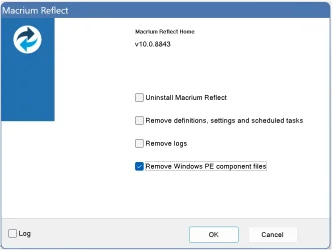
  • Choose only the folloing option and click "OK", it take car of both PE & RE

    1784583816785.webp
That will purge local copies of WinPE / WinRE that Macrium stored
Then you can rebuild the Macrium USB or ISO image

EDIT: alternatively, when you start the Build Rescue and go into advanced settings, the tab "Rescue Media Volume" tells you where Macrium stores and uses WinPE / WinRE. On the selected volume you will find at the root a folder called "boot" which has a subfolder named "Macrium". If you delete the Macrium subfolder it does the same as the uninstall option from above.
 

My Computer My Computer

At a glance

Windows 11
OS
Windows 11
@Phil_C
You need to purge the locally stored WinPE / WinRE files by Macrium.
I can only guide you for v10 but if I remember correctly it's the same for v8.
  • Go to Windows Settings / Apps
  • Locate Macrium and start the "Uninstall" option in the 3 dots on the right.
  • Confirm admin access
  • Choose only the folloing option and click "OK", it take car of both PE & RE

    View attachment 177167
That will purge local copies of WinPE / WinRE that Macrium stored
Then you can rebuild the Macrium USB or ISO image

EDIT: alternatively, when you start the Build Rescue and go into advanced settings, the tab "Rescue Media Volume" tells you where Macrium stores and uses WinPE / WinRE. On the selected volume you will find at the root a folder called "boot" which has a subfolder named "Macrium". If you delete the Macrium subfolder it does the same as the uninstall option from above.
This worked. Many thanks to you and @garlin.

I'm curious, though. I could not find WinRE files anywhere on my Windows drive. Where does Macrium find them in order to build the USB? The Recovery partition on my SSD?
 

My Computers My Computers

  • At a glance

    Windows 11 Pro 24H2Intel i7-1260P 12th Gen 4.7GHz32GB DDR4-3200NVIDIA T550 Laptop GPU
    OS
    Windows 11 Pro 24H2
    Computer type
    Laptop
    Manufacturer/Model
    Lenovo P16s Workstation
    CPU
    Intel i7-1260P 12th Gen 4.7GHz
    Memory
    32GB DDR4-3200
    Graphics Card(s)
    NVIDIA T550 Laptop GPU
    Sound Card
    Realtek Audio
    Monitor(s) Displays
    16" Laptop Display
    Screen Resolution
    2560x1600
    Hard Drives
    2TB Samsung M.2 2280 SSD PCIe 4.0 x 4 NVMe
    Mouse
    Logitech MX Anywhere 2s
    Internet Speed
    1000 Mb
    Browser
    Firefox
    Antivirus
    Avast
  • At a glance

    Windows 11 Pro 24H2i7-6820HQ 6th Gen 3.6 GHz32GB DDR4-2133NVIDIA Quadro M2000M Laptop GPU
    Operating System
    Windows 11 Pro 24H2
    Computer type
    Laptop
    Manufacturer/Model
    Lenovo P50 Workstation
    CPU
    i7-6820HQ 6th Gen 3.6 GHz
    Memory
    32GB DDR4-2133
    Graphics card(s)
    NVIDIA Quadro M2000M Laptop GPU
    Sound Card
    Realtek Audio
    Monitor(s) Displays
    15.6" Laptop Display
    Screen Resolution
    1920x1080
    Hard Drives
    2 x 1TB Samsung M.2 2280 SSD PCIe 3.0 x 4 NVMe
    Cooling
    Dual Fan System
    Mouse
    Logitech MX Anywhere 2s
    Internet Speed
    1000 Mb
    Browser
    Firefox
    Antivirus
    Avast
WinRE.wim can be found in one of two different places (depending on whether WinRE is enabled):

1. When WinRE is enabled, it's copied to your system's active Recovery partition.

Now if you've cloned a disk, done manual re-partitioning, or ran out of disk space on the original Recovery partition (and Windows created a replacement), you might have extra partitions which are marked as Recovery. But the important volume is where Windows thinks is the active WinRE, not the other dead versions that may be floating around.

2. When WinRE is disabled, it's stored as a protected file under C:\Windows\System32\Recovery, on the Windows volume.


The process of enabling/disabling WinRE through reagentc will either transfer the WinRE.wim file to the active Recovery volume, or pull it back to the Windows folder. In some cases, something wrong happens and you lose that file (it's missing from both Windows and the Recovery volume). For those cases, you will have to locate a replacement copy of WinRE.wim from an install source.

Macrium will try to cache a copy of its contents, mostly because it wants to merge it with possibly required storage drivers, so your final boot.wim can always read the disks on a target system. And it wants to add the Macrium-specific tools to the image.
 
Last edited:

My Computer My Computer

At a glance

Windows 7
OS
Windows 7
WinRE is enabled on both of my systems, so I could not find it in the Windows folder. And Macrium cached an older version. All is good now.

Thanks again.
 

My Computers My Computers

  • At a glance

    Windows 11 Pro 24H2Intel i7-1260P 12th Gen 4.7GHz32GB DDR4-3200NVIDIA T550 Laptop GPU
    OS
    Windows 11 Pro 24H2
    Computer type
    Laptop
    Manufacturer/Model
    Lenovo P16s Workstation
    CPU
    Intel i7-1260P 12th Gen 4.7GHz
    Memory
    32GB DDR4-3200
    Graphics Card(s)
    NVIDIA T550 Laptop GPU
    Sound Card
    Realtek Audio
    Monitor(s) Displays
    16" Laptop Display
    Screen Resolution
    2560x1600
    Hard Drives
    2TB Samsung M.2 2280 SSD PCIe 4.0 x 4 NVMe
    Mouse
    Logitech MX Anywhere 2s
    Internet Speed
    1000 Mb
    Browser
    Firefox
    Antivirus
    Avast
  • At a glance

    Windows 11 Pro 24H2i7-6820HQ 6th Gen 3.6 GHz32GB DDR4-2133NVIDIA Quadro M2000M Laptop GPU
    Operating System
    Windows 11 Pro 24H2
    Computer type
    Laptop
    Manufacturer/Model
    Lenovo P50 Workstation
    CPU
    i7-6820HQ 6th Gen 3.6 GHz
    Memory
    32GB DDR4-2133
    Graphics card(s)
    NVIDIA Quadro M2000M Laptop GPU
    Sound Card
    Realtek Audio
    Monitor(s) Displays
    15.6" Laptop Display
    Screen Resolution
    1920x1080
    Hard Drives
    2 x 1TB Samsung M.2 2280 SSD PCIe 3.0 x 4 NVMe
    Cooling
    Dual Fan System
    Mouse
    Logitech MX Anywhere 2s
    Internet Speed
    1000 Mb
    Browser
    Firefox
    Antivirus
    Avast
I'm curious, though. I could not find WinRE files anywhere on my Windows drive. Where does Macrium find them in order to build the USB? The Recovery partition on my SSD?

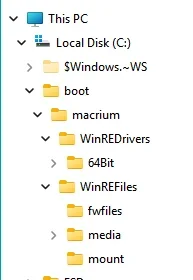
I have Macrium Reflect Free, and it looks like it's storing these files under the directory c:\boot\macrium on my machine. Here's the folder structure I see:

macrium_boot.webp

After I did the procedure outlined by anchamp65, I looked in the c:\boot folder and everything was gone. Then, after I created a rescue ISO (which took longer than usual), the directory structure above appeared again. If I were to venture a guess, this problem could come up again if the files in the directories above become outdated.

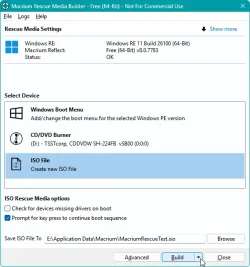
One procedure you can do is when invoking the dialog for creating a rescue ISO, pressing and holding Ctrl will cause a "down button" to appear on the "Build" button of the dialog as below.

save_rescue.webp

When you click it, you'll see the "Force WIM Rebuild" option. Choosing that has worked for me without having to do the uninstall procedure, and I've verified that it updates various files under c:\boot\macrium after saving the ISO.
 

My Computer My Computer

At a glance

Windows 11 pro 25h2AMD Ryzen 7 5700G64 GB G.Skill (F4-3200C16Q-64GVK)Integrated into CPU
OS
Windows 11 pro 25h2
Computer type
PC/Desktop
Manufacturer/Model
DIY
CPU
AMD Ryzen 7 5700G
Motherboard
MSI B450M Bazooka, BIOS version 7A38vHJ5 (latest beta as of 2025-09-23)
Memory
64 GB G.Skill (F4-3200C16Q-64GVK)
Graphics Card(s)
Integrated into CPU
Sound Card
Realtek (built into motherboard)
Monitor(s) Displays
Generic HDMI
Screen Resolution
1080p
Hard Drives
System and apps: SK hynix Gold P31 1TB M.2
Data: Toshiba HDWQ140 4TB internal SATA
PSU
Seasonic 400W SS-400FL2 fanless
Case
Fractal Design Define R5
Cooling
Cooler Master Hyper 212 Evo
Keyboard
Lenovo Preferred Pro II Wired External USB Keyboard (4X30M86879)
Mouse
Belkin cheapo corded USB mouse
Internet Speed
300 MBit/sec
Browser
Firefox
Antivirus
Windows Defender
WinRE is enabled on both of my systems, so I could not find it in the Windows folder. And Macrium cached an older version. All is good now.

Thanks again.
I placed a ticket on Macrium support about 2 months ago, they are aware of the the files not being always at the latest version the moment MS updates them. On Garlin's suggestion, I suggested that they use Get-SecureBootSVN powershell command to check if the rescue media needs to be updated and let the user know that he needs to update it.

As for the WinRE files, I only use WinRE for Macrium rescue media and the files are in the subfolers:
"<rescue_media_volume>\boot\macrium\WinREFiles"
Where "<rescue_media_volume>" is where you configure Macrium to store the files.
 

My Computer My Computer

At a glance

Windows 11
OS
Windows 11
You need to purge the locally stored WinPE / WinRE files by Macrium.
I can only guide you for v10 but if I remember correctly it's the same for v8.
  • Go to Windows Settings / Apps
  • Locate Macrium and start the "Uninstall" option in the 3 dots on the right.
  • Confirm admin access
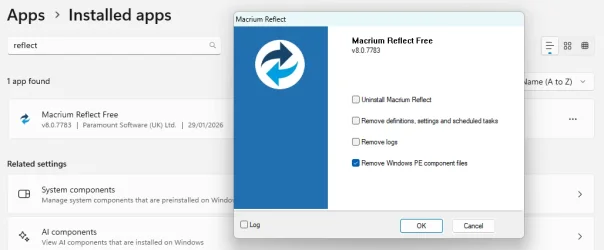
  • Choose only the folloing option and click "OK", it take car of both PE & RE
I can confirm that it's exactly the same for Reflect v8, Free or Home. In fact some things never change, it was the same for v7 too... ;)

1784590495831.webp
 

My Computers My Computers

  • At a glance

    Windows 11 HomeAMD Athlon Silver 3050U8GBRadeon Graphics
    OS
    Windows 11 Home
    Computer type
    Laptop
    Manufacturer/Model
    Acer Aspire 3 A315-23-R9VY
    CPU
    AMD Athlon Silver 3050U
    Memory
    8GB
    Graphics Card(s)
    Radeon Graphics
    Monitor(s) Displays
    laptop screen
    Screen Resolution
    1366x768 native resolution, up to 2560x1440 with Radeon Virtual Super Resolution
    Hard Drives
    1TB Samsung EVO 870 SSD (from April 2026: 250GB EVO 850)
    Internet Speed
    150 Mbps
    Browser
    Edge, Firefox
    Antivirus
    Defender
    Other Info
    fully 'Windows 11 ready' laptop. Windows 10 C: partition migrated from my old unsupported 'main machine' then upgraded to 11. A test migration ran Insider builds for 2 months. When 11 was released on 5th October 2021 it was re-imaged back to 10 and was offered the upgrade in Windows Update on 20th October. Windows Update offered the 22H2 Feature Update on 20th September 2022. It got the 23H2 Feature Update on 4th November 2023 through Windows Update, 24H2 on 3rd October 2024 through Windows Update by setting the Target Release Version for 24H2, and 25H2 on 30th September 2025 through Windows Update by setting the Target Release Version for 25H2.

    UPDATE - 11 April 2026: due to mechanical deterioration this PC has been retired from active duty. The OS with all software and files has been migrated to my System Seven in 'Other systems' to carry on as my general purpose 'main machine'.

    I've now clean installed 25H2 and used Garlin's scripts to update Secure Boot to CA 2023 and revoke the PCA 2011 certificates. It's new role is to test secure boot issues.
  • At a glance

    Windows 11 ProIntel® Core™ i5-520M8GB(integrated graphics) Intel HD Graphics
    Operating System
    Windows 11 Pro
    Computer type
    Laptop
    Manufacturer/Model
    Dell Latitude E4310
    CPU
    Intel® Core™ i5-520M
    Motherboard
    0T6M8G
    Memory
    8GB
    Graphics card(s)
    (integrated graphics) Intel HD Graphics
    Screen Resolution
    1366x768
    Hard Drives
    500GB Crucial MX500 SSD
    Browser
    Firefox, Edge
    Antivirus
    Defender
    Other Info
    unsupported machine: Legacy bios, MBR, TPM 1.2, upgraded from W10 to W11 using W10/W11 hybrid install media workaround.

    In-place upgrade to 22H2 using ISO and a workaround.
    Feature Update to 23H2 by manually installing the Enablement Package.
    In-place upgrade to 24H2 using hybrid 23H2/24H2 install media.
    Upgraded to 25H2 by Enablement Package.

    Also running Insider Dev, and Canary builds and Windows 10 as native boot .vhdx.
  • My SYSTEM THREE is a Dell Latitude 5410, i7-10610U, 32GB RAM, 512GB NVMe ssd, supported device running Windows 11 Pro.

    My SYSTEM FOUR is a 2-in-1 convertible Lenovo Yoga 11e 20DA, Celeron N2930, 8GB RAM, 256GB ssd. Unsupported device: currently running Win10 Pro, plus Win11 Pro RTM and Insider Dev, Beta, and RP 24H2 as native boot vhdx.

    My SYSTEM FIVE is a Dell Latitude 3190 2-in-1, Pentium Silver N5030, 8GB RAM, 1TB NVMe ssd, supported device running Windows 11 Pro, plus Insider Beta, Dev, and Canary builds (and a few others) as a native boot .vhdx.

    My SYSTEM SIX is a Dell Latitude 5550, Core Ultra 7 165H, 64GB RAM, 1TB NVMe SSD, supported device, Windows 11 Pro 24H2, Hyper-V host machine. Updated to 25H2 on 30th September 2025.

    My SYSTEM SEVEN is a Lenovo Thinkpad T580, Intel Core i7-8650U, 16GB RAM, 512GB NVMe SSD + 2nd 512GB NVMe SSD, a supported device for Windows 11. This is my current general purpose 'main machine'. The installed Windows 11 Home from my System One has been migrated to this machine.
One procedure you can do is when invoking the dialog for creating a rescue ISO, pressing and holding Ctrl will cause a "down button" to appear on the "Build" button of the dialog as below.
That too is a feature that has been available since at least Reflect v7......
 

My Computers My Computers

  • At a glance

    Windows 11 HomeAMD Athlon Silver 3050U8GBRadeon Graphics
    OS
    Windows 11 Home
    Computer type
    Laptop
    Manufacturer/Model
    Acer Aspire 3 A315-23-R9VY
    CPU
    AMD Athlon Silver 3050U
    Memory
    8GB
    Graphics Card(s)
    Radeon Graphics
    Monitor(s) Displays
    laptop screen
    Screen Resolution
    1366x768 native resolution, up to 2560x1440 with Radeon Virtual Super Resolution
    Hard Drives
    1TB Samsung EVO 870 SSD (from April 2026: 250GB EVO 850)
    Internet Speed
    150 Mbps
    Browser
    Edge, Firefox
    Antivirus
    Defender
    Other Info
    fully 'Windows 11 ready' laptop. Windows 10 C: partition migrated from my old unsupported 'main machine' then upgraded to 11. A test migration ran Insider builds for 2 months. When 11 was released on 5th October 2021 it was re-imaged back to 10 and was offered the upgrade in Windows Update on 20th October. Windows Update offered the 22H2 Feature Update on 20th September 2022. It got the 23H2 Feature Update on 4th November 2023 through Windows Update, 24H2 on 3rd October 2024 through Windows Update by setting the Target Release Version for 24H2, and 25H2 on 30th September 2025 through Windows Update by setting the Target Release Version for 25H2.

    UPDATE - 11 April 2026: due to mechanical deterioration this PC has been retired from active duty. The OS with all software and files has been migrated to my System Seven in 'Other systems' to carry on as my general purpose 'main machine'.

    I've now clean installed 25H2 and used Garlin's scripts to update Secure Boot to CA 2023 and revoke the PCA 2011 certificates. It's new role is to test secure boot issues.
  • At a glance

    Windows 11 ProIntel® Core™ i5-520M8GB(integrated graphics) Intel HD Graphics
    Operating System
    Windows 11 Pro
    Computer type
    Laptop
    Manufacturer/Model
    Dell Latitude E4310
    CPU
    Intel® Core™ i5-520M
    Motherboard
    0T6M8G
    Memory
    8GB
    Graphics card(s)
    (integrated graphics) Intel HD Graphics
    Screen Resolution
    1366x768
    Hard Drives
    500GB Crucial MX500 SSD
    Browser
    Firefox, Edge
    Antivirus
    Defender
    Other Info
    unsupported machine: Legacy bios, MBR, TPM 1.2, upgraded from W10 to W11 using W10/W11 hybrid install media workaround.

    In-place upgrade to 22H2 using ISO and a workaround.
    Feature Update to 23H2 by manually installing the Enablement Package.
    In-place upgrade to 24H2 using hybrid 23H2/24H2 install media.
    Upgraded to 25H2 by Enablement Package.

    Also running Insider Dev, and Canary builds and Windows 10 as native boot .vhdx.
  • My SYSTEM THREE is a Dell Latitude 5410, i7-10610U, 32GB RAM, 512GB NVMe ssd, supported device running Windows 11 Pro.

    My SYSTEM FOUR is a 2-in-1 convertible Lenovo Yoga 11e 20DA, Celeron N2930, 8GB RAM, 256GB ssd. Unsupported device: currently running Win10 Pro, plus Win11 Pro RTM and Insider Dev, Beta, and RP 24H2 as native boot vhdx.

    My SYSTEM FIVE is a Dell Latitude 3190 2-in-1, Pentium Silver N5030, 8GB RAM, 1TB NVMe ssd, supported device running Windows 11 Pro, plus Insider Beta, Dev, and Canary builds (and a few others) as a native boot .vhdx.

    My SYSTEM SIX is a Dell Latitude 5550, Core Ultra 7 165H, 64GB RAM, 1TB NVMe SSD, supported device, Windows 11 Pro 24H2, Hyper-V host machine. Updated to 25H2 on 30th September 2025.

    My SYSTEM SEVEN is a Lenovo Thinkpad T580, Intel Core i7-8650U, 16GB RAM, 512GB NVMe SSD + 2nd 512GB NVMe SSD, a supported device for Windows 11. This is my current general purpose 'main machine'. The installed Windows 11 Home from my System One has been migrated to this machine.
I can confirm that it's exactly the same for Reflect v8, Free or Home. In fact some things never change, it was the same for v7 too... ;)
Been using it since version 5 or 6 but can't say I remember all the differences... or what has not changed... ;-)
 

My Computer My Computer

At a glance

Windows 11
OS
Windows 11
One procedure you can do is when invoking the dialog for creating a rescue ISO, pressing and holding Ctrl will cause a "down button" to appear on the "Build" button of the dialog as below.

View attachment 177183

When you click it, you'll see the "Force WIM Rebuild" option. Choosing that has worked for me without having to do the uninstall procedure, and I've verified that it updates various files under c:\boot\macrium after saving the ISO.
I like the Ctrl>Magic Down Arrow. :cool:
 

My Computers My Computers

  • At a glance

    Windows 11 Pro 24H2Intel i7-1260P 12th Gen 4.7GHz32GB DDR4-3200NVIDIA T550 Laptop GPU
    OS
    Windows 11 Pro 24H2
    Computer type
    Laptop
    Manufacturer/Model
    Lenovo P16s Workstation
    CPU
    Intel i7-1260P 12th Gen 4.7GHz
    Memory
    32GB DDR4-3200
    Graphics Card(s)
    NVIDIA T550 Laptop GPU
    Sound Card
    Realtek Audio
    Monitor(s) Displays
    16" Laptop Display
    Screen Resolution
    2560x1600
    Hard Drives
    2TB Samsung M.2 2280 SSD PCIe 4.0 x 4 NVMe
    Mouse
    Logitech MX Anywhere 2s
    Internet Speed
    1000 Mb
    Browser
    Firefox
    Antivirus
    Avast
  • At a glance

    Windows 11 Pro 24H2i7-6820HQ 6th Gen 3.6 GHz32GB DDR4-2133NVIDIA Quadro M2000M Laptop GPU
    Operating System
    Windows 11 Pro 24H2
    Computer type
    Laptop
    Manufacturer/Model
    Lenovo P50 Workstation
    CPU
    i7-6820HQ 6th Gen 3.6 GHz
    Memory
    32GB DDR4-2133
    Graphics card(s)
    NVIDIA Quadro M2000M Laptop GPU
    Sound Card
    Realtek Audio
    Monitor(s) Displays
    15.6" Laptop Display
    Screen Resolution
    1920x1080
    Hard Drives
    2 x 1TB Samsung M.2 2280 SSD PCIe 3.0 x 4 NVMe
    Cooling
    Dual Fan System
    Mouse
    Logitech MX Anywhere 2s
    Internet Speed
    1000 Mb
    Browser
    Firefox
    Antivirus
    Avast
The script compares the SkuSiPolicy against the boot.wim's actual contents, to see if your WIM's winload.efi is allowed or not.
If it's not allowed, then your source WinPE or WinRE is outdated.
This was the case for me, Macrium using an outdated WinRE. I was going crazy trying to make my
Macrium boot media bootable with Secure Boot enabled. Tried WinRE, WinPE, neither worked.

But I figured it out. I can now boot my Macrium 8.1 WinRE media with Secure Boot enabled!

Code:
C:\Windows\System32>powershell -ep bypass -f D:\Scripts\BlockedOrNot.ps1
Windows 11 25H2 (26200.8894)
VBS: ON

Policy File: "\\.\HarddiskVolume1\EFI\Microsoft\Boot\SkuSiPolicy.p7b", Version 3.0.0.16

Filename                        FileVersion Status
--------                        ----------- ------
J:\sources\boot.wim             26100.8875  ALLOWED
C:\Windows\System32\winload.efi 26100.8875  ALLOWED
Disk 0 Partition 4 Winre.wim    26100.8875  ALLOWED

C:\Windows\System32>

Here's how I did it:

1. Downloaded a new winre.wim file from build 26200.8875 via UUPdump. Saved it to C:\temp
2. Directed Macrium to use it under Advanced, and built my usb.
1784619466932.webp
3. Once built, I ran @garlin script
.\Update_UEFI-CA2023.ps1 -bootmedia
4. I then ran his
powershell -ep bypass -f D:\Scripts\BlockedOrNot.ps1
script and everything matched.

I don't see a reason why this wouldn't work for Macrium X users as well.

Right-click on winre.wim, Save Link As...and name it winre.wim


EDIT: Or, if your WinRE is current, assign your recovery partition a drive letter and point it to
1784628482065.webp
I just tested this and it also worked.
 
Last edited:

My Computers My Computers

  • At a glance

    Win 11 Pro 25H2 26200.8894Intel® Core™ i7-14700KG.SKILL Ripjaws S5 Series 64GB (2 x 32GB) DDR5ASUS GeForce RTX 4070 Super 12GB
    OS
    Win 11 Pro 25H2 26200.8894
    Computer type
    PC/Desktop
    Manufacturer/Model
    Self Built
    CPU
    Intel® Core™ i7-14700K
    Motherboard
    ASUS TUF Z690-PLUS WIFI (BIOS 4505)
    Memory
    G.SKILL Ripjaws S5 Series 64GB (2 x 32GB) DDR5
    Graphics Card(s)
    ASUS GeForce RTX 4070 Super 12GB
    Sound Card
    Sound Blaster AE-5 Plus
    Monitor(s) Displays
    ASUS TUF Gaming 27" 2K HDR Gaming
    Screen Resolution
    2560 x 1440
    Hard Drives
    Samsung 990 Pro 1TB NVMe (Win 11 25H2)
    SK hynix P41 500GB NVMe
    SK hynix P41 2TB NVMe (x3)
    Crucial P3 Plus 4TB
    PSU
    Corsair RM850x Shift
    Case
    Antec Dark Phantom DP502 FLUX
    Cooling
    Corsair Nautilus 360 RS AIO
    Keyboard
    Logitech MK 320
    Mouse
    Razer Basilisk V3
    Internet Speed
    750Mbs
    Browser
    Firefox
    Antivirus
    Winows Security
    Other Info
    MR 8.1 Home
  • At a glance

    Win 11 Pro 25H2 26200.8894Intel Core i5-1140064 GB DDR4MSI GeForce RTX 3060 Ventus 2X 12GB
    Operating System
    Win 11 Pro 25H2 26200.8894
    Computer type
    PC/Desktop
    Manufacturer/Model
    Self Built
    CPU
    Intel Core i5-11400
    Motherboard
    Asus TUF Gaming Z590 Plus WiFi (BIOS 2803)
    Memory
    64 GB DDR4
    Graphics card(s)
    MSI GeForce RTX 3060 Ventus 2X 12GB
    Sound Card
    SoundBlaster Audigy Fx V2
    Monitor(s) Displays
    Samsung F27T350
    Screen Resolution
    1920x1080
    Hard Drives
    Samsung 980 Pro 1TB
    Samsung 970 EVO Plus 2TB
    Samsung 870 EVO 500GB SSD
    PSU
    Corsair HX750
    Case
    Cougar MX330-G Window
    Cooling
    Thermalright Frozen Edge 240 Black AIO
    Internet Speed
    350Mbps
    Browser
    Firefox
    Antivirus
    Windows Security
  • System Three
    Win 11 Pro 25H2 26200.8894
    ASUS PRIME Z370-P II BIOS 3004 7/12/21
    Intel Core i7-8700 CPU @ 3.20GHz
    32GB DDR4 RAM (4x8)
    iGPU Intel UHD Graphics 630
    Mid-Tower Desktop
Every time a new bootmgfw.efi or winload.efi is pushed out, either the SVN or SkuSiPolicy (respectively) gets bumped up. So what you need to do is recreate the Macrium drive again from the local system's WinRE.
And what about the system image captured before applying the patch if a restore becomes necessary?

Doesn't that defeat the purpose of taking snapshots?
 

My Computer My Computer

At a glance

11 25H2
OS
11 25H2

Latest Support Threads

Back
Top Bottom