Solved garlin's PowerShell scripts for updating Secure Boot CA 2023


MS is working quite a lot on the SkuSiPolicy.p7b. Compare the 3.0.0.10 version to the latest version and there are quite some additions. Version 3.0.0.10 focused solely on winload.efi (osloader.exe) and winresume.efi (hiberrsm.exe), version 3.0.0.16 has in addition
cbproxy.exe (10 entries)
ffuloader.efi (10 entries)
hvloader.efi (2 entries)
memdiag.exe (10 entries)
mmosloader.efi (10 entries)
Mobilestartup (10 entries)
resetphone.efi (10 entries)
SecConfig.efi (10 entries)
SfhRecovery.efi (8 entries)
I'm wondering if there's an actual security issue with those files, or they're rolling a new feature which requires every executable to be replaced.

What's with the Windows Phone files (like resetphone.efi)? I get the "one Windows for all" mantra, but it kinda seems ridiculous to list them for a desktop SKU.
 

My Computer My Computer

At a glance

Windows 7
OS
Windows 7
I don't see a problem with the current SkuSiPolicy.p7b (version 3.0.0.16).

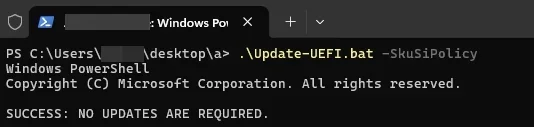
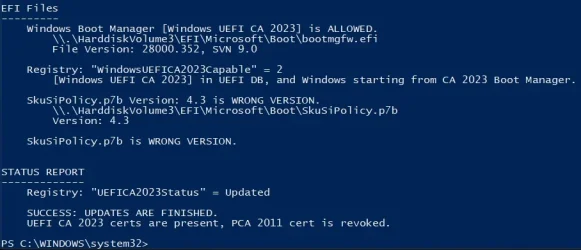
Your existing copy of the file on the EFI volume may be corrupted or the wrong file. Since the reported file version is 4.3, that is always greater than 3.0.0.16, so the update script will not replace it.

1. Run these commands:
Code:
mountvol S: /s
copy S:\EFI\Microsoft\Boot\SkuSiPolicy.p7b BAD_COPY_SkuSiPolicy.p7b
copy C:\Windows\System32\SecureBootUpdates\SkuSiPolicy.p7b S:\EFI\Microsoft\Boot\SkuSiPolicy.p7b
mountvol S: /d

2. Please create a ZIP file of the "BAD_COPY_SkuSiPolicy.p7b" on your C: drive.

3. Attach the ZIP in your next post. I would like to see what kind of file was installed, because I don't understand why it has a version 4.3

Thanks.
 

My Computer My Computer

At a glance

Windows 7
OS
Windows 7
  • Great Support
Reactions: x_1
1. Run these commands:
Code:
mountvol S: /s
copy S:\EFI\Microsoft\Boot\SkuSiPolicy.p7b BAD_COPY_SkuSiPolicy.p7b
copy C:\Windows\System32\SecureBootUpdates\SkuSiPolicy.p7b S:\EFI\Microsoft\Boot\SkuSiPolicy.p7b
mountvol S: /d
problem solved with these commands, thank you!
 

My Computer My Computer

At a glance

11 25H2
OS
11 25H2
Hi,

I thought I had all of this taken care of, All the CA were updated and I had 2011 revoked. So i was just checking, ran your scripts again, and found 2011 was no longer revoked and the dbx was empty. So I revoked it again.

It had to be Microsoft. Why would Microsoft enable it?
 

My Computers My Computers

  • At a glance

    Windows 11 ProIntel Core i9 14900K96GB (2x48) G.skill Ripjaws 6800 MT/s DDR5Asus ROG Strix 4070 Ti OC
    OS
    Windows 11 Pro
    Computer type
    PC/Desktop
    Manufacturer/Model
    DIY Photoshop/Audio/Game/tinker
    CPU
    Intel Core i9 14900K
    Motherboard
    Asus ROG Maximus Z790 Dark Hero
    Memory
    96GB (2x48) G.skill Ripjaws 6800 MT/s DDR5
    Graphics Card(s)
    Asus ROG Strix 4070 Ti OC
    Sound Card
    Bowers & Wilkins 606 S3 speakers; Audiolabs 7000a integrated amp; RSL 10S Mk2 sub; Creative Pebble Pro Minimilist
    Monitor(s) Displays
    Eizo CG2730 ColorEdge, ViewSonic VP2768, i1 Display Pro calibration puck
    Screen Resolution
    2560 x 1440p x 2
    Hard Drives
    WDC SN850X 4TB nvme, SN850 1TB nvme, SK-Hynix 2 TB P41 nvme,. Sabrent USB-C DS-SC5B 5-bay docking station: 6TB WDC Black, 6TB Ironwolf Pro; 2x 2TB WDC Black HDD
    PSU
    850W Seasonic Vertex PX-850 ATX 3.0/PCI-E 5.0
    Case
    Fractal Design North XL Mesh, Black Walnut
    Cooling
    EK Nucleus black 360 AIO w/Phanteks T30-120 fans, 2 Noctua NF-A14 Chromax case fan, 1 T30-120 fan cooling memory
    Keyboard
    Keychron Q3 Max TKL with custom GMK Redsuns Red Samuri keycaps, TX Stabs
    Mouse
    Logitech G305 wireless gaming
    Internet Speed
    575 Mb/s down | 25 Mb/s up
    Browser
    Firefox
    Antivirus
    Defender, Macrium Reflect X
    Other Info
    Phangkey Amaterasu V2 Desk Mat
  • At a glance

    Apple M1
    Computer type
    Laptop
    Manufacturer/Model
    💻 Apple 13" Macbook Pro 2020 (m1)
    CPU
    Apple M1
    Screen Resolution
    2560x1600
    Browser
    Firefox
I thought I had all of this taken care of, All the CA were updated and I had 2011 revoked. So i was just checking, ran your scripts again, and found 2011 was no longer revoked and the dbx was empty. So I revoked it again.

It had to be Microsoft. Why would Microsoft enable it?
There's no way to clear the DBX (or any of the Secure Boot variables) without going into the UEFI setup menus. You can always append new values to existing variables from Windows, but you can't clear them. It's a deliberate security measure, otherwise attackers could get Admin rights and simply defeat any Secure Boot settings you have. You must be physically present in the BIOS screens to manually clear variables.

Check if your BIOS got recently updated. Sometimes the process of applying a new firmware can break the existing settings (it's not supposed to, but on occasion it can end up in a messed up state). Normally you can reset to factory defaults, and repeat whatever process you did to get the certs updated (if it required manual intervention).
 

My Computer My Computer

At a glance

Windows 7
OS
Windows 7
There's no way to clear the DBX (or any of the Secure Boot variables) without going into the UEFI setup menus. You can always append new values to existing variables from Windows, but you can't clear them. It's a deliberate security measure, otherwise attackers could get Admin rights and simply defeat any Secure Boot settings you have. You must be physically present in the BIOS screens to manually clear variables.

Check if your BIOS got recently updated. Sometimes the process of applying a new firmware can break the existing settings (it's not supposed to, but on occasion it can end up in a messed up state). Normally you can reset to factory defaults, and repeat whatever process you did to get the certs updated (if it required manual intervention).

OK, thanks

I had reinstalled the same BIOS since then so maybe that was it. I guess one should check after every BIOS update.
 

My Computers My Computers

  • At a glance

    Windows 11 ProIntel Core i9 14900K96GB (2x48) G.skill Ripjaws 6800 MT/s DDR5Asus ROG Strix 4070 Ti OC
    OS
    Windows 11 Pro
    Computer type
    PC/Desktop
    Manufacturer/Model
    DIY Photoshop/Audio/Game/tinker
    CPU
    Intel Core i9 14900K
    Motherboard
    Asus ROG Maximus Z790 Dark Hero
    Memory
    96GB (2x48) G.skill Ripjaws 6800 MT/s DDR5
    Graphics Card(s)
    Asus ROG Strix 4070 Ti OC
    Sound Card
    Bowers & Wilkins 606 S3 speakers; Audiolabs 7000a integrated amp; RSL 10S Mk2 sub; Creative Pebble Pro Minimilist
    Monitor(s) Displays
    Eizo CG2730 ColorEdge, ViewSonic VP2768, i1 Display Pro calibration puck
    Screen Resolution
    2560 x 1440p x 2
    Hard Drives
    WDC SN850X 4TB nvme, SN850 1TB nvme, SK-Hynix 2 TB P41 nvme,. Sabrent USB-C DS-SC5B 5-bay docking station: 6TB WDC Black, 6TB Ironwolf Pro; 2x 2TB WDC Black HDD
    PSU
    850W Seasonic Vertex PX-850 ATX 3.0/PCI-E 5.0
    Case
    Fractal Design North XL Mesh, Black Walnut
    Cooling
    EK Nucleus black 360 AIO w/Phanteks T30-120 fans, 2 Noctua NF-A14 Chromax case fan, 1 T30-120 fan cooling memory
    Keyboard
    Keychron Q3 Max TKL with custom GMK Redsuns Red Samuri keycaps, TX Stabs
    Mouse
    Logitech G305 wireless gaming
    Internet Speed
    575 Mb/s down | 25 Mb/s up
    Browser
    Firefox
    Antivirus
    Defender, Macrium Reflect X
    Other Info
    Phangkey Amaterasu V2 Desk Mat
  • At a glance

    Apple M1
    Computer type
    Laptop
    Manufacturer/Model
    💻 Apple 13" Macbook Pro 2020 (m1)
    CPU
    Apple M1
    Screen Resolution
    2560x1600
    Browser
    Firefox
OK, thanks

I had reinstalled the same BIOS since then so maybe that was it. I guess one should check after every BIOS update.
+1, definitely!

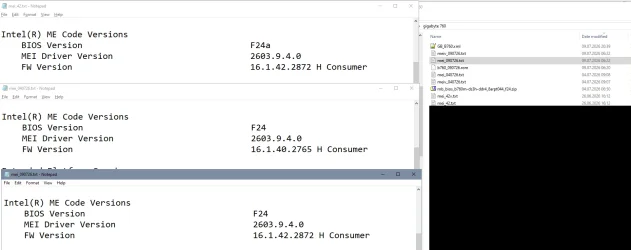
(Normally bios updates should leave out the NVRAM and settings / certificates but my Gigabyte B760 overwrites the complete firmware, leaving the dbx thereby empty again and in addition the update downgraded the Intel ME in the process)
 

My Computer My Computer

At a glance

W10
OS
W10
+1, definitely!

(Normally bios updates should leave out the NVRAM and settings / certificates but my Gigabyte B760 overwrites the complete firmware, leaving the dbx thereby empty again and in addition the update downgraded the Intel ME in the process)
Are you sure? I recently upgraded my BIOS on my Gigabyte B760M GAMING PLUS WIFI motherboard, and all my secure boot variables were left intact.

PowerShell 7.6.3
Secure Boot: ON
Virtualization Based Security: ON
BitLocker on (C:) OFF

UEFI KEK Certs
--------------
Microsoft Corporation KEK CA 2011
Microsoft Corporation KEK 2K CA 2023

UEFI DB Certs
-------------
MosbyKey [2025.07.17]
Microsoft Corporation UEFI CA 2011
Microsoft Windows Production PCA 2011
Microsoft Option ROM UEFI CA 2023
Microsoft UEFI CA 2023
Windows UEFI CA 2023

UEFI DBX Certs
--------------
Microsoft Windows Production PCA 2011
Windows BootMgr SVN 9.0

EFI Files
---------
Windows Boot Manager [Windows UEFI CA 2023] is ALLOWED.

Registry: "WindowsUEFICA2023Capable" = 2
[Windows UEFI CA 2023] in UEFI DB, and Windows starting from CA 2023 Boot Manager.

SkuSiPolicy.p7b is CURRENT.


STATUS REPORT
-------------
Registry: "UEFICA2023Status" = Updated

SUCCESS: UPDATES ARE FINISHED.
UEFI CA 2023 certs are present, PCA 2011 cert is revoked.
 

My Computers My Computers

  • At a glance

    Win 11 Pro 25H2, Build 26200.8875Intel Core i5 1450064GB DDR4GeForce RTX 4060
    OS
    Win 11 Pro 25H2, Build 26200.8875
    Computer type
    PC/Desktop
    Manufacturer/Model
    Home Brew
    CPU
    Intel Core i5 14500
    Motherboard
    Gigabyte B760M G P WIFI
    Memory
    64GB DDR4
    Graphics Card(s)
    GeForce RTX 4060
    Sound Card
    Chipset Realtek
    Monitor(s) Displays
    LG 45" Ultragear, Acer 24" 1080p
    Screen Resolution
    5120x1440, 1920x1080
    Hard Drives
    Crucial P310 2TB 2280 PCIe Gen4 3D NAND NVMe M.2 SSD (O/S)
    Silicon Power 2TB US75 NVMe PCIe Gen4 M.2 2280 SSD (backup)
    Crucial BX500 2TB 3D NAND (2nd backup)
    Seagate 4TB Ironwolf, rotating HDD archive files
    External off-line backup Drives: 2 NVMe 4TB drives in external enclosures
    PSU
    Thermaltake Toughpower GF3 750W
    Case
    LIAN LI LANCOOL 216 E-ATX PC Case
    Cooling
    Lots of fans!
    Keyboard
    Microsoft Comfort Curve 2000
    Mouse
    Logitech G305
    Internet Speed
    Verizon FiOS 1GB
    Browser
    Firefox
    Antivirus
    Malware Bytes & Windows Defender Security
  • At a glance

    Win 11 Pro 25H2, Build 26200.8875Intel Core i5 1440032GB DDR5Intel 700 Embedded GPU
    Operating System
    Win 11 Pro 25H2, Build 26200.8875
    Computer type
    PC/Desktop
    Manufacturer/Model
    Home Brew
    CPU
    Intel Core i5 14400
    Motherboard
    Gigabyte B760M DS3H AX
    Memory
    32GB DDR5
    Graphics card(s)
    Intel 700 Embedded GPU
    Sound Card
    Realtek Embedded
    Monitor(s) Displays
    27" HP 1080p
    Screen Resolution
    1920x1080
    Hard Drives
    Crucial P310 2TB 2280 PCIe Gen4 eD NAND PCIe SSD
    Samsung EVO 990 2TB NVMe Gen4 SSD
    Samsung 2TB SATA SSD
    PSU
    Thermaltake Smart BM3 650W
    Case
    Okinos Micro ATX Case
    Cooling
    Fans
    Keyboard
    Microsoft Comfort Curve 2000
    Mouse
    Logitech G305
    Internet Speed
    Verizon FiOS 1GB
    Browser
    Firefox
    Antivirus
    Malware Bytes & Windows Defender Security
  • Nimo N171 17" Laptop, (Intel i3-1215U, 16GB RAM, 2TB NVMe, Win11 Pro)
    Acemagic Vista Mini PC V1 (Intel N150, 16GB RAM, 1TB NVMe, Win11 Pro)
    HP ENVY h8-1540t, (24GB RAM, 2TB SSD, 2TB HDD, Win11 Pro)
Are you sure?
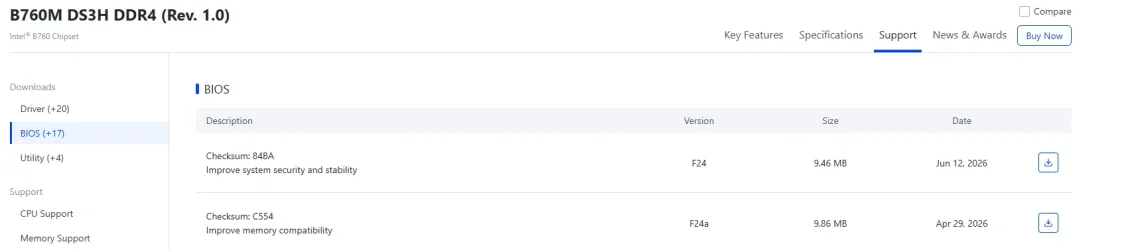
Yes, but that may differ from board to board, mine is a b760m-ds3h-ddr4, bios was F24 (not F24A).

To confirm that they downgraded even the Intel ME (management engine) region see the timeline for MEInfo output:
First bios F24A with ME 16.1.42.2872 (manually updated), then after update to the latest F24 ME is downgraded to 16.1.40.2765, then manually updated ME firmware again to 16.1.42.2872)

And overwriting the complete ME region is one step further than deleting / "refreshing" the NVRAM.... But I used the builtin bios fuctionality for updating, no separate software tools- did never search if there exist some?

1784386974725.webp
1784387147915.webp
 

My Computer My Computer

At a glance

W10
OS
W10
I also used the built-in BIOS update option, I put the BIOS on a USB stick and then use the Q-Flash in the BIOS. It updated the BIOS and left my Secure Boot alone.
 

My Computers My Computers

  • At a glance

    Win 11 Pro 25H2, Build 26200.8875Intel Core i5 1450064GB DDR4GeForce RTX 4060
    OS
    Win 11 Pro 25H2, Build 26200.8875
    Computer type
    PC/Desktop
    Manufacturer/Model
    Home Brew
    CPU
    Intel Core i5 14500
    Motherboard
    Gigabyte B760M G P WIFI
    Memory
    64GB DDR4
    Graphics Card(s)
    GeForce RTX 4060
    Sound Card
    Chipset Realtek
    Monitor(s) Displays
    LG 45" Ultragear, Acer 24" 1080p
    Screen Resolution
    5120x1440, 1920x1080
    Hard Drives
    Crucial P310 2TB 2280 PCIe Gen4 3D NAND NVMe M.2 SSD (O/S)
    Silicon Power 2TB US75 NVMe PCIe Gen4 M.2 2280 SSD (backup)
    Crucial BX500 2TB 3D NAND (2nd backup)
    Seagate 4TB Ironwolf, rotating HDD archive files
    External off-line backup Drives: 2 NVMe 4TB drives in external enclosures
    PSU
    Thermaltake Toughpower GF3 750W
    Case
    LIAN LI LANCOOL 216 E-ATX PC Case
    Cooling
    Lots of fans!
    Keyboard
    Microsoft Comfort Curve 2000
    Mouse
    Logitech G305
    Internet Speed
    Verizon FiOS 1GB
    Browser
    Firefox
    Antivirus
    Malware Bytes & Windows Defender Security
  • At a glance

    Win 11 Pro 25H2, Build 26200.8875Intel Core i5 1440032GB DDR5Intel 700 Embedded GPU
    Operating System
    Win 11 Pro 25H2, Build 26200.8875
    Computer type
    PC/Desktop
    Manufacturer/Model
    Home Brew
    CPU
    Intel Core i5 14400
    Motherboard
    Gigabyte B760M DS3H AX
    Memory
    32GB DDR5
    Graphics card(s)
    Intel 700 Embedded GPU
    Sound Card
    Realtek Embedded
    Monitor(s) Displays
    27" HP 1080p
    Screen Resolution
    1920x1080
    Hard Drives
    Crucial P310 2TB 2280 PCIe Gen4 eD NAND PCIe SSD
    Samsung EVO 990 2TB NVMe Gen4 SSD
    Samsung 2TB SATA SSD
    PSU
    Thermaltake Smart BM3 650W
    Case
    Okinos Micro ATX Case
    Cooling
    Fans
    Keyboard
    Microsoft Comfort Curve 2000
    Mouse
    Logitech G305
    Internet Speed
    Verizon FiOS 1GB
    Browser
    Firefox
    Antivirus
    Malware Bytes & Windows Defender Security
  • Nimo N171 17" Laptop, (Intel i3-1215U, 16GB RAM, 2TB NVMe, Win11 Pro)
    Acemagic Vista Mini PC V1 (Intel N150, 16GB RAM, 1TB NVMe, Win11 Pro)
    HP ENVY h8-1540t, (24GB RAM, 2TB SSD, 2TB HDD, Win11 Pro)
UPDATE: 2026-07-18

1. Update the EDK2 binaries ZIP file to version 1.6.5
2. Create a block list of PC models that have reported UFI issues with "bricking" (Lenovo M700)
3. String check for HP BIOS versions should ignore non-HP models
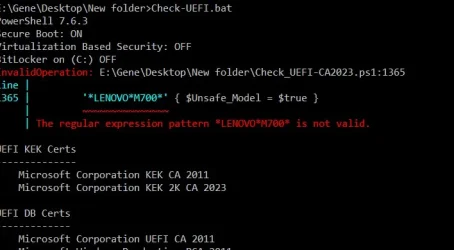
 

My Computer My Computer

At a glance

Windows 7
OS
Windows 7
UPDATE: 2026-07-18

1. Update the EDK2 binaries ZIP file to version 1.6.5
2. Create a block list of PC models that have reported UFI issues with "bricking" (Lenovo M700)
3. String check for HP BIOS versions should ignore non-HP models
Screenshot 2026-07-18 155644.webp
 

My Computers My Computers

  • At a glance

    Windows 11 ProIntel Core i9 14900K96GB (2x48) G.skill Ripjaws 6800 MT/s DDR5Asus ROG Strix 4070 Ti OC
    OS
    Windows 11 Pro
    Computer type
    PC/Desktop
    Manufacturer/Model
    DIY Photoshop/Audio/Game/tinker
    CPU
    Intel Core i9 14900K
    Motherboard
    Asus ROG Maximus Z790 Dark Hero
    Memory
    96GB (2x48) G.skill Ripjaws 6800 MT/s DDR5
    Graphics Card(s)
    Asus ROG Strix 4070 Ti OC
    Sound Card
    Bowers & Wilkins 606 S3 speakers; Audiolabs 7000a integrated amp; RSL 10S Mk2 sub; Creative Pebble Pro Minimilist
    Monitor(s) Displays
    Eizo CG2730 ColorEdge, ViewSonic VP2768, i1 Display Pro calibration puck
    Screen Resolution
    2560 x 1440p x 2
    Hard Drives
    WDC SN850X 4TB nvme, SN850 1TB nvme, SK-Hynix 2 TB P41 nvme,. Sabrent USB-C DS-SC5B 5-bay docking station: 6TB WDC Black, 6TB Ironwolf Pro; 2x 2TB WDC Black HDD
    PSU
    850W Seasonic Vertex PX-850 ATX 3.0/PCI-E 5.0
    Case
    Fractal Design North XL Mesh, Black Walnut
    Cooling
    EK Nucleus black 360 AIO w/Phanteks T30-120 fans, 2 Noctua NF-A14 Chromax case fan, 1 T30-120 fan cooling memory
    Keyboard
    Keychron Q3 Max TKL with custom GMK Redsuns Red Samuri keycaps, TX Stabs
    Mouse
    Logitech G305 wireless gaming
    Internet Speed
    575 Mb/s down | 25 Mb/s up
    Browser
    Firefox
    Antivirus
    Defender, Macrium Reflect X
    Other Info
    Phangkey Amaterasu V2 Desk Mat
  • At a glance

    Apple M1
    Computer type
    Laptop
    Manufacturer/Model
    💻 Apple 13" Macbook Pro 2020 (m1)
    CPU
    Apple M1
    Screen Resolution
    2560x1600
    Browser
    Firefox
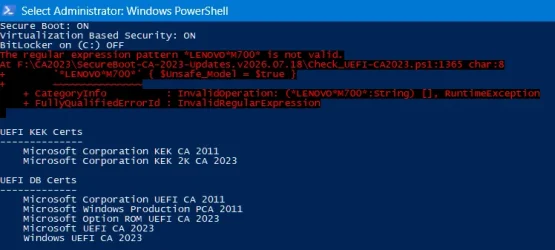
Create a block list of PC models that have reported UFI issues with "bricking" (Lenovo M700)
Bug report:

Code:
The regular expression pattern *LENOVO*M700* is not valid.
At F:\CA2023\SecureBoot-CA-2023-Updates.v2026.07.18\Check_UEFI-CA2023.ps1:1365 char:8
+        '*LENOVO*M700*' { $Unsafe_Model = $true }
+        ~~~~~~~~~~~~~~~
    + CategoryInfo          : InvalidOperation: (*LENOVO*M700*:String) [], RuntimeException
    + FullyQualifiedErrorId : InvalidRegularExpression
1784405156552.webp
 

My Computers My Computers

  • At a glance

    Windows 11 HomeAMD Athlon Silver 3050U8GBRadeon Graphics
    OS
    Windows 11 Home
    Computer type
    Laptop
    Manufacturer/Model
    Acer Aspire 3 A315-23-R9VY
    CPU
    AMD Athlon Silver 3050U
    Memory
    8GB
    Graphics Card(s)
    Radeon Graphics
    Monitor(s) Displays
    laptop screen
    Screen Resolution
    1366x768 native resolution, up to 2560x1440 with Radeon Virtual Super Resolution
    Hard Drives
    1TB Samsung EVO 870 SSD (from April 2026: 250GB EVO 850)
    Internet Speed
    150 Mbps
    Browser
    Edge, Firefox
    Antivirus
    Defender
    Other Info
    fully 'Windows 11 ready' laptop. Windows 10 C: partition migrated from my old unsupported 'main machine' then upgraded to 11. A test migration ran Insider builds for 2 months. When 11 was released on 5th October 2021 it was re-imaged back to 10 and was offered the upgrade in Windows Update on 20th October. Windows Update offered the 22H2 Feature Update on 20th September 2022. It got the 23H2 Feature Update on 4th November 2023 through Windows Update, 24H2 on 3rd October 2024 through Windows Update by setting the Target Release Version for 24H2, and 25H2 on 30th September 2025 through Windows Update by setting the Target Release Version for 25H2.

    UPDATE - 11 April 2026: due to mechanical deterioration this PC has been retired from active duty. The OS with all software and files has been migrated to my System Seven in 'Other systems' to carry on as my general purpose 'main machine'.

    I've now clean installed 25H2 and used Garlin's scripts to update Secure Boot to CA 2023 and revoke the PCA 2011 certificates. It's new role is to test secure boot issues.
  • At a glance

    Windows 11 ProIntel® Core™ i5-520M8GB(integrated graphics) Intel HD Graphics
    Operating System
    Windows 11 Pro
    Computer type
    Laptop
    Manufacturer/Model
    Dell Latitude E4310
    CPU
    Intel® Core™ i5-520M
    Motherboard
    0T6M8G
    Memory
    8GB
    Graphics card(s)
    (integrated graphics) Intel HD Graphics
    Screen Resolution
    1366x768
    Hard Drives
    500GB Crucial MX500 SSD
    Browser
    Firefox, Edge
    Antivirus
    Defender
    Other Info
    unsupported machine: Legacy bios, MBR, TPM 1.2, upgraded from W10 to W11 using W10/W11 hybrid install media workaround.

    In-place upgrade to 22H2 using ISO and a workaround.
    Feature Update to 23H2 by manually installing the Enablement Package.
    In-place upgrade to 24H2 using hybrid 23H2/24H2 install media.
    Upgraded to 25H2 by Enablement Package.

    Also running Insider Dev, and Canary builds and Windows 10 as native boot .vhdx.
  • My SYSTEM THREE is a Dell Latitude 5410, i7-10610U, 32GB RAM, 512GB NVMe ssd, supported device running Windows 11 Pro.

    My SYSTEM FOUR is a 2-in-1 convertible Lenovo Yoga 11e 20DA, Celeron N2930, 8GB RAM, 256GB ssd. Unsupported device: currently running Win10 Pro, plus Win11 Pro RTM and Insider Dev, Beta, and RP 24H2 as native boot vhdx.

    My SYSTEM FIVE is a Dell Latitude 3190 2-in-1, Pentium Silver N5030, 8GB RAM, 1TB NVMe ssd, supported device running Windows 11 Pro, plus Insider Beta, Dev, and Canary builds (and a few others) as a native boot .vhdx.

    My SYSTEM SIX is a Dell Latitude 5550, Core Ultra 7 165H, 64GB RAM, 1TB NVMe SSD, supported device, Windows 11 Pro 24H2, Hyper-V host machine. Updated to 25H2 on 30th September 2025.

    My SYSTEM SEVEN is a Lenovo Thinkpad T580, Intel Core i7-8650U, 16GB RAM, 512GB NVMe SSD + 2nd 512GB NVMe SSD, a supported device for Windows 11. This is my current general purpose 'main machine'. The installed Windows 11 Home from my System One has been migrated to this machine.
Oops, I formatted the "*" wrong. Forgot PS uses a different regex expression. I'll push the fix in the next 10 min.
 

My Computer My Computer

At a glance

Windows 7
OS
Windows 7
Pushed to post #1 and GitHub. I keep forgetting PS doesn't follow the same regular expressions as POSIX.

* (everything) is supposed to be .* (everything)
 

My Computer My Computer

At a glance

Windows 7
OS
Windows 7
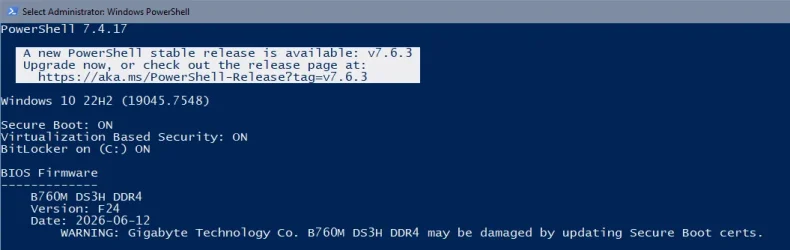
In addition: Seems the Warning is displayed right in the firmware paragraph. In my system this would disappear up out of the PS window and in addition I might overlook it since I'm familiar with the system specs and wouldn't read this part thoroughly.

Might I suggest a repetition in the summary where the possible tasks are listed?

1784405649470.webp

(No, your script doesn't detect my board, I just was curious how the warning would look alike)
 

My Computer My Computer

At a glance

W10
OS
W10
That's a good idea, I'll rewrite the REQUIRED ACTIONS to just stop and warn if you have an "unsafe" model.
 

My Computer My Computer

At a glance

Windows 7
OS
Windows 7

Latest Support Threads

Back
Top Bottom