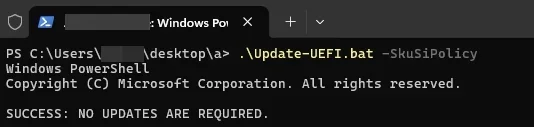
ok, let me try (i was in PS)If you're in PowerShell, you may need to add the full path to the batch file.
My Computer
At a glance
11 25H2
- OS
- 11 25H2

Follow along with the video below to see how to install our site as a web app on your home screen.
Note: This feature may not be available in some browsers.
ok, let me try (i was in PS)If you're in PowerShell, you may need to add the full path to the batch file.
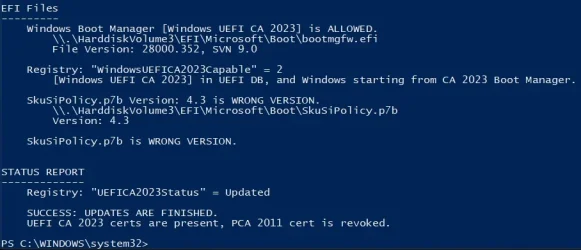
I'm wondering if there's an actual security issue with those files, or they're rolling a new feature which requires every executable to be replaced.MS is working quite a lot on the SkuSiPolicy.p7b. Compare the 3.0.0.10 version to the latest version and there are quite some additions. Version 3.0.0.10 focused solely on winload.efi (osloader.exe) and winresume.efi (hiberrsm.exe), version 3.0.0.16 has in addition
cbproxy.exe (10 entries)
ffuloader.efi (10 entries)
hvloader.efi (2 entries)
memdiag.exe (10 entries)
mmosloader.efi (10 entries)
Mobilestartup (10 entries)
resetphone.efi (10 entries)
SecConfig.efi (10 entries)
SfhRecovery.efi (8 entries)
i've edited the post above.
Looks like they may changed something in the policy file format. I'll have to investigate.ok, let me try (i was in PS)
mountvol S: /s
copy S:\EFI\Microsoft\Boot\SkuSiPolicy.p7b BAD_COPY_SkuSiPolicy.p7b
copy C:\Windows\System32\SecureBootUpdates\SkuSiPolicy.p7b S:\EFI\Microsoft\Boot\SkuSiPolicy.p7b
mountvol S: /dproblem solved with these commands, thank you!1. Run these commands:
Code:mountvol S: /s copy S:\EFI\Microsoft\Boot\SkuSiPolicy.p7b BAD_COPY_SkuSiPolicy.p7b copy C:\Windows\System32\SecureBootUpdates\SkuSiPolicy.p7b S:\EFI\Microsoft\Boot\SkuSiPolicy.p7b mountvol S: /d

 Apple 13" Macbook Pro 2020 (m1)
There's no way to clear the DBX (or any of the Secure Boot variables) without going into the UEFI setup menus. You can always append new values to existing variables from Windows, but you can't clear them. It's a deliberate security measure, otherwise attackers could get Admin rights and simply defeat any Secure Boot settings you have. You must be physically present in the BIOS screens to manually clear variables.I thought I had all of this taken care of, All the CA were updated and I had 2011 revoked. So i was just checking, ran your scripts again, and found 2011 was no longer revoked and the dbx was empty. So I revoked it again.
It had to be Microsoft. Why would Microsoft enable it?
There's no way to clear the DBX (or any of the Secure Boot variables) without going into the UEFI setup menus. You can always append new values to existing variables from Windows, but you can't clear them. It's a deliberate security measure, otherwise attackers could get Admin rights and simply defeat any Secure Boot settings you have. You must be physically present in the BIOS screens to manually clear variables.
Check if your BIOS got recently updated. Sometimes the process of applying a new firmware can break the existing settings (it's not supposed to, but on occasion it can end up in a messed up state). Normally you can reset to factory defaults, and repeat whatever process you did to get the certs updated (if it required manual intervention).
Apple 13" Macbook Pro 2020 (m1)+1, definitely!OK, thanks
I had reinstalled the same BIOS since then so maybe that was it. I guess one should check after every BIOS update.

Are you sure? I recently upgraded my BIOS on my Gigabyte B760M GAMING PLUS WIFI motherboard, and all my secure boot variables were left intact.+1, definitely!
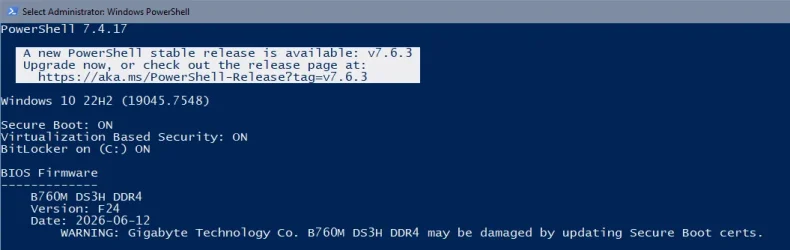
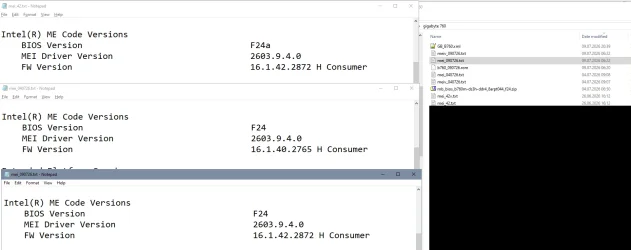
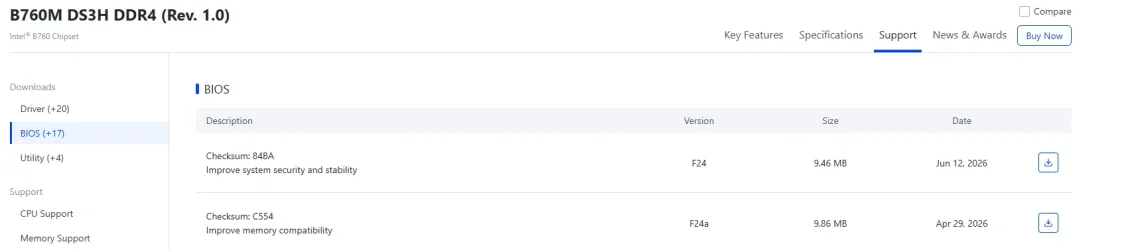
(Normally bios updates should leave out the NVRAM and settings / certificates but my Gigabyte B760 overwrites the complete firmware, leaving the dbx thereby empty again and in addition the update downgraded the Intel ME in the process)
Yes, but that may differ from board to board, mine is a b760m-ds3h-ddr4, bios was F24 (not F24A).Are you sure?
UPDATE: 2026-07-18
1. Update the EDK2 binaries ZIP file to version 1.6.5
2. Create a block list of PC models that have reported UFI issues with "bricking" (Lenovo M700)
3. String check for HP BIOS versions should ignore non-HP models
 Apple 13" Macbook Pro 2020 (m1)
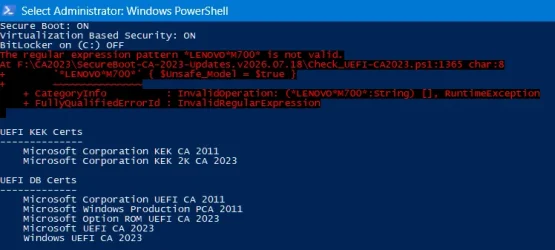
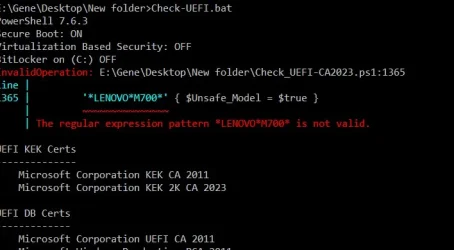
Bug report:Create a block list of PC models that have reported UFI issues with "bricking" (Lenovo M700)
The regular expression pattern *LENOVO*M700* is not valid.
At F:\CA2023\SecureBoot-CA-2023-Updates.v2026.07.18\Check_UEFI-CA2023.ps1:1365 char:8
+        '*LENOVO*M700*' { $Unsafe_Model = $true }
+        ~~~~~~~~~~~~~~~
    + CategoryInfo          : InvalidOperation: (*LENOVO*M700*:String) [], RuntimeException
    + FullyQualifiedErrorId : InvalidRegularExpression