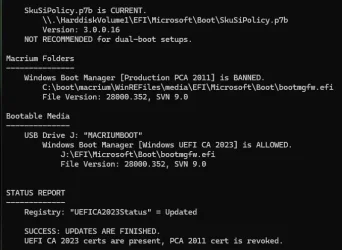
Solved garlin's PowerShell scripts for updating Secure Boot CA 2023


And what about the system image captured before applying the patch if a restore becomes necessary?

Doesn't that defeat the purpose of taking snapshots?
You can temporarily disable secure boot in firmware in a rescue situation.

With 'updated' rescue media and 'outdated' image you can restore an image with secure boot enabled, but have to disable secure boot to boot the restored ('outdated') image.
(But improbable combination: Who would bother with updating the rescue media while not taking a fresh image?)

With 'outdated' rescue media and 'outdated' image you have to disable secure boot for restoring the image and keep it disabled to boot the restored image.

With 'updated' rescue media and 'updated' image there's no problem...
 

My Computer My Computer

At a glance

W10
OS
W10
  • Like
Reactions: x_1
When you have a SkuSiPolicy mismatch, the normal workaround is to disable Secure Boot. You might have to reboot twice.

Two reboots because:
1. After Windows notices that Secure Boot is disabled, it clears a possible "UEFI lock" on the SkuSiPolicy being in effect from the BIOS settings.

2. Second reboot allows the cleared state (no UEFI lock) to be in effect. Without the second reboot, Windows might get confused if Secure Boot was re-enabled since the future SkuSiPolicy won't match what version the UEFI lock thinks it should be.

At this point, if you restored from an older backup then your "correct" version of the SkuSiPolicy is whatever version is in the restored "C:\Windows\System32\SecureUpdates" folder.
Code:
mountvol S: /s
copy C:\Windows\System32\SecureBootUpdates\SkuSiPolicy.p7b S:\EFI\Microsoft\Boot
mountvol S: /d

You could just leave it alone and run Windows Update to bring your older image to the latest files (so your winload.efi matches again). But that depends on why you're restoring from a backup (maybe the last Monthly Update was unstable for you).
 

My Computer My Computer

At a glance

Windows 7
OS
Windows 7
I was wondering if it wouldn't be better to sacrifice security for disaster recovery, while obviously maintaining certificate revocation.
Does the two reboots flush away the (Firmware) SVN?


Disable SkuSiPolicy enforcement.
- Disable Secure Boot mode, and restart Windows.​
- Run the commands:​
Code:
mountvol S: /s
del S:\EFI\Microsoft\Boot\SkuSiPolicy.p7b
mountvol S: /d
- Shutdown Windows. Re-enable Secure Boot and reboot.​
 

My Computer My Computer

At a glance

11 25H2
OS
11 25H2
I was wondering if it wouldn't be better to sacrifice security for disaster recovery, while obviously maintaining certificate revocation.
Does the two reboots flush away the (Firmware) SVN?
By design, SVN's are persistent. Once they're installed, you cannot clear them without manually deleting the exact entries (which is not easy, because they're only identified by very long hash ID names and some BIOS setup menus don't show you the entire name), or by clearing the entire DBX variable.

The SVN belongs to a different security mechanism than SkuSiPolicy. SVN is for boot manager, SkuSiPolicy is for winload.efi
 

My Computer My Computer

At a glance

Windows 7
OS
Windows 7
so, if I removed the skusipolicy.p7b file regardless of the SVN embedded in the firmware and i needed to use an image to restore the system, would there still be the risk of obsolete media or winload.efi mismatch??
 

My Computer My Computer

At a glance

11 25H2
OS
11 25H2
I don't see a reason why this wouldn't work for Macrium X users as well.

EDIT: Or, if your WinRE is current, assign your recovery partition a drive letter and point it to
View attachment 177241
I just tested this and it also worked.
Macrium X...

I tried the recovery partition copy of the wimre.wim and it did not work for me, I still needed to patch the USB drive using bcdboot. Maybe related to the fact that my OS build is 26200.8894 and Windows RE version is 10.0.26100.8875. But dism does say the winre.wim was modified on 2026-07-15, so I would assume MS would have updated it to match my CA 2023 state which is all updated.

Note: I decided not to mess with SkuSiPolicy.p7b, as suggested by Garlin, since I'm using an imaging software and due to the fact that my computers never leave home. So my risk level is reduced.

I will try the UUPDump scenario later today or tomorrow...
 

My Computer My Computer

At a glance

Windows 11
OS
Windows 11

Latest Support Threads

Back
Top Bottom