Solved garlin's PowerShell scripts for updating Secure Boot CA 2023


And what about the system image captured before applying the patch if a restore becomes necessary?

Doesn't that defeat the purpose of taking snapshots?
You can temporarily disable secure boot in firmware in a rescue situation.

With 'updated' rescue media and 'outdated' image you can restore an image with secure boot enabled, but have to disable secure boot to boot the restored ('outdated') image.
(But improbable combination: Who would bother with updating the rescue media while not taking a fresh image?)

With 'outdated' rescue media and 'outdated' image you have to disable secure boot for restoring the image and keep it disabled to boot the restored image.

With 'updated' rescue media and 'updated' image there's no problem...
 

My Computer My Computer

At a glance

W10
OS
W10
  • Like
Reactions: x_1
When you have a SkuSiPolicy mismatch, the normal workaround is to disable Secure Boot. You might have to reboot twice.

Two reboots because:
1. After Windows notices that Secure Boot is disabled, it clears a possible "UEFI lock" on the SkuSiPolicy being in effect from the BIOS settings.

2. Second reboot allows the cleared state (no UEFI lock) to be in effect. Without the second reboot, Windows might get confused if Secure Boot was re-enabled since the future SkuSiPolicy won't match what version the UEFI lock thinks it should be.

At this point, if you restored from an older backup then your "correct" version of the SkuSiPolicy is whatever version is in the restored "C:\Windows\System32\SecureUpdates" folder.
Code:
mountvol S: /s
copy C:\Windows\System32\SecureBootUpdates\SkuSiPolicy.p7b S:\EFI\Microsoft\Boot
mountvol S: /d

You could just leave it alone and run Windows Update to bring your older image to the latest files (so your winload.efi matches again). But that depends on why you're restoring from a backup (maybe the last Monthly Update was unstable for you).
 

My Computer My Computer

At a glance

Windows 7
OS
Windows 7
I was wondering if it wouldn't be better to sacrifice security for disaster recovery, while obviously maintaining certificate revocation.
Does the two reboots flush away the (Firmware) SVN?


Disable SkuSiPolicy enforcement.
- Disable Secure Boot mode, and restart Windows.​
- Run the commands:​
Code:
mountvol S: /s
del S:\EFI\Microsoft\Boot\SkuSiPolicy.p7b
mountvol S: /d
- Shutdown Windows. Re-enable Secure Boot and reboot.​
 

My Computer My Computer

At a glance

11 25H2
OS
11 25H2
I was wondering if it wouldn't be better to sacrifice security for disaster recovery, while obviously maintaining certificate revocation.
Does the two reboots flush away the (Firmware) SVN?
By design, SVN's are persistent. Once they're installed, you cannot clear them without manually deleting the exact entries (which is not easy, because they're only identified by very long hash ID names and some BIOS setup menus don't show you the entire name), or by clearing the entire DBX variable.

The SVN belongs to a different security mechanism than SkuSiPolicy. SVN is for boot manager, SkuSiPolicy is for winload.efi
 

My Computer My Computer

At a glance

Windows 7
OS
Windows 7
so, if I removed the skusipolicy.p7b file regardless of the SVN embedded in the firmware and i needed to use an image to restore the system, would there still be the risk of obsolete media or winload.efi mismatch??
 

My Computer My Computer

At a glance

11 25H2
OS
11 25H2
I don't see a reason why this wouldn't work for Macrium X users as well.

EDIT: Or, if your WinRE is current, assign your recovery partition a drive letter and point it to
View attachment 177241
I just tested this and it also worked.
Macrium X...

I tried the recovery partition copy of the wimre.wim and it did not work for me, I still needed to patch the USB drive using bcdboot. Maybe related to the fact that my OS build is 26200.8894 and Windows RE version is 10.0.26100.8875. But dism does say the winre.wim was modified on 2026-07-15, so I would assume MS would have updated it to match my CA 2023 state which is all updated.

Note: I decided not to mess with SkuSiPolicy.p7b, as suggested by Garlin, since I'm using an imaging software and due to the fact that my computers never leave home. So my risk level is reduced.

I will try the UUPDump scenario later today or tomorrow...
 

My Computer My Computer

At a glance

Windows 11
OS
Windows 11
so, if I removed the skusipolicy.p7b file regardless of the SVN embedded in the firmware and i needed to use an image to restore the system, would there still be the risk of obsolete media or winload.efi mismatch??
If there is no SkuSiPolicy.p7b file on the EFI volume, you can avoid problems with an outdated winload.efi.
 

My Computer My Computer

At a glance

Windows 7
OS
Windows 7
  • Like
Reactions: x_1
ATTENTION: Macrium and Hasleo users!!

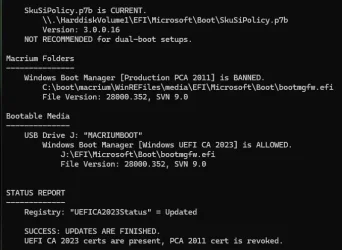
Do you want to share feedback on an upcoming version of the check script? If you use the -BootMedia option, the script will now check the Macrium and Hasleo staging folders, where they keep a cached copy of your WinRE or WinRE files, and check if they're using the right boot file.

Code:
EFI Files
---------
    Windows Boot Manager [Windows UEFI CA 2023] is ALLOWED.
        \\.\HarddiskVolume1\EFI\Microsoft\Boot\bootmgfw.efi
        File Version: 28000.352, SVN 9.0

    Registry: "WindowsUEFICA2023Capable" = 2
        [Windows UEFI CA 2023] in UEFI DB, and Windows starting from CA 2023 Boot Manager.

Macrium Folders
---------------
    Windows Boot Manager [Production PCA 2011] is BANNED.
        C:\boot\macrium\WinREFiles\media\EFI\Microsoft\Boot\bootmgfw.efi
        File Version: 28000.352, SVN 9.0

    Boot File [Production PCA 2011] is BANNED.
        C:\boot\macrium\\WA11KFiles\media\EFI\Boot\bootx64.efi
        File Version: 22621.1702, SVN 1.0

Hasleo Folders
--------------
    Windows Boot Manager [Windows UEFI CA 2023] is BANNED.
        C:\Program Files\Hasleo\Hasleo Backup Suite\bin\WADK\Boot\EFI_EX\bootmgfw.efi
        File Version: 26100.30227, SVN 7.0

Bootable Media
--------------
    USB Drive D: "HASLEOBS"
        Boot File [Production PCA 2011] is BANNED.
            D:\EFI\Boot\bootx64.efi
            File Version: 22621.1702, SVN 1.0

        D:\EFI\Microsoft\Boot\boot.stl [230881+501473] is WRONG VERSION.

Macrium - Checks for both WinPE & WinRE folders.

Hasleo - I have the free edition installed, which only does WinPE. If you know where licensed Hasleo keeps the cache folder for its copy of WinRE then let me know the full folder pathname, and I'll add that to the script. I'm looking for where bootmgfw.efi is hidden.
 

Attachments

My Computer My Computer

At a glance

Windows 7
OS
Windows 7
Hasleo - I have the free edition installed, which only does WinPE. If you know where licensed Hasleo keeps the cache folder for its copy of WinRE then let me know the full folder pathname, and I'll add that to the script. I'm looking for where bootmgfw.efi is hidden.
I´m not sure the free edition only creates a WinPE. I think it does if the "Download Windows components" option is checked. If not, it creates a WinRE. Also, the ISO created with this option not checked is large, 1 GB+, which is more common of a WinRE.
 

My Computer My Computer

At a glance

Windows 10
OS
Windows 10
ATTENTION: Macrium and Hasleo users!!

Do you want to share feedback on an upcoming version of the check script? If you use the -BootMedia option, the script will now check the Macrium and Hasleo staging folders, where they keep a cached copy of your WinRE or WinRE files, and check if they're using the right boot file.
Macirum X
Code:
Macrium Folders
---------------
    Windows Boot Manager [Production PCA 2011] is BANNED.

Script did not work initialy because I don't store the PE/RE files for Macrium on the system drive.
I don't want them in my image when I make a backup image...
I change the script to use my location (E:\) and then the script worked.
If you use the following regkey you can get the volume where Macrium stores the files:

Computer\HKEY_LOCAL_MACHINE\SOFTWARE\Macrium\RescuePE\InstallDir (REG_SZ)​
 

My Computer My Computer

At a glance

Windows 11
OS
Windows 11
side question...
I didn't know about UUPDump.net
How safe is this ?
It seems to get the files directly from Windows repos

Any one of you been using it for a while and can confirm it's reliable ? probably is... ;-)
 

My Computer My Computer

At a glance

Windows 11
OS
Windows 11
@garlin

The script seems to work for me. I have Macrium X. I ran -Verbose -BootMedia and got the SVN version 9 everywhere. At this time, I am not enforcing the SkuSiPolicy.
 

My Computers My Computers

  • At a glance

    Windows 11 Pro 25H2AMD Ryzen 9 7940HS32 GBRadeon 780M Graphics
    OS
    Windows 11 Pro 25H2
    Computer type
    PC/Desktop
    Manufacturer/Model
    Geekom AX7 Pro
    CPU
    AMD Ryzen 9 7940HS
    Memory
    32 GB
    Graphics Card(s)
    Radeon 780M Graphics
    Monitor(s) Displays
    Dell S2425H 24"
    Screen Resolution
    1920 x 1080
    Hard Drives
    2 TB NVMe SSD
    Internet Speed
    100 Mbs
    Browser
    Microsoft Edge / Firefox
    Antivirus
    F-Secure Security Suite
    Other Info
    All secure boot certificates updated to CA 2023
    Windows Production PCA 2011 certificate has been revoked.
  • At a glance

    Windows 11 Pro 25H212th Gen Intel Core i7-12700 processor (12-Co...16 GBIntel(R) UHD Graphics 770 with shared graphic...
    Operating System
    Windows 11 Pro 25H2
    Computer type
    PC/Desktop
    Manufacturer/Model
    Dell Inspiron 3910
    CPU
    12th Gen Intel Core i7-12700 processor (12-Core, 25M Cache, 2.1GHz to 4.8GHz)
    Motherboard
    Dell 0KHP4K
    Memory
    16 GB
    Graphics card(s)
    Intel(R) UHD Graphics 770 with shared graphics memory
    Monitor(s) Displays
    Dell 27" Monitor S2721DS,
    Screen Resolution
    QHD 2560 x 1440 @ 75 Hz
    Hard Drives
    1TB M.2, PCIe NVMe, SSD
    Internet Speed
    100 Mbps
    Browser
    Edge
    Antivirus
    F-Secure Security Suite
    Other Info
    All secure boot certificates updated to CA 2023
    Windows Production PCA 2011 certificate has been revoked.
  • HP Laptop 15-fd0xxx
    OS: Windows 11 Home 25H2
    Processor: 13th Gen Intel(R) Core(TM) i7-1355U (1.70 GHz), 10 Cores, 12 Logical Processors
    BIOS Version: AMI F.26 4/22/2026
    RAM: 16 GB
    SSD: 1 TB
    Screen Resolution: 1920 x 1080
    All secure boot certificates updated to CA 2023 by factory.
Script did not work initialy because I don't store the PE/RE files for Macrium on the system drive.
I don't want them in my image when I make a backup image...
I change the script to use my location (E:\) and then the script worked.
If you use the following regkey you can get the volume where Macrium stores the files:

Computer\HKEY_LOCAL_MACHINE\SOFTWARE\Macrium\RescuePE\InstallDir (REG_SZ)​
Fine. Be that way :)
 

Attachments

My Computer My Computer

At a glance

Windows 7
OS
Windows 7
Here's how I did it:

1. Downloaded a new winre.wim file from build 26200.8875 via UUPdump. Saved it to C:\temp
2. Directed Macrium to use it under Advanced, and built my usb.
3. Once built, I ran @garlin script
.\Update_UEFI-CA2023.ps1 -bootmedia
4. I then ran his
powershell -ep bypass -f D:\Scripts\BlockedOrNot.ps1
script and everything matched.

I don't see a reason why this wouldn't work for Macrium X users as well.

Right-click on winre.wim, Save Link As...and name it winre.wim

I initially missed that you had patched your boot media in step 3... my bad...
I guess the only thing that getting the winre.wim from UUPDump.net or recovery partition fixes is the SkuSiPolicy.p7b, correct ?
 

My Computer My Computer

At a glance

Windows 11
OS
Windows 11
@garlin
Are you also planning on integrating the Hasleo and Macrium to your update script ?
If so, your scripts are REALLY getting indispensable !!!

I know I'm repeating myself, but your work on all the secure boot related things is Soooooooooo Appreciated !!!!!!!!!!!!!!!!!!!!

PS: And I mean it even if you don't include Hasleo and Macrium in the update script
 

My Computer My Computer

At a glance

Windows 11
OS
Windows 11
  • Like
Reactions: x_1
Worked for me with the free version of Hasleo.
 

My Computers My Computers

  • At a glance

    Win 11 Pro 25H2, Build 26200.8894Intel Core i5 1450064GB DDR4GeForce RTX 4060
    OS
    Win 11 Pro 25H2, Build 26200.8894
    Computer type
    PC/Desktop
    Manufacturer/Model
    Home Brew
    CPU
    Intel Core i5 14500
    Motherboard
    Gigabyte B760M G P WIFI
    Memory
    64GB DDR4
    Graphics Card(s)
    GeForce RTX 4060
    Sound Card
    Chipset Realtek
    Monitor(s) Displays
    LG 45" Ultragear, Acer 24" 1080p
    Screen Resolution
    5120x1440, 1920x1080
    Hard Drives
    Crucial P310 2TB 2280 PCIe Gen4 3D NAND NVMe M.2 SSD (O/S)
    Silicon Power 2TB US75 NVMe PCIe Gen4 M.2 2280 SSD (backup)
    Crucial BX500 2TB 3D NAND (2nd backup)
    Seagate 4TB Ironwolf, rotating HDD archive files
    External off-line backup Drives: 2 NVMe 4TB drives in external enclosures
    PSU
    Thermaltake Toughpower GF3 750W
    Case
    LIAN LI LANCOOL 216 E-ATX PC Case
    Cooling
    Lots of fans!
    Keyboard
    Microsoft Comfort Curve 2000
    Mouse
    Logitech G305
    Internet Speed
    Verizon FiOS 1GB
    Browser
    Firefox
    Antivirus
    Malware Bytes & Windows Defender Security
  • At a glance

    Win 11 Pro 25H2, Build 26200.8894Intel Core i5 1440032GB DDR5Intel 700 Embedded GPU
    Operating System
    Win 11 Pro 25H2, Build 26200.8894
    Computer type
    PC/Desktop
    Manufacturer/Model
    Home Brew
    CPU
    Intel Core i5 14400
    Motherboard
    Gigabyte B760M DS3H AX
    Memory
    32GB DDR5
    Graphics card(s)
    Intel 700 Embedded GPU
    Sound Card
    Realtek Embedded
    Monitor(s) Displays
    27" HP 1080p
    Screen Resolution
    1920x1080
    Hard Drives
    Crucial P310 2TB 2280 PCIe Gen4 eD NAND PCIe SSD
    Samsung EVO 990 2TB NVMe Gen4 SSD
    Samsung 2TB SATA SSD
    PSU
    Thermaltake Smart BM3 650W
    Case
    Okinos Micro ATX Case
    Cooling
    Fans
    Keyboard
    Microsoft Comfort Curve 2000
    Mouse
    Logitech G305
    Internet Speed
    Verizon FiOS 1GB
    Browser
    Firefox
    Antivirus
    Malware Bytes & Windows Defender Security
  • Nimo N171 17" Laptop, (Intel i3-1215U, 16GB RAM, 2TB NVMe, Win11 Pro)
    Acemagic Vista Mini PC V1 (Intel N150, 16GB RAM, 1TB NVMe, Win11 Pro)
    HP ENVY h8-1540t, (24GB RAM, 2TB SSD, 2TB HDD, Win11 Pro)

Latest Support Threads

Back
Top Bottom