Solved garlin's PowerShell scripts for updating Secure Boot CA 2023


Do you happen to know where Hasleo keeps its copy of the WinRE files? I only have the option for WinPE in the Hasleo I installed for test purposes.
Hasleo has three options for building the the Emergency Disk (and winpe.iso): the Windows Recovery Environment from the PC, download of the components from Microsoft, or an offline package (that has been downloaded from Hasleo using a special program). The built winpe.ise is stored in "C:\Program Files\Hasleo\Hasleo Backup Suite\bin".
 

My Computer My Computer

At a glance

Windows 11 ProIntel Core Ultra16GBIntel(R) Arc Graphics
OS
Windows 11 Pro
Computer type
Laptop
Manufacturer/Model
ASUS Zenbook 14 OLED
CPU
Intel Core Ultra
Memory
16GB
Graphics Card(s)
Intel(R) Arc Graphics
Sound Card
Realtek High Definition Audio(SST)
Screen Resolution
2880 x 1800
Hard Drives
500 GB NVMe SSD
Internet Speed
1,500Mbps
Browser
Firefox, Edge
Antivirus
Windows Defender
Here are the results of your request:
PS C:\Users\thele> Get-ItemPropertyValue 'HKLM:\SYSTEM\CurrentControlSet\Control\SecureBoot\Servicing' -Name 'ConfidenceLevel'
Temporarily Paused
According to the official guide, HP is supposed to be working on a fix (new BIOS). Whether that's true or not, the script will treat "Temporarily Paused" and "Not Supported" as blocking conditions because HW issues were reported to MS. If HP moves forward, MS should re-classify your bucket's Confidence Level to "High Confidence" at a later date.

Now the Secure Boot task has no idea that you've already used a 3rd-party tool to fix your certs, but we should be balancing the concerns of people who want to be warned if there's any risk of breaking their BIOS'es.

A Closer Look at the High Confidence Database | Microsoft Support

Confidence classifications

The High Confidence Database groups devices into confidence classifications that reflect Microsoft’s current assessment of Secure Boot certificate update readiness and are used to guide deployment decisions.
  • High Confidence: Devices in this group have demonstrated, through observed data, that they can successfully update firmware using the new Secure Boot certificates.
  • Temporarily Paused: Devices in this group are affected by a known issue. To reduce risk, Secure Boot certificate updates are temporarily paused while Microsoft and partners work toward a supported resolution. This may require a firmware update. Look for an 1802 event for more details.
  • Not Supported - Known Limitation: Devices in this group do not support the automated Secure Boot certificate update path due to hardware or firmware limitations. No supported automatic resolution is currently available for this configuration.
  • Under Observation - More Data Needed: Devices in this group are not currently blocked, but there is not yet enough data to classify them as high confidence. Secure Boot certificate updates may be deferred until sufficient data is available.
  • No Data Observed - Action Required: Microsoft has not observed this device in Secure Boot update data. As a result, automatic certificate updates cannot be evaluated for this device, and administrator action is likely required. This classification is not included in the High Confidence Database and is emitted by Windows when the device is not found in the database.
 

My Computer My Computer

At a glance

Windows 7
OS
Windows 7
@garlin You're certainly getting a workout keeping up with these scripts! Remember, MSC probably has a whole team working on what you're trying to do single handed! 😲😂
 

My Computers My Computers

  • At a glance

    Win 11 Pro 25H2, Build 26200.9168Intel Core i5 14500, 14th Generation64GB DDR4GeForce RTX 4060
    OS
    Win 11 Pro 25H2, Build 26200.9168
    Computer type
    PC/Desktop
    Manufacturer/Model
    Home Brew
    CPU
    Intel Core i5 14500, 14th Generation
    Motherboard
    Gigabyte B760M G P WIFI
    Memory
    64GB DDR4
    Graphics Card(s)
    GeForce RTX 4060
    Sound Card
    Chipset Realtek
    Monitor(s) Displays
    LG 45" Ultragear & Acer 24" 1080p
    Screen Resolution
    5120x1440 & 1920x1080
    Hard Drives
    Crucial P310 2TB 2280 PCIe Gen4 3D NAND NVMe M.2 SSD (O/S)
    Silicon Power 2TB US75 NVMe PCIe Gen4 M.2 2280 SSD (backup)
    Crucial BX500 2TB 3D NAND (2nd backup)
    Seagate 4TB Ironwolf, rotating HDD archive files
    External off-line backup Drives: 2 NVMe 4TB drives in external enclosures
    PSU
    Thermaltake Toughpower GF3 750W
    Case
    LIAN LI LANCOOL 216 E-ATX PC Case
    Cooling
    Lots of fans!
    Keyboard
    Microsoft Comfort Curve 2000
    Mouse
    Logitech G305
    Internet Speed
    Verizon FiOS 1GB
    Browser
    Firefox
    Antivirus
    Malware Bytes & Windows Defender Security
  • At a glance

    Win 11 Pro 25H2, Build 26200.9168Intel Core i5 1440032GB DDR5Intel 700 Embedded GPU
    Operating System
    Win 11 Pro 25H2, Build 26200.9168
    Computer type
    PC/Desktop
    Manufacturer/Model
    Home Brew
    CPU
    Intel Core i5 14400
    Motherboard
    Gigabyte B760M DS3H AX
    Memory
    32GB DDR5
    Graphics card(s)
    Intel 700 Embedded GPU
    Sound Card
    Realtek Embedded
    Monitor(s) Displays
    27" HP 1080p
    Screen Resolution
    1920x1080
    Hard Drives
    Crucial P310 2TB 2280 PCIe Gen4 eD NAND PCIe SSD
    Samsung EVO 990 2TB NVMe Gen4 SSD
    Samsung 2TB SATA SSD
    PSU
    Thermaltake Smart BM3 650W
    Case
    Okinos Micro ATX Case
    Cooling
    Fans
    Keyboard
    Microsoft Comfort Curve 2000
    Mouse
    Logitech G305
    Internet Speed
    Verizon FiOS 1GB
    Browser
    Firefox
    Antivirus
    Malware Bytes & Windows Defender Security
  • Nimo N171 17" Laptop, (Intel i3-1215U, 16GB RAM, 2TB NVMe, Win11 Pro)
    Acemagic Vista Mini PC V1 (Intel N150, 16GB RAM, 1TB NVMe, Win11 Pro)
    HP ENVY h8-1540t, (24GB RAM, 2TB SSD, 2TB HDD, Win11 Pro)
@garlin You're certainly getting a workout keeping up with these scripts! Remember, MSC probably has a whole team working on what you're trying to do single handed! 😲😂
But the difference is that his scripts work from day one, don't take forever to evolve and are simple to use... ;-)
 

My Computer My Computer

At a glance

Windows 11
OS
Windows 11
Macrium Reflect 8.0.7783
SecureBoot-CA-2023-Updates.v2026.07.18
Desktop Windows 11Pro Version 25H2 Build 26200.8875

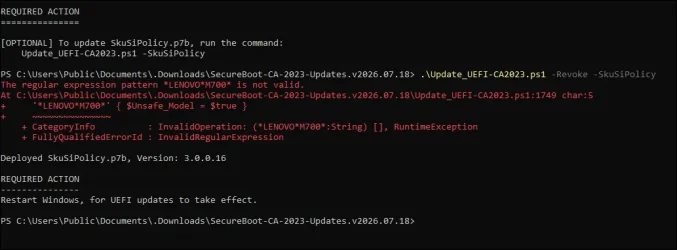
- Ran .\Check-UEFI.bat -Verbose

- Ran .\Update_UEFI-CA2023.ps1 -Revoke -SkuSiPolicy

- 2011 certificates had been previously revoked (April/May 2026), but I included -revoke parameter

- Rebooted

- External drives E: and F: were inserted with rescue disk and backup hard disk drive respectively, but didn't show either drive

- Booted to previously working (prior to SkuSiPoliy injection) rescue disk and it failed with error

- Removed rescue disk

- Booted to C:\ drive

- Plugged rescue disk into E: drive which now showed

- Formatted rescue disk

- Deleted C:\boot\macrium\WinREDrivers and C:\boot\macrium\WinREFiles

- Rebuilt rescue disk

- Ran .\Update_UEFI-CA2023.ps1 -bootmedia

- Boot to rescue disk succeeded

----------

- There is an error as shown (which does not affect the outcome).

- Boot media required additional steps after SkuSiPolicy.p7b was deployed.


skusipolicy.webp
 
Last edited:

My Computer My Computer

At a glance

Windows 11 Pro
OS
Windows 11 Pro
Computer type
Laptop
Manufacturer/Model
Acer TravelMate P215-52
I believe you're correct.


Added a version check to skip Hasleo version 5.8.2.2 or later.

Hi, @garlin

Is this your latest script? Do you have or use a Github site for downloading for users I can link to?

Thanks
 

My Computer My Computer

At a glance

Windows 11 Pro build 25H2 x64Intel i9-13900K64GBNvidia GeForce RTX-3090 Ti
OS
Windows 11 Pro build 25H2 x64
Computer type
PC/Desktop
Manufacturer/Model
ASUS Custom build
CPU
Intel i9-13900K
Motherboard
Asus ROG STRIX Z790 E GAMING WIFI 11
Memory
64GB
Graphics Card(s)
Nvidia GeForce RTX-3090 Ti
Internet Speed
1 Gbps
Browser
Firefox
Antivirus
Malwarebytes
Is this your latest script? Do you have or use a Github site for downloading for users I can link to?
Latest work-in-progress is post #2799.

I wanted to get more real-world feedback before pushing out a new official build to GitHub. If anyone else knows other differences in various Hasleo or Macrium releases, let me know. I only have the versions I've downloaded for testing purposes.
 

My Computer My Computer

At a glance

Windows 7
OS
Windows 7
Thanks @garlin

I've downloaded and will provide to a user I'm working with.
 

My Computer My Computer

At a glance

Windows 11 Pro build 25H2 x64Intel i9-13900K64GBNvidia GeForce RTX-3090 Ti
OS
Windows 11 Pro build 25H2 x64
Computer type
PC/Desktop
Manufacturer/Model
ASUS Custom build
CPU
Intel i9-13900K
Motherboard
Asus ROG STRIX Z790 E GAMING WIFI 11
Memory
64GB
Graphics Card(s)
Nvidia GeForce RTX-3090 Ti
Internet Speed
1 Gbps
Browser
Firefox
Antivirus
Malwarebytes
I don't know if you have enough samples from your request but here is mine taken from my ASUS desktop pc (born on date August 2015)

PS C:\Users\theislands> powershell -nop -ep bypass -f C:\temp\newscripts\Check_UEFI-CA2023.ps1 -bootmedia vebose
Secure Boot: ON
Virtualization Based Security: OFF
BitLocker on (C:) OFF

UEFI KEK Certs
--------------
Microsoft Corporation KEK CA 2011
Microsoft Corporation KEK 2K CA 2023

UEFI DB Certs
-------------
Microsoft Corporation UEFI CA 2011
Microsoft Windows Production PCA 2011
Microsoft Option ROM UEFI CA 2023
Microsoft UEFI CA 2023
Windows UEFI CA 2023

UEFI DBX Certs
--------------
Microsoft Windows Production PCA 2011
Windows BootMgr SVN 9.0

EFI Files
---------
Windows Boot Manager [Windows UEFI CA 2023] is ALLOWED.

Registry: "WindowsUEFICA2023Capable" = 2
[Windows UEFI CA 2023] in UEFI DB, and Windows starting from CA 2023 Boot Manager.

Macrium Folders
---------------
Windows Boot Manager [Production PCA 2011] is BANNED.
Boot File [Production PCA 2011] is BANNED.

Hasleo Folders
--------------
Windows Boot Manager [Windows UEFI CA 2023] is BANNED.

Bootable Media
--------------
USB Drive D: "HASLEOBS"
Boot File [Windows UEFI CA 2023] is ALLOWED.

D:\EFI\Microsoft\Boot\boot.stl [230881+501473] is WRONG VERSION.

STATUS REPORT
-------------
Registry: "UEFICA2023Status" = Updated

SUCCESS: UPDATES ARE FINISHED.
UEFI CA 2023 certs are present, PCA 2011 cert is revoked.

PS C:\Users\theislands>
 

My Computers My Computers

  • At a glance

    Windows 11 Home, ver 25H2 build 26200.8894Intel Core i5 5200U @ 2.20GH4 GBIntel HD Graphics 5500 on board
    OS
    Windows 11 Home, ver 25H2 build 26200.8894
    Computer type
    Laptop
    Manufacturer/Model
    Hewlett-Packard Spectre 13-4001 x360 convertable
    CPU
    Intel Core i5 5200U @ 2.20GH
    Motherboard
    Hewlett-Packard 802D
    Memory
    4 GB
    Graphics Card(s)
    Intel HD Graphics 5500 on board
    Sound Card
    Intel Smart Sound Technology (Intel SST)
    Hard Drives
    Micron 256GB M.2 2280 NGFF SSD MTFDDAV256TBN, (SATA 6.0 Gb/s)
    Keyboard
    Model # G01KB
    Antivirus
    Microsoft Defender
    Other Info
    born on date: 25 Feb 2016
  • At a glance

    Win 11 Home 25H2 build 26200.8894Intel Core i7 4th Gen 4790 (3.60GHz), Haswell...Samsung 16 GB DDR3 (8GB in 2 modules)NVIDIA GeForce GTX 760, 3GB, and on-board Int...
    Operating System
    Win 11 Home 25H2 build 26200.8894
    Computer type
    PC/Desktop
    Manufacturer/Model
    Asus Desktop model M32AD-US019S (DOM: 6/9/2014 )
    CPU
    Intel Core i7 4th Gen 4790 (3.60GHz), Haswell 22nm Technology, SOCKET 1150
    Motherboard
    H81M-E/M51AD/DP_MB
    Memory
    Samsung 16 GB DDR3 (8GB in 2 modules)
    Graphics card(s)
    NVIDIA GeForce GTX 760, 3GB, and on-board Intel HD Graphics 4600 Rev 6
    Monitor(s) Displays
    HP EliteDisplay E241i LED; HP EliteDisplay E243
    Hard Drives
    Samsung 500GB SSD, 870 EVO (SATA 6.0 )
    Micron 250GB SSD, CT250MX500
    Toshiba HDD, 3GB (original drive w/PC)
    Case
    ASUS
    Keyboard
    ASUS-------------------------
    Antivirus
    MS Defender
    Other Info
    purchased 8/28/2015 from Newegg.
  • HEWLETT PACKARD
    HP OmniBook X Flip NGAI (Next Gen AI),
    Model: 16-as0023dx
    PT# B5UH1UA#ABA Product #: B5UH1UA
    delivered and setup 7/25/25
    16" 2K Touch-Screen Laptop
    Intel Core Ultra 7 256V '24 Series 2 - CPU
    Boost Clock Frequency 4.8 gigahertz; Neural Processing Unit (NPU) Yes;
    16GB Memory, LPDDR5X
    1TB SSD PCIe 4.0
    Graphics: Intel Arc 140V
    1 x HDMI 2.1
    1 x Thunderbolt 4
    2K Touch-Screen display, LED, IPS; 1920 x 1200 (Full HD+)
    USB Ports: 1 x USB-C 3.1, 2 x USB-A 3.1
    Wi-Fi 6E

    DELL
    Model:I7591-7483BLK-PUS 2-in-1 (7000 Series)
    purchased new 12/3/2019,
    15.6 inch 2-IN-1;
    4K Ultra HD Touch-Screen, 3840 x 2160,
    Intel Core i7 10510U CPU 1.80GHz,
    16GB RAM DDR4 SDRAM 2400 megahert (2 slots),
    dedicated graphics Nvidia GeForce MX250 2 GB Graphics,
    PCIe 512GB Intel SSD + 32GB Optane Memory (Intel Optane Memory H10 with solid-state storage),
    wireless-AX & Bluetooth
    Battery: 68wh, Type 4VGMP 4 cell
Bootable Media
--------------
USB Drive D: "HASLEOBS"
Boot File [Windows UEFI CA 2023] is ALLOWED.

D:\EFI\Microsoft\Boot\boot.stl [230881+501473] is WRONG VERSION.
\EFI\Microsoft\Boot\boot.stl is a new requirement that appeared in the June 2026 updates.

It's always been around, but MS is now treating it as "you better have this file installed if you're using Dynamic Update" on boot media. Since it's more difficult to determine whether Dynamic Update is in force, it's easier to report your boot.stl doesn't match what's in the current "\Windows\Boot\EX" folder.

I don't believe bcdboot will copy the boot.stl over, so I'm going to add copying this file to "Update-UEFI.bat -BootMedia". One of those things where if the file doesn't match, you might get some weird boot error.
 

My Computer My Computer

At a glance

Windows 7
OS
Windows 7
I don't believe bcdboot will copy the boot.stl over, so I'm going to add copying this file to "Update-UEFI.bat -BootMedia". One of those things where if the file doesn't match, you might get some weird boot error.

The boot.stl file exists on my Macrium 8.1 WinRE boot media and matches
the modified date of the one in the EFI partition. Located in \EFI\Microsoft\Boot.

1784785219507.webp

The same is true for 8.0 Free version.
Also located in C:\boot\macrium\WinREFiles\media\EFI\Microsoft\Boot
 

My Computers My Computers

  • At a glance

    Win 11 Pro 25H2 26200.9168Intel® Core™ i7-14700KG.SKILL Ripjaws S5 Series 64GB (2 x 32GB) DDR5ASUS GeForce RTX 4070 Super 12GB
    OS
    Win 11 Pro 25H2 26200.9168
    Computer type
    PC/Desktop
    Manufacturer/Model
    Self Built
    CPU
    Intel® Core™ i7-14700K
    Motherboard
    ASUS TUF Z690-PLUS WIFI (BIOS 4505)
    Memory
    G.SKILL Ripjaws S5 Series 64GB (2 x 32GB) DDR5
    Graphics Card(s)
    ASUS GeForce RTX 4070 Super 12GB
    Sound Card
    Sound Blaster AE-5 Plus
    Monitor(s) Displays
    ASUS TUF Gaming 27" 2K HDR Gaming
    Screen Resolution
    2560 x 1440
    Hard Drives
    Samsung 990 Pro 1TB NVMe (Win 11 25H2)
    SK hynix P41 500GB NVMe
    SK hynix P41 2TB NVMe (x3)
    Crucial P3 Plus 4TB
    PSU
    Corsair RM850x Shift
    Case
    Antec Dark Phantom DP502 FLUX
    Cooling
    Corsair Nautilus 360 RS AIO
    Keyboard
    Logitech MK 320
    Mouse
    Razer Basilisk V3
    Internet Speed
    750Mbs
    Browser
    Firefox
    Antivirus
    Winows Security
    Other Info
    MR 8.1 Home
  • At a glance

    Win 11 Pro 25H2 26200.9168Intel Core i5-1140064 GB DDR4MSI GeForce RTX 3060 Ventus 2X 12GB
    Operating System
    Win 11 Pro 25H2 26200.9168
    Computer type
    PC/Desktop
    Manufacturer/Model
    Self Built
    CPU
    Intel Core i5-11400
    Motherboard
    Asus TUF Gaming Z590 Plus WiFi (BIOS 2803)
    Memory
    64 GB DDR4
    Graphics card(s)
    MSI GeForce RTX 3060 Ventus 2X 12GB
    Sound Card
    SoundBlaster Audigy Fx V2
    Monitor(s) Displays
    Samsung F27T350
    Screen Resolution
    1920x1080
    Hard Drives
    Samsung 980 Pro 1TB
    Samsung 970 EVO Plus 2TB
    Samsung 870 EVO 500GB SSD
    PSU
    Corsair HX750
    Case
    Cougar MX330-G Window
    Cooling
    Thermalright Frozen Edge 240 Black AIO
    Internet Speed
    350Mbps
    Browser
    Firefox
    Antivirus
    Windows Security
  • System Three
    Win 11 Pro 25H2 26200.9168
    ASUS PRIME Z370-P II BIOS 3004 7/12/21
    Intel Core i7-8700 CPU @ 3.20GHz
    32GB DDR4 RAM (4x8)
    iGPU Intel UHD Graphics 630
    Cooler Master Hyper 212
    Mid-Tower Desktop
For the record (but it's a very, very old machine):
BIOS Firmware
-------------
SAMSUNG ELECTRONICS CO. 300E4C/300E5C/300E7C
Version: P09RAP
Date: 2013-11-01

Since April 2026 LCU one no longer can apply the SVN dbx-update and the PCA2011-revocation together.
The firmware doesn't brick, it's just that the secure boot config gets corrupted
- when applying PCA revocation after SVN update already was installed or
- when applying SVN update after PCA revocation already was installed.
=> Reset secure boot certs to pre-2023 default, boot from SecureBootRecovery.efi, update KEK, certs, dbx again

The secureboot\servicing keys say
"ConfidenceLevel"="High Confidence"
Only data changing there is "LastTelemetrySendTime", "StateAttributes", and the key 'UploadedForCurrentBootCycle'

Windows 10 22H2 (19045.7548)

Secure Boot: ON
Virtualization Based Security: ON
BitLocker on (C:) ON

BIOS Firmware
-------------
SAMSUNG ELECTRONICS CO. 300E4C/300E5C/300E7C
Version: P09RAP
Date: 2013-11-01

Factory Default UEFI PK Cert
----------------------------
(NONE)

UEFI PK Cert
------------
SAMSUNG ELECTRONICS_PK

Factory Default UEFI KEK Certs
------------------------------
(NONE)

UEFI KEK Certs
--------------
Microsoft Corporation KEK CA 2011
Microsoft Corporation KEK 2K CA 2023
Phoenix Kek Example
SEC_PRODUCTION_KekRoot

Factory Default UEFI DB Certs
-----------------------------
(NONE)

UEFI DB Certs
-------------
Microsoft Corporation UEFI CA 2011
Microsoft Windows Production PCA 2011
Microsoft Option ROM UEFI CA 2023
Microsoft UEFI CA 2023
Windows UEFI CA 2023
SEC_PRODUCTION_KeyUEFI

Factory Default UEFI DBX Certs
------------------------------
(NONE)
EFI_CERT_SHA256_GUID Signatures: 0

UEFI DBX Certs
--------------
Microsoft Windows Production PCA 2011
Windows BootMgr SVN 5.0
EFI_CERT_SHA256_GUID Signatures: 295

UEFI Variables
--------------
Credential Guard: ON
SBAT (Linux only): sbat,1,2024010900 / shim,4 / grub,3 / grub.debian,4

EFI Files
---------
Windows Boot Manager [Windows UEFI CA 2023] is ALLOWED.
\\.\HarddiskVolume1\EFI\Microsoft\Boot\bootmgfw.efi
File Version: 28000.322, SVN 9.0

Registry: "WindowsUEFICA2023Capable" = 2
[Windows UEFI CA 2023] in UEFI DB, and Windows starting from CA 2023 Boot Manager.

SkuSiPolicy.p7b is CURRENT.
\\.\HarddiskVolume1\EFI\Microsoft\Boot\SkuSiPolicy.p7b
Version: 3.0.0.16


REQUIRED ACTION
===============
To update the DBX SVN, run the commands:

manage-bde -Protectors -Disable C: -RebootCount 1
reg add HKEY_LOCAL_MACHINE\SYSTEM\CurrentControlSet\Control\Secureboot /v AvailableUpdates /t REG_DWORD /d 0x200 /f
powershell Start-ScheduledTask -TaskName "\Microsoft\Windows\PI\Secure-Boot-Update"
Get-SecureBootUEFI : Incomplete information to validate signature.
At line:1 char:1
+ Get-SecureBootUEFI -Name DBX -Decoded
+ ~~~~~~~~~~~~~~~~~~~~~~~~~~~~~~~~~~~~~
+ CategoryInfo : InvalidResult: (Microsoft.Secur...BootUefiCommand:GetSecureBootUefiCommand) [Get-SecureB
ootUEFI], InvalidStateException
+ FullyQualifiedErrorId : IncompleteSignatureData,Microsoft.SecureBoot.Commands.GetSecureBootUefiCommand
Windows Registry Editor Version 5.00

[HKEY_LOCAL_MACHINE\SYSTEM\CurrentControlSet\Control\SecureBoot\Servicing]
"WindowsUEFICA2023Capable"=dword:00000002
"UEFICA2023Status"="Updated"
"BucketHash"="79fa93978065ad88d59446481511ffb9c1fa73475b65f72b49c9de37eb84928e"
"ConfidenceLevel"="High Confidence"
"LastParsedBucketDataVersion"=dword:00000013
"ConfidenceUpdateType"=dword:00005944
"LastTelemetrySendTime"=hex:e3,0e,3c,70,6a,1a,dd,01

[HKEY_LOCAL_MACHINE\SYSTEM\CurrentControlSet\Control\SecureBoot\Servicing\DeviceAttributes]
"CanAttemptUpdateAfter"=hex:f0,ed,0c,ad,39,1d,dd,01
"OEMManufacturerName"="SAMSUNG ELECTRONICS CO., LTD."
"OEMModelSystemVersion"="0.1"
"BaseBoardManufacturer"="SAMSUNG ELECTRONICS CO., LTD."
"FirmwareManufacturer"="Phoenix Technologies Ltd."
"OEMModelBaseBoard"="NP300E5C-A07US"
"FirmwareVersion"="P09RAP"
"OEMModelNumber"="300E4C/300E5C/300E7C"
"OEMModelSystemFamily"="ChiefRiver System"
"OEMName"="SAMSUNG ELECTRONICS CO., LTD."
"OSArchitecture"="AMD64"
"OEMModelSKU"="System SKUNumber"
"FirmwareReleaseDate"="11/01/2013"
"OEMModelBaseBoardVersion"="FAB1"
"StateAttributes"="05A67FD2950D007D005DFFFFFFE000000000000000000000000000000000000000000000000000-1-0-1-1-ER--BR--OR---RBR--0-4C53672414B01E10FF90D0A967C7C1446CAFF832-0--3A8FF6510039E8AE7AE54D730569A8E8A33712AC"
"OSVersionFull"="10.0.19045.7548.amd64fre.vb_release.191206-1406"
"FlightRing"="Retail"
"DeviceFamily"="Windows.Desktop"
Windows Registry Editor Version 5.00

[HKEY_LOCAL_MACHINE\SYSTEM\CurrentControlSet\Control\SecureBoot\Servicing]
"WindowsUEFICA2023Capable"=dword:00000002
"UEFICA2023Status"="Updated"
"BucketHash"="79fa93978065ad88d59446481511ffb9c1fa73475b65f72b49c9de37eb84928e"
"ConfidenceLevel"="High Confidence"
"LastParsedBucketDataVersion"=dword:00000013
"ConfidenceUpdateType"=dword:00005944
"LastTelemetrySendTime"=hex:4c,4c,c7,cb,6c,1a,dd,01

[HKEY_LOCAL_MACHINE\SYSTEM\CurrentControlSet\Control\SecureBoot\Servicing\DeviceAttributes]
"CanAttemptUpdateAfter"=hex:f0,ed,0c,ad,39,1d,dd,01
"OEMManufacturerName"="SAMSUNG ELECTRONICS CO., LTD."
"OEMModelSystemVersion"="0.1"
"BaseBoardManufacturer"="SAMSUNG ELECTRONICS CO., LTD."
"FirmwareManufacturer"="Phoenix Technologies Ltd."
"OEMModelBaseBoard"="NP300E5C-A07US"
"FirmwareVersion"="P09RAP"
"OEMModelNumber"="300E4C/300E5C/300E7C"
"OEMModelSystemFamily"="ChiefRiver System"
"OEMName"="SAMSUNG ELECTRONICS CO., LTD."
"OSArchitecture"="AMD64"
"OEMModelSKU"="System SKUNumber"
"FirmwareReleaseDate"="11/01/2013"
"OEMModelBaseBoardVersion"="FAB1"
"StateAttributes"="05A67FD2950D007D00DDFFFFFFE000000000000000000000000000000000000000000000000000-1-0-1-1-ER--BR--OR---RBR--0-4C53672414B01E10FF90D0A967C7C1446CAFF832-0--7C0A568E2370D7B930EF4EE2280AF8919630CF1B"
"OSVersionFull"="10.0.19045.7548.amd64fre.vb_release.191206-1406"
"FlightRing"="Retail"
"DeviceFamily"="Windows.Desktop"

[HKEY_LOCAL_MACHINE\SYSTEM\CurrentControlSet\Control\SecureBoot\Servicing\UploadedForCurrentBootCycle]
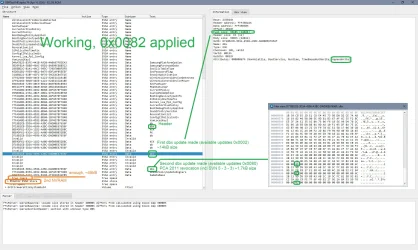
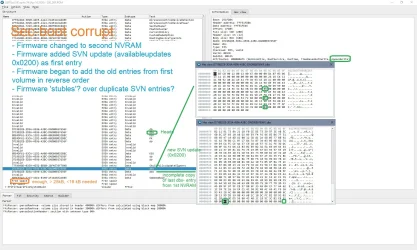
82_1.webp 200_1.webp
 
Last edited:

My Computer My Computer

At a glance

W10
OS
W10
For the record (but it's a very, very old machine):
BIOS Firmware
-------------
SAMSUNG ELECTRONICS CO. 300E4C/300E5C/300E7C
Version: P09RAP
Date: 2013-11-01

Since April 2026 LCU one no longer can apply the SVN dbx-update and the PCA2011-revocation together.
The firmware doesn't brick, it's just that the secure boot config gets corrupted
- when applying PCA revocation after SVN update already was installed or
- when applying SVN update after PCA revocation already was installed.
=> Reset secure boot certs to pre-2023 default, boot from SecureBootRecovery.efi, update KEK, certs, dbx again

The secureboot\servicing keys say
"ConfidenceLevel"="High Confidence"
Thanks. I'll add this model to the "unsafe" list.
It's interesting that DBX is obviously corrupted (can't read variable), but this PC model is categorized as High Confidence.

The core problem is MS has never shared their methodology for determining the update reliability. Did they try forcing an update, and confirming if the system failed? Or did they search for PC's that somehow made it to updated certs without fully investigating how they arrived there (manual help?).

As for telemetry data, "something is always better than nothing". But MS could have stated their logging can only cover certain conditions, and beyond that there is no firm data to draw other conclusions from. IMO the effectiveness of Confidence Level data may be oversold.
 

My Computer My Computer

At a glance

Windows 7
OS
Windows 7
Thanks. I'll add this model to the "unsafe" list.
It's interesting that DBX is obviously corrupted (can't read variable), but this PC model is categorized as High Confidence.
Well, this might be the last one of these laptops, so maybe not really worth the effort....

But you're right, HIgh Confidence is overrated.
On the other hand: Afaik MS never applied the PCA 2011 revocation automatically up to now. And the combination of SVN update (I assume these are already applied by the LCUs?) and 'normal' dbx updates (0x0202) is safe for this machine, too. Maybe Hich Confidence doesn't look into dbx updates at all since these were 'normal stuff' earlier, too.

The funny thing is, that everything worked until they changed something in april 2026. So some of the High Confidence data might have been gathered before that update...
 

My Computer My Computer

At a glance

W10
OS
W10
What I heard from the June 2026 Secure AMA was MS unlocked most of the "More Data Needed" stragglers to "High Confidence" for the June or July 2026 CU's. It's not clear if those buckets were being blocked because the data samples didn't give a clear trend on success rates, or MS just gave up and unlocked them because the clock ran out on cert expiration.

Maybe MS used the right rules to decide if it was safe, but we don't know since they refuse to detail how they made the decisions.

But it's an interesting point about not having forced mandatory revocation on everyone. If they push the DBXUpdate.bin list on everyone, could that unintentionally brick/break some PC's later this year?

They already shrank the DBX hash list by 154 entries in the April CU (removing all legacy Windows boot managers signed by PCA 2011, and before SVN). The UEFI spec doesn't require you to remove any old entries, unless you're specifically scared about overflowing the DBX variable.
 

My Computer My Computer

At a glance

Windows 7
OS
Windows 7
But it's an interesting point about not having forced mandatory revocation on everyone. If they push the DBXUpdate.bin list on everyone, could that unintentionally brick/break some PC's later this year?

They already shrank the DBX hash list by 154 entries in the April CU (removing all legacy Windows boot managers signed by PCA 2011, and before SVN). The UEFI spec doesn't require you to remove any old entries, unless you're specifically scared about overflowing the DBX variable.
Well, in my case that wasn't a problem of too little space in the NVRAM, the mechanisms worked fine for this firmware until MS made changes to the dbx updates in april.
As I wrote earlier, NVRAM is rewritten and refreshed constantly. There were firmwares where this didn't work and where NVRAM boundaries weren't defined properly, but there were a lot of firmwares where this worked quite well already in the early UEFI years.
But of course, there's always the possibility that the NVRAM get's corrupted.

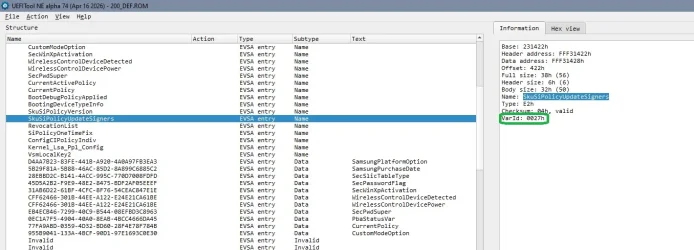
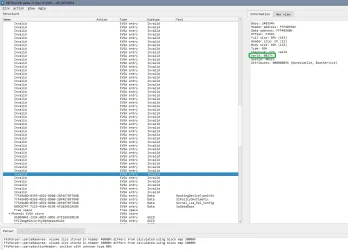
Have a look into the list of invalid NVRAM entries- in this list there're- among other kinds of entries- more than 40 invalid entries for SkuSiPolicyUpdateSigners, the value gets rewritten at every boot, meaning that the old entry is made invalid and a new entry is written. If one NVRAM- volume is "full" they go over to the other NVRAM volume and clean afterwards the first volume..... (How many NVRAM volumes there are and how they're structured is depending on the vendor). If you update SkuSiPolicy.p7b this isn't a value that's going to be changed- the old entry is marked invalid and a new entry is written. If this involves going to the other NVRAM volume, the certs (if located in this volume) might get transfered to / rewritten in the other NVRAM volume, too, as in my case.

1784835334033.webp
1784835149332.webp
 

My Computer My Computer

At a glance

W10
OS
W10
Have you tried this trick to clear out dead NVRAM entries?
Defragging my old Dell's UEFI NVRAM
Yes and no.

I used sort of these tools to change a chipsetvariable in NVRAM, but that was reading/writing single stores according to GUID.

When I first recognized the problems with the old Samsung notebook I thought, it might be worth a try to start with an empty NVRAM. As I wrote earlier the NVRAM gets- in most cases- rebuilt automatically (but sometimes you can loose machine specific data).

Intel Flash Programming tool (fpt- coresponding to Intel ME version) reads and writes if there are no protections installed. It's a rather stupid program, it doesn't check anything, it just follows either firmware region or adresses in commandline.
I flashed the marked EFI volume (with the both NVRAM volumes) over with the empty EFI volume from the stock bios region update (0x730000 to 0x760000 in firmware, 0x230000 to 0x260000 in bios region).
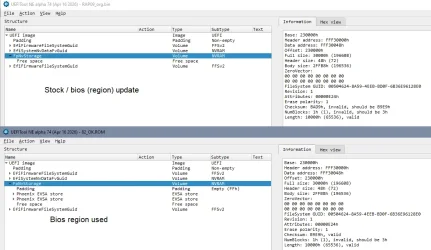
1784838715766.webp

EDIT But if I understand correctly your main interest would be to 'compact' the NVRAM to save some space and make secure boot operations 'safer'?
I don't think that would work generally. NVRAM was mainly unprotected in these years, the Dell from the linked post was probably Sandy Bridge, so NVRAM was unprotected. I assume / hope, it'd be protected better.

Bios vendors protect their NVRAM now better because of security and stability. On the other hand there are still references to basic operations for newer machines, for example HPE ProLiant Gen11 servers. It's unclear for me how far you could reach into a NVRAM, and if all variables were allowed to be rewritten (they shouldn't).
And you're still relying on the implemented firmware mechanisms, for example for systems with two alternating store you'd have access only to what the firmware would consider the active store (which in hardware might change while rewriting).

Maybe I can try later today (or in the next days) to try this for the old Samsung, and dump the firmware before and after to see what really happened...

But did you ever get a confirmation that a non working / bricking cert update really was NVRAM space related?

 
Last edited:

My Computer My Computer

At a glance

W10
OS
W10
Well, the short answer is that this doesn't necessarily save space even for older UEFI implementations.

Dos- boot to make a dump before (fpt)
EFI- boot
dmpstore -all -s dumpstore.txt
dmpstore -all -d
dmpstore -all -l dumpstore.txt
Dos- boot to make a dump after (fpt)
UEFIextract to get the shoen text reports from both dumps

(Be warned: The dumpstore action might brick a machine!)

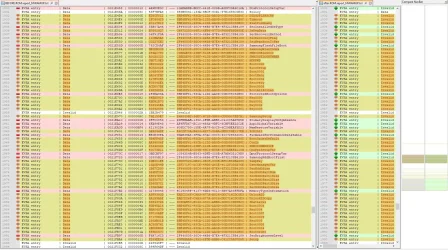
In the stores where the certs sit just a part of the NVRAM is re-written, making free space lower than before since the old values are marked invalid, not deleted.
At the same time I can find values from the other NVRAM store (mainly machine data) of the bios region in the dump. So even the "-all" option of dmpstore doesn't include the complete NVRAM

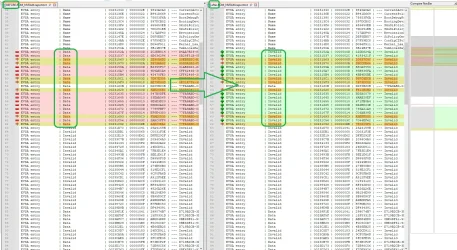
Changes in the first NVRAM volume (cert relevant volume):
41.webp 42.webp

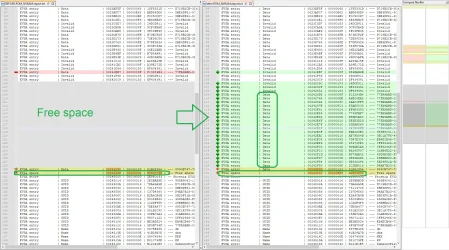
Free space in the second NVRAM volume unchanged (cert relevant volume):
43.webp


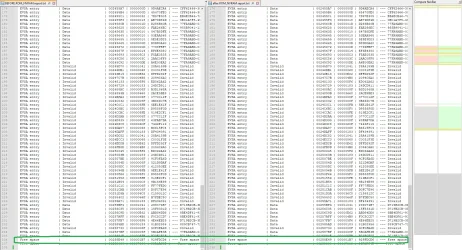
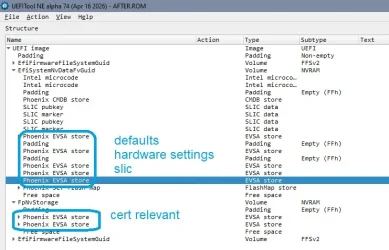
Other NVRAM set of NVRAM stores (the last two volumes in the first block - picture of bios region structure), defaults and another set of values, same type of changes, free space decreasing:
44.webp

Bios region structure:
45.webp

So even for rather old bios implementations dmpstore does not include all NVRAM values, but a set of values that may be spread over / be part of several EFI volumes depending on firmware vendor / architecture. Rewriting the values doesn't necessarily delete old values but may mark them invalid and generate new entries thus reducing free space.

(A smaller amount of these changes relates to changed boot order)
 
Last edited:

My Computer My Computer

At a glance

W10
OS
W10
Thanks for the great script. I used it to set up a Surface Laptop. Now it's running on 25h2 with Secure Boot.
 

My Computer My Computer

At a glance

Windows11
OS
Windows11
Computer type
PC/Desktop
Manufacturer/Model
dell
Back
Top Bottom