Solved garlin's PowerShell scripts for updating Secure Boot CA 2023


Well, that makes sense! If all that is done, you're finished, right?
But it doesn't allow someone to use the update script on untouched PC if they really, really, really wanted to try. It would require an override option from the command-line.

I don't own the Confidence data nor do I understand why MS moved a PC into the "bad" buckets. There could be a false positive. If you're running the check script, the worse thing is you get nagged for something that isn't actually wrong. But for the update process, that's a different matter.
 

My Computer My Computer

At a glance

Windows 7
OS
Windows 7
But it doesn't allow someone to use the update script on untouched PC if they really, really, really wanted to try. It would require an override option from the command-line.

I don't own the Confidence data nor do I understand why MS moved a PC into the "bad" buckets. There could be a false positive. If you're running the check script, the worse thing is you get nagged for something that isn't actually wrong. But for the update process, that's a different matter.
Suggestion, instead of adding a new command line flag, how about requiring the user to uncomment a line in your code that would allow update script to run even on troublesome computers. Like a boolean that must be true, but the only way it can be true is for the user to uncomment a line. And you could write some text to explain the risk in the script.

That way, they have to make explicit changes inside the script in order to allow the update script to excute against their computer.
I would say this is safe enough and no end user could use command line argument not truly understanding what it means and brick their computer.

And add text to post #1 explaining how a user can decide to use the update at his/her own risk, so warned twice, post #1 and in the script...

Added bonus, if they get a new version, line is in comment again !
 

My Computer My Computer

At a glance

Windows 11
OS
Windows 11
Thanks a lot for the valuable work @garlin. Worked on different systems (HP Z240 / HP 600 G1), where using Windows standard functionality was not sufficient (cjee21 scripts for ease of use). But for Lenovo Thinkpad X260 same problem and solution as stated here for T460:


Installing latest Lenovo bios (iso on stick, Windows tool won't do in in W11) and clearing all keys from within UEFI and afterwards using latest Mosby standard mode did work. Trying different scenarios with garlin's script led to a missing PK because of "Wrong signature for this UEFI variable" error. Trying to just update the 2023 KEK while keeping the default PK did't work either (cjee21 scripts).
 

My Computer My Computer

At a glance

Debian
OS
Debian
Computer type
PC/Desktop
But it doesn't allow someone to use the update script on untouched PC if they really, really, really wanted to try. It would require an override option from the command-line.

I don't own the Confidence data nor do I understand why MS moved a PC into the "bad" buckets. There could be a false positive. If you're running the check script, the worse thing is you get nagged for something that isn't actually wrong. But for the update process, that's a different matter.
It may not be possible for you to cover every eventuality and to update every computer. Truthfully, you've done an immense amount of work and certainly helped a ton of people get secure boot updated, but there's likely a limit to how much one person can support.

I did like the suggestion of having an override that you could perform with several warnings about the risks.
 

My Computers My Computers

  • At a glance

    Win 11 Pro 25H2, Build 26200.8894Intel Core i5 1450064GB DDR4GeForce RTX 4060
    OS
    Win 11 Pro 25H2, Build 26200.8894
    Computer type
    PC/Desktop
    Manufacturer/Model
    Home Brew
    CPU
    Intel Core i5 14500
    Motherboard
    Gigabyte B760M G P WIFI
    Memory
    64GB DDR4
    Graphics Card(s)
    GeForce RTX 4060
    Sound Card
    Chipset Realtek
    Monitor(s) Displays
    LG 45" Ultragear, Acer 24" 1080p
    Screen Resolution
    5120x1440, 1920x1080
    Hard Drives
    Crucial P310 2TB 2280 PCIe Gen4 3D NAND NVMe M.2 SSD (O/S)
    Silicon Power 2TB US75 NVMe PCIe Gen4 M.2 2280 SSD (backup)
    Crucial BX500 2TB 3D NAND (2nd backup)
    Seagate 4TB Ironwolf, rotating HDD archive files
    External off-line backup Drives: 2 NVMe 4TB drives in external enclosures
    PSU
    Thermaltake Toughpower GF3 750W
    Case
    LIAN LI LANCOOL 216 E-ATX PC Case
    Cooling
    Lots of fans!
    Keyboard
    Microsoft Comfort Curve 2000
    Mouse
    Logitech G305
    Internet Speed
    Verizon FiOS 1GB
    Browser
    Firefox
    Antivirus
    Malware Bytes & Windows Defender Security
  • At a glance

    Win 11 Pro 25H2, Build 26200.8894Intel Core i5 1440032GB DDR5Intel 700 Embedded GPU
    Operating System
    Win 11 Pro 25H2, Build 26200.8894
    Computer type
    PC/Desktop
    Manufacturer/Model
    Home Brew
    CPU
    Intel Core i5 14400
    Motherboard
    Gigabyte B760M DS3H AX
    Memory
    32GB DDR5
    Graphics card(s)
    Intel 700 Embedded GPU
    Sound Card
    Realtek Embedded
    Monitor(s) Displays
    27" HP 1080p
    Screen Resolution
    1920x1080
    Hard Drives
    Crucial P310 2TB 2280 PCIe Gen4 eD NAND PCIe SSD
    Samsung EVO 990 2TB NVMe Gen4 SSD
    Samsung 2TB SATA SSD
    PSU
    Thermaltake Smart BM3 650W
    Case
    Okinos Micro ATX Case
    Cooling
    Fans
    Keyboard
    Microsoft Comfort Curve 2000
    Mouse
    Logitech G305
    Internet Speed
    Verizon FiOS 1GB
    Browser
    Firefox
    Antivirus
    Malware Bytes & Windows Defender Security
  • Nimo N171 17" Laptop, (Intel i3-1215U, 16GB RAM, 2TB NVMe, Win11 Pro)
    Acemagic Vista Mini PC V1 (Intel N150, 16GB RAM, 1TB NVMe, Win11 Pro)
    HP ENVY h8-1540t, (24GB RAM, 2TB SSD, 2TB HDD, Win11 Pro)
Installing latest Lenovo bios (iso on stick, Windows tool won't do in in W11) and clearing all keys from within UEFI and afterwards using latest Mosby standard mode did work. Trying different scenarios with garlin's script led to a missing PK because of "Wrong signature for this UEFI variable" error. Trying to just update the 2023 KEK while keeping the default PK did't work either (cjee21 scripts).
"Wrong signature" indicates you have NVRAM corruption after certs have been added. For certain PC's, users have noted you have to clear the keys twice (and also reboot while in Secure Boot mode), so the internal data is written correctly.

As @t2s50 likes to note, different vendors can do strange things with the way Secure Boot (or UEFI) data is written to the flash ROM's. While my script isn't 100% effective, it follows a high-level "by the the book" process that's generally safe.

cjee21's scripts call the Secure Boot task with different AvailableUpdates values. But the task is probably too cautious, and sometimes waits for certain conditions before executing. My update script obeys safety checks, but it applies the same signed .bin files without waiting around for you to reboot the system a few times like Windows does.
 

My Computer My Computer

At a glance

Windows 7
OS
Windows 7
I have a compromise solution, which isn't 100% perfect but should work for most users.

The script will only issue a warning if your UEFI doesn't already have both the KEK CA 2023 installled and PCA 2011 in the DBX. My thinking is if you've already gotten that far, it's too late now to give you a warning not to update the UEFI.

@Capricornus, try this version of both scripts.
Garlin, Many, many thanks for these changed scripts.
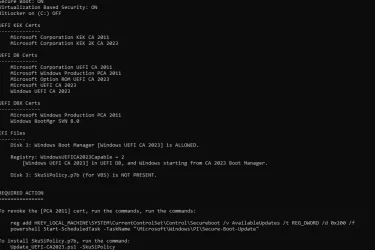
When I run the check-UEFI.bat with the changed ps1 script, I now get the following:
PS C:\Users\admin\Downloads\SecureBoot-CA-2023-Updates.v2026.07.26> .\check-UEFI.bat -Verbose
PowerShell 7.6.4
Windows 11 25H2 (26200.8894)

Secure Boot: ON
Virtualization Based Security: ON
BitLocker on (C:) OFF

BIOS Firmware
-------------
Hewlett-Packard HP Z440 Workstation
Version: M60 v02.62
Date: 2024-01-04

Factory Default UEFI PK Cert
----------------------------
Hewlett-Packard UEFI Secure Boot Platform Key

UEFI PK Cert
------------
Hewlett-Packard UEFI Secure Boot Platform Key

Factory Default UEFI KEK Certs
------------------------------
Microsoft Corporation KEK CA 2011
Hewlett-Packard UEFI Secure Boot Key Exchange Key

UEFI KEK Certs
--------------
Microsoft Corporation KEK CA 2011
Microsoft Corporation KEK 2K CA 2023
Hewlett-Packard UEFI Secure Boot Key Exchange Key

Factory Default UEFI DB Certs
-----------------------------
Microsoft Corporation UEFI CA 2011
Microsoft Windows Production PCA 2011
Hewlett-Packard UEFI Secure Boot DB Key

UEFI DB Certs
-------------
Microsoft Corporation UEFI CA 2011
Microsoft Windows Production PCA 2011
Microsoft Option ROM UEFI CA 2023
Microsoft UEFI CA 2023
Windows UEFI CA 2023
Hewlett-Packard UEFI Secure Boot DB Key
HP UEFI Secure Boot 2013 DB key

Factory Default UEFI DBX Certs
------------------------------
(NONE)
EFI_CERT_SHA256_GUID Signatures: 14

UEFI DBX Certs
--------------
Microsoft Windows Production PCA 2011
Windows BootMgr SVN 9.0
EFI_CERT_SHA256_GUID Signatures: 298

UEFI Variables
--------------
Credential Guard: ON
SBAT (Linux only): sbat,1,2024010900 / shim,4 / grub,3 / grub.debian,4

EFI Files
---------
Windows Boot Manager [Windows UEFI CA 2023] is ALLOWED.
\\.\HarddiskVolume1\EFI\Microsoft\Boot\bootmgfw.efi
File Version: 28000.352, SVN 9.0

Registry: "WindowsUEFICA2023Capable" = 2
[Windows UEFI CA 2023] in UEFI DB, and Windows starting from CA 2023 Boot Manager.

[OPTIONAL] SkuSiPolicy.p7b (for VBS) is MISSING.


STATUS REPORT
-------------
Registry: "UEFICA2023Status" = Updated

SUCCESS: UPDATES ARE FINISHED.
UEFI CA 2023 certs are present, PCA 2011 cert is revoked.

PS C:\Users\admin\Downloads\SecureBoot-CA-2023-Updates.v2026.07.26>

When I run chek-UEFI.at -Bootmedia, with the changed script, I get the following:
PS C:\Users\admin\Downloads\SecureBoot-CA-2023-Updates.v2026.07.26> .\check-UEFI.bat -Bootmedia
PowerShell 7.6.4
Secure Boot: ON
Virtualization Based Security: ON
BitLocker on (C:) OFF

UEFI KEK Certs
--------------
Microsoft Corporation KEK CA 2011
Microsoft Corporation KEK 2K CA 2023

UEFI DB Certs
-------------
Microsoft Corporation UEFI CA 2011
Microsoft Windows Production PCA 2011
Microsoft Option ROM UEFI CA 2023
Microsoft UEFI CA 2023
Windows UEFI CA 2023

UEFI DBX Certs
--------------
Microsoft Windows Production PCA 2011
Windows BootMgr SVN 9.0

EFI Files
---------
Windows Boot Manager [Windows UEFI CA 2023] is ALLOWED.

Registry: "WindowsUEFICA2023Capable" = 2
[Windows UEFI CA 2023] in UEFI DB, and Windows starting from CA 2023 Boot Manager.

[OPTIONAL] SkuSiPolicy.p7b (for VBS) is MISSING.

Bootable Media
--------------
USB Drive I: "RECOVERY"
Windows Boot Manager [Windows UEFI CA 2023] is ALLOWED.

boot.stl is WRONG VERSION.


USB Drive J: "REINER-SCT"
J:\EFI\Microsoft\Boot\boot.stl is MISSING.


STATUS REPORT
-------------
Registry: "UEFICA2023Status" = Updated

SUCCESS: UPDATES ARE FINISHED.
UEFI CA 2023 certs are present, PCA 2011 cert is revoked.

PS C:\Users\admin\Downloads\SecureBoot-CA-2023-Updates.v2026.07.26>

and when I run update-UEFI.bat -Bootmedia, with the changed script, I get this:

PS C:\Users\admin\Downloads\SecureBoot-CA-2023-Updates.v2026.07.26> .\Update-UEFI.bat -Bootmedia
PowerShell 7.6.4
Updating WinRE boot media on USB Drive I: "RECOVERY"
Boot files successfully created.
SUCCESS: NO UPDATES ARE REQUIRED.

PS C:\Users\admin\Downloads\SecureBoot-CA-2023-Updates.v2026.07.26>

and the boot.stl file is now current on my recovery drive.

This is simply brilliant. You made my day. THANK YOU. 😀😀😀
 

My Computer My Computer

At a glance

windows 11
OS
windows 11
These particular Lenovo systems seem to be oddballs in regard to updating secure boot data. I resetted several (countless ;-) times the uefi complete, the secure boot keys complete or only PK, tried variations of BIOS setting enabled/disabled, flashed the BIOS and again resetted the options to factory defaults ... to no avail or I missed one potentially succesful combination. A pity is there is only the option for resetting PK or all keys and no way to manually load seperate parts of the secure boot data. Regards and again thanks for your effort.
 

My Computer My Computer

At a glance

Debian
OS
Debian
Computer type
PC/Desktop
@garlin
Another idea that you might like better in which people would not have to edit your script.
You could prompt them with the risks and have them type something like "I accept the risk" before proceeding.
If they do not type the exact phrase, your script does not change anything on their computer...

Just another idea...
 

My Computer My Computer

At a glance

Windows 11
OS
Windows 11
Garlin, Many, many thanks for these changed scripts.
In the previous version, I followed a logical order of grabbing the BIOS details before moving on to the cert lists. But that meant your cert status wasn't available before the BIOS was checked for compatibility.

By switching the run order of certain functions, I can now use your current cert status to ignore the BIOS check if you're already revoked. Everyone who doesn't fall into that specific requirement will get the original treatment as intended.

@garlin
Another idea that you might like better in which people would not have to edit your script.
You could prompt them with the risks and have them type something like "I accept the risk" before proceeding.
If they do not type the exact phrase, your script does not change anything on their computer...

Just another idea...
I'm adding a -Force flag to the update script. But you will still have to enter "YES" before it actually does anything.
 

My Computer My Computer

At a glance

Windows 7
OS
Windows 7

Latest Support Threads

Back
Top Bottom





