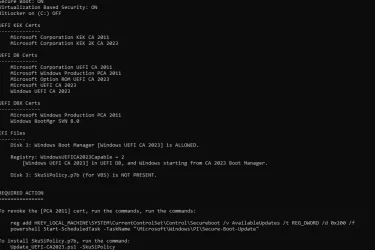
I have a compromise solution, which isn't 100% perfect but should work for most users.
The script will only issue a warning if your UEFI doesn't already have both the KEK CA 2023 installled and PCA 2011 in the DBX. My thinking is if you've already gotten that far, it's too late now to give you a warning not to update the UEFI.
@Capricornus, try this version of both scripts.
Garlin, Many, many thanks for these changed scripts.
When I run the check-UEFI.bat with the changed ps1 script, I now get the following:
PS C:\Users\admin\Downloads\SecureBoot-CA-2023-Updates.v2026.07.26> .\check-UEFI.bat -Verbose
PowerShell 7.6.4
Windows 11 25H2 (26200.8894)
Secure Boot: ON
Virtualization Based Security: ON
BitLocker on (C:) OFF
BIOS Firmware
-------------
Hewlett-Packard HP Z440 Workstation
Version: M60 v02.62
Date: 2024-01-04
Factory Default UEFI PK Cert
----------------------------
Hewlett-Packard UEFI Secure Boot Platform Key
UEFI PK Cert
------------
Hewlett-Packard UEFI Secure Boot Platform Key
Factory Default UEFI KEK Certs
------------------------------
Microsoft Corporation KEK CA 2011
Hewlett-Packard UEFI Secure Boot Key Exchange Key
UEFI KEK Certs
--------------
Microsoft Corporation KEK CA 2011
Microsoft Corporation KEK 2K CA 2023
Hewlett-Packard UEFI Secure Boot Key Exchange Key
Factory Default UEFI DB Certs
-----------------------------
Microsoft Corporation UEFI CA 2011
Microsoft Windows Production PCA 2011
Hewlett-Packard UEFI Secure Boot DB Key
UEFI DB Certs
-------------
Microsoft Corporation UEFI CA 2011
Microsoft Windows Production PCA 2011
Microsoft Option ROM UEFI CA 2023
Microsoft UEFI CA 2023
Windows UEFI CA 2023
Hewlett-Packard UEFI Secure Boot DB Key
HP UEFI Secure Boot 2013 DB key
Factory Default UEFI DBX Certs
------------------------------
(NONE)
EFI_CERT_SHA256_GUID Signatures: 14
UEFI DBX Certs
--------------
Microsoft Windows Production PCA 2011
Windows BootMgr SVN 9.0
EFI_CERT_SHA256_GUID Signatures: 298
UEFI Variables
--------------
Credential Guard: ON
SBAT (Linux only): sbat,1,2024010900 / shim,4 / grub,3 / grub.debian,4
EFI Files
---------
Windows Boot Manager [Windows UEFI CA 2023] is ALLOWED.
\\.\HarddiskVolume1\EFI\Microsoft\Boot\bootmgfw.efi
File Version: 28000.352, SVN 9.0
Registry: "WindowsUEFICA2023Capable" = 2
[Windows UEFI CA 2023] in UEFI DB, and Windows starting from CA 2023 Boot Manager.
[OPTIONAL] SkuSiPolicy.p7b (for VBS) is MISSING.
STATUS REPORT
-------------
Registry: "UEFICA2023Status" = Updated
SUCCESS: UPDATES ARE FINISHED.
UEFI CA 2023 certs are present, PCA 2011 cert is revoked.
PS C:\Users\admin\Downloads\SecureBoot-CA-2023-Updates.v2026.07.26>
When I run chek-UEFI.at -Bootmedia, with the changed script, I get the following:
PS C:\Users\admin\Downloads\SecureBoot-CA-2023-Updates.v2026.07.26> .\check-UEFI.bat -Bootmedia
PowerShell 7.6.4
Secure Boot: ON
Virtualization Based Security: ON
BitLocker on (C:) OFF
UEFI KEK Certs
--------------
Microsoft Corporation KEK CA 2011
Microsoft Corporation KEK 2K CA 2023
UEFI DB Certs
-------------
Microsoft Corporation UEFI CA 2011
Microsoft Windows Production PCA 2011
Microsoft Option ROM UEFI CA 2023
Microsoft UEFI CA 2023
Windows UEFI CA 2023
UEFI DBX Certs
--------------
Microsoft Windows Production PCA 2011
Windows BootMgr SVN 9.0
EFI Files
---------
Windows Boot Manager [Windows UEFI CA 2023] is ALLOWED.

Registry: "WindowsUEFICA2023Capable" = 2
[Windows UEFI CA 2023] in UEFI DB, and Windows starting from CA 2023 Boot Manager.

[OPTIONAL] SkuSiPolicy.p7b (for VBS) is MISSING.
Bootable Media
--------------
USB Drive I: "RECOVERY"
Windows Boot Manager [Windows UEFI CA 2023] is ALLOWED.
boot.stl is WRONG VERSION.
USB Drive J: "REINER-SCT"
J:\EFI\Microsoft\Boot\boot.stl is MISSING.
STATUS REPORT
-------------
Registry: "UEFICA2023Status" = Updated
SUCCESS: UPDATES ARE FINISHED.
UEFI CA 2023 certs are present, PCA 2011 cert is revoked.
PS C:\Users\admin\Downloads\SecureBoot-CA-2023-Updates.v2026.07.26>
and when I run update-UEFI.bat -Bootmedia, with the changed script, I get this:
PS C:\Users\admin\Downloads\SecureBoot-CA-2023-Updates.v2026.07.26> .\Update-UEFI.bat -Bootmedia
PowerShell 7.6.4
Updating WinRE boot media on USB Drive I: "RECOVERY"
Boot files successfully created.
SUCCESS: NO UPDATES ARE REQUIRED.
PS C:\Users\admin\Downloads\SecureBoot-CA-2023-Updates.v2026.07.26>
and the boot.stl file is now current on my recovery drive.
This is simply brilliant. You made my day. THANK YOU.




 times the uefi complete, the secure boot keys complete or only PK, tried variations of BIOS setting enabled/disabled, flashed the BIOS and again resetted the options to factory defaults ... to no avail or I missed one potentially succesful combination. A pity is there is only the option for resetting PK or all keys and no way to manually load seperate parts of the secure boot data. Regards and again thanks for your effort.