Solved garlin's PowerShell scripts for updating Secure Boot CA 2023


If you delete all existing disk partitions on the target disk, then Setup will end up creating a blank EFI volume from scratch.
So nothing carries over from before.
 

My Computer My Computer

At a glance

Windows 7
OS
Windows 7
If you delete all existing disk partitions on the target disk, then Setup will end up creating a blank EFI volume from scratch.
So nothing carries over from before.
Will that be a problem? I don't understand what that means for SkuSkiPolicy.

James.
 

My Computers My Computers

  • At a glance

    Windows 11 ProIntel Core i5-12600K 3.7 GHz 10-Core ProcessorCorsair Vengeance LPX 64 GB (2 x 32 GB) DDR4-...Integrated Intel UHD Graphics 770
    OS
    Windows 11 Pro
    Computer type
    PC/Desktop
    Manufacturer/Model
    Self built PC by me.
    CPU
    Intel Core i5-12600K 3.7 GHz 10-Core Processor
    Motherboard
    Gigabyte B760M H DDR4 Micro ATX LGA1700 Motherboard
    Memory
    Corsair Vengeance LPX 64 GB (2 x 32 GB) DDR4-3200 CL16 Memory
    Graphics Card(s)
    Integrated Intel UHD Graphics 770
    Sound Card
    Realtek
    Monitor(s) Displays
    LG
    Hard Drives
    Samsung 990 Pro 1 TB M.2-2280 PCIe 4.0 X4 NVME Solid State Drive
    Samsung 990 Pro 2 TB M.2-2280 PCIe 4.0 X4 NVME Solid State Drive
    PSU
    NZXT 850w ATX 3.1 Gold Fully Modular Power Supply
    Case
    Thermaltake Versa H25 ATX Mid Tower Case
    Cooling
    CPU Cooler Thermalright Assassin Spirit 120 EVO ARGB (ARGB Disabled) - Case Fans BlackThermalright TL-C12C-S X3 66.17 CFM 120 mm Fans 3-Pack (ARGB disabled)
    Internet Speed
    1 Gbps
    Other Info
    I hate ARGB.
  • At a glance

    Windows 11 Pro
    Operating System
    Windows 11 Pro
    Computer type
    Laptop
    Manufacturer/Model
    Lenovo ThinkBook 14 G2 ITL
SkuSiPolicy is copied to the EFI volume. If you delete all of the disk partitions from Setup, it will have to start with a clean slate and create every required disk volume from scratch. This effectively destroys all previous data without having to do an actual erase operation.

No previous data = don't care what was on the disk from before. SkuSiPolicy included.
 

My Computer My Computer

At a glance

Windows 7
OS
Windows 7
SkuSiPolicy is copied to the EFI volume. If you delete all of the disk partitions from Setup, it will have to start with a clean slate and create every required disk volume from scratch. This effectively destroys all previous data without having to do an actual erase operation.

No previous data = don't care what was on the disk from before. SkuSiPolicy included.
So, a truly clean disk with a totally new install, wouldn't your script replace all the needed bits? How does Windows handle Secure Boot on a brand new Install?
 

My Computers My Computers

  • At a glance

    Win 11 Pro 25H2, Build 26200.8894Intel Core i5 1450064GB DDR4GeForce RTX 4060
    OS
    Win 11 Pro 25H2, Build 26200.8894
    Computer type
    PC/Desktop
    Manufacturer/Model
    Home Brew
    CPU
    Intel Core i5 14500
    Motherboard
    Gigabyte B760M G P WIFI
    Memory
    64GB DDR4
    Graphics Card(s)
    GeForce RTX 4060
    Sound Card
    Chipset Realtek
    Monitor(s) Displays
    LG 45" Ultragear, Acer 24" 1080p
    Screen Resolution
    5120x1440, 1920x1080
    Hard Drives
    Crucial P310 2TB 2280 PCIe Gen4 3D NAND NVMe M.2 SSD (O/S)
    Silicon Power 2TB US75 NVMe PCIe Gen4 M.2 2280 SSD (backup)
    Crucial BX500 2TB 3D NAND (2nd backup)
    Seagate 4TB Ironwolf, rotating HDD archive files
    External off-line backup Drives: 2 NVMe 4TB drives in external enclosures
    PSU
    Thermaltake Toughpower GF3 750W
    Case
    LIAN LI LANCOOL 216 E-ATX PC Case
    Cooling
    Lots of fans!
    Keyboard
    Microsoft Comfort Curve 2000
    Mouse
    Logitech G305
    Internet Speed
    Verizon FiOS 1GB
    Browser
    Firefox
    Antivirus
    Malware Bytes & Windows Defender Security
  • At a glance

    Win 11 Pro 25H2, Build 26200.8894Intel Core i5 1440032GB DDR5Intel 700 Embedded GPU
    Operating System
    Win 11 Pro 25H2, Build 26200.8894
    Computer type
    PC/Desktop
    Manufacturer/Model
    Home Brew
    CPU
    Intel Core i5 14400
    Motherboard
    Gigabyte B760M DS3H AX
    Memory
    32GB DDR5
    Graphics card(s)
    Intel 700 Embedded GPU
    Sound Card
    Realtek Embedded
    Monitor(s) Displays
    27" HP 1080p
    Screen Resolution
    1920x1080
    Hard Drives
    Crucial P310 2TB 2280 PCIe Gen4 eD NAND PCIe SSD
    Samsung EVO 990 2TB NVMe Gen4 SSD
    Samsung 2TB SATA SSD
    PSU
    Thermaltake Smart BM3 650W
    Case
    Okinos Micro ATX Case
    Cooling
    Fans
    Keyboard
    Microsoft Comfort Curve 2000
    Mouse
    Logitech G305
    Internet Speed
    Verizon FiOS 1GB
    Browser
    Firefox
    Antivirus
    Malware Bytes & Windows Defender Security
  • Nimo N171 17" Laptop, (Intel i3-1215U, 16GB RAM, 2TB NVMe, Win11 Pro)
    Acemagic Vista Mini PC V1 (Intel N150, 16GB RAM, 1TB NVMe, Win11 Pro)
    HP ENVY h8-1540t, (24GB RAM, 2TB SSD, 2TB HDD, Win11 Pro)
So, a truly clean disk with a totally new install, wouldn't your script replace all the needed bits? How does Windows handle Secure Boot on a brand new Install?
Let's assume that you're allowed to boot a specific Windows ISO for a clean install.
This requires one of two conditions:

1. Secure Boot is disabled. You can boot whatever Windows ISO build you want. All the way back to W7, if desired.

2. Your physical DVD or USB boot device passes whatever current Secure Boot status is being enforced. It could be one of several conditions:
  • only CA 2011-signed boot media is trusted
  • both CA 2011 & CA 2023-signed boot media are trusted
  • only CA 2023-signed boot media is trusted (and if you've revoked CA 2011, a minimum SVN will be enforced on the boot file)
Windows Setup proceeds and extracts the install image to the target disk. Before exiting WinPE, bcdboot is run and the latest eligible boot manager (CA 2023 or CA 2011 in that order) is copied to the EFI volume. WinPE exits, and reboots into the newly installed Windows to finish the rest of installation.

The Secure Boot task runs after every boot (and then every 12 hours) to see if there's anything to do. It will compare the current state of the host to see if any work can be done to apply updates, or attempt to obey the AvailableUpdates setting (when possible).

Secure Boot updates are applied in the following order:

1. Check for presence of KEK CA 2023 cert. If the cert is missing, generate the BucketID hash value and look up the currently assigned Confidence Level from the BucketConfidenceLevel.cab's file contents. When the pre-determined match indicates "High Confidence" attempt to apply a signed KEK file from the KEKUpdateCombined.bin blob. Wait for a reboot to perform the next step.

If you're not marked "High Confidence", wait until a future Monthly Update changes your category (or maybe get stuck forever with no changes).

2. After confirming KEK CA 2023 is installed, install the Windows UEFI CA 2023 cert. Depending on whether there are legacy certs in the BIOS, apply the optional Microsoft UEFI CA 2023 and Option ROM certs. Wait for a reboot to perform the next step.

3. After confirming Windows UEFI CA 2023 is installed, copy the CA 2023 boot manager to the EFI volume if it's not already there.

Now you will notice there are no revocation steps. Because a clean install will never force a revocation. It's rumored that in a post 26H2-world, mandatory revocation will be done at the OOBE stage (but only if you have a supported PC).

The interesting problem comes on a PC where PCA 2011 has already been revoked, and has a DBX SVN registered. A SVN is designed to prevent any boot manager which is below its SVN level from booting. If you have a boot image that has SVN 5.0, it can't boot on any BIOS with SVN 8.0. But SVN 9.0 boot managers could boot on any BIOS with SVN 2.0.

My update script is similar to the Secure Boot task in that "it lives off the land". Or it uses the exact same files as the Secure Boot task. If you use a later version of a Windows release, or allow Windows Update to push newer Secure Boot files to the system, then the available files will change. But the script uses whatever is currently present when it runs.

Going back to the boot manager, if the UEFI SVN is higher than your Windows boot manager, my script won't push it to the EFI volume. Because it will fail to work anyway. You would have to wait for an update, before a newer boot manager is bundled in the latest Monthly Update to have a boot manager that has a SVN equal or higher to the DBX's SVN.

The update script won't push changes that don't make sense. If you don't have a valid KEK CA 2023, there's no point applying the CA 2023 DB certs, or pushing a CA 2023 boot manager. I've seen some scripts apply those changes anyway. It doesn't harm the system, but then it still doesn't work because you have missing pre-requisites.

Bottom line: The update script isn't stupid. It only does what can be logically supported. If it can't do something, it stops. If you re-run the script, it will find all unfinished steps that are not blocked and complete them. It should never cause any harm by performing steps out of logical order.

The reason the Secure Boot task can sometimes run faster is because of the Monthly or Preview Update. Because the task always runs after a reboot, it can "piggyback" on whatever reboots the Monthly Update process would have asked for. If there wasn't a planned reboot, it may take up to 3 manual reboots in a row for the Secure Boot task to finish all updates.

Unlike the Secure Boot task, I don't wait for a series of reboots before applying changes. If you have a supported PC, running a combined update and revoke only takes a few seconds. So you're not losing much time if you have to figure out how to solve the problem of getting a valid KEK CA 2023 installed.
 

My Computer My Computer

At a glance

Windows 7
OS
Windows 7
So, a truly clean disk with a totally new install, wouldn't your script replace all the needed bits? How does Windows handle Secure Boot on a brand new Install?

to add to @garlin good advise above.
if you are making a Windows bootable usb with the latest Windows boot loader
the bootable usb will boot to the install screen and then the install carries on normally from there

the only time there are problems are when the bootable Windows usb doesn't have the boot files that can get to the install screen because of the new secure 2023 certs or the old certs are still in place.

then you can install with secure boot disabled or replace the boot files within the Windows bootable usb
with the boot files from a Windows bootable usb that does have the correct boot files to support the new secure boot 2023 certs
or any system that doesn't have the new secure boot 2023 certs

i have a Windows 10 22h2 bootable usb with the boot files from a Windows 25H2 bootable usb transferred over to the Windows 10 22H2 bootable usb so Windows 10 22H2 can now be installed directly to any system with the new secure boot 2023 certs.

i have also done the reverse and have a Windows 25H2 bootable usb with the Windows 10 22H2 boot files
so that you can install Windows 25H2 directly to any system that doesn't comply with the restriction's that are put in place for Windows 25H2 including not being able to update the secure boot 2023 certs to that system.

there are work arounds.
best of luck Steve ..
 

My Computers My Computers

  • At a glance

    Windows 11 HomeRyzen 7 5825u64GB DDR4 3200Ryzen 7 5825u
    OS
    Windows 11 Home
    Computer type
    PC/Desktop
    Manufacturer/Model
    HP 24" AiO
    CPU
    Ryzen 7 5825u
    Motherboard
    HP
    Memory
    64GB DDR4 3200
    Graphics Card(s)
    Ryzen 7 5825u
    Sound Card
    RealTek
    Monitor(s) Displays
    24" HP AiO
    Screen Resolution
    1920 x 1080 @60 Hz
    Hard Drives
    1TB WD Blue SN580 M2 SSD Partitioned.
    2x 1TB USB HDD External Backup/Storage.
    PSU
    90W external power brick
    Case
    24" All in One
    Cooling
    Default Air Cooling
    Keyboard
    HP WiFi UK extended
    Mouse
    HP WiFi 3 Button
    Internet Speed
    1GB full fibre
    Browser
    Edge & Firefox
    Antivirus
    AVG Internet Security/Windows Defender
    Other Info
    Mainly Open Source Software
  • At a glance

    Ubuntu 22.04.5 LTSi5 7200u16GB DDR4Intel
    Operating System
    Ubuntu 22.04.5 LTS
    Computer type
    Laptop
    Manufacturer/Model
    Dell 13" Latitude 2017
    CPU
    i5 7200u
    Motherboard
    Dell
    Memory
    16GB DDR4
    Graphics card(s)
    Intel
    Sound Card
    Intel
    Monitor(s) Displays
    13" Dell Laptop
    Hard Drives
    250GB Crucial 2.5" SSD
    Mouse
    Generic WiFi 3 button
    Internet Speed
    WiFi only
    Browser
    Firefox
    Antivirus
    ClamAV TK
    Other Info
    Mainly Open Source Software
Looks like if you shoot yourself in the foot, the magic wand, at least for the present, is to disable Secure Boot until you sort out the issues. BTW @garlin , that was a great synopsys of the process, very nice! 👍
 

My Computers My Computers

  • At a glance

    Win 11 Pro 25H2, Build 26200.8894Intel Core i5 1450064GB DDR4GeForce RTX 4060
    OS
    Win 11 Pro 25H2, Build 26200.8894
    Computer type
    PC/Desktop
    Manufacturer/Model
    Home Brew
    CPU
    Intel Core i5 14500
    Motherboard
    Gigabyte B760M G P WIFI
    Memory
    64GB DDR4
    Graphics Card(s)
    GeForce RTX 4060
    Sound Card
    Chipset Realtek
    Monitor(s) Displays
    LG 45" Ultragear, Acer 24" 1080p
    Screen Resolution
    5120x1440, 1920x1080
    Hard Drives
    Crucial P310 2TB 2280 PCIe Gen4 3D NAND NVMe M.2 SSD (O/S)
    Silicon Power 2TB US75 NVMe PCIe Gen4 M.2 2280 SSD (backup)
    Crucial BX500 2TB 3D NAND (2nd backup)
    Seagate 4TB Ironwolf, rotating HDD archive files
    External off-line backup Drives: 2 NVMe 4TB drives in external enclosures
    PSU
    Thermaltake Toughpower GF3 750W
    Case
    LIAN LI LANCOOL 216 E-ATX PC Case
    Cooling
    Lots of fans!
    Keyboard
    Microsoft Comfort Curve 2000
    Mouse
    Logitech G305
    Internet Speed
    Verizon FiOS 1GB
    Browser
    Firefox
    Antivirus
    Malware Bytes & Windows Defender Security
  • At a glance

    Win 11 Pro 25H2, Build 26200.8894Intel Core i5 1440032GB DDR5Intel 700 Embedded GPU
    Operating System
    Win 11 Pro 25H2, Build 26200.8894
    Computer type
    PC/Desktop
    Manufacturer/Model
    Home Brew
    CPU
    Intel Core i5 14400
    Motherboard
    Gigabyte B760M DS3H AX
    Memory
    32GB DDR5
    Graphics card(s)
    Intel 700 Embedded GPU
    Sound Card
    Realtek Embedded
    Monitor(s) Displays
    27" HP 1080p
    Screen Resolution
    1920x1080
    Hard Drives
    Crucial P310 2TB 2280 PCIe Gen4 eD NAND PCIe SSD
    Samsung EVO 990 2TB NVMe Gen4 SSD
    Samsung 2TB SATA SSD
    PSU
    Thermaltake Smart BM3 650W
    Case
    Okinos Micro ATX Case
    Cooling
    Fans
    Keyboard
    Microsoft Comfort Curve 2000
    Mouse
    Logitech G305
    Internet Speed
    Verizon FiOS 1GB
    Browser
    Firefox
    Antivirus
    Malware Bytes & Windows Defender Security
  • Nimo N171 17" Laptop, (Intel i3-1215U, 16GB RAM, 2TB NVMe, Win11 Pro)
    Acemagic Vista Mini PC V1 (Intel N150, 16GB RAM, 1TB NVMe, Win11 Pro)
    HP ENVY h8-1540t, (24GB RAM, 2TB SSD, 2TB HDD, Win11 Pro)
This is a slightly off topic question, but I'm looking for a little education on running scripts. I've seen many users post in this topic that they ran one of the @garlin scripts with the format starting with "PS" which I don't understand.

As an example: PS C:\Users\admin\Downloads\SecureBoot-CA-2023-Updates.v2026.07.26> .\check-UEFI.bat -Verbose

I've Run CMD (Run as administrator)

And PowerShell (Run as administrator)

But have have had trouble running PowerShell 7.6.4 (pwsh.exe) (Run as administrator)
 

My Computers My Computers

  • At a glance

    Windows 11 Pro 25H2i7-8565U16GBIntel UHD Graphics 620
    OS
    Windows 11 Pro 25H2
    Computer type
    Laptop
    Manufacturer/Model
    Lenovo T490 (2020 Hardware)
    CPU
    i7-8565U
    Motherboard
    20N20028US
    Memory
    16GB
    Graphics Card(s)
    Intel UHD Graphics 620
    Sound Card
    Realtec Audio
    Monitor(s) Displays
    ASUS VE248
    Screen Resolution
    1920 X 1080
    Hard Drives
    Samsung SSD 970 PRO 512GB NVMe
    Internet Speed
    Frontier fiber 1GB
    Browser
    Chrome, Firefox, Edge
    Antivirus
    Norton 360 Deluxe Plus
    Other Info
    Supported hardware, upgraded from Windows 10 Pro to Windows 11 Pro version 24H2 on 06/01/2025 using the Windows 11 ISO file. Used the enablement package to upgrade to version 25H2 on 10/07/2025. Secure boot enabled. Secure Boot CA 2023 updated.
  • At a glance

    Windows 11 Pro 25H2i7-4770 (with SSE4.2, and POPCNT)16GBIntel HD Graphics 4600
    Operating System
    Windows 11 Pro 25H2
    Computer type
    PC/Desktop
    Manufacturer/Model
    Lenovo ThinkCentre M83 (2014 Hardware)
    CPU
    i7-4770 (with SSE4.2, and POPCNT)
    Motherboard
    10AL000GUS
    Memory
    16GB
    Graphics card(s)
    Intel HD Graphics 4600
    Sound Card
    Realtec High Definition Audio
    Monitor(s) Displays
    ASUS VE248
    Screen Resolution
    1920 X 1080
    Hard Drives
    Samsung SSD 860 PRO 1TB SATA
    Internet Speed
    Frontier fiber 1GB
    Browser
    Chrome, Firefox, Edge
    Antivirus
    Norton 360 Deluxe Plus
    Other Info
    Unsupported hardware, upgraded from Windows 10 Pro (TPM 1.2 & unsupported CPU, but does have SSE4.2, and POPCNT) to Windows 11 Pro version 24H2 on 06/15/2025. Added Registry Key HKEY_LOCAL_MACHINE\SYSTEM\Setup\MoSetup – AllowUpgradesWithUnsupportedTPMOrCPU=1 to allow installation using the Windows 11 ISO file. Used the enablement package to upgrade to version 25H2 on 10/08/2025. Secure boot enabled. Secure Boot CA 2023 updated.
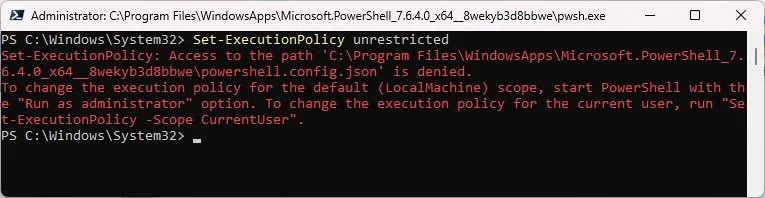
But have have had trouble running PowerShell 7.6.4 (pwsh.exe) (Run as administrator)
Can you provide an example? If there's something weird, maybe a screenshot explains it better.

The *.ps1 scripts are tested with both versions of PowerShell. The batch files will call PS 7 if you have it available, otherwise try PS 5.
 

My Computer My Computer

At a glance

Windows 7
OS
Windows 7
Can you provide an example? If there's something weird, maybe a screenshot explains it better.

The *.ps1 scripts are tested with both versions of PowerShell. The batch files will call PS 7 if you have it available, otherwise try PS 5.
These steps work for me using PS 5:

1. Open powershell as an administrator.
2. Run the command - Set-ExecutionPolicy unrestricted
3. Run the command - cd C:\SecureBoot\SecureBoot-CA-2023-Updates_v2026-07-24
4. Run the command - .\Check_UEFI-CA2023.ps1
5. Run the command - Set-ExecutionPolicy restricted
6. Run the command - exit

But if I use PS 7, I get this:

pwsh.webp
 

My Computers My Computers

  • At a glance

    Windows 11 Pro 25H2i7-8565U16GBIntel UHD Graphics 620
    OS
    Windows 11 Pro 25H2
    Computer type
    Laptop
    Manufacturer/Model
    Lenovo T490 (2020 Hardware)
    CPU
    i7-8565U
    Motherboard
    20N20028US
    Memory
    16GB
    Graphics Card(s)
    Intel UHD Graphics 620
    Sound Card
    Realtec Audio
    Monitor(s) Displays
    ASUS VE248
    Screen Resolution
    1920 X 1080
    Hard Drives
    Samsung SSD 970 PRO 512GB NVMe
    Internet Speed
    Frontier fiber 1GB
    Browser
    Chrome, Firefox, Edge
    Antivirus
    Norton 360 Deluxe Plus
    Other Info
    Supported hardware, upgraded from Windows 10 Pro to Windows 11 Pro version 24H2 on 06/01/2025 using the Windows 11 ISO file. Used the enablement package to upgrade to version 25H2 on 10/07/2025. Secure boot enabled. Secure Boot CA 2023 updated.
  • At a glance

    Windows 11 Pro 25H2i7-4770 (with SSE4.2, and POPCNT)16GBIntel HD Graphics 4600
    Operating System
    Windows 11 Pro 25H2
    Computer type
    PC/Desktop
    Manufacturer/Model
    Lenovo ThinkCentre M83 (2014 Hardware)
    CPU
    i7-4770 (with SSE4.2, and POPCNT)
    Motherboard
    10AL000GUS
    Memory
    16GB
    Graphics card(s)
    Intel HD Graphics 4600
    Sound Card
    Realtec High Definition Audio
    Monitor(s) Displays
    ASUS VE248
    Screen Resolution
    1920 X 1080
    Hard Drives
    Samsung SSD 860 PRO 1TB SATA
    Internet Speed
    Frontier fiber 1GB
    Browser
    Chrome, Firefox, Edge
    Antivirus
    Norton 360 Deluxe Plus
    Other Info
    Unsupported hardware, upgraded from Windows 10 Pro (TPM 1.2 & unsupported CPU, but does have SSE4.2, and POPCNT) to Windows 11 Pro version 24H2 on 06/15/2025. Added Registry Key HKEY_LOCAL_MACHINE\SYSTEM\Setup\MoSetup – AllowUpgradesWithUnsupportedTPMOrCPU=1 to allow installation using the Windows 11 ISO file. Used the enablement package to upgrade to version 25H2 on 10/08/2025. Secure boot enabled. Secure Boot CA 2023 updated.
That's a different problem, you don't have permission to change the JSON config file which controls global settings.

Some people have noted this bug:
Administrators do not have permissions to edit powershell.config.json when PowerShell is installed from MS Store · Issue #16523 · PowerShell/PowerShell

What you can do is uninstall PowerShell from Settings / Apps / Installed Apps, and re-install it from the Microsoft Store.

Also: If you run the batch file instead of calling the actual PS file, you don't have to do the Set-Execution dance. The batch file runs the PS file using an one-time exception (every time the batch file is called), and if you pass a command line option like "-Verbose", it's also passed to the underlying PS file.

These two commands get the same result:
Code:
.\Check-UEFI.bat -Verbose -BootMedia
.\Check_UEFI-CA2023.ps1 -Verbose -BootMedia
 

My Computer My Computer

At a glance

Windows 7
OS
Windows 7
That's a different problem, you don't have permission to change the JSON config file which controls global settings.

Some people have noted this bug:
Administrators do not have permissions to edit powershell.config.json when PowerShell is installed from MS Store · Issue #16523 · PowerShell/PowerShell

What you can do is uninstall PowerShell from Settings / Apps / Installed Apps, and re-install it from the Microsoft Store.

Also: If you run the batch file instead of calling the actual PS file, you don't have to do the Set-Execution dance. The batch file runs the PS file using an one-time exception (every time the batch file is called), and if you pass a command line option like "-Verbose", it's also passed to the underlying PS file.

These two commands get the same result:
Code:
.\Check-UEFI.bat -Verbose -BootMedia
.\Check_UEFI-CA2023.ps1 -Verbose -BootMedia
Quite some time ago I found that I could "RUN" the batch file and it works fine:

RunBat.webp

I will try uninstalling the PS app and installing it from the Microsoft Store and testing it.
 

My Computers My Computers

  • At a glance

    Windows 11 Pro 25H2i7-8565U16GBIntel UHD Graphics 620
    OS
    Windows 11 Pro 25H2
    Computer type
    Laptop
    Manufacturer/Model
    Lenovo T490 (2020 Hardware)
    CPU
    i7-8565U
    Motherboard
    20N20028US
    Memory
    16GB
    Graphics Card(s)
    Intel UHD Graphics 620
    Sound Card
    Realtec Audio
    Monitor(s) Displays
    ASUS VE248
    Screen Resolution
    1920 X 1080
    Hard Drives
    Samsung SSD 970 PRO 512GB NVMe
    Internet Speed
    Frontier fiber 1GB
    Browser
    Chrome, Firefox, Edge
    Antivirus
    Norton 360 Deluxe Plus
    Other Info
    Supported hardware, upgraded from Windows 10 Pro to Windows 11 Pro version 24H2 on 06/01/2025 using the Windows 11 ISO file. Used the enablement package to upgrade to version 25H2 on 10/07/2025. Secure boot enabled. Secure Boot CA 2023 updated.
  • At a glance

    Windows 11 Pro 25H2i7-4770 (with SSE4.2, and POPCNT)16GBIntel HD Graphics 4600
    Operating System
    Windows 11 Pro 25H2
    Computer type
    PC/Desktop
    Manufacturer/Model
    Lenovo ThinkCentre M83 (2014 Hardware)
    CPU
    i7-4770 (with SSE4.2, and POPCNT)
    Motherboard
    10AL000GUS
    Memory
    16GB
    Graphics card(s)
    Intel HD Graphics 4600
    Sound Card
    Realtec High Definition Audio
    Monitor(s) Displays
    ASUS VE248
    Screen Resolution
    1920 X 1080
    Hard Drives
    Samsung SSD 860 PRO 1TB SATA
    Internet Speed
    Frontier fiber 1GB
    Browser
    Chrome, Firefox, Edge
    Antivirus
    Norton 360 Deluxe Plus
    Other Info
    Unsupported hardware, upgraded from Windows 10 Pro (TPM 1.2 & unsupported CPU, but does have SSE4.2, and POPCNT) to Windows 11 Pro version 24H2 on 06/15/2025. Added Registry Key HKEY_LOCAL_MACHINE\SYSTEM\Setup\MoSetup – AllowUpgradesWithUnsupportedTPMOrCPU=1 to allow installation using the Windows 11 ISO file. Used the enablement package to upgrade to version 25H2 on 10/08/2025. Secure boot enabled. Secure Boot CA 2023 updated.
Quite some time ago I found that I could "RUN" the batch file and it works fine:

I will try uninstalling the PS app and installing it from the Microsoft Store and testing it.
I've also had some issues in the past when Powershell was installed from Microsoft store.
I now always install it from winget.
Here's MS doc on installing Powershell: Install PowerShell 7 on Windows

EX: "winget install --id Microsoft.PowerShell", this will install the latest version

You can run winget from CMD, so if you uninstalled it like suggested by Garlin, you can get it from CMD.
 

My Computer My Computer

At a glance

Windows 11
OS
Windows 11
I uninstalled PS 7 and reinstalled it by downloading from the MS Store. Same problem. I will try the method @anchamp65 suggested.

Nope. Installed using winget but still got the same error result.
 

My Computers My Computers

  • At a glance

    Windows 11 Pro 25H2i7-8565U16GBIntel UHD Graphics 620
    OS
    Windows 11 Pro 25H2
    Computer type
    Laptop
    Manufacturer/Model
    Lenovo T490 (2020 Hardware)
    CPU
    i7-8565U
    Motherboard
    20N20028US
    Memory
    16GB
    Graphics Card(s)
    Intel UHD Graphics 620
    Sound Card
    Realtec Audio
    Monitor(s) Displays
    ASUS VE248
    Screen Resolution
    1920 X 1080
    Hard Drives
    Samsung SSD 970 PRO 512GB NVMe
    Internet Speed
    Frontier fiber 1GB
    Browser
    Chrome, Firefox, Edge
    Antivirus
    Norton 360 Deluxe Plus
    Other Info
    Supported hardware, upgraded from Windows 10 Pro to Windows 11 Pro version 24H2 on 06/01/2025 using the Windows 11 ISO file. Used the enablement package to upgrade to version 25H2 on 10/07/2025. Secure boot enabled. Secure Boot CA 2023 updated.
  • At a glance

    Windows 11 Pro 25H2i7-4770 (with SSE4.2, and POPCNT)16GBIntel HD Graphics 4600
    Operating System
    Windows 11 Pro 25H2
    Computer type
    PC/Desktop
    Manufacturer/Model
    Lenovo ThinkCentre M83 (2014 Hardware)
    CPU
    i7-4770 (with SSE4.2, and POPCNT)
    Motherboard
    10AL000GUS
    Memory
    16GB
    Graphics card(s)
    Intel HD Graphics 4600
    Sound Card
    Realtec High Definition Audio
    Monitor(s) Displays
    ASUS VE248
    Screen Resolution
    1920 X 1080
    Hard Drives
    Samsung SSD 860 PRO 1TB SATA
    Internet Speed
    Frontier fiber 1GB
    Browser
    Chrome, Firefox, Edge
    Antivirus
    Norton 360 Deluxe Plus
    Other Info
    Unsupported hardware, upgraded from Windows 10 Pro (TPM 1.2 & unsupported CPU, but does have SSE4.2, and POPCNT) to Windows 11 Pro version 24H2 on 06/15/2025. Added Registry Key HKEY_LOCAL_MACHINE\SYSTEM\Setup\MoSetup – AllowUpgradesWithUnsupportedTPMOrCPU=1 to allow installation using the Windows 11 ISO file. Used the enablement package to upgrade to version 25H2 on 10/08/2025. Secure boot enabled. Secure Boot CA 2023 updated.
I uninstalled PS 7 and reinstalled it by downloading from the MS Store. Same problem. I will try the method @anchamp65 suggested.

Nope. Installed using winget but still got the same error result.
can you provide a new screenshot of the error while using the winget version
can you also run these commands to validate all point to the winget version and not still pointing to MStore
Code:
$PSHOME
(Get-Process -Id $PID).Path
Get-Command pwsh | Select-Object Source
where.exe pwsh

winget list Microsoft.PowerShell

Winget = C:\Program Files\PowerShell\7\pwsh.exe
MStore = C:\Program Files\WindowsApps\Microsoft.PowerShell_7.6.4.0_x64__8wekyb3d8bbwe\

the part in red can be different...
 

My Computer My Computer

At a glance

Windows 11
OS
Windows 11
Another thought, after uninstalling MStore, did you reboot ?
Maybe some environment variable is still pointing to MStore version
  1. uninstall all versions (MStore and winget)
  2. reboot
  3. install winget version
  4. test...
PS: "winget uninstall --id Microsoft.PowerShell" to remove winget version
 

My Computer My Computer

At a glance

Windows 11
OS
Windows 11
UPDATE 2028-07-28

1. Suppress blocks to "unsafe" PC's when UEFI already has updated CA 2023 certs
2. Provide -Force override option for Update_UEFI-CA2023.ps1

No real changes unless you have an "unsafe PC" which is blocked from updates because MS has categorized your Confidence Level is "Temporarily Paused" or "Not Supported", or your PC's model is listed as known to have NVRAM corruption issues.

If you have an "unsafe PC" and already managed to get the Secure Boot updates installed, the script will ignore the "unsafe PC" status.

If you have an "unsafe PC" and really want to try running the update script (at your own risk), the -Force command-line option will allow you to proceed. But the user must still confirm by entering "YES", when prompted.
Code:
Update-UEFI.bat -Force

WARNING: Updating [Example PC model] can lead to possible corruption or damage.

Please confirm you want to force an update.  Enter "YES" to confirm: YES
User entered the correct confirmation. Script will force an update.
 

My Computer My Computer

At a glance

Windows 7
OS
Windows 7
I'm starting this thread again with more information.
I've updated 3 old Dell Precision laptops by deleting all keys and using Garlins scripts.
I have a Dell OptiPlex 3010 desktop that won't update no matter what I do.
Note:
Setting the UEFI's Secure Boot menu to Custom mode, however, custom mode will not sustain through a Reboot.
Reset All Keys in Secure Boot Custom menu causes PC to hang but a Power button shut down clears this problem.

What I have tried with Secure Boot Disabled:
Enter Bios and set a Admin password. Reboot and PC boots.
Enter Bios and reset to factory defaults. Reboot to bios and setup to allow the PC to boot. Reboot.
Enter Bios UEFI's Secure Boot menu Custom mode. Reboot
Enter Bios UEFI's Secure Boot menu Custom mode. Custom mode no longer set. Set Custom mode and delete individually the PK, KEK DB, DBX keys. Add KEK .der file. No cert rejection no matter what extension is selected. (My previous Dells rejected the cert in any form). Reboot
Run Check_UEFI-CA2023.ps1.
Result:
PS C:\SecureBoot-CA-2023-Updates.v2026.07.24> .\Check_UEFI-CA2023.ps1 -verbose -audit
Windows 11 25H2 (26200.8894)
Secure Boot: OFF (Audit Report runs as ON)
Virtualization Based Security: OFF
BitLocker on (C:) OFF
BIOS Firmware
-------------
Dell Inc. OptiPlex 3010
Version: A22
Date: 2018-11-28
Factory Default UEFI PK Cert
----------------------------
(NONE)
UEFI PK Cert
------------
Dell Inc. UEFI Platform Key
Manual update of [KEK CA 2023] is REQUIRED.

Factory Default UEFI KEK Certs
------------------------------
(NONE)

UEFI KEK Certs
--------------
Microsoft Corporation KEK CA 2011

Factory Default UEFI DB Certs
-----------------------------
(NONE)

UEFI DB Certs
-------------
Microsoft Corporation UEFI CA 2011
Microsoft Windows Production PCA 2011
Microsoft Option ROM UEFI CA 2023
Microsoft UEFI CA 2023
Windows UEFI CA 2023

Factory Default UEFI DBX Certs
------------------------------
(NONE)
EFI_CERT_SHA256_GUID Signatures: 0

UEFI DBX Certs
--------------
Microsoft Windows PCA 2010
Windows BootMgr SVN is MISSING.
EFI_CERT_SHA256_GUID Signatures: 432

UEFI Variables
--------------
SBAT (Linux only): sbat,1,2024010900 / shim,4 / grub,3 / grub.debian,4

EFI Files
---------
Windows Boot Manager [Windows UEFI CA 2023] will be UNTRUSTED.
\\.\HarddiskVolume2\EFI\Microsoft\Boot\bootmgfw.efi
File Version: 28000.352, SVN 9.0

Registry: "WindowsUEFICA2023Capable" = 2
[Windows UEFI CA 2023] in UEFI DB, and Windows starting from CA 2023 Boot Manager.


AUDIT REPORT
============
1. Secure Boot is DISABLED
2. [Microsoft Corporation KEK 2K CA 2023] is missing from UEFI KEK
3. [Production PCA 2011] is missing from UEFI DBX
4. DBX Updates are missing from UEFI DBX
5. Windows BootMgr SVN is missing from UEFI DBX


REQUIRED ACTION
===============

Run the command:
Update_UEFI-CA2023.ps1 -Revoke

Finish the UEFI steps to manually add the [KEK CA 2023] cert, if the script provided instructions.

===============
REQUIRED ACTION
Run the command:
Update_UEFI-CA2023.ps1 -Revoke
Finish the UEFI steps to manually add the [KEK CA 2023] cert, if the script provided instructions.
Enter Bios UEFI's Secure Boot menu Custom mode.
===============
Ran Update_UEFI-CA2023.ps1 (excluded Revoke)
PS C:\SecureBoot-CA-2023-Updates.v2026.07.24> .\Update_UEFI-CA2023.ps1 -verbose
VERBOSE: Perform operation 'Enumerate CimInstances' with following parameters, ''className' = Win32_ComputerSystem,'namespaceName' = root\cimv2'.
VERBOSE: Operation 'Enumerate CimInstances' complete.
VERBOSE: Perform operation 'Enumerate CimInstances' with following parameters, ''className' = Win32_OperatingSystem,'namespaceName' = root\cimv2'.
VERBOSE: Operation 'Enumerate CimInstances' complete.
VERBOSE: Perform operation 'Enumerate CimInstances' with following parameters, ''className' = Win32_DeviceGuard,'namespaceName' = root\Microsoft\Windows\DeviceGuard'.
VERBOSE: Operation 'Enumerate CimInstances' complete.
VERBOSE: No bootmgfw.efi SVN found in DBX
VERBOSE: Using specified boot manager: \\.\HarddiskVolume2\EFI\Microsoft\Boot\bootmgfw.efi
VERBOSE: Boot Manager SVN: 9.0
VERBOSE: Staged SVN: 9.0
VERBOSE: Compliance Status: Not compliant (Staged SVN does not match firmware SVN)
VERBOSE: WebRequest: v1.1 GET https://raw.githubusercontent.com/m...ain/PostSignedObjects/KEK/kek_update_map.json
VERBOSE: WebResponse: 200 OK with text/plain payload
REQUIRED ACTION
---------------
Please follow the README_UEFI.TXT instructions, for installing the [KEK CA 2023] cert from BIOS.
Restart Windows, for UEFI updates to take effect.

PS C:\SecureBoot-CA-2023-Updates.v2026.07.24> .\Update_UEFI-CA2023.ps1 -verbose -audit
VERBOSE: Perform operation 'Enumerate CimInstances' with following parameters, ''className' = Win32_ComputerSystem,'namespaceName' = root\cimv2'.
VERBOSE: Operation 'Enumerate CimInstances' complete.
VERBOSE: Perform operation 'Enumerate CimInstances' with following parameters, ''className' = Win32_OperatingSystem,'namespaceName' = root\cimv2'.
VERBOSE: Operation 'Enumerate CimInstances' complete.
VERBOSE: Perform operation 'Enumerate CimInstances' with following parameters, ''className' = Win32_DeviceGuard,'namespaceName' = root\Microsoft\Windows\DeviceGuard'.
VERBOSE: Operation 'Enumerate CimInstances' complete.
VERBOSE: No bootmgfw.efi SVN found in DBX
VERBOSE: Using specified boot manager: \\.\HarddiskVolume2\EFI\Microsoft\Boot\bootmgfw.efi
VERBOSE: Boot Manager SVN: 9.0
VERBOSE: Staged SVN: 9.0
VERBOSE: Compliance Status: Not compliant (Staged SVN does not match firmware SVN)

AUDIT REPORT
============
1. [Microsoft Corporation KEK 2K CA 2023] is missing from UEFI KEK
2. [Production PCA 2011] is missing from UEFI DBX (DBXUpdate2024.bin)
3. DBX Updates are missing from UEFI DBX (dbxupdate.bin)
4. Windows BootMgr SVN is missing from UEFI DBX (DBXUpdateSVN.bin)

PS C:\SecureBoot-CA-2023-Updates.v2026.07.24>
============
Reboot
Run Check_UEFI-CA2023.ps1 and the same results as above
Help Me, Obi-Wan Kenobi!

 

My Computer My Computer

At a glance

win 11Intell Core i7 4900 MQDDR3 16 GB
OS
win 11
Computer type
Laptop
Manufacturer/Model
Dell Precision M4800
CPU
Intell Core i7 4900 MQ
Motherboard
Dell QT3YTY A00
Memory
DDR3 16 GB
I'm starting this thread again with more information.
I've updated 3 old Dell Precision laptops by deleting all keys and using Garlins scripts.
I have a Dell OptiPlex 3010 desktop that won't update no matter what I do.
Note:
Setting the UEFI's Secure Boot menu to Custom mode, however, custom mode will not sustain through a Reboot.
Reset All Keys in Secure Boot Custom menu causes PC to hang but a Power button shut down clears this problem.

What I have tried with Secure Boot Disabled:
Enter Bios and set a Admin password. Reboot and PC boots.
Enter Bios and reset to factory defaults. Reboot to bios and setup to allow the PC to boot. Reboot.
Enter Bios UEFI's Secure Boot menu Custom mode. Reboot
Enter Bios UEFI's Secure Boot menu Custom mode. Custom mode no longer set. Set Custom mode and delete individually the PK, KEK DB, DBX keys. Add KEK .der file. No cert rejection no matter what extension is selected. (My previous Dells rejected the cert in any form). Reboot
1. Admin passwords may be required if your BIOS doesn't display advanced Secure Boot options. Not every BIOS has this requirement, but usually it helps on some particular PC's.

2. When you perform a factory reset and enter Custom mode, the first approach should always be adding the KEK .der file by itself. This may or may not work, but it's the least obtrusive change to the Secure Boot settings. Some Dell's expect a specific file format and will reject the .der file. Other Dell's will successfully accept the same file.

If the .cer or .der file is accepted, then restart Windows. Run the update script. Nothing else is required from the BIOS level.

3. When the KEK file is rejected, use the second approach by deleting all of the PK, KEK, DB and DBX keys (or "Delete All Keys" if you have that option). Restart Windows, and run the update script.

You cannot mix & match the instructions. If you delete all keys but add only the KEK CA 2023 file, it's in a weird state where it's not correctly appended to the pre-existing factory certs, and nor is the BIOS completely empty of keys. In this instance, the update script doesn't really do anything because it will only proceed (for safety reasons) if you have deleted all keys, or there's an existing set of PK and KEK CA 2023 certs to work with.

When in doubt, start over from a known good point or "reset to factory defaults". Keep Secure Boot disabled, reboot Windows and shutdown. Now try the first approach. If you're rejected, then move on to the second approach. If you have an incomplete set of keys, then Custom mode might not be preserved.
 

My Computer My Computer

At a glance

Windows 7
OS
Windows 7
Back
Top Bottom