- Local time
- 1:42 PM
- Posts
- 258
- OS
- Windows 11
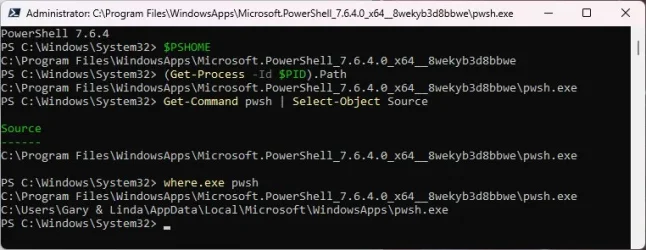
Something is wrong. Now what?
I'm lost with words on why you still have the one that looks like a MStore version
But this one seems correct
Can you run these commands again to validate you are pointing at the winget version
Code:
$PSHOME
(Get-Process -Id $PID).Path
Get-Command pwsh | Select-Object Source
where.exe pwsh
They should all point to "C:\Program Files\PowerShell\7" and last 3 should point to "pwsh.exe"
If they do, you can try Garlin's command again hoping it now works as expected.
These two commands get the same result:
Code:.\Check-UEFI.bat -Verbose -BootMedia .\Check_UEFI-CA2023.ps1 -Verbose -BootMedia
My Computers
-
At a glance
Windows 1132GB- OS
- Windows 11
- Computer type
- PC/Desktop
- Manufacturer/Model
- Dell 3910
- Memory
- 32GB
-
At a glance
Windows 1116GB- Operating System
- Windows 11
- Computer type
- Tablet
- Manufacturer/Model
- Surface Pro 9
- Memory
- 16GB