Solved garlin's PowerShell scripts for updating Secure Boot CA 2023


Something is wrong. Now what?

I'm lost with words on why you still have the one that looks like a MStore version

But this one seems correct
1785515035807.webp

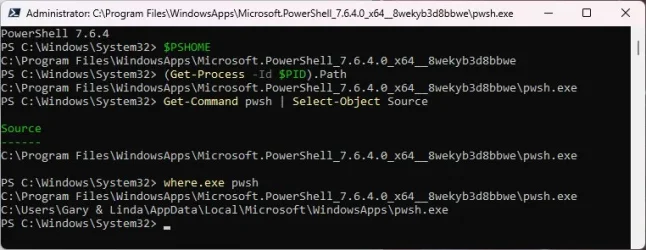
Can you run these commands again to validate you are pointing at the winget version
Code:
$PSHOME
(Get-Process -Id $PID).Path
Get-Command pwsh | Select-Object Source
where.exe pwsh

They should all point to "C:\Program Files\PowerShell\7" and last 3 should point to "pwsh.exe"
If they do, you can try Garlin's command again hoping it now works as expected.

These two commands get the same result:
Code:
.\Check-UEFI.bat -Verbose -BootMedia
.\Check_UEFI-CA2023.ps1 -Verbose -BootMedia
 

My Computer My Computer

At a glance

Windows 11
OS
Windows 11
My Dell Optiplex 9020 MT status.

As I understand things with my sandbox system not having an updated KEK CA 2023 certificate, it is possible to manually append a certificate that is at CA 2023. And, a CA 2023 KEK certificate as provided by MSFT can be found in the EFI partition. However, using the Dell Type 2 BIOS firmware requires an input format other than .der, .cer or .crt. One reference found says Dell expects .auth format.

I have found one reference which says it is possible to convert from .der to .auth but I am unclear about doing that. Between my lack of experience in doing such things and the lack of an explicit and detailed documentation for doing such a conversion, I think I'm at an impasse.

Another reference found along with a document from the DOD says it is possible to create your own self-signed certificates (all 4) and to use those to bring the Secure Boot enviroment up to CA 2023. But again this is beyond my experience level.

I guess in the meantime, the 9020 which has "one foot in the boat and the other foot on the dock", will be OK until October when the CA 2011 KEK certificate expires resulting in no more updates to db or dbx with the associated security risks.

Maybe I'll get lucky some how in the next few months and be able to salvage the use of these very solid systems as far as having a total and complete Secure Boot environment. But if I don't get lucky I guess the choices are: (1) remove them from use and recycle the electronics; (2) stop worrying about Secure Boot, disable it and continue to use my NAS/file servers without it.

Fire away!
 

My Computers My Computers

  • At a glance

    Windows 11 Pro; Windows Server 2016 EssentialsNUC8I7BEH16 GBIntel Iris
    OS
    Windows 11 Pro; Windows Server 2016 Essentials
    Computer type
    PC/Desktop
    Manufacturer/Model
    Intel
    CPU
    NUC8I7BEH
    Motherboard
    Intel NUC8BEB
    Memory
    16 GB
    Graphics Card(s)
    Intel Iris
    Sound Card
    Intel Cannon Lake-LP - cAVS (Audio, Voice, Speech)
    Monitor(s) Displays
    ASUS PB328
    Screen Resolution
    1920 x 1200
    Hard Drives
    Kingston SSD
  • At a glance

    Windows Server 2016 EssentialsIntel Xeon E-2246G16 GBMatrox MGA-G200eW3
    Operating System
    Windows Server 2016 Essentials
    Computer type
    PC/Desktop
    Manufacturer/Model
    Dell
    CPU
    Intel Xeon E-2246G
    Motherboard
    DELL 0DK9CR (Poweredge T340)
    Memory
    16 GB
    Graphics card(s)
    Matrox MGA-G200eW3
  • Intel NUCs (NUC10I5, NUC13I7, NUC13I3); Dell 9020 MT
I'm lost with words on why you still have the one that looks like a MStore version

But this one seems correct
View attachment 178091

Can you run these commands again to validate you are pointing at the winget version
Code:
$PSHOME
(Get-Process -Id $PID).Path
Get-Command pwsh | Select-Object Source
where.exe pwsh

They should all point to "C:\Program Files\PowerShell\7" and last 3 should point to "pwsh.exe"
If they do, you can try Garlin's command again hoping it now works as expected.
Still not right.

New1.webp

There is no folder named C:\Program Files\PowerShell on my system.

Time for a nap. :sleep:
 

My Computers My Computers

  • At a glance

    Windows 11 Pro 25H2i7-8565U16GBIntel UHD Graphics 620
    OS
    Windows 11 Pro 25H2
    Computer type
    Laptop
    Manufacturer/Model
    Lenovo T490 (2020 Hardware)
    CPU
    i7-8565U
    Motherboard
    20N20028US
    Memory
    16GB
    Graphics Card(s)
    Intel UHD Graphics 620
    Sound Card
    Realtec Audio
    Monitor(s) Displays
    ASUS VE248
    Screen Resolution
    1920 X 1080
    Hard Drives
    Samsung SSD 970 PRO 512GB NVMe
    Internet Speed
    Frontier fiber 1GB
    Browser
    Chrome, Firefox, Edge
    Antivirus
    Norton 360 Deluxe Plus
    Other Info
    Supported hardware, upgraded from Windows 10 Pro to Windows 11 Pro version 24H2 on 06/01/2025 using the Windows 11 ISO file. Used the enablement package to upgrade to version 25H2 on 10/07/2025. Secure boot enabled. Secure Boot CA 2023 updated.
  • At a glance

    Windows 11 Pro 25H2i7-4770 (with SSE4.2, and POPCNT)16GBIntel HD Graphics 4600
    Operating System
    Windows 11 Pro 25H2
    Computer type
    PC/Desktop
    Manufacturer/Model
    Lenovo ThinkCentre M83 (2014 Hardware)
    CPU
    i7-4770 (with SSE4.2, and POPCNT)
    Motherboard
    10AL000GUS
    Memory
    16GB
    Graphics card(s)
    Intel HD Graphics 4600
    Sound Card
    Realtec High Definition Audio
    Monitor(s) Displays
    ASUS VE248
    Screen Resolution
    1920 X 1080
    Hard Drives
    Samsung SSD 860 PRO 1TB SATA
    Internet Speed
    Frontier fiber 1GB
    Browser
    Chrome, Firefox, Edge
    Antivirus
    Norton 360 Deluxe Plus
    Other Info
    Unsupported hardware, upgraded from Windows 10 Pro (TPM 1.2 & unsupported CPU, but does have SSE4.2, and POPCNT) to Windows 11 Pro version 24H2 on 06/15/2025. Added Registry Key HKEY_LOCAL_MACHINE\SYSTEM\Setup\MoSetup – AllowUpgradesWithUnsupportedTPMOrCPU=1 to allow installation using the Windows 11 ISO file. Used the enablement package to upgrade to version 25H2 on 10/08/2025. Secure boot enabled. Secure Boot CA 2023 updated.
Still not right.

View attachment 178105

There is no folder named C:\Program Files\PowerShell on my system.

Time for a nap. :sleep:
You ran the commands in the MStore one, try them in the other window, this one

1785519304040.webp

But have you tried Garlin's commands again ? in either one ?

EDIT:
I think I found why your not finding the new one you installed with winget.
On my systems, I uninstalled all Powershell versions except the one from winget.
So when I search for PowerShell, that's the only one it finds.
Instead of searching for "
PowerShell" in the Start Menu, search for "pwsh", it should show you the one you installed with winget.
You should now see this one, right click and start as administrator and test Garlin's commands.


1785526004233.webp
 
Last edited:

My Computer My Computer

At a glance

Windows 11
OS
Windows 11
As I understand things with my sandbox system not having an updated KEK CA 2023 certificate, it is possible to manually append a certificate that is at CA 2023. And, a CA 2023 KEK certificate as provided by MSFT can be found in the EFI partition. However, using the Dell Type 2 BIOS firmware requires an input format other than .der, .cer or .crt. One reference found says Dell expects .auth format.

I have found one reference which says it is possible to convert from .der to .auth but I am unclear about doing that. Between my lack of experience in doing such things and the lack of an explicit and detailed documentation for doing such a conversion, I think I'm at an impasse.
Some older Dell BIOS'es can only accept the .auth file format. The .auth format is basically an export of the Secure Boot variable's raw bytes.

A Secure Boot certificate can be presented in one of two formats: pre-signed and post-signed. For the KEK, that means it needs to be signed by the current PK (which is the Dell factory PK by default).

A pre-signed cert is any cert which hasn't been signed by the PK. If you are the PK's owner (Dell, or you created your own private PK), then you own the PK's secret key that can be used to sign this cert file, transforming it into a post-signed file. But if you're not Dell, you don't have their private key.

The .auth format assumes the cert object has already been post-signed. As Dell won't support your PC, they will not provide a post-signed KEK file. Therefore this option is closed to us, and the next option is to Delete All Keys. This removes the PK as the blocking factor, and allows us to install a replacement set of Secure Boot keys.

Fortunately, MS provides a reference set of keys ("Windows OEM Device") which can be used.

If you have "Delete All Keys" presented, choose that option. Restart Windows, and run the update script. Before you delete all keys confirm you have disabled BitLocker (if enabled) on the C: drive and Windows Hello PIN (otherwise you may be locked out because it detects security changes).

Another reference found along with a document from the DOD says it is possible to create your own self-signed certificates (all 4) and to use those to bring the Secure Boot enviroment up to CA 2023. But again this is beyond my experience level.
Every user has the option to perform self-signing, but it's too much hassle for normal users if you're only updating the CA 2023 certs this one time.
 

My Computer My Computer

At a glance

Windows 7
OS
Windows 7
Every user has the option to perform self-signing, but it's too much hassle for normal users if you're only updating the CA 2023 certs this one time.
Wouldn't one benefit of self-signing assure you that the key was actually not compromised like the 2022 debacle?


My Computers My Computers

  • At a glance

    Win 11 Pro 25H2, Build 26200.9168Intel Core i5 14500, 14th Generation64GB DDR4GeForce RTX 4060
    OS
    Win 11 Pro 25H2, Build 26200.9168
    Computer type
    PC/Desktop
    Manufacturer/Model
    Home Brew
    CPU
    Intel Core i5 14500, 14th Generation
    Motherboard
    Gigabyte B760M G P WIFI
    Memory
    64GB DDR4
    Graphics Card(s)
    GeForce RTX 4060
    Sound Card
    Chipset Realtek
    Monitor(s) Displays
    LG 45" Ultragear & Acer 24" 1080p
    Screen Resolution
    5120x1440 & 1920x1080
    Hard Drives
    Crucial P310 2TB 2280 PCIe Gen4 3D NAND NVMe M.2 SSD (O/S)
    Silicon Power 2TB US75 NVMe PCIe Gen4 M.2 2280 SSD (backup)
    Crucial BX500 2TB 3D NAND (2nd backup)
    Seagate 4TB Ironwolf, rotating HDD archive files
    External off-line backup Drives: 2 NVMe 4TB drives in external enclosures
    PSU
    Thermaltake Toughpower GF3 750W
    Case
    LIAN LI LANCOOL 216 E-ATX PC Case
    Cooling
    Lots of fans!
    Keyboard
    Microsoft Comfort Curve 2000
    Mouse
    Logitech G305
    Internet Speed
    Verizon FiOS 1GB
    Browser
    Firefox
    Antivirus
    Malware Bytes & Windows Defender Security
  • At a glance

    Win 11 Pro 25H2, Build 26200.9168Intel Core i5 1440032GB DDR5Intel 700 Embedded GPU
    Operating System
    Win 11 Pro 25H2, Build 26200.9168
    Computer type
    PC/Desktop
    Manufacturer/Model
    Home Brew
    CPU
    Intel Core i5 14400
    Motherboard
    Gigabyte B760M DS3H AX
    Memory
    32GB DDR5
    Graphics card(s)
    Intel 700 Embedded GPU
    Sound Card
    Realtek Embedded
    Monitor(s) Displays
    27" HP 1080p
    Screen Resolution
    1920x1080
    Hard Drives
    Crucial P310 2TB 2280 PCIe Gen4 eD NAND PCIe SSD
    Samsung EVO 990 2TB NVMe Gen4 SSD
    Samsung 2TB SATA SSD
    PSU
    Thermaltake Smart BM3 650W
    Case
    Okinos Micro ATX Case
    Cooling
    Fans
    Keyboard
    Microsoft Comfort Curve 2000
    Mouse
    Logitech G305
    Internet Speed
    Verizon FiOS 1GB
    Browser
    Firefox
    Antivirus
    Malware Bytes & Windows Defender Security
  • Nimo N171 17" Laptop, (Intel i3-1215U, 16GB RAM, 2TB NVMe, Win11 Pro)
    Acemagic Vista Mini PC V1 (Intel N150, 16GB RAM, 1TB NVMe, Win11 Pro)
    HP ENVY h8-1540t, (24GB RAM, 2TB SSD, 2TB HDD, Win11 Pro)
You're free to use self-signed certs, and the really paranoid or technical folks do that. But you're on your own (DIY) or that app I'm not allowed to mention, or have to seek a different community (usually Linux) to support your questions.

PKFail was well known in security circles before it was named "PKFail". What Binary did was to shock the industry by trying to actively count how broad the problem was. MS already addressed this with the "Windows OEM Devices" fix here:

CERTCC/PKfail Mitigations & detection tools for VU#455367

My scripts will nag you if you have a "DO NOT [whatever]" or "Test" PK. This is more an issue of lazy engineering from some OEM's. The BIOS licensors clearly instructed everyone to create their own PK's, and not copy the reference design they gave out.

The point being if everyone used the exact same PK, then breaking the PK's encryption key means you have access to so many different vendor's PC's, instead of spending much more effort to hack each individual company's PK. For a large company like Dell, they have a lot of different PK's floating around (although some models were caught with the PKFail laziness).

Could the Windows OEM Devices PK be cracked too, and that's a new form of PKFail? True.

But short of getting into a key management mess, it's the lesser evil for non-technical users. It's the 80/20 rule. You can recommend others take a more technical route up the mountain, but are you going to help them when they get stuck halfway to the summit?
 

My Computer My Computer

At a glance

Windows 7
OS
Windows 7
i need some help. i delete all certs from bios and selected setup. i disable in the bios the secureboot. i use the update certs withou revoke and intall all certs (2011 and 2023). when i check dbx with verbose, says:

FAILED: Missing 2/291 EFI signatures from "dbxupdate.bin"
Missing [86A9482509A434CA61EA4D12B6010A9013E5D3FBFF09B14799EBC87C124BCFF0]
Missing [2EA557C44B83C0AD6B71EFB7EDCC18B6337AD1C1D682155DD9451B051B62FF40]
FAILED: Missing 3/3 SVN signatures from "DBXUpdate2024.bin"
Missing [01612B139DD5598843AB1C185C3CB2EB92000005000000000000000000000000] bootmgfw.efi SVN 5.0
Missing [019D2EF8E827E15841A4884C18ABE2F284000003000000000000000000000000] cdboot.efi SVN 3.0
Missing [01C2CA99C9FE7F6F4981279E2A8A535976000003000000000000000000000000] wdsmgfw.efi SVN 3.0
FAILED: Missing 3/3 SVN signatures from "DBXUpdateSVN.bin"
Missing [01612B139DD5598843AB1C185C3CB2EB92000009000000000000000000000000] bootmgfw.efi SVN 9.0
Missing [019D2EF8E827E15841A4884C18ABE2F284000003000000000000000000000000] cdboot.efi SVN 3.0
Missing [01C2CA99C9FE7F6F4981279E2A8A535976000003000000000000000000000000] wdsmgfw.efi SVN 3.0.

should i enable the secureboot to update or what i missing?

PD: I clarify when i update with the latest version windows 11 KB5101684, y have troubles with black screen (knmode excepion handled) and i discovered that the secureboot cause this. so i clear all certs, update with powershell, and i still have secure boot disabled, just in case.
My mobo is asrock h110m hdv. i7 6700, gpu amd rx 5700 xt (latest driver), hdd sata 3 1tb (latest intel rapid storage tecnology) , 16 gb ram.
 

My Computer My Computer

At a glance

WINDOWS 11
OS
WINDOWS 11
Computer type
PC/Desktop
i need some help. i delete all certs from bios and selected setup. i disable in the bios the secureboot. i use the update certs withou revoke and intall all certs (2011 and 2023).
When you deleted all of the certs, the DBX variable will be cleared. The DBX can contain two types of data:
- revoked certs like PCA 2011
- revoked EFI signatures (from a list of banned boot files)

when i check dbx with verbose, says:

FAILED: Missing 2/291 EFI signatures from "dbxupdate.bin"
Missing [86A9482509A434CA61EA4D12B6010A9013E5D3FBFF09B14799EBC87C124BCFF0]
Missing [2EA557C44B83C0AD6B71EFB7EDCC18B6337AD1C1D682155DD9451B051B62FF40]
You have two banned files which are in the current DBXUpdate.bin, but not found in your DBX. Usually those are are for non-Windows EFI files. Not having them added right now isn't a serious problem if you only use Windows, and no Linux distro's.

FAILED: Missing 3/3 SVN signatures from "DBXUpdate2024.bin"
Missing [01612B139DD5598843AB1C185C3CB2EB92000005000000000000000000000000] bootmgfw.efi SVN 5.0
Missing [019D2EF8E827E15841A4884C18ABE2F284000003000000000000000000000000] cdboot.efi SVN 3.0
Missing [01C2CA99C9FE7F6F4981279E2A8A535976000003000000000000000000000000] wdsmgfw.efi SVN 3.0
FAILED: Missing 3/3 SVN signatures from "DBXUpdateSVN.bin"
Missing [01612B139DD5598843AB1C185C3CB2EB92000009000000000000000000000000] bootmgfw.efi SVN 9.0
Missing [019D2EF8E827E15841A4884C18ABE2F284000003000000000000000000000000] cdboot.efi SVN 3.0
Missing [01C2CA99C9FE7F6F4981279E2A8A535976000003000000000000000000000000] wdsmgfw.efi SVN 3.0.
You have not revoked PCA 2011, so the SVN is not added yet. When you perform a revoke, the SVN's will be added until you get a highest SVN of 9.0.

should i enable the secureboot to update or what i missing?

PD: I clarify when i update with the latest version windows 11 KB5101684, y have troubles with black screen (knmode excepion handled) and i discovered that the secureboot cause this. so i clear all certs, update with powershell, and i still have secure boot disabled, just in case.
My mobo is asrock h110m hdv. i7 6700, gpu amd rx 5700 xt (latest driver), hdd sata 3 1tb (latest intel rapid storage tecnology) , 16 gb ram.
If you have a black screen on power up, it might be a problem with the GPU's firmware. Check if you have the Option ROM cert installed, or if there's a newer version of the Radeon 5700's firmware. You may have to ask for help on the AMD Radeon user forums to see if there are known Secure Boot problems.

One thing you can try is to temporarily remove the graphics card, and use the integrated Intel GPU to see if the problem is related to the Radeon or not.
 

My Computer My Computer

At a glance

Windows 7
OS
Windows 7
When you deleted all of the certs, the DBX variable will be cleared. The DBX can contain two types of data:
- revoked certs like PCA 2011
- revoked EFI signatures (from a list of banned boot files)


You have two banned files which are in the current DBXUpdate.bin, but not found in your DBX. Usually those are are for non-Windows EFI files. Not having them added right now isn't a serious problem if you only use Windows, and no Linux distro's.


You have not revoked PCA 2011, so the SVN is not added yet. When you perform a revoke, the SVN's will be added until you get a highest SVN of 9.0.


If you have a black screen on power up, it might be a problem with the GPU's firmware. Check if you have the Option ROM cert installed, or if there's a newer version of the Radeon 5700's firmware. You may have to ask for help on the AMD Radeon user forums to see if there are known Secure Boot problems.

One thing you can try is to temporarily remove the graphics card, and use the integrated Intel GPU to see if the problem is related to the Radeon or not.
So:

First step I revoke the 2011 certificate with this command:
reg add HKEY_LOCAL_MACHINE\SYSTEM\CurrentControlSet\Control\Secureboot /v AvailableUpdates /t REG_DWORD /d 0x282 /f
powershell Start-ScheduledTask -TaskName "\Microsoft\Windows\PI\Secure-Boot-Update" and restart (I haven't enabled Secure Boot yet).

Second step I check if it's the GPU using the integrated one.

Am I right?
im only using windows 11.

PD: I used Linux once, but I uninstalled it a long time ago by formatting the drive. So now I'm on Windows 11. In fact, I had to format the entire volume where Windows 11 was installed, deleting the recovery partition and the EFI partition, thinking my OS was corrupted. But I discovered it was Secure Boot that was conflicting with something, I don't know what. So basically, I have a freshly reinstalled Windows 11, with the corresponding efi and restore volumes.
 

My Computer My Computer

At a glance

WINDOWS 11
OS
WINDOWS 11
Computer type
PC/Desktop
Normally Secure Boot (as related to the certs) only prevents a boot file from booting. It shouldn't have other bad effects.

The exceptions are conflicts with a GPU's signed firmware (this is a well-known issue in the NVIDIA community, but the problem is the same) where it's not allowed once CA 2011 is revoked, and on occasion where your UEFI's NVRAM has corruption issues and "freezes" up whenever the Secure Boot task tries to check in there's any new work to be performed.

There hasn't been any NVRAM corruption issues reported on ASRock motherboards, so it's more likely a GPU issue with older cards. Newer cards have signed firmware which is compatible with CA 2023.
 

My Computer My Computer

At a glance

Windows 7
OS
Windows 7
Normally Secure Boot (as related to the certs) only prevents a boot file from booting. It shouldn't have other bad effects.

The exceptions are conflicts with a GPU's signed firmware (this is a well-known issue in the NVIDIA community, but the problem is the same) where it's not allowed once CA 2011 is revoked, and on occasion where your UEFI's NVRAM has corruption issues and "freezes" up whenever the Secure Boot task tries to check in there's any new work to be performed.

There hasn't been any NVRAM corruption issues reported on ASRock motherboards, so it's more likely a GPU issue with older cards. Newer cards have signed firmware which is compatible with CA 2023.
The strangest thing is that it would freeze once I was in Windows and sometimes when I tried to boot up. But I didn't have this problem until a few days ago with the latest KB5101684. I just hope it's not an NVRAM corruption issue. Is there any way to check for this?
 

My Computer My Computer

At a glance

WINDOWS 11
OS
WINDOWS 11
Computer type
PC/Desktop
There is no direct way to check for NVRAM corruption. But you can disable the Secure Boot task to see if that works.

Run as Administrator:
Code:
schtasks /change /disable /tn "\Microsoft\Windows\PI\Secure-Boot-Update"

schtasks /change /enable /tn "\Microsoft\Windows\PI\Secure-Boot-Update"
 

My Computer My Computer

At a glance

Windows 7
OS
Windows 7
There is no direct way to check for NVRAM corruption. But you can disable the Secure Boot task to see if that works.

Run as Administrator:
Code:
schtasks /change /disable /tn "\Microsoft\Windows\PI\Secure-Boot-Update"

schtasks /change /enable /tn "\Microsoft\Windows\PI\Secure-Boot-Update"
it seems you resolve my problem, now runs perfect win 11 and dont show any error, and i enable the secureboot. its incredible. also yi chedk and all everithing its ok:
Secure Boot: ON
Virtualization Based Security: OFF
BitLocker on (C:) OFF

UEFI KEK Certs
--------------
Microsoft Corporation KEK CA 2011
Microsoft Corporation KEK 2K CA 2023

UEFI DB Certs
-------------
Microsoft Corporation UEFI CA 2011
Microsoft Windows Production PCA 2011
Microsoft Option ROM UEFI CA 2023
Microsoft UEFI CA 2023
Windows UEFI CA 2023

UEFI DBX Certs
--------------
Microsoft Windows Production PCA 2011
Windows BootMgr SVN 9.0

EFI Files
---------
Windows Boot Manager [Windows UEFI CA 2023] is ALLOWED.

Registry: "WindowsUEFICA2023Capable" = 2
[Windows UEFI CA 2023] in UEFI DB, and Windows starting from CA 2023 Boot Manager.


AUDIT REPORT
============
PASSED ALL CHECKS.


STATUS REPORT
-------------
Registry: "UEFICA2023Status" = Updated

SUCCESS: UPDATES ARE FINISHED.
UEFI CA 2023 certs are present, PCA 2011 cert is revoked.

THANK YOU VERY MUCH!
 

My Computer My Computer

At a glance

WINDOWS 11
OS
WINDOWS 11
Computer type
PC/Desktop
it seems you resolve my problem, now runs perfect win 11 and dont show any error, and i enable the secureboot. its incredible. also yi chedk and all everithing its ok:
AUDIT REPORT
============
PASSED ALL CHECKS.


STATUS REPORT
-------------
Registry: "UEFICA2023Status" = Updated

SUCCESS: UPDATES ARE FINISHED.
UEFI CA 2023 certs are present, PCA 2011 cert is revoked.
I guess that works. Your UEFI still has some weird setting that freaks out the Secure Boot task... but if Windows boots fine 🤷‍♂️
 

My Computer My Computer

At a glance

Windows 7
OS
Windows 7
I guess that works. Your UEFI still has some weird setting that freaks out the Secure Boot task... but if Windows boots fine 🤷‍♂️
Like what things? haha
Dbx check : all says succes and matched with green color he.
Let me know if i have to do some thing else, just in case. Thanks again!
 

My Computer My Computer

At a glance

WINDOWS 11
OS
WINDOWS 11
Computer type
PC/Desktop
The Secure Boot task has two responsibilities:
1. Check on the current UEFI certs, and boot manager version.

2. Apply new changes after Windows Update downloads them (as part of the Monthly Update's security fixes). Changes include new banned EFI signatures (added to DBX), a new boot manager and SVN to be simultaneously applied.

Either the task is locking up Windows from checking something, or trying to apply new changes. If it's locking up, then it's difficult to know which one of the two roles in causing an issue. If you leave the Secure Boot task disabled, you can survive with future updates. But they won't be applied. You're frozen in place and not protected as new attacks are identified to the boot manager.

It's not ideal over the long term but preserves your system's stability. The check script reports conditions relative to whatever is currently installed on Windows. Because it passed today, you are good for July 2026. It might fall behind in boot manager versions in a later Monthly Update.

If you realize it's an outdated motherboard and are more interested in keeping it operational, then accept it might be easier to leave things alone and stop worrying. Until it's time to replace this PC.
 

My Computer My Computer

At a glance

Windows 7
OS
Windows 7
The Secure Boot task has two responsibilities:
1. Check on the current UEFI certs, and boot manager version.

2. Apply new changes after Windows Update downloads them (as part of the Monthly Update's security fixes). Changes include new banned EFI signatures (added to DBX), a new boot manager and SVN to be simultaneously applied.

Either the task is locking up Windows from checking something, or trying to apply new changes. If it's locking up, then it's difficult to know which one of the two roles in causing an issue. If you leave the Secure Boot task disabled, you can survive with future updates. But they won't be applied. You're frozen in place and not protected as new attacks are identified to the boot manager.

It's not ideal over the long term but preserves your system's stability. The check script reports conditions relative to whatever is currently installed on Windows. Because it passed today, you are good for July 2026. It might fall behind in boot manager versions in a later Monthly Update.

If you realize it's an outdated motherboard and are more interested in keeping it operational, then accept it might be easier to leave things alone and stop worrying. Until it's time to replace this P
ok, thanks for the info, just in case i leave the task secureboot enabled it. For me i thinck it was a bugged update. we will se with another update in the future. thanks again pal.
 

My Computer My Computer

At a glance

WINDOWS 11
OS
WINDOWS 11
Computer type
PC/Desktop
2011 certificates were revoked in a previous step.

Are SVN and SkuSiPolicy tied together?

After Microsoft updates SVN and SkuSiPolicy, is it necessary to apply them to the BIOS using Update_UEFI-CA2023.ps1?
 

My Computer My Computer

At a glance

Windows 11 Pro
OS
Windows 11 Pro
Computer type
Laptop
Manufacturer/Model
Acer TravelMate P215-52
Are SVN and SkuSiPolicy tied together?
No. Those are two separate protections that can be enabled in parallel.

SVN controls the minimum version of the Windows boot manager which can be booted.
SkuSiPolicy controls the minimum version of winload.efi (which actually starts most of the early Windows processes).

When MS fixes the boot manager, the SVN will increase in the same Monthly Update. When winload.efi is patched, a new SkuSiPolicy is released. Both, one, or none of those changes can happen in a CU. It depends on what security fixes are required.

After Microsoft updates SVN and SkuSiPolicy, is it necessary to apply them to the BIOS using Update_UEFI-CA2023.ps1?
Secure Boot task will update the Windows boot manager and SVN together (which is a requirement).

The task doesn't appear to copy the latest SkuSiPolicy.p7b file to the EFI (for the moment). MS is probably afraid of locking you out by accident if they forced a policy file change. SkuSiPolicy extends its control to all disks in a dual-boot setup, and USB media. MS could make the Secure Boot task push out a newer file to the EFI, but that would not account for other Windows disks or your existing USB media being updated to the same patch level.

For pushing a new SkuSiPolicy update, you can use the update script (easier) or manually copy the file.

Manual method for reference:
Code:
mountvol S: /s
copy C:\Windows\System32\SecureBootUpdates\SkuSiPolicy.p7b S:\EFI\Microsoft\Boot
mountvol S: /d
 

My Computer My Computer

At a glance

Windows 7
OS
Windows 7
Back
Top Bottom