Solved garlin's PowerShell scripts for updating Secure Boot CA 2023


OK. I threw in more{ where $_.DriveLetter -match '[A-Z]' }so non-matches should be excluded.
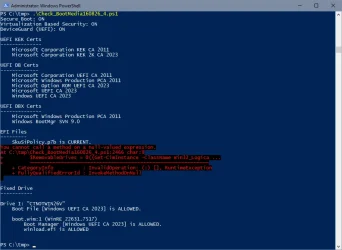
Nope. Same combination of error. Saw this message for the first 'Skipping USB Drive H: "VTOYEFI"'
 

My Computer My Computer

At a glance

Windows 11 ProIntel Core Ultra16GBIntel(R) Arc Graphics
OS
Windows 11 Pro
Computer type
Laptop
Manufacturer/Model
ASUS Zenbook 14 OLED
CPU
Intel Core Ultra
Memory
16GB
Graphics Card(s)
Intel(R) Arc Graphics
Sound Card
Realtek High Definition Audio(SST)
Screen Resolution
2880 x 1800
Hard Drives
500 GB NVMe SSD
Internet Speed
1,500Mbps
Browser
Firefox, Edge
Antivirus
Windows Defender
Nope. Same combination of error. Saw this message for the first 'Skipping USB Drive H: "VTOYEFI"'
I'm teaching the script to ignore Ventoy drives for two simple reasons:

1. Ventoy uses its own GRUB bootloader, so there's no point in me trying to analyze it.
2. Ventoy allows you to drop any random set of ISO files, in any folder under \ventoy. Since there isn't a fixed naming convention, there's no point trying to hunt down a randomly named Windows ISO.

Try this magic query:
Code:
Get-CimInstance -ClassName Win32_LogicalDisk | where { $_.FileSystem -and ($_.Description -match 'Removable|CD-ROM') -or ($_.Description -match 'Fixed' -and $_.FileSystem -match 'FAT') }
 

My Computer My Computer

At a glance

Windows 7
OS
Windows 7
I'm teaching the script to ignore Ventoy drives for two simple reasons:

1. Ventoy uses its own GRUB bootloader, so there's no point in me trying to analyze it.
2. Ventoy allows you to drop any random set of ISO files, in any folder under \ventoy. Since there isn't a fixed naming convention, there's no point trying to hunt down a randomly named Windows ISO.

Try this magic query:
Code:
Get-CimInstance -ClassName Win32_LogicalDisk | where { $_.FileSystem -and ($_.Description -match 'Removable|CD-ROM') -or ($_.Description -match 'Fixed' -and $_.FileSystem -match 'FAT') }
Ventoy is not the issue, its the Hasleo that raises the error.

The above magic quesry produced this with Hasleo
DeviceID DriveType ProviderName VolumeName Size FreeSpace
-------- --------- ------------ ---------- ---- ---------
F: 2 HASLEOBS 31583109120 30560075776

and this with Ventoy
DeviceID DriveType ProviderName VolumeName Size FreeSpace
-------- --------- ------------ ---------- ---- ---------
G: 2 Ventoy 30991024128 3305439232
H: 2 VTOYEFI 33277440 4493312
 

My Computer My Computer

At a glance

Windows 11 ProIntel Core Ultra16GBIntel(R) Arc Graphics
OS
Windows 11 Pro
Computer type
Laptop
Manufacturer/Model
ASUS Zenbook 14 OLED
CPU
Intel Core Ultra
Memory
16GB
Graphics Card(s)
Intel(R) Arc Graphics
Sound Card
Realtek High Definition Audio(SST)
Screen Resolution
2880 x 1800
Hard Drives
500 GB NVMe SSD
Internet Speed
1,500Mbps
Browser
Firefox, Edge
Antivirus
Windows Defender
Last test version for the weekend. I switched to the new magic.
 

Attachments

My Computer My Computer

At a glance

Windows 7
OS
Windows 7
This one still finds the GPT Fat32 USB SSD, but gives an error if it's the only USB storge device.
I can't repro this error, but here's a different sanity filter.
 

Attachments

My Computer My Computer

At a glance

Windows 7
OS
Windows 7

My Computer My Computer

At a glance

Windows 11 ProIntel Core Ultra16GBIntel(R) Arc Graphics
OS
Windows 11 Pro
Computer type
Laptop
Manufacturer/Model
ASUS Zenbook 14 OLED
CPU
Intel Core Ultra
Memory
16GB
Graphics Card(s)
Intel(R) Arc Graphics
Sound Card
Realtek High Definition Audio(SST)
Screen Resolution
2880 x 1800
Hard Drives
500 GB NVMe SSD
Internet Speed
1,500Mbps
Browser
Firefox, Edge
Antivirus
Windows Defender
When I attach my two bootable media (recovery USB drive and install USB stick) together with my USB hub, I get this with the script from post 3466:

PS C:\Users\admin\Downloads\SecureBoot-CA-2023-Updates.v2026.08.17> .\Check-Bootmedia.bat -Verbose
PowerShell 7.6.5
Windows 11 25H2 (26200.9168)

Secure Boot: ON
Virtualization Based Security: ON

UEFI KEK Certs
--------------
Microsoft Corporation KEK CA 2011
Microsoft Corporation KEK 2K CA 2023

UEFI DB Certs
-------------
Microsoft Corporation UEFI CA 2011
Microsoft Windows Production PCA 2011
Microsoft Option ROM UEFI CA 2023
Microsoft UEFI CA 2023
Windows UEFI CA 2023

UEFI DBX Certs
--------------
Microsoft Windows Production PCA 2011
Windows BootMgr SVN 9.0

EFI Files
---------
SkuSiPolicy.p7b is CURRENT.
\\.\HarddiskVolume1\EFI\Microsoft\Boot\SkuSiPolicy.p7b
Version: 3.0.0.17

FileRule MinimumFileVersion MaximumFileVersion
-------- ------------------ ------------------
ID_FILEATTRIB_F_0044 0.0.0.0 10.0.14393.9399
ID_FILEATTRIB_F_0042 10.0.14400.0 10.0.17763.9099
ID_FILEATTRIB_F_0040 10.0.18000.0 10.0.19041.7639
ID_FILEATTRIB_F_0041 10.0.19100.0 10.0.20348.5479
ID_FILEATTRIB_F_0046 10.0.20400.0 10.0.22621.7494
ID_FILEATTRIB_F_0049 10.0.23000.0 10.0.26100.9140
ID_FILEATTRIB_F_0045 10.0.26100.32000 10.0.26100.33249
ID_FILEATTRIB_F_0048 10.0.26172.0 10.0.26172.33249
ID_FILEATTRIB_F_0047 10.0.27000.0 10.0.28000.2684
ID_FILEATTRIB_F_0043 10.0.29426.0 65535.65535.65535.65535


Bootable Media
--------------

USB Drive H: "RECOVERY"
Windows Boot Manager [Windows UEFI CA 2023] is ALLOWED.
H:\EFI\Microsoft\Boot\bootmgfw.efi
File Version: 28000.352, SVN 9.0

Boot File [Windows UEFI CA 2023] is ALLOWED.
H:\EFI\Boot\bootx64.efi
File Version: 28000.352, SVN 9.0

boot.wim:1 (WinRE 26100.1)
Boot Manager [Windows UEFI CA 2023] is ALLOWED.
\Windows\Boot\EFI_EX\bootmgfw_EX.efi
File Version: 28000.352, SVN 9.0

\Windows\System32\winload.efi is ALLOWED.
File Version: 26100.9168


USB Drive J: "Win11_25H2_EngUS_x64_14aug2026"
Boot File [Windows UEFI CA 2023] is ALLOWED.
J:\EFI\Boot\bootx64.efi
File Version: 28000.352, SVN 9.0

boot.wim:2 (WinPE 26100.9168)
Boot Manager [Windows UEFI CA 2023] is ALLOWED.
\Windows\Boot\EFI_EX\bootmgfw_EX.efi
File Version: 28000.352, SVN 9.0

\Windows\System32\winload.efi is ALLOWED.
File Version: 26100.9168

'Repair My PC' is broken.

J:\EFI\Microsoft\Boot\boot.stl [18/05/2026 19:44] is CURRENT.

install.esd:1 (W11 25H2 26200.9168)
Boot Manager [Windows UEFI CA 2023] is ALLOWED.
\Windows\Boot\EFI_EX\bootmgfw_EX.efi
File Version: 28000.352, SVN 9.0

\Windows\System32\winload.efi is ALLOWED.
File Version: 26100.9168

Skipping over the next 6 images.


USB Drive K: "RUFUS_BOOT"
Boot File [Microsoft Corporation UEFI CA 2011] is ALLOWED.
K:\EFI\Boot\bootx64.efi
[THIRD-PARTY] EFI File


PS C:\Users\admin\Downloads\SecureBoot-CA-2023-Updates.v2026.08.17>

When I attach these USB sticks alone on the USB hub, all works well too.

However, there is one direct USB port on my computer where my USB sticks are not recognised, due to a problem with the combination of X570 motherboards and the 5800X processor. They then recommended to set the pcie to gen3 instead of 4. It was supposed to have been resolved with some bios version, but that never happened on my machine. Depending upon the combination of bios version and settings in the bios, chipset version, and windows updates, it sometimes works, and sometimes not. I also disconnected the USB-C on the front panel completely, as it only caused problems.

On top of that, considering that the USB standard was defined in a pretty vague manner, there is a lot of variation in which components work well, and which USB sticks work on which USB ports. I can clearly see these differences on my three computers.

And of course, the number of USB endpoints may play a role on some computers.

So, maybe you also run into such issues, when trying to recognise all these different USB sticks.
 

My Computer My Computer

At a glance

windows 11
OS
windows 11
Lastest from post #3466 still works for me
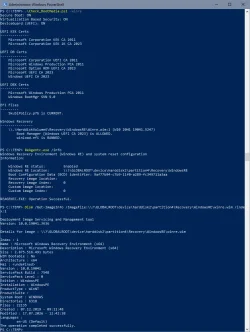
My frankenstein USB drive now comes out under "Fixed Drives"

For the last few weeks, your project has become more of a find the USB/removable/external drive... !

1786978601352.webp
 

My Computer My Computer

At a glance

Windows 11
OS
Windows 11
Thank you, works flawlessly for me (except for the 'you lost another sub' stick, of course)
I don't want to open a new can of worms, by checking Fixed Disk + NTFS volumes.

1. Almost no UEFI's natively boot from NTFS. So it's technically not a boot volume.

2. While I could filter out any volume that doesn't have a \sources\boot.wim, that's still risking someone crazy enough out there.

3. You can inspect the boot.wim, using the local files feature:
Code:
Check_BootMedia.ps1 H:\sources\boot.wim
 

My Computer My Computer

At a glance

Windows 7
OS
Windows 7
I don't want to open a new can of worms, by checking Fixed Disk + NTFS volumes.

1. Almost no UEFI's natively boot from NTFS. So it's technically not a boot volume.

2. While I could filter out any volume that doesn't have a \sources\boot.wim, that's still risking someone crazy enough out there.

3. You can inspect the boot.wim, using the local files feature:
Code:
Check_BootMedia.ps1 H:\sources\boot.wim
I suspect if you try to cover every possible iteration of systems, you'll be at this for a very long time! 🤣
 

My Computers My Computers

  • At a glance

    Win 11 Pro 25H2, Build 26200.9168Intel Core i5 14500, 14th Generation64GB DDR4GeForce RTX 4060
    OS
    Win 11 Pro 25H2, Build 26200.9168
    Computer type
    PC/Desktop
    Manufacturer/Model
    Home Brew
    CPU
    Intel Core i5 14500, 14th Generation
    Motherboard
    Gigabyte B760M G P WIFI
    Memory
    64GB DDR4
    Graphics Card(s)
    GeForce RTX 4060
    Sound Card
    Chipset Realtek
    Monitor(s) Displays
    LG 45" Ultragear & Acer 24" 1080p
    Screen Resolution
    5120x1440 & 1920x1080
    Hard Drives
    Crucial P310 2TB 2280 PCIe Gen4 3D NAND NVMe M.2 SSD (O/S)
    Silicon Power 2TB US75 NVMe PCIe Gen4 M.2 2280 SSD (backup)
    Crucial BX500 2TB 3D NAND (2nd backup)
    Seagate 4TB Ironwolf, rotating HDD archive files
    External off-line backup Drives: 2 NVMe 4TB drives in external enclosures
    PSU
    Thermaltake Toughpower GF3 750W
    Case
    LIAN LI LANCOOL 216 E-ATX PC Case
    Cooling
    Lots of fans!
    Keyboard
    Microsoft Comfort Curve 2000
    Mouse
    Logitech G305
    Internet Speed
    Verizon FiOS 1GB
    Browser
    Firefox
    Antivirus
    Malware Bytes & Windows Defender Security
  • At a glance

    Win 11 Pro 25H2, Build 26200.9168Intel Core i5 1440032GB DDR5Intel 700 Embedded GPU
    Operating System
    Win 11 Pro 25H2, Build 26200.9168
    Computer type
    PC/Desktop
    Manufacturer/Model
    Home Brew
    CPU
    Intel Core i5 14400
    Motherboard
    Gigabyte B760M DS3H AX
    Memory
    32GB DDR5
    Graphics card(s)
    Intel 700 Embedded GPU
    Sound Card
    Realtek Embedded
    Monitor(s) Displays
    27" HP 1080p
    Screen Resolution
    1920x1080
    Hard Drives
    Crucial P310 2TB 2280 PCIe Gen4 eD NAND PCIe SSD
    Samsung EVO 990 2TB NVMe Gen4 SSD
    Samsung 2TB SATA SSD
    PSU
    Thermaltake Smart BM3 650W
    Case
    Okinos Micro ATX Case
    Cooling
    Fans
    Keyboard
    Microsoft Comfort Curve 2000
    Mouse
    Logitech G305
    Internet Speed
    Verizon FiOS 1GB
    Browser
    Firefox
    Antivirus
    Malware Bytes & Windows Defender Security
  • Nimo N171 17" Laptop, (Intel i3-1215U, 16GB RAM, 2TB NVMe, Win11 Pro)
    Acemagic Vista Mini PC V1 (Intel N150, 16GB RAM, 1TB NVMe, Win11 Pro)
    HP ENVY h8-1540t, (24GB RAM, 2TB SSD, 2TB HDD, Win11 Pro)
UPDATE: 2028-08-18

1. Multiple USB removable drives aren't detected because I didn't bother testing with two drives
2. Relocate the rest of Check_UEFI-CA2023.ps1's "REQUIRED ACTIONS" code to Run-FiniteStateMachine()
3. Add backup URL for downloading wimlib-1.14.5
4. Check if boot.wim is missing two DLL files required for "Repair My PC" to work
5. Check_BootMedia.ps1 didn't check if a temporary WIM existed, and exporting a SWM caused unchecked appends to the temp file
6. Detect Ventoy USB drives from Check_BootMedia.ps1

Mostly big changes to the Check_BootMedia.ps1 script.

Thanks to everyone's patience and endless rounds of user testing, I believe we have a solution that correctly recognizes almost everyone's USB removable drives. Fixeds drive with a FAT/FAT32/exFAT filesystem will be scanned too. Except for @t2s50's backup copy of a boot drive (because he's a NTFS rebel).

Big thanks to @Quandary and @t2s50 for providing specific test cases that help me understand what the original logic was doing wrong. Props to everyone else who ran all the test scripts in the past 3 weeks.

I've added a backup method to download wimlib from the Wayback Machine (web.archive.org), when the primary website is not responding.

@fg2001gf11F's complaint about "Repair My PC" being broken in boot.wim (not winre.wim) is checked. But only in -Verbose mode, because not everyone cares about this WinPE feature and they would probably complain this notification confuses them.

Fixed some bugs with analyzing SWM files, mostly with how the temporary file was handled.

Detect you have a Ventoy drive, but we can't do much about verifying if it's bootable since Ventoy uses 3rd-party boot files (and we cannot check the MOK from Windows). We can't really scan the ISO files since you're allowed to place any kind of ISO and there isn't a forced standard for naming ISO files. The script is mostly saying "we know this is a Ventoy drive, so don't expect anything".

But you can always scan any Windows ISO file copied to the Ventoy drive (if you treat it as a standalone file):
Code:
Check-BootMedia F:\ventoy\Windows1.iso F:\ventoy\folder\Windows2.iso

 
Last edited:

My Computer My Computer

At a glance

Windows 7
OS
Windows 7
1. Multiple USB removable drives aren't detected because I didn't bother testing with two drives

It detects my Win 11 install and Macrium boot drives.

Code:
Bootable Media
--------------

USB Drive J: "BOOT2023PCA"
    Boot File [Windows UEFI CA 2023] is ALLOWED.
        J:\EFI\Boot\bootx64.efi
        File Version: 28000.352, SVN 9.0

    boot.wim:2 (WinRE 26100.9168)
        Boot Manager [Windows UEFI CA 2023] is ALLOWED.
            \Windows\Boot\EFI_EX\bootmgfw_EX.efi
            File Version: 28000.352, SVN 9.0

        \Windows\System32\winload.efi is ALLOWED.
            File Version: 26100.9168

    J:\EFI\Microsoft\Boot\boot.stl [5/18/2026 07:44] is CURRENT.

    Please wait while install SWM is analyzed.

    install.swm:1 (W11 25H2 26200.9168)
        Boot Manager [Windows UEFI CA 2023] is ALLOWED.
            \Windows\Boot\EFI_EX\bootmgfw_EX.efi
            File Version: 28000.352, SVN 9.0

        \Windows\System32\winload.efi is ALLOWED.
            File Version: 26100.9168


USB Drive K: "MACRIUMHOME"
    Windows Boot Manager [Windows UEFI CA 2023] is ALLOWED.
        K:\EFI\Microsoft\Boot\bootmgfw.efi
        File Version: 28000.352, SVN 9.0

    Boot File [Windows UEFI CA 2023] is ALLOWED.
        K:\EFI\Boot\bootx64.efi
        File Version: 28000.352, SVN 9.0

    boot.wim:1 (WinRE 26100.1)
        Boot Manager [Windows UEFI CA 2023] is ALLOWED.
            \Windows\Boot\EFI_EX\bootmgfw_EX.efi
            File Version: 28000.352, SVN 9.0

        \Windows\System32\winload.efi is ALLOWED.
            File Version: 26100.9168


PS D:\Scripts\SecureBoot-CA-2023-Updates.v2026.08.18>
 

My Computers My Computers

  • At a glance

    Win 11 Pro 25H2 26200.9168Intel® Core™ i7-14700KG.SKILL Ripjaws S5 Series 64GB (2 x 32GB) DDR5ASUS GeForce RTX 4070 Super 12GB
    OS
    Win 11 Pro 25H2 26200.9168
    Computer type
    PC/Desktop
    Manufacturer/Model
    Self Built
    CPU
    Intel® Core™ i7-14700K
    Motherboard
    ASUS TUF Z690-PLUS WIFI (BIOS 4505)
    Memory
    G.SKILL Ripjaws S5 Series 64GB (2 x 32GB) DDR5
    Graphics Card(s)
    ASUS GeForce RTX 4070 Super 12GB
    Sound Card
    Sound Blaster AE-5 Plus
    Monitor(s) Displays
    ASUS TUF Gaming 27" 2K HDR Gaming
    Screen Resolution
    2560 x 1440
    Hard Drives
    Samsung 990 Pro 1TB NVMe (Win 11 25H2)
    SK hynix P41 500GB NVMe
    SK hynix P41 2TB NVMe (x3)
    Crucial P3 Plus 4TB
    PSU
    Corsair RM850x Shift
    Case
    Antec Dark Phantom DP502 FLUX
    Cooling
    Corsair Nautilus 360 RS AIO
    Keyboard
    Logitech MK 320
    Mouse
    Razer Basilisk V3
    Internet Speed
    750Mbs
    Browser
    Firefox
    Antivirus
    Winows Security
    Other Info
    MR 8.1 Home
  • At a glance

    Win 11 Pro 25H2 26200.9168Intel Core i5-1140064 GB DDR4MSI GeForce RTX 3060 Ventus 2X 12GB
    Operating System
    Win 11 Pro 25H2 26200.9168
    Computer type
    PC/Desktop
    Manufacturer/Model
    Self Built
    CPU
    Intel Core i5-11400
    Motherboard
    Asus TUF Gaming Z590 Plus WiFi (BIOS 2803)
    Memory
    64 GB DDR4
    Graphics card(s)
    MSI GeForce RTX 3060 Ventus 2X 12GB
    Sound Card
    SoundBlaster Audigy Fx V2
    Monitor(s) Displays
    Samsung F27T350
    Screen Resolution
    1920x1080
    Hard Drives
    Samsung 980 Pro 1TB
    Samsung 970 EVO Plus 2TB
    Samsung 870 EVO 500GB SSD
    PSU
    Corsair HX750
    Case
    Cougar MX330-G Window
    Cooling
    Thermalright Frozen Edge 240 Black AIO
    Internet Speed
    350Mbps
    Browser
    Firefox
    Antivirus
    Windows Security
  • System Three
    Win 11 Pro 25H2 26200.9168
    ASUS PRIME Z370-P II BIOS 3004 7/12/21
    Intel Core i7-8700 CPU @ 3.20GHz
    32GB DDR4 RAM (4x8)
    iGPU Intel UHD Graphics 630
    Cooler Master Hyper 212
    Mid-Tower Desktop
It detects my Win 11 install and Macrium boot drives.
#1 should read "[BUG] Original script didn't work BECAUSE I didn't test with two drives".

I'm using a VMware test environment, and I can't do USB device pass-thru since my physical USB hub is maxed out. Also don't have a bunch of right-sized USB thumb drives to spare for testing. I ended up having to create two virtual USB drives just to see the bug.
 
Last edited:

My Computer My Computer

At a glance

Windows 7
OS
Windows 7
Thanks for the renewed script- versions!

(There was a little discrepancy when I checked the winre- image with the -winre switch - your scripts reported 5247, the version read with DISM was 7548, but after having manually updated Winre.wim I no longer can reproduce that)
 

Attachments

  • 1787117984654.webp
    1787117984654.webp
    88.4 KB · Views: 1
Last edited:

My Computer My Computer

At a glance

W10
OS
W10
(y)(y)(y)(y) Yes thank you.
 

My Computer My Computer

At a glance

Windows 11 Pro x64 Version V23H2i7-8700KG.Skill Trident Z 3200MHz F4-3200C16D-16GTZ (...Intel UHD Graphics 630
OS
Windows 11 Pro x64 Version V23H2
Computer type
PC/Desktop
Manufacturer/Model
Custom
CPU
i7-8700K
Motherboard
Asus Maximus X Code - Z370
Memory
G.Skill Trident Z 3200MHz F4-3200C16D-16GTZ (2) 32GB
Graphics Card(s)
Intel UHD Graphics 630
Sound Card
Integrated ROG SupremeFX
Monitor(s) Displays
Asus VP279 27", Samsung BX2431 24"
Screen Resolution
1920 x 1080
Hard Drives
Samsung M.2 NVMe 960 EVO 500GB Boot,
Samsung 840 EVO 250GB (System Copy Drive),
Samsung 860 EVO 1TB (Primary Data Drive),
WD Black 500GB (Data Copy Drive)
ICY Dock 5.25 2.5/3.5 Bays MB971SP-B
PSU
Corsair RM 650i +Gold
Case
Phanteks Enthroo Primo
Cooling
Corsair Hydro H150i, 360mm Rad & Five Corsair 140mm Pro ML Case Fans
Keyboard
das Keyboard MX Brown Mechanical Switches Model DASKMKPROSIL-3G7-r1.0
Mouse
Logitech MX Master 3 Wireless & Bluetooth
Internet Speed
500Mb +
Browser
Chrome (Pri), Firefox (Sec)
Antivirus
Malwarebytes Premium, SuperAntiSpyware Pro (Licensed)
Other Info
Microsoft LifeCam HD,
APC Back-UPS Pro 1500,
Macrium (Licensed),
Microsoft 365,
Wise Disk Cleaner,
Crystal Disk Info,
Screenpresso (Licensed),
AnyDesk (Licensed),
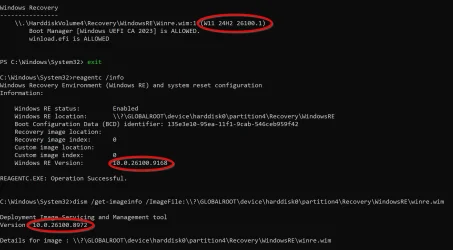
(There was a little discrepancy when I checked the winre- image with the -winre switch
Not just a little discrepancy here. Different results from Check-BootMedia, reagentc, and DISM. They must all be looking at different files.
 

Attachments

  • winre.webp
    winre.webp
    125 KB · Views: 1

My Computer My Computer

At a glance

Windows 11 ProIntel Core Ultra16GBIntel(R) Arc Graphics
OS
Windows 11 Pro
Computer type
Laptop
Manufacturer/Model
ASUS Zenbook 14 OLED
CPU
Intel Core Ultra
Memory
16GB
Graphics Card(s)
Intel(R) Arc Graphics
Sound Card
Realtek High Definition Audio(SST)
Screen Resolution
2880 x 1800
Hard Drives
500 GB NVMe SSD
Internet Speed
1,500Mbps
Browser
Firefox, Edge
Antivirus
Windows Defender
Not just a little discrepancy here. Different results from Check-BootMedia, reagentc, and DISM. They must all be looking at different files.
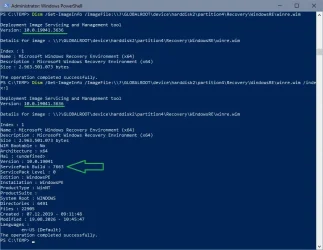
Not Dism, that's just the tool version, you need the index parameter to get the image version! My Dism is on 3636, the image itself is on 7663 (now).

1787151873711.webp
 

My Computer My Computer

At a glance

W10
OS
W10
Back
Top Bottom