
Solved garlin's PowerShell scripts for updating Secure Boot CA 2023


OK, still trying to fix my USB Hasleo rescue boot drive Here is what I'm seeing after trying to recreate a 'new emergency drive'


Hasleo 5.9.2.1
--------------
C:\Program Files\Hasleo\Hasleo Backup Suite\bin\WADK\Windows Preinstallation Environment\amd64\winpe.wim:1 (WinPE 26100.1)
Boot Manager [Windows UEFI CA 2023] is BANNED.
\Windows\Boot\EFI_EX\bootmgfw_EX.efi
File Version: 26089.1001, SVN 2.0

\Windows\System32\winload.efi is ALLOWED.
File Version: 26100.1

WinPE Boot Manager [Windows UEFI CA 2023] is ALLOWED.
C:\Program Files\Hasleo\Hasleo Backup Suite\bin\WADK\Boot\EFI_EX\bootmgfw.efi
File Version: 28000.352, SVN 9.0

Bootable Media
--------------

USB Drive G: "HASLEOBS"
Boot File [Windows UEFI CA 2023] is ALLOWED.
G:\EFI\Boot\bootx64.efi
File Version: 28000.352, SVN 9.0

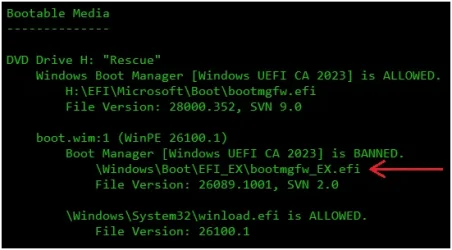
boot.wim:1 (WinPE 26100.1)
Boot Manager [Windows UEFI CA 2023] is BANNED.
\Windows\Boot\EFI_EX\bootmgfw_EX.efi
File Version: 26089.1001, SVN 2.0

\Windows\System32\winload.efi is ALLOWED.
File Version: 26100.1

where did that svn 2.0 come from and how to fix

EDIT: the USB does boot into Hasleo in this config
EDIT 2: I did this command to try and fix but did not clear the 2.0 banned.
copy C:\Windows\Boot\EFI_EX\bootmgfw_EX.efi "C:\Program Files\Hasleo\Hasleo Backup Suite\bin\WADK\Boot\EFI_EX\bootmgfw.efi"
Overwrite C:\Program Files\Hasleo\Hasleo Backup Suite\bin\WADK\Boot\EFI_EX\bootmgfw.efi? (Yes/No/All): all
1 file(s) copied.
 
Last edited:

My Computer My Computer

At a glance

Windows 11 Intel i5 10400 HD630 graphics chipi5-1040012 gbHD630 chipset
OS
Windows 11 Intel i5 10400 HD630 graphics chip
Computer type
PC/Desktop
Manufacturer/Model
HP
CPU
i5-10400
Memory
12 gb
Graphics Card(s)
HD630 chipset
Monitor(s) Displays
LG 24inch
Hard Drives
SSD, external usb drive 1tb for files/backups
Keyboard
wireless Logi
Mouse
ms 4000 wireless mouse
Internet Speed
10meg
Browser
Firefox
Antivirus
Defender
Other Info
Win11 Home 25h2 26200.9278 08/27/2026
EDIT 2: I did this command to try and fix but did not clear the 2.0 banned.
copy C:\Windows\Boot\EFI_EX\bootmgfw_EX.efi "C:\Program Files\Hasleo\Hasleo Backup Suite\bin\WADK\Boot\EFI_EX\bootmgfw.efi"
Overwrite C:\Program Files\Hasleo\Hasleo Backup Suite\bin\WADK\Boot\EFI_EX\bootmgfw.efi? (Yes/No/All): all
1 file(s) copied.
You need to copy the file to the USB drive
Or just run Garlin Update_UEFI-CA2023.ps1 -bootmedia, it will fix it for you

This regard this post, Garlin corrected me in the next post
Thanks Garlin
 
Last edited:

My Computer My Computer

At a glance

Windows 11
OS
Windows 11
USB Drive G: "HASLEOBS"
Boot File [Windows UEFI CA 2023] is ALLOWED.
G:\EFI\Boot\bootx64.efi
File Version: 28000.352, SVN 9.0
\EFI\Boot\bootx64.efi is the boot file on the USB drive's top-level folders. This is what your UEFI sees.

boot.wim:1 (WinPE 26100.1)
Boot Manager [Windows UEFI CA 2023] is BANNED.
\Windows\Boot\EFI_EX\bootmgfw_EX.efi
File Version: 26089.1001, SVN 2.0
This boot file is part of the boot.wim, it's a separate file from the USB drive's folder. What it means is Hasleo is pulling an outdated PE and not applying the right boot manager inside the boot.wim.

The USB's boot file chains (or hands off execution) to the boot.wim's boot manager. You need both files to be allowed. My update script only replaces the USB's boot file, it doesn't touch the boot.wim. That's a Hasleo problem.
 

My Computer My Computer

At a glance

Windows 7
OS
Windows 7
This boot file is part of the boot.wim, it's a separate file from the USB drive's folder. What it means is Hasleo is pulling an outdated PE and not applying the right boot manager inside the boot.wim.

The USB's boot file chains (or hands off execution) to the boot.wim's boot manager. You need both files to be allowed. My update script only replaces the USB's boot file, it doesn't touch the boot.wim. That's a Hasleo problem.
Getting same result if I use WinPE in Macrium X

1787855186449.webp

I had misunderstood your previous explanations.
I though that updating the file pointed by the red arrow would resolve the BANNED.
I now understand with your latest explanations, it's inside the boot.wim, so simply copiing is not a solution.
Good thing I always use WinRE, Macrium uses the winre.wim from my recovery partition which is up to date.

Output from check bootmedia when using WinRE...
Code:
    boot.wim:1 (WinRE 26100.9168)
        Boot Manager [Windows UEFI CA 2023] is ALLOWED.
            \Windows\Boot\EFI_EX\bootmgfw_EX.efi
            File Version: 28000.352, SVN 9.0

So, once again, thank you for the explanations !!!
 

My Computer My Computer

At a glance

Windows 11
OS
Windows 11
Discovered that FAT32 formatted boot media with split wim files show up when running check_bootmedia with 'Repair my PC' is broken in WinPE. Apparently the code recognizes valid .wim and .esd files, but does not convert split wims to check them. That's OK. Just reporting what I found. My blog post from today shows the media (can't stick the .png file URL here for some reason: FAT32 UFD Nixes "Repair My PC" - Ed Tittel).
Keep up the good work, Garlin! This is quite the ongoing odyssey!
--Ed--
 

My Computers My Computers

  • At a glance

    Windows 11i7-8650U (8th Gen/Kaby Lake)16 GBIntel UHD Graphics 620
    OS
    Windows 11
    Computer type
    Laptop
    Manufacturer/Model
    Lenovo X380 Yoga
    CPU
    i7-8650U (8th Gen/Kaby Lake)
    Motherboard
    20LH000MUS (U3E1)
    Memory
    16 GB
    Graphics Card(s)
    Intel UHD Graphics 620
    Sound Card
    Integrated Conexant SmartAudio HD
    Monitor(s) Displays
    FlexView Display
    Screen Resolution
    1920x1080
    Hard Drives
    Toshiba 1 TB PCIe x3 NVMe SSD
    external 5TB Seagate USB-C attached HDD
    PSU
    Lenovo integrated 65W power brick
    Case
    Laptop
    Cooling
    Laptop
    Keyboard
    Integrated Lenovo ThinkPad keyboard
    Mouse
    touchscreen, touchpad
    Internet Speed
    GbE (Spectrum/Charter)
    Browser
    all of em
    Antivirus
    Defender
    Other Info
    Purchased early 2019 as Windows Insider test PC
  • At a glance

    Windows 11Ryzen 5800X128 GB (4x32 DDR5-5600)NVIDIA 3070Ti
    Operating System
    Windows 11
    Computer type
    PC/Desktop
    Manufacturer/Model
    DIY
    CPU
    Ryzen 5800X
    Motherboard
    Asrock B550 Extreme4
    Memory
    128 GB (4x32 DDR5-5600)
    Graphics card(s)
    NVIDIA 3070Ti
    Sound Card
    built-in
    Monitor(s) Displays
    2xDell 2707
    Screen Resolution
    1980x1200
    Hard Drives
    2XNVMe, multiple HDDs from 3 to 12 TB
    PSU
    Seasonic 650
    Case
    NZXT Flo 6
    Cooling
    dual-fan air cooler
    Keyboard
    Logitech Wave
    Mouse
    Logitech Logi
    Internet Speed
    GbE
    Browser
    all of 'em
    Antivirus
    Defender
    Other Info
    temperamental UEFI
Solution posted in the comments of your blog post, Ed...

Regards,

Jim
 

My Computer My Computer

At a glance

Windows 11 Pro 25H2
OS
Windows 11 Pro 25H2
Computer type
Laptop
Manufacturer/Model
Toshiba
To @Banjoman301: thanks, I'll check it out. Much-appreciated. Tried it, and it works! How did I miss that in the first place? I guess when a thread grows to this many pages, it's inevitable somebody (or me, at least) will drop a stitch. Thanks again.
--Ed--
 

My Computers My Computers

  • At a glance

    Windows 11i7-8650U (8th Gen/Kaby Lake)16 GBIntel UHD Graphics 620
    OS
    Windows 11
    Computer type
    Laptop
    Manufacturer/Model
    Lenovo X380 Yoga
    CPU
    i7-8650U (8th Gen/Kaby Lake)
    Motherboard
    20LH000MUS (U3E1)
    Memory
    16 GB
    Graphics Card(s)
    Intel UHD Graphics 620
    Sound Card
    Integrated Conexant SmartAudio HD
    Monitor(s) Displays
    FlexView Display
    Screen Resolution
    1920x1080
    Hard Drives
    Toshiba 1 TB PCIe x3 NVMe SSD
    external 5TB Seagate USB-C attached HDD
    PSU
    Lenovo integrated 65W power brick
    Case
    Laptop
    Cooling
    Laptop
    Keyboard
    Integrated Lenovo ThinkPad keyboard
    Mouse
    touchscreen, touchpad
    Internet Speed
    GbE (Spectrum/Charter)
    Browser
    all of em
    Antivirus
    Defender
    Other Info
    Purchased early 2019 as Windows Insider test PC
  • At a glance

    Windows 11Ryzen 5800X128 GB (4x32 DDR5-5600)NVIDIA 3070Ti
    Operating System
    Windows 11
    Computer type
    PC/Desktop
    Manufacturer/Model
    DIY
    CPU
    Ryzen 5800X
    Motherboard
    Asrock B550 Extreme4
    Memory
    128 GB (4x32 DDR5-5600)
    Graphics card(s)
    NVIDIA 3070Ti
    Sound Card
    built-in
    Monitor(s) Displays
    2xDell 2707
    Screen Resolution
    1980x1200
    Hard Drives
    2XNVMe, multiple HDDs from 3 to 12 TB
    PSU
    Seasonic 650
    Case
    NZXT Flo 6
    Cooling
    dual-fan air cooler
    Keyboard
    Logitech Wave
    Mouse
    Logitech Logi
    Internet Speed
    GbE
    Browser
    all of 'em
    Antivirus
    Defender
    Other Info
    temperamental UEFI
Discovered that FAT32 formatted boot media with split wim files show up when running check_bootmedia with 'Repair my PC' is broken in WinPE. Apparently the code recognizes valid .wim and .esd files, but does not convert split wims to check them. That's OK. Just reporting what I found. My blog post from today shows the media (can't stick the .png file URL here for some reason: FAT32 UFD Nixes "Repair My PC" - Ed Tittel)
Here's a deeper dive on the "Repair My PC" sitaution. I'm translating from abbodi1406's work, because he's one of the true experts on Windows servicing (adding updates to Windows images) and wrote parts of the UUP dump build script.

1. MS started rolling out the Cloud rebuild option feature in April 2026, as another option for rebuilding a broken Window system.

You boot into WinRE, and patiently wait for Cloud rebuild to download a massive set of files, so you can do a local install without needing to have an Windows ISO ready to go. As long as you have network access to MS, and a lot of free time, you can re-install Windows from WinRE. I haven't tried it, but I imagine you get a fully up-to-date image (so patching isn't required when you're done).

2. Mistake #1: When they updated the original program that Repair My PC ran with this new Cloud rebuild version, it required a new DLL to support the cloud access. This new DLL in turn, depends on two other DLL's (wlanapi.dll & mobilenetworking.dll).

3. Mistake #2: Winre.wim already includes both missing files, because it's always designed to be network aware so you can remotely fetch images to start a repair process. But boot.wim doesn't bother to include either file, which the updated Repair My PC app needs in order to run.

4. abbodi1406 is unintentionally helped to hide the problem. If you download an authentic ISO from MS (using MCT), you get the untouched boot.wim. But for technical reasons, abbodi1406 isn't creating a "100% accurate copy" of boot.wim, because he's using the winre.wim as his starting point for boot.wim.

WinRE is basically the WinPE on steroids, you get the same code plus some specific RE extensions for rebuilding images. But it's also got hardcoded Wi-Fi support and extra system tools.
  • If you use the original MS ISO's, Repair My PC is broken from WinPE.
  • If you use UUP dump, Repair My PC works because it's a modified boot.wim.
For install purposes, it doesn't make a difference that UUP dump chooses to be different from the original image.

5. For the boot media check script to really know what's inside a WIM, it must extract the file using either wimlib or 7z.exe. This works out well for install.wim (direct download ISO's) or install.esd (MCT's save to ISO file). UUP dump gives you an option of choosing between WIM or ESD format.

What's really terrible is when you ask MCT to create an USB drive... It creates a split WIM, to get around the legacy problem of fitting an install image which is far larger than the 4 GB filesize limit for FAT32. Typically a split WIM is a WIM (or an ESD converted to a WIM) chopped into under-4 GB chunks.

Mistake #3: MCT wants to do uber compression, and creates a proprietary SWM is which an ESD (solid format) split into parts. This "non-standard" SWM cannot be opened by wimlib or 7z.exe. Only MCT can create this Franken-SWM. If you ran DISM to manually convert a WIM into a SWM, it would not create the same file. MS is undoubtedly trying to compress the heck out of the MCT files.

6. In order for my boot media script to examine a MCT-created SWM, we have to make a temporary copy and DISM convert it back into a WIM. Which wimlib or 7z.exe can now happily extract the desired files. When you have a WIM or ESD as the image file, none of this extra work is required.
 
Last edited:

My Computer My Computer

At a glance

Windows 7
OS
Windows 7
OK for a non expert it was a bit scary but with garlin's guidance I managed to remove the skusipolicy.p7b

PowerShell 7.6.5
PS C:\Windows\System32> powershell -nop -ep bypass -f C:\temp21\check_bootmedia.ps1 -verbose -audit
Windows 11 25H2 (26200.9168)

Secure Boot: ON
Virtualization Based Security: ON

UEFI KEK Certs
--------------
Microsoft Corporation KEK CA 2011
Microsoft Corporation KEK 2K CA 2023

UEFI DB Certs
-------------
Microsoft Corporation UEFI CA 2011
Microsoft Windows Production PCA 2011
Microsoft Option ROM UEFI CA 2023
Microsoft UEFI CA 2023
Windows UEFI CA 2023

UEFI DBX Certs
--------------
Microsoft Windows Production PCA 2011
Windows BootMgr SVN 9.0

EFI Files
---------
[OPTIONAL] SkuSiPolicy.p7b (for VBS) is MISSING.

Hasleo 5.9.2.1
--------------
WinPE Boot Manager [Windows UEFI CA 2023] is BANNED.
C:\Program Files\Hasleo\Hasleo Backup Suite\bin\WADK\Boot\EFI_EX\bootmgfw.efi
File Version: 26100.30227, SVN 7.0

Hey that's great!

Are you okay with running Check_UEFI-CA2023.ps1 -Audit -Verbose ?

Thanks.
 

My Computers My Computers

  • At a glance

    Windows 11 ProIntel Core i5-12600K 3.7 GHz 10-Core ProcessorCorsair Vengeance LPX 64 GB (2 x 32 GB) DDR4-...Integrated Intel UHD Graphics 770
    OS
    Windows 11 Pro
    Computer type
    PC/Desktop
    Manufacturer/Model
    Self built PC by me.
    CPU
    Intel Core i5-12600K 3.7 GHz 10-Core Processor
    Motherboard
    Gigabyte B760M H DDR4 Micro ATX LGA1700 Motherboard
    Memory
    Corsair Vengeance LPX 64 GB (2 x 32 GB) DDR4-3200 CL16 Memory
    Graphics Card(s)
    Integrated Intel UHD Graphics 770
    Sound Card
    Realtek
    Monitor(s) Displays
    LG
    Hard Drives
    Samsung 990 Pro 1 TB M.2-2280 PCIe 4.0 X4 NVME Solid State Drive
    Samsung 990 Pro 2 TB M.2-2280 PCIe 4.0 X4 NVME Solid State Drive
    PSU
    NZXT 850w ATX 3.1 Gold Fully Modular Power Supply
    Case
    Thermaltake Versa H25 ATX Mid Tower Case
    Cooling
    CPU Cooler Thermalright Assassin Spirit 120 EVO ARGB (ARGB Disabled) - Case Fans BlackThermalright TL-C12C-S X3 66.17 CFM 120 mm Fans 3-Pack (ARGB disabled)
    Internet Speed
    1 Gbps
    Other Info
    I hate ARGB.
  • At a glance

    Windows 11 Pro
    Operating System
    Windows 11 Pro
    Computer type
    Laptop
    Manufacturer/Model
    Lenovo ThinkBook 14 G2 ITL
What -Audit adds, is it pretends that both Secure Boot and VBS are enabled, so it does the full set of checks.

Otherwise, it normally runs based on your current security settings. This is useful when you're thinking of turning on Secure Boot or VBS, and need to know the predicted result of such a change.
 

My Computer My Computer

At a glance

Windows 7
OS
Windows 7
I wrote this script, as an exercise in PS, to update the Windows Install USB with the missing files required for "Repair My PC" functionality. In summary, it mounts the boot.wim, adds the two .dlls from the running windows system, and commits the changes to the USB. There a various checks and backup performed to protect the USB.
 

Attachments

My Computer My Computer

At a glance

Windows 11 ProIntel Core Ultra16GBIntel(R) Arc Graphics
OS
Windows 11 Pro
Computer type
Laptop
Manufacturer/Model
ASUS Zenbook 14 OLED
CPU
Intel Core Ultra
Memory
16GB
Graphics Card(s)
Intel(R) Arc Graphics
Sound Card
Realtek High Definition Audio(SST)
Screen Resolution
2880 x 1800
Hard Drives
500 GB NVMe SSD
Internet Speed
1,500Mbps
Browser
Firefox, Edge
Antivirus
Windows Defender
Here's my script if you want to compare notes.

1. Check if boot.wim's date is May 5, 2026 or later (when the problem was first reported) and missing the two files.

2. Pull files from install.wim/esd/swm on the USB (rather from the current host, so it's not dependent on the host or the ISO release). If you a read-only media like a mounted ISO file, then make a new offline boot.wim which the user can copy to a target USB.

3. Use wimlib instead of mounting images with DISM (because it's faster, since we're not applying any update packages).
 

Attachments

My Computer My Computer

At a glance

Windows 7
OS
Windows 7
When I run your script Repair_My-BootWIM.ps1, using a bat file, I get the following result:

PS C:\Users\admin\Downloads\SecureBoot-CA-2023-Updates.v2026.08.24> .\Repair_My_Bootmedia.bat I:
PowerShell 7.6.5
Making file updates to I:\sources\boot.wim
Extracting file data: 714 KiB of 714 KiB (100%) done
Done extracting files.
Adding files to boot.wim
Performing clean-up on boot WIM.

Remove-Item: C:\Users\admin\Downloads\SecureBoot-CA-2023-Updates.v2026.08.24\Repair_My_BootWIM.ps1:139
Line |
139 | Remove-Item "$TEMP_DIR\wlanapi.dll" -Force
| ~~~~~~~~~~~~~~~~~~~~~~~~~~~~~~~~~~~~~~~~~~
| Access to the path 'C:\Users\admin\AppData\Local\Temp\wlanapi.dll' is denied.
Remove-Item: C:\Users\admin\Downloads\SecureBoot-CA-2023-Updates.v2026.08.24\Repair_My_BootWIM.ps1:140
Line |
140 | Remove-Item "$TEMP_DIR\mobilenetworking.dll" -Force
| ~~~~~~~~~~~~~~~~~~~~~~~~~~~~~~~~~~~~~~~~~~~~~~~~~~~
| Access to the path 'C:\Users\admin\AppData\Local\Temp\mobilenetworking.dll' is denied.
PS C:\Users\admin\Downloads\SecureBoot-CA-2023-Updates.v2026.08.24>

When I then check the bootmedia,

PS C:\Users\admin\Downloads\SecureBoot-CA-2023-Updates.v2026.08.24> .\Check-Bootmedia.bat -Verbose
PowerShell 7.6.5
Windows 11 25H2 (26200.9168)

Secure Boot: ON
Virtualization Based Security: ON

UEFI KEK Certs
--------------
Microsoft Corporation KEK CA 2011
Microsoft Corporation KEK 2K CA 2023

UEFI DB Certs
-------------
Microsoft Corporation UEFI CA 2011
Microsoft Windows Production PCA 2011
Microsoft Option ROM UEFI CA 2023
Microsoft UEFI CA 2023
Windows UEFI CA 2023

UEFI DBX Certs
--------------
Microsoft Windows Production PCA 2011
Windows BootMgr SVN 9.0

EFI Files
---------
[OPTIONAL] SkuSiPolicy.p7b (for VBS) is MISSING.

Bootable Media
--------------

USB Drive I: "Win11_25H2_EngUS_x64_14aug2026"
Boot File [Windows UEFI CA 2023] is ALLOWED.
I:\EFI\Boot\bootx64.efi
File Version: 28000.352, SVN 9.0

boot.wim:2 (WinPE 26100.9168)
Boot Manager [Windows UEFI CA 2023] is ALLOWED.
\Windows\Boot\EFI_EX\bootmgfw_EX.efi
File Version: 28000.352, SVN 9.0

\Windows\System32\winload.efi is ALLOWED.
File Version: 26100.9168

I:\EFI\Microsoft\Boot\boot.stl [18/05/2026 19:44] is CURRENT.

install.esd:1 (W11 25H2 26200.9168)
Boot Manager [Windows UEFI CA 2023] is ALLOWED.
\Windows\Boot\EFI_EX\bootmgfw_EX.efi
File Version: 28000.352, SVN 9.0

\Windows\System32\winload.efi is ALLOWED.
File Version: 26100.9168

Skipping over the next 6 images.


USB Drive K: "RUFUS_BOOT"
Boot File [Microsoft Corporation UEFI CA 2011] is ALLOWED.
K:\EFI\Boot\bootx64.efi
[THIRD-PARTY] EFI File


PS C:\Users\admin\Downloads\SecureBoot-CA-2023-Updates.v2026.08.24>

This is a USB stick that used to give the message "Repair my pc is broken". So the new script does its job. Thank you, Garlin.
 

My Computer My Computer

At a glance

windows 11
OS
windows 11

Latest Support Threads

Back
Top Bottom




