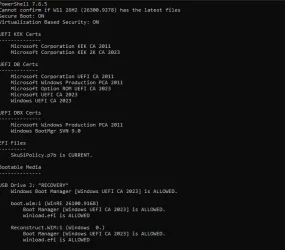
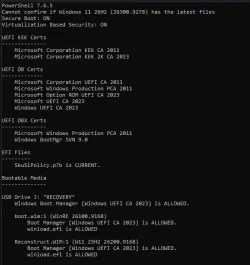
Your Windows can have a Winre.wim which is out-of-date or corrupted. Assuming it's from the same release branch, the next time WU applies the Monthly Update it will have instructions on how to update your Winre.wim at the same time.
I wasn't really asking about how winre.wim is suppose to get updated by Windows update.
I was only using it as an example to compare to what your script does.
Thanks any way
Hope @garlin doesn't mind me posting an update for an Nitro AN515-45. I was updating to 2600.9278 today but not actually following it. It rebooted once, I think, then it went into full fanspeed mode. It not only did the preview update but it also updated the bios to 5.42.1.14. How that happened I don't know.
Once it was settled then checked update again and it installed Secure Boot Allowed Key Extchange Key (KEK) Update. At long last but better late than never. So if you have a Nitro machine it should be due for the Secure Boot update.
Thank you garlin.
Hope @garlin doesn't mind me posting an update for an Nitro AN515-45. I was updating to 2600.9278 today but not actually following it. It rebooted once, I think, then it went into full fanspeed mode. It not only did the preview update but it also updated the bios to 5.42.1.14. How that happened I don't know.
Once it was settled then checked update again and it installed Secure Boot Allowed Key Extchange Key (KEK) Update. At long last but better late than never. So if you have a Nitro machine it should be due for the Secure Boot update.
Thank you garlin.
For supported models, Acer has decided to push BIOS capsule updates by using Windows Update.
Any OEM can submit a specially formatted BIOS image and have Windows install it without requiring a vendor-provided flashing tool. This is an universal method available to all OEM's, but less vendors take advantage of it. I imagine Acer didn't want to make a newer tool for all the affected PC's.
Nitro AN16-41
Available on Windows Update
V1.26
Nitro AN16-51
Available on Windows Update
V1.12
Nitro AN17-41
Available on Windows Update
V1.26
Nitro AN17-51
Available on Windows Update
V1.12
Nitro AN17-71
Under process
Nitro AN515-44
Under process
Nitro AN515-45
Available on Windows Update
V1.14
Nitro AN515-46
Available on Windows Update
V1.19
Nitro AN515-47
Available on Windows Update
V1.19
Nitro AN515-55
09/22/2026
Nitro AN515-56
Available on Windows Update
V1.11
Nitro AN515-57
Available on Windows Update
V1.21
Nitro AN515-58
Available on Windows Update
V2.21
Nitro AN517-41
Available on Windows Update
V1.14
Nitro AN517-42
Under process
Nitro AN517-43
Under process
Nitro AN517-52
09/22/2026
Aspire AN517-53
Under process
Nitro AN517-54
Available on Windows Update
V1.21
Nitro AN517-55
Available on Windows Update
V2.20
Nitro ANV15-51
Available on Windows Update
V1.60
Nitro ANV15-52
Available on Windows Update
V1.60
Unlike earlier this year, Acer is now listing more models as "Under process". Which is a good sign they're really committed to supporting their users, a change from their previous stance of only announcing fewer supported PC's.
1. Provide correct machine architecture names in different places
2. Required actions for Check_UEFI-CA2023.ps1 should allow for disabled or removed "Secure-Boot-Update" task
3. Check for Secure Boot update task is not locale-independent
4. Check for "reagentc /info" is not locale-independent
Minor bug fixes to correct handling of non-x64 architectures by using the proper EFI platform names (ia32 instead of x86).
Allow for users to disable the Secure Boot task (because of the TPM attestation bug on Dell's and other PC's), and report when it's disabled or removed. This mostly impacted Check_UEFI-CA2023.ps1, since it originally provided instructions to run the Secure Boot task. The update script has always been able to do 90% of the same things as the task (without needing it), but the check script reported the "MS method" any way for compatibility reasons.
If you have disabled or removed the task, Check_UEFI-CA2023.ps1 will instruct you to run Update_UEFI-CA2023.ps1
Otherwise it works the same as before, when the task is available.
Improve international support because matching strings in English doesn't work for everyone.
To report the image's real build number, the SOFTWARE reg hive needs to be extracted.
Recovery files are a little weird. Unlike a SWM where a single image is split across different parts, but can be reconstructed into a single image; Reconstruct WIM's are written ahead of time as standalone WIM files, with different parts of the backup. Don't ask me why MS decided to be inconsistent.
One of the problems is knowing where a file will end up in the multiple WIM's.
In my testing, the reg hives were always in the first WIM (which makes sense) and everything else was randomly in the following WIM's. There's logic to search for the boot manager across the files, but that's because they don't store the boot file itself but the WinSxS version of it. Not sure if this means I have to repeat that process with the SOFTWARE hive.
For a Recovery file, it's safe to presume the Windows images matches the boot.wim's built (or close enough). I see about changing the logic.
Your Windows version doesn't really matter, but you would expect the backup process to "walk" the Windows folder structure and hit \Windows\System32\config before reaching Windows\WinSxS. And maybe it doesn't.
I just changed the code to brute force it, and ask 7z.exe to extract the same registry file from every WIM (and silently ignore the errors). It's not elegant, but considering you're only running this script occasionally, the extra time it takes isn't too bad.
MS has made a dumb-witted decision to re-organize the latest post-signed DBX update files available for download from their GitHub repo. "Dumb" in because they provided the same DBX content into two wildly different folder layouts.
SignedByKEK2011 has multiple subfolders for each architecture (containing multiple files).
SignedByKEK2023 has a single folder containing a single file for each architecture type.
This breaks the rarely used (by still useful) "Update_UEFI-CA2023.ps1 -Revoke -Latest" command, which downloads the latest GitHub files in case MS has newer content than what's available on your local Windows. Which is useful on End-of-Life systems that no longer get Windows Updates to push the latest DBXupdate.bin file. It'll probably be fixed later tonight or by tomorrow.
UPDATE: Fixed the scripts. Besides changing the GitHub folder structure, they arbitrarily decided to rename the files from .bin to .efiauth2 (because that doesn't break all the naming conventions MS previously used...)
Just in case anyone needs the script before the next official ZIP version.
1. Check_BootMedia.ps1 doesn't always find SOFTWARE hive from Recovery WIM's
2. Convert Confirm-MinimumUBR function from using switch() to a lookup table
3. MS changed the folder layout of DBX update files on their GitHub repo
4. Correct reporting of Windows release name from CurrentVersion reg keys
5. Rename VMWare's default PK to "NULL PK"
MS recently updated their GitHub repo, so the latest DBX update files (in case you wanted to check if GitHub had a newer version than Windows) got renamed and re-organized. In the past, activity on the MS GitHub moved faster and sometimes it had newer files than Windows. But for months now, it's lagging behind the Monthly Updates as the source of the most recent files.
You may have used "Update-UEFI.bat -Revoke -Latest" to check for a newer DBX update file.
The old version of the script throws an error because the GitHub file it was looking for is gone. This update changes how those file(s) are downloaded. If you never used that feature to check for the latest DBX files, then you don't need to immediately change scripts.
The rest are minor fixes, including improvements to how your Windows version name is reported (ie. Server 2025).
For supported models, Acer has decided to push BIOS capsule updates by using Windows Update.
Any OEM can submit a specially formatted BIOS image and have Windows install it without requiring a vendor-provided flashing tool. This is an universal method available to all OEM's, but less vendors take advantage of it. I imagine Acer didn't want to make a newer tool for all the affected PC's.
Nitro AN16-41
Available on Windows Update
V1.26
Nitro AN16-51
Available on Windows Update
V1.12
Nitro AN17-41
Available on Windows Update
V1.26
Nitro AN17-51
Available on Windows Update
V1.12
Nitro AN17-71
Under process
Nitro AN515-44
Under process
Nitro AN515-45
Available on Windows Update
V1.14
Nitro AN515-46
Available on Windows Update
V1.19
Nitro AN515-47
Available on Windows Update
V1.19
Nitro AN515-55
09/22/2026
Nitro AN515-56
Available on Windows Update
V1.11
Nitro AN515-57
Available on Windows Update
V1.21
Nitro AN515-58
Available on Windows Update
V2.21
Nitro AN517-41
Available on Windows Update
V1.14
Nitro AN517-42
Under process
Nitro AN517-43
Under process
Nitro AN517-52
09/22/2026
Aspire AN517-53
Under process
Nitro AN517-54
Available on Windows Update
V1.21
Nitro AN517-55
Available on Windows Update
V2.20
Nitro ANV15-51
Available on Windows Update
V1.60
Nitro ANV15-52
Available on Windows Update
V1.60
Unlike earlier this year, Acer is now listing more models as "Under process". Which is a good sign they're really committed to supporting their users, a change from their previous stance of only announcing fewer supported PC's.
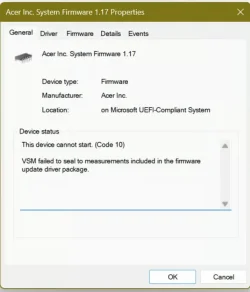
In theory, version 1.17 would also work. What I would try is this:
1. Disable Secure Boot.
2. Try reset to factory defaults (it should have the CA 2023 certs included now).
3. Leave Secure Boot off. Boot Windows.
4. Run the check script, make sure everything is still OK.
5. Enable Secure Boot. See if the VSM error disappears; sometimes a firmware update leaves corrupted NVRAM values which the reset to defaults can fix.
I am seeing some results on my setup that I haven't seen before. I first saw this with the 09/04 script version, but then I tried the 08/31 version and saw the same thing. When doing a Check_UEFI-CA2023.ps1 -Verbose -Audit command, the audit report now contains the text "Windows Boot Manager [Windows UEFI CA 2023] is wrong version". Then, in "Required Action, it says:
Code:
REQUIRED ACTION
===============

To install Windows Boot Manager [UEFI CA 2023], run the commands:

    reg add HKEY_LOCAL_MACHINE\SYSTEM\CurrentControlSet\Control\Secureboot /v AvailableUpdates /t REG_DWORD /d 0x100 /f
    powershell Start-ScheduledTask -TaskName "\Microsoft\Windows\PI\Secure-Boot-Update"
The entire output looks as follows
Code:
> .\Check_UEFI-CA2023.ps1 -Verbose -Audit
Windows 11 25H2 (26200.9168)
Secure Boot: ON
Virtualization Based Security: OFF (Audit Report runs as ON)
BitLocker on (C:) OFF

BIOS Firmware
-------------
    Micro-Star International Co. MS-7A38
    Version: H.J6
    Date: 2026-07-19

Factory Default UEFI PK Cert
----------------------------
    MSI SHIP PK

UEFI PK Cert
------------
    MSI SHIP PK

Factory Default UEFI KEK Certs
------------------------------
    Microsoft Corporation KEK CA 2011
    Microsoft Corporation KEK 2K CA 2023
    MSI SHIP KEK

UEFI KEK Certs
--------------
    Microsoft Corporation KEK CA 2011
    Microsoft Corporation KEK 2K CA 2023
    MSI SHIP KEK

Factory Default UEFI DB Certs
-----------------------------
    Microsoft Corporation UEFI CA 2011
    Microsoft Windows Production PCA 2011
    Microsoft Option ROM UEFI CA 2023
    Microsoft UEFI CA 2023
    Windows UEFI CA 2023
    MSI SHIP DB

UEFI DB Certs
-------------
    Microsoft Corporation UEFI CA 2011
    Microsoft Windows Production PCA 2011
    Microsoft Option ROM UEFI CA 2023
    Microsoft UEFI CA 2023
    Windows UEFI CA 2023
    MSI SHIP DB

Factory Default UEFI DBX Certs
------------------------------
    (NONE)
    EFI_CERT_SHA256_GUID Signatures: 431

UEFI DBX Certs
--------------
    Microsoft Windows Production PCA 2011
    Windows BootMgr SVN 9.0
    EFI_CERT_SHA256_GUID Signatures: 449

UEFI Variables
--------------
    Credential Guard: ON
    SBAT (Linux only): sbat,1,2024010900 / shim,4 / grub,3 / grub.debian,4

EFI Files
---------
    Windows Boot Manager [Windows UEFI CA 2023] is ALLOWED.
        \\.\HarddiskVolume3\EFI\Microsoft\Boot\bootmgfw.efi
        File Version: 28000.355, SVN 9.0

    Registry: "WindowsUEFICA2023Capable" = 2
        [Windows UEFI CA 2023] in UEFI DB, and Windows starting from CA 2023 Boot Manager.

    [OPTIONAL] SkuSiPolicy.p7b (for VBS) is MISSING.

AUDIT REPORT
============
1.  Windows Boot Manager [Windows UEFI CA 2023] is wrong version

[OPTIONAL] SkuSiPolicy.p7b (for VBS) is missing from EFI

STATUS REPORT
-------------
    Registry: "UEFICA2023Status" = Updated


REQUIRED ACTION
===============

To install Windows Boot Manager [UEFI CA 2023], run the commands:

    reg add HKEY_LOCAL_MACHINE\SYSTEM\CurrentControlSet\Control\Secureboot /v AvailableUpdates /t REG_DWORD /d 0x100 /f
    powershell Start-ScheduledTask -TaskName "\Microsoft\Windows\PI\Secure-Boot-Update"
I ran the reg add and Start-ScheduledTask commands above from a PowerShell admin prompt, then rebooted, then re-ran the script. The output, shown below, appears to be the same.
Code:
> .\Check_UEFI-CA2023.ps1 -Verbose -Audit
Windows 11 25H2 (26200.9168)
Secure Boot: ON
Virtualization Based Security: OFF (Audit Report runs as ON)
BitLocker on (C:) OFF

BIOS Firmware
-------------
    Micro-Star International Co. MS-7A38
    Version: H.J6
    Date: 2026-07-19

Factory Default UEFI PK Cert
----------------------------
    MSI SHIP PK

UEFI PK Cert
------------
    MSI SHIP PK

Factory Default UEFI KEK Certs
------------------------------
    Microsoft Corporation KEK CA 2011
    Microsoft Corporation KEK 2K CA 2023
    MSI SHIP KEK

UEFI KEK Certs
--------------
    Microsoft Corporation KEK CA 2011
    Microsoft Corporation KEK 2K CA 2023
    MSI SHIP KEK

Factory Default UEFI DB Certs
-----------------------------
    Microsoft Corporation UEFI CA 2011
    Microsoft Windows Production PCA 2011
    Microsoft Option ROM UEFI CA 2023
    Microsoft UEFI CA 2023
    Windows UEFI CA 2023
    MSI SHIP DB

UEFI DB Certs
-------------
    Microsoft Corporation UEFI CA 2011
    Microsoft Windows Production PCA 2011
    Microsoft Option ROM UEFI CA 2023
    Microsoft UEFI CA 2023
    Windows UEFI CA 2023
    MSI SHIP DB

Factory Default UEFI DBX Certs
------------------------------
    (NONE)
    EFI_CERT_SHA256_GUID Signatures: 431

UEFI DBX Certs
--------------
    Microsoft Windows Production PCA 2011
    Windows BootMgr SVN 9.0
    EFI_CERT_SHA256_GUID Signatures: 449

UEFI Variables
--------------
    Credential Guard: ON
    SBAT (Linux only): sbat,1,2024010900 / shim,4 / grub,3 / grub.debian,4

EFI Files
---------
    Windows Boot Manager [Windows UEFI CA 2023] is ALLOWED.
        \\.\HarddiskVolume3\EFI\Microsoft\Boot\bootmgfw.efi
        File Version: 28000.355, SVN 9.0

    Registry: "WindowsUEFICA2023Capable" = 2
        [Windows UEFI CA 2023] in UEFI DB, and Windows starting from CA 2023 Boot Manager.

    [OPTIONAL] SkuSiPolicy.p7b (for VBS) is MISSING.

AUDIT REPORT
============
1.  Windows Boot Manager [Windows UEFI CA 2023] is wrong version

[OPTIONAL] SkuSiPolicy.p7b (for VBS) is missing from EFI

STATUS REPORT
-------------
    Registry: "UEFICA2023Status" = Updated


REQUIRED ACTION
===============

To install Windows Boot Manager [UEFI CA 2023], run the commands:

    reg add HKEY_LOCAL_MACHINE\SYSTEM\CurrentControlSet\Control\Secureboot /v AvailableUpdates /t REG_DWORD /d 0x100 /f
    powershell Start-ScheduledTask -TaskName "\Microsoft\Windows\PI\Secure-Boot-Update"
The only thing that comes to mind as a possible cause is that earlier this week, I installed the KB5120998 Preview Update. Then I heard some horror stories and decided to uninstall it just to be safe. Might this be the cause of what I'm seeing?
My Computer
At a glance
Windows 11 pro 25h2AMD Ryzen 7 5700G64 GB G.Skill (F4-3200C16Q-64GVK)Integrated into CPU
OS
Windows 11 pro 25h2
Computer type
PC/Desktop
Manufacturer/Model
DIY
CPU
AMD Ryzen 7 5700G
Motherboard
MSI B450M Bazooka, BIOS version 7A38vHJ5 (latest beta as of 2025-09-23)
Memory
64 GB G.Skill (F4-3200C16Q-64GVK)
Graphics Card(s)
Integrated into CPU
Sound Card
Realtek (built into motherboard)
Monitor(s) Displays
Generic HDMI
Screen Resolution
1080p
Hard Drives
System and apps: SK hynix Gold P31 1TB M.2
Data: Toshiba HDWQ140 4TB internal SATA
PSU
Seasonic 400W SS-400FL2 fanless
Case
Fractal Design Define R5
Cooling
Cooler Master Hyper 212 Evo
Keyboard
Lenovo Preferred Pro II Wired External USB Keyboard (4X30M86879)
That worked. Thank you! The hashes were indeed different. When I run the script now, I get no warnings anymore. There is now an earlier version in "EFI Files" as follows:
Code:
EFI Files
---------
    Windows Boot Manager [Windows UEFI CA 2023] is ALLOWED.
        \\.\HarddiskVolume3\EFI\Microsoft\Boot\bootmgfw.efi
        File Version: 28000.352, SVN 9.0
Before doing the steps you suggested the version was:
Code:
EFI Files
---------
    Windows Boot Manager [Windows UEFI CA 2023] is ALLOWED.
        \\.\HarddiskVolume3\EFI\Microsoft\Boot\bootmgfw.efi
        File Version: 28000.355, SVN 9.0
Thanks again!
My Computer
At a glance
Windows 11 pro 25h2AMD Ryzen 7 5700G64 GB G.Skill (F4-3200C16Q-64GVK)Integrated into CPU
OS
Windows 11 pro 25h2
Computer type
PC/Desktop
Manufacturer/Model
DIY
CPU
AMD Ryzen 7 5700G
Motherboard
MSI B450M Bazooka, BIOS version 7A38vHJ5 (latest beta as of 2025-09-23)
Memory
64 GB G.Skill (F4-3200C16Q-64GVK)
Graphics Card(s)
Integrated into CPU
Sound Card
Realtek (built into motherboard)
Monitor(s) Displays
Generic HDMI
Screen Resolution
1080p
Hard Drives
System and apps: SK hynix Gold P31 1TB M.2
Data: Toshiba HDWQ140 4TB internal SATA
PSU
Seasonic 400W SS-400FL2 fanless
Case
Fractal Design Define R5
Cooling
Cooler Master Hyper 212 Evo
Keyboard
Lenovo Preferred Pro II Wired External USB Keyboard (4X30M86879)
Insider releases don't exactly follow the same release window for boot manager like on Production channel (where the file is simultaneously switched from W10 22H2 all the way to 26H1). Sometimes the Insider version is slightly ahead in version.
The Secure Boot task will not push an older boot manager from \Windows\Boot to the EFI as a safety check.
Having a newer boot manager (28000.355) than what Windows has (28000.352) isn't necessarily bad. But there's no real guidance on what to do if the versions are really mismatched, say your EFI ended up with 29000.123. Is that a supported combination?