Solved garlin's PowerShell scripts for updating Secure Boot CA 2023


When you have no keys present, the UEFI considers that as Setup mode and Secure Boot by definition is disabled. You can't enforce Secure Boot when no certs exist. As soon as you install a working set of keys, then enforcement can begin again. Since my update script fills all of the missing certs in one pass (when you're in Setup Mode), you don't have switch Secure Boot modes.

But it's generally good to temporarily do that, in case some unexpected error happens.
 

My Computer My Computer

At a glance

Windows 7
OS
Windows 7
@garlin, I can't remember if you previously explained it, if you did, sorry to ask again.
A part from OEM DBX entries which MS has no control over, will MS overtime remove obsolete/unrequired DBX entries ?
On the same topic, have you ever seen OEMs cleaning up obsolete/unrequired DBX entries ?
 

My Computers My Computers

  • At a glance

    Windows 1132GB
    OS
    Windows 11
    Computer type
    PC/Desktop
    Manufacturer/Model
    Dell 3910
    Memory
    32GB
  • At a glance

    Windows 1116GB
    Operating System
    Windows 11
    Computer type
    Tablet
    Manufacturer/Model
    Surface Pro 9
    Memory
    16GB
Just as an FYI - I tried several different procedures I found on the internet to rollback the T490 BIOS from version 1.85 to 1.84 and none of them worked. That was the main thing that pushed me to the Mosby route to redo the certificates. I didn't stop to think that @garlin 's update script would do the same thing.
 

My Computers My Computers

  • At a glance

    Windows 11 Pro 25H2i7-8565U16GBIntel UHD Graphics 620
    OS
    Windows 11 Pro 25H2
    Computer type
    Laptop
    Manufacturer/Model
    Lenovo T490 (2020 Hardware)
    CPU
    i7-8565U
    Motherboard
    20N20028US
    Memory
    16GB
    Graphics Card(s)
    Intel UHD Graphics 620
    Sound Card
    Realtec Audio
    Monitor(s) Displays
    ASUS VE248
    Screen Resolution
    1920 X 1080
    Hard Drives
    Samsung SSD 970 PRO 512GB NVMe
    Internet Speed
    Frontier fiber 1GB
    Browser
    Chrome, Firefox, Edge
    Antivirus
    Norton 360 Deluxe Plus
    Other Info
    Supported hardware, upgraded from Windows 10 Pro to Windows 11 Pro version 24H2 on 06/01/2025 using the Windows 11 ISO file. Used the enablement package to upgrade to version 25H2 on 10/07/2025. Secure boot enabled. Secure Boot CA 2023 updated.
  • At a glance

    Windows 11 Pro 25H2i7-4770 (with SSE4.2, and POPCNT)16GBIntel HD Graphics 4600
    Operating System
    Windows 11 Pro 25H2
    Computer type
    PC/Desktop
    Manufacturer/Model
    Lenovo ThinkCentre M83 (2014 Hardware)
    CPU
    i7-4770 (with SSE4.2, and POPCNT)
    Motherboard
    10AL000GUS
    Memory
    16GB
    Graphics card(s)
    Intel HD Graphics 4600
    Sound Card
    Realtec High Definition Audio
    Monitor(s) Displays
    ASUS VE248
    Screen Resolution
    1920 X 1080
    Hard Drives
    Samsung SSD 860 PRO 1TB SATA
    Internet Speed
    Frontier fiber 1GB
    Browser
    Chrome, Firefox, Edge
    Antivirus
    Norton 360 Deluxe Plus
    Other Info
    Unsupported hardware, upgraded from Windows 10 Pro (TPM 1.2 & unsupported CPU, but does have SSE4.2, and POPCNT) to Windows 11 Pro version 24H2 on 06/15/2025. Added Registry Key HKEY_LOCAL_MACHINE\SYSTEM\Setup\MoSetup – AllowUpgradesWithUnsupportedTPMOrCPU=1 to allow installation using the Windows 11 ISO file. Used the enablement package to upgrade to version 25H2 on 10/08/2025. Secure boot enabled. Secure Boot CA 2023 updated.
@garlin, I can't remember if you previously explained it, if you did, sorry to ask again.
A part from OEM DBX entries which MS has no control over, will MS overtime remove obsolete/unrequired DBX entries ?
On the same topic, have you ever seen OEMs cleaning up obsolete/unrequired DBX entries ?
The inherent problem is a host OS cannot (according the UEFI spec) delete an existing key from a Secure Boot variable. The supported actions are to either replace the entire contents of a variable, or to append a new entry.

Window cannot scan the existing DBX list and delete the 151 (or really 154) entries on a live system. They're not going to write a tool to collect the current DBX list, trim it down, and then rewrite the shorter list back to the DBX. But in order to perform that task, they need to have a copy of your PK to authenticate the new list (which they don't have any way).

So the answer is no. Neither MS or your PC vendor will help you in this regard. Now most OEM's stopped collecting new EFI signatures for the factory defaults years ago, because it was clear MS was taking the lead to perform this at the Windows level with dbxupdate.bin. This is why most factory defaults tend to have under 200 DBX entries. There's no point duplicating this work when MS is supposed to track newer entries.

But... some OEM's have decided to embrace the latest DBX list as it's currently published. Like the one with 430 factory defaults. It's up to the OEM.

If you want to remove the obsoleted entries, that's up to the user. The UEFI Forum, which serves as the standards group for the industry, doesn't have a mandate covering cleanup because it's never happened before. MS was trying to help users on older PC's with BIOS restrictions on Secure Boot variable space, and now that's created a gray area.

For an average user to reset their keys may be a challenging task if they're not familiar with their Secure Boot menu options, or your OEM has a terrible BIOS which makes it really confusing. So nobody in the industry is willing to tell you to reset any keys. That's an unwanted support nightmare with confused users.
 

My Computer My Computer

At a glance

Windows 7
OS
Windows 7
Just installed windows 26H2 and this came up

Code:
PS C:\SecureBoot-CA-2023-Updates.v2026.09.10> powershell -nop -ep bypass -f .\Check_UEFI-CA2023.ps1 -Verbose -Audit
Windows 11 26H2 (26300.9457)
Secure Boot: ON
Virtualization Based Security: ON
BitLocker on (C:) OFF

BIOS Firmware
-------------
    Gigabyte Technology Co. B760M H DDR4
    Version: F14
    Date: 2025-06-19

Factory Default UEFI PK Cert
----------------------------
    GIGABYTE

UEFI PK Cert
------------
    GIGABYTE

Factory Default UEFI KEK Certs
------------------------------
    Microsoft Corporation KEK CA 2011
    Microsoft Corporation KEK 2K CA 2023
    GIGABYTE

UEFI KEK Certs
--------------
    Microsoft Corporation KEK CA 2011
    Microsoft Corporation KEK 2K CA 2023
    GIGABYTE

Factory Default UEFI DB Certs
-----------------------------
    Microsoft Corporation UEFI CA 2011
    Microsoft Windows Production PCA 2011
    Windows UEFI CA 2023
    GIGABYTE
    GIGABYTE

UEFI DB Certs
-------------
    Microsoft Corporation UEFI CA 2011
    Microsoft Windows Production PCA 2011
    Microsoft Option ROM UEFI CA 2023
    Microsoft UEFI CA 2023
    Windows UEFI CA 2023
    GIGABYTE
    GIGABYTE

Factory Default UEFI DBX Certs
------------------------------
    (NONE)
    EFI_CERT_SHA256_GUID Signatures: 77

UEFI DBX Certs
--------------
    Microsoft Windows Production PCA 2011
    Windows BootMgr SVN 11.0
    EFI_CERT_SHA256_GUID Signatures: 504

UEFI Variables
--------------
    Credential Guard: ON
    SBAT (Linux only): sbat,1,2025051000 / shim,4 / grub,5 / grub.debian,4 / grub.peimage,2 / grub.proxmox,2

EFI Files
---------
    Windows Boot Manager [Windows UEFI CA 2023] is ALLOWED.
        \\.\HarddiskVolume1\EFI\Microsoft\Boot\bootmgfw.efi
        File Version: 28000.367, SVN 11.0

    Registry: "WindowsUEFICA2023Capable" = 2
        [Windows UEFI CA 2023] in UEFI DB, and Windows starting from CA 2023 Boot Manager.

    SkuSiPolicy.p7b is CURRENT.
        \\.\HarddiskVolume1\EFI\Microsoft\Boot\SkuSiPolicy.p7b
        Version: 3.0.0.18

AUDIT REPORT
============
1.  Cannot confirm if Windows 11 26H2 (26300.9457) has the latest files

STATUS REPORT
-------------
    Registry: "UEFICA2023Status" = Updated

    SUCCESS: UPDATES ARE FINISHED.
    UEFI CA 2023 certs are present, PCA 2011 cert is revoked.

PS C:\SecureBoot-CA-2023-Updates.v2026.09.10>


1. Cannot confirm if Windows 11 26H2 (26300.9457) has the latest files

Safe to ignore this?
 

My Computers My Computers

  • At a glance

    Windows 11 ProIntel Core i5-12600K 3.7 GHz 10-Core ProcessorCorsair Vengeance LPX 64 GB (2 x 32 GB) DDR4-...Integrated Intel UHD Graphics 770
    OS
    Windows 11 Pro
    Computer type
    PC/Desktop
    Manufacturer/Model
    Self built PC by me.
    CPU
    Intel Core i5-12600K 3.7 GHz 10-Core Processor
    Motherboard
    Gigabyte B760M H DDR4 Micro ATX LGA1700 Motherboard
    Memory
    Corsair Vengeance LPX 64 GB (2 x 32 GB) DDR4-3200 CL16 Memory
    Graphics Card(s)
    Integrated Intel UHD Graphics 770
    Sound Card
    Realtek
    Monitor(s) Displays
    LG
    Hard Drives
    Samsung 990 Pro 1 TB M.2-2280 PCIe 4.0 X4 NVME Solid State Drive
    Samsung 990 Pro 2 TB M.2-2280 PCIe 4.0 X4 NVME Solid State Drive
    PSU
    NZXT 850w ATX 3.1 Gold Fully Modular Power Supply
    Case
    Thermaltake Versa H25 ATX Mid Tower Case
    Cooling
    CPU Cooler Thermalright Assassin Spirit 120 EVO ARGB (ARGB Disabled) - Case Fans BlackThermalright TL-C12C-S X3 66.17 CFM 120 mm Fans 3-Pack (ARGB disabled)
    Internet Speed
    1 Gbps
    Other Info
    I hate ARGB.
  • At a glance

    Windows 11 Pro
    Operating System
    Windows 11 Pro
    Computer type
    Laptop
    Manufacturer/Model
    Lenovo ThinkBook 14 G2 ITL
Until tomorrow. I didn't know when 26H2 was going to GA, so I couldn't add a minimum version check until today.
Thanks for answering just wondering if you are going to release a new version soon or wait until the upcoming patch Tuesday?
😳
 

My Computers My Computers

  • At a glance

    Windows 11 ProIntel Core i5-12600K 3.7 GHz 10-Core ProcessorCorsair Vengeance LPX 64 GB (2 x 32 GB) DDR4-...Integrated Intel UHD Graphics 770
    OS
    Windows 11 Pro
    Computer type
    PC/Desktop
    Manufacturer/Model
    Self built PC by me.
    CPU
    Intel Core i5-12600K 3.7 GHz 10-Core Processor
    Motherboard
    Gigabyte B760M H DDR4 Micro ATX LGA1700 Motherboard
    Memory
    Corsair Vengeance LPX 64 GB (2 x 32 GB) DDR4-3200 CL16 Memory
    Graphics Card(s)
    Integrated Intel UHD Graphics 770
    Sound Card
    Realtek
    Monitor(s) Displays
    LG
    Hard Drives
    Samsung 990 Pro 1 TB M.2-2280 PCIe 4.0 X4 NVME Solid State Drive
    Samsung 990 Pro 2 TB M.2-2280 PCIe 4.0 X4 NVME Solid State Drive
    PSU
    NZXT 850w ATX 3.1 Gold Fully Modular Power Supply
    Case
    Thermaltake Versa H25 ATX Mid Tower Case
    Cooling
    CPU Cooler Thermalright Assassin Spirit 120 EVO ARGB (ARGB Disabled) - Case Fans BlackThermalright TL-C12C-S X3 66.17 CFM 120 mm Fans 3-Pack (ARGB disabled)
    Internet Speed
    1 Gbps
    Other Info
    I hate ARGB.
  • At a glance

    Windows 11 Pro
    Operating System
    Windows 11 Pro
    Computer type
    Laptop
    Manufacturer/Model
    Lenovo ThinkBook 14 G2 ITL
Wednesday, which is tomorrow in Redmond time. Since 26H2 GA isn't aligned with Patch Tuesday, there are no Secure Boot changes permitted.
 

My Computer My Computer

At a glance

Windows 7
OS
Windows 7
1. Cannot confirm if Windows 11 26H2 (26300.9457) has the latest files

Safe to ignore this?
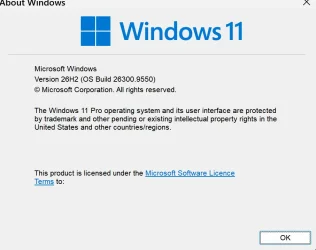
Interesting I am on a newer build and ran the enablement package last week.
 

Attachments

  • Screenshot 2026-09-30 125001.webp
    Screenshot 2026-09-30 125001.webp
    44.3 KB · Views: 1

My Computer My Computer

At a glance

Windows 11AMD Ryzen 8700G64 GBOnboard
OS
Windows 11
Computer type
PC/Desktop
Manufacturer/Model
Generic
CPU
AMD Ryzen 8700G
Motherboard
Gigabyte B650 UD AC
Memory
64 GB
Graphics Card(s)
Onboard
Sound Card
Onboard
Monitor(s) Displays
Del U2723QE
Screen Resolution
3840 x 2160
Hard Drives
Corsiar MP600 1TB
PSU
Silverstone 750 GOLD
Case
Silverstone FARA 513
Secure Boot updates are considered security fixes. By rule, Patch Tuesday is the only day a security fix can be released (unless it's an Out-of-Band emergency fix). 26300.9550 is a Preview Update (it's not uncommon for the GA build to be a Preview), and next month it will be repackaged with October's security fixes.

Whether a new boot manager (and therefore SVN) is required cannot be known before then. Or at least outside of MS; as there are strict rules related to responsible disclosure. Nobody is allowed a "head start" on knowing a security fix is imminent, and no outsiders get early access to security patches. This creates an equal playing field for all Windows clients.
 

My Computer My Computer

At a glance

Windows 7
OS
Windows 7
Cannot confirm if Windows 11 26H2 (26300.9457) has the latest files
It was the latest version of the MCT ISO today...

Deployment Image Servicing and Management tool
Version: 10.0.26100.8972

Details for image : E:\sources\install.esd

Index : 6
Name : Windows 11 Pro
Description : Windows 11 Pro
Size : 26,770,709,765 bytes
WIM Bootable : No
Architecture : x64
Hal : <undefined>
Version : 10.0.26300
ServicePack Build : 9457
ServicePack Level : 0
Edition : Professional
Installation : Client
ProductType : WinNT
ProductSuite : Terminal Server
System Root : WINDOWS
Directories : 34635
Files : 152999
Created : 9/13/2026 - 11:44:57 AM
Modified : 9/29/2026 - 2:33:39 PM
Languages : en-US (Default)
The operation completed successfully.

However, I installed the enablement package, and it bumped my version and build from 26200.9445 (25H2 September 8th updates) to 26300.9445

As @garlin mentioned, it will be repackaged again for the October 13th updates, so I wouldn't be too concerned about the latest files.
 
Last edited:

My Computer My Computer

At a glance

Windows 11 Pro 25H2
OS
Windows 11 Pro 25H2
Computer type
Laptop
Manufacturer/Model
Toshiba
Back
Top Bottom