
Solved garlin's PowerShell scripts for updating Secure Boot CA 2023


UPDATE: 2026-10-14

1. Incorrect warning on DeviceGuard registry key inside Update_UEFI-CA2023.ps1
2. Incorrect warning on RescuePE registry key inside Check_BootMedia.ps1
3. October 2026 LCU introduced SVN 12.0, requiring a new minimum UBR for supported releases
4. October 2026 LCU removed SVN's from DBXUpdate2024.bin

Reverted v2026-10-08 changes to all Get-ItemPropertyValue function calls, where the "-ErrorAction Stop" parameter was incorrectly removed. This broke the error handling when reading from any undefined reg value. Users should not see the "DeviceGuard" error.

Oct 2026's LCU introduced two new changes. SVN was bumped to 12.0, so October's update is now the minimum baseline for having the right Monthly Update installed.

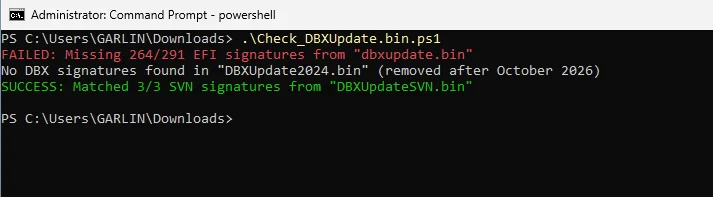
DBXUpdate2024.bin no longer contains any SVN's, and Check_DBXUpdate.bin.ps1 should not consider this an "error". The reported message will remain "No DBX signatures found", but it will be noted whenever the DBX file is DBXUpdate2024.bin. This preserves backward compatibility with older Windows releases, which are stuck with the previous versions of this file.
1791995872808.webp
 

My Computer My Computer

At a glance

Windows 7
OS
Windows 7
@garlin thanks updated:


PS C:\Windows\System32> powershell -nop -ep bypass -f C:\temp28\check_dbxupdate.bin.ps1 -verbose -audit
SUCCESS: Matched 291/291 EFI signatures from "dbxupdate.bin"
No DBX signatures found in "DBXUpdate2024.bin" (removed after October 2026)
SUCCESS: Matched 3/3 SVN signatures from "DBXUpdateSVN.bin"
 

My Computer My Computer

At a glance

Windows 11 Intel i5 10400 HD630 graphics chipi5-1040012 gbHD630 chipset
OS
Windows 11 Intel i5 10400 HD630 graphics chip
Computer type
PC/Desktop
Manufacturer/Model
HP
CPU
i5-10400
Memory
12 gb
Graphics Card(s)
HD630 chipset
Monitor(s) Displays
LG 24inch
Hard Drives
SSD, external usb drive 1tb for files/backups
Keyboard
wireless Logi
Mouse
ms 4000 wireless mouse
Internet Speed
10meg
Browser
Firefox
Antivirus
Defender
Other Info
Win11 Home 26h2 26300.9550 09/30/2026
@garlin What does "Scheduled Task: "Secure-Boot-Update" is Ready." mean? I don't remember seeing that before. Is there something else I need to do?

The Check script said I had to run these commands on both of my PCs which I did. It was after that, that the Scheduled Task line showed up in the STATUS REPORT.

reg add HKEY_LOCAL_MACHINE\SYSTEM\CurrentControlSet\Control\Secureboot /v AvailableUpdates /t REG_DWORD /d 0x200 /f
powershell Start-ScheduledTask -TaskName "\Microsoft\Windows\PI\Secure-Boot-Update"

Task.webp
 

My Computers My Computers

  • At a glance

    Windows 11 Pro 26H2i7-8565U16GBIntel UHD Graphics 620
    OS
    Windows 11 Pro 26H2
    Computer type
    Laptop
    Manufacturer/Model
    Lenovo T490 (2020 Hardware)
    CPU
    i7-8565U
    Motherboard
    20N20028US
    Memory
    16GB
    Graphics Card(s)
    Intel UHD Graphics 620
    Sound Card
    Realtec Audio
    Monitor(s) Displays
    ASUS VE248
    Screen Resolution
    1920 X 1080
    Hard Drives
    Samsung SSD 970 PRO 512GB NVMe
    Internet Speed
    Frontier fiber 1GB
    Browser
    Chrome, Firefox, Edge
    Antivirus
    Norton 360 Deluxe Plus
    Other Info
    Supported hardware, upgraded from Windows 10 Pro to Windows 11 Pro version 24H2 on 06/01/2025 using the Windows 11 ISO file. Used the enablement package to upgrade to version 25H2 on 10/07/2025. Secure boot enabled. Secure Boot CA 2023 updated.
  • At a glance

    Windows 11 Pro 26H2i7-4770 (with SSE4.2, and POPCNT)16GBIntel HD Graphics 4600
    Operating System
    Windows 11 Pro 26H2
    Computer type
    PC/Desktop
    Manufacturer/Model
    Lenovo ThinkCentre M83 (2014 Hardware)
    CPU
    i7-4770 (with SSE4.2, and POPCNT)
    Motherboard
    10AL000GUS
    Memory
    16GB
    Graphics card(s)
    Intel HD Graphics 4600
    Sound Card
    Realtec High Definition Audio
    Monitor(s) Displays
    ASUS VE248
    Screen Resolution
    1920 X 1080
    Hard Drives
    Samsung SSD 860 PRO 1TB SATA
    Internet Speed
    Frontier fiber 1GB
    Browser
    Chrome, Firefox, Edge
    Antivirus
    Norton 360 Deluxe Plus
    Other Info
    Unsupported hardware, upgraded from Windows 10 Pro (TPM 1.2 & unsupported CPU, but does have SSE4.2, and POPCNT) to Windows 11 Pro version 24H2 on 06/15/2025. Added Registry Key HKEY_LOCAL_MACHINE\SYSTEM\Setup\MoSetup – AllowUpgradesWithUnsupportedTPMOrCPU=1 to allow installation using the Windows 11 ISO file. Used the enablement package to upgrade to version 25H2 on 10/08/2025. Secure boot enabled. Secure Boot CA 2023 updated.
The scheduled task can be in one of four states:
- Ready (not Running)​
- Running​
- Disabled​
- Removed​

The first two states indicate you have not disabled or removed the task. Some users are forced to do that to solve an unrelated problem with the Secure Boot task triggering a system lockup (ie. Dell's with a specific model TPM chip).

For them, it's important to confirm the task is properly Disabled or Removed. Most users should have the task as Ready.
 

My Computer My Computer

At a glance

Windows 7
OS
Windows 7
Like someone earlier indicated, my system too reads: as below and I can still boot into Hasleo using an old rescue disk. So that does confirm Garlin's recent post stating that the rescue media won't boot if the Firmware SVN is lower than 11.

Code:
FirmwareSVN      : 11.0
BootManagerSVN   : 12.0
StagedSVN        : 12.0
ComplianceStatus : Not compliant (Firmware does not match boot manager)
BootManagerPath  : \\.\HarddiskVolume1\EFI\Microsoft\Boot\bootmgfw.efi
 

My Computers My Computers

  • At a glance

    Windows 11 Home, ver 25H2 build 26200.8894Intel Core i5 5200U @ 2.20GH4 GBIntel HD Graphics 5500 on board
    OS
    Windows 11 Home, ver 25H2 build 26200.8894
    Computer type
    Laptop
    Manufacturer/Model
    Hewlett-Packard Spectre 13-4001 x360 convertable
    CPU
    Intel Core i5 5200U @ 2.20GH
    Motherboard
    Hewlett-Packard 802D
    Memory
    4 GB
    Graphics Card(s)
    Intel HD Graphics 5500 on board
    Sound Card
    Intel Smart Sound Technology (Intel SST)
    Hard Drives
    Micron 256GB M.2 2280 NGFF SSD MTFDDAV256TBN, (SATA 6.0 Gb/s)
    Keyboard
    Model # G01KB
    Antivirus
    Microsoft Defender
    Other Info
    born on date: 25 Feb 2016
  • At a glance

    Win 11 Home 25H2 build 26200.8894Intel Core i7 4th Gen 4790 (3.60GHz), Haswell...Samsung 16 GB DDR3 (8GB in 2 modules)NVIDIA GeForce GTX 760, 3GB, and on-board Int...
    Operating System
    Win 11 Home 25H2 build 26200.8894
    Computer type
    PC/Desktop
    Manufacturer/Model
    Asus Desktop model M32AD-US019S (DOM: 6/9/2014 )
    CPU
    Intel Core i7 4th Gen 4790 (3.60GHz), Haswell 22nm Technology, SOCKET 1150
    Motherboard
    H81M-E/M51AD/DP_MB
    Memory
    Samsung 16 GB DDR3 (8GB in 2 modules)
    Graphics card(s)
    NVIDIA GeForce GTX 760, 3GB, and on-board Intel HD Graphics 4600 Rev 6
    Monitor(s) Displays
    HP EliteDisplay E241i LED; HP EliteDisplay E243
    Hard Drives
    Samsung 500GB SSD, 870 EVO (SATA 6.0 )
    Micron 250GB SSD, CT250MX500
    Toshiba HDD, 3GB (original drive w/PC)
    Case
    ASUS
    Keyboard
    ASUS-------------------------
    Antivirus
    MS Defender
    Other Info
    purchased 8/28/2015 from Newegg.
  • HEWLETT PACKARD
    HP OmniBook X Flip NGAI (Next Gen AI),
    Model: 16-as0023dx
    PT# B5UH1UA#ABA Product #: B5UH1UA
    delivered and setup 7/25/25
    16" 2K Touch-Screen Laptop
    Intel Core Ultra 7 256V '24 Series 2 - CPU
    Boost Clock Frequency 4.8 gigahertz; Neural Processing Unit (NPU) Yes;
    16GB Memory, LPDDR5X
    1TB SSD PCIe 4.0
    Graphics: Intel Arc 140V
    1 x HDMI 2.1
    1 x Thunderbolt 4
    2K Touch-Screen display, LED, IPS; 1920 x 1200 (Full HD+)
    USB Ports: 1 x USB-C 3.1, 2 x USB-A 3.1
    Wi-Fi 6E

    DELL
    Model:I7591-7483BLK-PUS 2-in-1 (7000 Series)
    purchased new 12/3/2019,
    15.6 inch 2-IN-1;
    4K Ultra HD Touch-Screen, 3840 x 2160,
    Intel Core i7 10510U CPU 1.80GHz,
    16GB RAM DDR4 SDRAM 2400 megahert (2 slots),
    dedicated graphics Nvidia GeForce MX250 2 GB Graphics,
    PCIe 512GB Intel SSD + 32GB Optane Memory (Intel Optane Memory H10 with solid-state storage),
    wireless-AX & Bluetooth
    Battery: 68wh, Type 4VGMP 4 cell
The scheduled task can be in one of four states:
- Ready (not Running)​
- Running​
- Disabled​
- Removed​

The first two states indicate you have not disabled or removed the task. Some users are forced to do that to solve an unrelated problem with the Secure Boot task triggering a system lockup (ie. Dell's with a specific model TPM chip).

For them, it's important to confirm the task is properly Disabled or Removed. Most users should have the task as Ready.
So I don't need to take any action? I just wait and at some point it will take care of itself?
 

My Computers My Computers

  • At a glance

    Windows 11 Pro 26H2i7-8565U16GBIntel UHD Graphics 620
    OS
    Windows 11 Pro 26H2
    Computer type
    Laptop
    Manufacturer/Model
    Lenovo T490 (2020 Hardware)
    CPU
    i7-8565U
    Motherboard
    20N20028US
    Memory
    16GB
    Graphics Card(s)
    Intel UHD Graphics 620
    Sound Card
    Realtec Audio
    Monitor(s) Displays
    ASUS VE248
    Screen Resolution
    1920 X 1080
    Hard Drives
    Samsung SSD 970 PRO 512GB NVMe
    Internet Speed
    Frontier fiber 1GB
    Browser
    Chrome, Firefox, Edge
    Antivirus
    Norton 360 Deluxe Plus
    Other Info
    Supported hardware, upgraded from Windows 10 Pro to Windows 11 Pro version 24H2 on 06/01/2025 using the Windows 11 ISO file. Used the enablement package to upgrade to version 25H2 on 10/07/2025. Secure boot enabled. Secure Boot CA 2023 updated.
  • At a glance

    Windows 11 Pro 26H2i7-4770 (with SSE4.2, and POPCNT)16GBIntel HD Graphics 4600
    Operating System
    Windows 11 Pro 26H2
    Computer type
    PC/Desktop
    Manufacturer/Model
    Lenovo ThinkCentre M83 (2014 Hardware)
    CPU
    i7-4770 (with SSE4.2, and POPCNT)
    Motherboard
    10AL000GUS
    Memory
    16GB
    Graphics card(s)
    Intel HD Graphics 4600
    Sound Card
    Realtec High Definition Audio
    Monitor(s) Displays
    ASUS VE248
    Screen Resolution
    1920 X 1080
    Hard Drives
    Samsung SSD 860 PRO 1TB SATA
    Internet Speed
    Frontier fiber 1GB
    Browser
    Chrome, Firefox, Edge
    Antivirus
    Norton 360 Deluxe Plus
    Other Info
    Unsupported hardware, upgraded from Windows 10 Pro (TPM 1.2 & unsupported CPU, but does have SSE4.2, and POPCNT) to Windows 11 Pro version 24H2 on 06/15/2025. Added Registry Key HKEY_LOCAL_MACHINE\SYSTEM\Setup\MoSetup – AllowUpgradesWithUnsupportedTPMOrCPU=1 to allow installation using the Windows 11 ISO file. Used the enablement package to upgrade to version 25H2 on 10/08/2025. Secure boot enabled. Secure Boot CA 2023 updated.
So I don't need to take any action? I just wait and at some point it will take care of itself?
You don't read the Status, but review if there are any REQUIRED ACTIONS listed. The status is provided for the paranoid users, who are concerned something may have changed since the last time.
 

My Computer My Computer

At a glance

Windows 7
OS
Windows 7
You don't read the Status, but review if there are any REQUIRED ACTIONS listed. The status is provided for the paranoid users, who are concerned something may have changed since the last time.
I executed the REQUIRED ACTIONS that I listed in my post, so I'll try not to be paranoid. :wink::lmao:
 

My Computers My Computers

  • At a glance

    Windows 11 Pro 26H2i7-8565U16GBIntel UHD Graphics 620
    OS
    Windows 11 Pro 26H2
    Computer type
    Laptop
    Manufacturer/Model
    Lenovo T490 (2020 Hardware)
    CPU
    i7-8565U
    Motherboard
    20N20028US
    Memory
    16GB
    Graphics Card(s)
    Intel UHD Graphics 620
    Sound Card
    Realtec Audio
    Monitor(s) Displays
    ASUS VE248
    Screen Resolution
    1920 X 1080
    Hard Drives
    Samsung SSD 970 PRO 512GB NVMe
    Internet Speed
    Frontier fiber 1GB
    Browser
    Chrome, Firefox, Edge
    Antivirus
    Norton 360 Deluxe Plus
    Other Info
    Supported hardware, upgraded from Windows 10 Pro to Windows 11 Pro version 24H2 on 06/01/2025 using the Windows 11 ISO file. Used the enablement package to upgrade to version 25H2 on 10/07/2025. Secure boot enabled. Secure Boot CA 2023 updated.
  • At a glance

    Windows 11 Pro 26H2i7-4770 (with SSE4.2, and POPCNT)16GBIntel HD Graphics 4600
    Operating System
    Windows 11 Pro 26H2
    Computer type
    PC/Desktop
    Manufacturer/Model
    Lenovo ThinkCentre M83 (2014 Hardware)
    CPU
    i7-4770 (with SSE4.2, and POPCNT)
    Motherboard
    10AL000GUS
    Memory
    16GB
    Graphics card(s)
    Intel HD Graphics 4600
    Sound Card
    Realtec High Definition Audio
    Monitor(s) Displays
    ASUS VE248
    Screen Resolution
    1920 X 1080
    Hard Drives
    Samsung SSD 860 PRO 1TB SATA
    Internet Speed
    Frontier fiber 1GB
    Browser
    Chrome, Firefox, Edge
    Antivirus
    Norton 360 Deluxe Plus
    Other Info
    Unsupported hardware, upgraded from Windows 10 Pro (TPM 1.2 & unsupported CPU, but does have SSE4.2, and POPCNT) to Windows 11 Pro version 24H2 on 06/15/2025. Added Registry Key HKEY_LOCAL_MACHINE\SYSTEM\Setup\MoSetup – AllowUpgradesWithUnsupportedTPMOrCPU=1 to allow installation using the Windows 11 ISO file. Used the enablement package to upgrade to version 25H2 on 10/08/2025. Secure boot enabled. Secure Boot CA 2023 updated.
@garlin
Thanks for the adaptation.
It's a more clear message now.

SUCCESS: Matched 291/291 EFI signatures from "dbxupdate.bin"
No DBX signatures found in "DBXUpdate2024.bin" (removed after October 2026)
SUCCESS: Matched 3/3 SVN signatures from "DBXUpdateSVN.bin"
 

My Computers My Computers

  • At a glance

    Win 11 Pro 26H2 Build 26300.9550, Zorin OS ProIntel® Core™ i7-12700KF 12th Gen. (S1700)32GB DDR5 5600-36 Vengeance (2x16)PCIe4.0 Asus NVIDIA RTX3060Ti
    OS
    Win 11 Pro 26H2 Build 26300.9550, Zorin OS Pro
    Computer type
    PC/Desktop
    Manufacturer/Model
    Self built
    CPU
    Intel® Core™ i7-12700KF 12th Gen. (S1700)
    Motherboard
    ASUS Prime Z690-A, BIOS v4505 (Z690 Intel Chipset)
    Memory
    32GB DDR5 5600-36 Vengeance (2x16)
    Graphics Card(s)
    PCIe4.0 Asus NVIDIA RTX3060Ti
    Sound Card
    Onboard; Realtek
    Monitor(s) Displays
    34" LG 34UC79G-B Curved 21:9 144Hz
    Screen Resolution
    2560x1080 (No HDR)
    Hard Drives
    250Gb Samsung 870PRO NVMe (Win 11 Pro)
    1Tb Samsung 980PRO NVMe
    1Tb Samsung 970EVO NVMe
    2Tb Samsung 990PRO NVMe with heatsink.
    4Tb WDC WD40EZRZ Blue SATA (Int.)
    4Tb WDC WD40EZRZ Blue SATA (Int.)
    3Tb WDC WD30EFRZ Red SATA (Int.)
    256Gb Samsung 840PRO SSD (RHEL 9,5)
    256Gb Samsung 850PRO SSD (Zorin OS Pro 18)
    PSU
    Coolermaster 850W V2 Gold with internal 12cm exaust fan
    Case
    Be-Quiet Pure Base 600.
    Cooling
    3x Be-Quiet! 12/14cm "Silent Wings 4" casefans, 1x Arctic Freezer i35 CPU towerblock with fan.
    Keyboard
    Steelseries APEX 7 keyboard.
    Mouse
    Logitech G-502 Hero
    Internet Speed
    1Gb
    Browser
    Brave
    Antivirus
    F-Secure
    Other Info
    No Noise system.
    256Gb Kingston Travler USB 3.0 drive.
    64Gb Sandisk USB 3.2 drive. (Ventoy)
    8Gb Philips USB 3.0 drive. (Win. Inst.)
    8Gb Philips USB 3.0 drive. (Rescue disk)
    2Tb WD USB 3.0 Passport drive.
    USB Ext. 500Gb WD SATA drive.
    External USB 3.0 C.A. CD/DVD* burner.
  • At a glance

    Windows 11 Pro 26H2Intel® Core™ i7-6700K 6th Gen. (S1151)32Gb DDR4 2400 Corsair Vengeance (4x8)ASUS GeForce GTX1080
    Operating System
    Windows 11 Pro 26H2
    Computer type
    PC/Desktop
    Manufacturer/Model
    Selfbuild
    CPU
    Intel® Core™ i7-6700K 6th Gen. (S1151)
    Motherboard
    ASUS Maximus VIII Ranger (Intel Chipset Z170)
    Memory
    32Gb DDR4 2400 Corsair Vengeance (4x8)
    Graphics card(s)
    ASUS GeForce GTX1080
    Sound Card
    Onboard; Realtek
    Monitor(s) Displays
    LG IPS277L 27" WideLED, IPS
    Screen Resolution
    1920x1080
    Hard Drives
    Samsung 850 Pro SSD
    PSU
    Zalman ZM600-HP with internal exhaust fan. Heatpipes & Modular cables.
    Case
    Cooler Master Aero
    Cooling
    Scythe Mugen 4 dual fan towerblock.
    Keyboard
    Red Dragon
    Mouse
    Red Dragon
    Internet Speed
    1Gb
    Browser
    Brave
    Antivirus
    F-Secure
Found the steps to update USB - now updated


Bootable Media
--------------

USB Drive G: "HASLEOBS"
Boot File [Windows UEFI CA 2023] is ALLOWED.
G:\EFI\Boot\bootx64.efi
File Version: 28000.376, SVN 12.0

boot.wim:1 (WinPE 26100.1)
Boot Manager [Windows UEFI CA 2023] is ALLOWED.
\Windows\Boot\EFI_EX\bootmgfw_EX.efi
File Version: 28000.376, SVN 12.0

\Windows\System32\winload.efi is ALLOWED.
File Version: 26100.1
 

My Computer My Computer

At a glance

Windows 11 Intel i5 10400 HD630 graphics chipi5-1040012 gbHD630 chipset
OS
Windows 11 Intel i5 10400 HD630 graphics chip
Computer type
PC/Desktop
Manufacturer/Model
HP
CPU
i5-10400
Memory
12 gb
Graphics Card(s)
HD630 chipset
Monitor(s) Displays
LG 24inch
Hard Drives
SSD, external usb drive 1tb for files/backups
Keyboard
wireless Logi
Mouse
ms 4000 wireless mouse
Internet Speed
10meg
Browser
Firefox
Antivirus
Defender
Other Info
Win11 Home 26h2 26300.9550 09/30/2026
Updated my Asus Vivobook X1605VA just now.
I'm not going to do the optional SkuSiPolicy on this machine.

1792004297169.webp
 

My Computers My Computers

  • At a glance

    Windows 11 Pro 26H2Intel Core i9 13900KCorsair Dominator Platinum 64gb 5600MT/s DDR5...Sapphire NITRO+ AMD Radeon RX 7900 XTX Vapor-...
    OS
    Windows 11 Pro 26H2
    Computer type
    PC/Desktop
    Manufacturer/Model
    Homebuilt
    CPU
    Intel Core i9 13900K
    Motherboard
    Asus ProArt Z790 Creator WiFi - Bios 3202
    Memory
    Corsair Dominator Platinum 64gb 5600MT/s DDR5 Dual Channel
    Graphics Card(s)
    Sapphire NITRO+ AMD Radeon RX 7900 XTX Vapor-X 24GB
    Sound Card
    External DAC: Cambridge Audio DACMagic200M - Headphone Amps: Topping L70 & SMSL H400
    Monitor(s) Displays
    Samsung S95F OLED 55" TV
    Screen Resolution
    3840 x 2160 120hz
    Hard Drives
    Samsung 980 Pro 2TB (OS)
    Samsung 980 Pro 1TB (Files)
    Lexar NZ790 4TB
    LaCie d2 Professional 6TB external - USB 3.1
    Seagate Expansion 16TB external - USB 3.2
    Seagate One Touch 18TB external HD - USB 3.0
    PSU
    Corsair RM1200x Shift
    Case
    Corsair RGB Smart Case 5000x (white)
    Cooling
    NAUTILUS 360 RS Liquid CPU Cooler
    Keyboard
    Incase Ergonomic USB (Microsoft clone)
    Mouse
    Logitech MX Master 3S
    Internet Speed
    Fibre 900/500 Mbps
    Browser
    Microsoft Edge Chromium
    Antivirus
    Bitdefender Total Security
    Other Info
    AMD Radeon Software & Drivers
    Hasleo Backup Suite
    Dashlane password manager
    Kensington Verimark fingerprint reader
    Logitech Brio 4K webcam
    Orico 10-port powered USB 3.0 hub
  • At a glance

    Windows 11 Pro 25H2Intel® Core™ i9-13900H32GB DDR4-3200 Dual channel*Intel Iris Xᵉ Graphics G7
    Operating System
    Windows 11 Pro 25H2
    Computer type
    Laptop
    Manufacturer/Model
    Asus Vivobook X1605VA
    CPU
    Intel® Core™ i9-13900H
    Motherboard
    Asus X1605VA bios 309
    Memory
    32GB DDR4-3200 Dual channel
    Graphics card(s)
    *Intel Iris Xᵉ Graphics G7
    Sound Card
    Realtek | Intel SST Bluetooth & USB
    Monitor(s) Displays
    16.0-inch, WUXGA 16:10 aspect ratio, IPS-level Panel
    Screen Resolution
    1920 x 1200 60hz
    Hard Drives
    512GB M.2 NVMe™ PCIe® 3.0 SSD
    Mouse
    Logitech MX Ergo Trackball
    Antivirus
    Bitdefender Total Security
    Other Info
    720p Webcam
    WiFi & USB to ethernet
Found the steps to update USB - now updated


Bootable Media
--------------

USB Drive G: "HASLEOBS"
Boot File [Windows UEFI CA 2023] is ALLOWED.
G:\EFI\Boot\bootx64.efi
File Version: 28000.376, SVN 12.0

boot.wim:1 (WinPE 26100.1)
Boot Manager [Windows UEFI CA 2023] is ALLOWED.
\Windows\Boot\EFI_EX\bootmgfw_EX.efi
File Version: 28000.376, SVN 12.0

\Windows\System32\winload.efi is ALLOWED.
File Version: 26100.1
What were the steps?
 

My Computer My Computer

At a glance

win 11Intell Core i7 4900 MQDDR3 16 GB
OS
win 11
Computer type
Laptop
Manufacturer/Model
Dell Precision M4800
CPU
Intell Core i7 4900 MQ
Motherboard
Dell QT3YTY A00
Memory
DDR3 16 GB
Code:
Update-UEFI.bat -BootMedia
 

My Computer My Computer

At a glance

Windows 7
OS
Windows 7
What were the steps?
My notes are messy - not sure I want to share for fear of messing someone up - try google for how to update boot.wim1 on USB
 

My Computer My Computer

At a glance

Windows 11 Intel i5 10400 HD630 graphics chipi5-1040012 gbHD630 chipset
OS
Windows 11 Intel i5 10400 HD630 graphics chip
Computer type
PC/Desktop
Manufacturer/Model
HP
CPU
i5-10400
Memory
12 gb
Graphics Card(s)
HD630 chipset
Monitor(s) Displays
LG 24inch
Hard Drives
SSD, external usb drive 1tb for files/backups
Keyboard
wireless Logi
Mouse
ms 4000 wireless mouse
Internet Speed
10meg
Browser
Firefox
Antivirus
Defender
Other Info
Win11 Home 26h2 26300.9550 09/30/2026
Your SVN versions 8.0 and 9.0 are outdated, if Windows had updated them automatically, they would be at version 11(and then 12 with the latest KB).

To update them, run the following commands in an Administrator Command Prompt:

Code:
reg add HKEY_LOCAL_MACHINE\SYSTEM\CurrentControlSet\Control\Secureboot /v AvailableUpdates /t REG_DWORD /d 0x200 /f

Code:
Start-ScheduledTask -TaskName "\Microsoft\Windows\PI\Secure-Boot-Update"

Restart the computer and wait about 5 minutes before checking.

Edit: Ignore the error associated with the second command.
What error is associated with the second command?

1792007175594.webp
 

My Computers My Computers

  • At a glance

    Win 11 Pro 26H2, Build 26300.9711Intel Core i5 14500, 14th Generation64GB DDR4GeForce RTX 4060
    OS
    Win 11 Pro 26H2, Build 26300.9711
    Computer type
    PC/Desktop
    Manufacturer/Model
    Home Brew
    CPU
    Intel Core i5 14500, 14th Generation
    Motherboard
    Gigabyte B760M G P WIFI
    Memory
    64GB DDR4
    Graphics Card(s)
    GeForce RTX 4060
    Sound Card
    Chipset Realtek
    Monitor(s) Displays
    LG 45" Ultragear & Acer 24" 1080p
    Screen Resolution
    5120x1440 & 1920x1080
    Hard Drives
    Crucial P310 2TB 2280 PCIe Gen4 3D NAND NVMe M.2 SSD (O/S)
    Silicon Power 2TB US75 NVMe PCIe Gen4 M.2 2280 SSD (backup)
    Crucial BX500 2TB 3D NAND (2nd backup)
    Seagate 4TB Ironwolf, rotating HDD secondary backup
    External off-line backup Drives: 2 NVMe 4TB drives in external enclosures
    PSU
    Thermaltake Toughpower GF3 750W
    Case
    LIAN LI LANCOOL 216 E-ATX PC Case
    Cooling
    Lots of fans!
    Keyboard
    Microsoft Comfort Curve 2000
    Mouse
    Logitech G305
    Internet Speed
    Verizon FiOS 1GB
    Browser
    Firefox
    Antivirus
    MalwareBytes & Windows Defender Security
  • At a glance

    Win 11 Pro 25H2, Build 26300.9550Intel Core i5 1440032GB DDR5Intel 700 Embedded GPU
    Operating System
    Win 11 Pro 25H2, Build 26300.9550
    Computer type
    PC/Desktop
    Manufacturer/Model
    Home Brew
    CPU
    Intel Core i5 14400
    Motherboard
    Gigabyte B760M DS3H AX
    Memory
    32GB DDR5
    Graphics card(s)
    Intel 700 Embedded GPU
    Sound Card
    Realtek Embedded
    Monitor(s) Displays
    27" HP 1080p
    Screen Resolution
    1920x1080
    Hard Drives
    Crucial P310 2TB NVMe Gen4 SSD
    Samsung EVO 990 2TB NVMe Gen4 SSD
    Samsung 2TB SATA SSD
    Seagate 4TB Ironwolf, rotating HDD secondary backup
    PSU
    Thermaltake Smart BM3 650W
    Case
    Okinos Micro ATX Case
    Cooling
    Fans
    Keyboard
    Microsoft Comfort Curve 2000
    Mouse
    Logitech G305
    Internet Speed
    Verizon FiOS 1GB
    Browser
    Firefox
    Antivirus
    Malware Bytes & Windows Defender Security
  • Nimo N171 17" Laptop, (Intel i3-1215U, 16GB RAM, 2TB NVMe, Win11 Pro)
    Acemagic Vista Mini PC V1 (Intel N150, 16GB RAM, 1TB NVMe, Win11 Pro)
    HP ENVY h8-1540t, (24GB RAM, 2TB SSD, 2TB HDD, Win11 Pro)
I have now updated my SVN so all values are 12.0. I've recreated my Macrium Reflect rescue disk as that at first would not boot because it said it was 3.0. I've now also rebuilt my Rufus 26H2 USB but it will now not boot because its SVN is 9.0. And a bootable USB created directly from the MCT won't boot as its SVN is 11.0.

How do I get Rufus (or MCT) create a 12.0 SVN, or do I simply turn off secure boot if the need arises to do a re-install? Not needed at the moment though.

Thanks
 

My Computers My Computers

  • At a glance

    Windows 11 Home 26H2 RPIntel I3-1010016 GBNvidia GT 1030
    OS
    Windows 11 Home 26H2 RP
    Computer type
    PC/Desktop
    Manufacturer/Model
    Self-build
    CPU
    Intel I3-10100
    Motherboard
    MSI H410M-PRO
    Memory
    16 GB
    Graphics Card(s)
    Nvidia GT 1030
    Sound Card
    Motherboard default
    Monitor(s) Displays
    Philips 27 inch
    Screen Resolution
    1920x1080
    Hard Drives
    Samsung EVO 970 NVMe SSD 256 Gb
    Samsung QVO 870 SATA SSD 2 Tb
    PSU
    ATX 450W
    Keyboard
    Logitech
    Mouse
    Logitech Wireless
    Internet Speed
    930 Mb down / 120 Mb up
    Browser
    Edge
    Antivirus
    Windows Defender
    Other Info
    Microsoft Office 2021 Plus
  • At a glance

    Windows 11 HomeIntel i3-810016 GbNvidia GT 720
    Operating System
    Windows 11 Home
    Computer type
    PC/Desktop
    Manufacturer/Model
    Self-build
    CPU
    Intel i3-8100
    Motherboard
    Gigabyte Z370 D3
    Memory
    16 Gb
    Graphics card(s)
    Nvidia GT 720
    Sound Card
    Motherboard default
    Monitor(s) Displays
    Philips 27-inch
    Screen Resolution
    1920x1080
    Hard Drives
    Samsung 960 NVMe SSD 256 Gb
    Seagate 2 Tb HDD
    PSU
    ATX 450W
    Keyboard
    Microsoft
    Mouse
    Logitech Wireless
    Internet Speed
    930 Mb down / 120 Mb up
    Browser
    Edge
    Antivirus
    Windows Defender
And a bootable USB created directly from the MCT won't boot as its SVN is 11.0.
Created just now or before tuesday ?
USB or ISO created with MCT should not be kept for future use, especially if Microsoft just updated SVN...
 

My Computers My Computers

  • At a glance

    Windows 1132GB
    OS
    Windows 11
    Computer type
    PC/Desktop
    Manufacturer/Model
    Dell 3910
    Memory
    32GB
  • At a glance

    Windows 1116GB
    Operating System
    Windows 11
    Computer type
    Tablet
    Manufacturer/Model
    Surface Pro 9
    Memory
    16GB
Created just now or before tuesday ?
USB or ISO created with MCT should not be kept for future use, especially if Microsoft just updated SVN...
Bootable USB from MCT created just now.
 

My Computers My Computers

  • At a glance

    Windows 11 Home 26H2 RPIntel I3-1010016 GBNvidia GT 1030
    OS
    Windows 11 Home 26H2 RP
    Computer type
    PC/Desktop
    Manufacturer/Model
    Self-build
    CPU
    Intel I3-10100
    Motherboard
    MSI H410M-PRO
    Memory
    16 GB
    Graphics Card(s)
    Nvidia GT 1030
    Sound Card
    Motherboard default
    Monitor(s) Displays
    Philips 27 inch
    Screen Resolution
    1920x1080
    Hard Drives
    Samsung EVO 970 NVMe SSD 256 Gb
    Samsung QVO 870 SATA SSD 2 Tb
    PSU
    ATX 450W
    Keyboard
    Logitech
    Mouse
    Logitech Wireless
    Internet Speed
    930 Mb down / 120 Mb up
    Browser
    Edge
    Antivirus
    Windows Defender
    Other Info
    Microsoft Office 2021 Plus
  • At a glance

    Windows 11 HomeIntel i3-810016 GbNvidia GT 720
    Operating System
    Windows 11 Home
    Computer type
    PC/Desktop
    Manufacturer/Model
    Self-build
    CPU
    Intel i3-8100
    Motherboard
    Gigabyte Z370 D3
    Memory
    16 Gb
    Graphics card(s)
    Nvidia GT 720
    Sound Card
    Motherboard default
    Monitor(s) Displays
    Philips 27-inch
    Screen Resolution
    1920x1080
    Hard Drives
    Samsung 960 NVMe SSD 256 Gb
    Seagate 2 Tb HDD
    PSU
    ATX 450W
    Keyboard
    Microsoft
    Mouse
    Logitech Wireless
    Internet Speed
    930 Mb down / 120 Mb up
    Browser
    Edge
    Antivirus
    Windows Defender
MCT is still offering the Sep 2026 ISO. Sometime on Thursday of this week, it will switch to October's ISO. If you're not sure, wait for this Friday before running MCT again.
 

My Computer My Computer

At a glance

Windows 7
OS
Windows 7
Back
Top Bottom




