Solved garlin's PowerShell scripts for updating Secure Boot CA 2023


I ran the Check-UEFI check and it shows my 2011 Cert as still active even though I revoked it months ago.
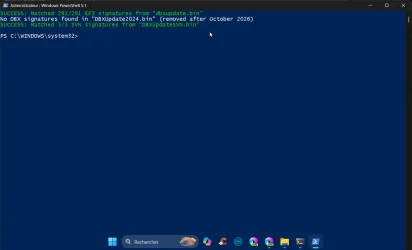
So I ran the Check-DBX check and I get this.

1792591735813.webp


If they're removed after Oct, why is this an error?
 

My Computers My Computers

  • At a glance

    Win 11 Pro 26H2, Build 26300.9711Intel Core i5 14500, 14th Generation64GB DDR4GeForce RTX 4060
    OS
    Win 11 Pro 26H2, Build 26300.9711
    Computer type
    PC/Desktop
    Manufacturer/Model
    Home Brew
    CPU
    Intel Core i5 14500, 14th Generation
    Motherboard
    Gigabyte B760M G P WIFI
    Memory
    64GB DDR4
    Graphics Card(s)
    GeForce RTX 4060
    Sound Card
    Chipset Realtek
    Monitor(s) Displays
    LG 45" Ultragear & Acer 24" 1080p
    Screen Resolution
    5120x1440 & 1920x1080
    Hard Drives
    Crucial P310 2TB 2280 PCIe Gen4 3D NAND NVMe M.2 SSD (O/S)
    Silicon Power 2TB US75 NVMe PCIe Gen4 M.2 2280 SSD (backup)
    Crucial BX500 2TB 3D NAND (2nd backup)
    Seagate 4TB Ironwolf, rotating HDD secondary backup
    External off-line backup Drives: 2 NVMe 4TB drives in external enclosures
    PSU
    Thermaltake Toughpower GF3 750W
    Case
    LIAN LI LANCOOL 216 E-ATX PC Case
    Cooling
    Lots of fans!
    Keyboard
    Microsoft Comfort Curve 2000
    Mouse
    Logitech G305
    Internet Speed
    Verizon FiOS 1GB
    Browser
    Firefox
    Antivirus
    MalwareBytes & Windows Defender Security
  • At a glance

    Win 11 Pro 25H2, Build 26300.9550Intel Core i5 1440032GB DDR5Intel 700 Embedded GPU
    Operating System
    Win 11 Pro 25H2, Build 26300.9550
    Computer type
    PC/Desktop
    Manufacturer/Model
    Home Brew
    CPU
    Intel Core i5 14400
    Motherboard
    Gigabyte B760M DS3H AX
    Memory
    32GB DDR5
    Graphics card(s)
    Intel 700 Embedded GPU
    Sound Card
    Realtek Embedded
    Monitor(s) Displays
    27" HP 1080p
    Screen Resolution
    1920x1080
    Hard Drives
    Crucial P310 2TB NVMe Gen4 SSD
    Samsung EVO 990 2TB NVMe Gen4 SSD
    Samsung 2TB SATA SSD
    Seagate 4TB Ironwolf, rotating HDD secondary backup
    PSU
    Thermaltake Smart BM3 650W
    Case
    Okinos Micro ATX Case
    Cooling
    Fans
    Keyboard
    Microsoft Comfort Curve 2000
    Mouse
    Logitech G305
    Internet Speed
    Verizon FiOS 1GB
    Browser
    Firefox
    Antivirus
    Malware Bytes & Windows Defender Security
  • Nimo N171 17" Laptop, (Intel i3-1215U, 16GB RAM, 2TB NVMe, Win11 Pro)
    Acemagic Vista Mini PC V1 (Intel N150, 16GB RAM, 1TB NVMe, Win11 Pro)
    HP ENVY h8-1540t, (24GB RAM, 2TB SSD, 2TB HDD, Win11 Pro)
The first line, currently in red, should be in green with 291/291 signatures. That is what I have.
 

My Computer My Computer

At a glance

windows 11
OS
windows 11
like this;-)
 

Attachments

  • powershell_YUTraZ5BwV.webp
    powershell_YUTraZ5BwV.webp
    34 KB · Views: 1

My Computer My Computer

At a glance

windows 11 25H224GBiris xe
OS
windows 11 25H2
Computer type
Laptop
Manufacturer/Model
ASUS Vivobook 15 (X1504)
Motherboard
Intel Alder Lake-P PCH
Memory
24GB
Graphics Card(s)
iris xe
Sound Card
realtek
Screen Resolution
1920X1080
Hard Drives
Samsung SSD 990 PRO 1TB
Browser
edge
Antivirus
eset anti virus
I am working on updating the certs on my notebook (see signature) for quite a while now and it is a PITA. Before going into details too much and probably wasting your time, my simple question is: is it possible to update the 2023 KEK manually because stupid manufacturer did not provide a signed PK / KEK to MS to deploy?

Crippled UEFI (Aptio) does not allow any kind of key management and so i am either stuck on default secure boot keys (with 2011 KEK) or stuck in secure boot setup mode with 2023 certs (after update script) but with no chance to switch to any working secure boot mode (user / custom etc) without getting "secure boot violation" at boot up.
There's four methods of adding Secure Boot certs (ranked in order of least to most obtrusive):

1. BIOS update with CA 2023 certs in factory defaults (best option)
2. OEM submits a signed KEK CA 2023 to MS, and the Secure Boot update task can install it.
3. Manual key enrollment of KEK CA 2023 from the UEFI setup menu.
4. Deleting all keys, and installing a replacement set.

For the first two methods, your PC OEM or their BIOS provider needs to help out. If you don't have the option for Manual key enrollment, you need to check if your UEFI supports a Custom mode. Sometimes the Custom mode is enabled only if you Delete All Keys or you set a BIOS admin password.

When you delete all keys, the Platform Key is cleared and this allows a new set of certs to be installed. Assuming this works, run the update script and it will detect this mode. The script will download and install the Windows OEM Devices keys as a replacement set. This is a last resort, assuming the first three methods are not available to you.

Some BIOS implementations are more bare-bones than others.
 

My Computer My Computer

At a glance

Windows 7
OS
Windows 7
So far, all the Builds that are not in the blocked ranges, booted just fine.
The last one I tried on purpose is in the blocked range. and it just turns off the PC if I try booting from it.
No problem booting the same media on another machine that has not that SKuSiPolicy.p7b.

Edit:
I think it is interesting that with the ranges that are blocked they force a PC power off without giving any error message. 😵‍💫😂🤷‍♂️
That's kinda weird. Windows is supposed to display the digital signature is invalid for winload.efi. If you can't read the message, how would you know what the problem is?
 

My Computer My Computer

At a glance

Windows 7
OS
Windows 7
I ran the Check-UEFI check and it shows my 2011 Cert as still active even though I revoked it months ago.
So I ran the Check-DBX check and I get this.
1. dbxupdate.bin has 15 missing EFI signatures your DBX variable doesn't currently have. You should run "Update-UEFI.bat -Revoke" to add the missing signatures.

2. DBXUpdate2024.bin used to have a "starter set" of 3 SVN's bundled along with the PCA 2011 cert. In the Oct 2026 CU, MS removed these obsolete SVN's so they're no longer included in this file. For users who have not updated to Oct 2026, or running on an End-of-Life Windows which stopped updating before this month, this file will be the older version which still has the SVN's.

3. DBXupdateSVN.bin contains the latest SVN's, which is why DBXUpdate2024.bin no longer needs to include an older set of them. The cleanup of DBXUpdate2024.bin is for administrative reasons, it doesn't affect any Secure Boot functionality.
 

My Computer My Computer

At a glance

Windows 7
OS
Windows 7
1. dbxupdate.bin has 15 missing EFI signatures your DBX variable doesn't currently have. You should run "Update-UEFI.bat -Revoke" to add the missing signatures.

2. DBXUpdate2024.bin used to have a "starter set" of 3 SVN's bundled along with the PCA 2011 cert. In the Oct 2026 CU, MS removed these obsolete SVN's so they're no longer included in this file. For users who have not updated to Oct 2026, or running on an End-of-Life Windows which stopped updating before this month, this file will be the older version which still has the SVN's.

3. DBXupdateSVN.bin contains the latest SVN's, which is why DBXUpdate2024.bin no longer needs to include an older set of them. The cleanup of DBXUpdate2024.bin is for administrative reasons, it doesn't affect any Secure Boot functionality.
Hmm... I did the October updates, but the update batch fixed it anyway. I was surprised that was complaining, I thought that was behind me.
Thanks. 😊
 

My Computers My Computers

  • At a glance

    Win 11 Pro 26H2, Build 26300.9711Intel Core i5 14500, 14th Generation64GB DDR4GeForce RTX 4060
    OS
    Win 11 Pro 26H2, Build 26300.9711
    Computer type
    PC/Desktop
    Manufacturer/Model
    Home Brew
    CPU
    Intel Core i5 14500, 14th Generation
    Motherboard
    Gigabyte B760M G P WIFI
    Memory
    64GB DDR4
    Graphics Card(s)
    GeForce RTX 4060
    Sound Card
    Chipset Realtek
    Monitor(s) Displays
    LG 45" Ultragear & Acer 24" 1080p
    Screen Resolution
    5120x1440 & 1920x1080
    Hard Drives
    Crucial P310 2TB 2280 PCIe Gen4 3D NAND NVMe M.2 SSD (O/S)
    Silicon Power 2TB US75 NVMe PCIe Gen4 M.2 2280 SSD (backup)
    Crucial BX500 2TB 3D NAND (2nd backup)
    Seagate 4TB Ironwolf, rotating HDD secondary backup
    External off-line backup Drives: 2 NVMe 4TB drives in external enclosures
    PSU
    Thermaltake Toughpower GF3 750W
    Case
    LIAN LI LANCOOL 216 E-ATX PC Case
    Cooling
    Lots of fans!
    Keyboard
    Microsoft Comfort Curve 2000
    Mouse
    Logitech G305
    Internet Speed
    Verizon FiOS 1GB
    Browser
    Firefox
    Antivirus
    MalwareBytes & Windows Defender Security
  • At a glance

    Win 11 Pro 25H2, Build 26300.9550Intel Core i5 1440032GB DDR5Intel 700 Embedded GPU
    Operating System
    Win 11 Pro 25H2, Build 26300.9550
    Computer type
    PC/Desktop
    Manufacturer/Model
    Home Brew
    CPU
    Intel Core i5 14400
    Motherboard
    Gigabyte B760M DS3H AX
    Memory
    32GB DDR5
    Graphics card(s)
    Intel 700 Embedded GPU
    Sound Card
    Realtek Embedded
    Monitor(s) Displays
    27" HP 1080p
    Screen Resolution
    1920x1080
    Hard Drives
    Crucial P310 2TB NVMe Gen4 SSD
    Samsung EVO 990 2TB NVMe Gen4 SSD
    Samsung 2TB SATA SSD
    Seagate 4TB Ironwolf, rotating HDD secondary backup
    PSU
    Thermaltake Smart BM3 650W
    Case
    Okinos Micro ATX Case
    Cooling
    Fans
    Keyboard
    Microsoft Comfort Curve 2000
    Mouse
    Logitech G305
    Internet Speed
    Verizon FiOS 1GB
    Browser
    Firefox
    Antivirus
    Malware Bytes & Windows Defender Security
  • Nimo N171 17" Laptop, (Intel i3-1215U, 16GB RAM, 2TB NVMe, Win11 Pro)
    Acemagic Vista Mini PC V1 (Intel N150, 16GB RAM, 1TB NVMe, Win11 Pro)
    HP ENVY h8-1540t, (24GB RAM, 2TB SSD, 2TB HDD, Win11 Pro)
The Secure Boot task doesn't automatically perform revocation tasks (which includes adding new DBX entries). You have to force it using an AvailableUpdates reg value, or running something like the update script.

I believe MS is still paranoid about forced revocations because non-technical users aren't aware of what changes that will bring (possibly banning your bootable ISO or USB drive).
 

My Computer My Computer

At a glance

Windows 7
OS
Windows 7
Back
Top Bottom