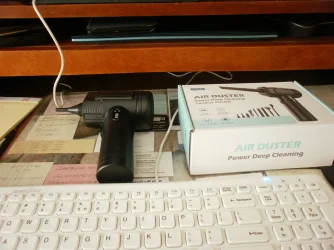
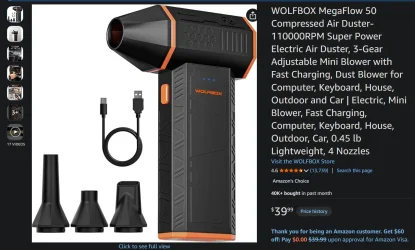
General question (Really not sure where this should be)


Johnnys123

Member
Local time
4:06 PM
Posts
25
OS
Windows 11
Dust in a PC (Hear me out) can it actually affect it? (daft question I know) reason I asking though? I noticed I had a hell of a amount of dust building inside and on here before I've said I was getting BSOD after BSOD infact up to recently I was getting BSOD'S with kernel failure....................so I took the plunge from amazon and I bought a IT Dusters Compucleaner Xpert fan ............the results have been good. I let it rip inside the PC itself and since then? BSOD'S I was having have just stopped. Kernel power failures seem to have stopped too
 

My Computer My Computer

At a glance

Windows 11
OS
Windows 11
Computer type
PC/Desktop
Manufacturer/Model
Cyberpower
Dust in a PC (Hear me out) can it actually affect it?
Yes, as you have found out. Vac then duster blower (canned air). I do my computers every year, sometimes twice a year.
 

My Computers My Computers

  • At a glance

    Win 10 Pro / Win 11 Pro & Home, Linux MintAMD Ryzen 7 5700X / A10-7860K32GB / 16GBAMD RX 6650 XT / RX 580
    OS
    Win 10 Pro / Win 11 Pro & Home, Linux Mint
    Computer type
    PC/Desktop
    Manufacturer/Model
    Custom builds
    CPU
    AMD Ryzen 7 5700X / A10-7860K
    Motherboard
    MSI PRO B550-VC / ASRock A88M-G/3.1
    Memory
    32GB / 16GB
    Graphics Card(s)
    AMD RX 6650 XT / RX 580
    Monitor(s) Displays
    Samsung 27" / LG 24"
    Screen Resolution
    1920x1080
    Hard Drives
    Toshiba 2 TB
    Toshiba 1 TB
    Toshiba 1 TB
    WD Black SN770 1TB

    PNY 1 TB
    PNY 500 GB
    WD Black SN770 200 GB
    Inland 500 GB
    Inland 256 GB
    Case
    NZXT / Lian LI
    Keyboard
    ROCCAT PYRO / Logitech 148
    Mouse
    Logitech
    Browser
    Firefox, Opera, Waterfox, Tor
  • At a glance

    Windows 11 HomeIntel i516GB
    Operating System
    Windows 11 Home
    Computer type
    Laptop
    Manufacturer/Model
    HP 17
    CPU
    Intel i5
    Memory
    16GB
    Screen Resolution
    1920 x 1080
    Hard Drives
    512 GB
    Browser
    Firefox
I perform a dusting and cleanout of our PCs on an annual basis. (Yes, it is on my calendar :) )I used to use canned air but earlier this year I purchased a small blower with a rechargeable battery and a few attachments. Works like a champ. Helps me to clean the case, all internal components, keyboard, etc.
Here's a link--> https://www.amazon.com/dp/B0GBWYMW1D?ref=clp_cat_p_0&th=1
 

My Computer My Computer

At a glance

Windows 11 Pro 26200.9168Ryzen 5 5600G24GB
OS
Windows 11 Pro 26200.9168
Computer type
PC/Desktop
Manufacturer/Model
Home Built
CPU
Ryzen 5 5600G
Motherboard
ASUS X470 Prime Pro
Memory
24GB
Monitor(s) Displays
Alienware 2518HF
Screen Resolution
1920 x 1080
Hard Drives
Boot: NVME WDC WDS500G; ASUS M.2 Riser card with 3 additional NVME drives
Various Internal SDD (Samsung and WDC) and HDD drives mostly Western Digital
PSU
Seasonic Focus Gold 650W
Case
Corsair 200R
Cooling
Noctua PWM fans x 3
Keyboard
Corsair K60 SE Pro
Mouse
Corsair Dark Core RGB Pro SE
Internet Speed
500/500
Browser
MS Edge
Antivirus
Malwarebytes Premium

My Computer My Computer

At a glance

Windows 10/11
OS
Windows 10/11
Computer type
Laptop
Manufacturer/Model
Acer
Assuming you folks are aware, but mentioning as a reminder. Be sure your electronics are not powered when you do this. Obvious I know. But anyway.
In the past, experience taught it was necessary to be cautious when using a forced air "blower" because of likely static electricty interraction. Canned air, not so much of a problem. Vacuum cleaners was less risky.
 

My Computers My Computers

  • At a glance

    Clean Install 26200.9168 Secure boot is on.AMD Ryzen 7 8845HSDDR5-5600 / PC5-44800 DDR5 SDRAM SO-DIMM32GAMD Radeon 780M
    OS
    Clean Install 26200.9168 Secure boot is on.
    Computer type
    PC/Desktop
    Manufacturer/Model
    Beelink SER8 Mini
    CPU
    AMD Ryzen 7 8845HS
    Motherboard
    AZW SER8 AMD Promontory/Bixby FCH
    Memory
    DDR5-5600 / PC5-44800 DDR5 SDRAM SO-DIMM32G
    Graphics Card(s)
    AMD Radeon 780M
    Sound Card
    AMD Zen - Audio Processor - HD Audio Controller
    Monitor(s) Displays
    1 LG HDR 32"
    Screen Resolution
    2560x1440
    Hard Drives
    1TB Crucial NVME Internal
    2TB Crucial NVME Internal
    2TB Crucial NVME External
    WD 1TB SSD SATA to USB3
    Samsung SSD 1TB SATA to USB3
    Samsung 500G SATA to USB3
    500G Crucial SSD to USB3
    PSU
    Beelink
    Case
    Beelink
    Cooling
    Beelink
    Keyboard
    Logitech Backlit USB
    Mouse
    Logitech M510
    Internet Speed
    250-500
    Browser
    Edge, Firefox, Chrome
    Antivirus
    Microsoft Security 1.451.235.0 version created 6-2-2026
    Other Info
    Macrium X Build 10.0.8843
    Minitool Pro Ultimate 13.9
    Aomie Partition Assistant Pro 10.12.0
    REVO Pro 5.5.2.0 Portable
    JAM Treesize 9.7.2.2203 Perpetual Outdated.
    JAM Ultrasearch Pro 4.9.1.1204 Perpetual Outdated.
    Malwarebytes Pro 5.6.5 Update 1.0.113698 Component 163.0.5714
    Screenpresso Pro 2.2.12.3 beta (.Net 4.8) 2026-5-026
    Hamrick Vue Scan Pro 9.7.99
    Visio 2021 Pro 2021 MSO (Version 2605 Build 16.0.20026.20076) 64-bit
    Droid Transfer-Android 26.2.26.0
    Thunderbird 154
    em Client 10.4.5674
    Affinity Suite Publisher, Designer, Photo 2.6.5
    Microsoft 365 MSO (Version 2608 Build 16.0.20326.20072) 64-bit
    Adobe Creative cloud Version 6911 Apps 6.9.0.618 CCLibrary 4.16.2 (Photo subscription)
    HXD Hex Editor Version 2.5.0.0
    DAW Software Reaper-Izotope Plugins
    WYSIWYG Web Builder 20.4.2
    Filezilla 3.70.5
    System Informer
    O&O Regedit
    Advanced IP Scanner 2.5.1
    Epson Eco Tank Printers and Epson Scanners.
    PEAK DCA Transistor Graphical USB Interface for Viewing Transistor Operational Curves. Win
    Games - Win-7 Card Games
    Microsoft FSX "Pro Gold Flight Sim with add ons. Still works perfectly.
    Many Other free and paid applications
  • At a glance

    Win11 Pro OEM 25H2 OS Build 26200.7019AMD Ryzen 7 8845HSDDR5 32GBeelink SER7
    Operating System
    Win11 Pro OEM 25H2 OS Build 26200.7019
    Computer type
    PC/Desktop
    Manufacturer/Model
    Beelink
    CPU
    AMD Ryzen 7 8845HS
    Motherboard
    AMD
    Memory
    DDR5 32G
    Graphics card(s)
    Beelink SER7
    Sound Card
    Beelink SER7
    Monitor(s) Displays
    Dell
    Screen Resolution
    Native
    Hard Drives
    1TB Crucial NVMe SSD 2G SATA
    PSU
    Beelink Proprietary
    Case
    Beelink Proprietary
    Cooling
    Beelink Proprietary
    Keyboard
    gaming keyboard
    Mouse
    MS
    Internet Speed
    T-Mobile 5G
    Antivirus
    Defender Malwarebytes
    Other Info
    Microsoft 365 Family Office
    Macrium X Subscription1 Version 10
    Mini-Tool Ultimate 13.0 Lifetime
    Malwarebytes Premium w/VPN 5
    Revo Pro Portable Pro 5
    Roboform 9.7.7.
    Others. (All legit)
Oh when I cleaned things out everything was powered off don't worry I mean it wasn't clogged clogged but enough to the point there was obviously issues going on and 1 blow later......... It's not completely dust free maybe I could get a bit more away but unclogged enough the BSOD'S are no more
 

My Computer My Computer

At a glance

Windows 11
OS
Windows 11
Computer type
PC/Desktop
Manufacturer/Model
Cyberpower
Many years ago, I used to just blow my own air at it a lot. It wasn't all that effective (helped a bit) and wouldn't have been safe. Was all sorts of big dust in there. We're talking when the Internet was in its early days. You do all sorts when you're younger 😮‍💨.

Don't be doing it folks.
 

My Computer My Computer

At a glance

Windows 11 ProSnapdragon® X Plus (10 Core)16GB
OS
Windows 11 Pro
Computer type
Laptop
Manufacturer/Model
Microsoft Surface Laptop 7 (ARM)
CPU
Snapdragon® X Plus (10 Core)
Memory
16GB
Hard Drives
512GB SSD
I use a 20 gallon air compressor twice a year.

Does the job perfectly.

Just need to make sure any to secure fan blades so they do no spin out.

I usually just stick a pencil in between the fan blades and then blow out.

I will also clean fan blades with q tips and isopropyl alcohol.
 

My Computer My Computer

At a glance

Windows 11proIntel Core i7-14700K Raptor Lake-S Refresh 3....Crucial Pro 96GB (2 x 48GB) DDR5-5600 PC5-44800PNY NVIDIA GeForce RTX 5080 EPIC-X RGB Overcl...
OS
Windows 11pro
Computer type
PC/Desktop
Manufacturer/Model
Homebuilt
CPU
Intel Core i7-14700K Raptor Lake-S Refresh 3.4GHz
Motherboard
MSI Z790 MAG Tomahawk Max WiFi Intel LGA 1700 ATX Motherboard
Memory
Crucial Pro 96GB (2 x 48GB) DDR5-5600 PC5-44800
Graphics Card(s)
PNY NVIDIA GeForce RTX 5080 EPIC-X RGB Overclocked Triple Fan 16GB GDDR7
Sound Card
Onkyo AVR TX-NR656 5.1
Monitor(s) Displays
3X -LG 32GN650-B Ultragear Gaming Monitor 32” QHD (2560 x 1440) Display, 165Hz Refresh Rate
Screen Resolution
2560 x 1440)
Hard Drives
Wat to many.
PSU
Corsair RM1000e Fully Modular Low-Noise Power Supply - ATX 3.1 & PCIe 5.1
Case
Lian Li LANCOOL 207 DIGITAL Tempered Glass ATX Mid-Tower
Cooling
Thermaltake TH240
Keyboard
Corsair K95 RGB Platinum
Browser
Brave
Antivirus
Defender
Other Info
This is 1 of 5 HTPC also have built a PC for Blue Iris security software.
Hi-
Instead of canned air, I use VC023 Air Duster (from Amazon) once a week, on my HP Pavilion All-In-One desktop (sealed back) PC. The Air Duster is ~$23.00 and is for my needs, and over time it's a cheaper alternative to purchasing multiple cans of air.
 

Attachments

  • P8060001.webp
    P8060001.webp
    365.1 KB · Views: 1

My Computers My Computers

  • At a glance

    Windows 11 (25H2)Core(TM) i5-12400T12.0 GB (11.7 GB usable)Intel(R) UHD Graphics 730
    OS
    Windows 11 (25H2)
    Computer type
    PC/Desktop
    Manufacturer/Model
    HP Pavilion 577B5AA#ABA
    CPU
    Core(TM) i5-12400T
    Motherboard
    HP 89E9
    Memory
    12.0 GB (11.7 GB usable)
    Graphics Card(s)
    Intel(R) UHD Graphics 730
    Sound Card
    DFX Audio
    Monitor(s) Displays
    HO Generic PnP Monitor
    Screen Resolution
    1920 x 1080
    Hard Drives
    SAMSUNG MZVLQ10HBLB00BH1 SSD 1TB
    PSU
    HP Std. for this product
    Case
    All-in-One
    Cooling
    Fan
    Keyboard
    HP Wireless / Bluetooth
    Mouse
    HP Wireless / Bluetooth
    Internet Speed
    Link speed (Receive/Transmit): 1000/1000 (Mbps)
    Browser
    Firefox
    Antivirus
    Malwarebytes Pro / Windows Security
    Other Info
    Retired IT professional.
  • At a glance

    Windows 11 (25H2)Intel I-7-1165G78 GB DDR4-3200 SDRAMIntel Iris Xe Graphics
    Operating System
    Windows 11 (25H2)
    Computer type
    Laptop
    Manufacturer/Model
    HP 15tegooo [HP Pavilion Laptop Intel I-7]
    CPU
    Intel I-7-1165G7
    Motherboard
    HP
    Memory
    8 GB DDR4-3200 SDRAM
    Graphics card(s)
    Intel Iris Xe Graphics
    Sound Card
    Realtek
    Monitor(s) Displays
    HP HD micro edge, Bright View, 250 nits
    Screen Resolution
    1366 x768
    Hard Drives
    256 GB DD4-3200 SDRAM
    PSU
    HP
    Case
    Std HP Laptop
    Cooling
    Fan
    Keyboard
    std
    Mouse
    Logi M585
    Browser
    Edge
    Antivirus
    Windows Security
Hi-
Instead of canned air, I use VC023 Air Duster (from Amazon) once a week, on my HP Pavilion All-In-One desktop (sealed back) PC. The Air Duster is ~$23.00 and is for my needs, and over time it's a cheaper alternative to purchasing multiple cans of air.
I went a similar route as the compressed air goes fast and adds up over time.
 

Attachments

  • Screenshot 2026-07-24 105258.webp
    Screenshot 2026-07-24 105258.webp
    132.3 KB · Views: 1

My Computers My Computers

  • At a glance

    Windows 11 25H2Intel Core Ultra 9 275HX (24-Core)64GB DDR5 6400MT/sNVIDIA GeForce RTX 5080 and Intel UHD Graphics
    OS
    Windows 11 25H2
    Computer type
    Laptop
    Manufacturer/Model
    Alienware 18 Area-51
    CPU
    Intel Core Ultra 9 275HX (24-Core)
    Motherboard
    Alienware
    Memory
    64GB DDR5 6400MT/s
    Graphics Card(s)
    NVIDIA GeForce RTX 5080 and Intel UHD Graphics
    Sound Card
    Onboard, Realtek high-performance Audio chips (ALC3329 & ALC1708))
    Monitor(s) Displays
    300HZ 18-inch QHD 500 nit Comfort View+
    Screen Resolution
    2560 x 1600
    Hard Drives
    2TB NVMe M.2 PCIe Gen 5 SSD
    Case
    Magnesium Alloy
    Cooling
    Advanced Cryo-Tech Quad-Fan Cooling system & large vapor chamber
    Keyboard
    Cherry MX ultra low profile mechanical keyboard with per key AlienFX RGB lighting
    Mouse
    Logitech MX Master 4
    Browser
    Vivaldi (main), Firefox, Chrome, Edge
    Antivirus
    MS Defender and Malwarebytes Free
  • At a glance

    Windows 11 25H2Qualcomm Snapdragon X Elite (12 Core) ARM bas...16GB LPDDR5Qualcomm Adreno X1-85
    Operating System
    Windows 11 25H2
    Computer type
    Laptop
    Manufacturer/Model
    Microsoft Surface Laptop 7
    CPU
    Qualcomm Snapdragon X Elite (12 Core) ARM based CPU
    Motherboard
    Microsoft Corp.
    Memory
    16GB LPDDR5
    Graphics card(s)
    Qualcomm Adreno X1-85
    Sound Card
    Omnisonic speakers with Dolby Atmos spatial sound
    Monitor(s) Displays
    120 Hz 13.8-inch 600 nit PixelSense Flow touchscreen
    Screen Resolution
    2304x1536
    Hard Drives
    1TB NVMe Gen 4 SSD
    Case
    Anodized Aluminum
    Cooling
    Traditional active cooling fan system
    Keyboard
    Mechanical QWERTY, backlit when in use
    Mouse
    Logitech MX Master 4 and Surface Arc Mouse
    Browser
    Vivaldi (main), Firefox, Chrome, Edge
    Antivirus
    MS Defender and Malwarebytes Free
I also run a HEPA air purifier in the room where the PC is. Less dust in the air means less dust gets sucked into the PC by its case fans.
 

My Computer My Computer

At a glance

Windows 11Ryzen 9 7900X64 GBNvidia GeForce GTX 1650
OS
Windows 11
Computer type
PC/Desktop
Manufacturer/Model
Custom
CPU
Ryzen 9 7900X
Motherboard
ASUS ROG STRIX B-650 E-F
Memory
64 GB
Graphics Card(s)
Nvidia GeForce GTX 1650
Hard Drives
C: SSD, 500 GB
D: HDD, 1 TB
J: HDD, 1 TB
Antivirus
Norton
My own experience: My main PC (see 2nd system specs) had originally a 3rd generation Intel Core-i3 3220 CPU. I later bought my 3rd generation Intel Core-i7 3770 second hand to upgrade without replacing everything. However, the previous owner had kept the Intel CPU fan, so I used my old Core-i3 CPU fan to avoid buying a new one. This wasn't adequate for the more powerful Core-i7 and it had higher than average CPU temperatures, over 80 degrees Centigrade, but I didn't mind. But, in a hot summer day with outside temperature of 40 degrees, the CPU eventually reached the threshold of 105 degrees at full load and in order to protect itself it was dropped to about 1.5GHz and felt slower than an old Intel Celeron! My system was crawling. I then bought a third-party CPU fan with adequate airflow and dropped the average CPU temperature under 75 degrees, lower than 55 degrees in non hot days. So, yes, high temperature can affect performance and even the life of your electronics, so a good dusting does a huge difference. I use an air blower. Avoid vacuum cleaner as it might generate static electricity and damage the motherboard or other devices. Also I replace the old dry thermal paste between the CPU and the heat sink with fresh every couple of years. This makes at least 3-5 degrees difference if the old one is dry.
 

My Computers My Computers

  • At a glance

    Windows 11 Pro 23H2 (5699), 25H2 (9168)Mobile DualCore Intel Core 2 Duo T7250, 2000 MHz4GBMobile Intel(R) GMA 4500M (Mobile 4 series)
    OS
    Windows 11 Pro 23H2 (5699), 25H2 (9168)
    Computer type
    Laptop
    Manufacturer/Model
    Acer Extensa 5630EZ
    CPU
    Mobile DualCore Intel Core 2 Duo T7250, 2000 MHz
    Motherboard
    Acer Extensa 5630
    Memory
    4GB
    Graphics Card(s)
    Mobile Intel(R) GMA 4500M (Mobile 4 series)
    Sound Card
    Realtek ALC268 @ Intel 82801IB ICH9 - High Definition Audio Controller
    Monitor(s) Displays
    1
    Screen Resolution
    1280x800
    Hard Drives
    Samsung SSD 850 EVO 250GB SATA Device (250 GB, SATA-III)
    Internet Speed
    802.11g wireless 54 Mbps
    Browser
    MICROSOFT EDGE
    Antivirus
    WINDOWS DEFENDER
    Other Info
    Legacy MBR installation, no TPM, no Secure Boot, no WDDM 2.0 graphics drivers, no SSE4.2, cannot get more unsupported ;) This is only my test laptop. I had installed Windows 11 here before upgrading my main PC. For my main PC I use everyday see my 2nd system specs.
  • At a glance

    Windows 11 Pro v25H2 (build 26200.9168)Intel Core-i7 3770 3.40GHz s1155 (3rd generat...2x Kingston Hyper-X Blu 8GB DDR3-1600GIGABYTE GeForce RTX 3050 WINDFORCE OC V2 6GB...
    Operating System
    Windows 11 Pro v25H2 (build 26200.9168)
    Computer type
    PC/Desktop
    Manufacturer/Model
    Custom-built PC
    CPU
    Intel Core-i7 3770 3.40GHz s1155 (3rd generation)
    Motherboard
    Asus P8H61 s1155 ATX
    Memory
    2x Kingston Hyper-X Blu 8GB DDR3-1600
    Graphics card(s)
    GIGABYTE GeForce RTX 3050 WINDFORCE OC V2 6GB (GV-N3050WF2OCV2-6GD)
    Sound Card
    Realtek HD audio (ALC887)
    Monitor(s) Displays
    Sony Bravia KDL-19L4000 19" LCD TV via VGA
    Screen Resolution
    1440x900 32-bit 60Hz
    Hard Drives
    WD Blue SA510 2.5 1000GB SSD as system disk, Western Digital Caviar Purple 4TB SATA III (WD40PURZ) as second
    PSU
    Thermaltake Litepower RGB 550W Full Wired
    Case
    SUPERCASE MIDI-TOWER
    Cooling
    Deepcool Gamma Archer CPU cooler, 1x 8cm fan at the back
    Keyboard
    Mitsumi 101-key PS/2
    Mouse
    Microsoft Compact Optical Mouse
    Internet Speed
    802.11ac 5GHz wireless 260Mpbs
    Browser
    Microsoft Edge, Mozilla Firefox
    Antivirus
    Microsoft Windows Defender
    Other Info
    Legacy BIOS (MBR) installation, no TPM, no Secure Boot, WDDM 3.0 graphics drivers, WEI score 7.4

Latest Support Threads

Back
Top Bottom