Get a list of all Windows apps?


Fortitude

Well-known member
Member
VIP
Local time
1:35 PM
Posts
66
OS
Windows 11 Pro 22H2 OS Build 22621.675
In my "All apps" list of installed programs there is at least one that by using Everything I located inside the C:\Program Files\WindowsApps folder. This is a hidden folder that I'm denied access to it anyway.
I'm wondering if there's a way to list all programs that may be in the WindowsApps folder. I read somewhere that you can do this in Windows 10 by running shell:AppsFolder using the Run command, but I couldn't get it to work in Windows 11.

I'm looking for a solution not involving getting a list in text form or to take control of the folder, but rather a list in a window graphical format.
 
Windows Build/Version
22H2 22621.675

My Computer

System One

  • OS
    Windows 11 Pro 22H2 OS Build 22621.675
    Computer type
    Laptop
    Manufacturer/Model
    Dell Inspiron 5482 2-in-1
    CPU
    Intel Core i7-8565U
    Memory
    8GB
    Monitor(s) Displays
    BenQ
    Internet Speed
    1Gbps/300Mbps (nominal)
    Browser
    Chrome, Firefox, Edge
    Antivirus
    Windows Defender, Defender UI, Voodooshield
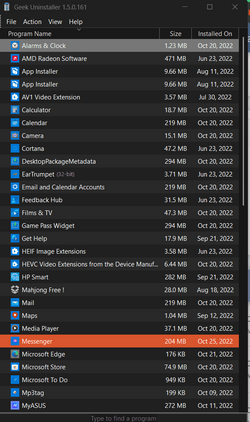
Geek Uninstaller will show Apps.

2022-10-26 07_48_06-Get a list of all Windows apps_ _ Windows 11 Forum and 9 more pages - Pers...png
 

My Computers

System One System Two

  • OS
    Win 11 Pro
    Computer type
    Laptop
    Manufacturer/Model
    ASUS Vivobook
    CPU
    AMD Ryzen™ 7 7730U
    Motherboard
    M1605YA
    Memory
    24GB Dual-Channel DDR4 @ 1596MHz (22-22-22-52)
    Graphics Card(s)
    512MB ATI AMD Radeon Graphics (ASUStek Computer Inc)
    Monitor(s) Displays
    Generic PnP Monitor (1920x1200@60Hz) - P1 PLUS (1920x1080@59Hz)
    Screen Resolution
    1920 X 1200
    Hard Drives
    953GB Western Digital WD
    PSU
    45 Watts
    Mouse
    Lenovo Bluetooth.
    Internet Speed
    500 Mbps
    Browser
    Edge
    Antivirus
    Defender
  • Operating System
    Windows 11
    Computer type
    Laptop
    Manufacturer/Model
    ACER NITRO
    CPU
    AMD Ryzen 7 5800H / 3.2 GHz
    Motherboard
    CZ Scala_CAS (FP6)
    Memory
    32 GB DDR4 SDRAM 3200 MHz
    Graphics card(s)
    NVIDIA GeForce RTX 3060 6 GB GDDR6 SDRAM
    Sound Card
    Realtek Audio. NVIDIA High Definition Audio
    Monitor(s) Displays
    15.6" LED backlight 1920 x 1080 (Full HD) 144 Hz
    Screen Resolution
    1920 x 1080 (Full HD)
    Hard Drives
    Samsung 970 Evo Plus 2TB NVMe M.2
    PSU
    180 Watt, 19.5 V
    Mouse
    Lenovo Bluetooth
    Internet Speed
    500 Mbps
    Browser
    Edge
    Antivirus
    Defender
Geek Uninstaller
RevoUninstaller
 

My Computers

System One System Two

  • OS
    Windows 11 2xH2 (latest update ... forever anal)
    Computer type
    PC/Desktop
    Manufacturer/Model
    HP Slim S01
    CPU
    Intel i5-12400
    Memory
    8GB
    Graphics Card(s)
    NVIDIA GeForce GT730
    Sound Card
    OOBE
    Monitor(s) Displays
    Acer 32"
    Screen Resolution
    1920x1080
    Hard Drives
    512GB KIOXIA NVMe
    1TB SATA SSD
    PSU
    OOBE
    Case
    OOBE
    Cooling
    OOBE
    Keyboard
    BT
    Mouse
    BT
    Browser
    Brave FFox Chrome Opera
    Antivirus
    KIS
  • Operating System
    Windows 11 Pro 2xH2 (latest update ... 4ever anal)
    Computer type
    Laptop
    Manufacturer/Model
    HP Pavillion 15
    CPU
    i7-1165G7 @ 2.80GHz
    Graphics card(s)
    Intel Iris Xe Graphics
    Hard Drives
    Samsung NVMe 512GB
    + numerous/multiple SSD Type C USB enclosures
    Internet Speed
    NBN FTTN 50
    Browser
    Brave
    Antivirus
    KIS
Many thanks for the suggestions. I was hoping for something that would show the apps in, say, icon format and enable me to run them.
 

My Computer

System One

  • OS
    Windows 11 Pro 22H2 OS Build 22621.675
    Computer type
    Laptop
    Manufacturer/Model
    Dell Inspiron 5482 2-in-1
    CPU
    Intel Core i7-8565U
    Memory
    8GB
    Monitor(s) Displays
    BenQ
    Internet Speed
    1Gbps/300Mbps (nominal)
    Browser
    Chrome, Firefox, Edge
    Antivirus
    Windows Defender, Defender UI, Voodooshield
Back
Top Bottom